I have a headache from dealing with Secure Boot this past week. I’m also now worried about the future of security on PCs, given the economy right now.
Let’s rewind. On June 24, security certificates for a very important Windows feature began expiring. (This actually affects Linux too, but I’m focusing on Windows since most people use it.) You can read more about Secure Boot in this guide, but basically, it helps block a type of malware that’s hard to detect and get rid of.
Welcome to Safe Mode, your weekly report for pressing security and privacy news—and what steps to take next. Want this newsletter to come directly to your inbox? Sign up on our website!
In the lead-up to this mini apocalypse, Microsoft was rolling out the newer Secure Boot certificates to PCs, but a fair number of computers were still left out. The company issued a few warnings, but didn’t otherwise change course. Then, on June 24, it unexpectedly sprang into action, announcing an expansion of the automatic upgrades.
You might assume Microsoft’s policy change was helpful. It was, but it also added additional confusion into the mix. Even as someone familiar with Windows and hardware updates, I spent several hours figuring out the situation. It was not immediately clear what the different warnings now meant, the level of danger for most people, and why some PCs still wouldn’t receive automatic updates.
Most people would not take the time to do this. (It’s why I ended up writing two guides on Secure Boot, to at least make the basics of the situation clear.) But unfortunately, security on older PCs may continue to be chaotic.
PCWorld
I’m hoping that won’t happen. But tech companies—the same ones behind the rapid expansion of datacenters in the name of AI—have increasingly focused on newer hardware to push stronger security measures. Problem is, no one can afford to keep upgrading regularly right now. AI has made consumer hardware far more expensive.
Microsoft and other companies need to acknowledge more quickly that many people can’t replace their PC (or other tech) right now. Even if it means going without vital security features. They have telemetry data—they know what configurations people use, along with applied updates.
Right now, we’re all voting with our dollars. (Hard not to, what with job layoffs and rising cost of living constantly hanging overhead.) And a strong, secure device is important for trusting these corporations with our daily lives. I don’t think it’s a coincidence that Microsoft also quietly extended Windows 10’s security updates for another year.
I’m happy to help translate complicated tech for people. It’s what I’m paid to do. But even I balk at situations where major companies could work more closely with partners to ensure a better consumer experience, especially when they’re not in a position to just buy their way out of a headache.
So my recommendation: If you ever find yourself frustrated by feeling like companies still expect you to go along with planned obsolescence…. Don’t. Speak up. Tell them how you feel, and if you find their approach confusing or off-putting.
I’ll keep doing so from my end. A safer environment benefits everyone.
In the news
This week, the biggest security and privacy developments spanned the whole range between helpful to downright infuriating. For me, I’m most upset about Apple’s failure to address an apparent problem with its email masking service. I see it as a huge issue.
At least WhatsApp is still trying to preserve privacy for users.
A new WhatsApp feature will soon enhance your privacy.
The good
- WhatsApp is rolling out usernames. While the move won’t completely anonymize you on the platform, it’s a healthy step toward keeping your phone number more private. I recommend reserving your desired username ASAP, as the company says it has over 3 billion users.
The neutral
- The US Federal Trade Commission (FTC) fined Amazon $2.25 million for violating the Fair Credit Reporting Act. (The company failed to provide details about compromised accounts to identity theft victims.) Ultimately it’s a win for consumer protections, but only after a major failure on Amazon’s part.
The bad
- AI browsers can be tricked into performing tasks that they shouldn’t—a particularly dangerous situation, as an AI agent in such software can perform multi-step tasks across multiple tabs. My advice is to hold off on using these kinds of browser apps until better safeguards are proven to be in place.
The ugly
- 404 Media revealed this week that your real email info isn’t private when using Apple’s “Hide My Email” feature. In theory, “Hide My Email” aliases can’t be used to trace back to your actual address, but that’s apparently false. And has been for a year. You may want to consider switching to another email masking service.
Tip of the week
PCWorld
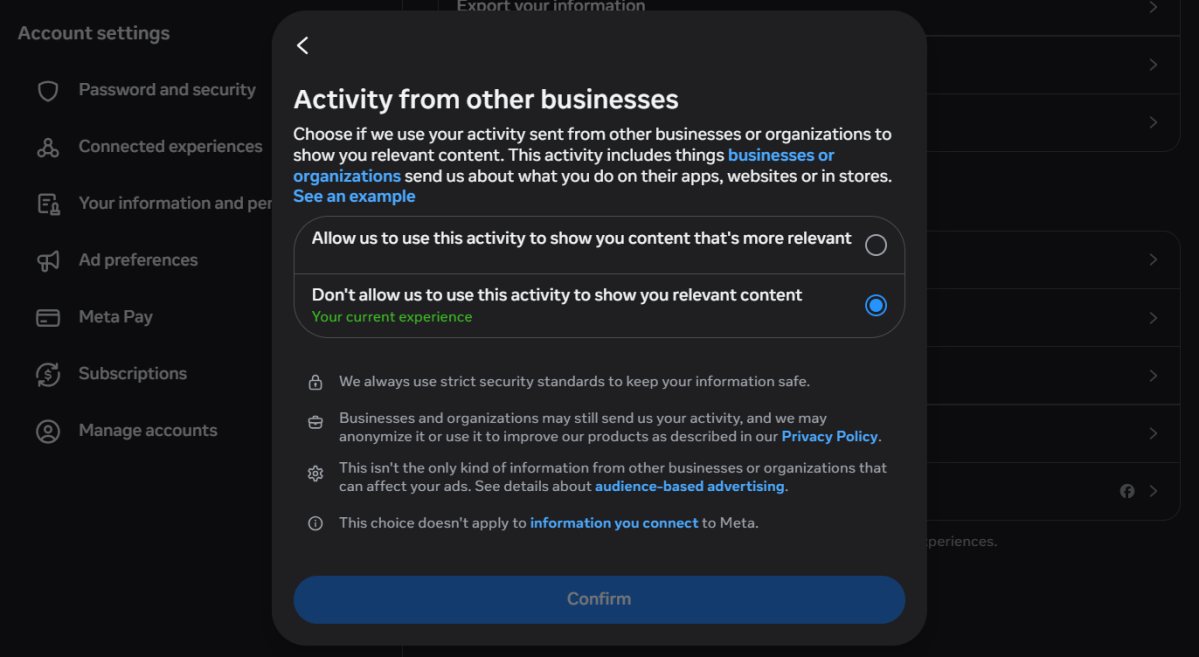
Speaking of Meta and privacy, Facebook is updating its settings related to third-party information. Soon the Your Activity off Meta technologies will disappear—but Meta is still definitely using information businesses give it about you and your activity elsewhere.
My recommendation: Don’t let Meta personalize your ads and other content based on that data sharing. To do so, head to accountscenter.facebook.com, then choose Your information and permissions. Select Activity from other businesses and change the toggle to Don’t allow us to use this activity to show you relevant content.
Facebook knows a lot about you, sure. But no need to help them profile you even better by serving ads and posts you’re more likely to click.


