At a glance
Expert’s Rating
Pros
- Arc 140V graphics lead the way in integrated GPUs
- High AI performance thanks to a powerful NPU (up to 115 TOPS in total)
- PCIe 4.0 SSD with very high transfer rates
- 5GbE LAN and two USB4 ports
- Latest version of Windows and AI tool
Cons
- No USB-C port on the front of the case
- RAM is soldered in place and cannot be upgraded
- Weaker multi-core performance than Ryzen competitors
Our Verdict
The NucBox K13 is GMKtec’s first mini-PC featuring Intel’s Lunar Lake platform, and the switch has paid off. The Arc 140V graphics card delivers a frame rate that outperforms many AMD models. The PCIe 4.0 SSD is speedy, while the NPU equips the system for local AI tasks. Anyone looking for a small, energy-efficient computer for everyday use, media, and light gaming will find this a good choice.
Price at time of review
This value will show the geolocated pricing text for product undefined
Best Price Today
Price When Reviewed
$950
Best Prices Today: GMKtec NucBox K13

Mini PCs have long covered a broad spectrum, from compact office machines to small workstations. With the NucBox K13, GMKtec is using Intel’s Lunar Lake chip for the first time and combining it with modern connectivity options. On paper, the device promises plenty of AI performance and decent graphics. We’ve tested the computer over several days and highlight where its strengths lie.
NucBox K13 design and build quality
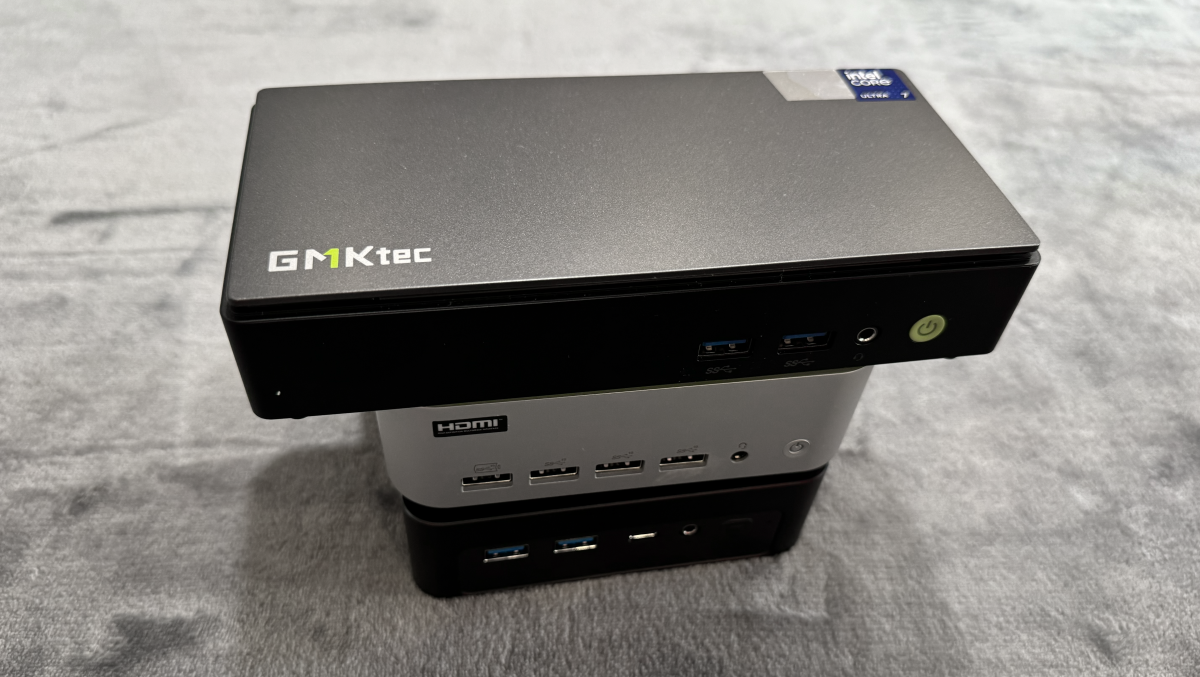
The NucBox K13 breaks with the familiar cube shape of other models. The case is flat and rectangular, measuring 7.32 × 3.46 × 1.44 inches and weighing around 18.44 ounces. With a volume of around 0.6 quarts, the computer is barely larger than a smartphone in terms of footprint and will therefore fit on any desk or behind a monitor.
Christoph Hoffmann
The matte top panel features the engraved GMKtec logo and an Intel Core Ultra 7 sticker. Fingerprints are barely noticeable. A striking green accent runs around the bottom edge, contrasting with the simple black front. The gaps are even, and the casing feels sturdy.
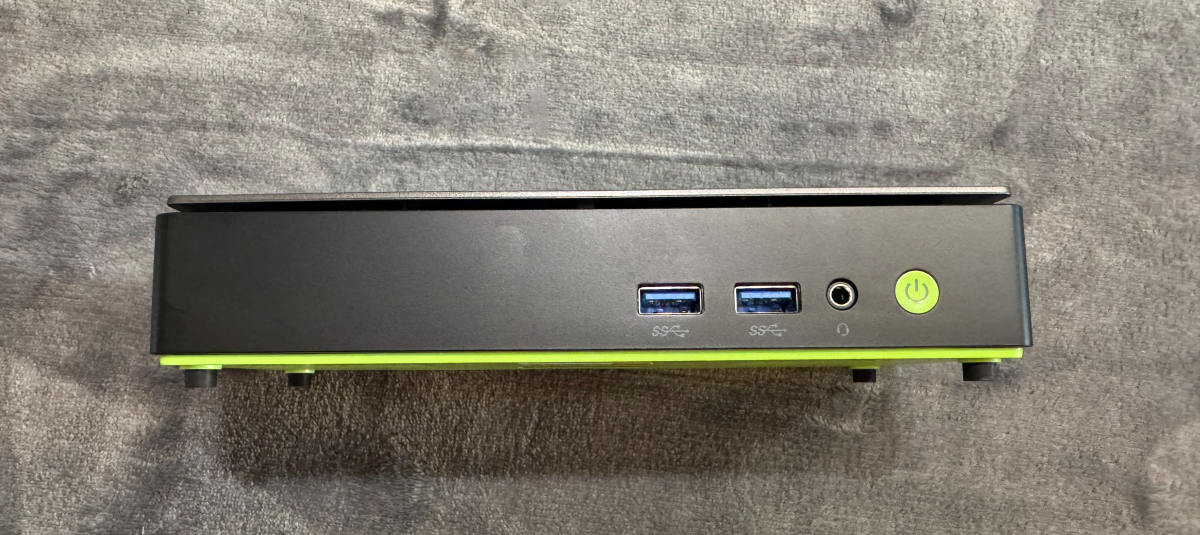
The ports are conveniently distributed across the front and rear. At the front are two USB-A ports with 10Gbit/s, plus a 3.5mm jack and the green-backlit power button.
Christoph Hoffmann
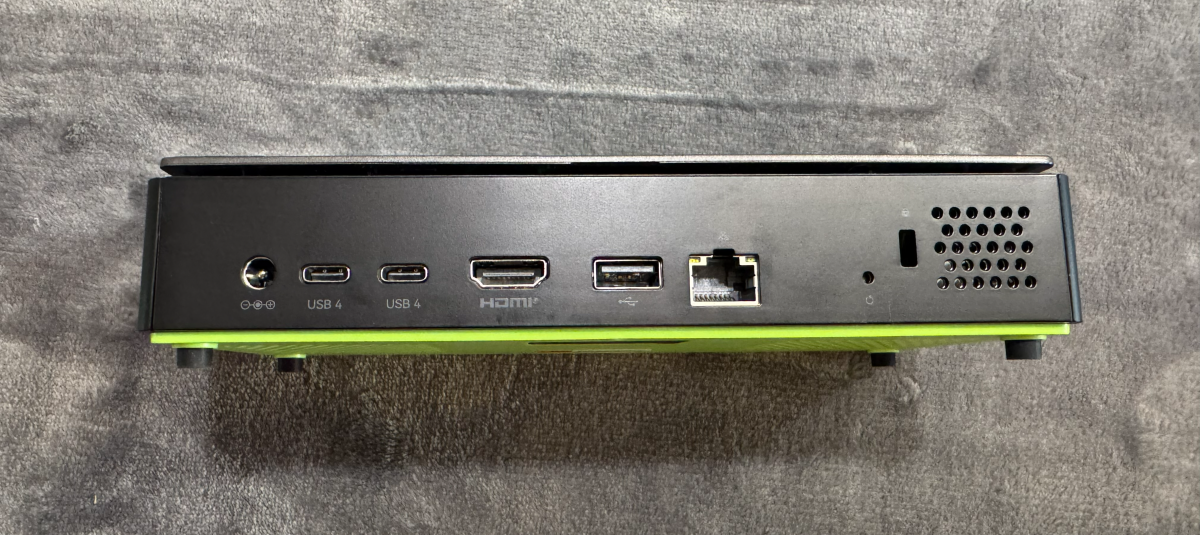
At the rear are the power socket, two USB4 ports, HDMI 2.1, an older USB-A port, the RJ45 socket, a reset hole, and a Kensington slot. Cooling is provided by a copper turbine fan, which draws air in from the side and expels it at the rear. The external power supply delivers 100 watts and is pleasantly compact.
Christoph Hoffmann
NucBox K13 specifications
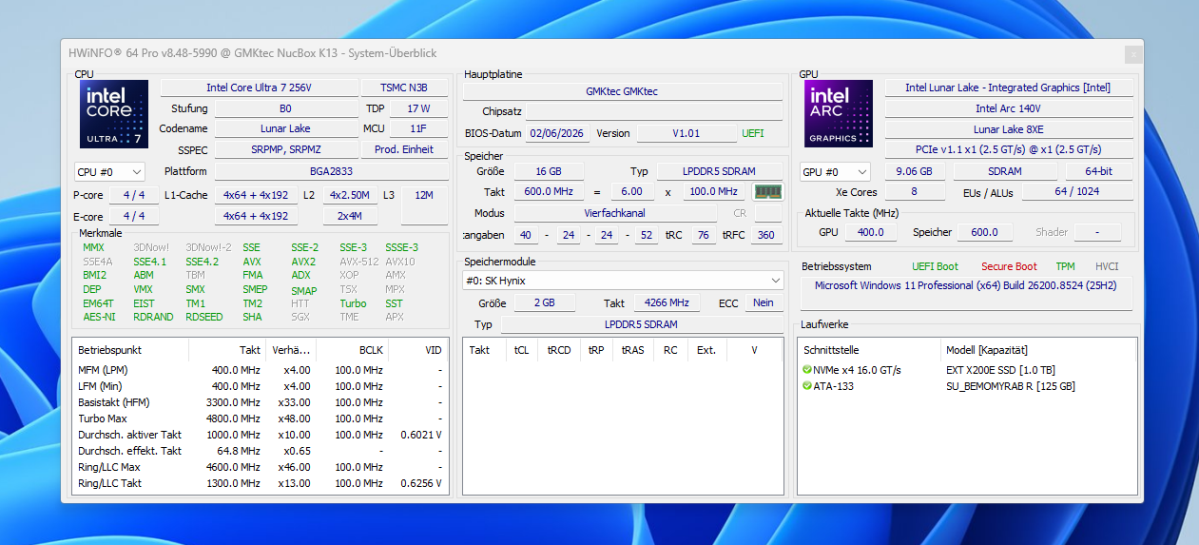
Inside, the laptop is powered by the Intel Core Ultra 7 256V, a Lunar Lake chip manufactured using TSMC’s 3-nanometer process. It combines four Lion Cove performance cores and four Skymont Spark cores. This gives the processor a total of eight cores and eight threads. The clock speed reaches up to 4.8GHz, while the base TDP is a modest 17 watts. Graphics are handled by the integrated Arc 140 V with eight Xe cores, clocked at up to 1.95GHz.
The NPU contributes up to 47 TOPS. The total performance of up to 115 TOPS advertised by Intel results from the combined AI computing power of the NPU, integrated Arc graphics and the CPU. The NPU alone does not achieve this figure.
Christoph Hoffmann
The system features 16GB of LPDDR5X RAM running at 8,533 MT/s. The memory is soldered in place and cannot be upgraded — a compromise also made by the NucBox K16 mini PC.
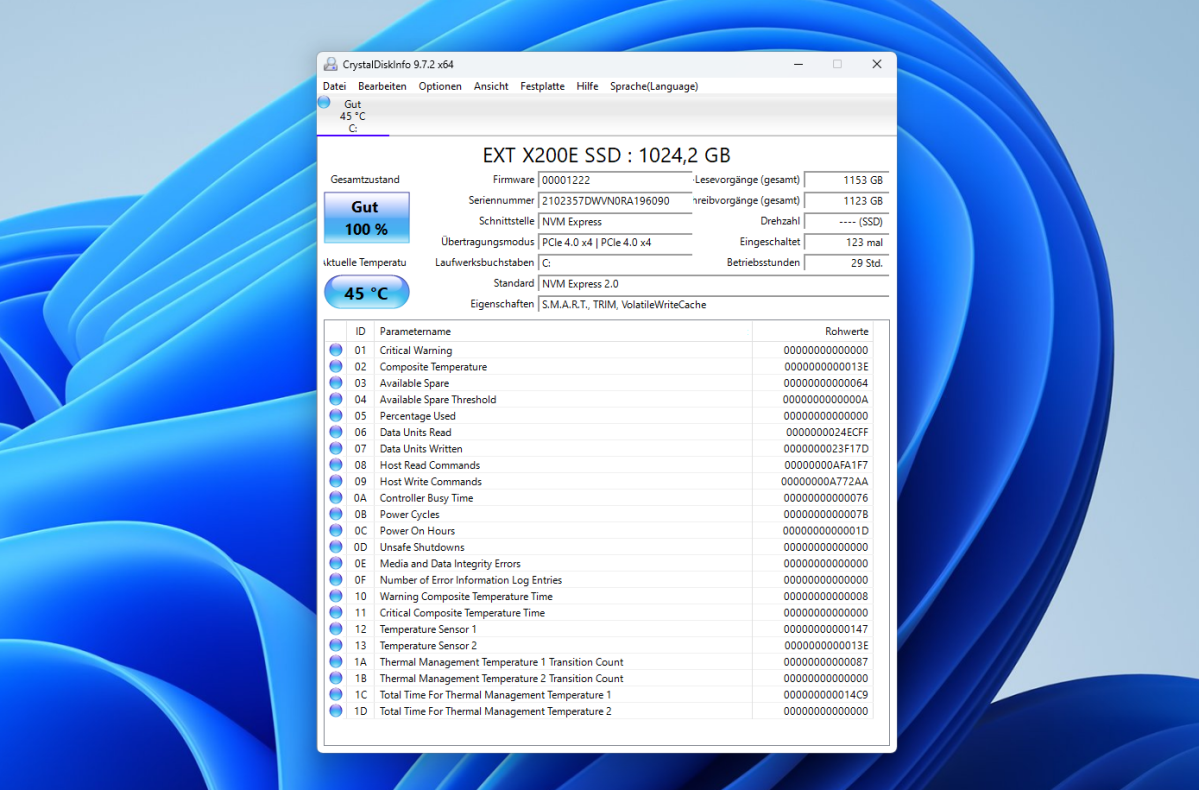
The system offers greater flexibility when it comes to storage. The test unit features a 1TB PCIe 4.0 SSD, while a second M.2 slot allows for expansion up to 16TB.
Christoph Hoffmann
In terms of connectivity, the K13 stands out with a feature that GMKtec has not included in any of its previous mini PCs: a 5Gbit/s LAN port. It also features Wi-Fi 6E and Bluetooth 5.2. The two USB4 ports transfer data at 40 Gbit/s, output DisplayPort signals and accept up to 100 watts of charging power via Power Delivery. Together with HDMI 2.1, up to three 4K displays can be operated in parallel.
This is where the difference to the K16 becomes clear. The older model offers an OCuLink port for external graphics cards and no fewer than two 2.5Gbit LAN sockets. The K13 does not feature OCuLink and connects an external GPU via USB4 only. In return, it offers faster networking via its single 5Gbit/s port and a significantly more modern computing platform.
Windows 11 and pre-installed AI software
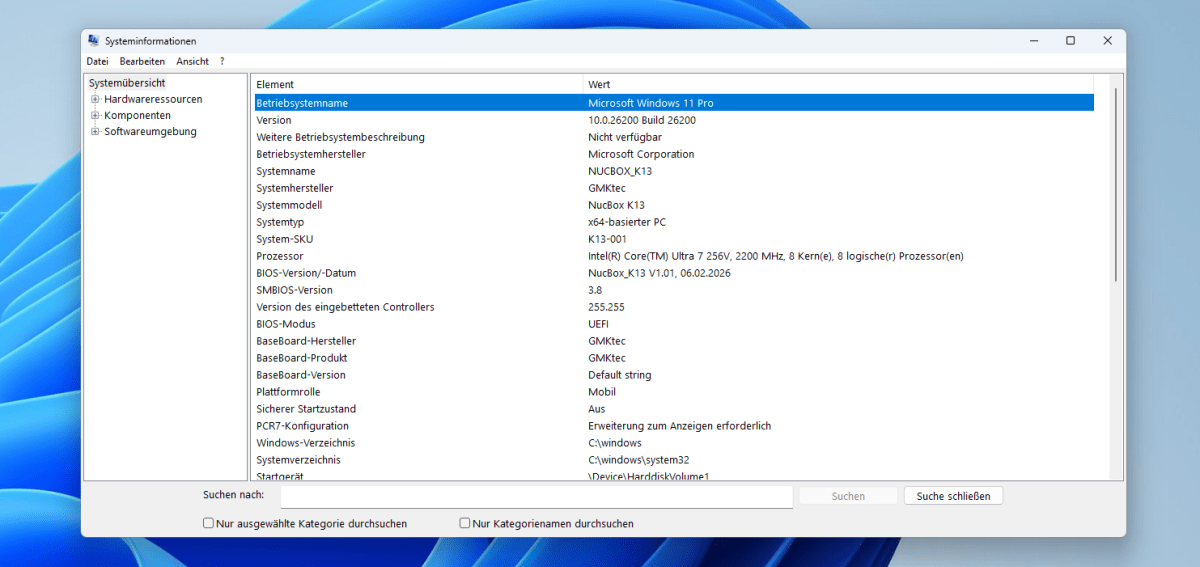
GMKtec has got a lot right when it comes to the operating system. The test unit runs Windows 11 Pro version 25H2 with build 26200. The system is therefore up to date, eliminating the need for extensive post-installation updates. With the K16, we had previously found an outdated version that first had to be brought up to date via an update. The manufacturer has avoided this slip-up here.
Christoph Hoffmann
One notable feature is the pre-installed AI software. However, it only became active after we had connected a webcam. An alternative microphone serves the same purpose, so an audio input must be available.

Christoph Hoffmann
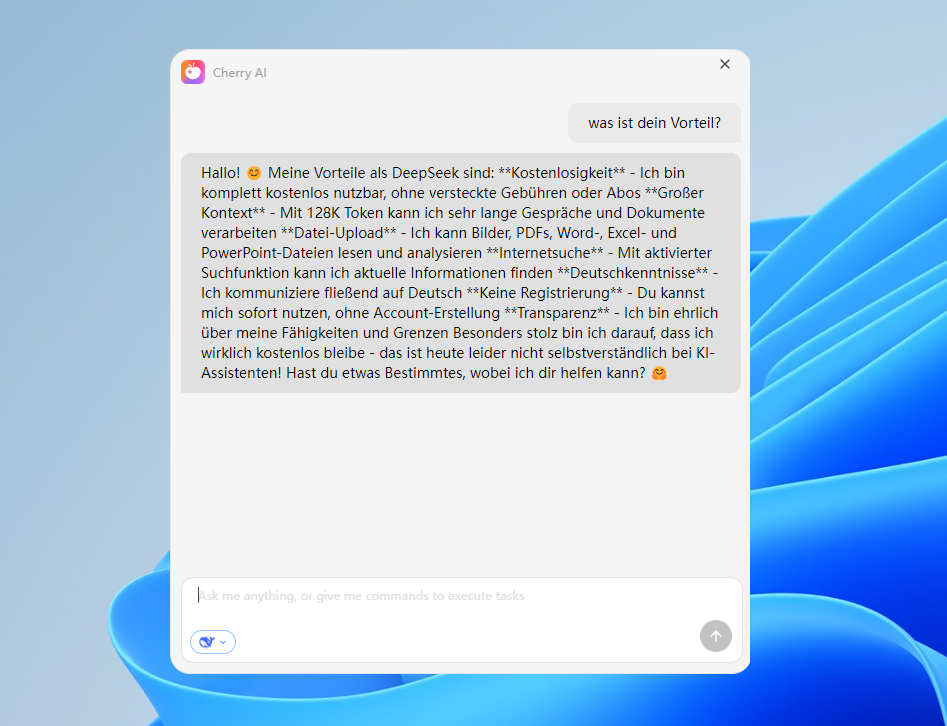
A launcher called Cherry AI then appears, allowing you to select from several models, including Doubao, Qwen, and DeepSeek. When asked about its advantages, the default assistant identifies itself as DeepSeek and highlights its free usage, large context window, and file upload capabilities.
Christoph Hoffmann
This means it is an interface for cloud services, not a model running locally. For a device advertised as having local AI, this point is worth noting from a data privacy perspective.
NucBox K13 computing power
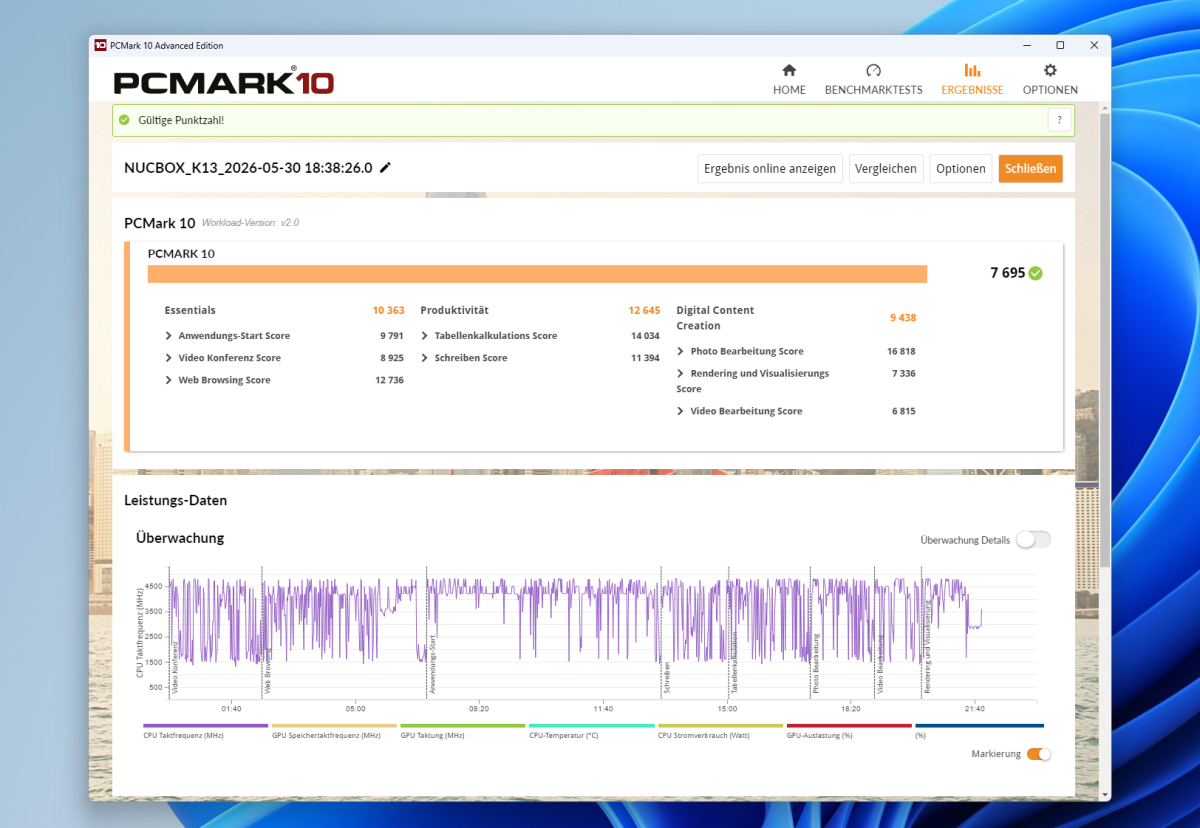
In PCMark 10, the NucBox K13 achieves an impressive 7,695 points. This score places the device at the top end of the current range of mini PCs and is noticeably higher than the 6,836 points achieved by the NucBox K16. The K13 also holds its own against high-performance Ryzen AI systems: Models such as the Geekom A9 Max with Ryzen AI 9 are on a similar level, scoring around 7,700 points.
Christoph Hoffmann
The sub-scores are consistently high, with 10,363 points in Essentials, 12,645 in Productivity, and 9,438 in Digital Content Creation. In everyday use, this translates to smooth system boot-ups, short loading times, and hassle-free multitasking.
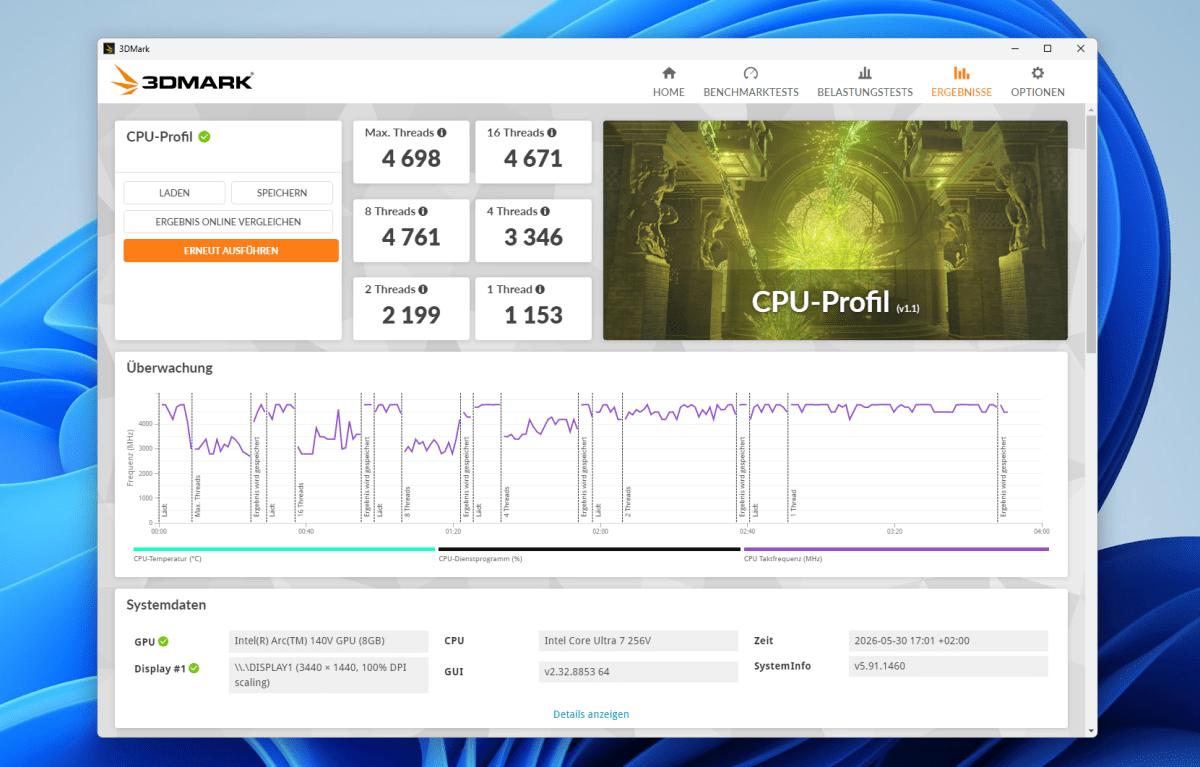
The CPU profile in 3DMark highlights the platform’s distinctive characteristics. With 4,698 points at full thread utilization, the processor lags clearly behind the 16-thread Ryzen chips, such as the K16’s 6,691 points or the Ryzen AI 9’s figure of over 9,700 points. Eight threads set the limit here.
Christoph Hoffmann
What is remarkable, however, is the single-thread score of 1,153 points, which is on a par with the most powerful AMD models. To put the results into context, it’s worth taking a look at the architecture: Lunar Lake was launched at the end of 2024 and was designed by Intel primarily for energy efficiency and AI acceleration.
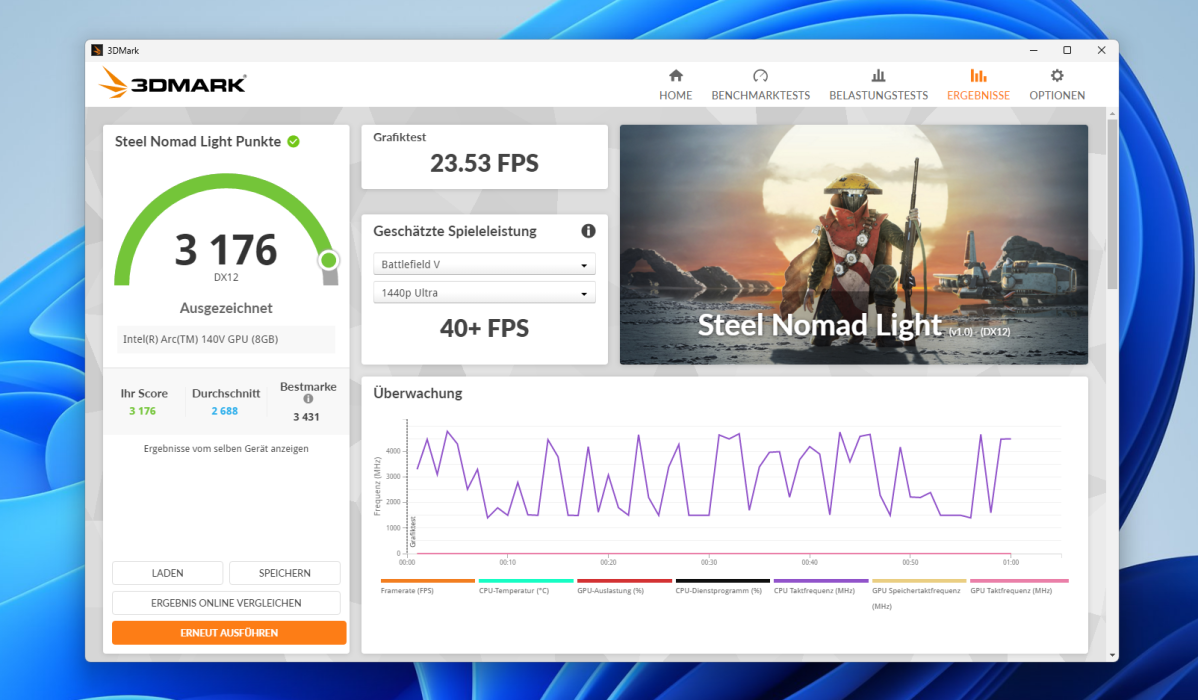
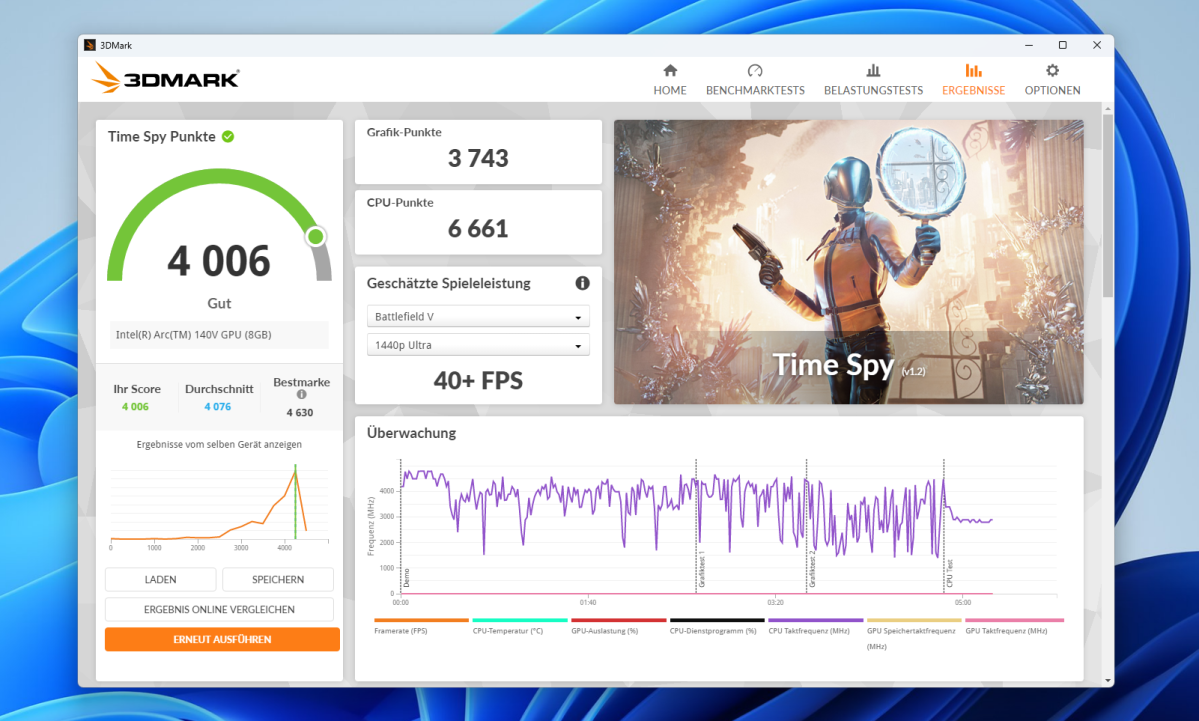
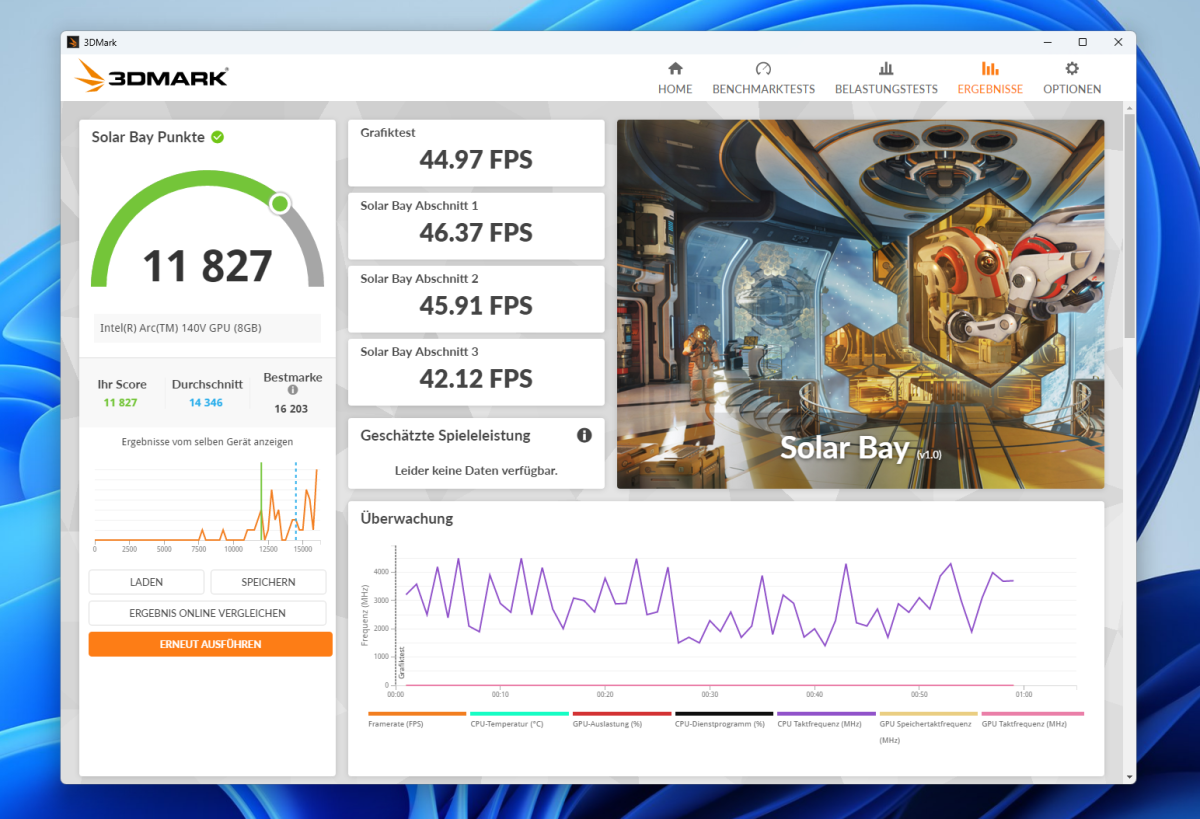
When it comes to graphics, the picture changes. In Time Spy, the Arc 140V scores 4,006 points, comprising 3,743 graphics points and 6,661 CPU points. This outperforms the Radeon 890M found in current Ryzen systems, which typically scores between 3,000 and 3,900 points, and more than doubles the 1,762 points achieved by the Radeon 680M in the K16. In Steel Nomad Light, the K13 achieves 3,176 points at 23.5 frames per second, and in the ray-traced Solar Bay, it even reaches 11,827 points at just under 45 fps.
In practice, many titles run smoothly in Full HD with adjusted settings. Demanding blockbusters require reduced detail levels but remain playable.
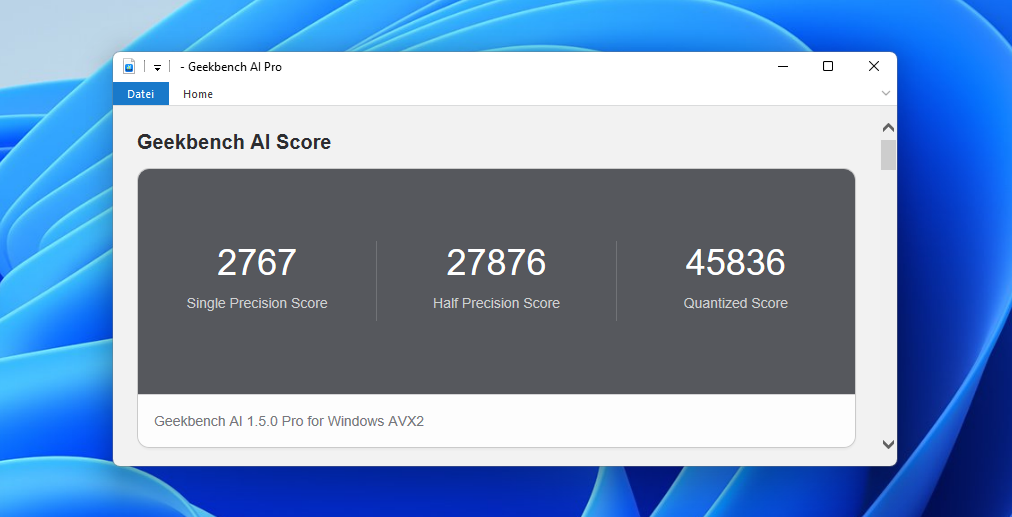
The system is well equipped for AI tasks. The real strength of the Lunar Lake platform lies in the combination of the NPU, Arc graphics, and CPU, which can process specially optimized AI models significantly faster. In Geekbench AI Pro, the NucBox K13 scored 2,767 points in the single-precision test, 27,876 points in the half-precision test, and 45,836 points in the quantized test on the Windows AI test path.
Christoph Hoffmann
These figures underscore that the mini PC is not only suitable for traditional office tasks but is also well-equipped for modern AI applications. In practice, however, the actual performance boost depends on whether an application specifically supports the NPU, GPU, or CPU.
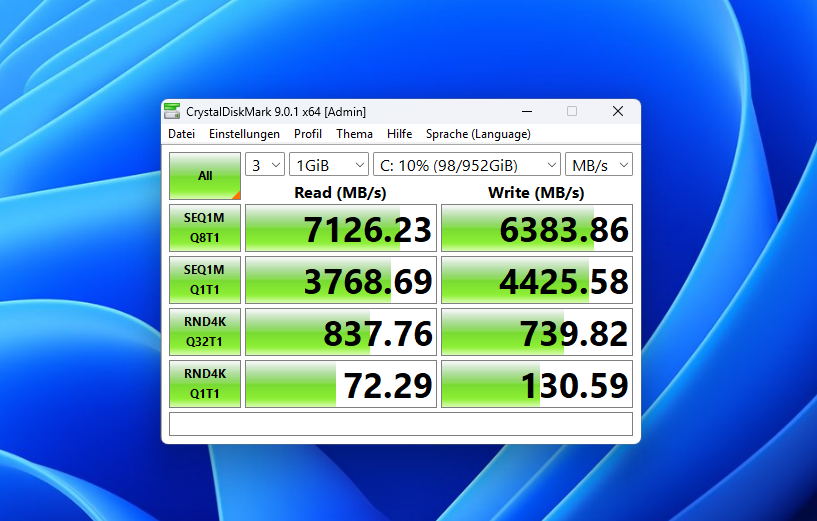
The fast PCIe 4.0 SSD rounds off the picture: In CrystalDiskMark, it reads at 7,126 MB/s and writes at 6,384 MB/s. The K16, with its PCIe 3.0 drive, only manages about half that here.
Christoph Hoffmann
NucBox K13 noise levels and power consumption
In everyday use, the NucBox K13 operates pleasantly unobtrusively. When using Office applications, web browsers, and streaming services, the fan usually remains in the background. It only becomes audible under prolonged load, without, however, drawing attention to itself with high-frequency background noise.
The Lunar Lake platform also demonstrates its strengths when it comes to power consumption. In our test, the mini PC consumed just 8.3 watts when idle. Under load, power consumption ranged between 20 and 28 watts, depending on the workload. This makes the K13 one of the more energy-efficient models in its performance class.
Christoph Hoffmann
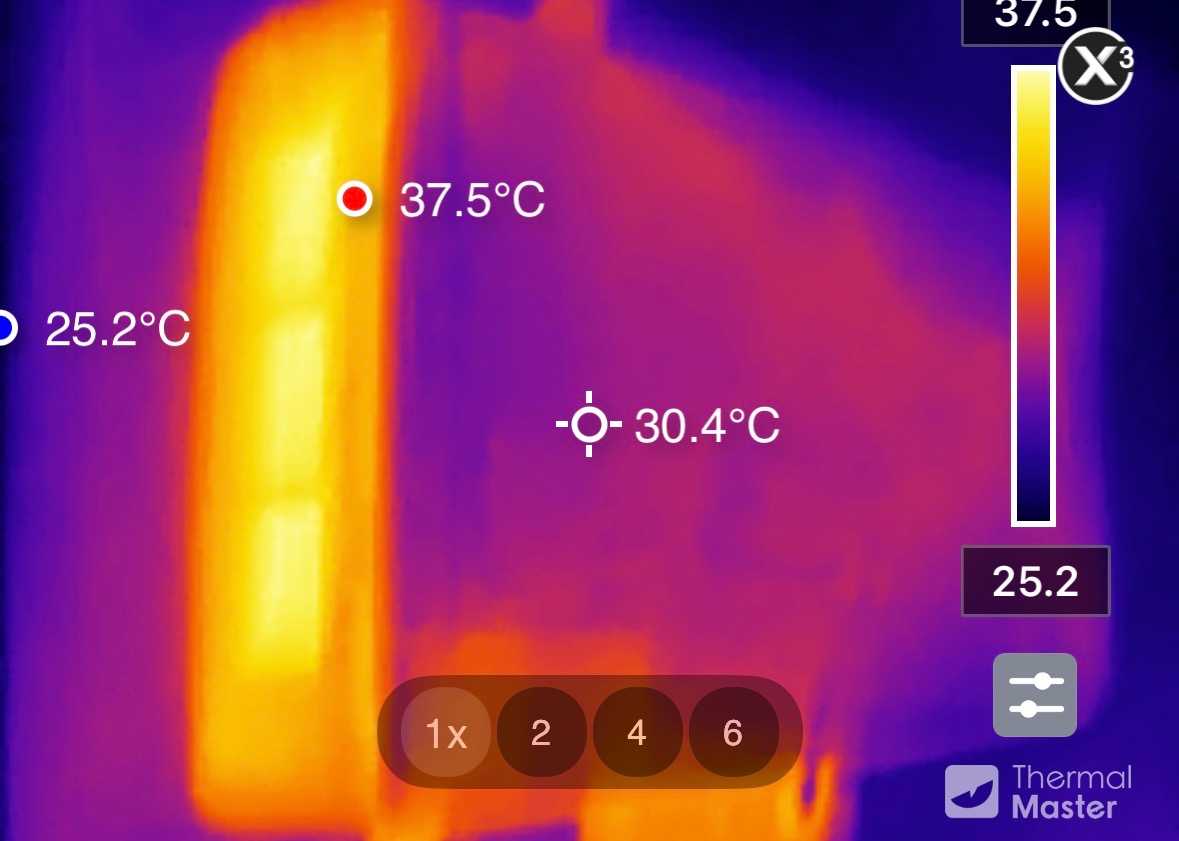
Thermally, the compact case also performed unremarkably. Using the Thermal Master P3, we measured a temperature of around 30 degrees Celsius on the case surface. Inside, the temperature was 37.5 degrees Celsius. Even after prolonged use, the SSD reached only 45 degrees Celsius. There were no indications of thermal issues or performance losses due to throttling during the test.
NucBox K13 warranty and guarantee
GMKtec provides a one-year manufacturer’s warranty on the NucBox K13. In the event of a warranty claim, the manufacturer will cover the repair costs, but the buyer is responsible for the postage costs to the service center. This means the warranty period is shorter than that offered by some competitors, such as Geekom, which offers three years.
When purchasing from an EU retailer, the statutory warranty of 24 months also applies. Therefore, buying from European suppliers is usually the better choice.
Should you buy the NucBox K13?
The NucBox K13 marks GMKtec’s entry into the Lunar Lake class, and it’s a successful move. The Arc 140V graphics are among the best that integrated solutions currently have to offer. Added to this are a very fast SSD, a powerful NPU, 5Gbit LAN and the latest version of Windows. The compact chassis gives a high-quality impression.
The weaknesses are clearly identified: The RAM is limited to 16GB and cannot be upgraded. Under multi-core loads, the eight-core CPU falls behind current Ryzen systems. Furthermore, there is no OCuLink port for external graphics cards.
Compared to the K16, there is a clear reversal of roles. The K13 excels in graphics performance, memory speed, AI acceleration, and energy efficiency. The K16, on the other hand, offers more threads, OCuLink, and dual LAN. Anyone looking for a compact and energy-efficient all-rounder for office work, media playback, AI applications, and occasional gaming will find the K13 a good choice. For virtualization, rendering, or other highly parallelized tasks, Ryzen AI systems remain the more attractive alternative.
Technical specifications
- Processor: Intel Core Ultra 7 256V (Lunar Lake, TSMC N3B), 8 cores/threads: 4 P-cores, 4 E-cores
- Clock speed: Base 2.2 GHz, Turbo up to 4.8 GHz, 12MB Smart Cache
- Graphics: Intel Arc 140V (8 Xe cores), 400MHz to 1.95GHz
- NPU: Intel AI Boost, up to 47 TOPS; total AI performance up to 115 TOPS (Int8)
- RAM: 16GB LPDDR5X, 8,533MT/s (soldered, not expandable)
- Internal storage: 1TB M.2 2280 SSD (PCIe 4.0)
- Expansion: 2 × M.2 2280, up to 16TB in total
- Graphics output: HDMI 2.1 2 × USB4, up to 3 × 4K at 60Hz
- Front ports: 2 × USB-A 3.2 Gen 2 (10 Gbit/s), 3.5mm jack
- Rear ports: 2 × USB4 (40 Gbit/s, DP 1.4, PD 100 W input), HDMI 2.1, 1 × USB-A 2.0, 5 Gbit RJ45, DC-In, Reset, Kensington
- Connectivity: Wi-Fi 6E (MediaTek MT7922/RZ616), 5Gbit LAN, Bluetooth 5.2
- Operating system: Windows 11 Pro 25H2 (Build 26200)
- Power supply: 100 watts (DC 20 V / 5 A)
- Dimensions: 7.32 × 3.46 × 1.44 inches
- Weight: 18.44 ounces


