There have been two major changes in phishing attacks in recent years: Criminals are using generative AI to create emails that are linguistically almost perfect, and which are now virtually indistinguishable from legitimate messages in terms of style, structure, and tone. Whereas clumsy language used to immediately arouse suspicion, a phishing email today reads just like a genuine message from Microsoft, a bank, or a parcel delivery service.
The design, too, usually looks highly professional. Furthermore, the technical tricks used in data theft are now more sophisticated. Some scams even bypass two-factor authentication. The attackers’ primary targets remain login credentials, session tokens, and personal information.
1. Microsoft 365 login trap circumvents two-factor authentication
A new attack method uses the genuine Microsoft login dialog and therefore requires almost no fake websites. To do this, the criminals use the OAuth device code flow. This is a sign-in procedure for devices or programs that do not have a usable browser or convenient text input, such as smart TVs, IoT devices, printers, or CLI tools.
Officially, it is called the “OAuth 2.0 Device Authorization Grant.” This method can also be used to take over accounts protected by two-factor authentication.
The criminals send their victims a phishing message, claiming that the victim’s device needs to be re-authorized to log in to their Microsoft 365 account. The messages usually start off innocently — for example, with “Your session has expired,” and provide a link to log in again. If the victim follows the link in the message, they are initially directed to a fake website, but eventually end up at the official Microsoft authentication process for devices and applications (OAuth Device Code Flow).
With this trick, the attackers can also take over accounts that are protected by two-factor authentication. To do this, they combine genuine Microsoft authentication pages with phishing websites.
Proofpoint
These are genuine Microsoft notifications and web pages. However, the victim is not authorizing access to their own PC or smartphone, but to an application controlled by the criminals. Once authorized by the deceived victim, the criminals receive an access token. This allows the malicious application to access the Microsoft account via API without the need to enter a password again.
Incidentally, most of these attacks hide the link to the fake website within a QR code. This is more likely to bypass spam filters than a standard link, and it prompts most victims to switch from their PC to their smartphone.
On a smartphone, due to the smaller screen and the frequent lack of security software, it is even more likely that the victim will fail to notice the deception. The security experts at Proofpoint have published a detailed analysis of the attacks on Microsoft 365 accounts.
2. Support scam: ‘Your computer is locked’ and similar claims
Although the support scam is not new, it still works: Numerous people continue to fall for this insidious fraud strategy. Among the high-profile victims is Julia Klöckner, president of the Bundestag in Germany.
Attackers, believed to be state-sponsored, contacted her via the Signal messaging service, posing as Signal support staff. Under a pretext, they asked Klöckner and other politicians to enter their PINs. This gave the attackers access to the victims’ Signal accounts — and thus to their private chats and contacts.
The Federal Office for the Protection of the Constitution and the Federal Office for Information Security (BSI) have jointly published a guide to help potential victims check whether their Signal account has been compromised.
Phishing using the support scam. A fake Windows or Defender warning is used to pressure you into making a phone call to the attackers.
Bundesnetzagentur
Attacks by people posing as Microsoft support staff also remain widespread. The fraudsters contact their victims by telephone, email, or via fake pop-up warnings in the browser.
They claim that the Windows PC has a security issue — for example, that the computer is locked or infected with malware. They then try to persuade the victims to install remote maintenance software or a supposed security tool. In reality, this often gives the attackers full access to the computer.
3. Fake Microsoft Defender warning
Microsoft Defender is a built-in Windows feature that protects PCs against all known PC viruses. Consequently, a warning from this antivirus tool is particularly alarming for many users. A fake version of this warning sometimes appears via email, sometimes as a pop-up in the browser. These messages claim that Defender’s protection must be renewed for a fee. Users are then redirected to fake online shops that demand payment for virus protection.
As a general rule, Microsoft Defender is a built-in feature on personal computers and is included free of charge in Windows. No payment is required. If you receive the warning via email, simply delete it. If it appears as a pop-up in your browser, simply close the browser window, using the ‘Alt F4’ key combination if necessary.
The antivirus specialist Norton has published a guide explaining how to remove such pop-up warnings from your browser if they have become entrenched in the system.
4. Microsoft OneDrive: Cloud phishing via shared files
Many Windows users access cloud services such as Microsoft OneDrive several times a day. This is precisely why they are an attractive target for phishing. Instead of traditional emails with file attachments, users receive sharing notifications with a subject line such as “Document has been shared with you.” The content usually appears harmless and is often work-related: invoices, project plans, pay slips, or internal documents.
The combination of genuine and fake elements is particularly insidious. Some attacks actually use legitimate cloud platforms, but host manipulated documents there. The primary aim of these attacks is to obtain the victims’ login details for their cloud and email accounts. The attackers then take control of these accounts and use them, for example, to launch further phishing attacks.
5. Delivery services, delivery services, and yet more delivery services
Phishing carried out in the name of parcel delivery services is one of the most persistent attack patterns of all and is, at the same time, becoming increasingly sophisticated. The reason for this is its high relevance to everyday life: Almost everyone expects regular deliveries and is therefore hardly suspicious when an email, text message or WhatsApp message about a parcel delivery arrives. Modern variants contain not just simple text links, but full tracking systems.
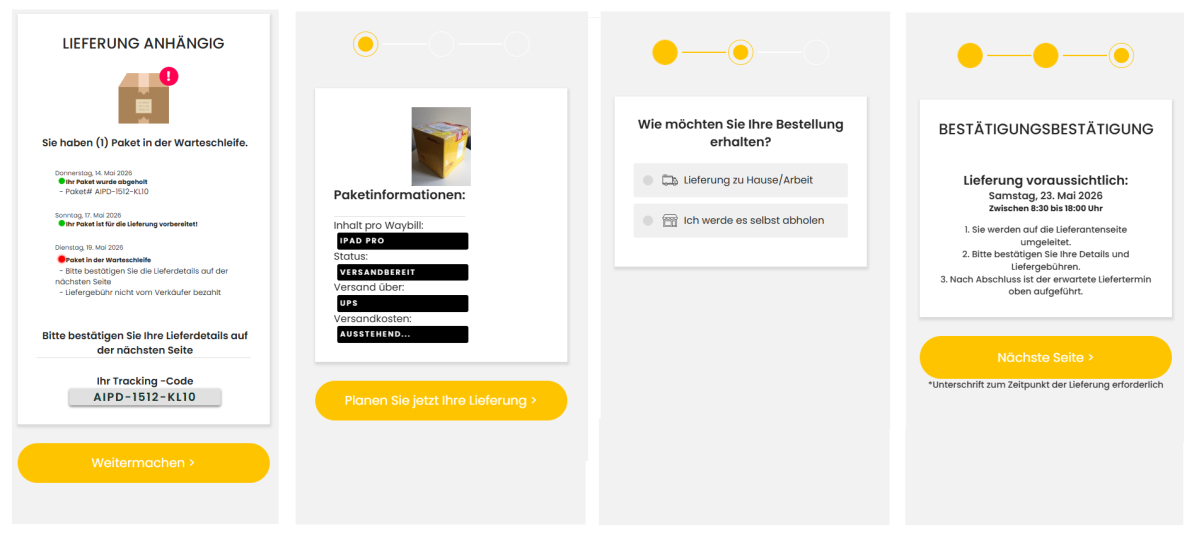
Here you can see four steps from a purported delivery service that claims to be delivering a parcel to you. In subsequent steps, you are asked to complete your customer account with personal details and pay for an express delivery.
Arne Arnold
These pages are dynamically generated and simulate real logistics processes. The delivery status might then read, for example: “Delivery failed – please confirm address” or “Last chance to change the delivery date.” The combination of time pressure and context is particularly critical. Anyone who falls victim to such an attack usually reveals their login details for online shopping or payment services. Alternatively, they may transfer money directly to the attackers, as they are told that taxes, processing fees, or an express surcharge are due.
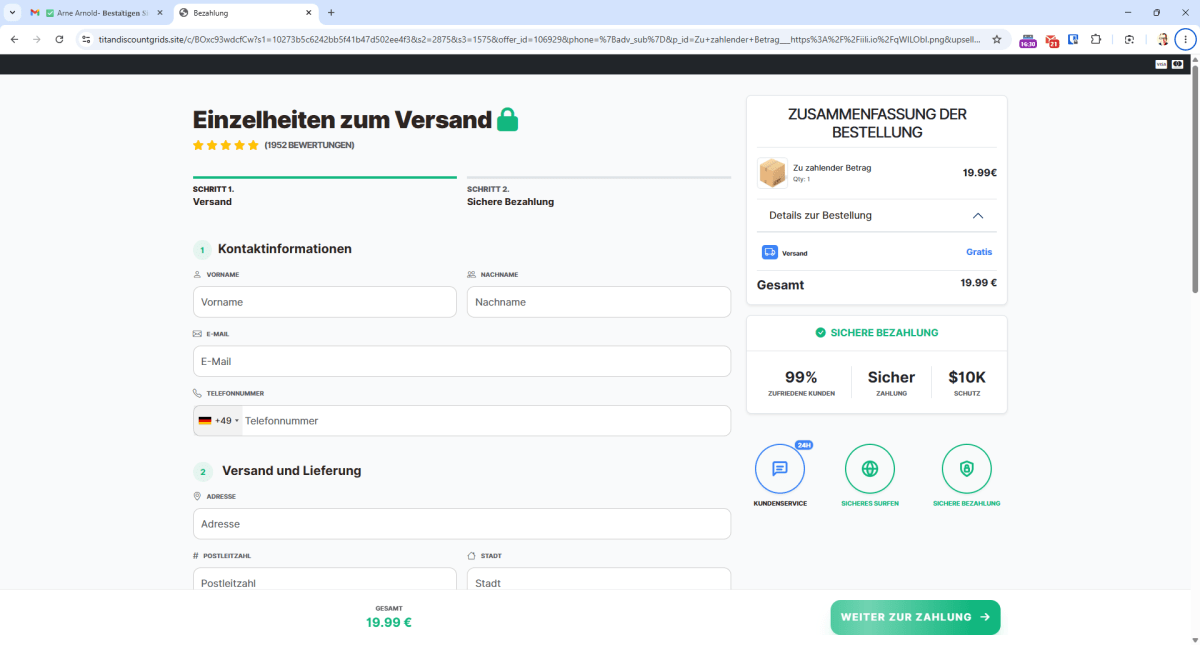
A phishing website posing as a delivery service, which attempts to collect an additional payment here before the parcel can be delivered.
Arne Arnold
6. Phishing targeting online banking is a constant threat
Phishing targeting online banking has been around almost as long as online banking itself. However, the threat level is higher than ever, as attacks are now truly numerous. Consumer advice centers, amongst others, provide information on the latest phishing scams.
Examples from May 2026 include the following: “Confirmation of your mobile number required.” The sender is purportedly Easybank. A fake Commerzbank email warns of an overdue “Photo-TAN update,” which requires a “one-off verification of login details.”
Other phishing emails claim to be from Deutsche Bank and demand that the “photoTAN security certificate” be reactivated. DKB customers also received phishing emails in May.
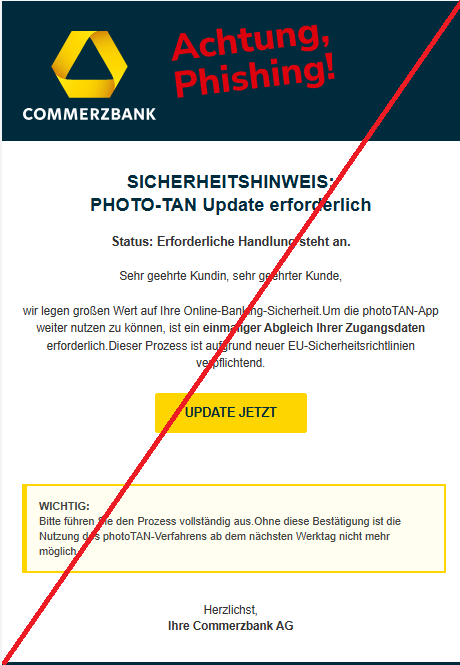
A recent phishing email targeting Commerzbank customers. The text effectively builds up pressure. Anyone who fails to respond will allegedly lose access to their bank account “on the next working day”.
Verbraucherzentrale
If you receive an email from your bank, under no circumstances should you click on any of the links in that email. If you are unsure whether you should respond, go to your bank’s website via your browser.
If the bank does indeed have a matter to discuss, this will be displayed once you have logged into your online account. Alternatively, simply ring your bank and ask whether they require any information from you.
7. Phishing by post: Credit fraud via the Postident procedure
These phishing attacks reach you by post in your actual mailbox. The letters claim to be from your bank and ask you to confirm your details again via Postident. Postident is a procedure provided by the Post Office that allows you to verify your identity to third parties, such as a new bank or credit institution. Anyone using the enclosed letter is usually authorizing a large loan with another bank.
Losses ranging from 15,000 to 25,000 dollars are not uncommon in such cases. This is usually preceded by the theft of your specific personal details (postal address, main bank, employer, income), which the attackers then exploit. Criminals obtain this data, for example, via fake property listings on Immoscout24 or similar portals. Anyone applying for a flat or house by providing pay slips and other details has already revealed all the key information needed for Postident fraud. Always be particularly careful when using the Postident procedure. You can read specific tips here.
Security tips: Recognizing and blocking phishing
You can recognize fraudulent messages by these characteristics:
- Unsolicited contact: You receive an email, WhatsApp message, or text message regarding a credit, a direct debit or other financial claims, even though you haven’t currently cancelled or disputed any transaction.
- Time pressure: The message suggests that urgent action is required and urges you to respond quickly.
- Suspicious links: The links in the message are hidden behind a QR code, lead to inappropriate domains, or are unusually long.
- Requests for personal details: Reputable companies very rarely ask you to provide sensitive information in messages or emails.
- Impersonal salutation: Often, the message does not address you by name or uses generic phrasing.
These measures protect against phishing scams:
- Email, SMS, WhatsApp, and similar platforms are not secure messaging channels: You must expect to receive fraudulent messages as well.
- Be wary of links in messages: Do not click on any links or scan any QR codes if the email contains requests for login details, payment information, or security verification. Open the relevant service in your browser by manually entering the address.
- Use your browser and password manager as an early warning system: If your password manager refuses to fill in your login details on a website, the domain is likely to be fake. Also pay attention to any warnings from your browser.
- Enable MFA: Always use two-factor or multi-factor authentication where available. Passkeys, in particular, enhance security.
- Be wary of remote support: Do not install any remote support tools after being contacted unsolicited.
- Question shared access: If you receive shared access to files in cloud storage, contact the sender first — ideally by telephone.
Information on current attacks: Find out about phishing campaigns, for example from the NRW Consumer Advice Center.
As a last line of defence, you can use antivirus programs, browser protection, and specialized tools:
- Antivirus: Major security suites such as G Data Internet Security filter out phishing emails before you open them.
- Browser protection: Browsers from security providers block many current phishing sites, such as the AI browser Norton Neo.
- Specialized tools: AI chatbots such as Scamio from Bitdefender analyze suspicious messages and warn you about dangerous content.
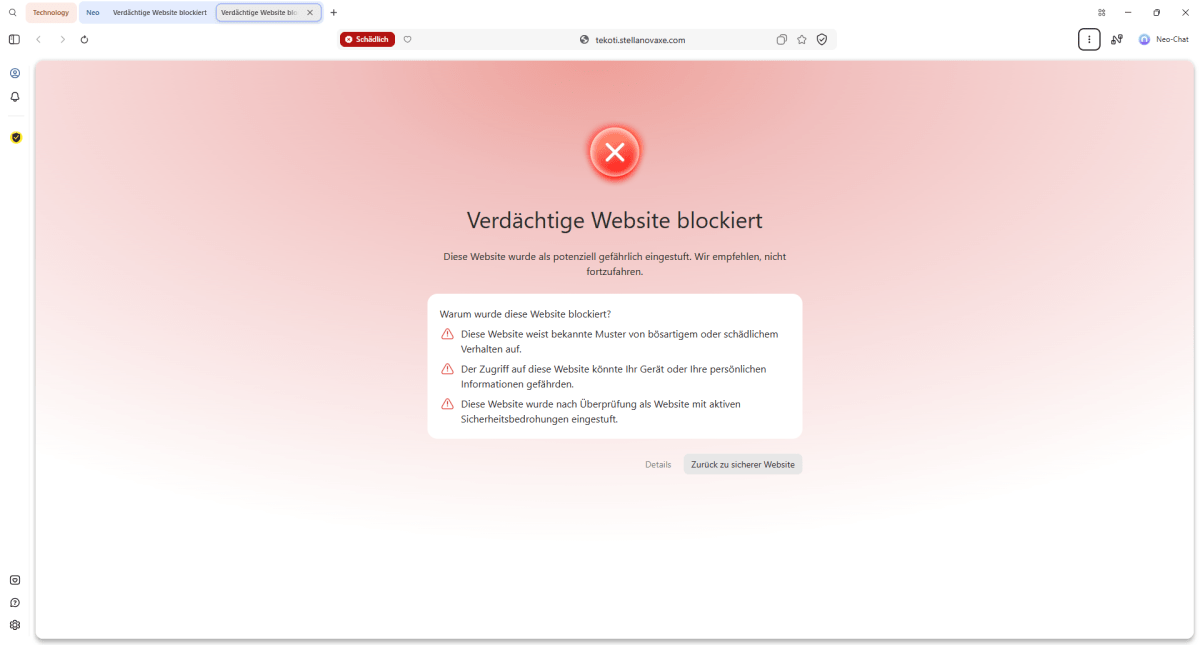
You can get good phishing protection, for example, through browsers from security providers such as Norton Neo.
Arne Arnold


