Normally, I favor the Toyota Camrys of Thunderbolt docks — practical vehicles to route data across your desk and between devices. Then something like the PexarBolt Ultra comes along.
I have no shame in admitting that I really like the trend of putting displays on just about any and all geek tech devices, to visually communicate what’s going on under the hood. I don’t want them to flash and beep and distract me, but to quietly report in. And the PexarBolt Ultra is a Thunderbolt 5 dock with a whopping 22 ports, a 5-inch visual display dashboard, an NVMe slot, and even a dial (!) that controls it all.
Wow.
I don’t need this. You don’t need this. My list of the best Thunderbolt docks is brutal in how I try to cut out the fat and gristle of unnecessary features in an effort to save cost. But sometimes just pulling up to a fancy steakhouse in a Ferrari is satisfying. And at an MSRP of $649…yeah. Ferrari prices, for sure.
The PexarBolt Ultra is manufactured by Lexar, a known name in memory — which has enjoyed its own rise into luxury pricing, sadly. This is the company’s first docking station. Anyone making the trip to the IFA show in Berlin on Sept. 4 will be able to see it in person, though Lexar will be raising funds via Kickstarter to begin with at about that time. There, you can buy it for $479 — still about $120 or so more than what I’d like to pay for a Thunderbolt 5 dock.
Lexar
At its roots, the PexarBolt Ultra shares the same basic features as other Thunderbolt 5 docks: 80Gbps in either direction, increasing to 120Gbps if needed via a Thunderbolt 5 technology called Bandwidth Boost. Unfortunately, Thunderbolt 5 controllers are much more common in the Apple Mac ecosystem.
In the Windows world, they’re more commonly found on gaming laptops…which favor the bright, informative aesthetic that the PexarBolt Ultra plays to. From a productivity aspect, Thunderbolt 5 also can drive three 4K displays at 144Hz apiece, providing both smooth mousing and scrolling as well as refresh rates for gamers.
There’s another aspect: The dock only supplies 140W to the laptop. That’s fine for normal productivity laptops and possibly even gaming laptops in a “silent” mode where the discrete GPU isn’t in use. While gaming, however, a gaming laptop would have to draw power from the battery to keep up. Again, however, this is typical of all Thunderbolt 5 docking stations.
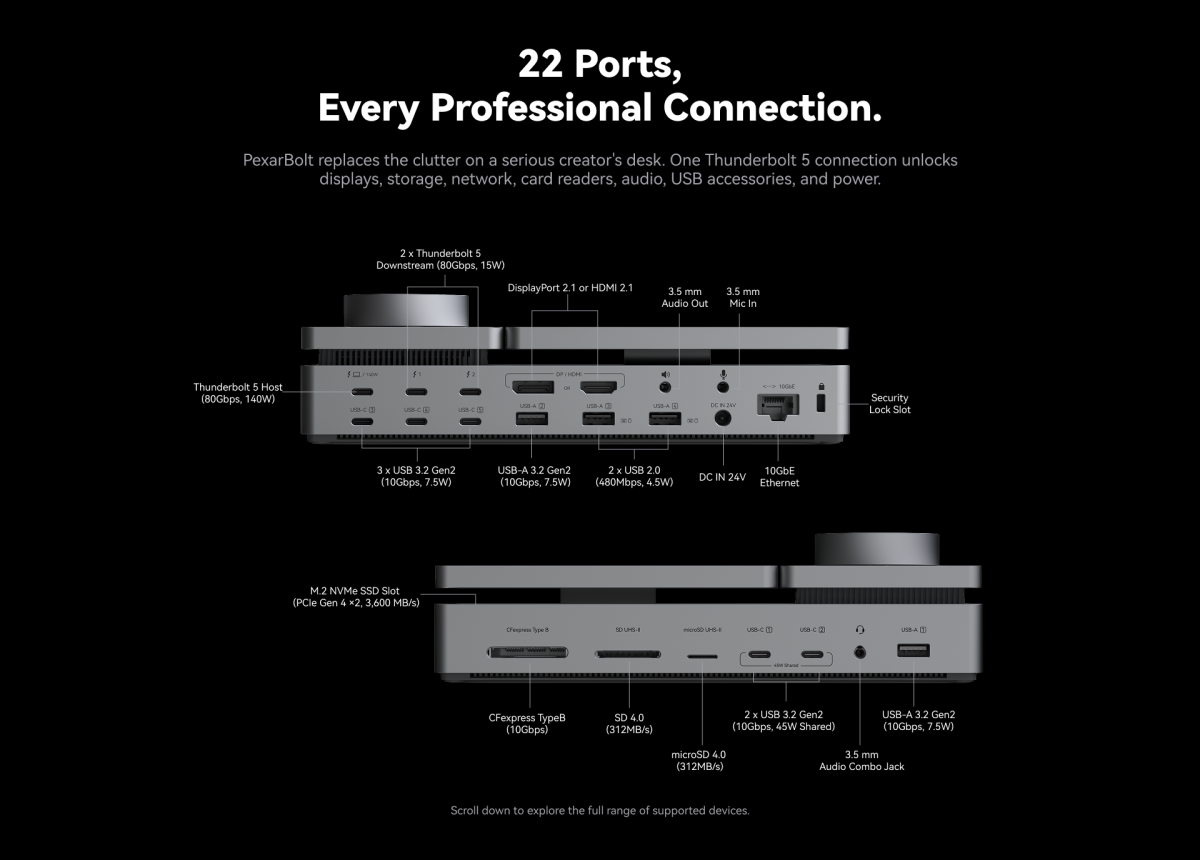
Basically, this 22-in-1 dock features four USB-A ports, five USB-C ports (including 45W of charging power shared between two USB-C ports), and one DisplayPort and one HDMI port. All told, there are 12 “charging-capable” ports on this dock, though many won’t deliver enough power to charge more than a pair of earbuds or a mouse. Interestingly, there are also microSD, SD, and CompactFlash (type B) slots as well. Lexar is also including a 10Gbps Ethernet connection, which will eat up some of that 80Gbps TB5 throughput at full speed.
What sets the PexarBolt Ultra apart?
In 2023 I reviewed the DockCase 10-in-1 hub, which, like the PexarBolt Ultra, included a small screen. It was geeky, yet informative, visually communicating what was going on and reporting if some glitch prevented a stable connection. I’d expect the same here.
Lexar hasn’t revealed the specifications of the 5-inch screen yet but I’m seeing some very interesting information being shown: the total power draw, which ports are in use, the temperature of the dock (which is actively cooled), and even an AI token count.
Lexar says that this device is compatible with Claude Code, so that you’ll be able to see how many tokens are in use. That sounds extremely handy.
Many of the early Thunderbolt 5 docking stations that I saw included the option (populated or not) to include an M.2 NVMe SSD, and the PexarBolt Ultra follows suit. My tests of early docks showed that a Thunderbolt 5 SSD — inside a dock or connected to it via an interface — basically performed at the performance of an internal SSD, so the dock could serve as an additional SSD slot. Of course, you know the catch: Large, fast SSDs are notoriously expensive right now, which makes this feature less of a priority.
I’ve never tried running local AI models from an external SSD, but the combination of the dashboard and the external SSD capabilities certainly suggest an intriguing use case for those who are open to AI and have the budget for it.
Lexar
But wait! Alongside the display is a big metal knob, which can be used to “dial” and navigate, with input entered with a tap. That’s wild that we’re seeing Surface Dial-like functionality on a Thunderbolt 5 docking station, and specifically to navigate around the dock interface.
Let’s face it: You can fly from Seattle to Tokyo in coach. Or you can fly the same route in business class. Both will deliver you to the same destination at the same time. One, however, will provide an upgraded experience, for a substantially upgraded price. That’s the core of the argument here. Who knew that the K-shaped economy would come for the dock market, too?
Related posts:
 iVanky FusionDock Ultra review: 26-port Thunderbolt 5 dock for serious Mac setups
 OWC Envoy Ultra review: Super-fast Thunderbolt 5 storage for your new M4 Pro/Max Mac
 iVanky FusionDock Max 2 review: 23-port, 3x display pro warship of a Thunderbolt 5 dock
 Wavlink Thunderbolt 5 Dock review: Affordable fast Thunderbolt plus handy power options