M5 Max Mac Studio: Our model’s specifications
The Mac Studio is available in two standard configurations: A $2,499 model with an M5 Max chip (18-core CPU, 32-core GPU) and 36GB of RAM, and a $5,499 model with an M5 Ultra chip with 96GB of RAM. Customers can customize their purchase by adjusting the number of CPU and GPU cores, and add more memory and SSD storage.
This review focuses on the M5 Max Mac Studio with a chip upgrade, additional RAM, and a larger SSD. Here are the specs of our review unit:
- CPU: M5 Max with 18 cores (6 super cores, 12 performance cores), 16-core Neural Engine
- GPU: 40 cores
- Memory: 128GB unified memory (614GBps memory bandwidth)
- Storage: 4TB SSD
- Ports: 4 Thunderbolt 5/USB-C; 10Gb ethernet; 2 USB-A (USB 3); HDMI 2.1; 3.5mm audio; 2 USB-C; SDXC Card slot
- Networking: Wi‑Fi 7 (802.11be); Bluetooth 6; Threads; 10Gb ethernet
- Weight: 6 pounds (2.7 kg)
- Dimensions: 3.7 x 7.7 x 7.7 inches (9.5 x 19.7 x 19.7 cm)
- Price (as tested): $6,899/£6,899/CA$10,099/AU$10,899
The Mac Studio design reamins unchanged from its introduction in 2022.
Fundry
M5 Max Mac Studio: Performance
The odd M4 Max and M3 Ultra offerings Apple had with the previous Mac Studio were due to Apple skipping a generation with its Ultra chips. This time around, Apple decided that the M5 series would have an Ultra chip, so you can get either an M5 Max or M5 Ultra.
The $2,499 M5 Max Mac Studio comes standard with an 18-core CPU (6 super cores, 12 performance cores), a 32-core GPU, 36GB of unified memory, and a 512GB SSD. However, this CPU is essentially fixed at 36GB of RAM; if you want more, you must upgrade to the 18-core CPU/40-core GPU, which technically costs $300 but actually adds $600 to the price when the cost of the 48GB RAM upgrade is factored in. It can further be upgraded to 64GB ($400) or 128GB ($2,000).
This review looks at the M5 Max option with an 18-core CPU, a 40-core GPU, 128GB of RAM, and a 4TB SSD, which adds $4,400 the price of the Mac Studio. More about the pricing at the end of this review.
Blackmagic Disk Tests
Foundry
Typically, we start our reviews by looking at overall performance with Geekbench, and then we work our way through more specific aspects. But the SSD performance is so overwhelmingly good, it’s the story here. I mean, this chart doesn’t look correct, does it? Apple improved SSD performance with the M5 chip series, and we’ve seen big improvements in the M5 MacBook Pro. It’s finally come to the Mac Studio–it’s almost a shame that we had to wait so long. This is one of the key reasons why you should upgrade from another Mac Studio, even if you bought one this year. It’s a difference you’ll definitely feel.
Geekbench 7
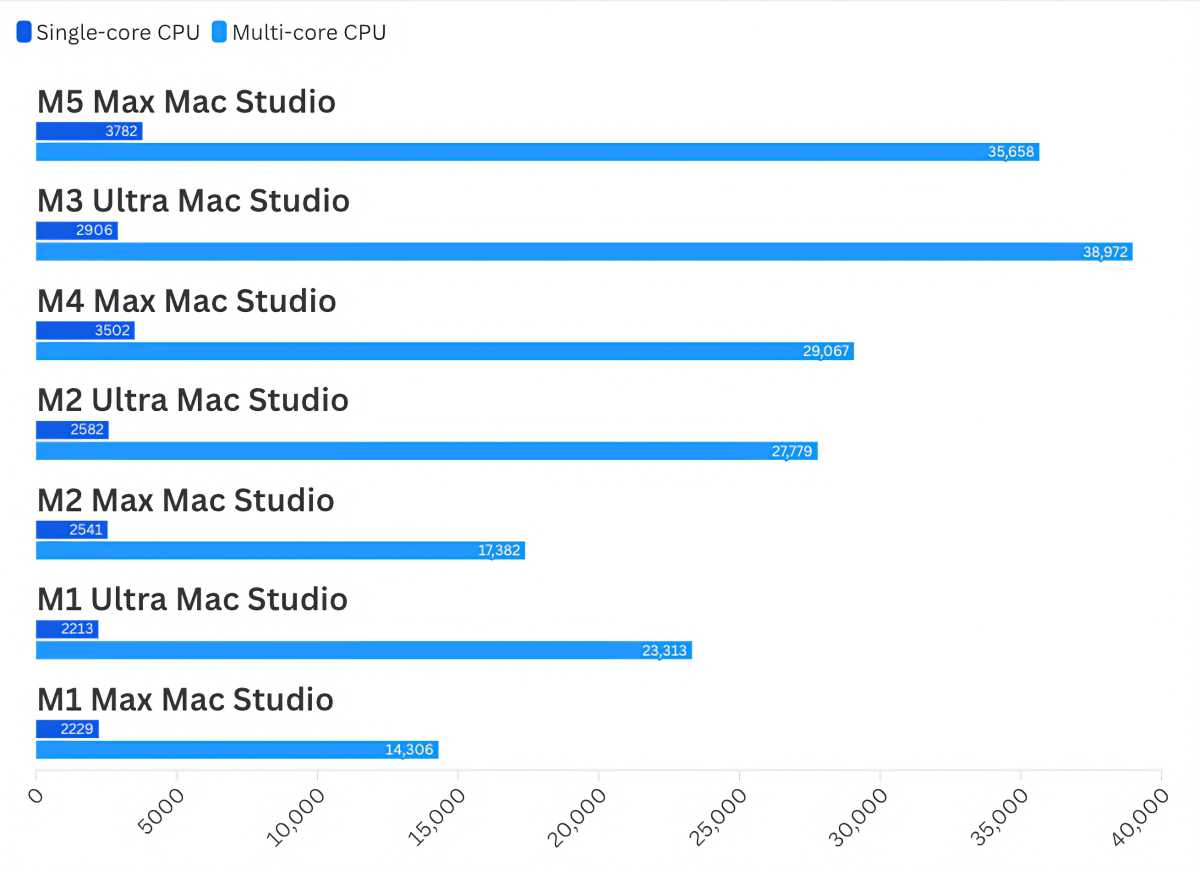
Results are expressed as Geekbench scores. Higher scores/longer bars are faster.
Foundry
Geekbench 7 was released just this year; it’s a general-purpose benchmark tool for gauging performance. The previous-generation M3 Ultra is faster than the M5 Max in multi-core CPU testing, but only by 9 percent. The difference between the M5 Max and the M4 Max that it replaces is more substantial at 22 percent.


