At a glance
Expert’s Rating
Pros
- Very fast Thunderbolt 5 SSD performance
- Tons of ports in a nice arrangement
- Beefy power supply
Cons
- On the expensive side
- The spacing of front USB ports is narrower than optimal
Our Verdict
Though pricey for pure storage, if you need more ports along with your super-fast 80Gbps SSD, the TB5 is a short-lister.
Price When Reviewed
This value will show the geolocated pricing text for product undefined
Best Pricing Today
Price When Reviewed
$329.99
Best Prices Today: Orico TB5 dock with NVMe storage
Yes, the Orico TB5 is a Thunderbolt 5 hub/dock. But as it also offers lightning fast storage performance, we thought users might be interested in just how fast said storage is. Long story short — very.
Of course, I tested it as a dock as well, but only to confirm functionality. Okay, I lie. I kicked the dock features pretty thoroughly and cover them below, but it’s not my beat so I’ll just say it’s easily one of my favorites in that regard. Right up there with the OWC StudioStack.
Read on to learn more, then see our roundup of the best external SSDs and best Thunderbolt docks for comparison.
What are the Orico TB5’s features?
The TB5 is compact, measuring approximately 6.7-inches wide, by 3.5-inches deep, by 1.35-inches tall. The hub/dock/NVMe enclosure controlled by Intel’s JHL9480 weighs around 15 ounces including the NVMe SSD.
I must say, I was impressed with the location and access to the TB5’s single PCIe 4.0 M.2 NVMe port. It’s on the bottom of the unit (see the image below), walled off by a magnetically secured access plate. You can pry the plate off with a finger, yet it’s not going anywhere unless you want it to.
I was slightly perplexed to see that the SSD retaining screw wasn’t already in place — but sure enough, there was one in a mini-baggie in the box. Kind of a waste of plastic in my book, but what the heck.
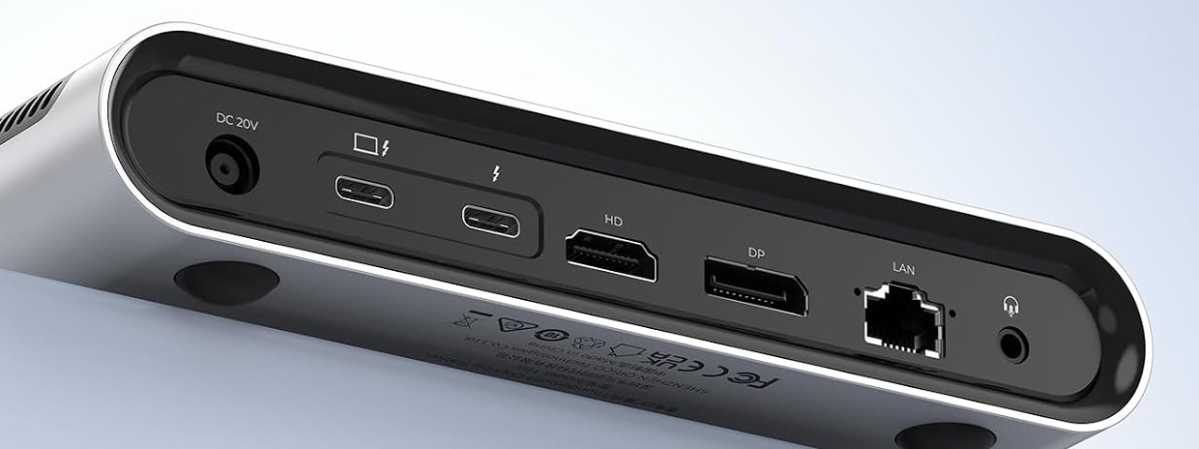
As the TB5 is primarily a hub/dock, it makes sense to list all the ports that it provides. On the back are the power jack, full-sized HDMI and DP ports, the upstream (PC) Thunderbolt 5 port, a single downstream Thunderbolt 5 port, a 2.5GbE (Ethernet) port, and a headphone jack.
The front is home to SD and TF 4.0 card slots, four 10Gbps USB ports (three Type-A, one Type-C), a second downstream Thunderbolt 5 port, and the power button. Personally, I find the front/back allotment of the ports fits my needs perfectly, with a major caveat that I’ll discuss in a bit. It’s a matter of taste, but I like the USB on the front.
The TB5, as all Thunderbolt 5 docks do, ships with a very beefy power supply. In this case a 20 volt, 9 amp brick that weighs around 1 pound , 7 ounces. Like I said, beefy.
Orico advertises 120Gbps as the TB5’s maximum speed, as do many Thunderbolt 5 docks. However, with Thunderbolt 5 standard, 120Gbps is only for uni-directional downstream video to allow more high-resolution displays and/or greater resolutions. Storage, being bi-directional is capped at 80Gbps, or around 6GBps sequential throughput.
How much is the Orico TB5?
At $330 the TB5 is hardly an impulse buy. Depending on your impulses, of course. That said, keep in mind that Thunderbolt 5 storage enclosures sans accouterments already run around the $150 mark.
If you need to kill two issues with one device — the need for more easily accessible ports and fast external storage — then a hybrid dock with storage is well worth considering. It certainly cuts down on the clutter — until you start cabling other devices, that is.
You’ll need to provide your own NVMe SSD for the TB5, which isn’t going to be cheap these days. In case you go bargain hunting in this NAND/DRAM-challenged market, even a PCIe 4.0 SSD is fast enough to saturate the 80Gbps bus.
A PCIe 3.0 NVMe SSD will still get you two-thirds of the way there with around 4GBps sequential transfers. PCIe 5.0 is overkill and a needless expense. Just sayin’
How is the TB5 as a hub/dock?
As I mentioned, I kicked all the ports on the TB5 thoroughly. All ports worked as advertised and to speed. I had only a 4K display with which to check the HDMI and DP ports, but they were fine at that resolution at 60Hz. 80Gbps storage performance via the two downstream Thunderbolt 5 ports was mostly on par with the internal storage discussed in the next section.
I do have two complaints: First, the unit doesn’t power on with your system — you have to press the power button. I’d prefer that the TB5 power on, then allow the option of turning it off with said power button. A piddling gripe, that.
More annoyingly, the front USB ports are spaced too close together if you want to use a thumb drive in each. The three Type-A’s are approximately 0.75-inches from center to center and the rightmost is only 0.65-inches from the center of the 10Gbps Type-C.
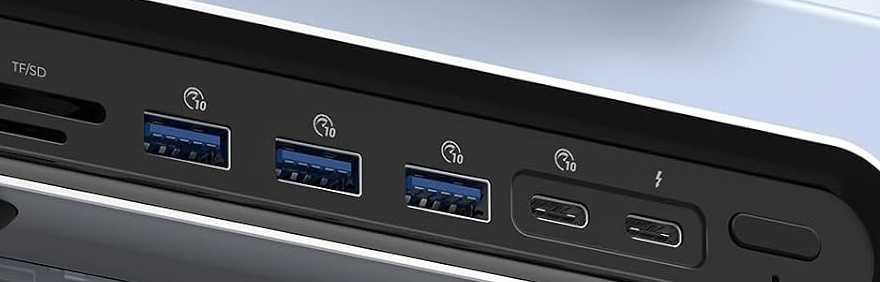
Most thumb drives are a tad wider than 0.75-inches. I could not fit three abreast in the Type-A ports, or use one in the rightmost Type-A port and the Type-C port at the same time. I could squish two thumb drives into adjacent Type-A ports, but only with one at a slight angle. Doable, but hardly optimal.
Obviously, this will not be an issue with devices that attach with cables and their thinner connectors, but if you’re rife with thumb drives, take note. You could, of course, use USB extension cables, but that’s an unsightly kludge if you’re opposed to cable clutter.
In the next iteration, Orico should consider spacing the ports more widely, or orienting them vertically. Perhaps move the power button to the back, where you’re likely using cables anyway?
How fast is the Orico TB5?
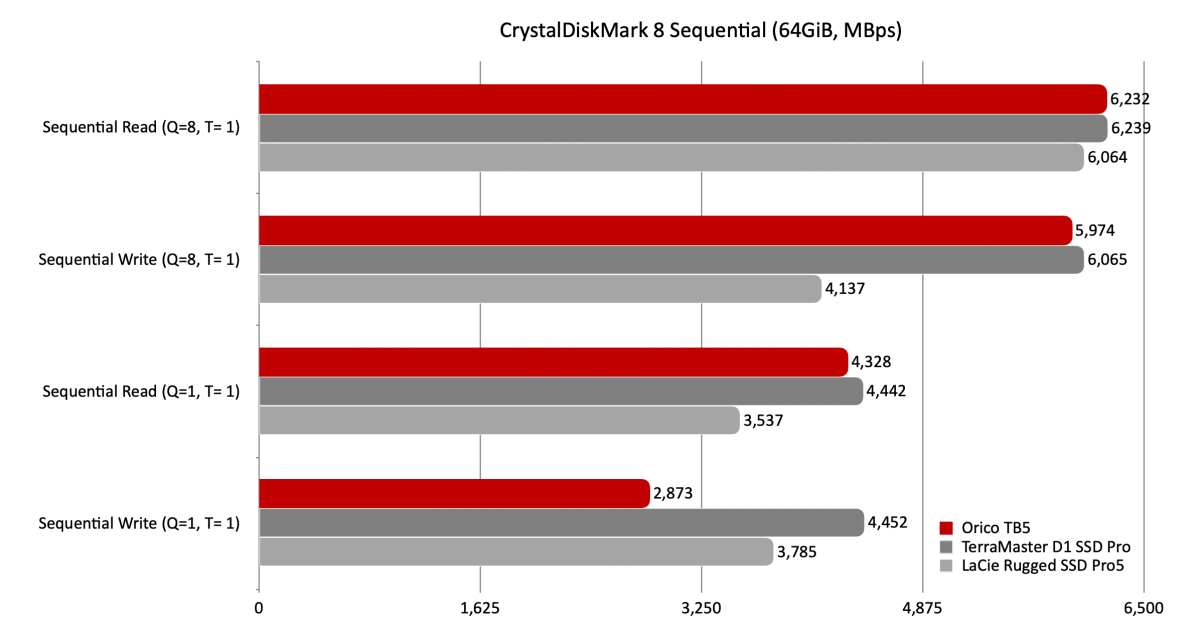
The Orico TB5’s storage performance lived up to the company’s 6GBps claims. In fact, it even finished first in a couple of tests and is currently the third-fastest external SSD I’ve ever tested. Note that this was in no small part due to my populating the M.2 slot with a PCIe 5.0 Crucial T705 — an SSD capable of over 14GBps.
Though not the fastest in CrystalDiskMark 8, the TB5 was within shouting distance of the leaders in most tests.
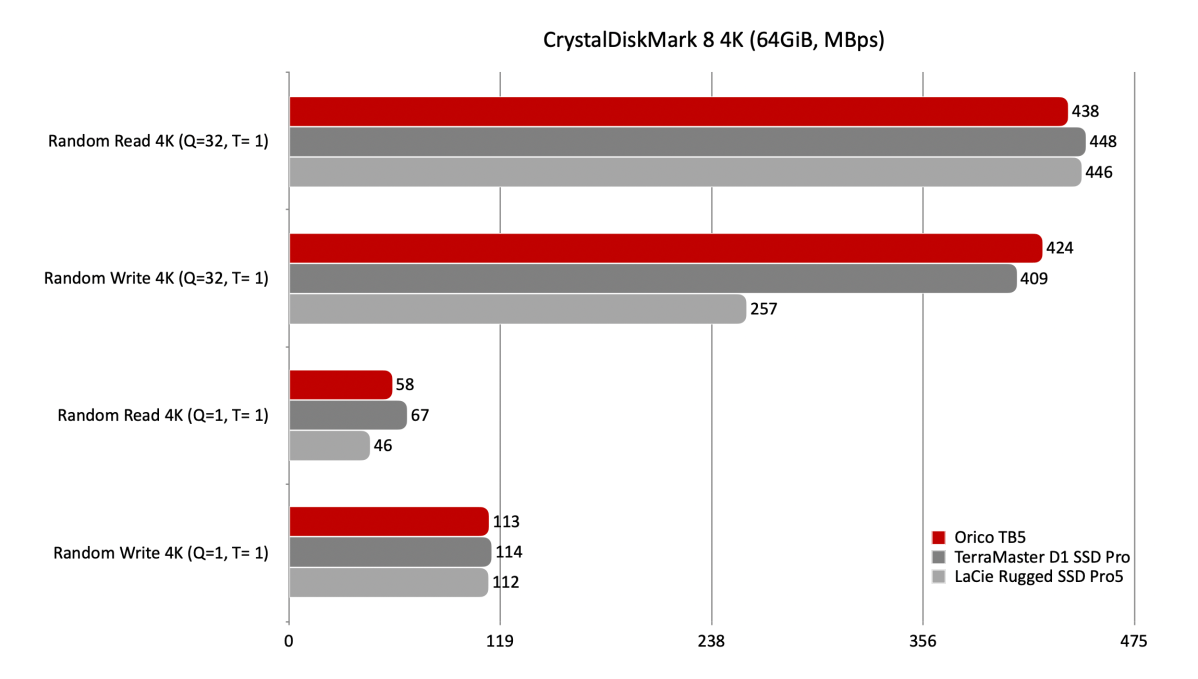
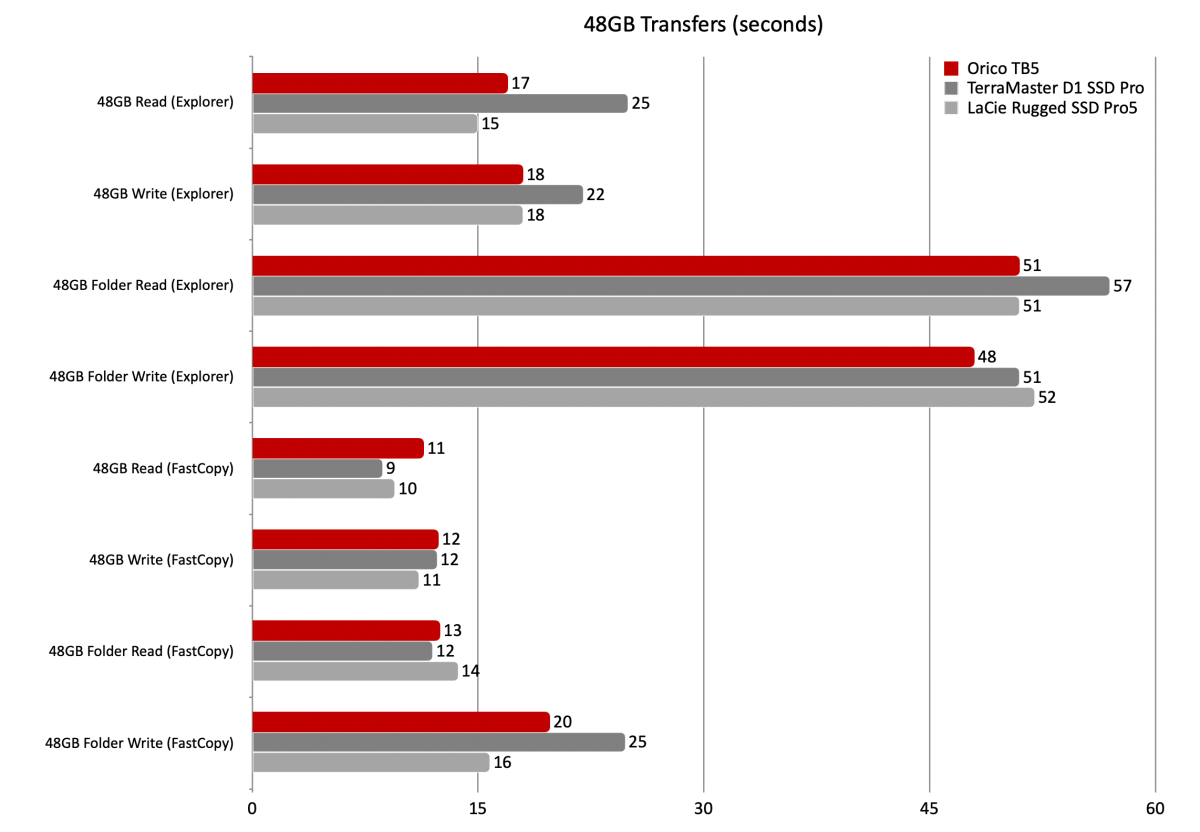
With CrystalDiskMark’s 4K tests, it was right on par overall, as well as the fastest writing with 32 queues. Note that Windows Explorer, even more than a decade out from the advent of NVMe, still does not use queues. Maybe if Microsoft concentrated on making its OS perform better rather than be more intrusive, this might change. Until then, use FastCopy.
The TB5/T710 combo was no slouch in the real world either, turning in a stellar 48GB transfer performance in Windows Explorer.
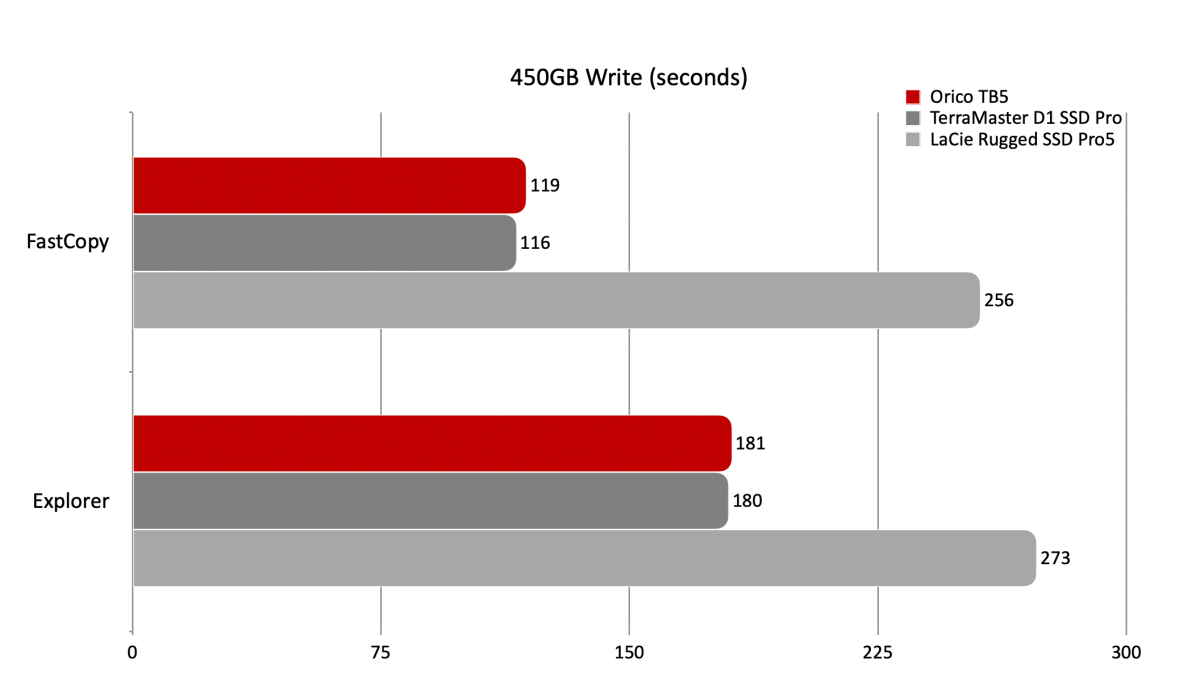
The TB5 came close to the best time writing 450GB, falling a bit short but still within 10 seconds of the number one OWC 1M2 80Gbps (not listed).
The TB5’s internal storage is indeed fast. An 80Gbps SSD (the number one OWC 1M2 80Gbps) attached to the downstream Thunderbolt ports read just as fast, but write performance was a good 2GBps slower. Still 4GBps while placing data in cells ain’t half bad.
Should you buy the Orico TB5?
Just for storage? No. You can get by a whole lot cheaper if that’s all you’re interested in.
However, if you’re looking for a full-blown dock that doubles as very fast Thunderbolt 5 storage, then that’s a yes. It’s basically on par performance-wise with any Thunderbolt 5 storage I’ve tested.
Just mind the narrow USB port spacing on the front of the unit.
How we test
Our storage tests currently utilize Windows 11 (22H2) 64-bit running on a Z790 (PCIe 5.0) motherboard/i5-12400 CPU combo with two Kingston Fury 32GB DDR5 modules (64GB of memory total). Intel integrated graphics are used. The 48GB transfer tests utilize an ImDisk RAM disk taking up 58GB of the 64GB total memory. The 450GB file is transferred from a Samsung 990 Pro 2TB, which also contains the operating system.
Each test is performed on a newly formatted and TRIM’d drive so the results are optimal. Note that as any drive fills up, performance will decrease due to less NAND for secondary caching, and other factors.
The performance numbers shown apply only to the drive we were shipped as well as the capacity tested. SSD performance can vary by capacity due to more or fewer chips to read/write across and the amount of NAND available for secondary caching (writing TLC/QLC as SLC). Vendors also occasionally swap components. If you ever notice a large discrepancy between the performance you experience and that which we report (systems being roughly equal), by all means — let us know.
Related posts:
 Kensington SD5000T5 EQ Thunderbolt 5 Dock review: 140W and 60W TB5 ports for MacBooks
 Wavlink Thunderbolt 5 Dock review: Affordable fast Thunderbolt plus handy power options
Kensington EQ Pro Thunderbolt 5 Dock for MacBook review: Fast with special guest stars
Satechi Thunderbolt 5 CubeDock Review: 4 TB5 ports and built-in 8TB SSD expansion
Wavlink Thunderbolt 5 Dock review: Affordable fast Thunderbolt plus handy power options
Kensington EQ Pro Thunderbolt 5 Dock for MacBook review: Fast with special guest stars
Satechi Thunderbolt 5 CubeDock Review: 4 TB5 ports and built-in 8TB SSD expansion