At a glance
Expert’s Rating
Pros
- Great build quality
- Excellent battery life
- Lightweight
Cons
- Only 8GB of RAM (non-upgradeable)
- Limited storage
- Expensive upgrade
Our Verdict
There’s a lot to love about the OmniBook 5, but I’d have a hard time overlooking the 8GB of non-upgradeable RAM at this price, especially if you plan on keeping it around for a few years.
Price When Reviewed
This value will show the geolocated pricing text for product undefined
Best Pricing Today
Best Prices Today: HP OmniBook 5
For the past couple of months, I’ve tested a variety of budget laptops, though I hesitate to call them “budget” because they feel so premium in hand.
The HP OmniBook 5 is the latest laptop to land on my desk, and it has a lot in common with some of the machines I’ve tested recently. Like several of the Googlebooks and Wildcat Lake systems I’ve looked at, it has a lightweight design and surprisingly premium feel.
At $699.99, the OmniBook 5 has a lot going for it, including an all-metal chassis and superb battery life. It’s not without its compromises, though. The base configuration just comes with 8GB of non-upgradeable RAM and 256GB of storage. So my main question is… is this one of the better affordable laptops you can buy right now?
It depends!
HP OmniBook 5: Specifications
The review unit I tested costs $699.99 and it comes with an Intel Core 5 320 processor, 8GB of RAM, and 256GB of SSD storage. There’s a higher-tier configuration featuring an Intel Core 7 350, 16GB of RAM, and 512GB of SSD storage–this one is pricier at $1,069.99.
Since we’re living in the age of AI, I’d prefer to see 16GB of RAM instead of 8GB (doubly so because you can’t upgrade it on this machine). That’s one of my (very few) nitpicks here, but I think it’s an important one. 8GB is fine for day-to-day workloads, but I worry it won’t be enough as applications and operating systems become more demanding over time. I would’ve liked to have seen more storage, too — but RAM and storage are both at insane price premiums in these AI-crazed times.
- CPU: Intel Core 5 320 (6 cores, 6 threads, up to 4.6GHz)
- GPU: Intel integrated graphics
- Display: 14-inch 1920×1200 OLED panel, 300 nits, 100% DCI-P3
- RAM: 8GB LPDDR5-6400 (onboard)
- Storage: 256GB PCIe Gen4 NVMe M.2 SSD
- Webcam: 1080p FHD IR camera
- Weight: 2.56 pounds
- Ports: 2 USB-C, HDMI
- Price: $699.99
HP OmniBook 5: Design, build quality
Foundry / Ashley Biancuzzo
The OmniBook 5 makes a damn fine first impression. I absolutely adore the green colorway, which HP calls “Soft Honeydew.” You don’t see many laptops in this color, so it really stands out. My iPhone camera doesn’t really do the colorway justice, though. It looks a lot lighter in photos than it does in person. It’s also available in Peony Pink, Smoke Silver, and Starlit Blue. HP’s redesigned logo looks great, too.
The build quality is equally impressive, especially for a laptop well under $1,000. The whole thing is made of metal, not plastic. There’s hardly any flex in the keyboard deck and the screen doesn’t twist much when applying pressure to it. The display also has a layer of Corning Gorilla Glass on it, which is a nice added touch.
The OmniBook 5 is pretty portable, too. It weighs 2.56 pounds and measures 12.3 x 8.62 x 0.46.
HP OmniBook 5: Keyboard, touchpad
Foundry / Ashley Biancuzzo
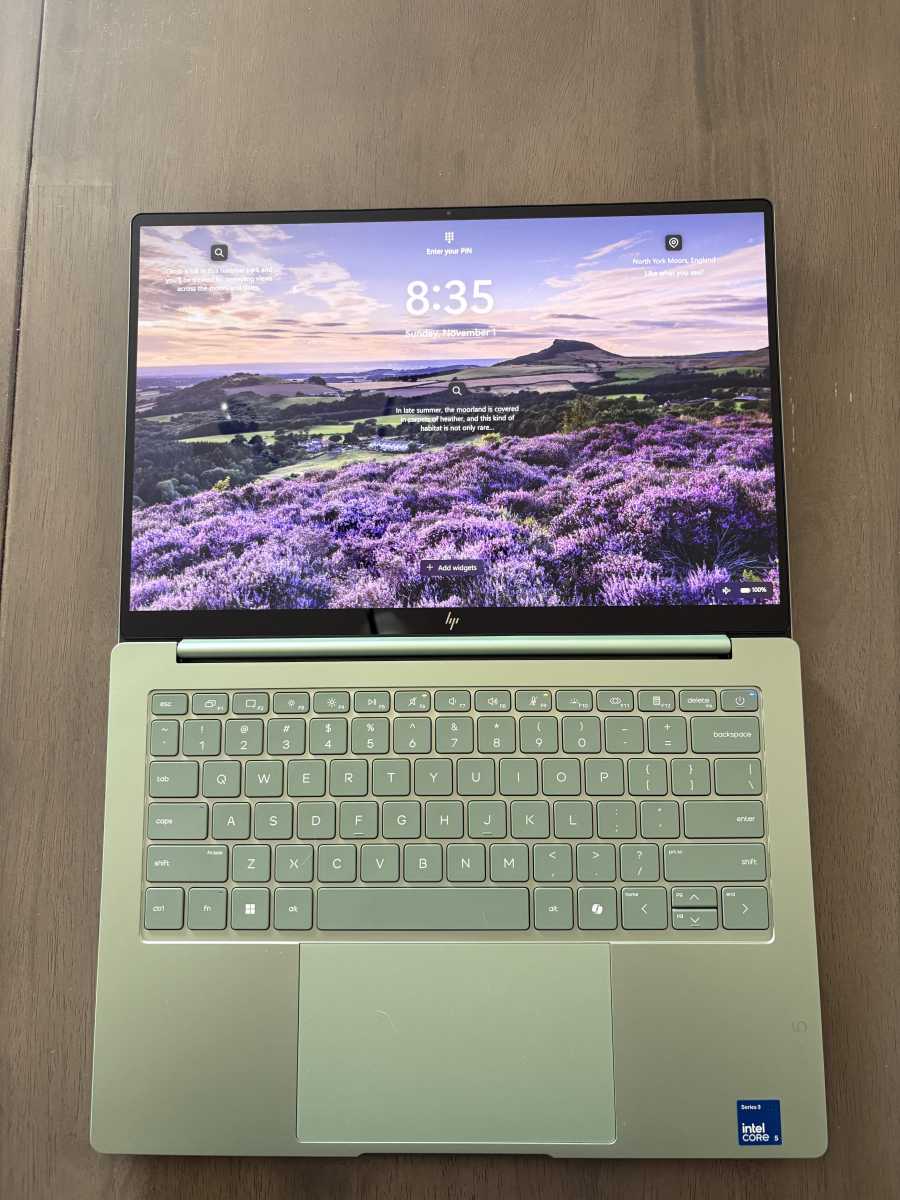
The keyboard is almost a carbon copy of the ones on the Googlebooks I recently tested. I don’t mind this layout, as my hands work best on a smaller keyboard. My coworker, Mark Hachman, however, really struggles with this type of keyboard. Me? I was up and running in no time, with only a few typos here and there. It’s also got backlighting, which is useful if you typically work in a dimmer room.
The touchpad is a good size and I like that it sits in the center. But I did struggle with it more than the keyboard–at least in the beginning. My day-to-day laptop touchpad needs to be pressed down, but this one does not. Once I got used to tapping instead of pressing, I managed it no problem.
HP OmniBook 5: Display, audio
Foundry / Ashley Biancuzzo
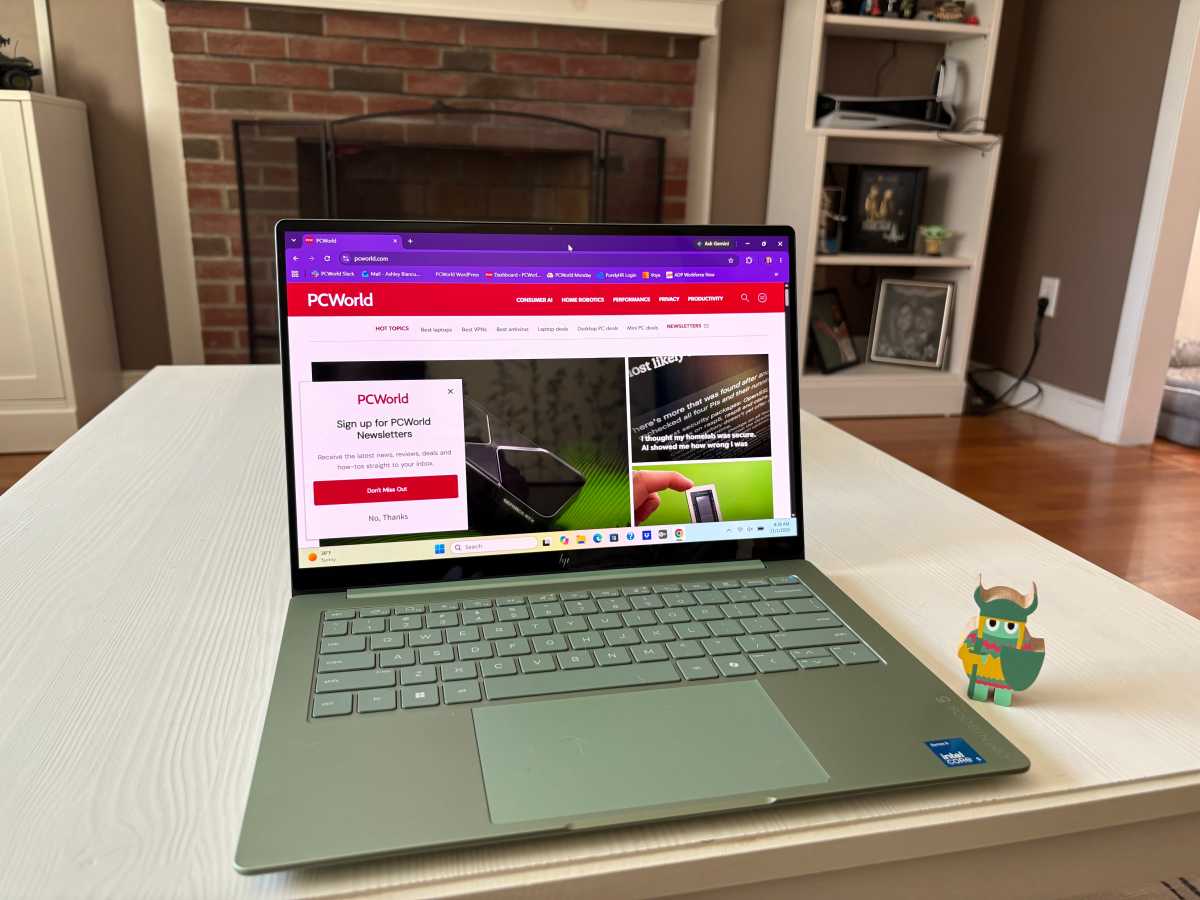
The 14-inch 1920×1200 OLED display is lovely, as they tend to be. It also covers 100 percent of the DCI-P3 color gamut and it’s got a rated brightness of 300 nits. My husband and I watched a few episodes of Star Wars: The Clone Wars on it. One episode took place on the colorful underworld where the Mon Calamari live (the “It’s a trap!” aliens), so there was lots of green and purple. Honestly, it made for a great opportunity to appreciate the display’s colors.
We also watched an episode of Love is Blind. The “contestants’ apartments,” which look kind of artificial and creepy because they’re so obviously staged, looked sharp enough where I could make out smaller details.
To test the audio, I listened to the entire Priscilla, Queen of the Desert soundtrack. It’s mostly disco songs, but overall I was pleased with the sound quality coming out of the laptop’s dual speakers. The volume was loud enough that I could hear the music while banging around the kitchen making dinner.
HP OmniBook 5: Performance
The first thing to note is that the HP OmniBook 5 is a perfectly fast laptop for the stuff you do on a day-to-day basis, like checking your inbox or dropping numbers into a spreadsheet. Its Intel Core 5 320 processor doesn’t suffer much at all here. This is reflected in its PCMark 10 score of 5,341 and UL Procyon Office Productivity score of 4,660–both of which assess how well a laptop handles productivity workloads.
The graphics performance is a bit of a different story, though. The integrated Intel graphics aren’t powerful. It managed a Time Spy score of 1,655. That’s not a great score, but I also don’t hold the OmniBook 5 to the same standard as I would with a gaming laptop. The OmniBook 5 isn’t a powerhouse nor was it designed to be.
The processor also delivered a Cinebench 2026 multi-thread score of 1,548 points and a single-thread score of 382 points. This basically tells me that it’s a good laptop for daily productivity, but probably not something more demanding like photo editing.
Now let’s get into some comparisons and see how the OmniBook 5 stacks up against similar machines. I’ve compared it against the Dell XPS 13 and the Acer Swift Air 14, which both have Intel Core 5 320 (Wildcat Lake) processors and 8GB of RAM.
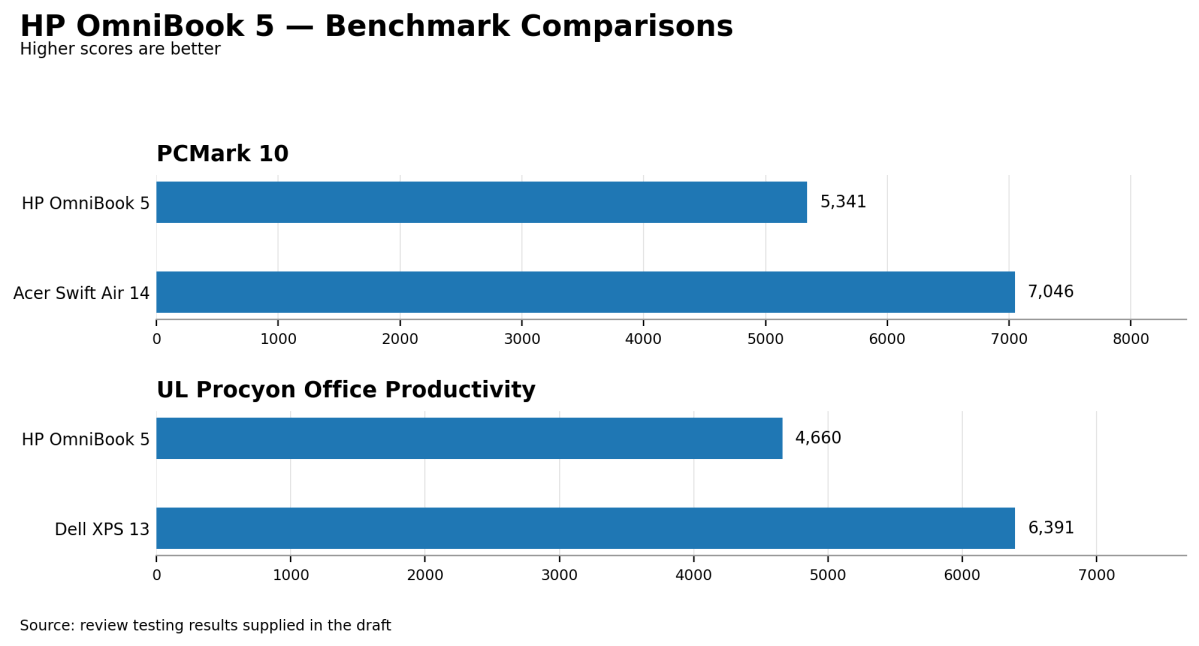
First, the Dell XPS 13. Aside from having more storage (512GB) than the OmniBook, they’re pretty much identical as far as hardware goes. It pulls ahead in the UL Procyon Office Productivity benchmark with a score of 6,391. This could be due to a better thermal system or faster memory.
Then there’s the Acer Swift Air 14. Interestingly, it performed significantly better in PCMark 10 with a score of 7,046 compared to the OmniBook 5’s 5,341. That’s roughly a 32 percent difference, giving the Acer a noticeable advantage in this benchmark. This just goes to show you that two laptops with nearly identical hardware can perform differently. Differences in thermal management and memory configuration could play a role here, though it’s difficult to pinpoint the exact reason.
HP OmniBook 5: Battery life
HP says the OmniBook 5 can get up to 42 hours of local video playback, which is quite the promise. I didn’t come anywhere close to that figure, but my results were still impressive.
In UL Procyon’s Office Productivity Battery benchmark, which simulates a typical workday using Microsoft Office, the OmniBook 5 ran for a little over 18 hours. That’s a really good result, especially for a laptop at this price point. It lasted considerably longer than the Dell XPS 13, which managed just nine hours. The Acer Swift Air 14 did slightly better at 19.5 hours.
So should you get it?
The HP OmniBook 5 is a surprisingly premium laptop for $699.99. I love its lightweight metal construction, stunning OLED display, and excellent battery life. It’s totally capable of handling daily activities, too.
My biggest qualm is the hardware configuration. 8GB of non-upgradeable RAM and just 256GB of storage feel a bit limiting for a laptop at this price, even in this price-crazed AI-fueled world. The Dell XPS 13 and the Acer Swift Air 14, for example, are similarly priced and have more storage.
Still, there’s a lot to like here. If you’re looking for a lightweight everyday laptop with a beautiful display and long battery life, the OmniBook 5 is worth considering. Just be mindful of its memory and storage limitations.


