At a glance
Expert’s Rating
Pros
- Great design
- Excellent display and speakers
- Long battery life
- Capable gaming performance
Cons
- Soldered memory
- Default profile leaves performance on the table
Our Verdict
The Asus ROG Zephyrus G16 isn’t the beefiest gaming laptop, but it’s a lean, mean machine with stable performance, largely silent cooling, and an overall great package.
Price When Reviewed
This value will show the geolocated pricing text for product undefined
Best Pricing Today
Price When Reviewed
$2,149
Best Prices Today: Asus ROG Zephyrus G16


Asus already had a great laptop on its hands with 2024’s ROG Zephyrus G16, and the 2025 Asus ROG Zephyrus G16 doesn’t change too much. The outward appearance of the laptop is largely the same, continuing to offer a thin and light gaming laptop with an elegant metal build and great display.
Asus seems to have taken some of the criticism to heart, though, as it proves a largely quiet running device even when it’s cranked to Turbo settings. And though it has a premium price and trails beefier machines in performance, it remains conveniently portable and even undercuts other design-focused laptops.
Asus ROG Zephyrus G16: Specs and features
- CPU: Intel Core Ultra 9 285H
- Memory: 16GB LPDDR5X-7467
- Graphics/GPU: Nvidia RTX 5070 8GB 115W
- Display: 16-inch 2560×1600 240Hz OLED, Glossy, G-Sync
- Storage: 1TB PCIe Gen 4 SSD
- Webcam: 1080p IR
- Connectivity: 1x Thunderbolt 4 with Power Delivery and DisplayPort Alternate Mode, 1x USB-C 3.2 Gen 2 with Power Delivery and DisplayPort Alternate Mode, 2 x USB 3.2 Gen 2 Type-A, 1x HDMI 2.1, 1x SD card reader, 1x 3.5mm combo audio
- Networking: WiFi 7, Bluetooth 5.4
- Biometrics: Windows Hello facial recognition
- Battery capacity: 90 watt-hours
- Dimensions: 13.97 x 9.72 x 0.66 inches
- Weight: 4.01 pounds
- MSRP: $2,149 as-tested ($2,149 base)
This test unit is a special Best Buy model with lower base specifications than Asus’s own store offerings. It has a $2,149 starting price. To get the Zephyrus G16 from Asus directly, you’ll pay $2,799, but you’ll also get bumped up to an RTX 5070 Ti, 32GB of memory, and 2TB of storage. Additionally, Asus offers two even higher configurations. Bumping up to an RTX 5080 and 64GB of memory raises the price to $3,599. For an RTX 5090 and otherwise identical specs, that raises further to $4,599.
The Asus ROG Zephyrus G16 is an impressive machine. It offers an excellent build, great speakers, a gorgeous display, and fits potent hardware all into a laptop that’s surprisingly thin and light.
Asus ROG Zephyrus G16: Design and build quality
Foundry / Mark Knapp
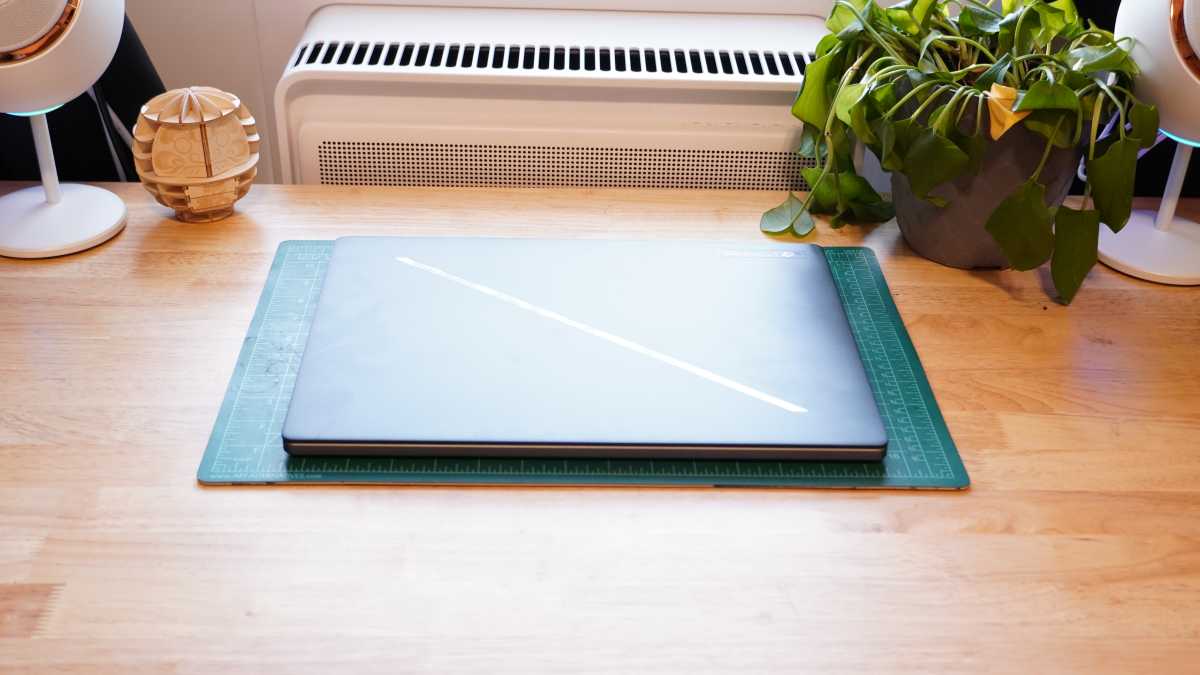
The Asus ROG Zephyrus G16 is wonderfully built and far sleeker than you’d expect from a gaming laptop, even with the impressively slim models that have been coming out in recent years. It boasts a largely aluminum design with the keyboard deck, base, and display lid all made of metal.
The display also has an all glass cover — no plastic bezels. It would be more impressive if it weren’t essentially the same hardware as last year’s Zephyrus G16, but there’s no need to fix what isn’t broken, and the internal components haven’t changed enough to justify a major redesign.
All the metal here makes for a firm construction that doesn’t flex much. And even though this is a 16-inch gaming laptop, it weighs only a hair over four pounds. The chassis itself is also just 0.66 inches thick, though its rubber feet add to its overall height.
The slim design still has plenty of air intake underneath with a large grille on the bottom panel, but there’s very little exhaust along the back edge, which aims all the exhaust downward. Fortunately, the long rubber foot at the rear of the base prevents any of the exhaust from feeding directly back into the intake fans.
The display has uneven bezels, including a slightly larger one at the bottom that doesn’t look terribly modern but is at least not too unsightly. The thicker top bezel fits in the webcam with Windows Hello tech, which makes it easier to excuse given how convenient this is for quick sign-ins.
Chamfered edges around the frame provide a good lip for opening the lid with one hand, and the base keeps planted while doing so. The back of the lid has a stylish slash across it that also integrates some flashy lighting, though it’s not colorful like the RGB keyboard lighting.
Asus ROG Zephyrus G16: Keyboard, trackpad
Foundry / Mark Knapp
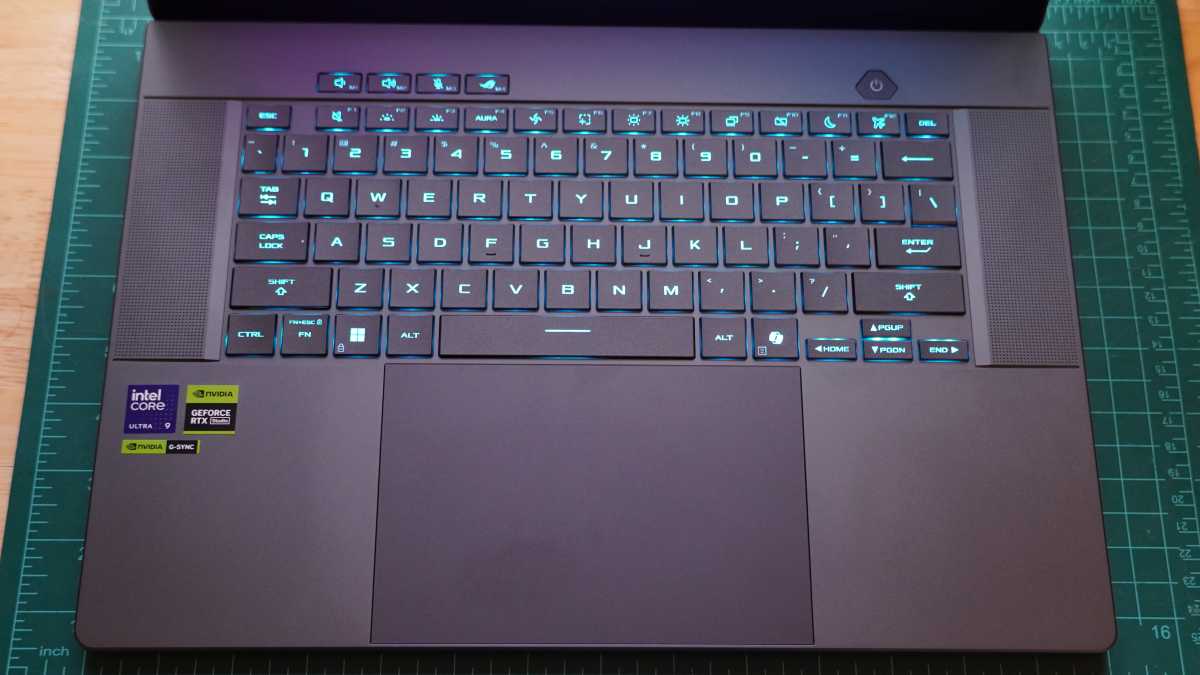
The Asus ROG Zephyrus G16 packs in a great keyboard and trackpad. The keyboard isn’t quite excellent, as it has only subtle contour to the keycaps that doesn’t help with finger centering, and edge stability could use a little improvement.
The RGB backlighting also struggles to evenly illuminate larger key legends and secondary functions. But it’s still quite a pleasant keyboard to type on. I was able to reach a typing speed of 126 words-per-minute at 99 percent accuracy. Given this is a 16-inch laptop, it would have been nice to see a number pad, but at least without it the keyboard ends up nicely centered.
Asus has squeezed in a massive trackpad that uses up almost all the vertical space available to it with only a thin strip bordered its top and bottom edges. It also spans an extreme width. Between the abundant space for swiping around, the pleasantly soft physical click, and the smooth glass surface, it’s a joy to use. The trackpad also has proven to offer good palm rejection, an issue that held back the Razer Blade 16 and its massive trackpad.
Asus ROG Zephyrus G16: Display, audio
Foundry / Mark Knapp
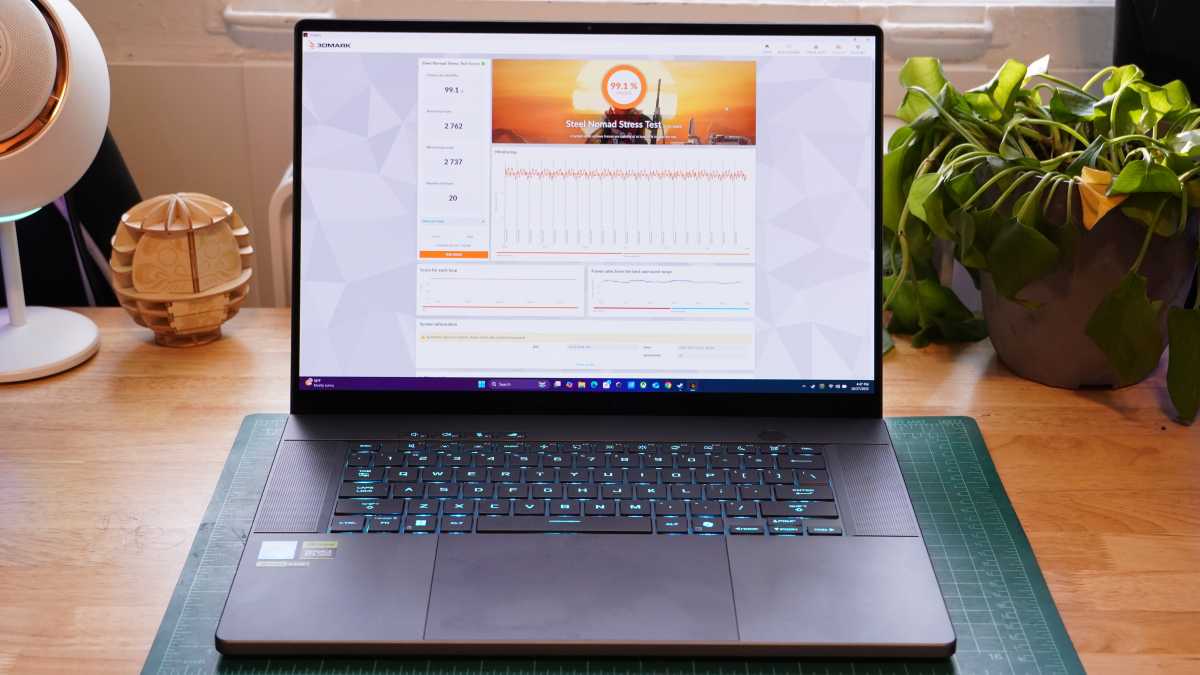
The Asus ROG Zephyrus G16 is set up well for media. It combines an excellent display and speaker setup. The sizable 16-inch display offers a 2560×1600 resolution and runs at 240Hz for super-smooth visuals. That’s aided along by the panel’s OLED tech, which has fast pixel response times for crisp gameplay and G-Sync support to ensure clean frames and no screen tearing.
The display is also wonderfully bright and colorful. It proved capable of hitting 419 nits in SDR and 444 nits in HDR with smaller highlights going brighter still. A 10 percent window in HDR was able to hit 640 nits, and that comes alongside infinite contrast and 100 percent coverage of the DCI-P3 and sRGB color spaces. Color accuracy was also high with an average dE1976 measured at 0.85 and a max dE of just 2.33.
Plenty of high-end gaming laptops have similarly impressive displays, and even some cheaper ones come close. But many laptops skimp on speakers. Asus didn’t. This laptop’s speakers are exceptional.
It combines four woofers that balance each other in pairs providing surprising depth for the sound; meanwhile two extra tweeters can deliver crisp high-end. Together, the speakers pump out plenty of volume without distorting or sounding boxed in. Strong sub-bass is still out of the cards, but the Asus ROG Zephyrus G16’s speakers remain impressive for a laptop audio system.
Asus ROG Zephyrus G16: Webcam, microphone, biometrics
The webcam’s performance is mixed. On one hand, it handles exposure well, avoiding blown out highlights or sunken dark details. Even though it’s a 1080p sensor, the visual fidelity is a little lacking with grainy detail anything other than bright lighting and then odd sharpening even in bright light. But the visuals look natural at least, and if you’re just appearing as a small window in a group video call, the quality will be sufficient.
The webcam also supports Windows Hello facial recognition, providing a quick and easy way to sign in that has proven handy in testing.
The mics also have mixed performance. They capture my voice quite fully, but they don’t seem to have any processing going on to cancel out room noise. This leads to a bit of room echo, and the mics will pick up background noises quite well, so you’ll want to avoid typing or clicking around with your mouse while you’re on calls.
Asus ROG Zephyrus G16: Connectivity
Foundry / Mark Knapp
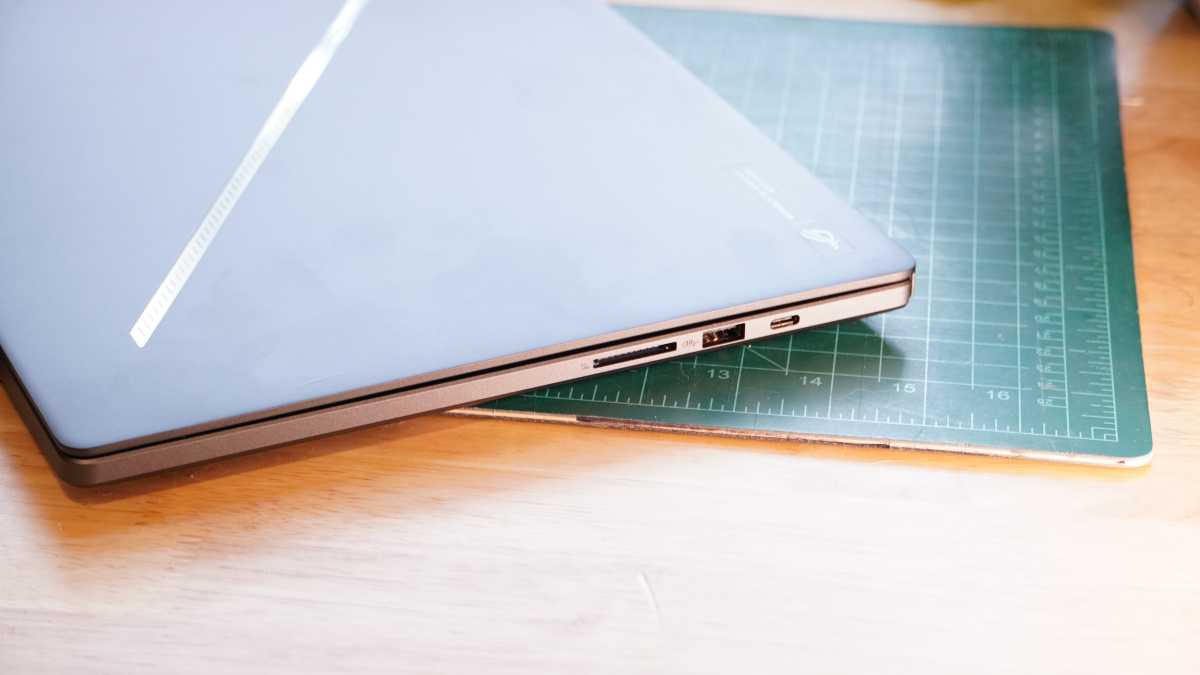
The Asus ROG Zephyrus G16 offers decent connectivity. It’s a joy to see a laptop spreading out ports of the same type, and the Asus ROG Zephyrus G16 puts one USB-A and one USB-C port on each side. Both USB-A ports are 3.2 Gen 2 ports with 10Gbps speeds. The left USB-C port provides Thunderbolt 4 while the right one is only a USB 3.2 Gen 2, and either can support DisplayPort output, though only the right one runs through the GPU for G-Sync support.
Asus rounds out the connections with an HDMI 2.1 port and 3.5mm audio jack on the left edge and a full-size UHS-II SD card slot on the right edge. Since the laptop doesn’t include any side vents, all of the ports are situated toward the back half of the laptop as well.
The Asus ROG Zephyrus G16 includes a dedicated 200W power brick with a proprietary port on the left edge of the laptop. This is key to getting the full power of the system, but may be a lot to lug around everywhere you go. Thankfully, the system’s USB-C ports can also support power input, letting you juice up on the go with something smaller if you have a GaN charger or other USB-C power source. I was able to trickle charge with a compact 65W PD charger I had handy.
Wireless connectivity is also strong. The system supports Wi-Fi 7 and has offered high bandwidth and stability connectivity throughout testing. It’s disappointing to see Bluetooth 5.4 still now that 6.0 exists, but the laptop’s Bluetooth connection at least provided reliable, quickly reconnecting to a paired set of headphones whenever I turned them on and never once dropping that connection.
Asus ROG Zephyrus G16: Performance
The Asus ROG Zephyrus G16 packs in powerful components, so it stands to reason that it would have plenty of performance. And for the most part, this is the case.
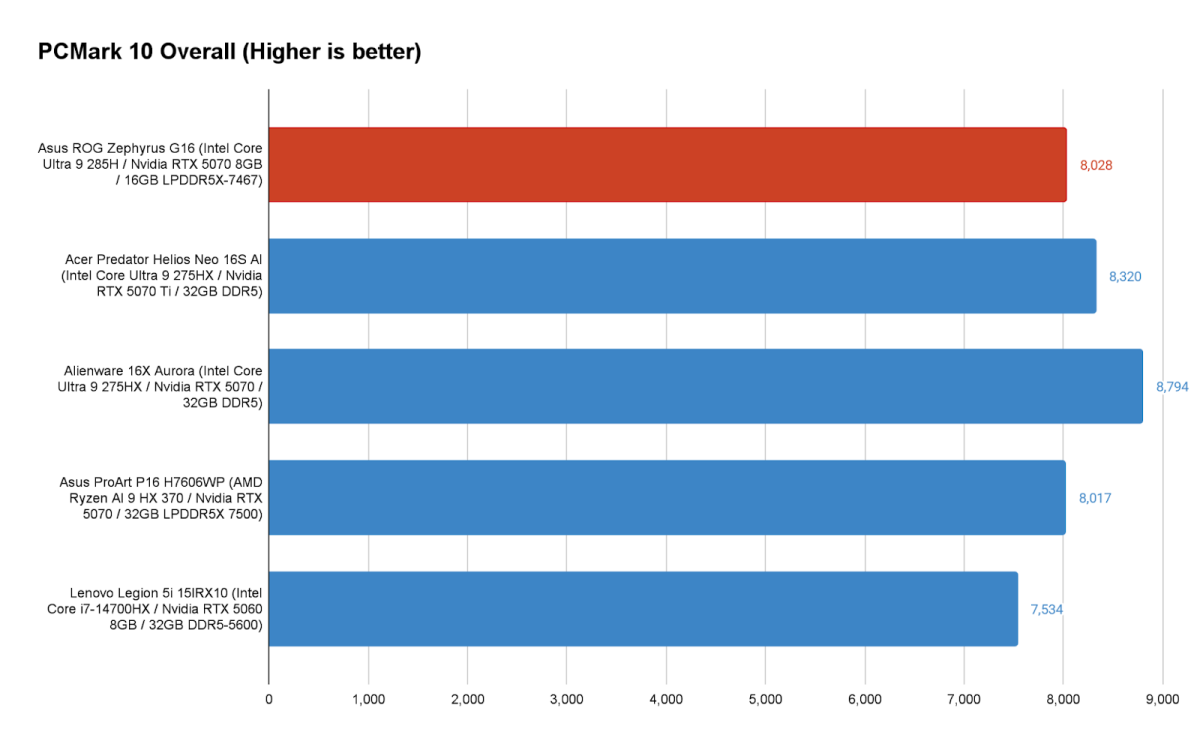
We can see in the holistic PCMark 10 benchmark that the Asus ROG Zephyrus G16 offers plenty of speed for everyday office tasks and even creative workloads, dramatically exceeding the 5,000-point threshold that tends to mark a machine that’ll readily handle most office tasks. It largely keeps pace with similar systems running Intel and AMD hardware.
While general tasks will be a breeze on the Asus ROG Zephyrus G16, once you start getting into more demanding tasks that put serious strain on the system, you may begin to encounter some of its limitations. The CPU included is simply not as potent as what you can get in some of its competitors.
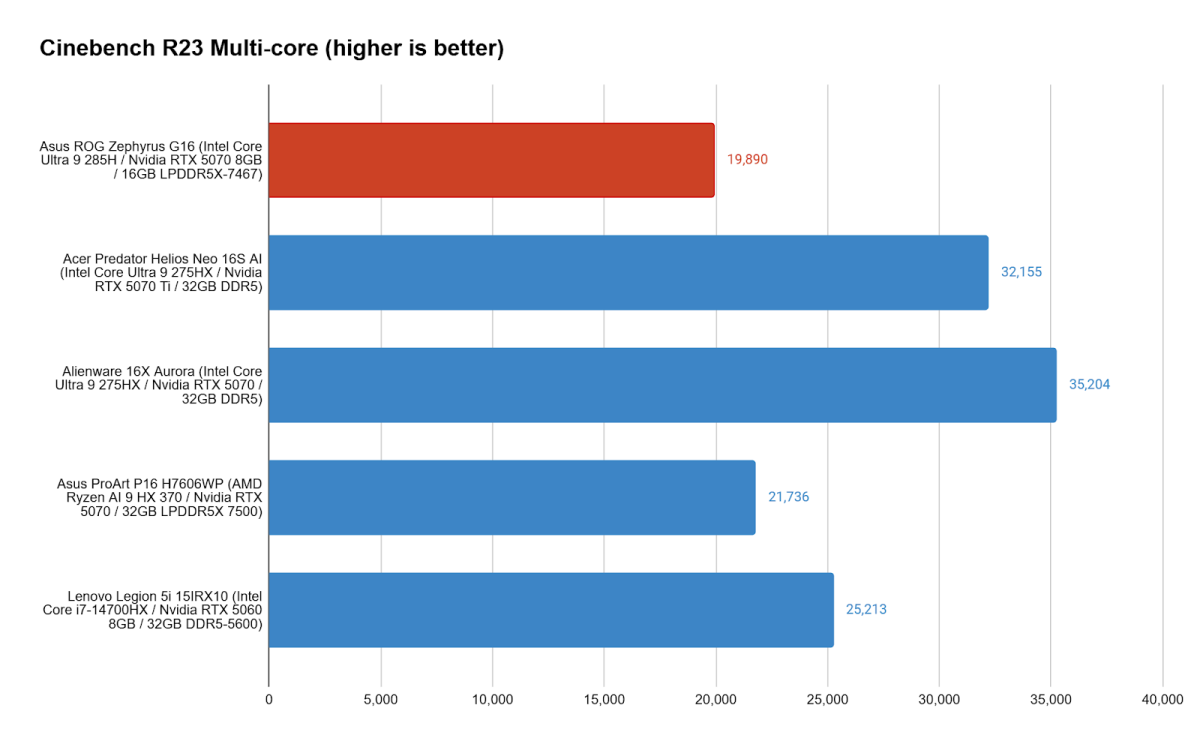
The Intel Core Ultra 9 285H’s single-core performance is excellent, but it’s no match for HX-series CPUs from Intel, which many of its competitors include. Across Cinebench R15, R20, R23, and R24, it falls well behind. This lower performance also sees it take longer in our Handbrake video encoding test. While heat could be a factor for the thin Asus ROG Zephyrus G16 in Cinebench R24’s and Handbrake’s longer tests, the lower performance in Cinebench R15, R20, and R23, which are much quicker, suggests it’s just a limitation of this CPU next to the competition.
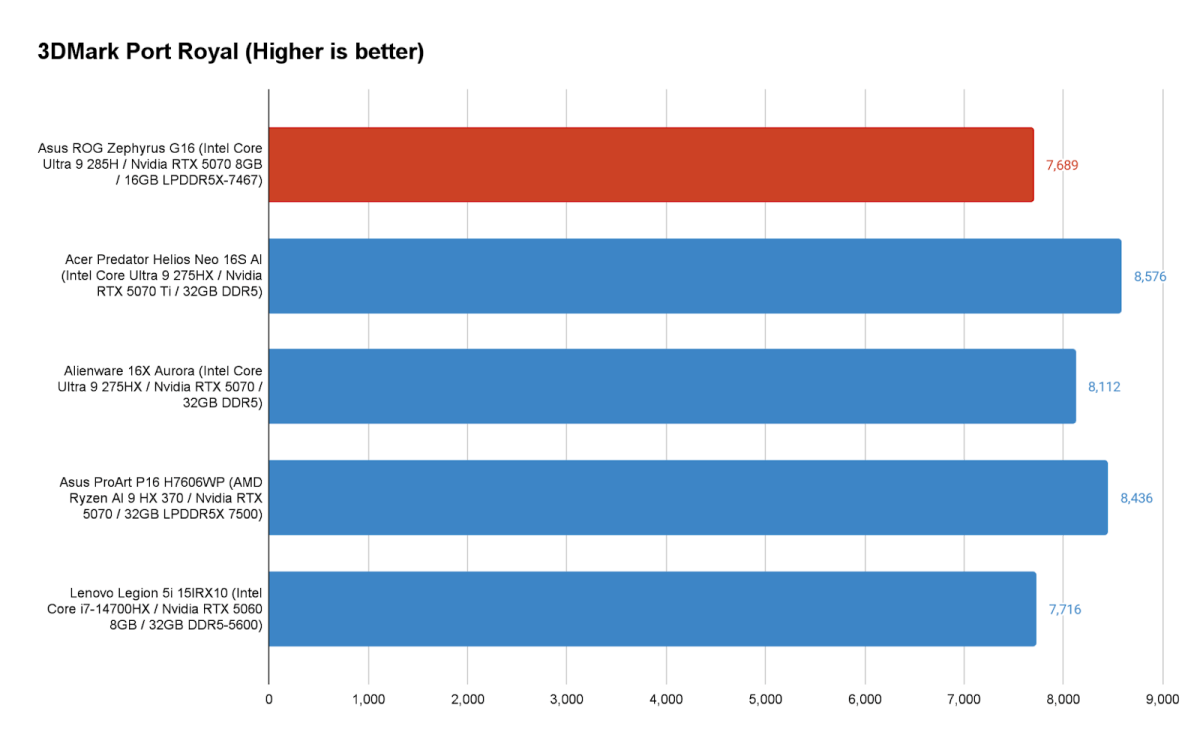
Graphical performance is also respectable in the Asus ROG Zephyrus G16, though not necessarily what you’d expect from a system with an RTX 5070 and a price tag over $2,000. In the graphically demanding 3DMark Port Royal test, the Asus ROG Zephyrus G16 lags behind RTX 5070-equipped systems like the Alienware 16X Aurora and Asus ProArtP16, but perhaps more embarrassingly, it even falls short of the RTX 5060-powered Lenovo Legion 5i 15IRX10 — a system that costs almost half as much. The same fate befalls the Asus ROG Zephyrus G16 in Time Spy as well.
The curious thing is that the Asus ROG Zephyrus G16 isn’t limited to that performance level, but Asus just defaults to it. In fact, using the laptop’s Turbo profile, its Port Royal score leaps up to 8,552 points. This kind of bump from changing power profiles is fairly common, but the fact Asus’s default Performance profile sees the RTX 5070 nerfed to RTX 5060 levels is an odd choice that its competitors don’t seem to be making.
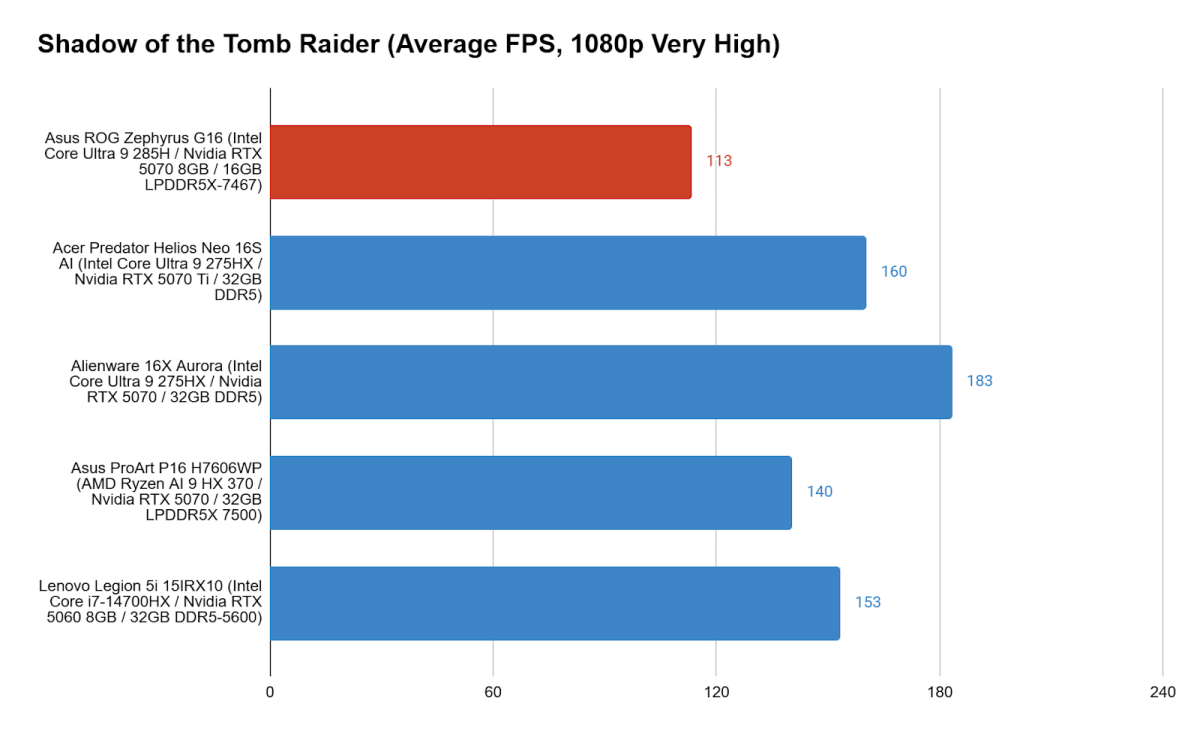
The shortcoming in graphical performance stemming from Asus’s settings combine with the weaker CPU in the system to leave the Asus ROG Zephyrus G16 falling behind the pack in actual games. We see it lag the whole field in Shadow of the Tomb Raider, which tends to lean a bit more heavily on the CPU than some other games, thus giving those systems with more powerful processors an edge. Again, enabling Turbo mode brings the Asus ROG Zephyrus G16’s average frame rate up to 159.
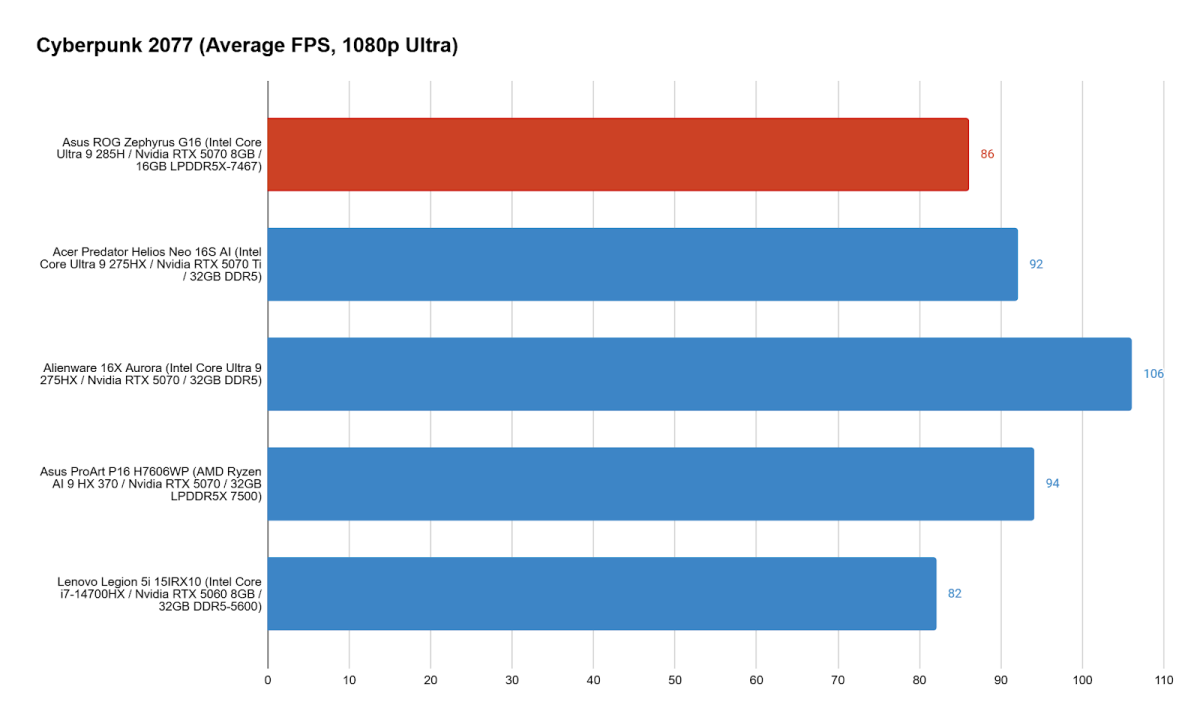
Cyberpunk 2077 is an especially demanding game, enough so that even the power-limited RTX 5070 could at last come out ahead of the Legion’s RTX 5060, likely aided along by the faster single-core performance of the CPU, which tends to improve frame rates. The Asus ROG Zephyrus G16 doesn’t pull ahead of its competitors though, unless Turbo mode is enabled, then its average frame rate jumps to 99.
While the Asus ROG Zephyrus G16 tends to fall behind the other systems in its default Performance profile, a perk of the system is that it musters that performance while remaining rather quiet. Even under load in its Performance mode, the fans are hushed and hardly a bother. For some, that may be a worthwhile trade-off, and from time to time, when serious performance isn’t essential, it can certainly be a benefit. The system even remains stable with that light fan operation, with it providing 99.1 percent stable performance in 3DMark’s 20-run Steel Nomad Stress Test.
The fans really only kick into high gear in Asus’s Turbo mode, and even then they’re not shrill, just a noisy breeze. They also manage the heat well, with the system again maintaining stable performance in the Steel Nomad Stress Test and the surface of the laptop not even getting hot over the course of the test. It’s great to see that Turbo mode can bring the Asus ROG Zephyrus G16 largely back into performance parity with its rivals, though it’s equally likely that those systems would recover a good chunk of their leads if they, too, flipped over to their highest power settings.
Asus ROG Zephyrus G16: Battery life
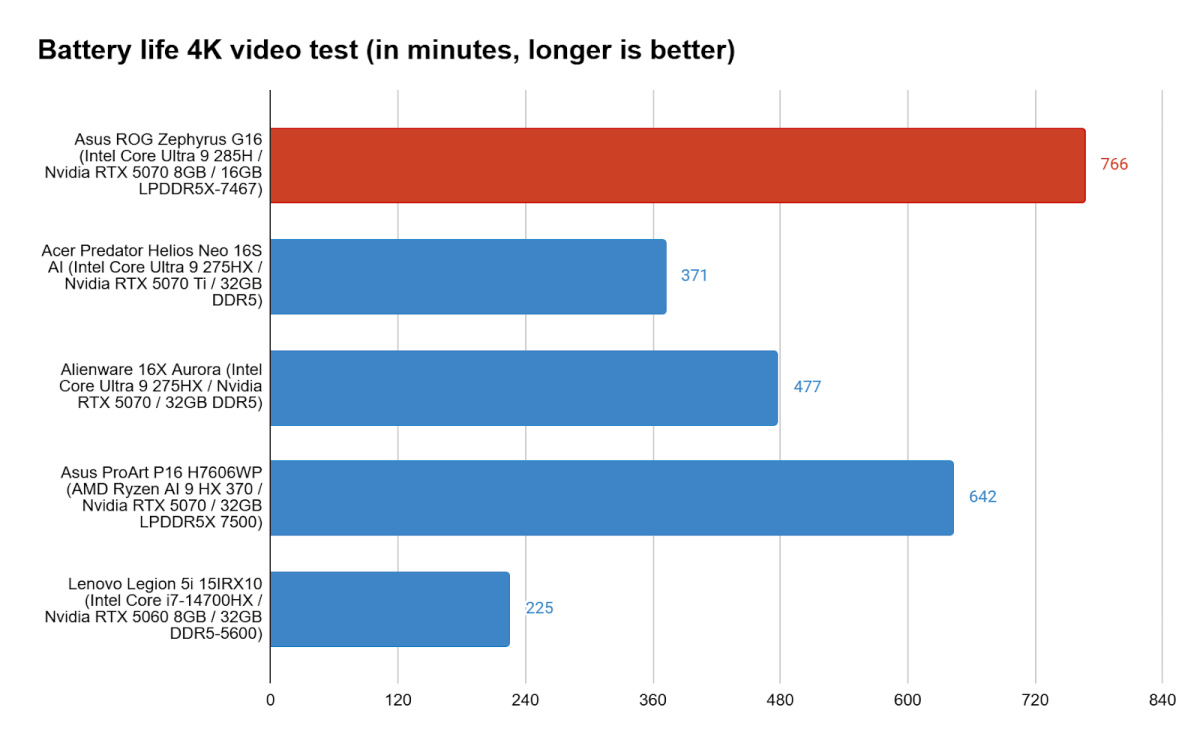
Conservative power management tends to have a benefit where battery life is concerned, and that proves the case for the Asus ROG Zephyrus G16. In our offline video playback tests, which run a locally stored 4K video on repeat with the display brightness set between 250 and 260 nits, the Asus ROG Zephyrus G16 managed an impressive 12 hours and 46 minutes, showing past Asus’s own ProArt 16 and dramatically outpacing the other systems running on HX-series Intel processors.
As great a result as that is for a gaming PC, you still shouldn’t expect the Asus ROG Zephyrus G16 to be an all-day performer for actual use outside of video playback. It’s good for a gaming PC, but real-world office use tends to see the battery drain after five to six hours. That still beats the two to three hours you can expect from a lot of gaming laptops.
Asus ROG Zephyrus G16: Conclusion
The Asus ROG Zephyrus G16 is an impressive machine. It offers an excellent build, great speakers, a gorgeous display, and fits potent hardware all into a laptop that’s surprisingly thin and light. All the more surprising is the fact that the Asus ROG Zephyrus G16 doesn’t show much of a struggle managing its heat. By default, it doesn’t take full advantage of its hardware, and it remains quiet thanks to that decision, but full performance is just a couple clicks away and helps the Asus ROG Zephyrus G16 keep pace with its competition better.
While you’ll still likely want a beefier laptop if you want full performance all the time, there’s something to be said for the Asus ROG Zephyrus G16’s ability to deliver solid performance sometimes and good portability the rest of the time. The pricing on the Asus ROG Zephyrus G16 also makes it a true threat to the Razer Blade 16, a system that is thicker, heavier, and generally more expensive for like configurations.


