At a glance
Expert’s Rating
Pros
- Webcam is no longer terrible
- Dual Thunderbolt 5 ports
Cons
- The same panel tech from 2017 (or earlier)
- Webcam and speakers are just serviceable
- Included stand is tilt-only and upgrades are expensive
Our Verdict
The new Studio Display is a serviceable everyday monitor for 2026, but it is priced like a premium high-end HDR display. Its speakers and webcam get the job done but not much more, and while dual Thunderbolt 5 ports are nice, the ability to plug in other products via HDMI or DisplayPort would be even nicer.
Price When Reviewed
This value will show the geolocated pricing text for product undefined
Best Pricing Today
Price When Reviewed
$1499
Best Prices Today: Apple Studio Display (2026)
$1,499
$1499

$1599

$1677.01
When we reviewed the original Studio Display back in 2022, we found it to be overpriced. For $1,600, you got the exact same panel with the exact same stats and performance as the 2020 Intel-based iMac (coincidentally discontinued at the same time). That iMac started at $1,799 for an entire computer, while the Studio Display was just the screen, with integrated webcam and speakers, at nearly the same price.
Now four years later, Apple has doubled down on this bad value with the updated 2026 Studio Display. The ports, camera, and speakers are better, but crucially, the display itself is not. And the price hasn’t changed. It’s not a bad monitor, it’s just a bad deal.
Studio Display (2026): A good, old, screen
The display panel on the 2026 Studio Display is identical to the display panel on the 2022 Studio Display. Same specs, brightness, and performance. 5K, DCI-P3 wide color, and a fixed 60Hz refresh rate. No HDR, no adaptive refresh rate, no high refresh rate.
As previously mentioned, it’s the same panel you’d find in the 27-inch Intel-based iMac that was discontinued in 2022. Apple has been selling some version of this exact panel since at least 2017, when you could get it in an iMac for $1,799—that’s $1,799 for the whole computer, including a mouse and keyboard.
There’s nothing wrong with this display. Brightness uniformity is good, and color accuracy is excellent. It’s just old, with poor motion clarity from a slow pixel response and a complete lack of modern expected display properties. It’s 2026, and all but the very cheapest monitors have refresh rates over 60Hz, adaptive refresh, HDR, or all of the above.
For a monitor being sold new in 2026, the Studio Display looks like what a nice $699 5K display should. But it costs $1,000 more than that, and the addition of the webcam, speakers, and Thunderbolt ports doesn’t make up the difference.
Studio Display (2026): What’s actually improved
If the display is the same as 2022’s, which was the same one Apple shipped in similarly-priced iMacs for years prior, then exactly what is new?
To start with, the six-speaker array has improved bass response, according to Apple. I could hear a difference, but it’s small. The Studio Display’s speakers are a lot better than what you find in most monitors with built-in speakers, but that’s a very low bar to clear. If you really care about audio quality, you’ll want to get a pair of external speakers.
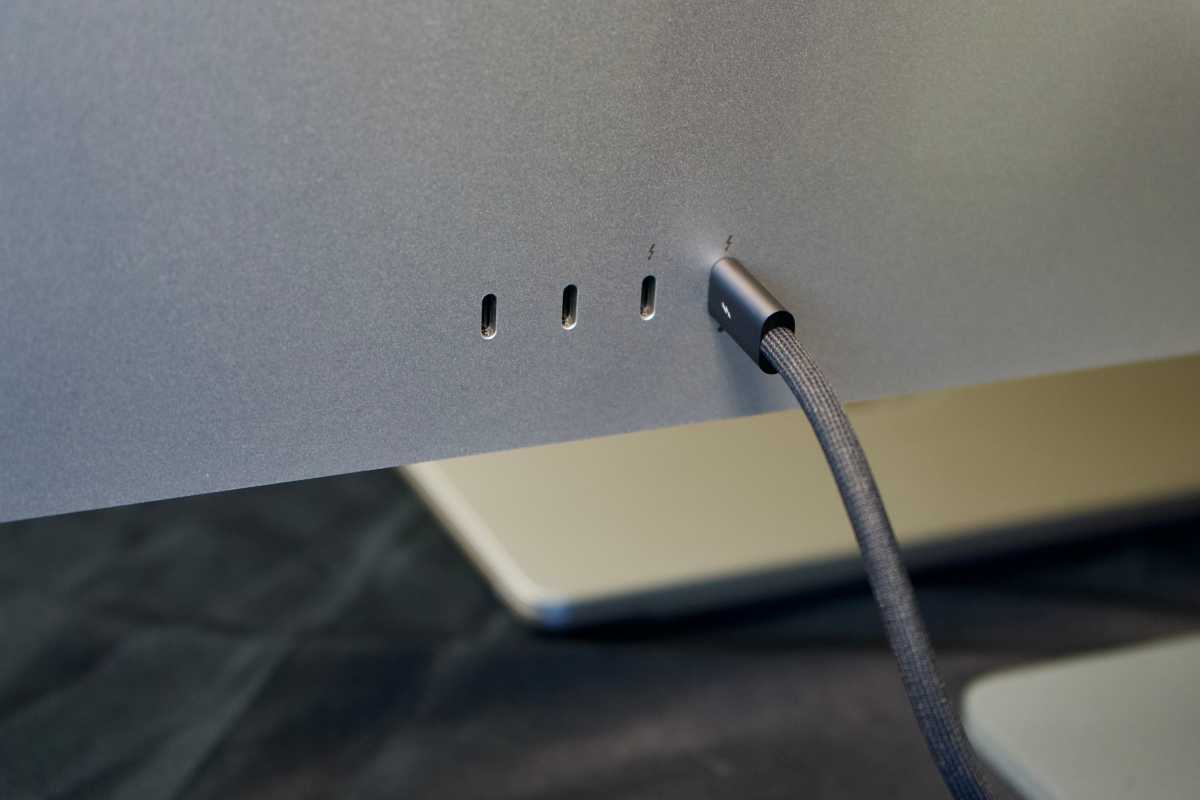
The USB-C hub on the back is also updated. Instead of one Thunderbolt 3 port and three USB ports, there are two Thunderbolt 5 ports and two USB-C ports. One of the Thunderbolt ports is an upstream port to daisy-chain other monitors together, and the main port supplies up to 96W of power to charge your MacBook.
Foundry
The biggest upgrade is with the webcam. It’s still a 12MP camera with Center Stage, but now it includes Desk View. And the quality has taken a big step up. While the old Studio Display’s webcam was simply bad, the new model is now perfectly serviceable for Zoom meetings and FaceTime calls.
Still, it’s not up to the same quality we expect from iPhones. Apple should use the same front camera from the iPhone 17 line, with an 18MP square sensor that can shoot landscape or portrait (an increasingly popular format) and supports 4K video up to 60fps. For a monitor this expensive and thick, that’s the quality level Apple should aim for.
Should you buy a 2nd-gen Studio Display?
The Studio Display is made exclusively for Macs, so if you have a PC, keep moving. The only input is Thunderbolt, and the only way to adjust display properties is with macOS. But that’s not really the problem.
The 5K SDR display gets plenty bright and has good accuracy and uniformity, but is lacking nearly all modern monitor features. That’s not really the problem either.
The speakers are serviceable, and the webcam is good, if not exceptional. It’s a big improvement over the poor webcam in the earlier model, at least. Even that’s not the problem.
This thing costs $1,599. That is the problem. For that price, you get a stand that only tilts—it’s $400 more if you want it to tilt and go up and down like nearly every thousand-dollar monitor for the past 20 years. Don’t like the glossy finish? It’s $300 more for the nano-texture display.
Apple was asking too much for the Studio Display four years ago, and the new model, which doesn’t even update the display part, is an even worse value. The Studio Display isn’t bad, it’s just overpriced for what it is—and not in a little “Apple tax” way. The new Studio Display needs to be better, cheaper, or both, but it’s hard to be anything but underwhelmed by what $1,599+ gets you.


