If you’re a creator, marketer, or active social media user, you’ve probably felt the pressure to produce polished visuals quickly. It’s not just a creativity challenge, it’s about time, tools, and technical skill. That’s exactly where Adobe Firefly stands out. It offers a suite of free, AI-powered tools that let you upload your images and walk through edits step by step—delivering fast, precise, and professional-quality results without requiring advanced design experience.
What makes Firefly particularly powerful is its “quick action” approach. Instead of digging through complex menus, users are guided through pre-built prompts tailored to specific tasks. Even better, Firefly allows experimentation with variations using models from partners such as Google and OpenAI—all without switching platforms. The result is a streamlined editing experience that feels intuitive and efficient.
Here are five of the most useful free image editing tools inside Adobe Firefly:
1. Remove objects instantly with Generative Remove
Adobe
Unwanted elements can ruin an otherwise perfect image—think stray tourists, messy signage, or distracting wires. Firefly’s Generative Remove tool makes cleanup effortless. Simply brush over the object you want gone, click “Generate,” and the AI replaces it with a natural-looking background.
The real advantage here is precision. Instead of awkward patches or visible edits, Firefly intelligently fills in textures, lighting, and context so the final image looks untouched. Whether you’re refining a product shot or cleaning up a travel photo, the process takes seconds rather than hours.
2. Expand your image beyond its borders
Adobe
Sometimes the biggest limitation of a photo is its framing. With Generative Expand, Firefly allows you to extend your image outward while maintaining visual consistency.
This tool is especially valuable for marketers and social media users who need multiple aspect ratios. A square image can quickly become a widescreen banner or vertical story format. Firefly automatically generates new content that matches the original image’s lighting, perspective, and style.
It’s more than resizing, it’s about reimagining. You can even guide the expansion with text prompts, turning a simple background into a forest scene, a cityscape, or something more imaginative.
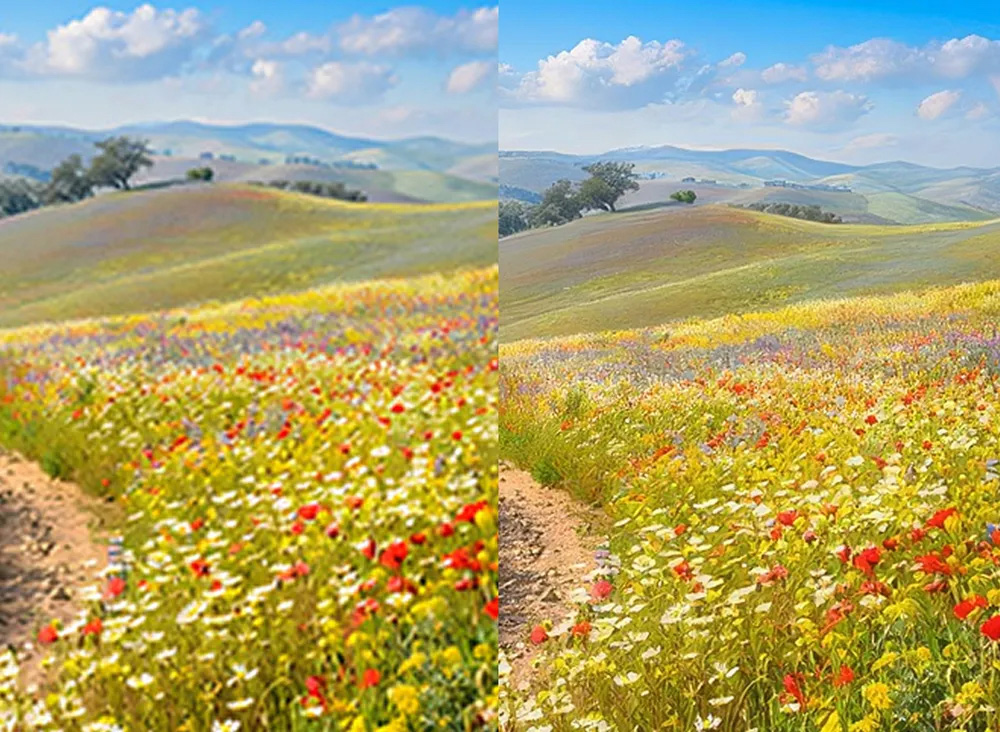
3. Upscale images without losing quality
Adobe
Low-resolution images are a common frustration, especially when working with older assets or user-generated content. Firefly’s AI-powered upscaling tool solves this by increasing image size while preserving sharpness and detail.
Instead of stretching pixels, the AI reconstructs missing detail, making images look crisp even at 2x or 4x enlargement. This is particularly useful for marketers who need to repurpose customer photos or improve outdated brand assets without reshooting or redesigning.
It also breathes new life into scanned or archival images, making them suitable for modern use across digital and print platforms.
4. Remove people with precision

Adobe
Crowded backgrounds can distract from your subject. Firefly’s people removal feature—also powered by Generative Remove—lets you eliminate unwanted individuals just as easily as objects.
Brush over the person, generate the edit, and the AI seamlessly fills the space. The result is a clean, distraction-free image that keeps focus exactly where you want it.
For social media users, this means no more photobombers. For brands, it ensures visuals stay aligned with messaging and aesthetics.
5. Generate and replace backgrounds effortlessly

Adobe
Backgrounds define mood, context, and brand identity. Firefly’s AI background generator makes it incredibly simple to swap or create entirely new environments.
The tool automatically detects your subject, separates it from the background, and replaces it with a new scene based on your prompt. Whether you want a minimalist studio look, a vibrant outdoor setting, or something more imaginative, Firefly delivers realistic results with matching light and shadows.
This is a game-changer for product photography and content creation. Instead of organizing expensive shoots, you can generate professional-grade visuals in minutes—perfectly tailored to your campaign or platform.
Why Firefly stands out
The real strength of Adobe Firefly lies in its balance of simplicity and control. It doesn’t overwhelm users with technical complexity, yet it delivers highly precise edits that meet professional standards.
Speed is another major advantage. Tasks that once required hours of manual work—masking, cloning, resizing—are now completed in a few clicks. And because the platform guides you through each step, even beginners can achieve results that look expertly crafted.
For creators juggling deadlines, marketers scaling campaigns, or anyone looking to elevate their visuals, Firefly offers a practical, accessible solution. It turns image editing from a time-consuming chore into a fast, creative process—without sacrificing quality.
Start using Adobe Firefly for free.
In a world where visual content drives engagement, tools like Firefly aren’t just convenient—they’re essential.
Additional Firefly plans with more premium features and higher level of generative credits are also available.
Better still, there’s a special offer through May 20th that allows you unlimited generations in Firefly.


