At a glance
Expert’s Rating
Pros
- Sturdy build quality
- Excellent optional mechanical keyboard
- Lots of physical connectivity including Thunderbolt 5
- Extremely powerful CPU performance
- Respectable GPU performance
Cons
- Heavy and thick, design is a mix bag
- Tiny touchpad
- Short battery life on OLED model
Our Verdict
Alienware’s beefy 16-inch Area 51 packs excellent CPU and GPU performance, though battery life suffers.
Price When Reviewed
This value will show the geolocated pricing text for product undefined
Best Pricing Today
Price When Reviewed
$4,759.99
Best Prices Today: Alienware Area-51
The Alienware Area 51 is a laptop with history. The first Alienware Area 51 desktop was released back in 1998, and then came the Area 51 laptops in the 2000s. Fast forward to today and the Alienware Area 51 is still among the most powerful laptops available and capable of record-setting performance.
Alienware 16 Area 51: Specs and features
The Alienware 16 Area 51 has Intel’s Arrow Lake mobile processors. That means a lot of cores—the model I reviewed, with the Intel Core Ultra 9 290HX Plus, serves up a total of 24 cores. The configuration I reviewed also had a Nvidia GeForce RTX 5080, 32GB of RAM, and 2TB of solid state storage.
- CPU: Intel Core Ultra 9 290HX Plus
- Memory: 32GB DDR5-6400
- Graphics/GPU: Nvidia GeForce RTX 5080
- NPU: Intel AI Boost up to 13 TOPS
- Display: 2560×1600 240Hz OLED anti-glare with Nvidia G-Sync
- Storage: 2TB PCIe 5.0 SSD
- Webcam and microphone: 1080p webcam with IR camera and privacy shutter, dual microphone array
- Connectivity: 2x Thunderbolt 5, 3x USB-A 3.2 Gen 1, 1x HDMI 2.1, 1x SD card, 1x 3.5mm combo audio
- Networking: Wi-Fi 7, Bluetooth 5.4
- Biometrics: Windows Hello facial recognition
- Audio: 2x 2-watt tweeters, 2x 2-watt woofers
- Battery capacity: 96 watt-hours
- Dimensions: 14.37 x 11.41 x 1.12 inches
- Weight: 7.49 pounds
- Operating System: Windows 11 Pro
- Price: $4,759.99 MSRP as configured
The model I tested had an MSRP of $4,759.99, but the range of pricing is broad, as Alienware offers many configurations.
The entry-level model with an Intel Core Ultra 7 255HX and GeForce RTX 5080 starts at $2,379.99. Tick off all the options, though, and you’ll be spending $11,519.99.
A lot of the extra bucks go towards the Area 51’s storage options, which go all the way up to a 12TB RAID 0 configuration with a trio of 4TB PCIe 5.0 solid state drives. That’s an incredible amount of storage, but if you need it, the Area 51 is among the few laptops that can deliver it.
The Alienware 16 Area 51 is an impressively powerful laptop that delivers across multiple aspects of performance.
Alienware 16 Area 51: Design and build quality
Foundry / Matthew Smith
Alienware used to be a company that was rather brash and bold in its design, but in recent years it has taken a more restrained approach. The Alienware 16 Area 51 is a good example of that.
Oh, sure, it’s huge—the laptop measures over an inch thick and weighs over seven pounds. And it does include customizable RGB-LED accent lights. However, these traits are counter-balanced by the laptop’s curved, organic design language, matte navy colorway, and relative lack of flair besides the accent lights I mentioned.
Does it work? Yes, for the most part. I particularly like the rear accent light, which has a pleasant, diffuse glow. However, I think Alienware has skewed a bit too simple with the quality of its materials. The exterior uses aluminum panels with a nice luster and interesting green-blue hue, but the rest of the laptop’s interior materials lack texture and show no luster under bright lights. That means the Area 51 either looks about as expensive as it actually is, or quite a bit less so, depending on if the laptop is open or closed. Alienware has placed a fun transparent panel towards the rear edge of the bottom panel but, being that it’s on the bottom, you won’t often have the chance to see it.
That’s not to say the laptop is poorly built, though. On the contrary, it’s among the most solid large gaming laptops I’ve recently tested. Machines this big can flex and groan under their own weight, but the 16-inch Area 51 shows almost no flex when picked up from a single side or corner. Keyboard and display flex are also minimal. The end result is a laptop that feels like a tank but looks like an economy car.
Alienware 16 Area 51: Keyboard, touchpad
Foundry / Matthew Smith
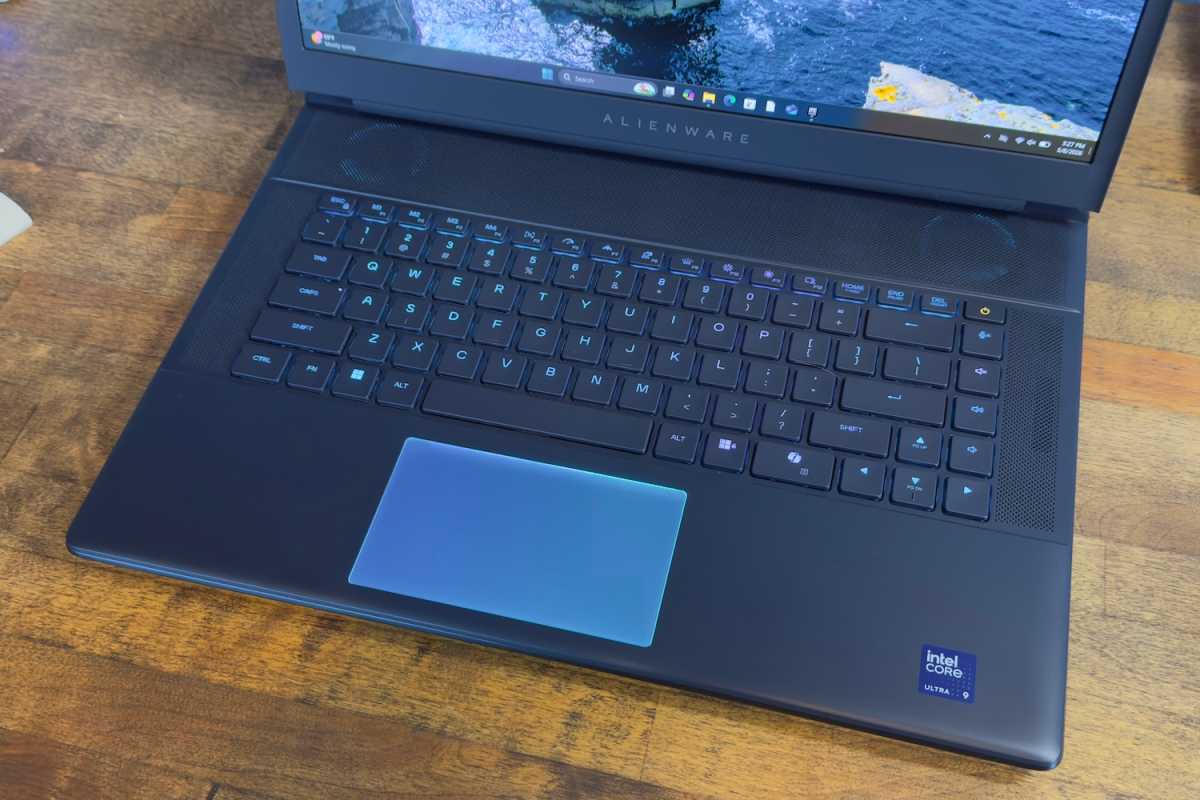
The Alienware 16 Area 51’s keyboard is a little special—or at least it was on the configuration I reviewed. While the base model has a typical keyboard with scissor switch keys, the Area 51 I reviewed had CherryMX ultra-low-profile mechanical key switches (a $50 optional upgrade).
I adore this keyboard. It’s crisp, taut, snappy, and quick. Keys activate smoothly but bottom with a definitive tactile action and an audible snap. I could probably go with these switches for my desktop keyboard—on a laptop, they’re spectacular.
The keyboard layout is spacious. That’s in part because it lacks a numpad, which leaves a lot of space for the rest of the keyboard. The palm rests are also generous. RGB-LED lighting is standard for all Area 51 models and can be customized per-key.
While the Area 51’s keyboard is top-notch, its touchpad is not. It’s tiny, measuring about four and a half inches wide by two and a half deep. That doesn’t leave much room for multi-touch gestures. The surface is RGB-LED backlit and lights up when touched, which is fun, but it’s otherwise an underwhelming experience.
Alienware 16 Area 51: Display
Foundry / Matthew Smith
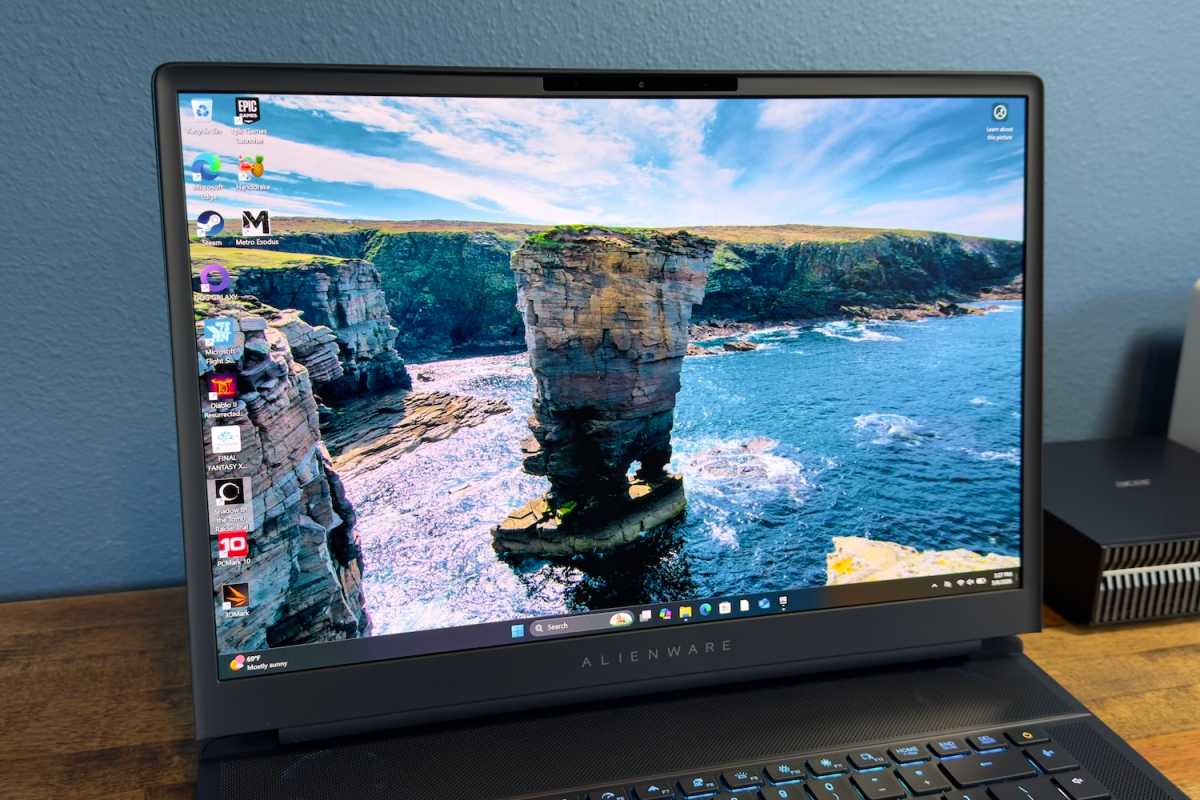
You can buy the Alienware 16 Area 51 with one of two display options, both of which provide 2560×1600 resolution and a 240Hz refresh rate.
The less expensive option uses an IPS panel that lacks HDR but has Nvidia G-Sync with Advanced Optimus. Alternatively, you can upgrade to an OLED panel that supports HDR and Nvidia G-Sync but lacks Optimus. The OLED panel upgrade is currently linked to the Intel Core Ultra 9 290HX Plus processor. If all other specs are the same, choosing the OLED panel and the 290HX Plus adds $350 to the price tag.
I love the OLED displays, though not just for the usual reasons. Yes, it has outstanding contrast, vivid color, and superb motion clarity—all of which is typical for OLED. What I really like, though, is the semi-gloss finish. This is uncommon for an OLED display on a laptop, and it makes the display a lot easier to view in a bright room. With that said, the anti-glare finish reduces the perceived contrast (though it still looks great). This is due to how ambient light is diffused across the display.
One additional thing to note about the OLED display is that it lacks support for switchable graphics. That means the powerful Nvidia GeForce RTX 5080 will also be active and, as I’ll discuss in the battery section, that is bad news for battery life. If you want your gaming laptop to also be portable—perhaps you’re a student or a work-from-home professional—the IPS display might be a better pick.
Alienware 16 Area 51: Audio
Every Alienware 16 Area 51 has a four-speaker sound system with a pair of two-watt tweeters and a pair of two-watt woofers. The speakers are primarily directed towards the user, which provides a clear path for the sound and prevents it from becoming muddled if the laptop is used on a softer surface. The speakers offer excellent volume and a clear, crisp presentation with some low-end oomph. Though they won’t please audiophiles, the speakers are great for a gaming laptop and I expect most owners will be happy with them.
Alienware 16 Area 51: Webcam, microphone, biometrics
A 1080p webcam is packed in the Alienware 16 Area 51’s top bezel. It provides a sharp image with good color reproduction, though it often looks a bit grainy. The microphones, meanwhile, capture clear audio with good volume and reject soft to moderate background noise.
Biometric login is supported by an IR camera that can be used for Windows Hello facial recognition. The feature is fast, reliable, and can be used even in a dark room. A fingerprint reader is not available.
Alienware 16 Area 51: Connectivity
Alienware packs cutting-edge connectivity in high-end configurations of the 16-inch Area 51. This includes two Thunderbolt 5 ports. Both of these ports support 80Gbps data transfers, DisplayPort video output, and power delivery with up to 130 watts in and 15 watts out. These are extremely capable ports and their inclusion means the laptop can handle a wide range of displays, storage devices, and other peripherals—it doesn’t get better than this.
The Thunderbolt 5 ports are backed up by three USB-A ports. It’s good to see this number of USB-A ports included. It means you can attach a USB-A wired keyboard, mouse, and gamepad at once.
Additional physical connectivity includes HDMI 2.1, a 3.5mm combo audio jack, and a full-sized SD card.
Wireless connectivity is also solid, as the laptop supports Wi-Fi 7 and Bluetooth 5.4. At this price, I would expect the Area 51 to support modern wireless standards (as do competitors), but it’s good to see that Alienware didn’t hold back in this area.
Alienware 16 Area 51: Performance
The Alienware 16-inch Area 51 I received had the Intel Core Ultra 9 290HX Plus. This is Intel’s flagship mobile gaming and workstation processor. It delivers 24 cores, eight of which are performance cores and 16 of which are efficient cores, with a maximum Turbo frequency of 5.5GHz.
Alienware paired the beefy Intel processor with Nvidia’s GeForce RTX 5080. The laptop delivers up to 175 watts of power to the GPU, which should be good news for gaming performance. The Area 51 I tested also had 32GB of DDR5-6400 memory and a 2TB PCIe 5.0 solid state drive.
Foundry / Matthew Smith
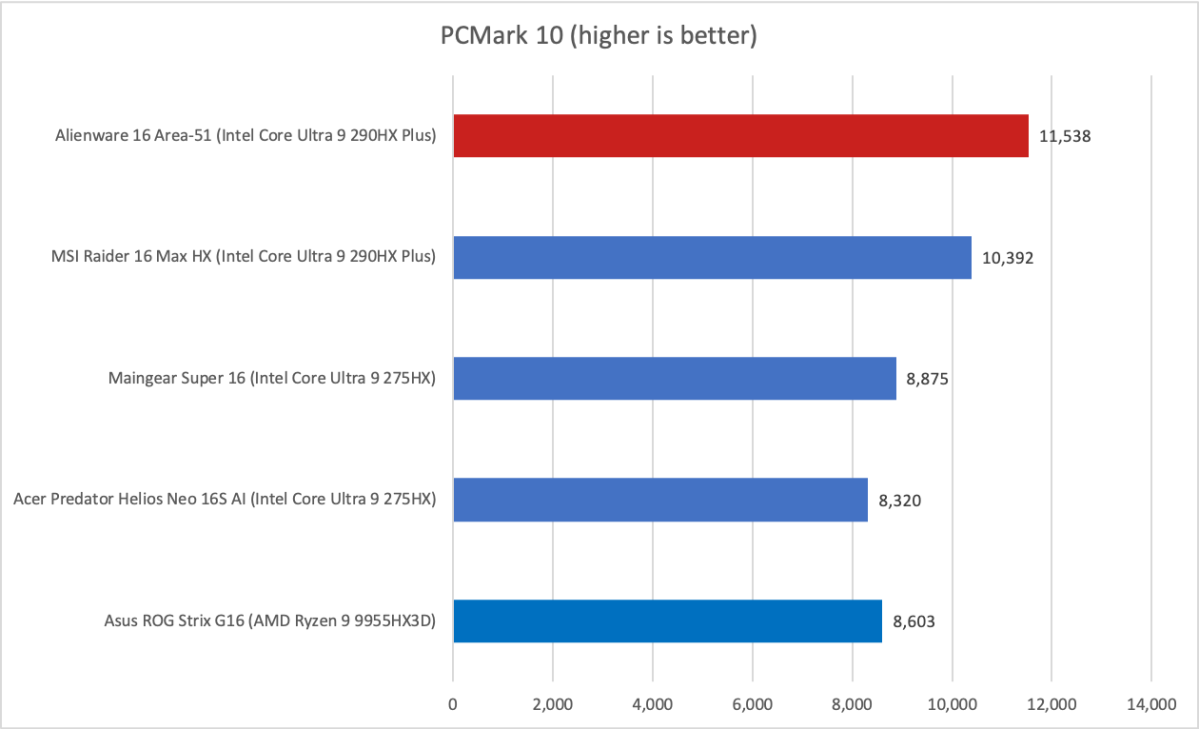
We start off with PCMark 10, a holistic system benchmark, and—holy smokes, the Area 51 is fast in this test. The Area 51’s score of 11,538 is a new record and beats most similar laptops by over 1,000 points.
Because this is a holistic test, it benefits from good performance across all aspects of the laptop. The Area 51 configuration I tested is well balanced in this regard. The CPU and GPU are both fast and supported by a healthy amount of RAM and a speedy PCIe 5.0 solid state drive. Combined, this gives the Area 51 a comfortable lead.
Foundry / Matthew Smith
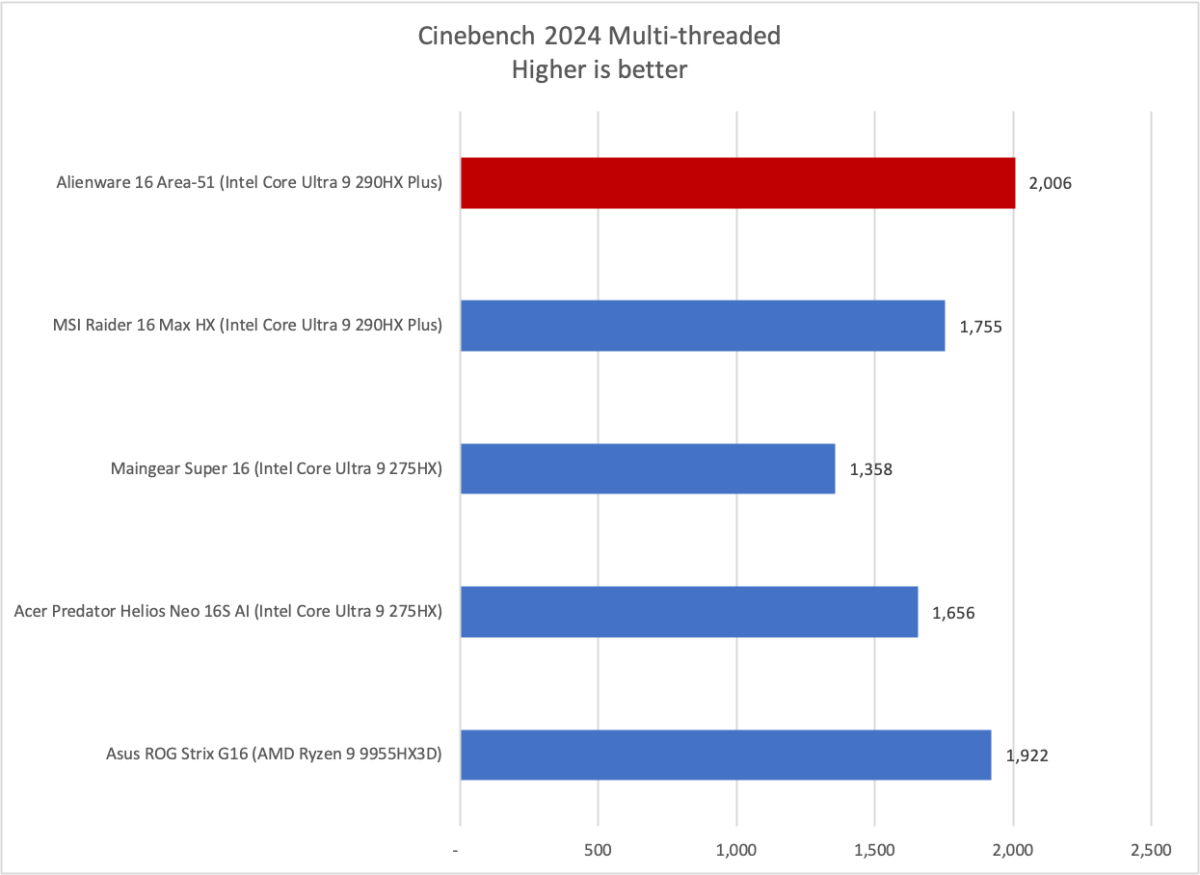
Next up is Cinebench 2024, a heavily multi-threaded CPU benchmark. The Area 51 once again delivers a fantastic score in this test, though it falls just a couple dozen points short of setting a record. Still, this is obviously a fantastic result and indicates the Area 51 will churn through heavily multi-threaded CPU tasks with ease.
Foundry / Matthew Smith
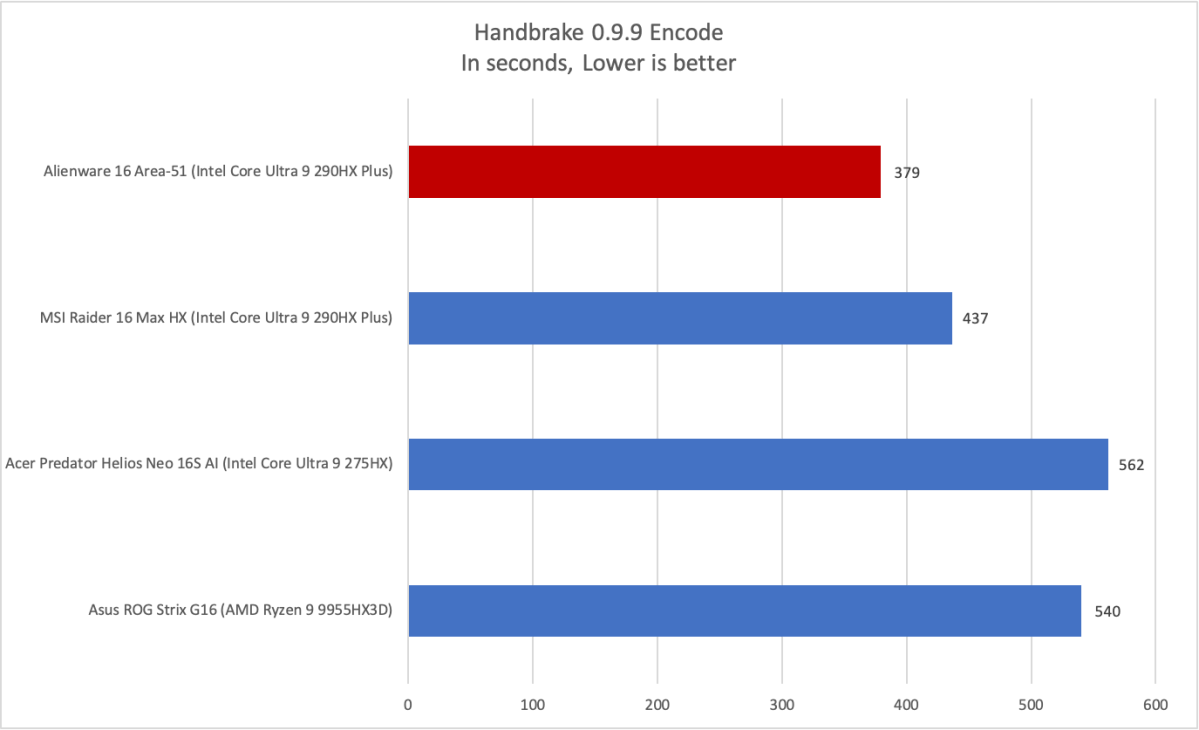
Handbrake, our other CPU test, tells a similar story. This test involves transcoding a feature-length film at 1080p resolution. Amazingly, the Area 51 is able to accomplish that in just over six minutes—another record result.
Foundry / Matthew Smith
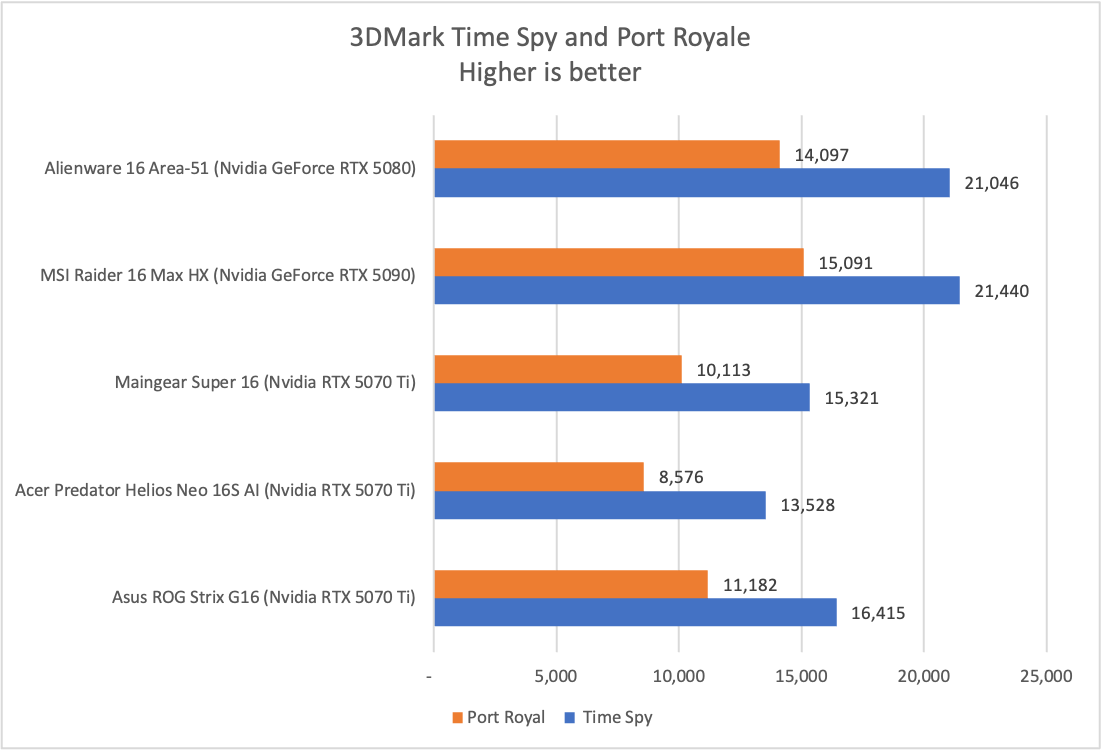
Obviously, the Area 51 I tested is a standout when it comes to CPU performance. But what about the GPU? While it does provide Nvidia’s GeForce RTX 5080, the Area 51 is priced in territory where RTX 5090 laptops are sometimes available.
However, 3DMark reveals that this is less of a problem than it may at first appear. The RTX 5090 mobile is technically a more capable GPU than the RTX 5080 mobile, but in reality the latter can often go toe-to-toe with its big brother. This comes down to the power and thermal constraints of modern laptops.
Keep in mind that the Area 51 is available with an RTX 5090, too. I’d expect it to be at least a little quicker than the RTX 5080, though by how much I can’t say.
Foundry / Matthew Smith
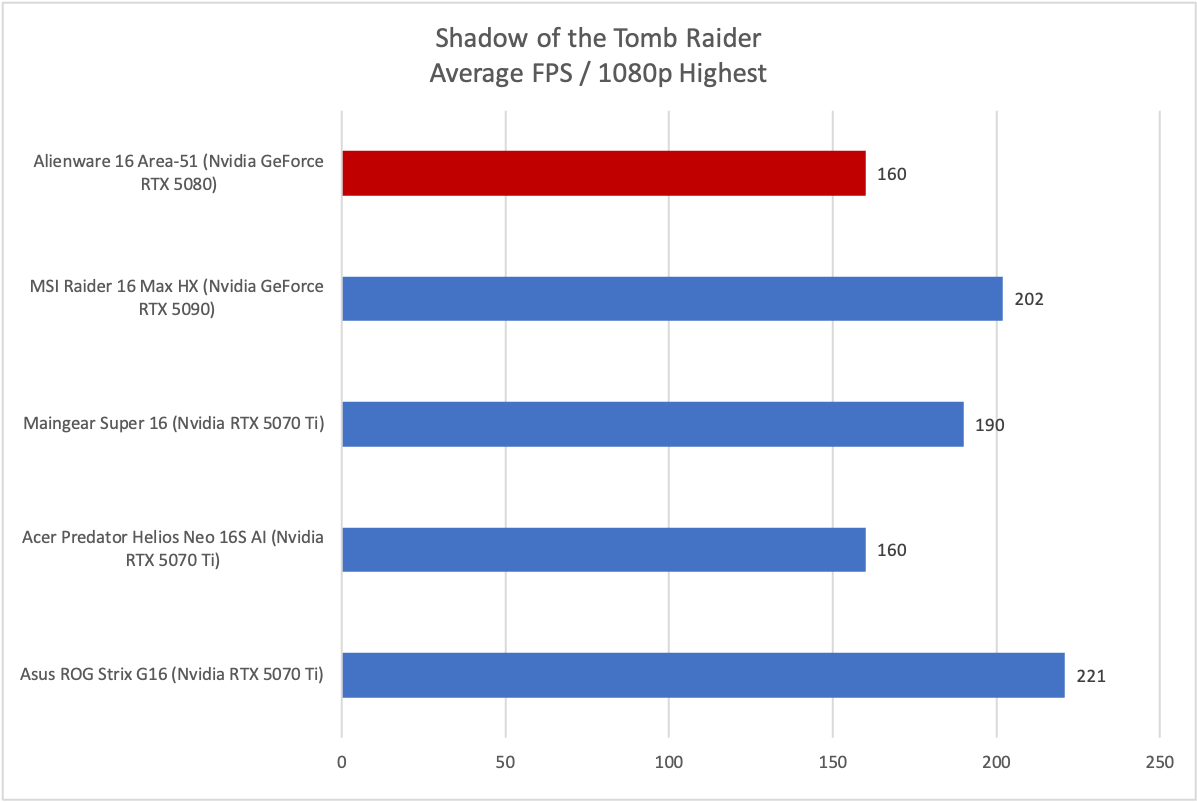
Shadow of the Tomb Raider is an odd case, because the Area 51 doesn’t perform as well as would be expected in this machine. The level of performance seems to suggest a CPU bottleneck, though that shouldn’t be the case given how fast the processor is. In any case, this will turn out to be an outlier.
Foundry / Matthew Smith
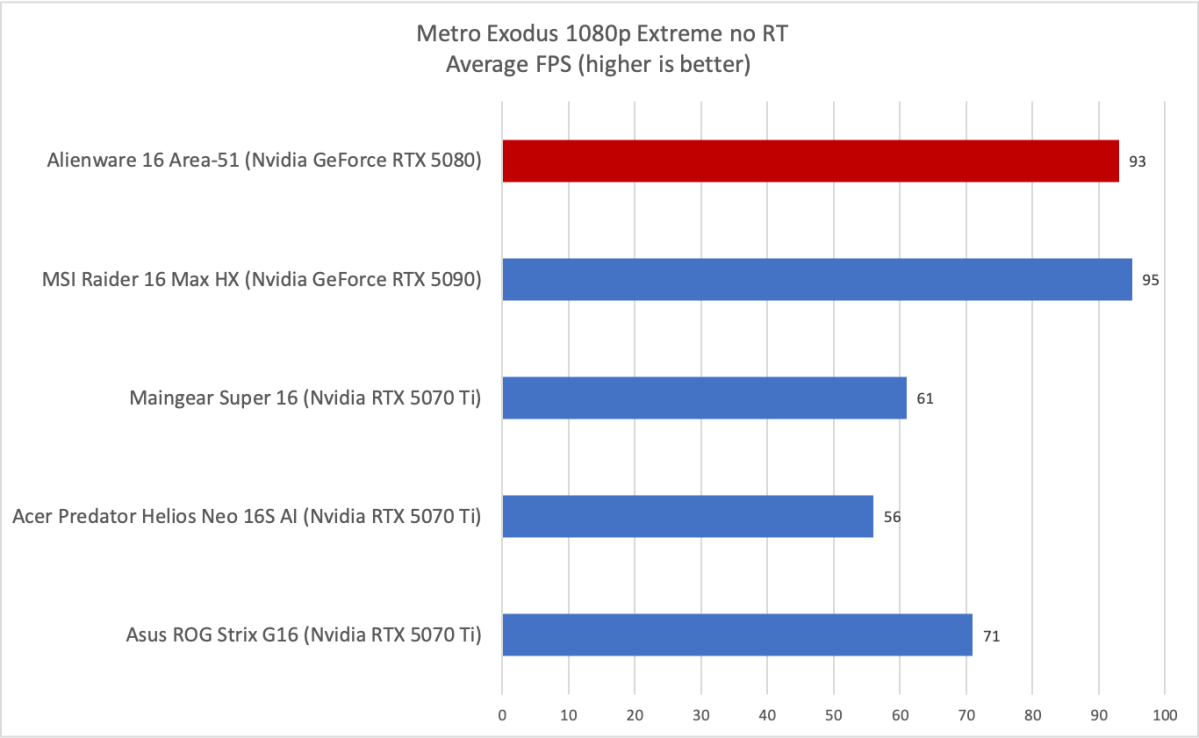
Metro Exodus puts the Area 51 back in its expected position, as it manages to fall in right behind the MSI Raider 16 Max HX, which has the same CPU and Nvidia’s GeForce RTX 5090. There’s also a large and very impactful gap between the Area 51 and less performant systems with RTX 5070/5070 Ti graphics.
Foundry / Matthew Smith
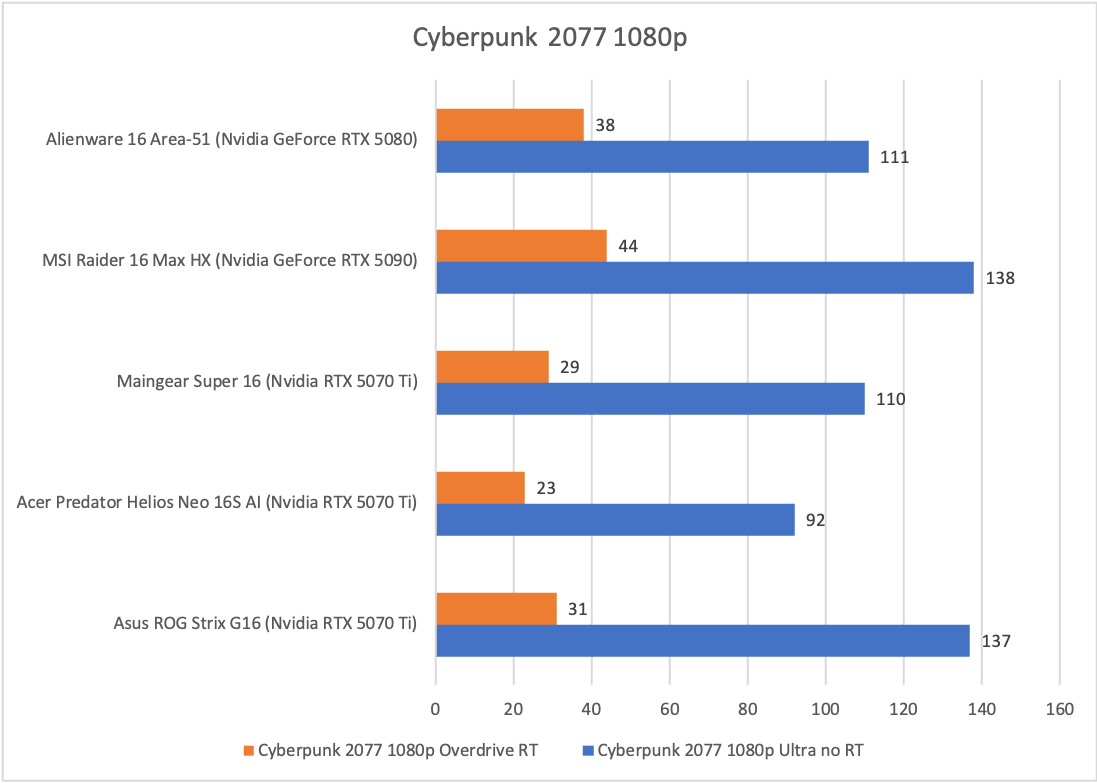
Moving on to Cyberpunk 2077, we again see the Area 51 perform well, though the results vary. The 1080p result without ray tracing engaged shows a good result, but not an amazing one. This makes me think once again that we have a CPU bottleneck.
Looking at the ray traced result, however, we see the Area 51 again performs well. The performance gap between the RTX 5070/5070 Ti systems and the Area 51 with RTX 5080 is much larger than the gap between the Area 51 with RTX 5080 and the MSI Raider 16 Max HX with RTX 5090. In other words, you’ll get a lot more for your money with the upgrade from RTX 5070 to RTX 5080 than you do with the upgrade from RTX 5080 to RTX 5090.
Alienware 16 Area 51: Battery life and portability
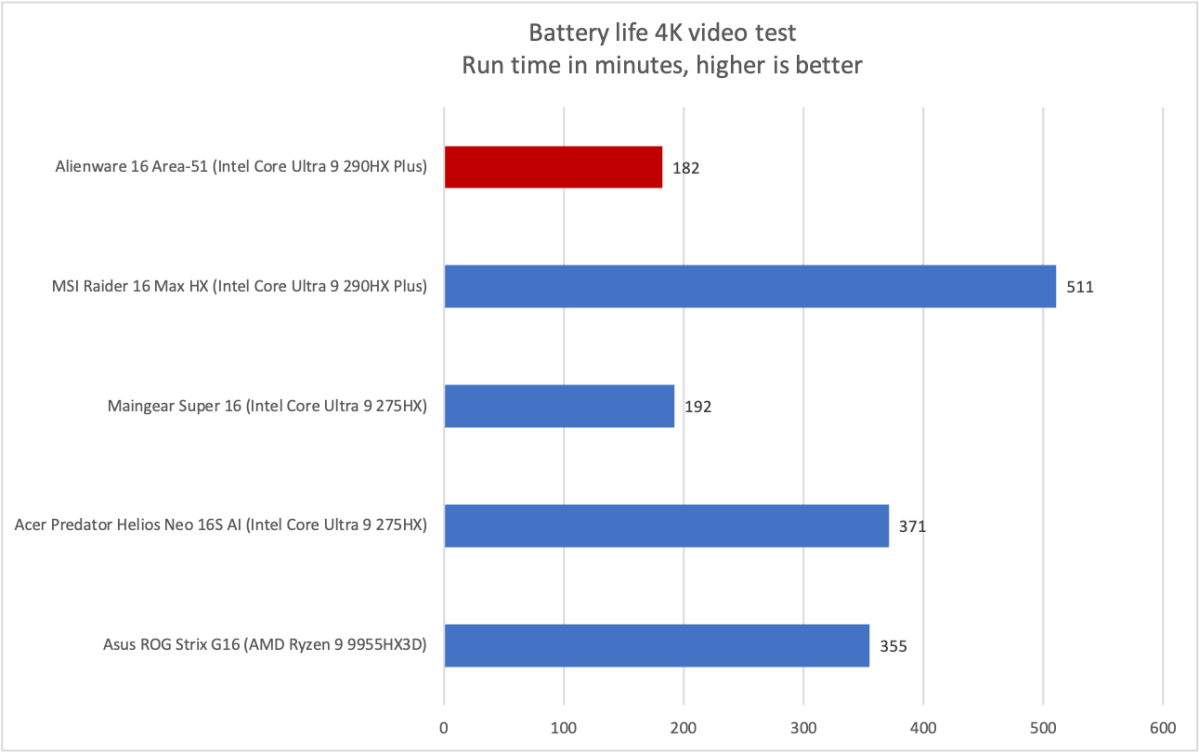
The Alienware 16 Area 51 that I reviewed was a heavily upgraded model, and one particular upgrade has a big negative impact on battery life: the OLED display. That’s because the Area 51 with the IPS display has switchable graphics, while the model with the OLED display does not.
Foundry / Matthew Smith
As the graph shows, this makes for rather dire battery life despite the Area 51’s large 96 watt-hour battery. The laptop fell short of three hours of battery life in PCWorld’s battery test, which loops a 4K file of the short film Tears of Steel. And this, mind you, was with the Battery power profile engaged.
While this result is short, it’s not mysterious. The Area 51 has a powerful but also power-hungry Intel processor paired with an Nvidia GeForce RTX 5080 with a graphics power of 175 watts. Alienware says total system power draw is up to 240 watts for the Area 51. Even a larger battery can’t stand up to that, particularly when a laptop doesn’t provide the option to disable the Nvidia GPU and fall back to integrated graphics.
Alienware 16 Area 51: Conclusion
The Alienware 16 Area 51 is an impressively powerful laptop that delivers across multiple aspects of performance. It has an incredible CPU, a respectable GPU, a healthy amount of RAM and a fast solid state drive. The model I reviewed also had a beautiful OLED display and a mechanical keyboard.
Unfortunately, the Area 51 with the OLED display also struggles with short battery life, and the laptop’s design is a bit drab considering its price. However, if you care more about performance than portability or looks, the Area 51 is a fantastic choice—both for gaming and for any workload that requires a beefy CPU.


