Oliver Schusser, Apple’s Vice President in charge of running Apple Music, recently gave an interview to Billboard magazine in which he discussed a wide range of topics, including the often thorny issue of lossless audio.
Following that interview, several media outlets reported Schusser as having said that “most people can’t tell the difference” when listening to lossless or high-res audio. In fact, what he really said was – “lossless actually doesn’t work over Bluetooth. When you have a wireless connection, lossless doesn’t actually work”. So Schusser was really pointing out the limitations of using Bluetooth for wireless headphones, rather than saying that lossless audio doesn’t matter at all (or, as suggested by some outlets, that it only matters to pretentious audiophiles who like to pretend that they can hear the difference).
It’s true that Bluetooth does require audio files to be heavily compressed for wireless transmission, and that compression can affect the audio quality even when using really expensive Bluetooth headphones such as Apple’s own AirPods Max. But, of course, that completely overlooks the option of using traditional wired headphones instead. Wired headphones do have the ability to play ‘lossless’ or ‘high-res’ audio that retains all the clarity and detail of the original recording – and, of course, many of the best Bluetooth headphones now provide a wired option as well.
However, most computers and mobile devices aren’t designed for handling lossless or high-res audio, so a DAC – a digital-to-analogue-converter – can help your Mac, iPhone or iPad to deliver the best possible sound quality to your wired headphones.
Should you buy a DAC?
Consider a DAC if:
- you use wired headphones
- you listen to lossless/high-res audio
- you want better sound quality from a phone or laptop
You probably don’t need a DAC if:
- you mainly use Bluetooth headphones
- you stream compressed audio only
- convenience matters more than audio quality
Best starting point: Portable DAC under $100/£100
What Does A DAC actually improve?
Foundry
As the saying goes – it does what it says on the tin. A digital-to-analogue-converter (DAC) accepts a digital audio signal from any digital device, such as a Mac, iPhone or iPad, and then converts it into analogue sound waves that can be played through your headphones for your old-fashioned analogue ears.
Modern mobile devices, such as the iPhone and iPad, have long since ditched the traditional 3.5mm headphone socket, so when they’re not using Bluetooth they can only output digital audio via their USB-C connectors. Most Mac models do still have a 3.5mm audio socket, but their internal audio circuitry is fairly basic and can be prone to electrical interference from other components within the Mac, so it’s still a good idea to switch to the Mac’s USB-C interface for digital audio output.
That’s where the DAC steps in. A DAC will provide a USB-C interface for connecting to your Mac, iPhone or iPad. Its specialised sound chips will convert the digital audio signal into high-quality analogue sound, and then output the sound via a 3.5mm headphone socket (and some DACs also provide 4.4mm and 6.3mm connectors for high-end Hi-Fi headphones).
Recent years have seen the arrival of many portable DACs that are specifically designed for use with smartphones. However, there are also larger DACs that are designed for use on the desktop at home or in an office, and these may also be powerful enough to drive a set of external speakers, as well as headphones.
Will you hear a difference with a DAC?
Anyone who owns a good set of wired headphones will benefit from the boost in sound quality provided by a DAC (it’s worth checking the packaging or technical details for your headphones to see if they mention high-res or lossless audio). That’s especially true if you subscribe to a streaming service such as Apple Music or Tidal, which provides music in high-quality ‘lossless’ or ‘high-res’ audio formats. A DAC with a built-in amplifier can also provide a kick in volume that’s great for exercise or a bit of air-guitar headbanging. Some DACs also provide filters and effects that you can use to boost the bass on dance music, or fine-tune the sound to suit your personal taste. A DAC that works with external speakers can also be useful for musicians recording their own music, or people who need to edit audio for video or podcasts.
Who Shouldn’t Use A DAC?
If you want the convenience of Bluetooth headphones that don’t have any cables to get lost or tangled up then a DAC isn’t going to help you very much – remember, “lossless doesn’t actually work over Bluetooth”. Cheaper wired headphones that aren’t rated for high-res audio may not benefit very much either – Apple EarPods, we’re looking at you – although our reviews of the best wired headphones show that there are still some high-quality headphones available at very competitive prices.
When does a DAC make the biggest difference?
Well, you need a good set of wired headphones to start off with, as less expensive headphones may not be able to reveal all the clarity and detail in your favourite tracks. However, you also need to make sure that you’re listening to high-quality music files that use ‘lossless’ or ‘high-res’ audio formats.
The term ‘lossless audio’ generally refers to digital music files that have the same sound quality as conventional music CDs, which store music in a file format known as 16-bit/44.1KHz. This means that the music was sampled at a rate of 44.1KHz and each sample is stored using 16-bit data files. Any music above that level is known as ‘high-res audio’, and should be superior to ‘lossless’ or CD-quality as it comes close to the quality of the original master recordings created in the studio. The most common high-res formats available on Apple Music and other streaming services are 24-bit/48KHz, followed by 24-bit/96KHz and 24-bit/192KHz, although my own high-res playlists on Apple Music largely seem to consist of tracks in the 24-bit/96KHz format.
Many people use wired headphones with a DAC at home, so that they can sit back and enjoy their favourite music with the highest possible sound quality. But they may then switch to more convenient wire-free Bluetooth headphones when they leave home. There are a number of DACs that are specifically designed for gaming, and for use with wired gaming headsets. Some of the more powerful desktop DACs can also work with external speakers too, so they’re a good option for recording or audio-editing work, as well as simply enjoying music at home.
And, thanks to the all-conquering iPhone, there are also lots of portable DACs now available that are specifically designed for use with smartphones, tablet and laptops. These can be really useful if you want to relax on a long journey, or chill out on a beach. Just remember that lossless and high-res audio files can be very large, so you should download your lossless music onto your mobile devices before leaving home so that you don’t use up all your expensive mobile broadband data.
Which DAC features actually matter?
Foundry
High-quality audio is, of course, the main reason to buy a DAC, but there are lots of other features that you should consider as well. Most DACs use a USB-C interface to connect to your computer or mobile devices, but some may also include a Lightning adaptor for older iPhone and iPad models that still use Lightning (but check on this before buying).
The most important decision is probably deciding whether you want a portable DAC that you can carry around with your iPhone or laptop, or a larger, desktop DAC that sits on your desk at home or in your office. Most portable DACs draw power from your mobile devices via their USB-C port, although they don’t need a lot of power so they shouldn’t drain your iPhone or laptop battery too quickly. However, there are some that do have a rechargeable battery in order to avoid draining the power from your mobile devices. A rechargeable battery can provide more power too, allowing the DAC to act as an amplifier to boost the volume of your headphones as well as the sound quality.
Desktop DACs are typically larger and generally run off mains power, although some can also draw power from the USB-C port on a desktop Mac or MacBook laptop if necessary. That extra size and power allows them to provide additional features, such as multiple connectors for different types of headphones, or connectors for external speakers. Many desktop DACs also include an amplifier that can provide more power for your headphones, or may even be powerful enough to drive a beefy set of external speakers. And for real Hi-Fi buffs there are even DACs that can support ultra-high-res audio formats up to 32-bit/768KHz.
How Much Do DACs Cost?
A few years ago, DACs were expensive, specialist devices that were mainly aimed at well-heeled Hi-Fi buffs, but the arrival of mass-market smartphones and streaming services changed all that. There are now quite a few portable DACs available for under $100/£100, although some of the more expensive portable models can cost around $400/£400.
Desktop DACs are more varied, depending on the range of features they provide, and there are specialist Hi-Fi DACs that cost several thousand dollars. But, for first-time users, there are some affordable desktop DACs that start at around $100/£100, with some of the more versatile models going up to $300 – $400/£300 – £400.
DAC buying checklist
Use this quick checklist to narrow down the right DAC for your setup.
| Question | What to Choose |
|---|---|
| Do you need portability? | Portable DAC if you listen on the go with an iPhone, iPad, or laptop. Desktop DAC if you mainly listen at a desk or home studio. |
| What headphone connector do you use? | Most headphones use 3.5mm. High-end balanced headphones may need 4.4mm. Some desktop Hi-Fi headphones use 6.3mm. |
| Which iPhone do you have? | Newer iPhones use USB-C. Older iPhones need Lightning compatibility or a Lightning adaptor. |
| Do you want to connect speakers too? | Choose a desktop DAC with speaker outputs (such as RCA connectors) if you plan to use external speakers or studio monitors. |
| Do your headphones need more power? | Look for a DAC with a built-in amplifier if your headphones sound quiet or hard to drive. Portable DACs with batteries and most desktop DACs provide extra amplification. |
| What’s your budget? | Under $100/£100: great starter portable DACs. $150–$400/£150–£400: better sound, more power, extra connectors, speaker support. Higher-end desktop DACs: specialist audiophile features. |
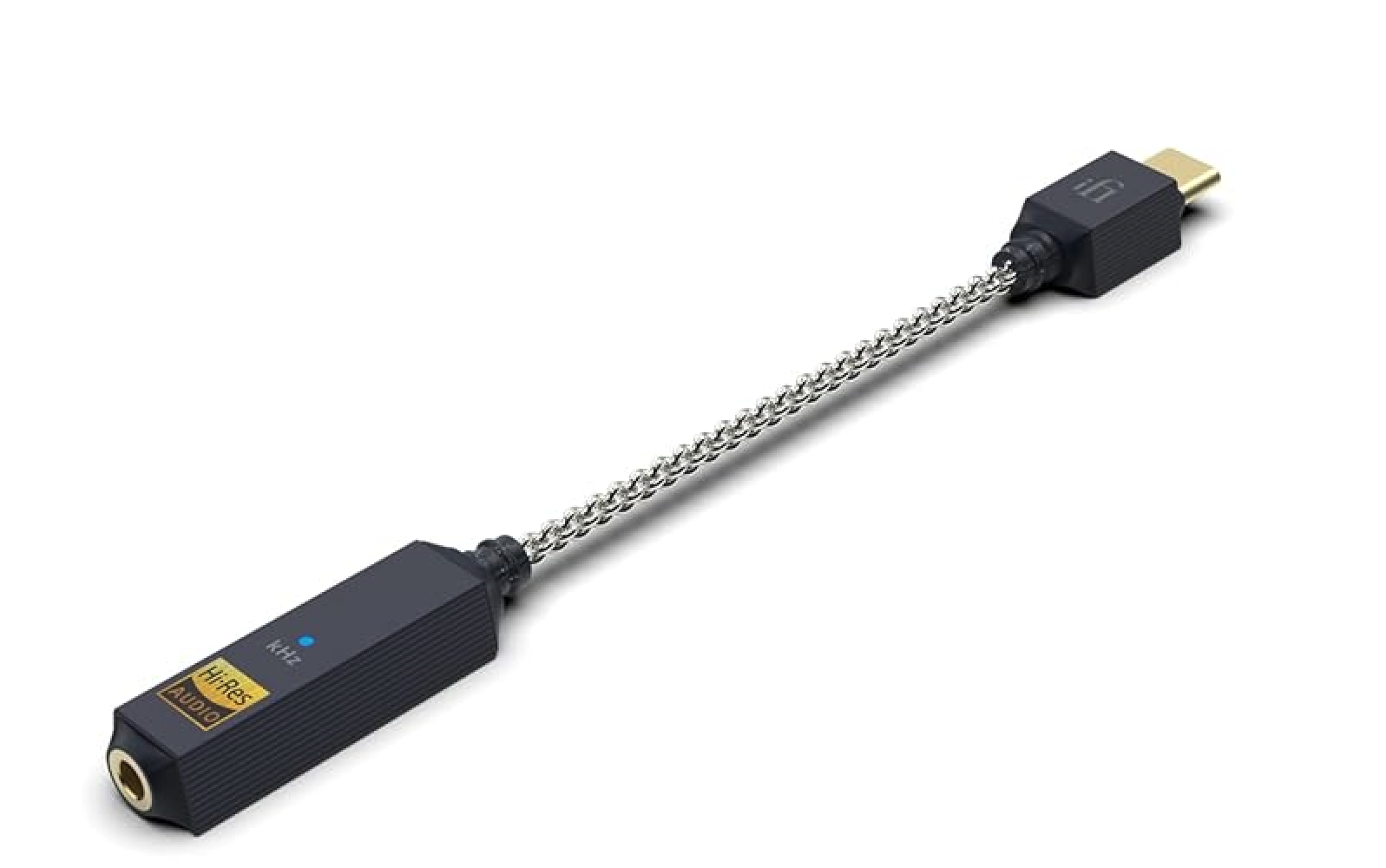
1. iFi Go Link 2 – Best starter DAC
Price When Reviewed:
$59
Best Prices Today:

$59
The latest addition to iFi’s range of portable DACs is really good value for money. Priced at just $59/£59, the Go Link 2 looks like little more than a chunky cable that plugs into the USB-C port on your iPhone or iPad, and it only weighs 7.8g so you can easily slip it into your pocket or bag when you’re travelling.
Despite its compact design, the Go Link 2 provides really good sound quality, and enough power to get you motivated when you’re jogging or working out, and its USB-C interface will work with Macs and PCs as well as mobile devices.
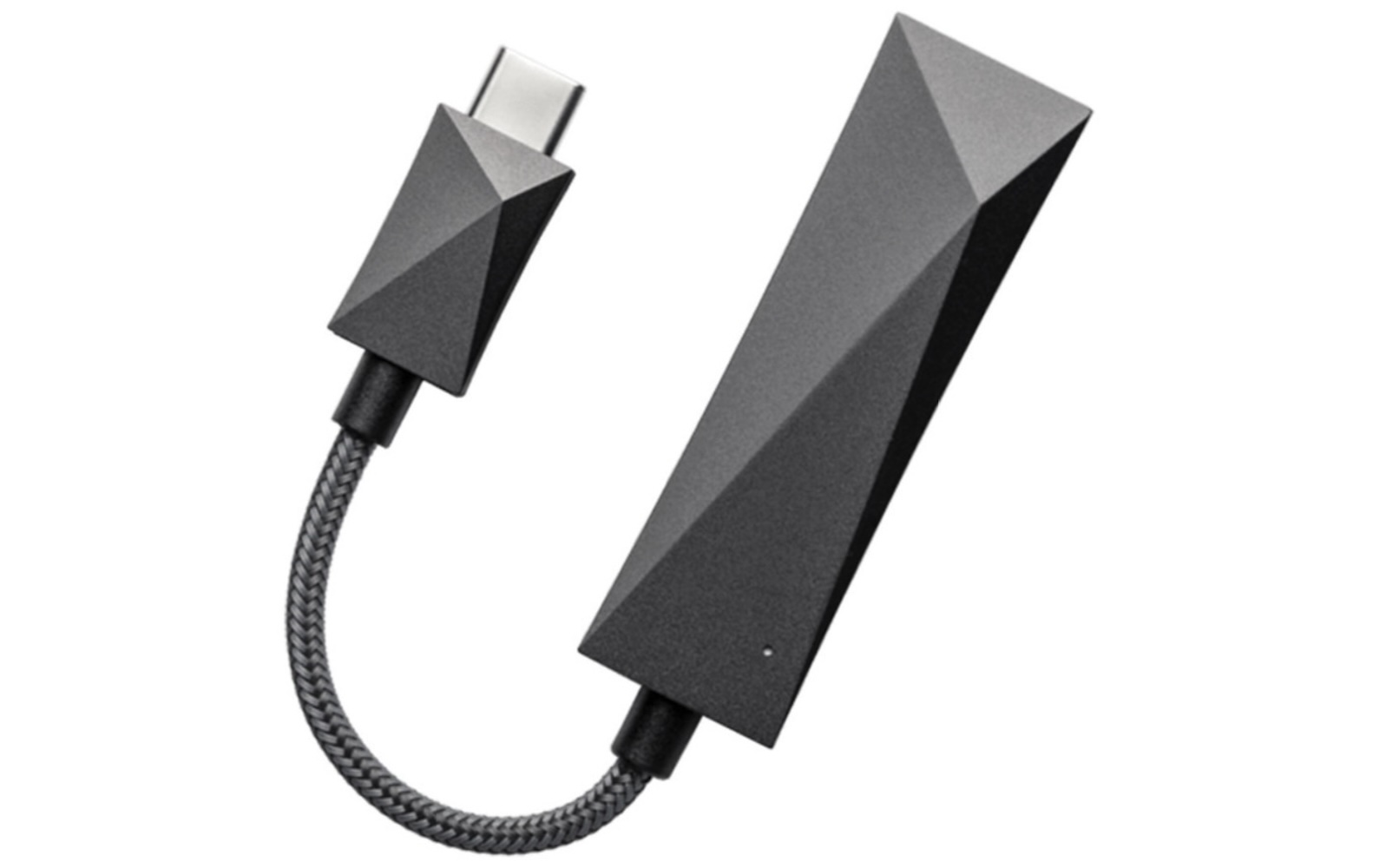
2. Astell & Kern HC3 – Best portable DAC
Price When Reviewed:
$250
Astell & Kern was one of the first companies to offer portable DACs for mobile devices, and its mid-range HC3 is a versatile all-rounder.
Its sturdy aluminium casing only weighs 20g but is tough enough to cope with life on the road. It supports all the main high-res audio formats and includes both a standard 3.5mm connector, and a 4.4mm connector for Hi-Fi headphones.
It also works with headphones that have a microphone, either for taking voice calls or for a burst of online gaming with a headset.
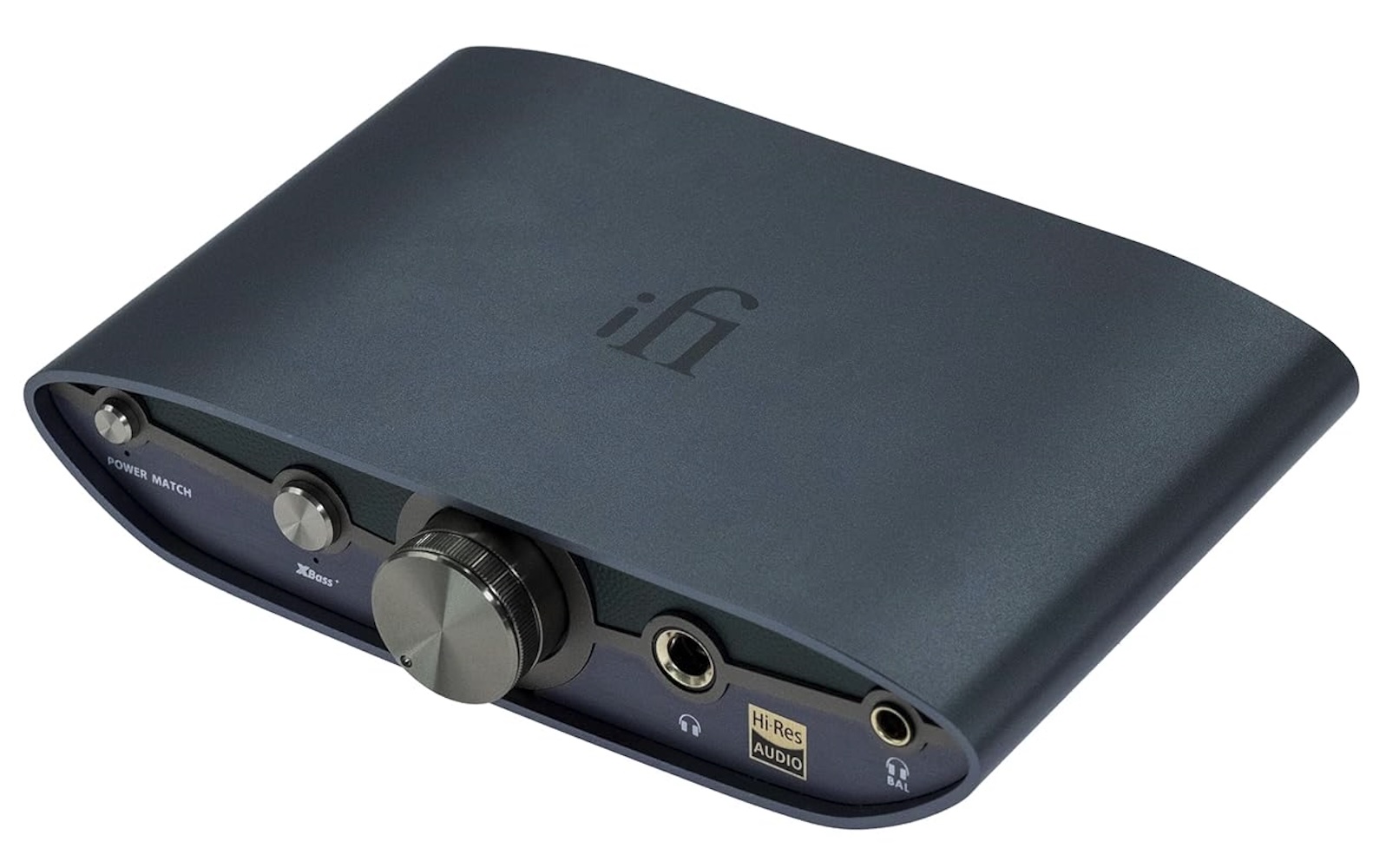
3. iFi Zen DAC 3
Price When Reviewed:
$229
Best Prices Today:
$229
You’re spoilt for choice in the desktop category, but you can’t go wrong with iFi’s Zen DAC 3. It’s a combined DAC/amplifier with connectors for 4.4mm and 6.3mm headphones, with a 3.5mm adaptor included as well. There’s also a set of RCA connectors on the back panel that will allow you to use it with a set of external speakers for a really good desktop studio set-up. It’s designed for desktop use, but you can also power it via USB-C from a laptop, making it a great choice for anyone that needs a portable studio that they can take on the road.
Related posts:
 Got a problem with your Mac, iPhone, or iPad? Macworld’s Mac 911 can help
 Is iMessage not working? Here’s how to fix it on iPhone, iPad or Mac
 PSA: Dozens of critical security updates are waiting for your iPhone and Mac
 Apple rolls out first ‘background security’ update for iPhones, iPads, and Macs to fix Safari bug