At a glance
Expert’s Rating
Pros
- Excellent battery life
- Good display
- Aggressive price tag
Cons
- Annoying keyboard bug
- Average performance
- 8GB of memory might not be enough for certain applications
Our Verdict
Acer’s Swift Air 14 mostly hits its mark as a solid budget productivity laptop. However, its 8GB of memory still can pose problems in certain scenarios.
Price When Reviewed
This value will show the geolocated pricing text for product undefined
Best Pricing Today
Price When Reviewed
$699.99
Best Prices Today: Acer Swift Air 14 (SFA14-I31)
On paper, the Acer Swift Air 14 is almost exactly what a productivity laptop buyer in 2026 ought to want. A great price, decent performance, and excellent battery life. Does it all play out as planned?
Here’s the tradeoff, in short. The laptop’s $699 sticker price is offset by an anemic 8GB of RAM — a grievous error in 2025, but more forgivable during the component shortages of 2026 and beyond (?). It all plays out as you would hope… but just don’t push it.
Acer Swift Air 14: Specs and configurations
Right now, the Acer Swift Air 14 (SFA14-I31-58V8) is available to buy at Acer and Best Buy for $699. It might be also worth noting that Acer’s chief executive recently said that he expects PC prices to rise by between five to 20 percent during the fourth quarter of 2026, which may be an incentive for you to buy soon.
Mark Hachman / Framework
- Model number: SFA14-I3
- CPU: Intel Core 5 320
- Memory: 8GB LPDDR5X (expandable to 16GB)
- Graphics/GPU: Intel Graphics
- NPU: Yes, 16 TOPS
- Display: 14-inch (1920×1200) TFT, 30-120Hz
- Storage: 512GB PCIe Gen4 SSD
- Webcam: 1080p
- Connectivity: 2X USB-C (Thunderbolt 4), USB-A, 3.5mm headphone jack
- Networking: Wi-Fi 6e, Bluetooth 5.3
- Biometrics: Windows Hello (webcam)
- Battery capacity: 70 watt-hours
- Dimensions: 12.4 x 8.8 x 0.51 inches
- Weight: 2.62 pounds
- MSRP: $699.99 as tested
Acer Swift Air 14: Out of the box and construction
Since Acer sells this laptop for $699, I wanted to see if any corners had been cut. As the specs above note, one key shortcoming is the amount of memory: we all know that RAM is expensive, but we’ll see how 8GB affects its overall performance later in the review.
Otherwise, you might expect the Swift “Air” to float in your hands. It doesn’t, but at 2.62 pounds, it’s much lighter than a typical 14-inch laptop, which typically weighs about three pounds. Its aluminum construction feels solid, and I couldn’t feel any untoward flexing either in the keyboard tray or as I moved the display up and down.
Acer’s product page indicates that the Swift Air 14 ships in “purple, blue, pink, and green,” though Acer and Best Buy sell the laptop in a sage green only.
Mark Hachman / Framework
Put another way, the Acer Swift Air 14 does not feel cheap, which was one of the goals of the Intel Project Firefly program associated with the Core Series 3 (“Wildcat Lake”) processor inside the laptop itself.
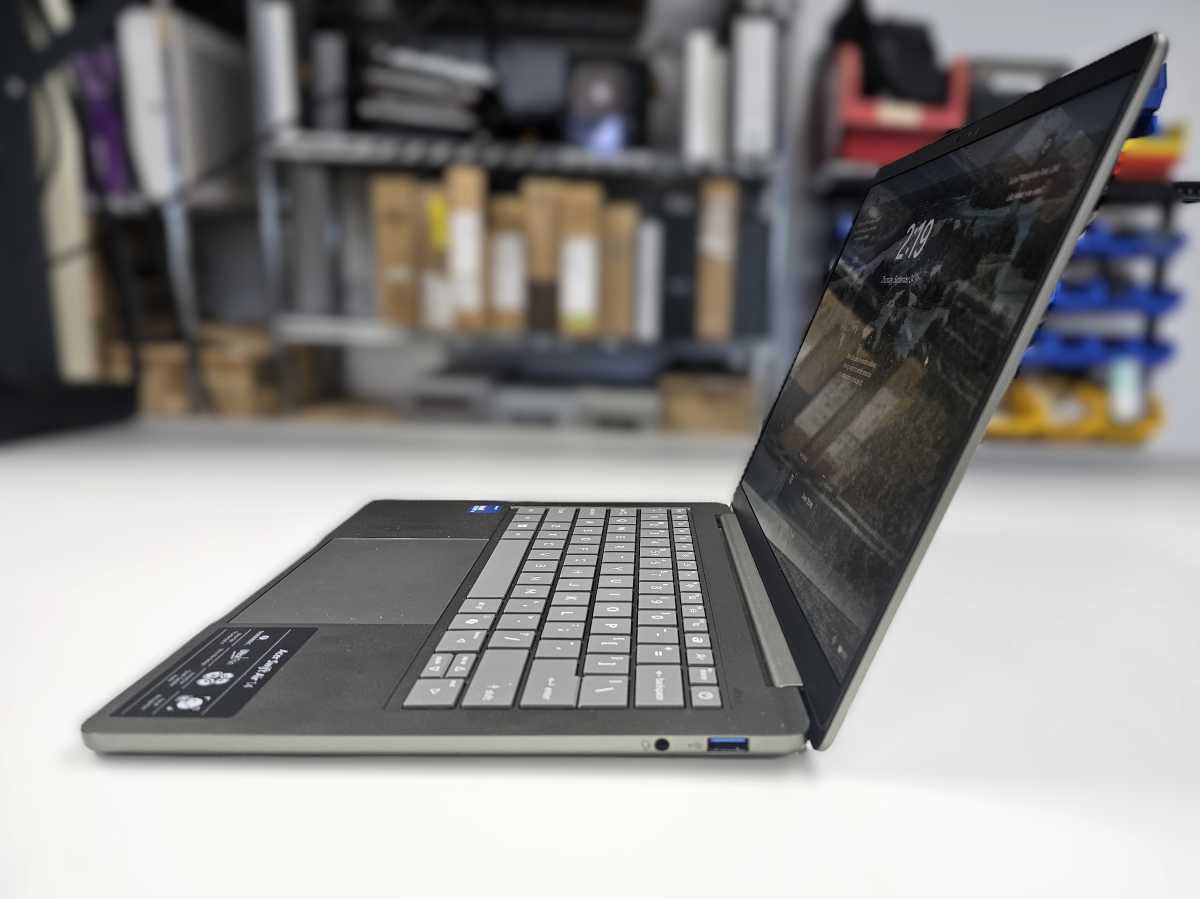
The laptop’s display fully reclines, which is a little odd given that the Swift Air 14’s display isn’t touch-enabled. Acer included a pair of powerful USB-C ports with Thunderbolt 4 capabilities on the left side of the laptop, with just a single USB-A port and a headphone jack on the right. It feels perfectly appropriate for the size of the laptop and its price point.
Mark Hachman / Framework
Note that this laptop can’t connect to the latest Wi-Fi 7 routers, although Wi-Fi 6e still has sufficient bandwidth for home networking.
Acer Swift Air 14: Display
Even 14-inch laptops seem to have moved beyond 1080p resolution to 1200p, a positive step forward for the industry. My colorimeter measured the display brightness at 376 nits, substantially higher than the 250 to 260 nits we deem adequate for everyday office use. Though the panel used pretty standard IPS technology, Acer’s “Comfyview” matte coating does a good job of diffusing reflections to make it easier to work under bright lights.
No one seems to care too much about bezel sizing, though the underscreen bezel seems a bit bigger than most to achieve the 16:10 aspect ratio.
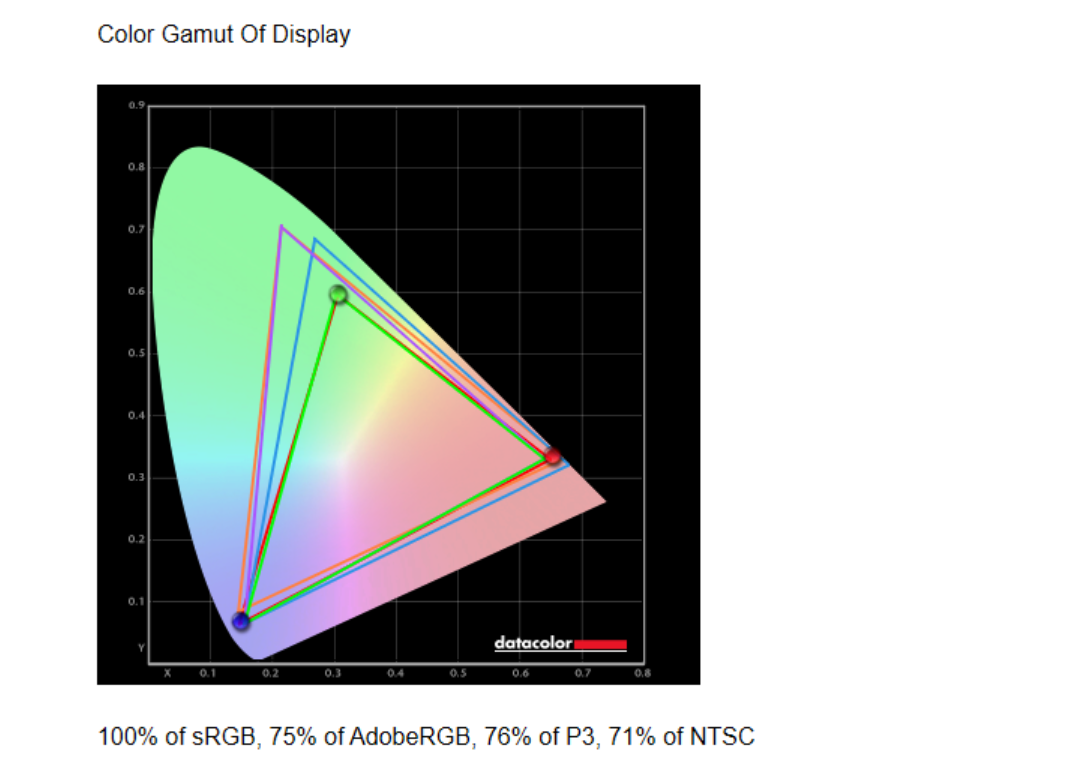
Budget laptops usually lack the visual fidelity of more expensive “creator-class” laptops. Still, I applied my colorimeter to the display and it fares pretty well. Here’s how my colorimeter assessed the display output:
Foundry
Remember, too, that the variable refresh rate of the screen (30 to 120Hz) can provide silky smooth mousing and scrolling at the highest refresh rate, but sips power at 30Hz to extend battery life. You’ll need to go into the Windows settings menu to enable the dynamic refresh rate. Otherwise, it will remain fixed at 120Hz.
Acer Swift Air 14: Keyboard and touchpad
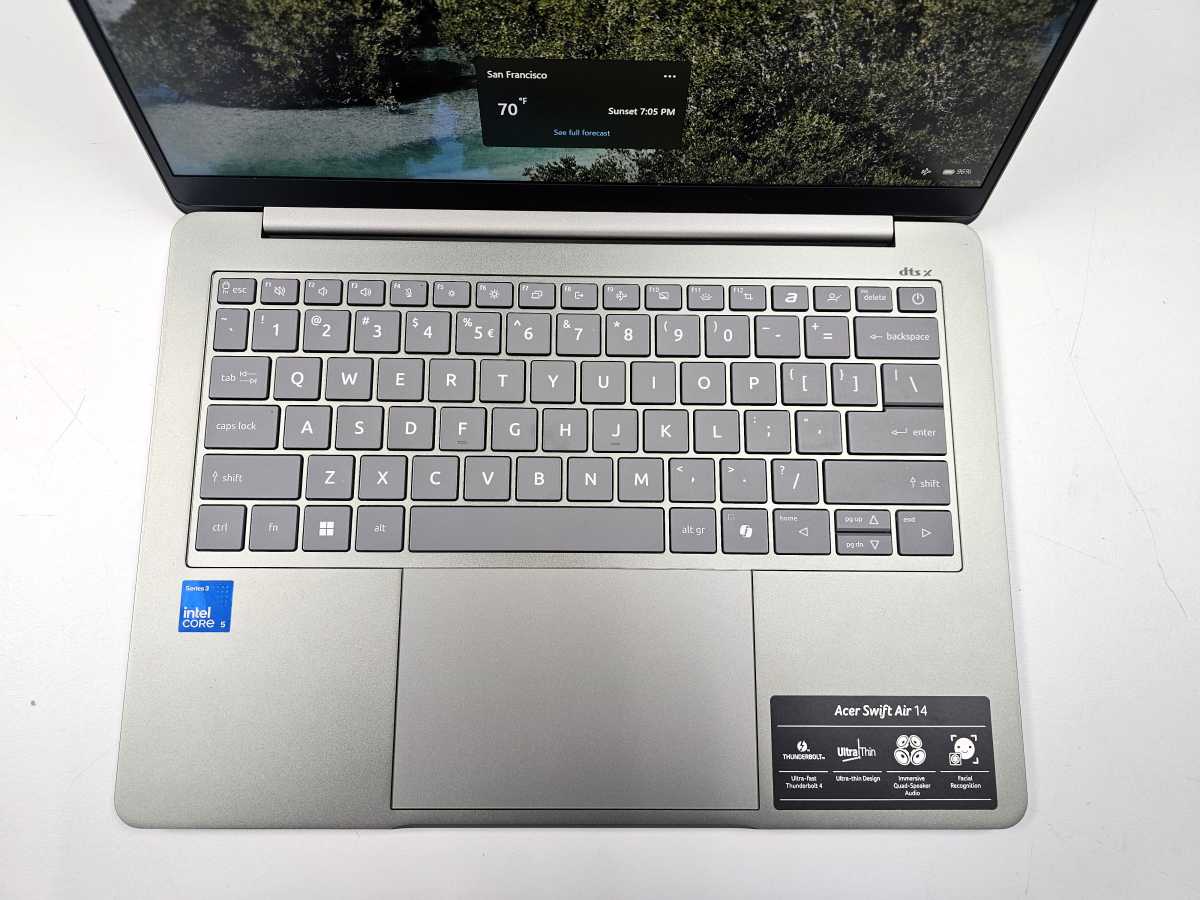
I like Acer’s laptop keyboards, and the Swift Air 14 is no exception. The keys are wide and spacious. The key travel is comfortable and forgiving, too. As a budget productivity laptop, this is ideal. The top row of the keyboard includes dedicated keys for AcerSense, Acer’s utility software, as well as a shortcut to Acer.com.
I did catch a bug. The keyboard doesn’t wake up immediately at the tap of a button–this happens when the laptop’s running on battery and wall power. After the first tap, however, the keyboard worked normally… until I left idle for a few seconds. Then the laptop would revert to its earlier state.
In other words, when I tapped the Start button, the laptop did nothing. I also wondered why I kept mistakenly entering PIN codes and passwords! That was why. Acer advised me to reset the PC as a workaround, which solved the problem.
Mark Hachman / Framework
The included trackpad works as well as could be expected for a budget trackpad. It’s clickable up until the about the top third, where it peters out. Gestures work like normal.
Acer Swift Air 14: Audio, webcam, mics, and biometrics
The laptop’s audio quality is good. Acer mounts four speakers inside the laptop, enhanced by DTS:X Ultra Audio. The combination delivers solid audio from lows to highs. It’s a little soft on the low-end bass, but with good volume otherwise. Moreover, turning up the volume doesn’t immediately turn the audio into mishmash, as older laptops used to do. (I did notice a little distortion on Fleetwood Mac’s Go Your Own Way, however.) Watching video on the laptop is surprisingly good, too.
Access to the laptop is protected by Windows Hello, enabled on the webcam’s depth camera. This is traditionally difficult to test because we only have the laptop for a short time. However, I was able to set it up and it recognized me several times without flaw over the course of the review.
Otherwise, the laptop’s 1080p/30Hz webcam was acceptable. You’ll notice that the laptop’s processor does include a small NPU of 16 TOPS. This is enough for the Windows Studio Effects (pan and zoom, background blur, and the odd “eye contact” effect)–these all worked well enough. Right now, I’m not convinced that this class of laptop will really benefit from local AI, save the for the built-in studio effects.
I’ve included a sample webcam shot below. (Consider one of our webcam recommendations otherwise.)

Foundry
There’s also an interesting twist: Acer specifically pushes a popup at you if you open the Windows Camera application. It advertises a “Acer Phone Webcam” application that can be downloaded for your Android or iPhone. Essentially, your (far superior) phone camera’s feed stands in for your webcam.
Acer Phone Webcam isn’t that different than what you can already do with your PC, though using a phone camera as a webcam is a bit complicated to set up within Windows. Acer simplifies it, and it’s a smart use of an app to do so.
The on-device mics don’t do a great job of capturing audio, though the audio filtering is excellent — with a major caveat. I test the microphone quality by using the Windows Sound Recorder application to record my voice, with and without music, then with white noise playing in the background.
The Acer Swift Air 14 did a good job filtering out the white noise — rainfall, in this case. My voice was captured almost perfectly. My voice sounded more distorted when I was playing music in the background, though the music was totally filtered out. Great work! Well, kind of.
On my first run I noticed I had a benchmark program sitting idle in the background. However, the memory that app took up negatively affected the laptop’s audio capture ability, turning my voice into more of a garbled mess than an actual recording.
Acer Swift Air 14: Performance
The 8GB of RAM prevented one of our benchmark applications from running entirely. I think a bigger concern, however, is that an 8GB laptop pushes you to look at the hardware requirements for certain applications. Photoshop might be a poor example in this scenario, but its “required” memory is just 8GB. Adobe “recommends” 16GB instead. That means risking a substantial amount of money on an application that might not run well on your PC.
(Microsoft, oddly, doesn’t even list a minimum memory allotment for Microsoft 365, though Word, PowerPoint, and Excel all performed acceptably.)
I doubt that the keyboard issue I noticed above wasn’t due to the fact that this laptop only has 8GB of RAM, but leaving another application open while recording audio certainly affected the audio quality in a negative way. On the other hand, I was able to open ten media-rich tabs in Microsoft Edge, plus Word, and almost max out the laptop’s memory usage at 97 percent. Those tabs were perfectly navigable. Some of them even included video, too.
The Acer Swift Air is sufficient for basic tasks, including Office work and web browsing. It’s not a content creation laptop or a gaming rig, though, so you might want to taper your expectations. You may reach a bottleneck faster with 8GB of RAM.
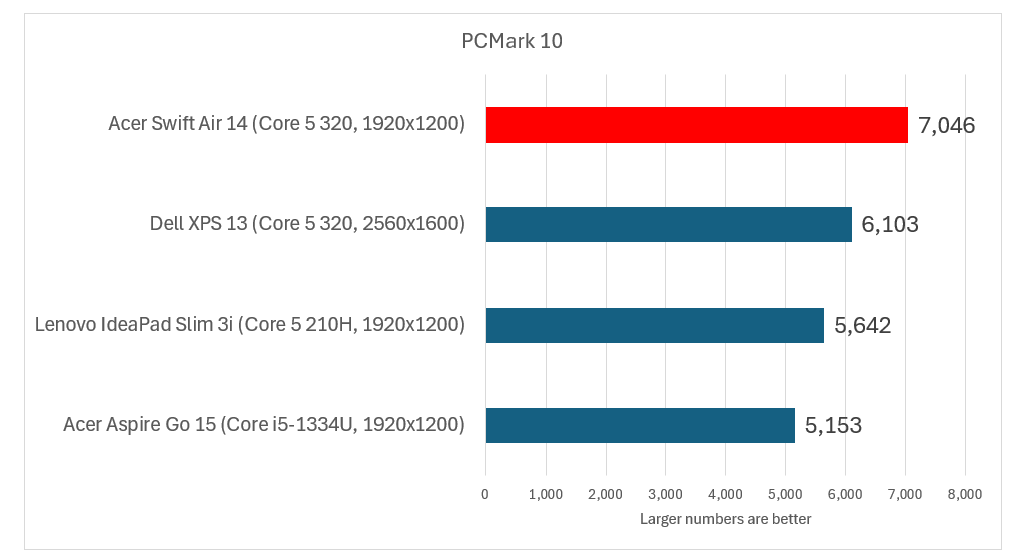
Let’s assume that you’re trying to spend as little as possible on a laptop. In response to the Apple MacBook Neo, laptop manufacturers have presented options: the $699 Lenovo IdeaPad Slim 3i (now $749.99 at Lenovo), the $429 Acer Aspire Go 15 (now $515), and the $699.99 Dell XPS 13, which has increased in price to $799.99. All of these use 8GB of RAM by default, though the price and display sizes vary. The difference? The first two PCs date to 2025, when memory was more abundant and an 8GB laptop could be more heavily criticized. Sadly, minimal memory is much more acceptable in 2026.
The PCMark benchmark combines a number of tasks, from basic office work (spreadsheets, word processing) all the way up to video calls and CAD applications. I think it’s one of the most well-rounded benchmarks out there, but it doesn’t support Windows on Arm. Still, it gives a clear edge to the Acer Swift Air.
Foundry
Normally, we’d follow this with the Cinebench 2024 benchmark, but it doesn’t run on laptops with 8GB of memory. I dropped it down to Cinebench R23, which does, and it produced a score of 7,274. That’s less than the Acer Aspire Go, which scored 8,530. That’s not great — by contrast, the Ryzen AI 400 chip inside the Acer Swift Go 16 produced a score of 11,967. You’re trading off some significant performance for the cost savings.
On the other hand, the laptop is closing in on the MacBook Neo. Using the cross-platform Geekbench 6 multicore benchmark, the Neo produced a score of 8,996, while the Swift Air recorded a score of 7,647, a 16 percent difference. The single-core score is also significant.
Here, the Neo recorded a score of 3,574, while the Swift Air 14 being reviewed here recorded a score of 2,397 — a whopping 39 percent difference, and usually an indicator using the laptop’s menus and navigating through its applications will lag a bit.
I also tested the laptop using the Handbrake transcoding benchmark, and it generated a score of 1,901 seconds, versus 2,053 seconds for the IdeaPad Slim 3i.
Foundry
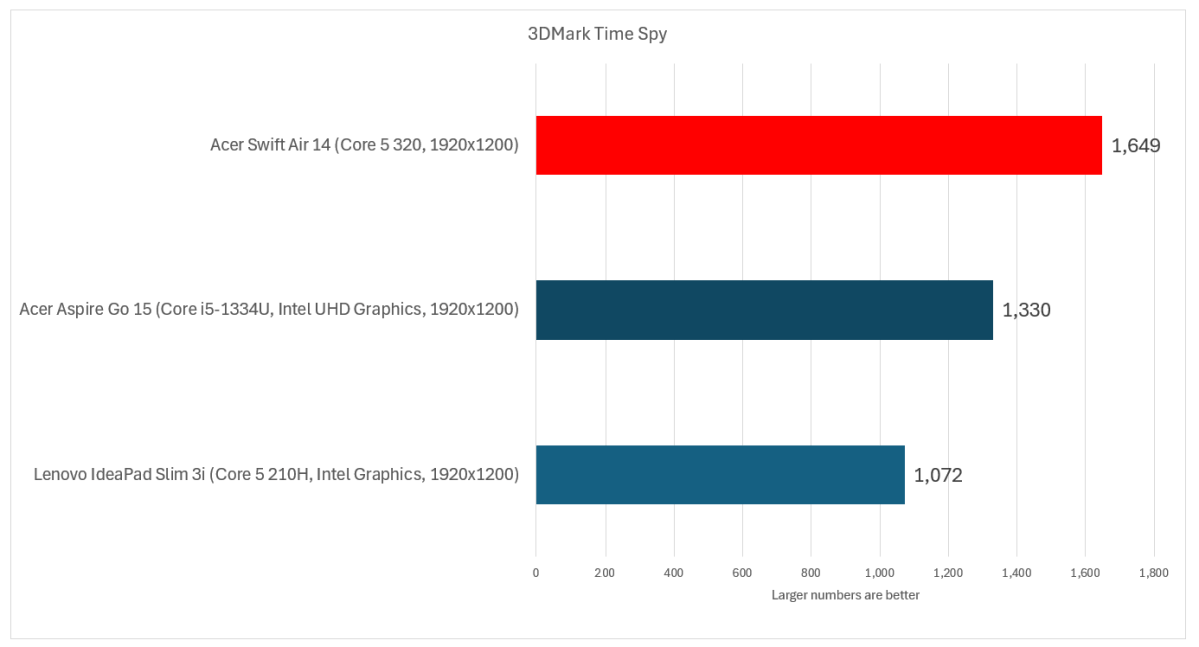
As my colleague Ashley Biancuzzo pointed out in her review of the Dell XPS 13, these aren’t gaming machines — though the Swift Air does outperform the Ryzen AI 400 series. Still, even light gaming is going to be a struggle. Don’t bother.
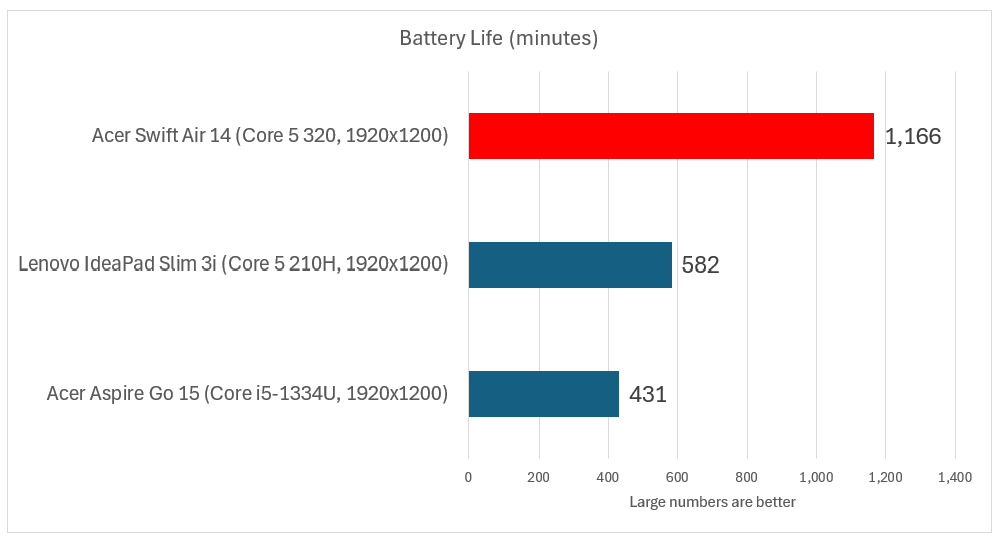
With regards to battery life, the specs tell the story. The Acer Swift Air 14 includes a 70 Wh battery, the largest of all the laptops we tested for this article. (The maximum allowed by the FAA’s battery restrictions is a 99Wh battery.) That gives a clear and massive edge to this laptop, even among more expensive machines.
Foundry
Using our standard video rundown test, the Acer Swift Air 14 delivered about 19.5 hours of battery life, a tremendous showing. Even using the more arduous and realistic Procyon benchmark, which applies a series of standardized Microsoft Office tasks over and over, the total time was 11 hours 14 minutes. That’s a great result and a definite plus in this laptop’s favor. You might be able to push it even higher by enabling the dynamic display refresh rate — I left it at a fixed 120 Hz for testing.
Should you buy the Acer Swift Air 14?
Save for that annoying keyboard bug, I liked my time with the Acer Swift Air. That doesn’t mean I’d recommend it to everyone. For the basics — Office work, some light web browsing — it’s sufficient, and the battery life is outstanding no matter what the price tag says.
The trouble is that most laptops, perhaps excepting the ones we reviewed here, jump immediately to the $1,200 range and above. There’s going to be a class of people who immediately turn up their noses at any laptop with 8GB of memory. Others will be forced into it by necessity or to save a few bucks.
My recommendation would be to buy this laptop from a store with a solid return policy (Best Buy usually qualifies, but be sure) and check to see that you can do what you need to do with it before the return period expires.


