At a glance
Expert’s Rating
Pros
- Minimalist, functional design
- Excellent SDR and HDR image quality
- Low price for latest QD-OLED ultrawide panel
- High HDR brightness
Cons
- Design is arguably a bit too reserved
- No USB-C with video input
- 3440×1440 resolution is adequate but not sharp
Our Verdict
The Alienware AW3426DW combines just-the-basics design with an excellent five-layer tandem QD-OLED panel to deliver great image quality at a lower price.
Price When Reviewed
This value will show the geolocated pricing text for product undefined
Best Pricing Today
Alienware has long been a leader in QD-OLED ultrawide monitors. It was first to hop on the trend in a big way with the Alienware AW3423DW, released in 2022, and it has consistently released updates as new QD-OLED ultrawide panels were released. The AW3426DW is the latest, and it has Samsung’s five-layer tandem QD-OLED. However, with this release Alienware has cut back on features to provide an attractive $799.99 MSRP. Does that make it a winner, or is it a bit too affordable?
Read on to learn more, then see our roundup of the best monitors for comparison.
Alienware AW3426DW specs and features
The Alienware AW3426DW falls in line with its new strategy for QD-OLED monitors. Instead of trying to pack them with features, as it has in the past, Alienware focuses more on delivering strong core image quality at a lower price than alternatives.
- Display size: 34-inch 21:9 ultrawide
- Native resolution: 3440×1440
- Panel type: 5-layer Tandem QD-OLED
- Refresh rate: 280Hz
- Adaptive sync: Yes, VESA Adaptive Sync, Nvidia G-Sync Compatible, AMD FreeSync Premium Pro
- HDR: HDR10 and Dolby Vision, VESA DisplayHDR True Black 500 Certified
- Ports: 2x HDMI 2.1, 1x DisplayPort 1.4, 1x USB-A downstream with 5Gbps data, 1x USB-C downstream with 5Gbps data and 15 watts of power, 1x USB-B upstream with 5Gbps data
- Audio: None
- Warranty: 3-year burn-in coverage
- Price: $799.99 MSRP
At a glance, Alienware is successful. The monitor lacks several features I generally like to see, such as USB-C with Power Delivery. It doesn’t have speakers or even an audio-out jack, either.
What it does have is a five-layer QD-OLED panel with a refresh rate up to 280Hz at an MSRP of $799.99. Similar monitors, such as the MSI MPG 341CQR QD-OLED X36, are generally $100 more expensive at MSRP.
Alienware AW3426DW design
The Alienware AW3426DW uses the company’s “Alienware 30” design language, which consists of swooping curved surfaces, minimalist branding, and a single dark blue-black colorway. I don’t like it nearly as well as the bright, bold retro-future design that preceded it. Still, it looks fine.
Alienware’s minimalist streak means you won’t see bright, bold RGB-LED lighting here. The Alienware logo is technically RGB-LED backlit, but it’s small and dim, so it won’t add much to your desktop ambiance. Personally, I don’t mind this, but gamers who want a bold, loud look should consider Asus, which tends to offer the best RGB-LED lighting, though only in some high-end monitors.
Matthew Smith / Foundry
This is a curved monitor, but the curve radius is only 1800R. A lower number means a more aggressive curve, so this is relatively tame. The curve is noticeable but quickly starts to fade into the background while using the monitor.
Looks aside, Alienware’s design is functional. It includes a compact stand (though not as compact as the MSI MPG 341CQR) that measures just a few tenths of an inch thick. The stand also supports a good range of height, tilt, and swivel adjustment. A 100x100mm VESA mount is supported, so you can attach the monitor to a third-party stand or arm.
Alienware AW3426DW connectivity
Connectivity, much like the Alienware AW3426DW’s design, is kept to a minimum.
Video connectivity includes two HDMI 2.1 ports and one DisplayPort 1.4. All of these can support the monitor’s maximum resolution and refresh rate. This is a typical configuration for a modern gaming monitor.
However, the AW3426DW lacks a USB-C port with DisplayPort and Power Delivery. That means you can’t enjoy an easy, single-cable video power connection to a laptop. The lack of USB-C is a major difference between the AW3426DW and the MSI MPG 341CQR QD-OLED X36, which has a USB-C port with 98 watts of Power Delivery.
The AW3426DW isn’t completely lacking USB connectivity, but it’s limited. The monitor has a single USB-B upstream port, which can drive two downstream ports: one USB-C with 15 watts of power and one USB-A. All of these ports support data up to a mere 5Gbps, although that is typical for a gaming monitor.
You won’t find a 3.5mm audio-out jack, either. This is somewhat uncommon for a monitor, but prior Alienware monitors have also ditched this port. Gamers with wired headphones will need to connect directly to their PC, because audio passthrough is not an option here.
Alienware AW3426DW menus and features
The Alienware AW3426DW has an easy-to-use joystick centered behind the front bezel. It provides quick and easy access to monitor features. Alienware also provides Command Center, an app that lets you change monitor features within Windows. I think the app is among the best of its kind, right alongside Asus.
However, as is true with other elements of the display, the menu options are stripped down. The monitor doesn’t truly offer color temperature. There is a Warm and Cool mode, but these are broad image quality presets, not individual adjustments that can be used in any image preset. Gamma is available, but only in the Creator preset. The monitor does provide color gain, offset, hue, and saturation adjustment, though only for RGB.
Matthew Smith / Foundry
Another feature you might miss is a KVM switch. Because this monitor only has one USB-B input, there’s no way to use the monitor as a USB hub for multiple devices. And that means a KVM switch is out.
Gaming features are a bit more robust. You’ll find features like a dark stabilizer, which makes foes easier to see in dark scenes, and Alienware’s own Alien Vision modes, which alter image quality in different ways to try and give players a competitive advantage. The monitor can also restrain the display area to emulate a 25-inch screen, which you might need in certain esports titles.
Alienware AW3426DW audio
The Alienware AW3426DW doesn’t include speakers. This is typical for a 34-inch gaming ultrawide. Most don’t include audio.
Alienware AW3426DW image quality
As you might have noticed by now, the Alienware AW3426DW isn’t a monitor that defines itself based on a wide variety of features. Instead it tries to offer the core capabilities relevant to gaming alongside solid image quality at a price that undercuts the alternatives. So…is it successful?
Matthew Smith / Foundry
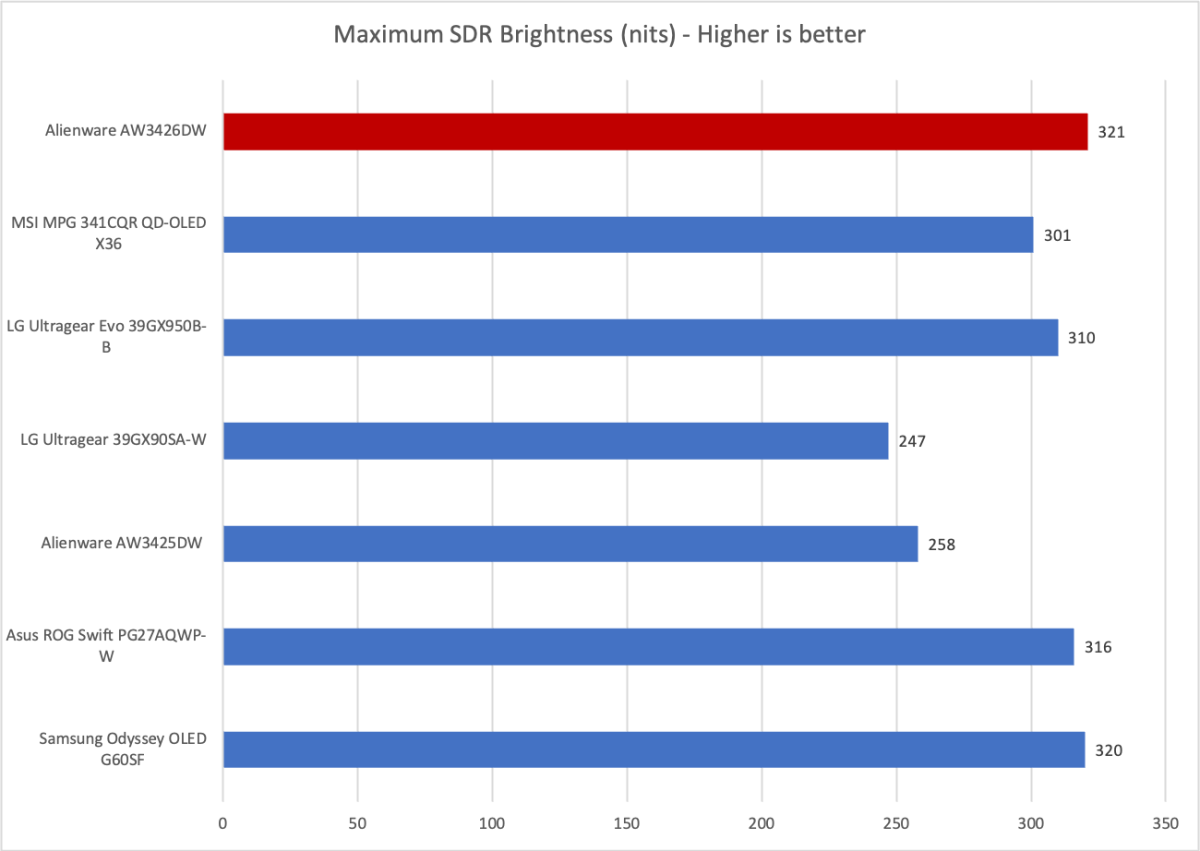
Alienware gets off to a strong start in brightness, as the AW3426DW provides a maximum sustained SDR brightness of 321 nits. As the graph shows, this is at the upper end of what current QD-OLED gaming monitors can provide.
The monitor has a glossy finish, however, so you can expect to see reflections if you use the monitor in a bright room. It won’t be an issue in many situations, but if you have a bright source of light near you, like a sunlit window, you’ll need to pull down a shade for an ideal experience.
Matthew Smith / Foundry
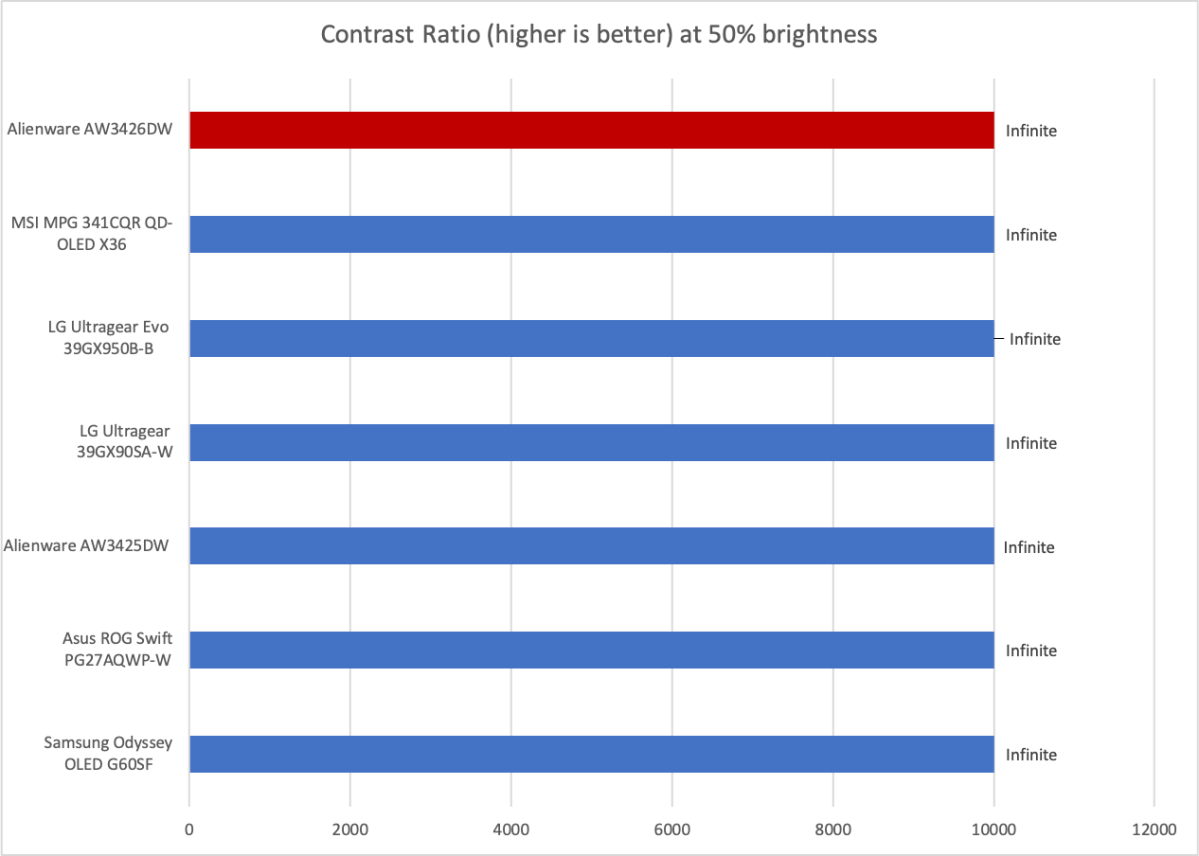
Contrast is a huge advantage for all OLED monitors. They can reach a minimum luminance of zero nits, which blows out the contrast ratio and provides a far more immersive and realistic image than a typical LCD display.
This is good news for the AW3426DW, which benefits from excellent contrast. However, the same is true for all similar OLED monitors, so this isn’t an advantage over Alienware’s competitors.
Matthew Smith / Foundry
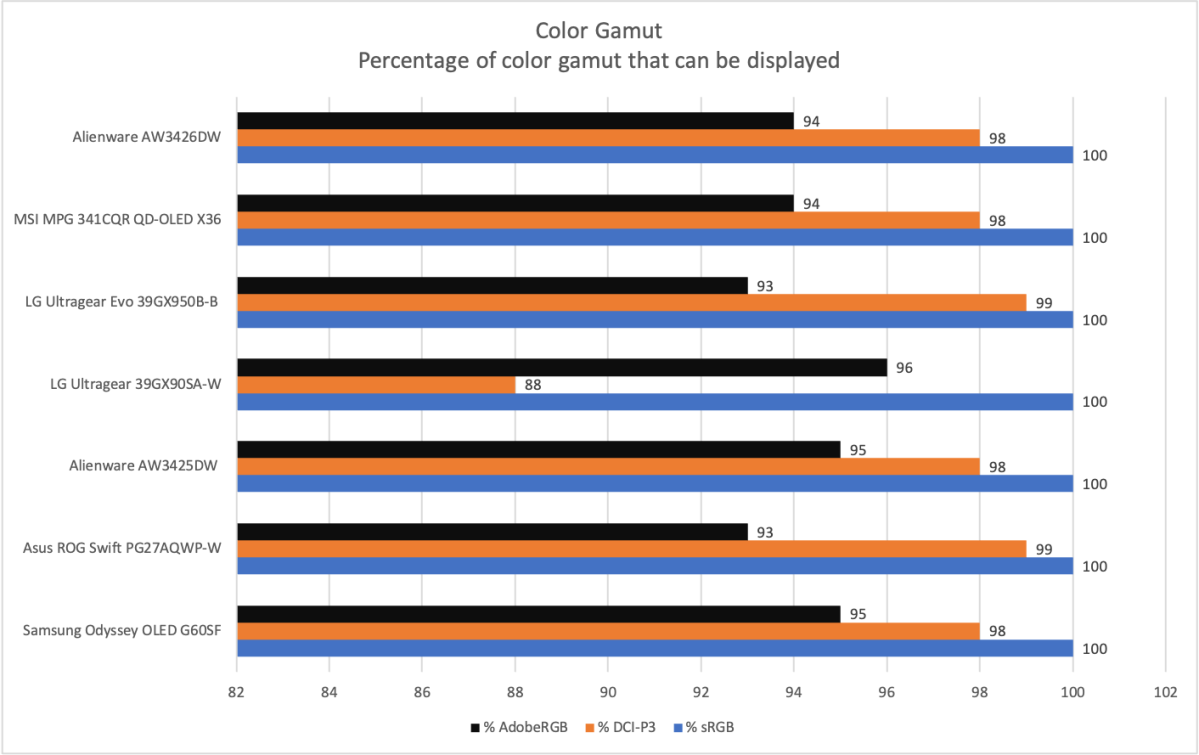
I can say the same for color gamut. While many QD-OLED monitors are available, they all use panels produced by Samsung. As a result, all QD-OLED monitors tend to cluster around similar color gamut results: usually 100 percent of sRGB, 98 percent of DCI-P3, and 93 to 95 percent of AdobeRGB. The AW3426DW is no different in this regard.
Still, a color gamut that spans 98 percent of DCI-P3 and 94 percent of AdobeRGB is excellent. It provides a vivid, saturated image in games and movies, and it’s sufficient for most creative work, too.
Matthew Smith / Foundry
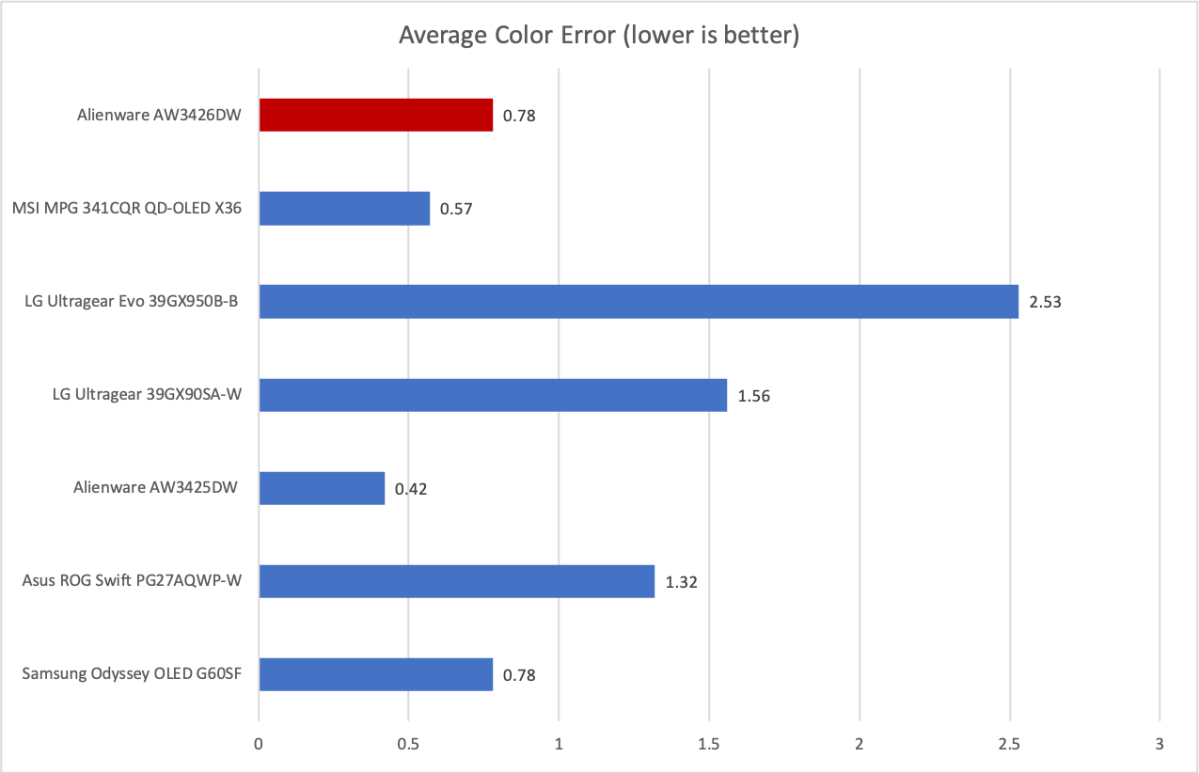
The Alienware AW3426DW also provides great color accuracy with an average color error of 0.78. Anything below a color error value of 1 is excellent, so yea, this is a tremendous result. It is not, however, much different from competitors. QD-OLED monitors are generally extremely good when it comes to color accuracy.
I measured a default color temperature of 6500K, which is right on target. I also measured a gamma curve of 2.3, which is a little off the target of 2.2, and means the image can look slightly darker than intended. It’s a small difference, however, and generally hard to notice.
Sharpness is mediocre. The AW3426DW has a native resolution of 3440×1440 on a 34-inch panel, which works out to a pixel density of about 110 pixels per inch. That’s not bad, but it’s not that high for a display in 2026. A 27-inch 4K display provides about 163 pixels per inch; a 15-inch 1080p display provides 146 pixels per inch.
Alienware AW3426DW HDR image quality
The Alienware AW3426DW supports HDR10 and also Dolby Vision. The latter is more unusual, and though I’d argue it’s not a huge deal for a PC monitor (as most sources will be HDR10) there are some console titles that support Dolby Vision.
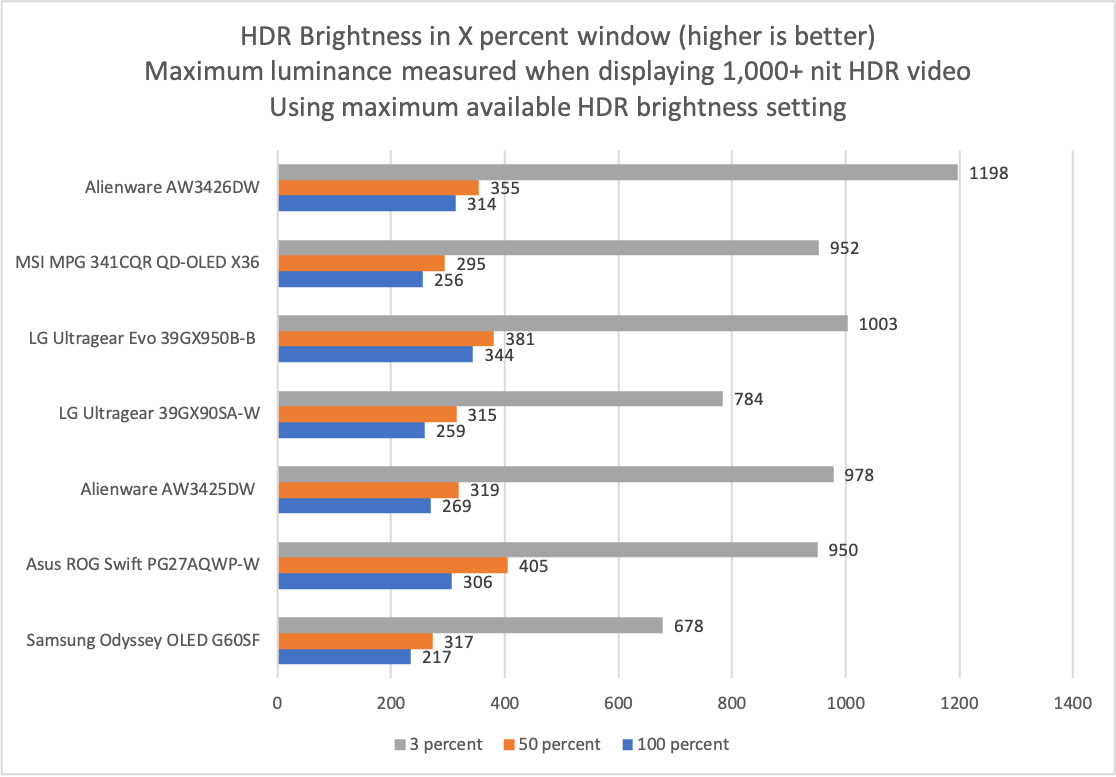
Alienware also boasts VESA DisplayHDR True Black 500 certification and has a peak claimed brightness up to 1,300 nits. I wasn’t able to push the AW3426DW to that level, but as the graph below shows, the AW3426DW’s HDR brightness is impressive and towards the top of the pack.
Matthew Smith / Foundry
The AW3426DW can reach a peak HDR brightness of up to 1,197 nits when a small portion of the display is lit. It also achieves better-than-average brightness when large portions of the display is lit. On the whole, then, it’s an extremely vivid HDR display and can show a lot of detail in brightly lit scenes.
True to the trend of cutting features, the AW3426DW doesn’t provide menu options to change the HDR brightness curve to your preferences, which is a little annoying. In some situations HDR can look too bright on a monitor, and it’s nice to have the option to tame brightness if desired.
Alienware AW3426DW motion performance
The Alienware AW3426DW has a maximum refresh rate of 280Hz. That’s not bad, of course, but it’s also not that impressive for a modern OLED monitor. Refresh rates have shot into the stratosphere recently: 360Hz is not hard to find, and some monitors go up to 500Hz or more, though usually not in an ultrawide format.
With that said, 280Hz is still an excellent refresh rate. If you’re coming from an older monitor with a 120Hz or (Gasp! Horror!) 60Hz refresh rate, well, you’re going to be shocked at how good the motion clarity looks. It’s also worth remembering that OLED provides low pixel response times, which reduces ghosting. As a result, an OLED like the AW3426DW will look sharper in motion than an LCD even at lower refresh rates.
While the AW3426DW’s refresh rate doesn’t set records, the monitor does provide adaptive sync and official support for VESA Adaptive Sync, G-Sync, and AMD FreeSync. So, adaptive sync should work with just about any PC that you have connected to the monitor.
Is the Alienware AW3426DW worth it?
Like other recent Alienware monitors, the AW3426DW isn’t all that impressive, but it is practical. The monitor largely lacks gee-whiz features that bolster its spec sheet. There’s no USB-C with DisplayPort and Power Delivery, no backlight strobing mode, and the refresh rate isn’t the highest.
However, the AW3426DW has a functional minimalist design, a five-layer tandem QD-OLED with great image quality, and it undercuts the alternatives on price with an MSRP of $799.99. So, if you want the latest QD-OLED panel at a more affordable price, the AW3426DW is hard to beat.


