At a glance
Expert’s Rating
Pros
- Great design offers dual-screen perks with few downsides
- Large and responsive touchpad
- Two gorgeous OLED displays
- Solid six-speaker sound system
- Long-lasting battery life in hybrid GPU mode
Cons
- Wired connectivity doesn’t include Ethernet
- Intel Core Ultra 9 386H offers modest multi-core performance
- Only 32GB of RAM and 1TB of solid state storage despite $5,000+ MSRP
Our Verdict
The ROG Zephyrus Duo successfully brings the dual-screen design of the Asus ZenBook Duo to a gaming laptop, though at a high price.
Price When Reviewed
This value will show the geolocated pricing text for product undefined
Best Pricing Today
Price When Reviewed
$5,499.99
Best Prices Today: Asus ROG Zephyrus Duo
Do you like having a screen on your laptop? Good news! The Asus ROG Zephyrus Duo has two of them! More is better, right?
Well, in this case… yes. More is definitely better. While most games don’t readily support display across multiple screens simultaneously, extra display space is always appreciated, especially if you often need to watch a guide or refer to external websites while playing (Path of Exile players, I’m looking at you).
The Asus ROG Zephyrus Duo isn’t just a gimmick, either. Instead, it’s a robust, attractive, and well-executed dual-screen laptop, though it does have a notable problem.
Asus ROG Zephyrus Duo: Specs and features as-tested
The first hint of the problem can be found in the specification sheet.
This laptop has Intel’s Core Ultra 9 386H. While this is part of Intel’s latest Panther Lake silicon, the CPU has only 16 cores, just four which are Performance cores. The laptop also has 32GB of RAM and a 1TB PCIe 5.0 solid state drive. Nvidia’s RTX 5090 graphics rounds out the configuration.
- Model: GX651
- CPU: Intel Core Ultra 9 386H
- Memory: 32GB LPDDR5X-8533
- Graphics/GPU: Nvidia GeForce RTX 5090
- NPU: Intel NPU up to 50 TOPS
- Display: Dual 16-inch 2880×1800 120Hz HDR OLED touchscreen
- Storage: 1TB PCIe 5.0 SSD
- Webcam and microphone: 1080p webcam with IR camera and privacy shutter, dual microphone array
- Connectivity: 2x Thunderbolt 4 / USB-C with DisplayPort 2.1 and Power Delivery, 2x USB-A 3.2 Gen 2, 1x HDMI 2.1, 1x SD card reader, 1x 3.5mm audio combo jack
- Networking: Wi-Fi 7, Bluetooth 6.0
- Biometrics: Windows Hello facial recognition
- Battery capacity: 90 watt-hours
- Dimensions: 13.98 x 9.69 x 0.78 inches
- Weight: 6.22 pounds
- Operating System: Windows 11 Home
- Price: $5,499.99 MSRP
The Asus ROG Zephyrus Duo that I tested was the premium configuration, which is priced at an eyebrow-raising $5,499.99 MSRP. I’ve reviewed laptops above $5,000 before, but they typically had 64GB of RAM and 2TB of storage (or more).
Asus also offers a $4,499.99 configuration with an Nvidia RTX 5070 Ti instead of the RTX 5090. The two configurations are otherwise identical.
Asus ROG Zephyrus Duo: Design and build quality
Foundry / Matthew Smith
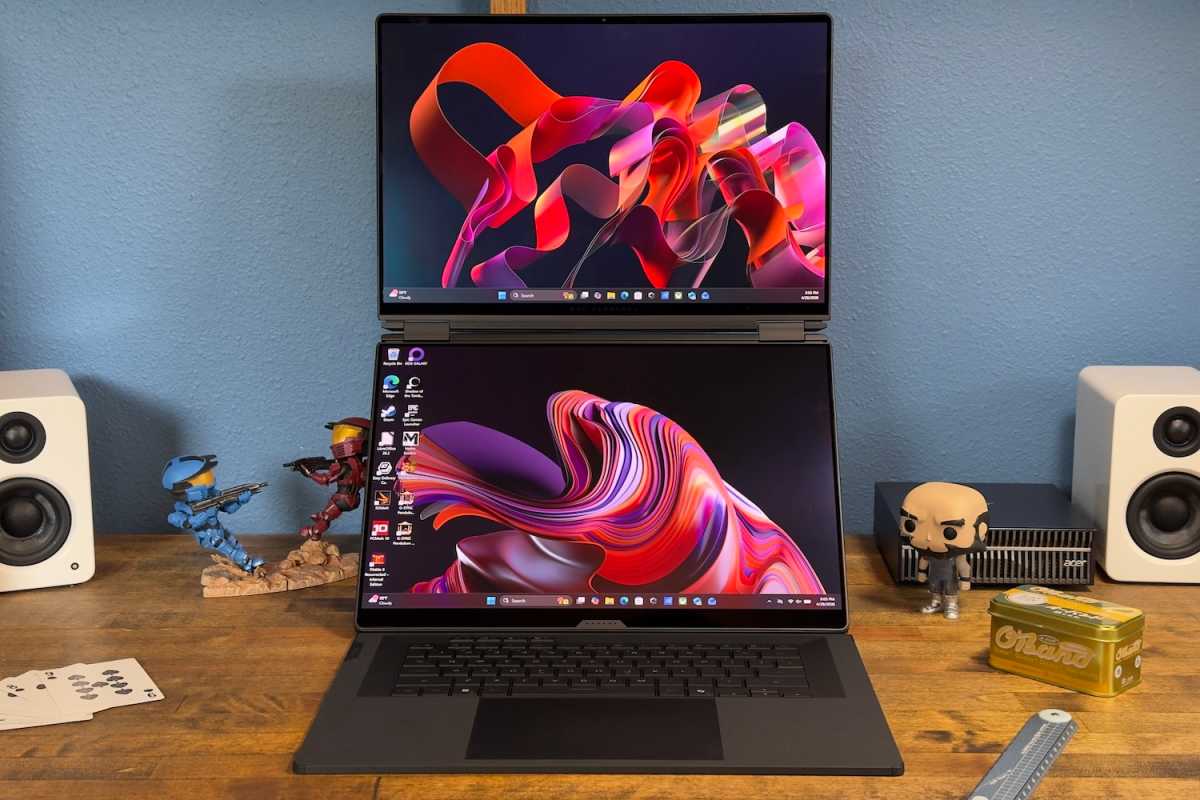
The Asus ROG Zephyrus Duo is a dual-screen laptop with two 16-inch displays. One is in the typical location, while the second is placed where you’d normally find the keyboard.
The laptop keyboard isn’t attached but instead removable. You can place it on top of the second display, in which case the ROG Zephyrus Duo will look like a normal laptop. Alternatively, you can detach the keyboard and use it wirelessly.
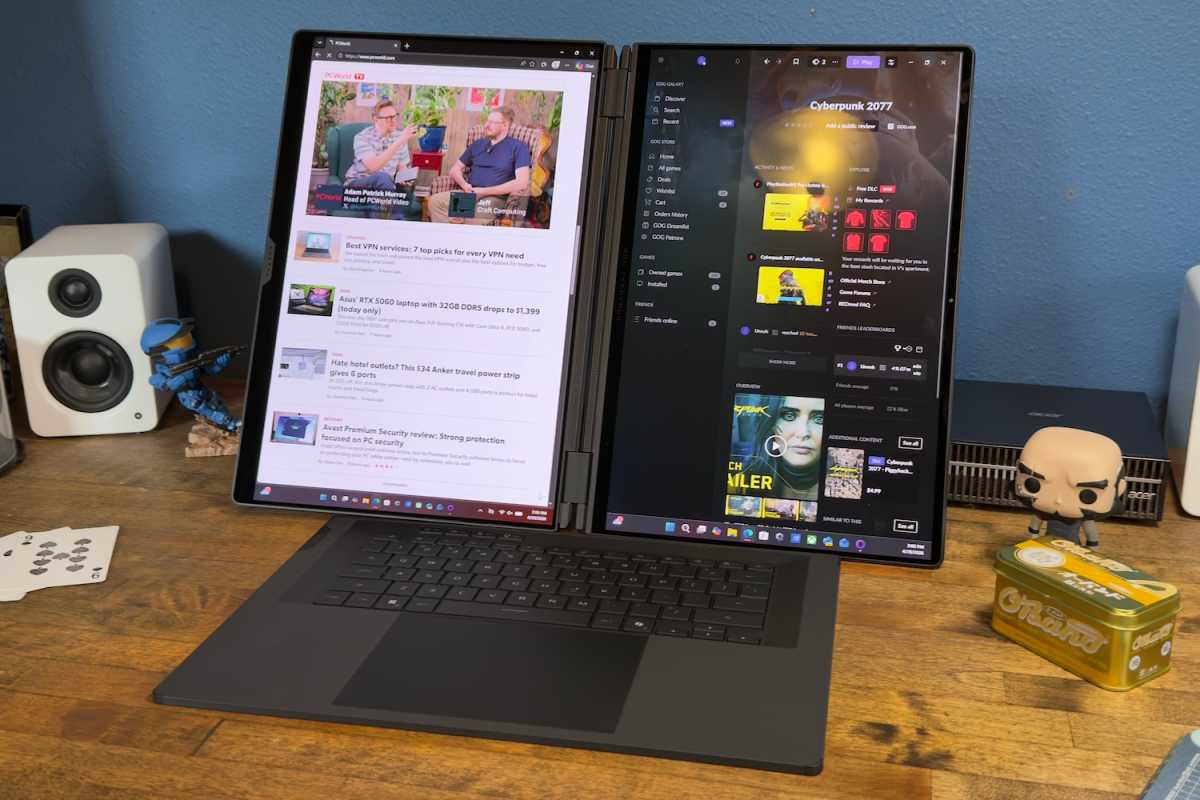
In that case, the ROG Zephyrus Duo is basically two OLED displays with a hinge in the middle, and works more like an all-in-one PC than a laptop. It even has a built-in kickstand that can support the displays as if the laptop is a giant portable monitor. The displays can be used in a stacked configuration (vertically, one above the other) or in a side-by-side configuration (horizontally, one display to the left and the other to the right).
But is it any good? The answer is a simple yes.
Indeed, you’d be hard-pressed to notice it’s a dual-screen laptop when the keyboard is placed over the second display. It looks and feels like a typical 16-inch gaming laptop. Once the keyboard is detached, though, the extra screen real estate is useful. The total display real estate is similar to a 24-inch or 25-inch monitor, albeit one with a permanent division down the middle.
This is not quite as helpful for gaming as for productivity, as most games are not designed to be displayed on multiple screens at once. With that said, I think a lot of gamers will like to play in the stacked configuration, with one display positioned above the other. A game can be played on one display while a written guide or YouTube video is visible on the other. Many modern games benefit from quick access to online guides, and the ROG Zephyrus is ideal for these titles.
Unique dual-screen design aside, the ROG Zephyrus Duo would be a well-built laptop even if it didn’t have a second screen. It actually feels more rigid and premium than most premium 16-inch gaming laptops. The laptop is a bit thick at eight-tenths of an inch, and it tips the scales at 6.22 pounds, but these figures aren’t much different from 16-inch laptops that lack a second display.
Asus ROG Zephyrus Duo: Keyboard, touchpad
Foundry / Matthew Smith
The Asus ROG Zephyrus Duo ships with a detachable keyboard and touchpad. It’s a single unit built to exactly match the laptop’s interior dimensions, and it succeeds. In fact, people who don’t know the keyboard is removable probably won’t think to try it. The keyboard is kept firmly in place with magnets; it doesn’t budge or wobble when typing on the laptop or picking it up.
Perhaps the only giveaway is the keyboard’s feel. It offers a good amount of key travel (1.7 millimeters), and keys activate with a smooth action, but the keys have less tactile feel than I’d prefer. I’m picking nits here, though. It’s an enjoyable keyboard overall and I didn’t have any problem typing accurately.
The keyboard is wireless and therefore has a battery. Charging can happen over USB-C or via a connector on the bezel of the second display, which automatically charges the keyboard whenever it’s attached to the ROG Zephyrus Duo. Though meant for use with the Asus ROG Zephyrus Duo, the keyboard uses Bluetooth, and it’s possible to pair it with other devices. RGB-LED keyboard backlighting is included and the backlight can be customized through Asus’ built-in software.
The included touchpad measures almost six inches wide and nearly four inches deep. It also provides a physical click action which, though shallow, is noticeable. While competitors like the Razer Blade 16 have an ever-so-slightly larger touchpad, the ROG Zephyrus Duo’s touchpad is large and ranks among the laptop’s best features. It feels responsive and provides a lot of space for executing multi-touch gestures.
Asus ROG Zephyrus Duo: Display, audio
Foundry / Matthew Smith
As mentioned, the Asus ROG Zephyrus Duo has not one but two 16-inch displays. Both are OLED touchscreens with 2880×1800 resolution, a refresh rate of up to 120Hz, and HDR support.
They’re beautiful. OLED display technology provides outstanding contrast, vivid color, and deep black levels, all of which makes for a tremendously alluring image. And while the displays lack 4K resolution, they still provide an ultra-sharp pixel density of 212 pixels per inch. That’s much sharper than a 27-inch 4K monitor, which has about 163 pixels per inch.
It’s not quite as helpful for gaming as for productivity, but having a second screen available is handy if you need to reference a guide or video while playing.
Brightness can be a problem for some OLED laptops, but it’s less of an issue here. The displays can exceed 400 nits in SDR. They’re also VESA DisplayHDR True Black 1000 Certified, which means they can exceed 1,000 nits in HDR, though only in specific circumstances, such as when displaying small bright objects in a dark scene.
G-Sync is supported, though only on the “main” display, which is the display that is visible when using the laptop in traditional clamshell mode. That’s good, but I would’ve liked to see G-Sync available on both displays.
Foundry / Matthew Smith
The displays are also very glossy. That in turn can make the displays difficult to view in bright rooms or outdoors, even with the display brightness turned up to its maximum. This, however, is also true of most laptops with an OLED display.
Audio is delivered by a six-speaker system with two tweeters and four woofers, and it has the goods. The laptop provides plenty of volume and a clear sound stage that never seems overwhelmed or bogged down by bass-heavy tracks or explosions in action scenes. While high-quality external speakers will still be preferable, the speakers are better than average, and I expect some owners will think the included audio is good enough.
Asus ROG Zephyrus Duo: Webcam, microphone, biometrics
A 1080p webcam lurks in the thin bezel above the Asus ROG Zephyrus Duo’s upper display. The camera field-of-view is extremely wide by default, so you’ll probably want to crop the video or use an auto-framing feature (which effectively reduces the resolution).
Audio is recorded via a dual-microphone array also crammed into the upper display’s top bezel. It has great audio capture, though it still suffers the hollow quality common to a laptop microphone.
Biometric login is provided thanks to an IR camera that supports Windows Hello facial recognition. This method of login is quick, reliable, and works even in a dark room.
While the Asus ROG Zephyrus Duo’s webcam and microphone setup is solid, it’s nothing special. Most modern Windows laptops now offer a 1080p webcam and dual array microphone.
Asus ROG Zephyrus Duo: Connectivity
The Asus ROG Zephyrus Duo has two Thunderbolt 4 ports. Each of these also support DisplayPort 2.1 for video output and Power Delivery 3.0 up to 100 watts. That means the ports can be used to charge the laptop, or to provide small amounts of power to other devices. Note, though, that the ports don’t provide enough power to fully power the laptop, which ships with a 300-watt power adapter.
The laptop also has two USB-A ports with support for USB 3.2 and data speeds up to 10Gbps. Additional connectivity includes HDMI 2.1, an SD card reader, and a 3.5mm combo audio jack.
One port that’s notably absent is wired Ethernet. Although it’s becoming less common with each passing year, Ethernet is still available on many 16-inch gaming laptops, including budget machines.
The ROG Zephyrus Duo’s connectivity offers a wide range of options, but all the ports are found on the device’s flanks. This is a consequence of the dual-screen design, as there’s no way to place ports on the laptop’s rear without blocking them in some use cases. Asus places the ports on the rear of each flank, at least, which mitigates cable clutter as much as possible.
Wireless connectivity is strong, as the ROG Zephyrus Duo has Wi-Fi 7 and Bluetooth 6.0. These are the latest versions of each standard. These standards aren’t uncommon among high-end gaming laptops but it’s good to see them included.
Asus ROG Zephyrus Duo: Performance
The Asus ROG Zephyrus Duo is rather interesting from a hardware perspective. That’s because it pairs Intel’s Core Ultra 9 386H with an Nvidia GeForce RTX 5090.
The Nvidia GPU is of course a known quantity at this point, but the Core Ultra 9 386H is a new chip. It provides 16 CPU cores (four performance cores, eight efficient cores, and four low-power efficient cores). However, it has a miserly maximum Turbo power draw of 80 watts, and a maximum Turbo clock speed of 4.9GHz. For comparison, an Intel Core Ultra 9 285HX has a maximum Turbo power draw of 160 watts and can clock up to 5.5GHz.
Asus supports the CPU and GPU with 32GB of LPDDR5X-8533 of RAM and a 1TB PCIe 5.0 solid state drive. If 32GB of RAM and 1TB of storage seems a bit slim for a laptop with an MSRP north of $5,000, I agree. In 2024 I reviewed an MSI Titan 18 HX that had 128GB of RAM and 4TB of storage at $5,399! While it’s tempting to blame this on the ROG Zephyrus Duo’s unusual dual-screen design, the broader RAM and storage pricing crisis no doubt contributes to the problem.
Note: I tested the laptop in Turbo mode for performance benchmarks, and Silent mode in battery benchmarks, with the Hybrid GPU mode engaged in all cases. Asus does include a manual mode that allows some additional customization, including additional graphics power.
Foundry / Matthew Smith
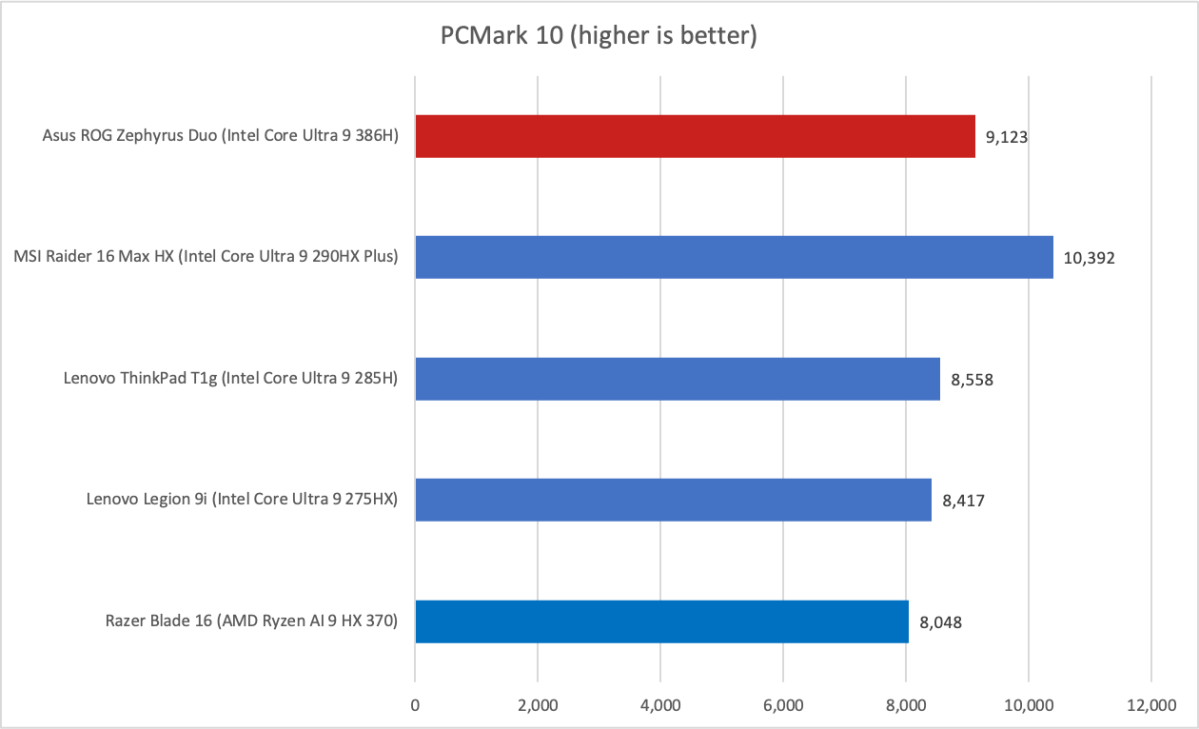
First up is PCMark 10, a holistic system benchmark, and it proves to be favorable for the Asus ROG Zephyrus Duo. While the CPU isn’t remarkable in terms of its multi-core performance, it still has a lot of cores and good clock speeds. More importantly, it’s paired with fast RAM, a fast solid state drive, and a fast GPU, all of which help the Asus ROG Zephyrus Duo top a PCMark 10 score of 9,123.
Foundry / Matthew Smith
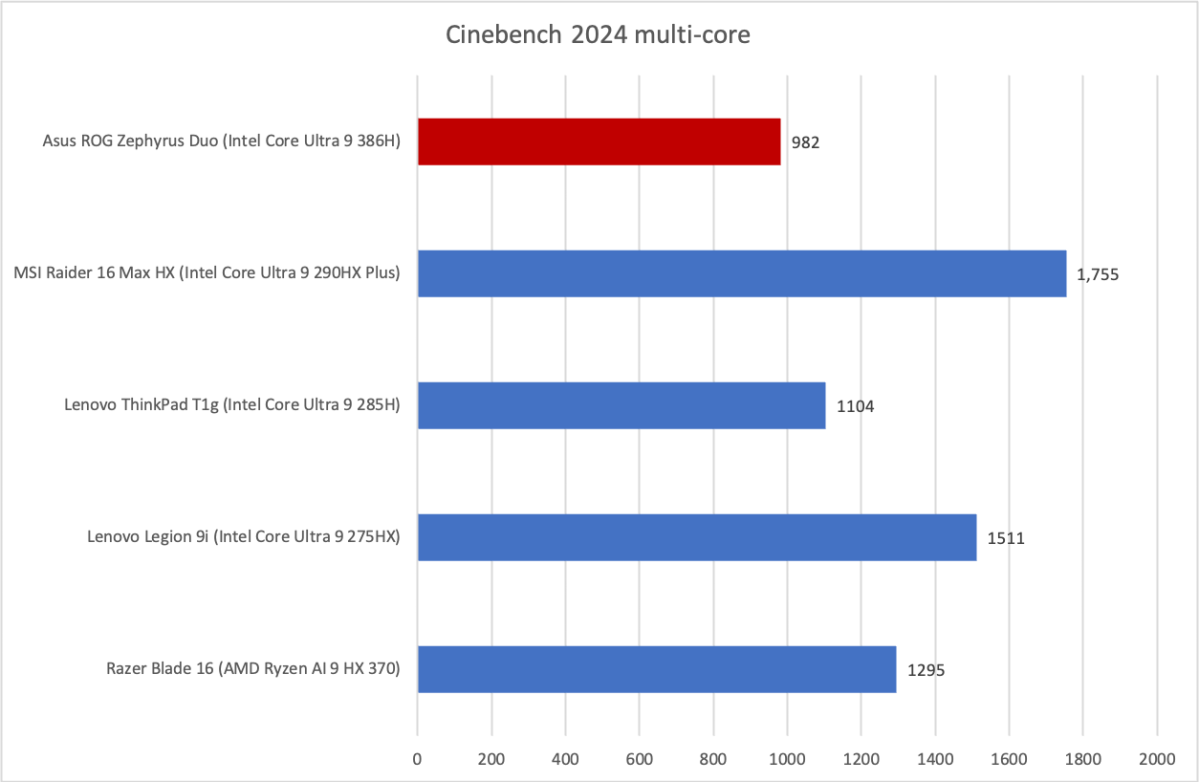
Moving on to Cinebench 2024, a heavily multi-threaded CPU benchmark, we see the narrative take a less favorable turn for the ROG Zephyrus Duo.
While the Intel Core Ultra 9 386H has 16 cores, only four of those are Performance cores. That puts the Zephyrus Duo in an uncomfortable position, because comparably priced gaming laptops usually have Intel Core Ultra 9 285 or 290H processors—or AMD’s Ryzen AI 9. All of those have more CPU cores and/or more high-performance cores. The end result is that the Intel Core Ultra 9 386H can’t keep up.
Foundry / Matthew Smith
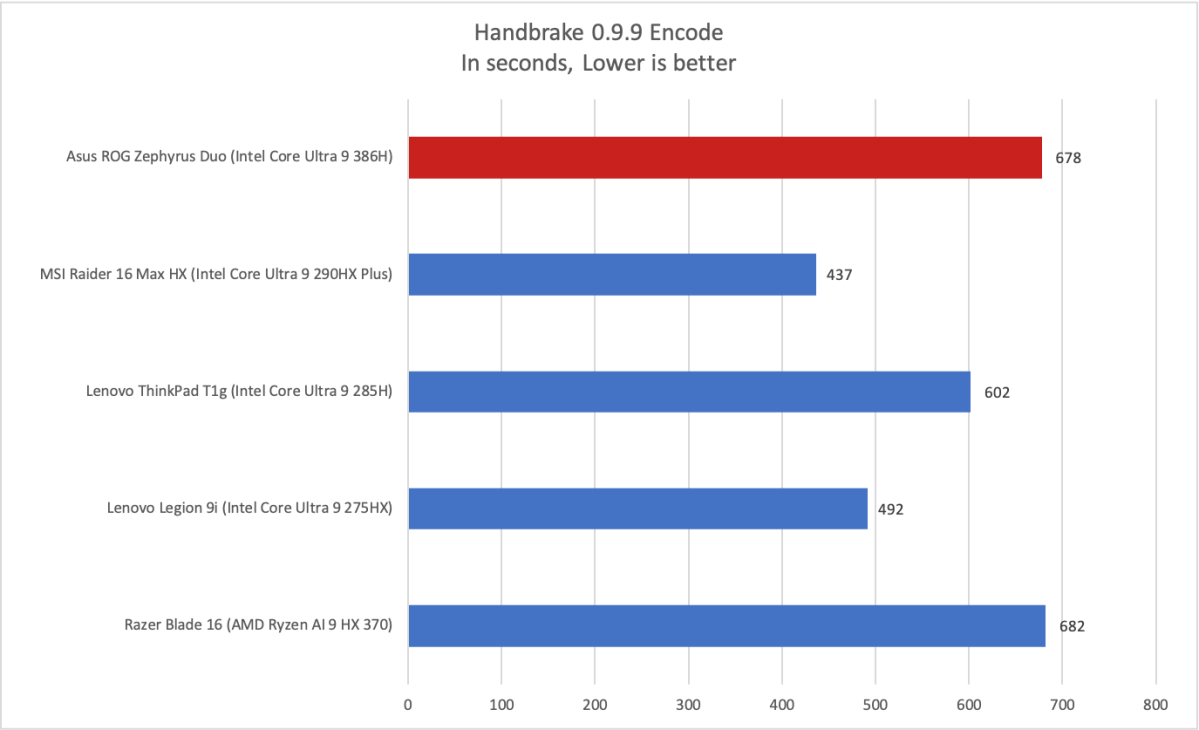
It’s a somewhat similar story in Handbrake, another heavily multi-threaded CPU benchmark. In this case, however, the gap between the ROG Zephyrus Duo and its competitors is much tighter. The ROG Zephyrus Duo with Intel Core Ultra 9 386H even managed a tiny win over the Razer Blade 16 with an AMD Ryzen AI 9 HX 370.
These benchmarks point out the ROG Zephyrus Duo’s biggest flaw. The Intel Core Ultra 9 386H can’t keep up with the types of CPUs typically found in comparably priced gaming laptops, including Intel’s own Core Ultra 275HX/285HX/290HX hardware.
Foundry / Matthew Smith
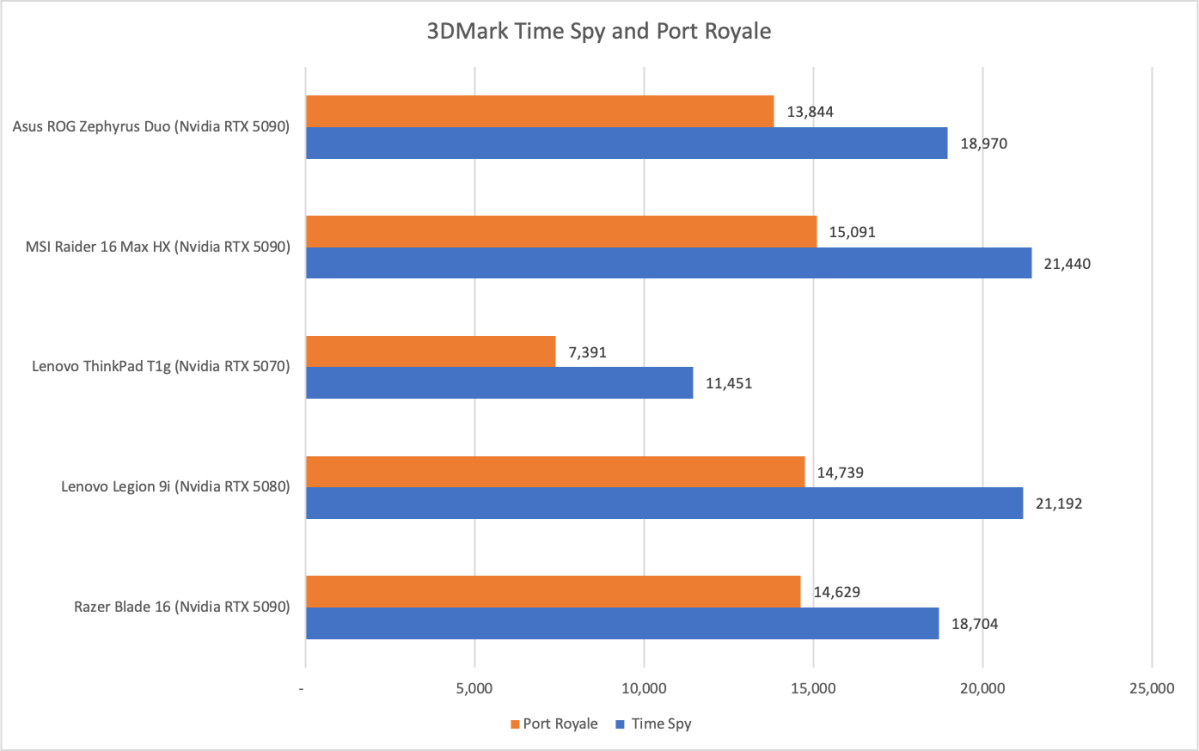
Now we move on to 3DMark, where we see the Asus ROG Zephyrus Duo with Nvidia RTX 5090 post a Time Spy score of 18,970 and a Port Royale score of 13,844. As the graph shows, these are high scores but towards the lower end of what should be expected from an Nvidia RTX 5090.
Once again, available power is a concern, as the RTX 5090 in the Asus ROG Zephyrus Duo has a maximum graphics power of 150 watts. Some high-end gaming laptops deliver up to 175 watts.
Foundry / Matthew Smith
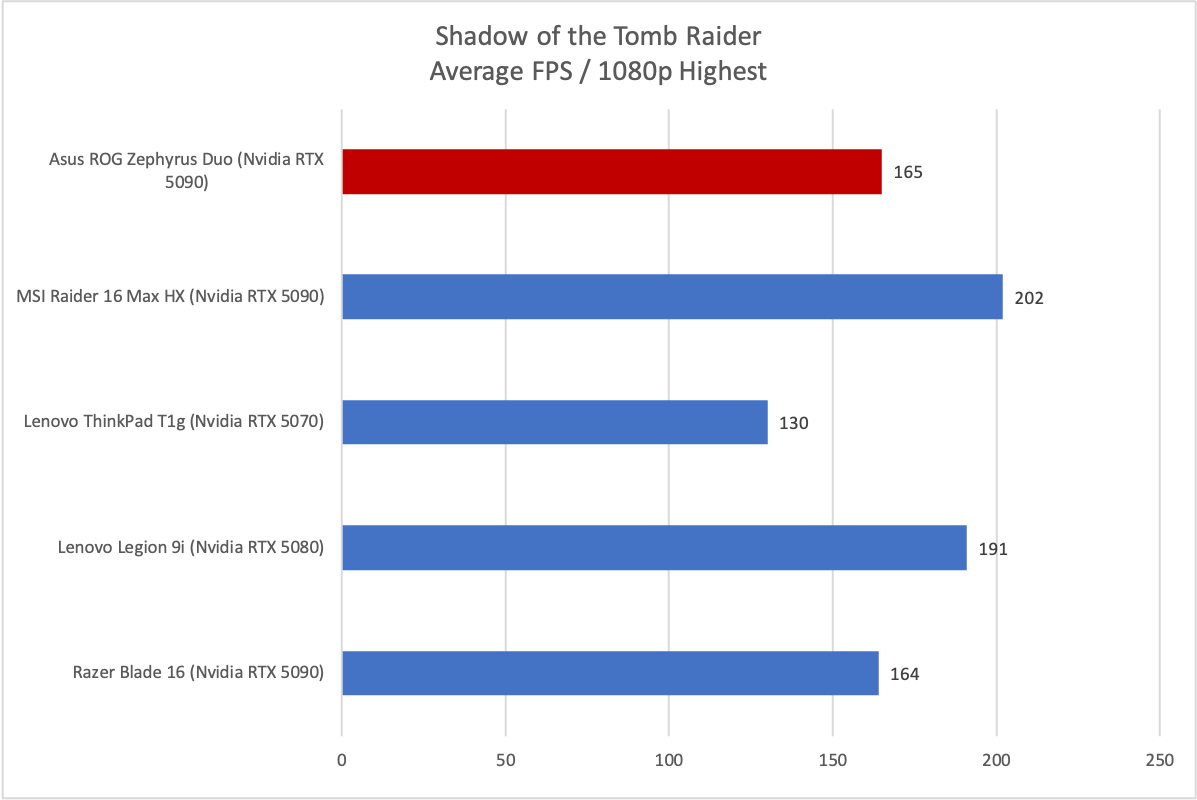
Shadow of the Tomb Raider also shows the limits of performance. The game hit an average of 165 frames per second at 1080p resolution and Highest detail. That’s not a bad result, and basically ties the Razer Blade 16 with Nvidia RTX 5090. However, gaming laptops with more powerful CPUs, as well as more available graphics power for the RTX 5090 GPU, can achieve better results. Even the Lenovo Legion 9i averaged a higher framerate, though it “only” has an RTX 5080.
Foundry / Matthew Smith
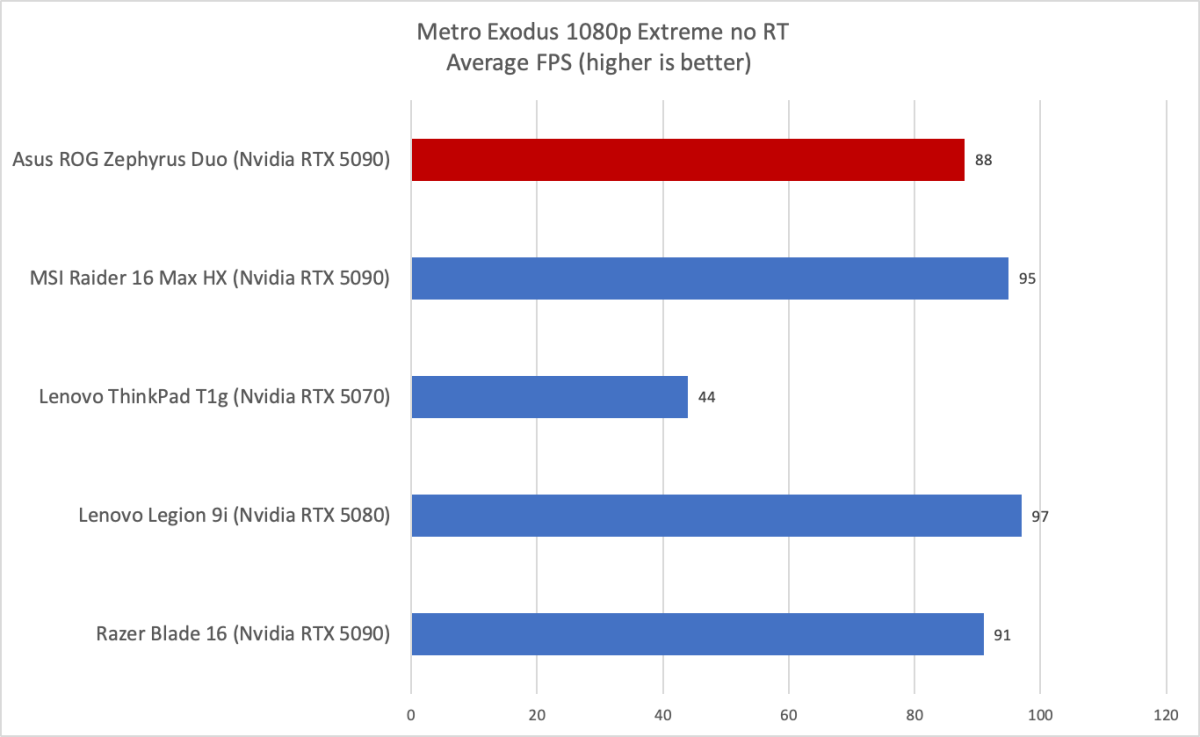
It’s a similar though slightly worse story in Metro Exodus, which we test at 1080p and Extreme detail, though with ray tracing turned off. This is a CPU heavy graphics test, so it’s not a surprise to see the ROG Zephyrus Duo lag the field.
Foundry / Matthew Smith
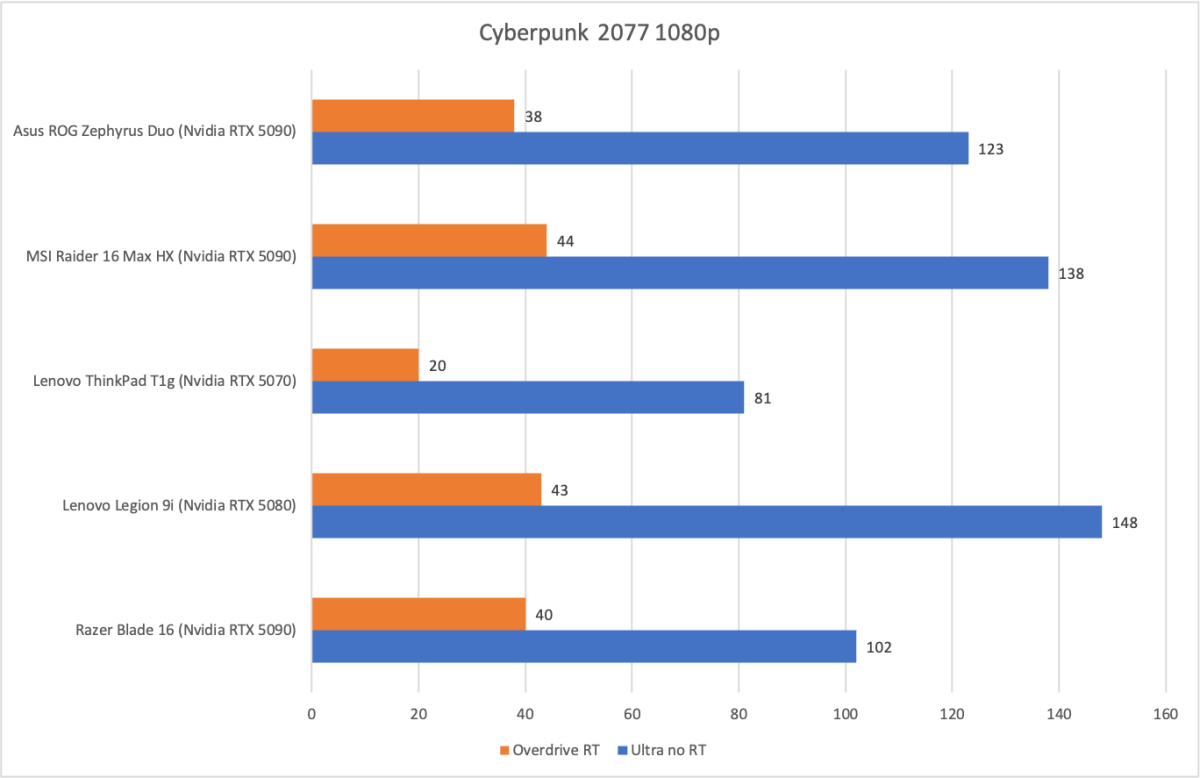
The story is slightly better in Cyberpunk 2077, which we test at 1080p at both the Ultra preset and the Overdrive ray-traced preset. This benchmark sees the performance of the ROG Zephyrus Duo return to competition with the Razer Blade 16 (2025). However, the Lenovo Legion 9i and MSI Raider 16 Max HX still have a significant advantage.
This makes for a clear verdict. The Asus ROG Zephyrus Duo is not as quick as it should be given its $5,000+ MSRP. Asus clearly leaned towards a more portable, power efficient machine instead of one that goes all-out on performance, and that has consequences.
This is not to say the ROG Zephyrus Duo is slow—its deficient only in comparison to laptops like the MSI Raider 16 Max HX and Lenovo Legion 9i, which rank among the quickest we’ve tested. Still, if performance-per-dollar is your priority, the ROG Zephyrus Duo might not be for you.
Asus ROG Zephyrus Duo: Battery life and portability
The Asus ROG Zephyrus Duo has a 90 watt-hour battery. That’s large, but a bit less than the 99 watt-hour maximum battery size that’s allowed on passenger flights, and is the usual effective cap for a laptop. Asus combats that with effective battery management, and the results are impressive.
Foundry / Matthew Smith
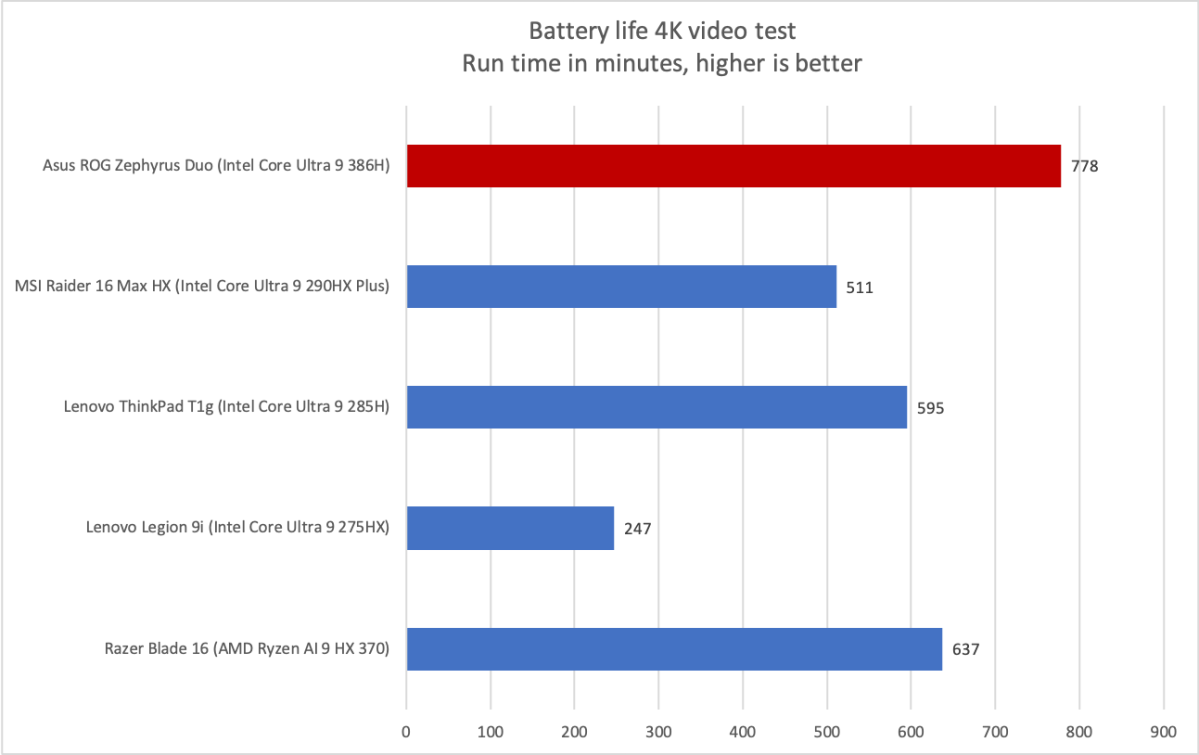
To my surprise, the Asus ROG Zephyrus Duo was able to endure PCWorld’s standard battery test, which loops a 4K clip of the short film Tears of Steel, for almost 13 hours. This figure was produced with one display active and the discrete GPU in hybrid mode, meaning it can be used but is turned off when not required.
Asus’ software deserves a lot of credit for this result. I received notifications when I was on battery power and an application was using the GPU in the background. Asus’ software also provides a button to terminate all applications using the GPU. That made it obvious which apps should be closed to prevent excessive battery drain.
Using both displays has only a moderate impact on battery life. Repeating the battery test with both screens active drained the battery dry in just over 11 hours. The exact battery life reduction was 100 minutes for the dual-screen mode vs. the single-screen mode. That still leaves the Asus ROG Zephyrus Duo with above-average battery life for its category.
Though these results are excellent, potential owners should remember that it’s possible to drain the battery much more quickly. Battery life of one to two hours should be expected if you try to play a game with the laptop in a high-performance profile. My testing was conducted in Silent mode with the Hybrid GPU mode.
That’s true for all laptops with a powerful CPU and GPU, however, and the Asus ROG Zephyrus Duo’s overall battery life performance is outstanding for a laptop in its category.
Asus ROG Zephyrus Duo: Conclusion
The Asus ROG Zephyrus Duo successfully brings the dual-screen formula that works for its mid-range ZenBook Duo to a high-end gaming laptop. It’s not quite as useful for gaming as it is for productivity, but having a second screen available is handy if you need to reference a guide or video while playing. And while the ROG Zephyrus Duo is primarily a gaming laptop, it’s also a solid choice for general productivity, in which case the dual-screen design is a major advantage.
There is a trade-off, however, and that’s the performance-per-dollar Asus can offer. The ROG Zephyrus Duo uses an Intel Core Ultra 9 386H processor with 16 cores. Only four of those are performance cores, and that has consequences for the laptop’s multi-core CPU performance. While it’s hardly slow, the Asus ROG Zephyrus Duo is behind a laptop like the MSI Raider 16 Max HX, which has the 24-core Intel Core Ultra 9 290HX Plus.
Fortunately for Asus, the ROG Zephyrus Duo strikes back with several excellent features. It has a large touchpad, a great sound system, two gorgeous OLED displays, and long battery life (so long as the discrete GPU is not engaged). These perks will help some shoppers overlook the Core Ultra 9 386H’s modest scores in multi-threaded benchmarks.


