At a glance
Expert’s Rating
Pros
- Sharp OLED touchscreen with 120Hz refresh rate
- Healthy amount of RAM and storage for the price
- Wide range of physical connectivity
- Good integrated GPU performance
Cons
- Boring design
- Supports table mode, but too heavy for frequent use
- CPU performance doesn’t stand out
- Battery life is just average for the category
Our Verdict
The Asus Vivobook 16 Flip’s yawn-worthy design is countered by well-rounded performance and a 16-inch 120Hz OLED touchscreen.
Price When Reviewed
This value will show the geolocated pricing text for product undefined
Best Pricing Today
Price When Reviewed
$1,349.99
Best Prices Today: Asus Vivobook 16 Flip
Windows 2-in-1s just aren’t what they used to be—though, arguably, that’s probably for the best. Instead of tiny thin-and-lights with displays sized for a child, we now get 2-in-1s like the Asus Vivobook 16 Flip, which has a 16-inch OLED touchscreen. It’s definitely not an iPad alternative, but it’s a versatile Windows machine with solid performance.
Asus Vivobook 16 Flip: Specs and features as-tested
The Asus Vivobook 16 Flip I received for review is the maxed-out configuration, which is available from Costco at $1,249.99. It has an Intel Core Ultra 7 258V octo-core processor, 32GB of RAM, and 1TB of storage, as well as a 16-inch OLED touchscreen. While none of these specifications are remarkable on their own, they represent good value at the $1,249.99 price point.
- Model number: TP3607
- CPU: Intel Core Ultra 7 258V
- Memory: 32GB LPDDR5x-8533
- Graphics/GPU: Intel Arc 140V
- NPU: Up to 47 TOPS
- Display: 16-inch 2880×1800 OLED 120Hz touchscreen
- Storage: 1TB M.2 PCIe 4.0 solid state drive
- Webcam and microphone: 1080p with dual microphone array and physical privacy shutter
- Connectivity: 1x USB-C 3.2 Gen 2 with DisplayPort and Power Delivery and up to 20Gbps data, 1x Thunderbolt 4 with DisplayPort and Power Delivery and up to 40Gbps data, 1x USB-A 3.2 Gen 1, 1x HDMI 2.1, 1x 3.5mm, MicroSD card reader
- Networking: Wi-Fi 7, Bluetooth 5.4
- Biometrics: None
- Battery capacity: 75 watt-hours
- Dimensions: 13.98 x 9.62 x 0.69 inches
- Weight: 3.97 pounds
- Operating System: Windows 11 Home
- Price: $1,349.99 MSRP / $1,249.99 typical retail from Costco
Asus also offers a less expensive model with an Intel Core Ultra 7 256V, 16GB of memory, and 512GB of storage. That model retails for $1,049.99 from Asus and is currently $1,019.99 on Amazon.
I think you should spring for the more expensive configuration if you can swing it. Getting twice as much RAM and storage, plus a processor upgrade, is good value in return for an extra $200 to $230.
Asus Vivobook 16 Flip: Design and build quality
Foundry / Matthew Smith
The Asus Vivobook 16 Flip’s design makes a modest first impression. It’s a slab of metallic silver-gray material with minimal branding and no flair.
This, of course, is also true of many mid-range laptops. But there’s definitely something about the Vivobook 16 Flip’s design that screams “budget!” to me. I think it’s the bottom of the laptop, which is adorned with large ridged fan vents and rubber feet. It’s a serviceable design but not one that stands out.
Build quality is the same story. The laptop feels solid and doesn’t allow much flex in typical laptop use. However, picking up the laptop from a corner flexes the chassis enough to cause a couple disconcerting creaks and groans. That contributes to the Vivobook 16 Flip’s budget feel.
As the name implies, the Vivobook 16 Flip is a 2-in-1 with a 360 display that can rotate (or flip) so that the display is flush with the bottom of the laptop, effectively converting it into a tablet. This is a 16-inch machine that weighs in at nearly four pounds, and while that’s light for a laptop of this size, it’s still heavy enough to make tablet use awkward.
I find the rotating hinge more useful when the laptop is in “tent” mode on a desk. This places the touchscreen at your fingertips, while the keyboard rotates back to become a stand. It’s a nice option if you want to watch Netflix or YouTube.
Asus Vivobook 16 Flip: Keyboard, trackpad, mouse

Foundry / Matthew Smith
A spacious keyboard with numpad spans the Asus Vivobook 16 Flip’s interior. The primary alphanumeric keys are large and well positioned. Only the left-side Tab, Caps, and Ctrl keys are a little undersized—and even then, no more so than other laptops. The numpad keys aren’t full-sized but larger than most 16-inch laptops that squeeze in a numpad.
Key feel is mediocre but good enough. The keys have good travel and a decent bottoming action, but the keyboard is quiet and lacks a sense of tactile feedback. That is not my preference, but people who want a smooth and quiet typing experience will like it. White LED keyboard backlighting is standard, which is typical for a laptop sold above $1,000.
The inclusion of a numpad means the primary alphanumeric keys are shifted to the left, and the touchpad also shifts left to keep itself centered under the spacebar.
I like the touchpad. It’s large, at roughly six inches wide and four inches deep, and provides a smooth, responsive touchpad surface with good palm rejection. There’s plenty of room to execute Windows’ more elaborate multi-touch gestures, like the five-finger pinch-to-minimize. But many 16-inch laptops, from the more expensive Lenovo Yoga Pro 9i 16 to the budget Acer Aspire 16 AI, have similar touchpads.
Asus Vivobook 16 Flip: Display, audio

Foundry / Matthew Smith
The Asus Vivobook 16 Flip has an OLED touchscreen with 2880×1800 resolution, a 16:10 aspect ratio, and a 120Hz refresh rate.
It’s a wonderful display with great sharpness, deep contrast, vibrant color, and good motion clarity thanks to the high refresh rate. Even the brightness is decent with an HDR maximum of 500 nits and, in my testing, an SDR maximum of about 400 nits.
My nitpick is with the glossy finish. It’s glossy, and while the display is bright for OLED glare can be an issue if you’re near a sunlit window. But this is a common problem for many OLED laptops, so while it’s an annoyance, it’s not a disadvantage.
That cuts both ways, though. The OLED panel, while fantastic, is identical to the OLED panels found on many other 16-inch laptops, such as the Lenovo Yoga Pro 9i 16. The Vivobook 16 Flip is inexpensive for a 16-inch laptop with an OLED touchscreen, at least.
The speakers offer good volume and a rich, robust sound at lower volumes, which can prove genuinely enjoyable for chill beats or less demanding gaming. However, at higher volumes the sound can become muddy and imprecise. Most competitors have the same issues, though more expensive competitors like Lenovo’s Yoga Pro 9i and Apple’s MacBook Pro have a serious advantage in audio performance.
Asus Vivobook 16 Flip: Webcam, microphone, biometrics
You’ll find a 1080p webcam stuffed into the display’s top bezel. It provides decent sharpness and color but can look grainy in dark lighting. I also noticed the default field-of-view is wide, which means you’ll look small in the frame, which often isn’t ideal for video calls. You can counter that with zoom, but doing that will reduce the effective resolution.
I had no problem with the dual microphone array. It picked up my voice without issue and was able to cancel out the sound of a space heater in my room. Louder and more abrupt noises, like a barking dog, may make it through the noise cancellation.
Biometric login is not supported, which is a bit unusual for a Windows laptop above $1,000. Many competitors have either an IR camera for facial recognition or a fingerprint reader (and sometimes both), but neither is included here.
Asus Vivobook 16 Flip: Connectivity
Foundry / Matthew Smith
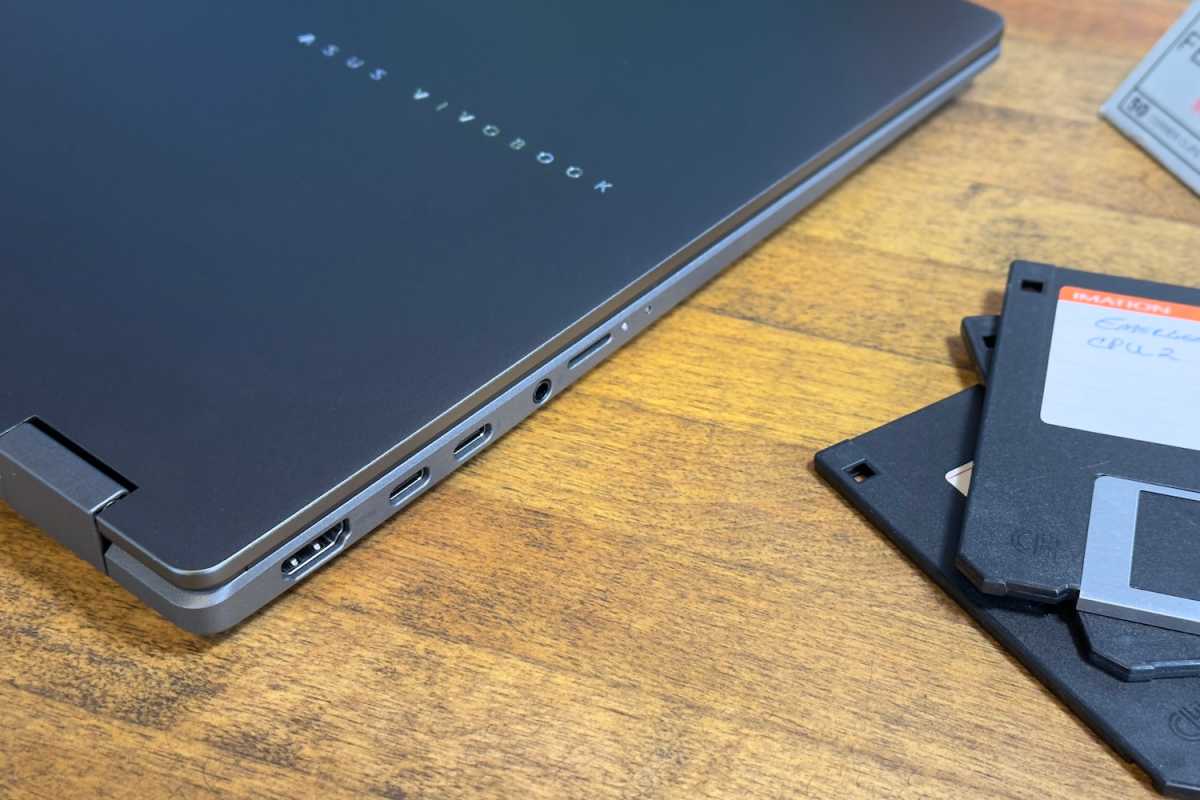
Asus provides a good mix of physical connectivity on the Asus Vivobook 16 Flip. It has a Thunderbolt 4 port and a USB-C 3.2 Gen 2 port, both with DisplayPort and Power Delivery. That means both can be used to connect displays or charge the laptop.
There’s also a single USB-A 3.2 Gen 1 port. Additional connectivity includes an HDMI 2.1 port, a MicroSD card reader, and a 3.5mm audio jack.
This is a good, though not remarkable range of connectivity. Most competitive laptops have a similar number of USB-C ports and at least one USB-A. Perhaps counterintuitively, you’re actually more likely to see laptops and 2-in-1s above $2,000 ditch USB-A and HDMI, while competitors in the Vivobook 16 Flip’s price range are more likely to have these ports.
Wireless connectivity covers the bases, too, with Wi-Fi 7 and Bluetooth 5.4. These are the latest versions of each wireless standard, though most laptops in this price range provide the same support.
Asus Vivobook 16 Flip: Performance
The Asus Vivobook 16 Flip that I reviewed had the Intel Core Ultra 7 258V. It’s an eight-core CPU with a maximum clock speed of 4.8GHz, four performance cores, and four low-power efficient cores. It also provides a robust version of Intel’s Arc 140V integrated graphics. The Intel chip was paired with a healthy 32GB of memory and 1TB of solid state storage.
Foundry / Matthew Smith
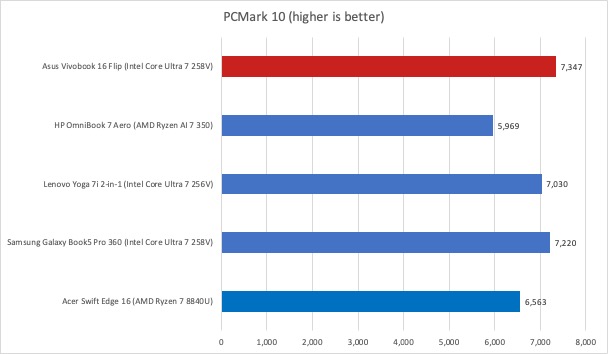
The Asus Vivobook 16 Flip gets off to a strong start in PCMark 10, a holistic system benchmark. This test tends to favor heavily multi-threaded CPU performance a bit less and does benefit from a GPU, all of which turns out well for the Vivobook 16 Flip. It delivers the best score and even beat more expensive 2-in-1s like the Samsung Galaxy Book5 Pro 360.
Foundry / Matthew Smith
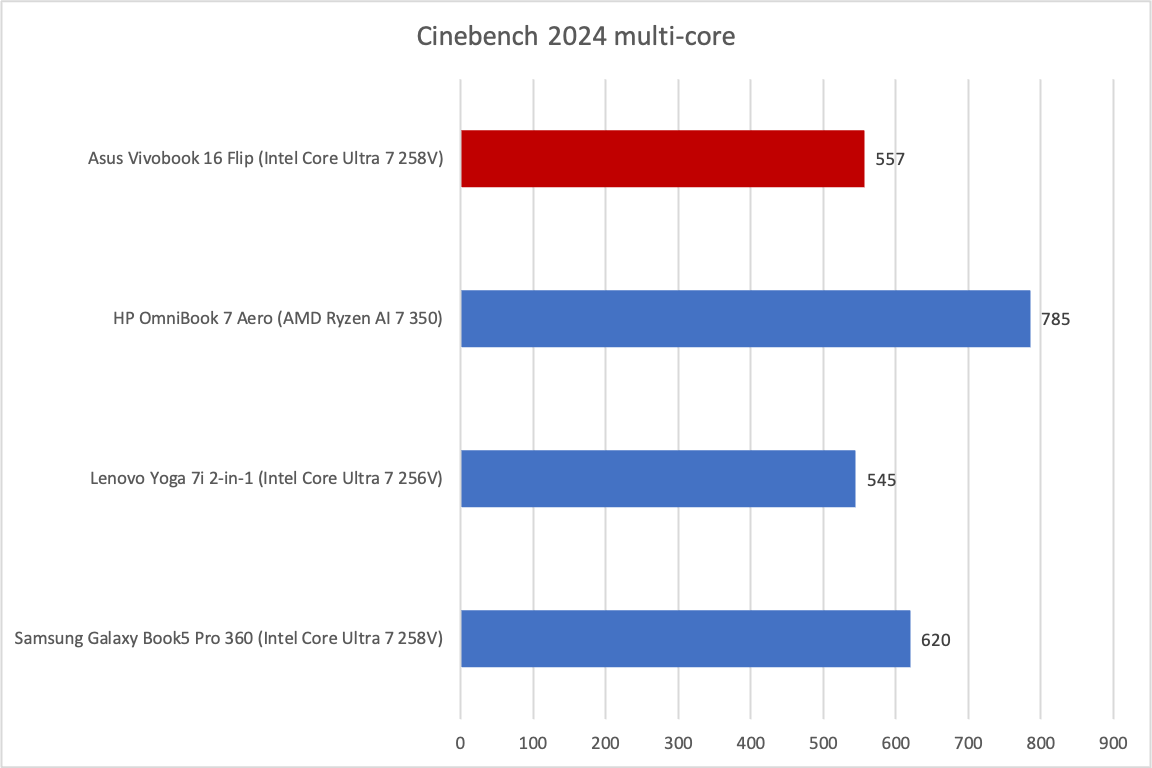
The story is a bit different in Cinebench 2024, a heavily multi-threaded benchmark. As mentioned, the Intel Core Ultra 7 258V has eight cores, but only half of those are performance cores. Many competitors offer more high-performance cores, and it shows. The AMD Ryzen AI 7 350 runs circles around it here.
Foundry / Matthew Smith
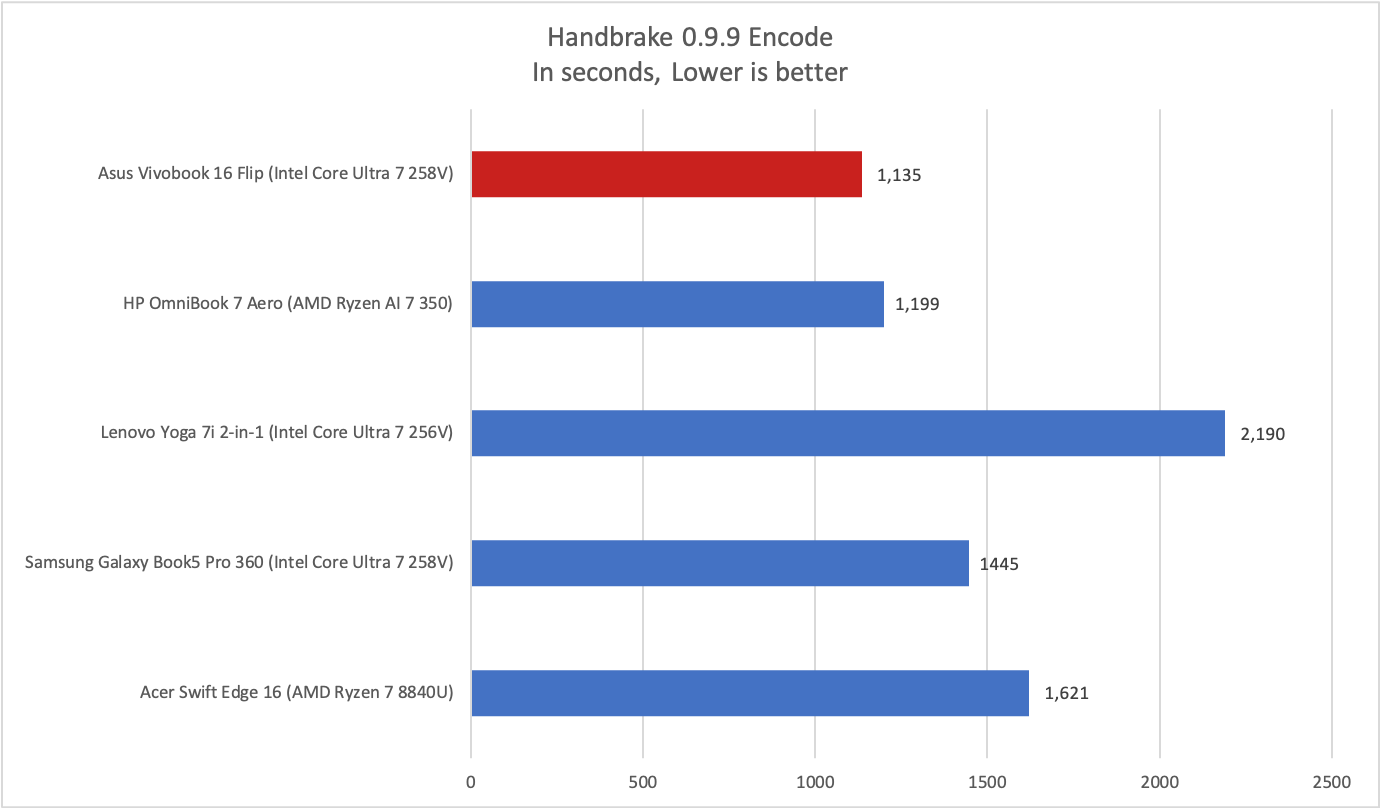
Things once again change in Handbrake, however. Here, we see that the Vivobook 16 Flip provides a strong score for an Intel Core Ultra 7 258V laptop. It seems the laptop’s aggressive cooling (which is rather loud at full load) is more able to keep the chip running at full tilt over the duration of this test.
Foundry / Matthew Smith
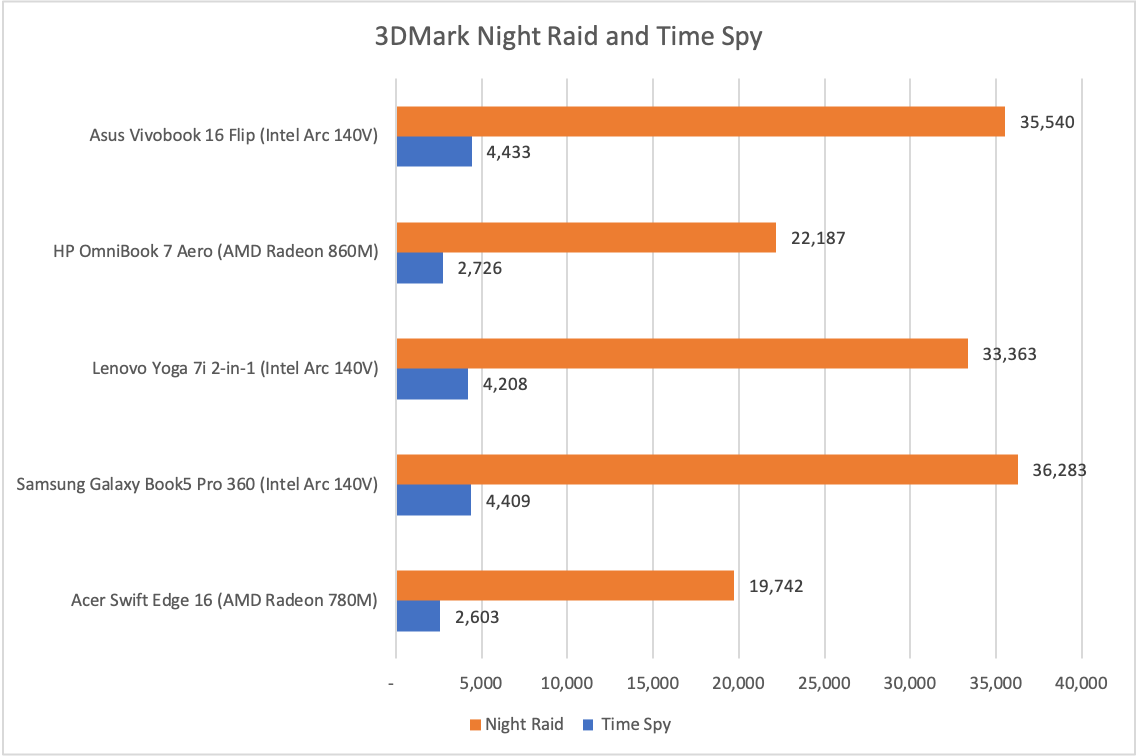
Diving in 3D benchmarks, we see Intel’s Arc 140V strut its stuff. The 140V is generally a great integrated graphics solution and the Vivobook 16 Flip helps it extend its lead over AMD’s Radeon alternatives. While the Samsung Galaxy Book5 Pro 360 is more-or-less tied with the Vivobook 16 Flip, the Vivobook’s performance here is strong.
The 3DMark score will translate to strong performance in older or less demanding 3D games. Shadow of the Tomb Raider, for example, averaged 67 frames per second at 1080p resolution and Highest detail. A wide range of more modest games, from World of Warcraft to Ball X Pit, will be enjoyable on this laptop.
I’m happy with the Asus Vivobook 16 Flip’s performance, and it’s probably the most significant reason to choose this laptop over a competitor that might have AMD’s Ryzen AI 7 350 or the Intel Core Ultra 256V. While I wouldn’t call the Vivobook 16 Flip a high-performance laptop, it’s very respectable for the price, and can handle both productivity apps and less demanding 3D games. The laptop’s 32GB of RAM and 1TB solid state drive are icing on the cake.
While I wouldn’t call the Vivobook 16 Flip a high-performance laptop, it’s very respectable for the price, and can handle both productivity apps and less demanding 3D games.
Asus Vivobook 16 Flip: Battery life and portability
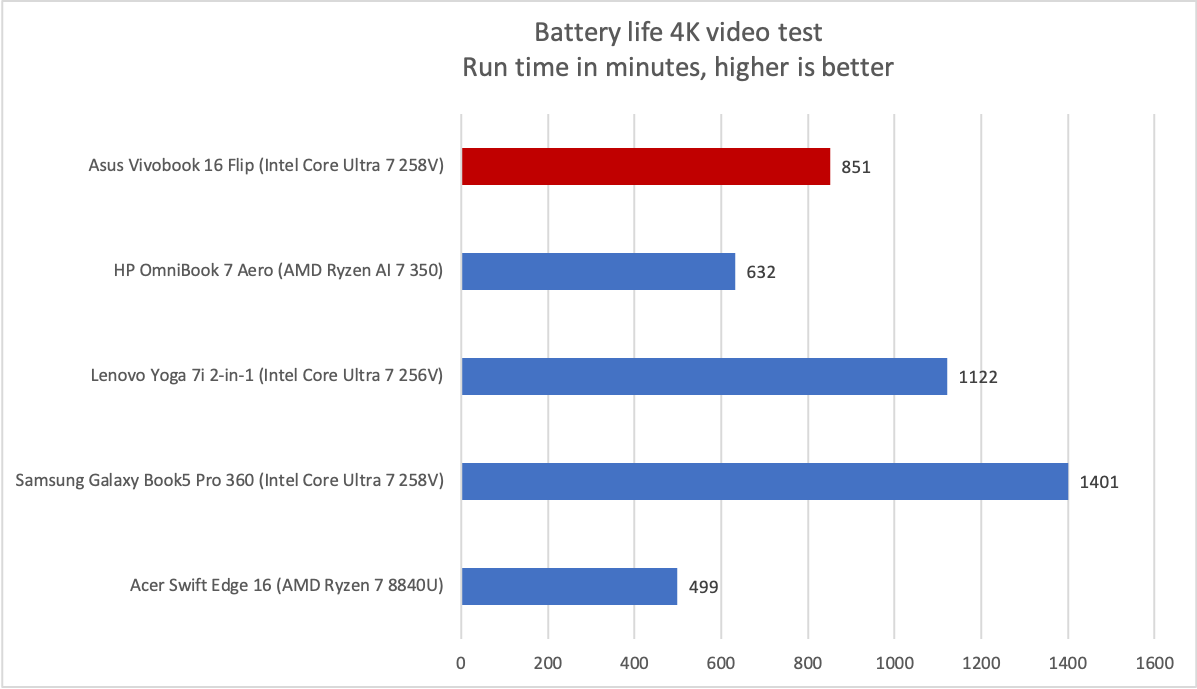
A 75 watt-hour battery lurks inside the Asus Vivobook 16 Flip. That is an average size for a Windows laptop, and it results in average battery life.
Foundry / Matthew Smith
The good news is that Asus’ Vivobook 16 Flip managed to endure PCWorld’s standard battery test, which loops a 4K file of the short film Tears of Steel, for over 14 hours. That’s a long time! The bad news is that many Windows laptops in this category offer similar or better battery life.
Real-world battery life will generally prove a bit less, though roughly 10 hours shouldn’t be hard to squeeze out and 14 hours is achievable if you keep to less demanding apps, use a low-performance power profile, and set the display to around 50 percent of its maximum brightness.
It’s an easy laptop to charge, too. It ships with a small 65-watt USB-C power adapter and can be charged with a wide range of third-party USB-C chargers. Even a modern phone charger can charge it to 100 percent in about four or five hours.
Asus Vivobook 16 Flip: Conclusion
The Asus Vivobook 16 Flip is a well-rounded 16-inch 2-in-1 that often fails to excel,but generally provides good value when compared to the competition. It’s strongest in performance, where it often was a bit quicker than the alternatives. The Vivobook also provides an OLED touchscreen at an affordable price, and while it doesn’t have any headline feature that really separates it from the competition, it also avoids any major problems that might make it a hard pass. It’s also a good value at $1,249.99


