At a glance
Expert’s Rating
Pros
- Reliable performance
- Excellent coverage with Wi-Fi 8 as the backbone
- Lots of smart features
Cons
- Slow mesh optimization
- May require some technical knowledge
- Expensive
Our Verdict
Wi-Fi 8 has only just gotten off the ground, and this mesh router demonstrates what the technology is capable of. Its high stability and long range between nodes, even in tricky conditions, are impressive. But if you don’t have unlimited funds, it might be wise to wait and get a cheaper Wi-Fi 7 mesh system instead, until there are more Wi-Fi 8 clients available.
Price When Reviewed
This value will show the geolocated pricing text for product undefined
Best Pricing Today
Price When Reviewed
$1,299.99
Best Prices Today: Asus ZenWiFi BN12
While the rest of us have barely had time to get used to Wi-Fi 7, two manufacturers have already started releasing Wi-Fi 8 routers. I recently tested TP-Link’s standalone Archer 8 Ultra, a monolithic device which, somewhat surprisingly, delivered good results despite there being no Wi-Fi 8-compatible receivers available yet. Because that’s apparently the thing about Wi-Fi 8 — it even improves Wi-Fi 7, at least to some extent.
Above all, it’s about more stable performance, less interference from other radio signals, and higher speeds even when the signal is weak, over long distances, and with many obstacles in the way. This has been the main benefit of every other major Wi-Fi upgrade since Wi-Fi 5. Wi-Fi 6 offered much greater range; Wi-Fi 6e and 7 increased speeds with the 6 GHz band and wider channels; and Wi-Fi 8 is now taking another step forward, primarily in terms of range and stability.
Now it’s the turn of a Wi-Fi 8 mesh system, the Asus ZenWiFi BN12. It features tri-band Wi-Fi — 2.4, 5, and 6 GHz — with ample bandwidth across all three frequencies and a total bandwidth of over 19 Gbit/s. It’s also sold as a single unit as a standalone router, but is primarily available in packs of two or three for use with the Asus AI Mesh architecture, enabling it to cover multiple rooms and large areas.
Mattias Inghe
Full Wi-Fi 8 internally
Unlike the TP-Link router, there is actually a way here to take full advantage of Wi-Fi 8 — in the communication between the mesh units. The nodes communicate via dynamically assigned Wi-Fi in an MLO configuration, utilizing the best channel bandwidth and delivering the smoother, more stable traffic that Wi-Fi 8 enables.
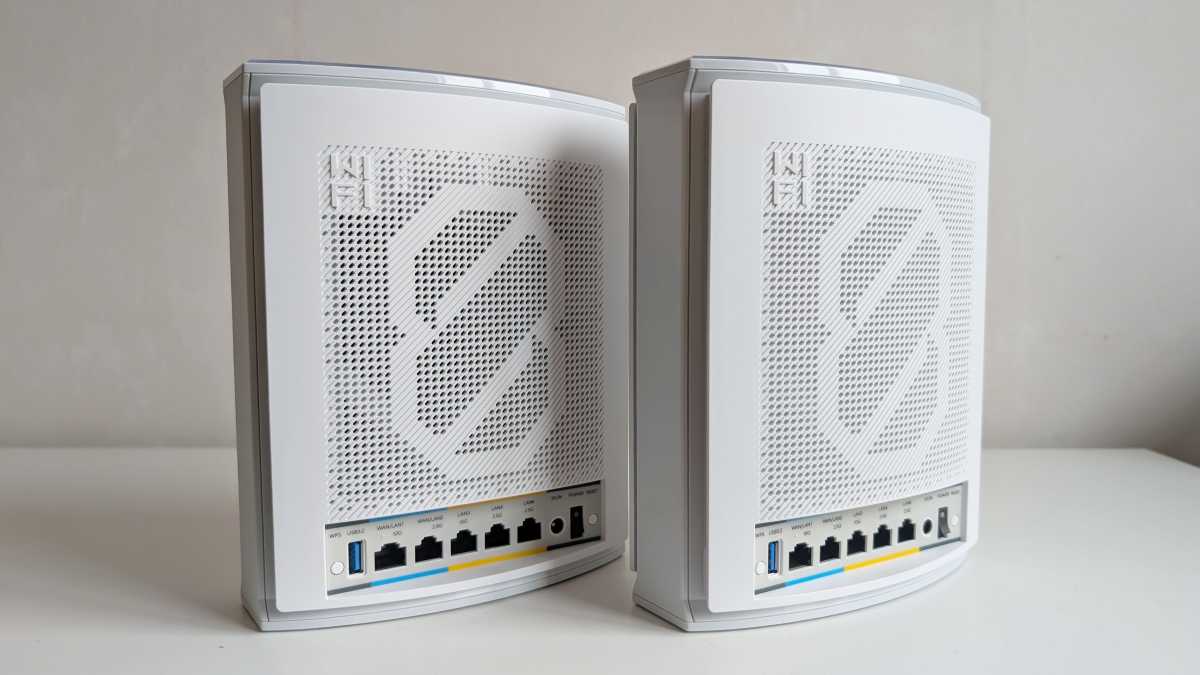
The ZenWiFi BN12 two-pack I tested consists of two units that are identical in appearance. White, flat towers, almost as wide as they are tall. They are 8.58 inches tall and 3.46 inches thick, without external antennas. They share the same generous array of five Ethernet ports and one USB-A port, arranged in a row on the rear panel. This comprises a mix of 10 Gbit and 2.5 Gbit ports, and two of them can dynamically switch between WAN and LAN.
There is, however, some sort of difference between them, as one of them has a sticker on it stating that it is the main unit and that the user should start by connecting it. This is probably just down to how they are pre-configured.
Optimization can take time
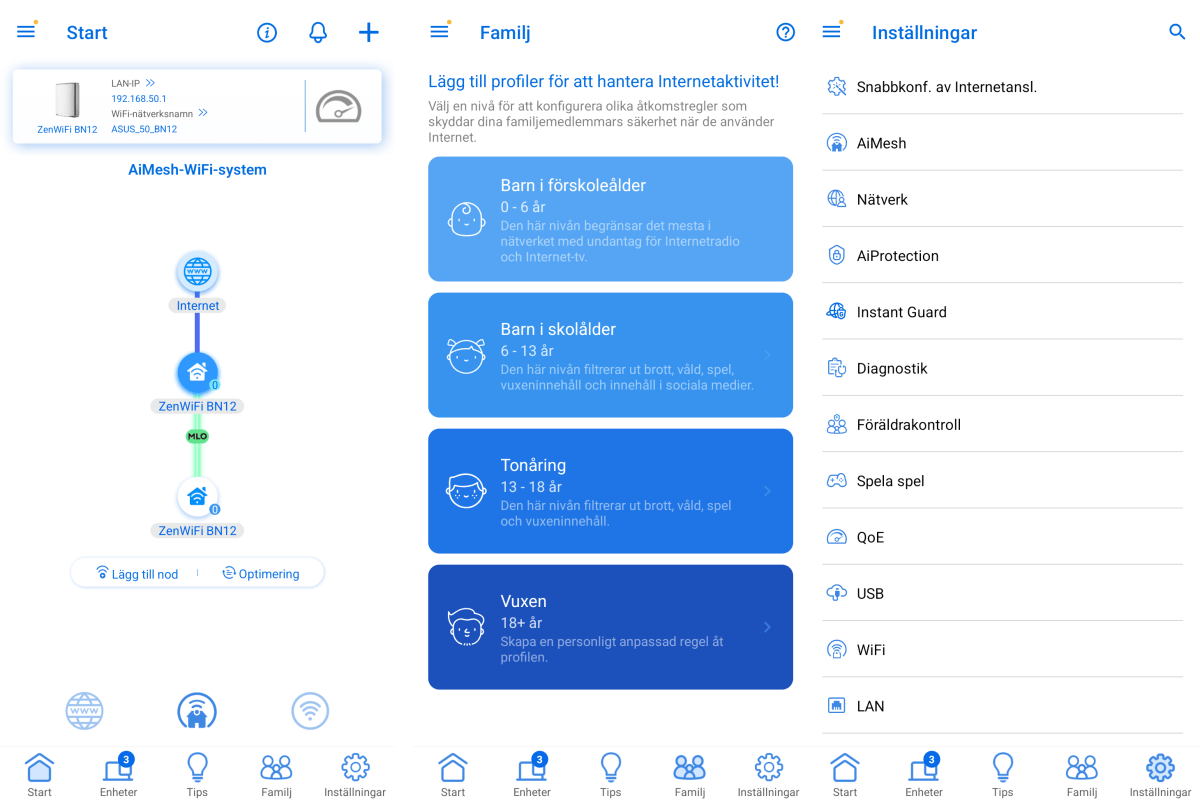
Once I’ve set up the first unit as the router — it’s easy with the Asus Router app; just follow the instructions in the app — all I need to do to get the mesh network up and running is to start the second unit and wait a while. It’s detected and configured automatically.
Mattias Inghe
However, it’s not quite as straightforward as it might sound. Although Wi-Fi 8 offers a long range, Asus wants me to place the second unit right next to the main unit for the initial configuration. Only once it has finished the configuration and optimization process can I move it to another room where I intended to keep it to get better coverage.
There, it initially complains that the signal is too weak. It takes a further one to two hours of automatic fine-tuning of signals and antennas (I assume — it’s not clear exactly what it’s doing) before it indicates that everything is as it should be and that the mesh system is working optimally.
Hopefully. There’s a risk you’ll have to spend a day trying out different placements for unit two if it turns out to be out of the main router’s range, behind a thick concrete wall, or something similar. Or too close, so that you’re not making the most of the range. It’s not difficult, but it does involve a lot of waiting around.
Good range, high peak speed
For my part, with a bit of patience, I eventually achieve perfect coverage in a single-storey house with five rooms and around 656 square feet, where the signal is strong and the browsing speed is, at most, only marginally lower than the house’s 500 Mbit/s fiber broadband. Back in my own smaller flat, the main unit is enough to provide full coverage and gigabit speeds in several rooms.
Not in all of them, but when I get a speed of at least 390 Mbit with the router placed as far away from me as possible, I can only conclude that the ZenWiFi BN12 delivers very capable Wi-Fi, even for Wi-Fi 6 and Wi-Fi 7 receivers. At my neighbor’s, with a solid concrete wall in between, or out on the street three floors below, I still get a connection and over 100 Mbit, even if it’s only on the 2.4 GHz band.
Mattias Inghe
Usually, the frequency is selected automatically, and in that respect I think the BN12 does a good job of giving me the best possible connection on both a mobile and a laptop. If you want to force a 6 GHz connection, you can choose to separate it into a separate SSID. You can also choose to enable MLO, which combines frequency bands not only for internal communication but also for clients that support it, though this is disabled by default.
You can also easily set up a separate 2.4 GHz IoT network, your own ‘child’ SSID with the same content filters and browsing schedule, which you can also assign to clients via separate parental controls, and, of course, a guest network that provides internet access but not access to the internal network. You can also set up a permanent VPN network as a separate SSID, either via manual configuration or using accounts with services such as Surfshark, CyberGhost, and NordVPN.
A wealth of detailed settings
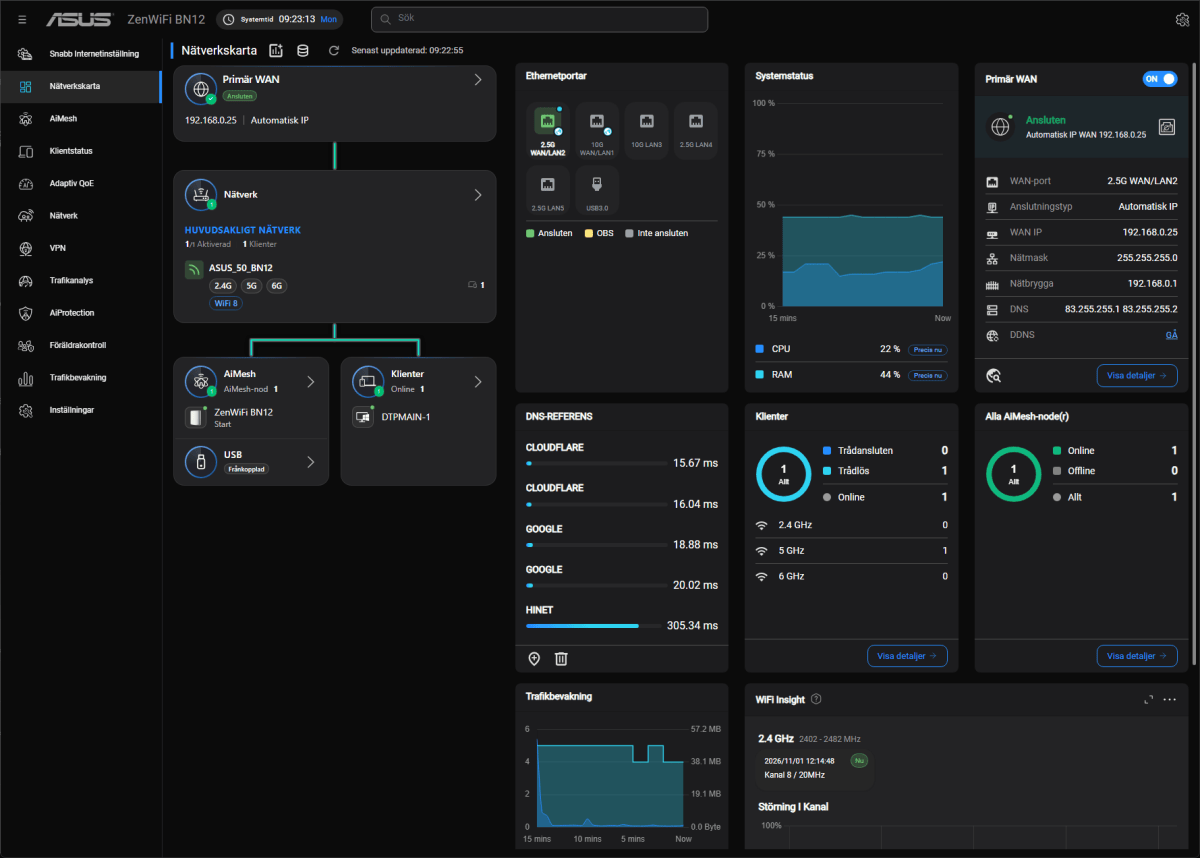
Asus routers have always given you a great deal of control and customization options, and you can manage everything from the firewall and ports to numerous details for Wi-Fi, wired ports, and traditional router settings. Mostly via the web interface, but also in the app.
On the web, for example, you get full control over AI Protection, Asus’s security layer. This consists of monitoring that is said to be able to block external attacks, malicious websites, and malware-infected devices. It also includes ad and tracking blocking, as well as security checks on router settings.
I have previously criticized the web interface for being cluttered and throwing a host of cryptic options straight in the face of less tech-savvy consumers. Asus has improved in this regard, and the version of the system featured here is more streamlined. The most advanced options are well hidden, but are there if you want them. However, there is still a certain risk that you might get lost amongst the detailed settings and allocation tables if you aren’t fully familiar with such things.
Mattias Inghe
More ways to connect – perhaps
With a USB port on the router, you can also connect external storage and use it as a file and media server. Or connect a printer and share it. However, I can’t find the additional features that Asus usually offers via its USB ports, such as a download client or the ability to connect a USB modem for mobile broadband.
The latter is mentioned on the Asus product page, but I can’t find anything in the interface about how to go about configuring it. Perhaps it happens automatically when a USB modem is connected, but I didn’t have one on hand to test it. Mobile broadband via a USB stick isn’t that common these days, after all.
This is both a very good router and, thanks to Wi-Fi 8, an excellent and very stable mesh network. In some earlier ZenWiFi mesh kits, I’ve been bothered by micro-pauses with lost connections between the nodes, but I don’t notice that here. So it’s just the large, bulky units, the sometimes fiddly settings, and the high price that let it down.
It’s up to you whether you want to spend over $1,200 on a Wi-Fi 8 mesh system right now, or whether it’s wiser to wait until cheaper alternatives are available, and until there are actually devices you can connect to it. However, even with just two mesh units, you’ll already get more out of the new technology than you would with a single Wi-Fi 8 router.
Specifications
Product name: Asus ZenWiFi BN12 (2-pack)
Tested: November 2026
Manufacturer: Asus
Wi-Fi type: Wi-Fi 8
Frequency bands: 2.4GHz, 5GHz, 6GHz
Wi-Fi capacity: 1,376, 6,764, 11,529 Mbit/s
Number of nodes: 2, main unit and one extender
Security: WPA, WPA2, WPA3, WPS
Connections per unit: 1 x 10 Gbit WAN/LAN, 1 x 2.5 Gbit WAN/LAN, 1 x 10 Gbit LAN, 2 x 2.5 Gbit LAN, USB-A Gen 3
Ethernet backhaul: Yes
Speed, 3 m*: 1,515 Mbit/s
Range per unit**: 68 feet
Administration interface: App, web
Remote administration: Yes, via app
File server/printer server: Yes/yes
Other features: Guest network, IoT network, parental controls, QoE, VPN client, VPN server, firewall, malware protection, ad blocking, tracking blocking, DDoS protection, and more
Dimensions per unit: 17.3 x 8.8 x 21.8 cm
Price: $1,299.99 at Asus
* Measured on the system’s main unit against a laptop with 2×2 Wi-Fi 7 at 6 GHz. (Wi-Fi 8 receivers are not yet available).
** Maximum distance, including two internal walls, at which a speed of at least 200 Mbit/s is maintained between the nodes.


