At a glance
Expert’s Rating
Pros
- Fast PCIe 5.0 performer
- Up to 4TB capacity, with 8TB in the works
- Higher-than-average TBW rating
Cons
- Not the least expensive in the class
Our Verdict
Corsair’s latest MP700 Pro XT ups the performance ante for the MP700 series. It’s fast and affordable, though it doesn’t quite lead the pack in either department.
Price When Reviewed
This value will show the geolocated pricing text for product undefined
Best Pricing Today
Price When Reviewed
1TB: $160 I 2TB: $250 I 4TB: $460
Best Prices Today: Corsair MP700 Pro XT

If it seems as if we’ve reviewed quite a few MP700’s from Corsair, it’s because we have (MP700 Elite, MP700 Pro, MP700 Pro SE). The company keeps upping the ante with performance or other features, so we’re back with yet another — the MP700 Pro XT.
Is it better than its predecessors? Yup. Not by a ton, but hey! Every little bit counts. All that aside, the MP700 Pro XT is a top-notch PCIe 5.0 SSD.
Read on to learn more, then see our roundup of the best SSDs for comparison.
What are the Corsair MP700 Pro XT’s features?
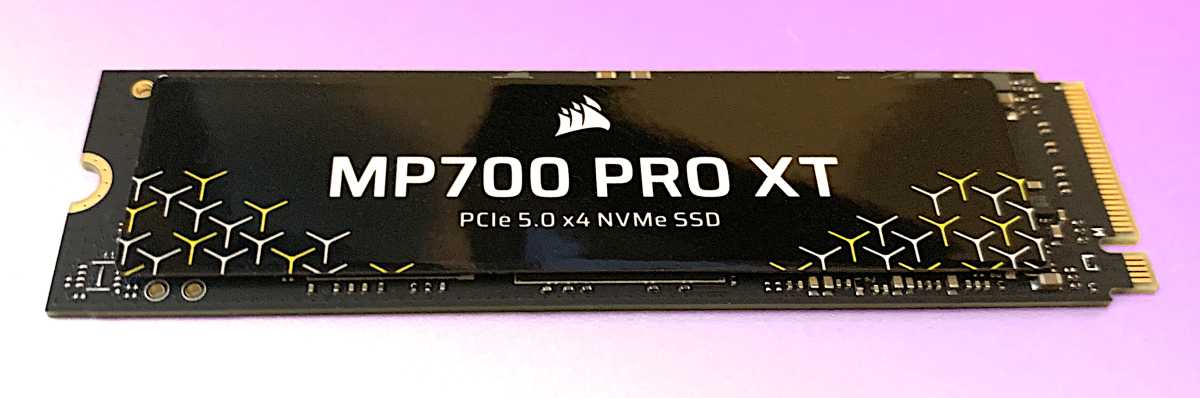
An M.2 2280 (22mm wide, 80mm long) SSD, the MP700 Pro XT features PCIe 5.0, a Phison E28 controller, and 218-layer TLC NAND. The drive is a DRAM design for faster random ops, with 1GB of cache per terabyte of capacity.
The MP700 Pro XT carries a 5-year warranty and a 700TBW (terabytes that may be written before read-only mode commences) per 1TB of capacity endurance rating. The former is standard, and the latter slightly more generous than the 600TBW norm for this class of drive.
How much is the Corsair MP700 Pro XT?
The MP700 Pro is available in 1TB/$160, 2TB/$250, and 4TB/$460 capacities, with an 8TB model apparently in the works. Those are the prices from the company’s own web store. You might see them cheaper eventually on Amazon.
Compared to the competition, those prices are higher than the Samsung 9100 Pro and slightly higher than the WD SN8100, and lower than the Kingston Renegade G5 and Crucial T710 at the time of this writing. Shop around.
How fast is the Corsair MP700 Pro XT?
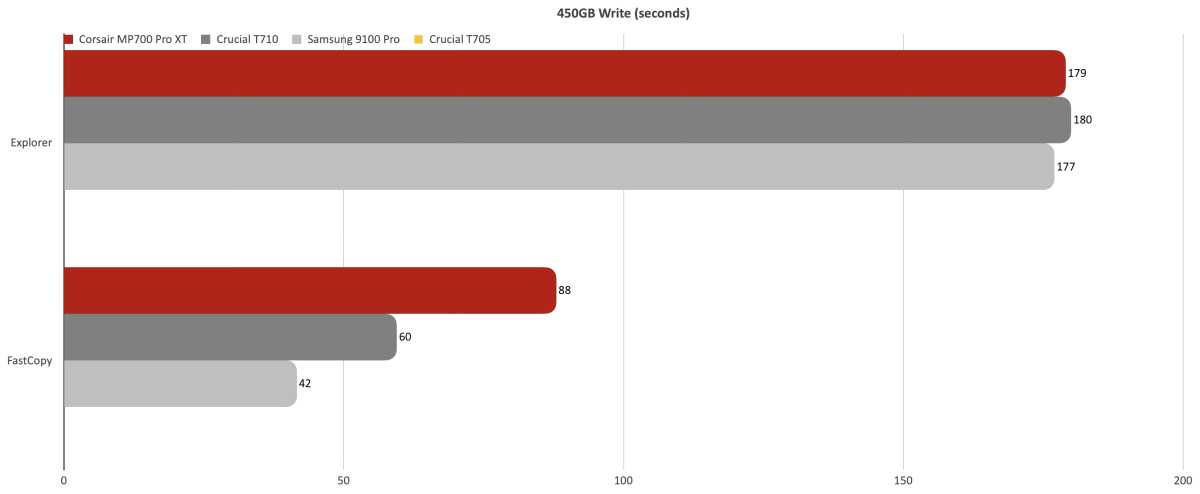
The MP700 Pro XT was very fast, though the benchmarks were a bit sunnier than our real-world transfers. A rather lackluster time in our 450GB write test using Fast Copy hurt its overall ranking, which was still 5th fastest among NVMe SSDs.
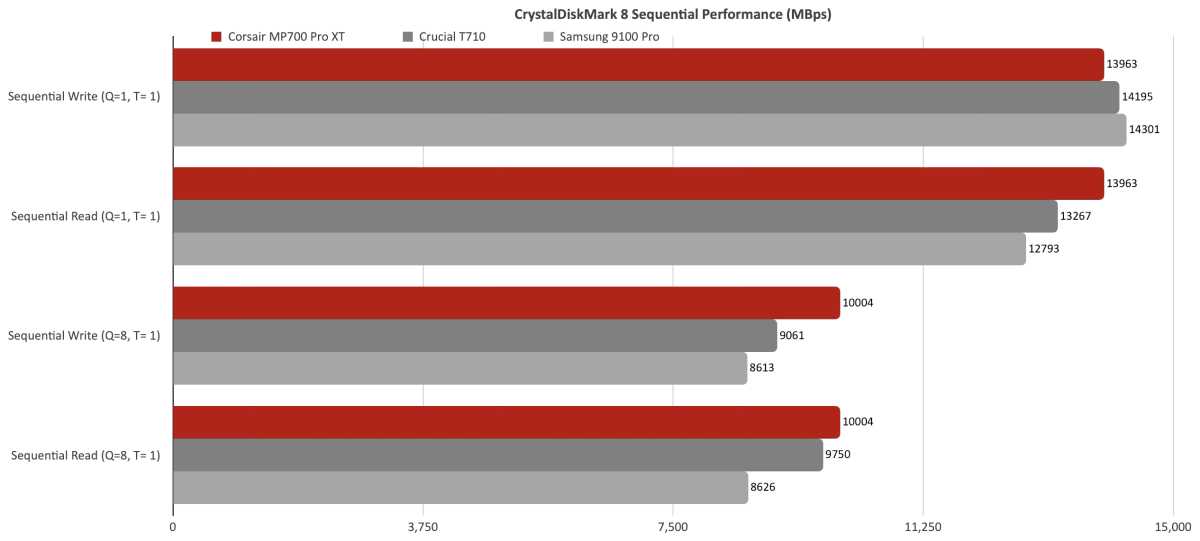
The MP700 Pro XT’s numbers in CrystalDiskMark 8’s sequential tests were excellent.
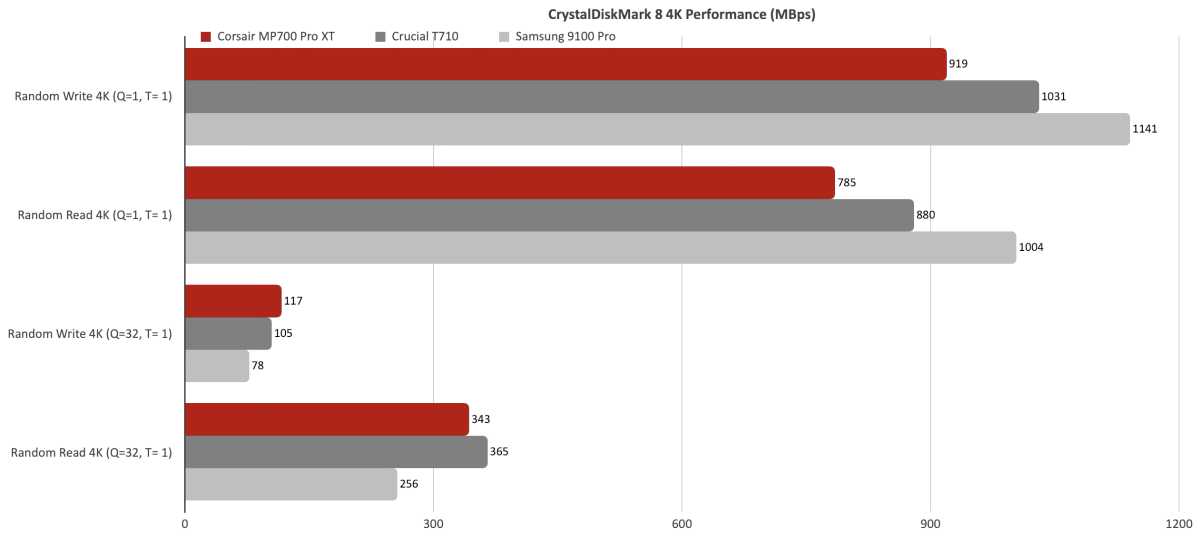
Random performance, on the other hand, was slower than the competing drives (also DRAM designs) when only one queue was used. Windows itself normally uses only a single queue.
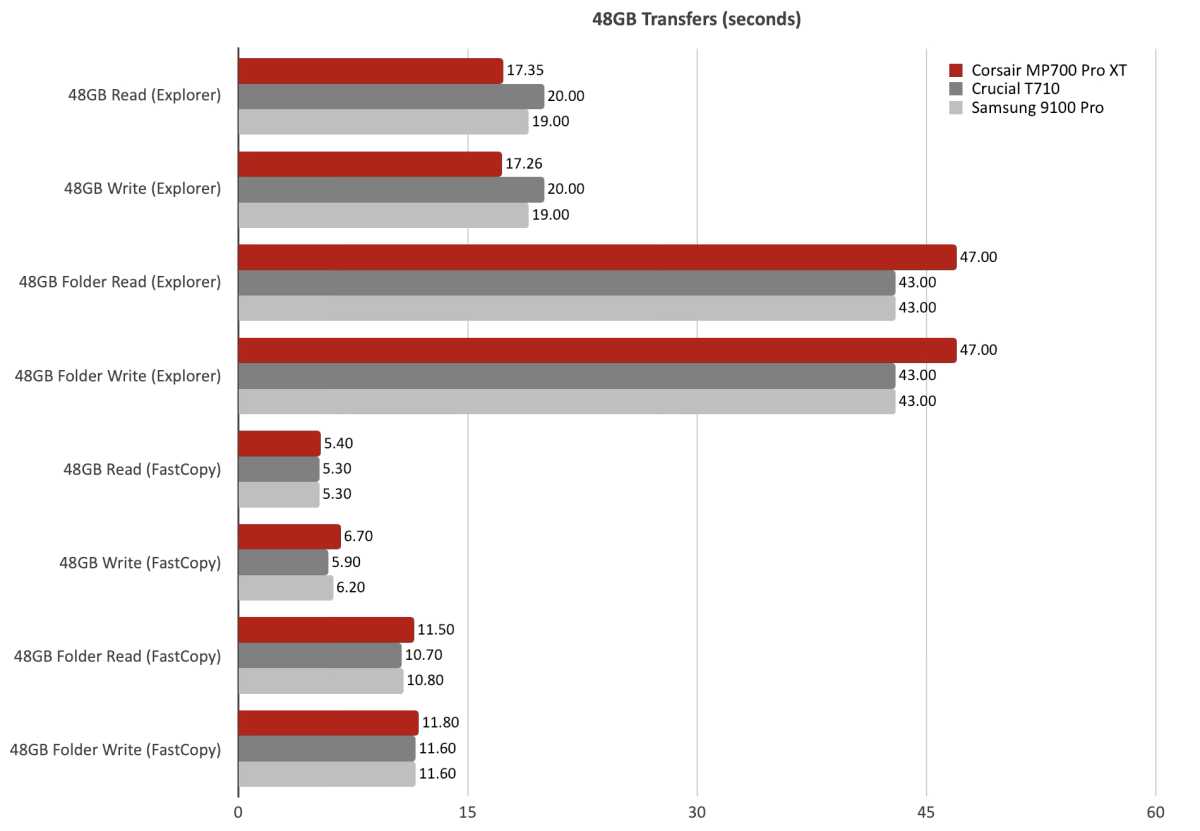
The MP700 Pro XT was just a hair off the pace in our 48GB transfers, especially with the folders.
It was the slowish (for PCIe 5.0) 450GB write with Fast Copy that sabotaged the MP700 Pro XT’s overall score. Not that it’s slow in the grand scheme of things, but its competitors, especially the Samsung 9100 Pro were much faster.
Jon L. Jacobi
During the second consecutive 450GB write (no pause in between), speed dropped, but only to 1.5GBps. Not too shabby.
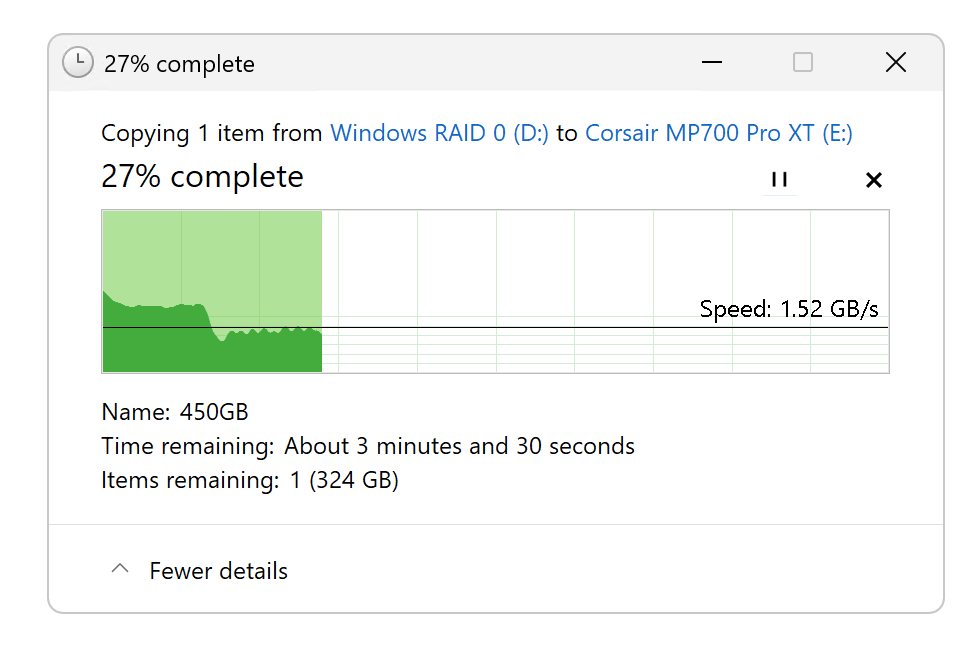
All told, the MP700 Pro is well within the PCIe 5.0 DRAM performance ballpark. I’d still like to see a bit better performance transfers with Fast Copy, but otherwise, it’s all good.
Should you buy the Corsair MP700 Pro XT?
Yes, given the right price. It’s a very good performer, but so are its competitors. In truth, you’d be more than happy with any of the top contenders. Shop for the best price.
How we test
Drive tests currently utilize Windows 11 24H2, 64-bit running off of a PCIe 4.0 Samsung 990 Pro in an Asus Z890-Creator WiFi (PCIe 4.0/5.0) motherboard. The CPU is a Core Ultra i5 225 feeding/fed by two Crucial 64GB DDR5 5600MHz modules (128GB of memory total).
Both 20Gbps USB and Thunderbolt 5 are integrated into the motherboard and Intel CPU/GPU graphics are used. Internal PCIe 5.0 SSDs involved in testing are mounted in an Asus Hyper M.2 x16 Gen5 adapter card sitting in a PCIe 5.0 slot.
We run the CrystalDiskMark 8.04 (and 9), AS SSD 2, and ATTO 4 synthetic benchmarks (to keep article length down, we report only the former) to find the storage device’s potential performance. Then we run a series of 48GB transfer and 450GB write tests using Windows Explorer drag and drop to show what users will see during routine copy operations, as well as the far faster FastCopy run as administrator to show what’s possible.
A 25GBps two-SSD RAID 0 array on the aforementioned Asus Hyper M.2 x16 Gen5 is used as the second drive in our transfer tests. Formerly the 48GB tests were done with a RAM disk serving that purpose.
Each test is performed on a NTFS-formatted and newly TRIM’d drive so the results are optimal. Note that in normal use, as a drive fills up, performance may decrease due to less NAND for secondary caching, as well as other factors. This issue has abated somewhat with the current crop of SSDs utilizing more mature controllers and far faster, late-generation NAND.
Note that our testing MO evolves and these results may not match those from previous articles. Only comparisons inside the article are 100% valid as those results are gathered using the current hardware and MO.


