At a glance
Expert’s Rating
Pros
- Gorgeous display
- Fast connections
- Good everyday performance
Cons
- Lags behind in graphics and heavy processing
- So-so battery life
- High price for the specs
Our Verdict
Everything is more expensive now, but that doesn’t excuse the Dell 16S for lagging so far behind similarly priced contemporaries at just about every corner.
Price When Reviewed
This value will show the geolocated pricing text for product undefined
Best Pricing Today
Price When Reviewed
$1,769
Best Prices Today: Dell 16S
The Dell 16S positions itself as a successor to Dell’s earlier Inspiron Plus line, offering a modest system and a premium build. That naturally comes with some extra cost, though. For the model we tested, the Dell 16S struggled to justify its high price, with performance that fell short. It had a tough time keeping up with worthy rivals like the brilliant Acer Swift 16 AI or the powerful Lenovo Yoga Pro 9i 16 Gen 10.
Dell 16S: Specs and features
- CPU: Intel Core Ultra 7 355
- Memory: 16GB LPDDR5x-7467
- Graphics/GPU: Intel Graphics
- Display: 16-inch 2880×1800 OLED touchscreen
- Storage: 1TB PCIe 4.0 SSD – Sandisk PC_SN5100S
- Webcam: 2MP + IR
- Connectivity: 2x Thunderbolt 4 / USB-C with Power Delivery and DisplayPort 2.1, 2x USB 3.2 Gen 1, 1x HDMI 2.1, 1x 3.5mm combo audio
- Networking: Wi-Fi 7, Bluetooth 6.0
- Biometrics: Windows Hello facial recognition
- Battery capacity: 69.1 watt-hours
- Dimensions: 14.05 x 9.9 x 0.61 inches
- Weight: 3.98 pounds
- MSRP: $1,769 as-tested ($1,319 base)
The Dell 16S has a starting price of $1,319, which gets you a configuration with an Intel Core Ultra 5 322 processor with Intel Graphics, 16GB of LPDDR5x memory, 512GB of storage, and a drab 1200p touch display. Our test unit upgrades the storage to 1TB, the CPU to an Intel Core Ultra 7 355 processor, and the display to a colorful 2880×1800 OLED. This raises the price to $1,769.
Dell also offers configuration options with Intel Core Ultra X7 358H and Core Ultra 9 386H processors, Intel Arc graphics, 32GB of memory, and 1200p or 2560×1600 non-touch displays. Dell doesn’t let you freely mix and match components, though. For instance, you can’t opt for 16GB of memory and 512GB of storage but get an Intel Core Ultra X7 358H processor with Intel Arc Graphics.
To get Arc graphics, you’re limited to a configuration with the Core Ultra X7 chip, 32GB of memory, 1TB of storage, and the 2560×1600 non-touch display (that’s not OLED either). This configuration comes out to $2,119, but saw a discount to $1,819 at the time of writing, which seems like a great deal next to our test configuration if you prize performance.
Dell also offers an AMD-powered version of the Dell 16S.
Dell 16S: Design and build quality
Foundry / Mark Knapp
The Dell 16S is a big and rather plain laptop. That’s not to say it’s not a polished, quality machine, but it doesn’t sport much style. It has a plain, dark chassis thankfully made with sturdy metal. It feels plenty robust. The seams between panels are also clean. This gives it some elegance but still not style.
Plain isn’t bad, though. Simplicity has its benefits, and there’s little to get confused about with the Dell 16S. The speaker grilles are easy to spot on the underside near the outer edges of the base. The air intakes sit beneath a large grille on the underside, and warm air exhausts through the display hinge. It may not be the neatest exhaust path, but the wide rear rubber foot helps prevent that warm air from being drawn back into the cooling system. Two more rubber feet at the front keep the laptop nice and secure on desks and tables.
The Dell 16S’s hinge is stiff and avoids any wiggle while typing and almost instantly stops wiggling after adjustments. Despite that stiffness, I can open the lid with one hand cleanly without needing to hold the base down. There’s not much lip on the lid to get purchase on, though, so having a bit of fingernail can help.
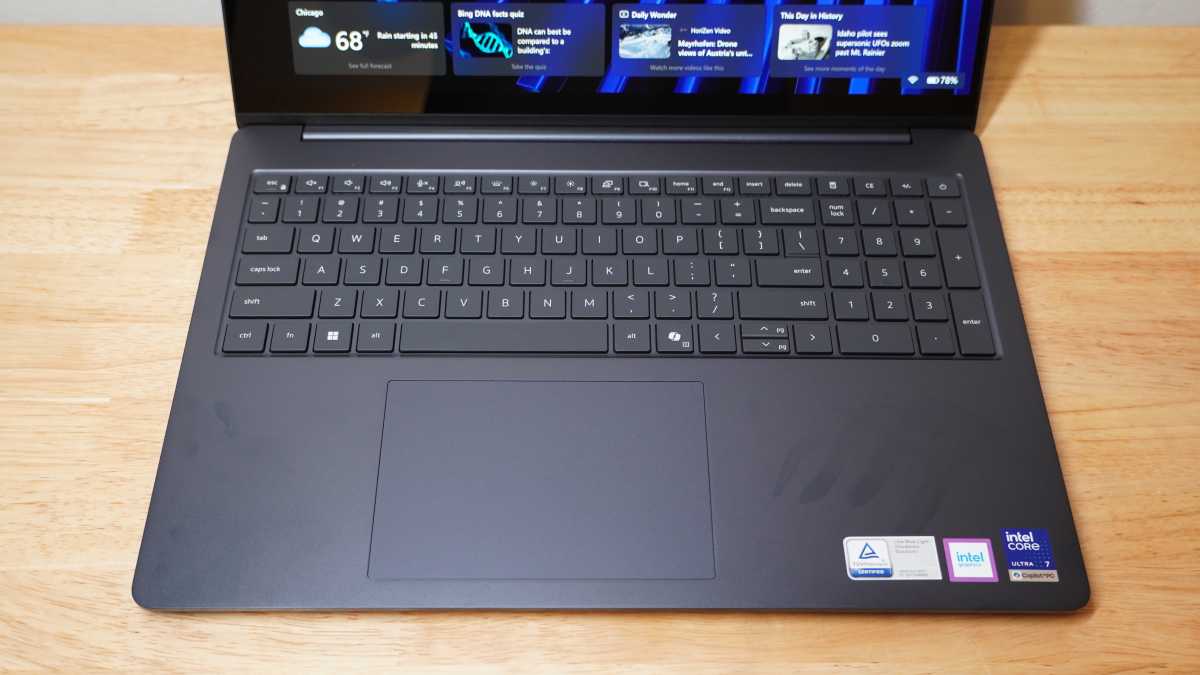
Dell uses the extra size of the 16-incher here to add in a nearly full-size number pad. It could have stood to round the front edge of the laptop a little bit, though. The longer reach to the keyboard sees my wrists resting on that front lip, which can become a pain.
The Dell 16S is at least fairly portable for a 16-incher. It’s just shy of four pounds, and excluding its rubber feet, it’s just 0.61 inches thick. It may be a little deeper than it needed to be though at 9.9 inches. With a fairly large upper and lower bezel around the display, there was certainly room to trim. Sitting under four pounds is good, too, but not close to leading its class.
Dell 16S: Keyboard, trackpad
Foundry / Mark Knapp
Much like the design, the keyboard on the Dell 16S is unremarkable. It gets the job done, but there’s little memorable about the feel of it. The keys are largely flat, making it a little difficult to feel for the exact center and keep in ideal position for fast and accurate typing. I was able to get up to 109 words per minute with 96 percent accuracy in Monkeytype, which is a little bit low in both respects for me to call it a great keyboard. Part of the issue is the uncomfortable reach up to the keyboard. The keyboard at least includes clear backlighting and a nearly full-size number pad.
The trackpad has proven a major headache. Out of the box, something felt off about the system, and I realized that there was latency to mouse movements. The mouse was plainly lagging behind my movements on the trackpad in a way I can’t recall experiencing on other systems. I was able to fix this with a registry edit, but I couldn’t believe it came this way. Only later did I discover that the edit may have made the trackpad too sensitive, and it became a palm rejection nightmare, ultimately forcing me to switch back to the slower trackpad input.
The test configuration also includes touch input on the display. This proves convenient and responsive, though the glossy panel will show fingerprints and oils after you touch it much.
Dell 16S: Display, audio
Foundry / Mark Knapp
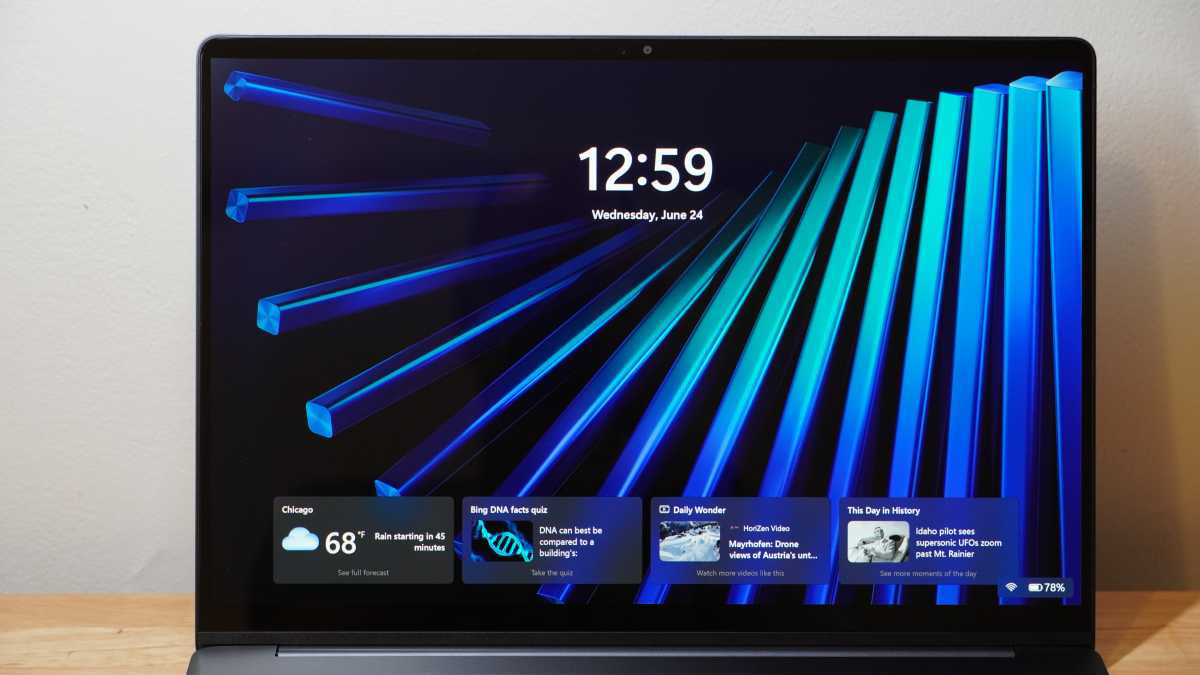
Our test configuration of the Dell 16S includes a great display. It’s a big, colorful OLED panel that delivers the infinite contrast the technology is known for and the wide color gamut. It completely covers the sRGB and DCI-P3 color spaces, and it does so accurately, with an astounding dE1976 max of just 1.19. This is a display you can do creative work on.
That said, the display tops out at 391 nits, which is just decently bright. HDR highlights can go brighter, but you won’t be looking at documents and spreadsheets with a very bright white point. The 2880×1800 resolution is satisfyingly sharp as well, and it runs at 120Hz for smooth visuals. The quality of the display makes it all the more a shame that you can’t get better graphics processing with it.
The speakers pump out bright, mid-heavy audio. There’s a little bass to give music some extra depth, but the mids are a little too strong. There’s plenty of volume to be had from the speakers, too, so that emphasis in the mids can become a pain to the ears before long. Thankfully, for speech, the speakers work quite well without sounding as harsh.
Dell 16S: Webcam, microphone, biometrics
The Dell 16S’s webcam is effective, but not without issue. It captures decent detail, remaining surprisingly crisp even in dimmer environments, though some noise naturally shows up. Where it struggles is in exposure. It struggles to make the right call in how to expose an image. While sitting still in front of the camera, I can see it shift from overexposed to thoroughly underexposed, and sometimes the shift is sudden and dramatic.
The mics on the Dell 16S work quite well. They capture my voice clearly in a quiet space and with a bit of white noise in the background. My voice has a fullness to it that is nice to hear as well. Busier background noise is a challenge, though. In a cafe environment, the mics occasionally trim the first syllable out of my mouth, and intelligibility drops a bit with my voice sounding more compressed.
The webcam on the Dell 16S has IR sensors nearby to enable Windows Hello facial recognition for quick biometric sign-ons. In practice, it has only taken a second or two to spot me and unlock the computer. The power button looks like it’s a little different from the rest of the keyboard, but it’s not a fingerprint reader on this model.
Dell 16S: Connectivity
Foundry / Mark Knapp
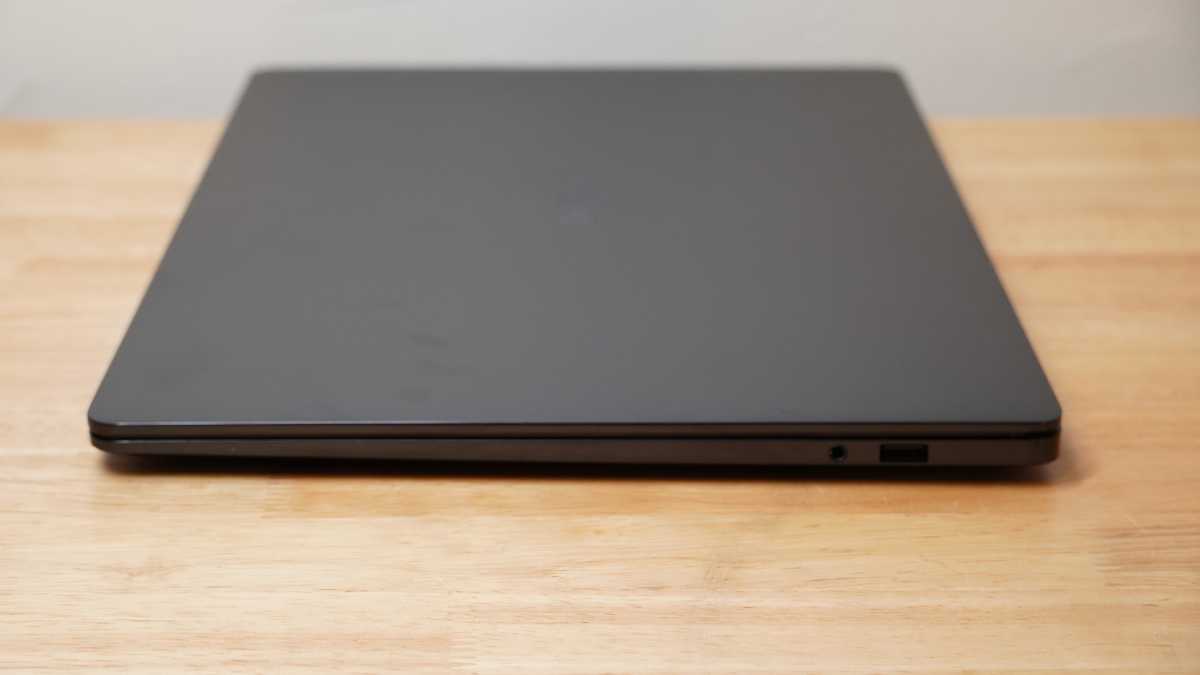
The Dell 16S offers good I/O for a thin laptop, but that sinks to just OK when taking the weight and size of the laptop into account. It gets two Thunderbolt 4 ports, a USB-A port, and an HDMI 2.1 port on the left side. The right side has just a USB-A port and a 3.5mm headphone jack. Both USB-A ports top out at just 5Gbps. That’s that same port configuration offered on Dell’s 14-inch model, the Dell 14S. An extra USB-C port on the right for charging on either side of the laptop would have been great to see, as would an SD card slot for creative workers.
Wireless connectivity is solid at least. The Dell 16S supports Wi-Fi 7 and Bluetooth 6.0, and both have worked well in testing. I’ve enjoyed fast transfer speeds and stable connections on Wi-Fi, and Bluetooth headsets have been stable.
Dell 16S: Performance
For day-to-day tasks, the Dell 16S is no slouch. Its Intel Core Ultra 7 355 processor and 16GB of memory keep up with light duties just fine, especially with a large chassis to sink heat into.
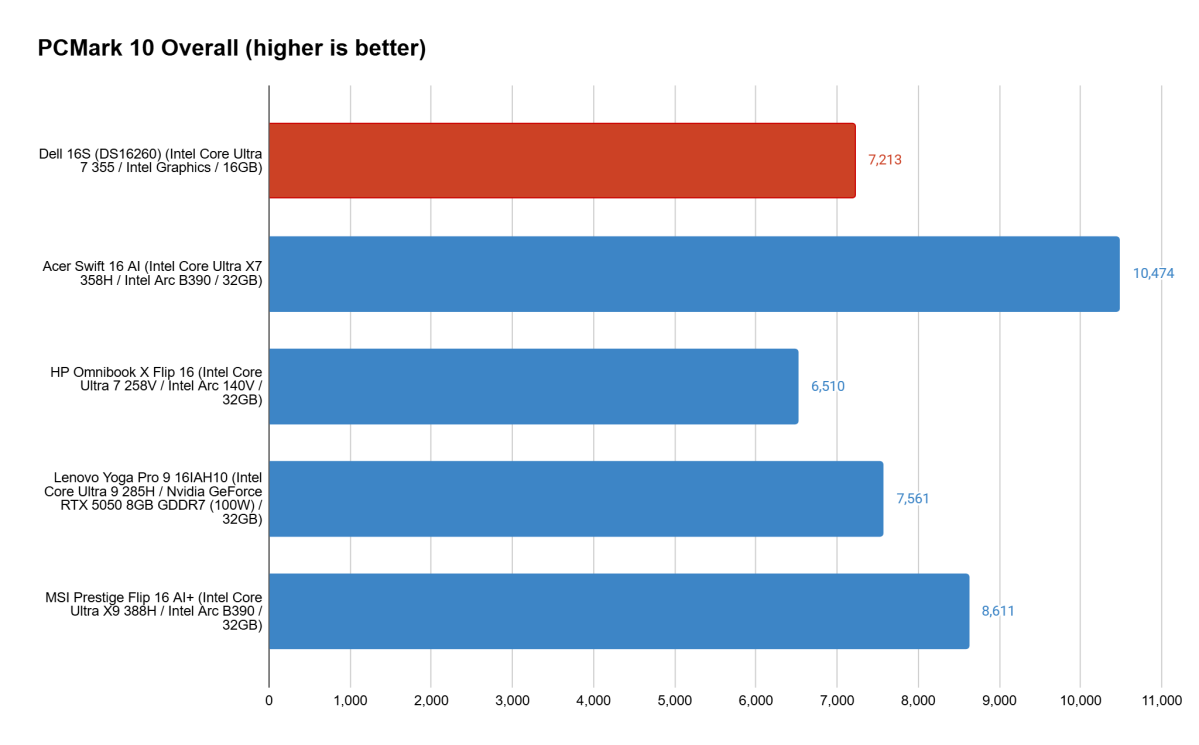
The Dell 16S performed modestly in PCMark 10’s holistic office benchmark, showing that it has the prowess to keep up with browsing, video calls, and spreadsheets just fine. It’s largely held back in the content creation department, though, thanks to its basic Intel Graphics. It’s not bad overall, but the systems it’s up against generally have more to offer where content creation is concerned, and the other systems built on Intel Core Ultra 300-series chips show it up in even more departments.
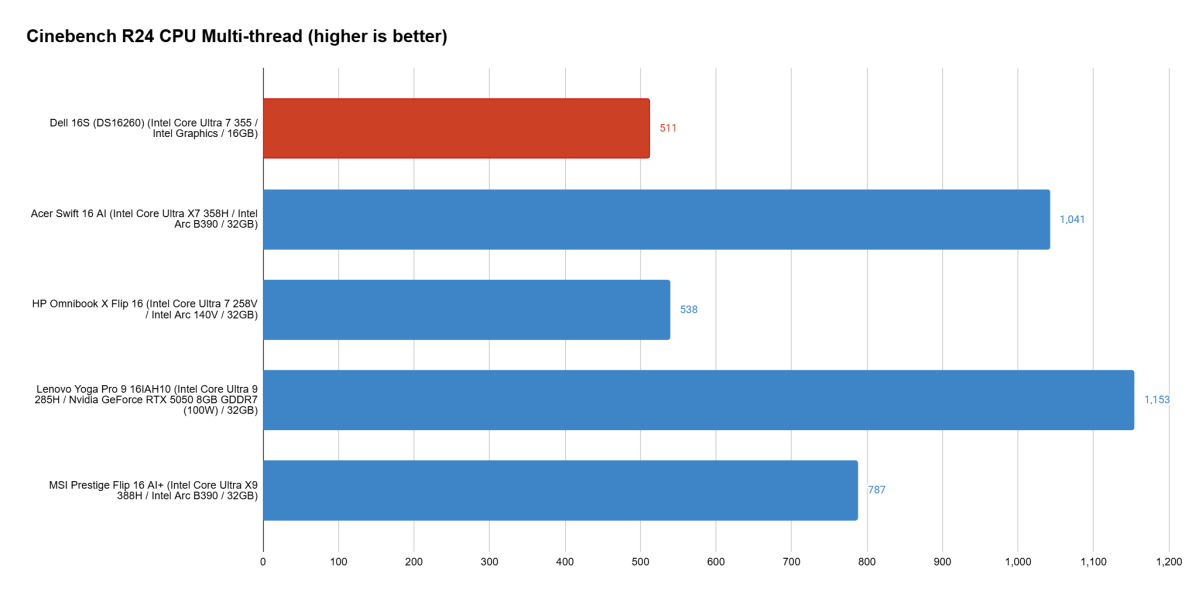
As well as the Dell 16S’s CPU handles everyday tasks, it struggles when faced with heavier workloads that rely on sheer horsepower from the CPU. Cinebench puts it to the test. It offers decent single-core speeds for snappy performance in general, but it doesn’t get ahead of its competition here. Its multi-core performance only further sets it back.
The Dell 16S is a fair laptop that simply doesn’t manage to stand out.
It fails to get ahead of the earlier Intel Core Ultra 7 258V in the HP OmniBook X Flip 16 across all four versions of Cinebench that we test, and it’s no contest against the Intel Core Ultra X7 358H, Intel Core Ultra 9 285H, and Intel Core Ultra X9 388H, which consistently hit almost double the multi-core performance.
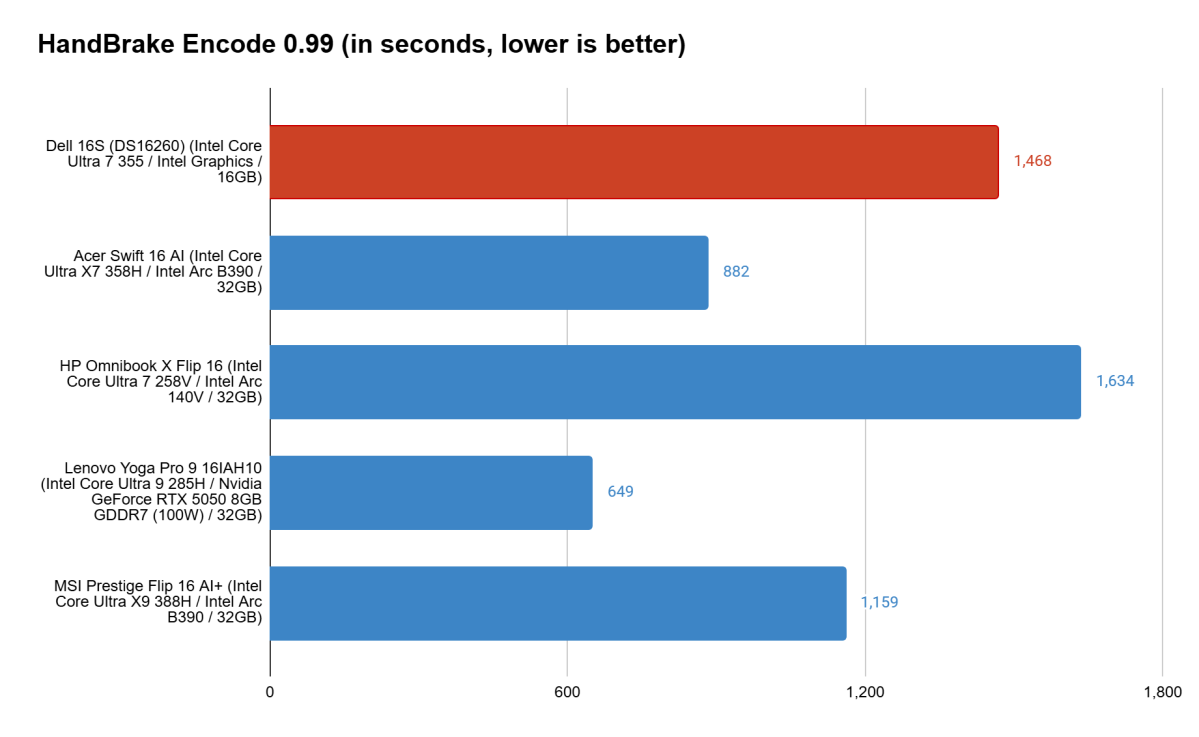
The Dell 16S isn’t helped nor hindered much by its cooling. While it had trailed the HP OmniBook X Flip 16 in multi-core performance, it managed to get ahead in the extended Handbrake encoding test, which hits the system with a sustained load and really puts cooling solutions to the test. That said, it again lags behind the other systems by a considerable amount.
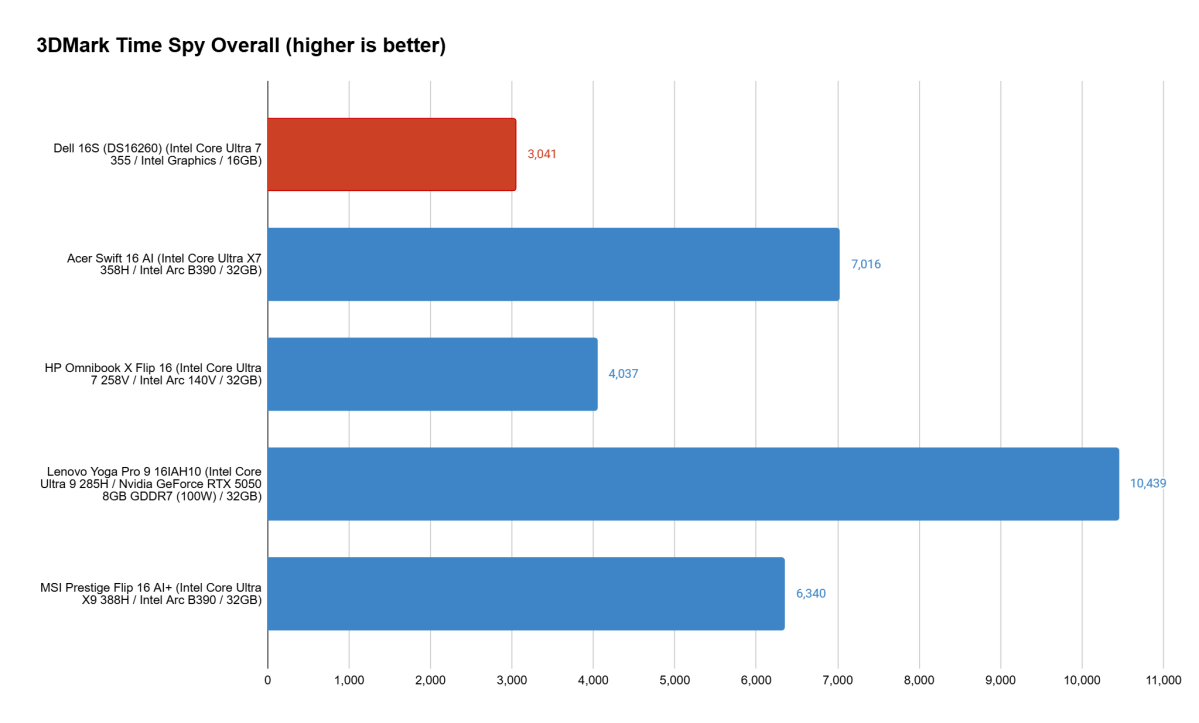
The Dell 16S already struggled to keep up in most departments, but when it comes to 3D performance, it has little chance. All of these other systems have more advanced forms of Intel Arc graphics (or a dedicated RTX GPU in Lenovo’s case), and even the lowest tier of these in HP’s system provides a considerable uplift.
Dell 16S: Battery life
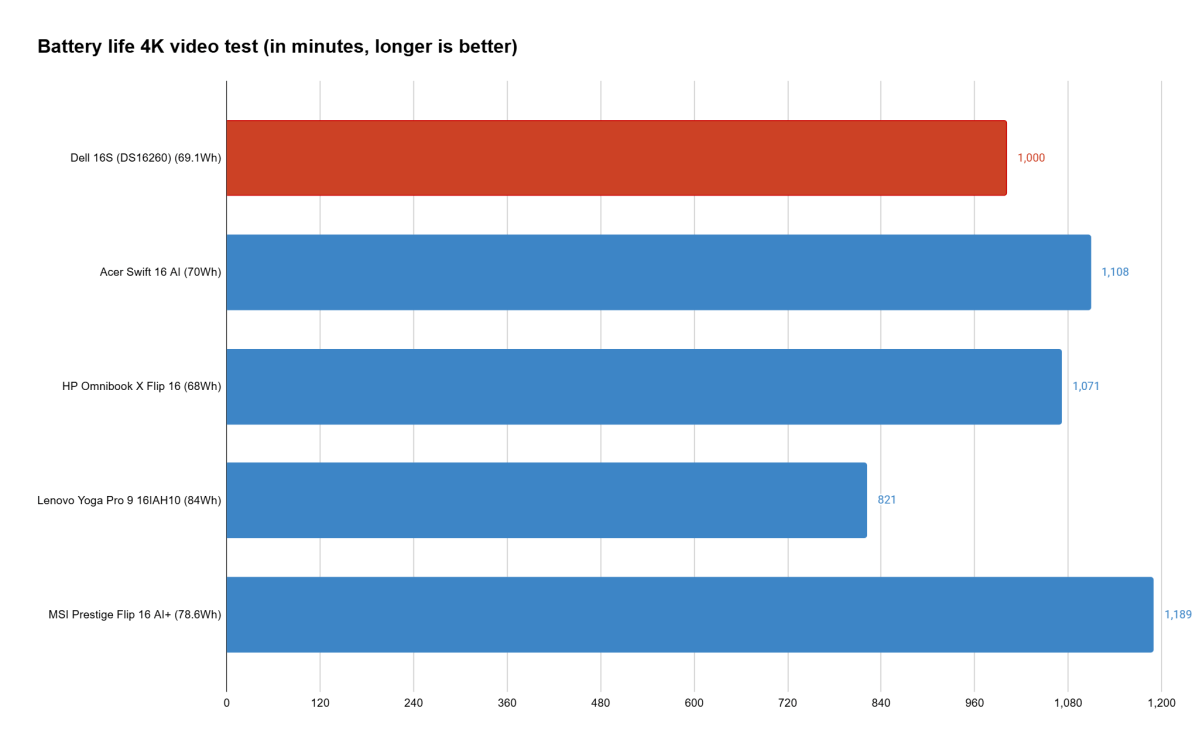
Often, when a system doesn’t keep up in performance, it can have an edge in efficiency and make a solid comeback when it comes to battery life. Sadly, that’s not the case for the Dell 16S. In our offline 4K video playback test, which runs the system at 250-260 nits in Airplane mode with a video on loop until the battery dies, the Dell 16S lasted for a little under 17 hours. That’s a modest result, but not a winning one.
It’s readily beaten by most of the competition here by an hour or more. And though the Lenovo Yoga Pro 9i Gen 10 landed almost three hours behind, that’s not such a terrible deficit for a system that absolutely knocks the Dell 16S out in performance across the board. There’s not even a major display difference to give the Dell 16S back some credit. All of these systems offer 16-inch, 2880×1800 OLED touchscreens.
In regular use browsing the web and drafting documents, the Dell 16S was on track for about seven hours of runtime in my testing, which is a bit tamer and more likely what you can expect outside of casual streaming. Lighter use, lower brightness, and lower power settings could stretch that a bit, but the same can be said for other systems that have a better starting point.
Dell 16S: Conclusion
The Dell 16S is a fair laptop that simply doesn’t manage to stand out. It goes up against a lot of really solid options that are not only comparable in price, but also spec’d out to be far more impressive in terms of performance. It may have a decent design and effective performance, but that’s not enough. If it had a much lower price, a much longer battery life, or performance that kept up with its rivals, it may have been a worthwhile option. But with so many sub-par results, not to mention a troublesome trackpad, the Dell 16S falls flat.


