By now, most avenues for cheap computer gear have been exhausted: Prime Days, eBay, even swapping gear in a parking lot. But there’s one place where you can find a true bargain: your local university campus.
It’s weird, right? Tuition and housing costs are absolutely skyrocketing, but the humble computing shop on campus sells gear — collected from students moving out, faculty, and staff — and resells it for super cheap. What most people don’t realize is that those bargains are available to you, the public, as well as students already paying tens of thousands of dollars per year.
Yes, this is indeed the era of the used PC, but there’s a better way to buy them than sketchy Facebook Marketplace meetups. Just don’t expect to buy any used primo gaming PC. These stores cater strictly to productivity buyers, which is why it’s the tip and the topic of this week’s Smart Mode newsletter.
Welcome to PCWorld’s newsletter, Smart Mode! The focus of this newsletter is productivity: from software to hardware to peripherals, all with the idea to get what you need to get done, efficiently.
I’m your host, Mark Hachman, covering the productivity tips, tools, and trends that you need to know about, both from within PCWorld and beyond. If you want the latest issue in your inbox each week, just sign up right here.
A few weeks ago, I dropped off my son Aidan at his first year of school at UC Santa Cruz. (Go Fighting Banana Slugs!) We tried to nudge him toward some smart choices (you don’t need eight pairs of jeans, just wash them) and, of course, send with the tech gear I chose for his dorm room and backpack. Aidan prefers subdividing a widescreen monitor into two windows, so we brought his widescreen — or did we? Somehow we packed the van without the monitor ever making it inside.
Uh-oh. What then? A run to Best Buy? Some frantic Amazon ordering? Nah. Just a quick trip to the UCSC Surplus Store, the best bargain bin for PC gear most people have never heard of.
Inside what was once an old barn were rows of laptops, stocked casually on shelves. All-in-one iMacs and Apple displays. Bins of hard drives. It was all run by a genial older dude (this was Santa Cruz; he was a dude) who hooked us up and basically just offered us the run of the place.
Mark Hachman / Foundry
Were there prices? I guess? Not really. So we walked out of the store with a mouse, keyboard, large 1080p display, cables, and a random laptop power supply for $30.
Honestly, I felt like I should have loaded up. Everyone knows what storage prices are going for right now, and there were just bins of hard drives available. I saw a 3TB 3.5-inch hard drive on top, an ideal addition to a hard-drive caddy to solve the storage crisis. I’m pretty sure that drive was like $20, but again…no prices that I could see. Everything was pretty much negotiable, where “negotiating” was already lower than I expected to pay, and where phrases like “I don’t know, let’s say [dollar amount]” were used pretty liberally.
Campus surplus stores combine the value of bargain-bin shopping with the casual interaction of your local computer shop. That computer shop, though, has to pay rent and make a profit. Your local university is funded by its endowment and every student who is handed a diploma. The goal of the surplus store is generally little more than trying to keep its accumulated e-waste out of a landfill.
It’s like visiting a Michelin restaurant, relatively; everyone else is lining up for the ten-course tasting menu. You’re just there for the breadsticks.
Check around for local options
What makes this tip worthwhile, I think, is that many people associate “campus computer shop” with “students only.” That’s often not the case, especially if the university in question is a public one. The public may have restricted hours, but you still can get access.
Just keep in mind that each university operates on a campus-by-campus basis. UCSC has a used computer store; UCLA does not. Instead, it sells new laptops at “education discounts.” That’s great, but not really what we’re looking for. On the other hand, the University of Minnesota (listed below) collects so much that in the fall they simply give away things for free.
Here’s a small list of possibilities. Be sure and check out the university, state school, or even community college near you. Who knows?
- University of Washington, open 10-4 to the public every Tuesday.
- UC San Diego: 10-3:30 Monday through Friday
- University of Minnesota ReUse: Thursdays, 8:30-5, Saturdays, 10-4
- UT Austin: Thursdays, 3-7; Saturdays, 8-12
- Michigan State Surplus Store: open Fridays, 8-3:30.
Bargain shoppers can often follow the surplus store on social media for new offers, like Penn State, below.
The fact that the universities oversee the sales has a side benefit: they’re governed by data protection laws. Donate a laptop, and you can be fairly confident it will be wiped clean. Likewise, if you purchase a hard drive, you can be assured no malware is hanging out, ready to pounce. At least at UCSC, I was encouraged to just a grab a nearby laptop and some cable and double-check if the display worked. I like that vibe.
(Just don’t expect a return policy. Once you’ve bought it, it’s generally yours.)
I think it’s great that nerds of all stripes can come together and shop electronics swap meets and flea markets, or dig though online listings and government auctions for bargains. In Silicon Valley, however, everyone seems to know down to the dollar how much everything will cost.
UCSC’s garage-sale atmosphere was casual, laid-back, where I was almost guaranteed a deal along with the chance that I might just find something amazing. I know I’ll stop by again.
Productivity in the news
I’m somewhat ambivalent on the new RTX Spark platform from Nvidia. If you buy a laptop with 32GB of memory ($2,599?! Ouch!) it’s split between the CPU and the GPU. That also means that you don’t get offered the opportunity to run an agent like Hermes. It feels a bit like there’s a “base” and a “premium” experience within RTX Spark.
- Right now, I have a review of the Microsoft Surface Laptop Ultra (32GB) and it’s a decent laptop, though with many aspects that will give you pause. I tested and tested and tested, so if you want to dive deep, please do.
- If you want all of the interesting stuff (at least to me) pulled out and summarized, I have that as well: eight things I learned about the RTX Spark, and you should know, too.
- Apps that slurp up data on the sly need to be rooted out. Google Gemini can be a culprit.
- Speaking of Gemini, its newest version can now better understand video.
- I’m still churning away on my Googlebook review, but here’s Ashley’s review of the HP Googlebook 14.I can see where she’s coming from…
- Feels faster? That’s the claim some make whenever Microsoft issues a new update. And this one is literally aimed at speed.
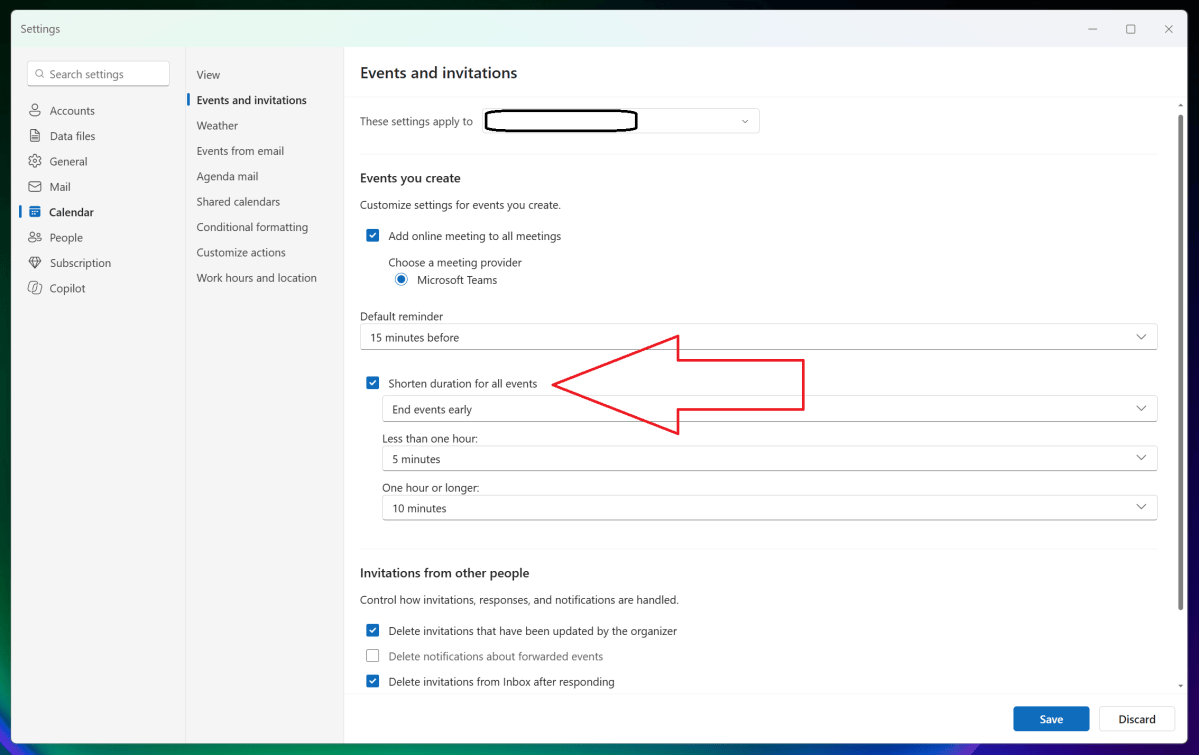
Productivity tip of the week: Shorten your meetings, automatically
Everyone appreciates a little time at the end of a meeting to check email, use the restroom, or just do a little prep work for the next one. By default, however, meetings tend to be scheduled for the full hour. That doesn’t have to happen!
Mark Hachman / Foundry
In the Outlook settings menu, select Calendar from the left nav bar, then Events and invitations. Click the checkbox for “Shorten duration for all events” and simply select the appropriate shortened meeting duration. One click, and everyone on your team will love you. Or they should!
Thanks for reading!
Thanks for tuning in to this edition of Smart Mode, PCWorld’s newsletter devoted to helping you make the most of your life, smartly. Sign up and have it sent to your inbox every Thursday!


