Auf einen Blick
Unsere Wertung
Pro
- Very compact, slim-line casing
- Plenty of ports, including an SD card reader
- Quiet operation and low power consumption
- Windows 11 Pro pre-installed
- RAM and SSD upgradeable
Kontra
- Outdated dual-core processor (2020 technology)
- Poor value for money for 2026
- Weak at multitasking and creative tasks
- Only 8GB single-channel RAM
- No room for future upgrades
Fazit
The Geekom Air12 2026 is a very compact, quiet, and energy-efficient mini PC designed for the simplest office tasks, web browsing, and streaming. Its biggest weakness is the outdated dual-core platform: For multitasking, image editing, or more demanding applications, the Pentium Gold 7505 is clearly too underpowered in 2026.
Price at the time of review
This value will show the geolocated pricing text for product undefined
Best Pricing Today
Aktuell bester Preis: Geekom Air12 2026
Mini PCs have evolved from a niche product to a staple on the desk. With the Air12 2026, Geekom is launching a new edition of its slimmest series, which aims above all to score points with a supposedly low entry-level price. The base model is on offer for just under $300. However, our test quickly reveals that Geekom has cut corners in the wrong places here.
Geekom Air12 2026 design and build quality
Measuring just 4.6 × 4.4 × 1.3 inches, the Air12 2026 is one of the slimmest mini PCs we’ve come across to date. When compared directly with other models from our test lab, such as the Geekom A9 Max, the case looks almost dainty.
Christoph Hoffmann
Nevertheless, Geekom has incorporated a sturdy metal inner frame which, according to the manufacturer, can withstand compressive loads of up to 400 pounds. We didn’t place any weights on the lid, but can confirm that, despite its plastic surface, the case feels solid and doesn’t give way under light pressure.
The top features a glossy, scratch-resistant coating with the Geekom logo, while the underside remains plain and matte. In terms of color, Geekom has opted for two shades of gray, which give the Air12 a subtle, understated look. This is perfectly adequate for desk use, and fingerprints hardly show at all.
Christoph Hoffmann
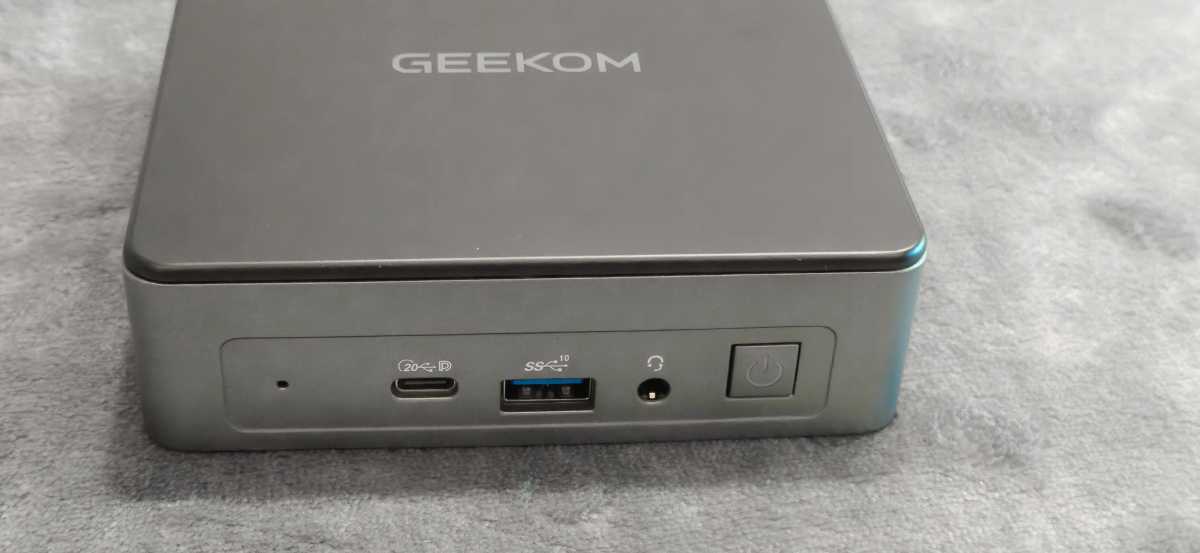
The most frequently used ports are conveniently located on the front, including a USB-C port with 20Gbit/s, a high-speed USB-A port, and a headphone jack.
Christoph Hoffmann
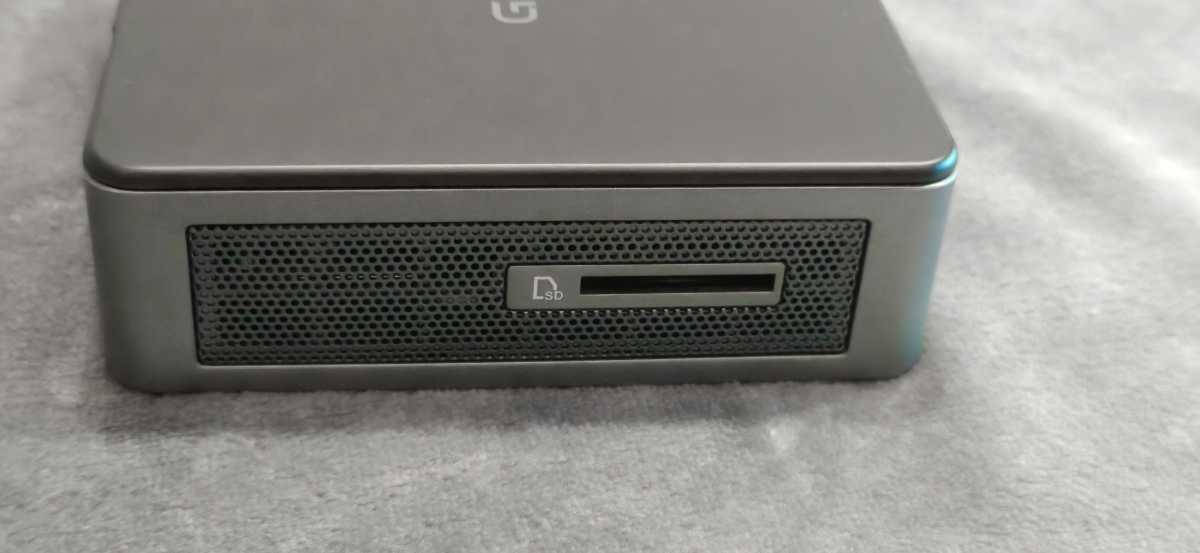
To the right of this, hidden behind a speaker grille, is a full-size SD card reader. While the PC is too slow for professional image editing, the card reader proves handy in everyday use — for example, for quickly copying photos to an external hard drive.
Christoph Hoffmann
A VESA mount is included, allowing for concealed mounting behind a compatible monitor, which helps to keep the desk even tidier. Compared to larger models in the Geekom range, such as the A5 Pro or the A9 Max, the Air12 is noticeably more compact, though it does forgo sophisticated cooling systems and more powerful platforms.
Weighing around 16 ounces, it matches the rest of its design: The mini PC can be effortlessly stowed away in a bag, making it ideal as a portable companion for presentations or as a secondary workstation. The build quality, particularly around the gaps and ports, is neat; nothing rattles or sits crookedly. For a device in this price range, that’s not something to be taken for granted.
Geekom Air12 2026 specifications
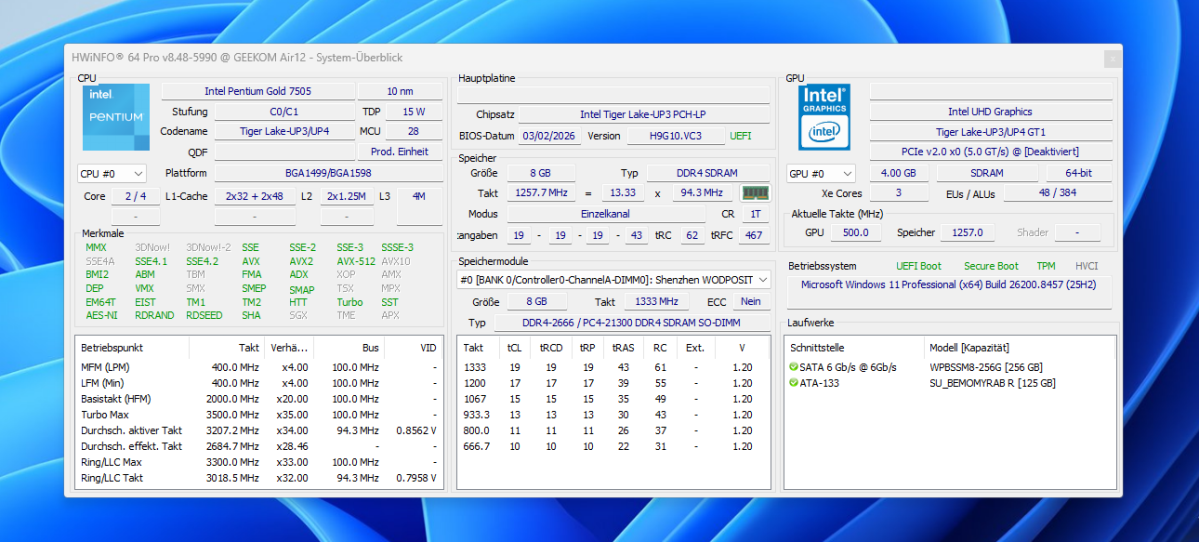
Inside, Geekom has opted for the Intel Pentium Gold 7505, a dual-core processor with four threads and a clock speed of up to 3.5 gigahertz. The chip is from the Tiger Lake generation and was launched back in late 2020. Compared with current processors in 2026, this is a completely outdated platform, aimed primarily at users with minimal requirements.
Christoph Hoffmann
Our test model combines the processor with 8GB of DDR4 RAM in single-channel mode and a small 256GB SATA SSD. Both components can be upgraded at a later date. According to the datasheet, the Geekom supports up to 32GB of RAM and additional storage via a second M.2-2280 slot. The Air12 is surprisingly generous when it comes to connectivity options.
Christoph Hoffmann
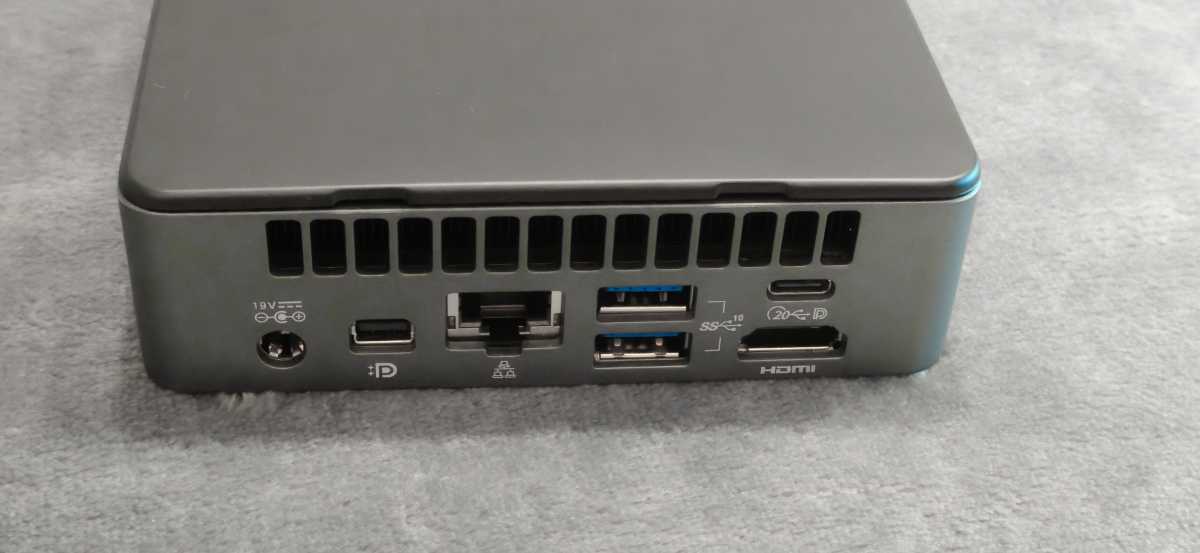
On the rear panel are the power connector, a further USB-C port with video output, a Gigabit Ethernet socket, two additional USB-A 3.2 ports, and an HDMI 2.0 output. There is also a Mini DisplayPort. Together with HDMI and USB-C, up to three monitors can be used simultaneously.
For wireless connectivity, a Realtek Wi-Fi 6 module is built in, which provided a stable connection without any dropouts during testing. Bluetooth 5.2 rounds off the external connectivity options.
Windows 11 Pro is pre-installed and already activated, so there are no additional licence costs once you’ve unboxed it. An 11th-generation Intel UHD graphics unit handles the graphics output, sharing the system memory with the processor. It is sufficient for video playback, office applications, and driving multiple monitors, but complex 3D calculations are out of the question.
The device also features an Intel Gigabit LAN port, which delivered a stable, full connection speed without any dropouts during testing. Those who rely on wired networks are better off with this than with Wi-Fi, even though the latter also works reliably in everyday use.
Computing performance
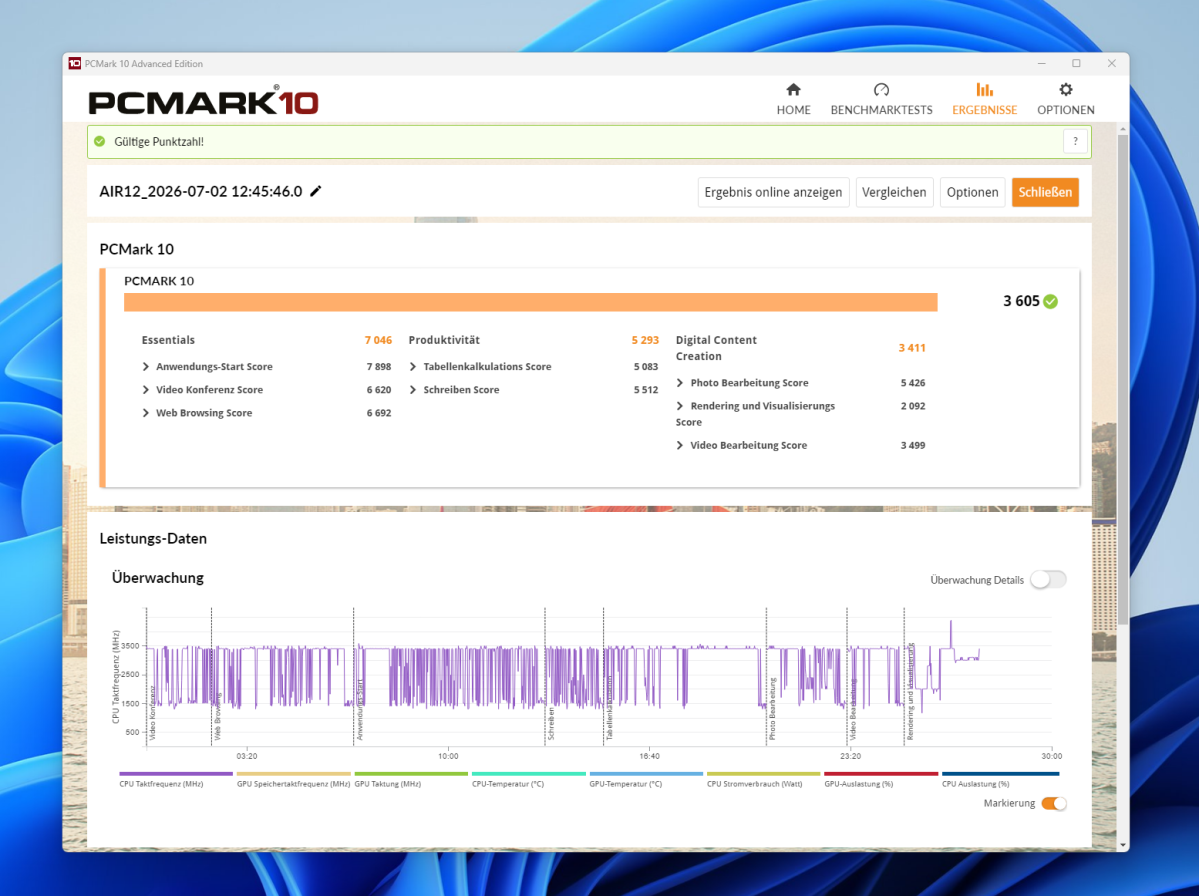
A look at the benchmark results makes the Air12 2026’s shortcomings abundantly clear. In PCMark 10, our test unit achieved an overall score of 3,605 points. The Essentials score of 7,046 points is still respectable and reflects the speedy launch of simple programs. In the productivity category, the score drops to 5,293 points, while in digital content creation it falls to a meager 3,411 points.
Christoph Hoffmann
By way of comparison: A Geekom A5 Pro 2026 with a Ryzen 5 7530U processor scored 6,526 points in PCMark 10 in our test lab, whilst a Nipogi E3B with AMD’s Ryzen Embedded chip achieved 5,279 points.
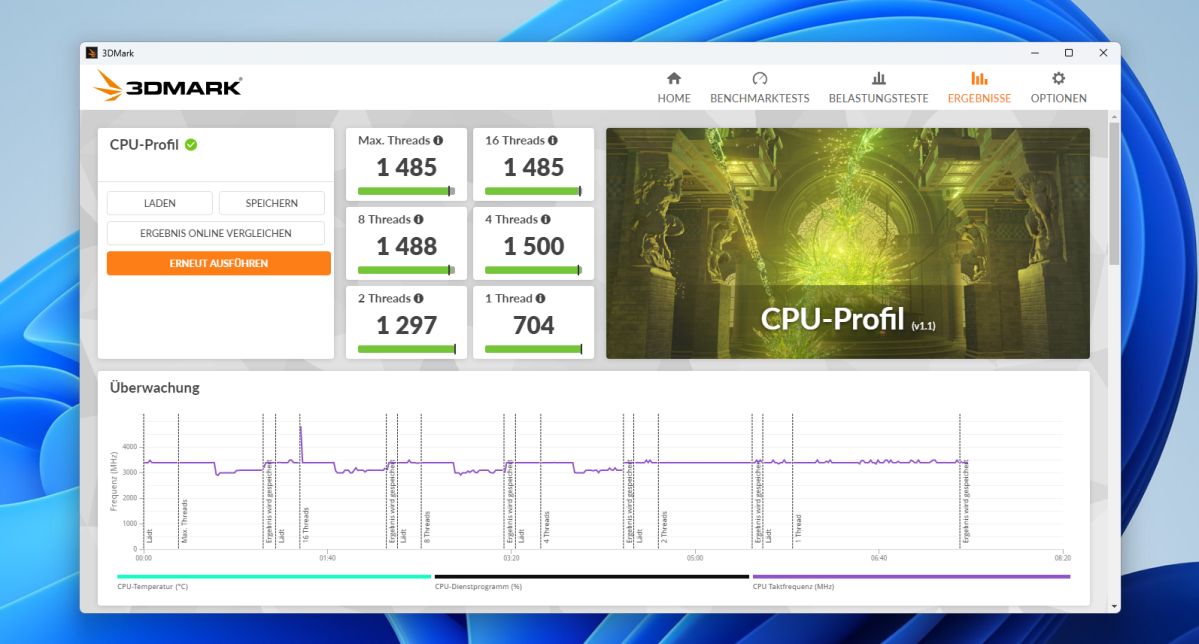
The 3DMark CPU Profile highlights the tight performance limits of the dual-core processor: With 1,485 points at maximum thread utilization, 1,500 points with four threads, and 704 points with a single thread, the Air12 lags far behind modern multi-core mini-PCs.
Christoph Hoffmann
The Air12 2026 therefore ranks well below modern mini PCs with the latest quad-core or hexa-core processors. In practice, this is particularly noticeable when running several programs simultaneously. As soon as a Word document and a YouTube stream are open alongside a browser with many tabs, the aging dual-core chip starts to struggle. However, the Air12 handles individual tasks such as writing text without any background load without any noticeable hesitation.
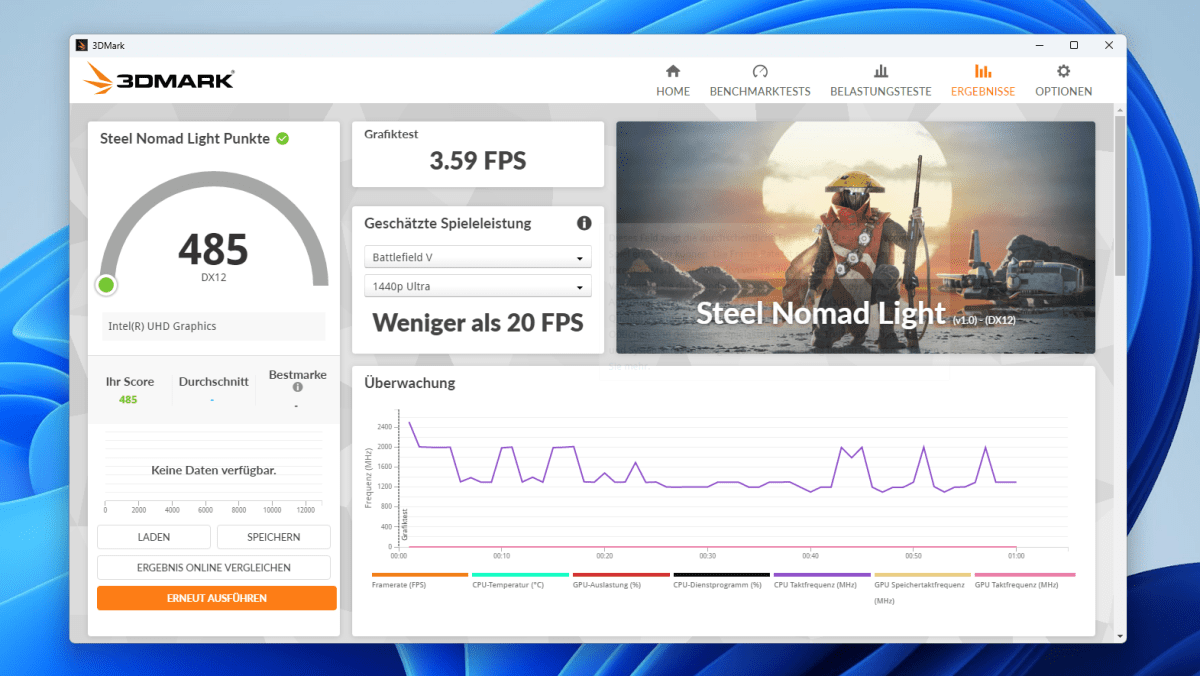
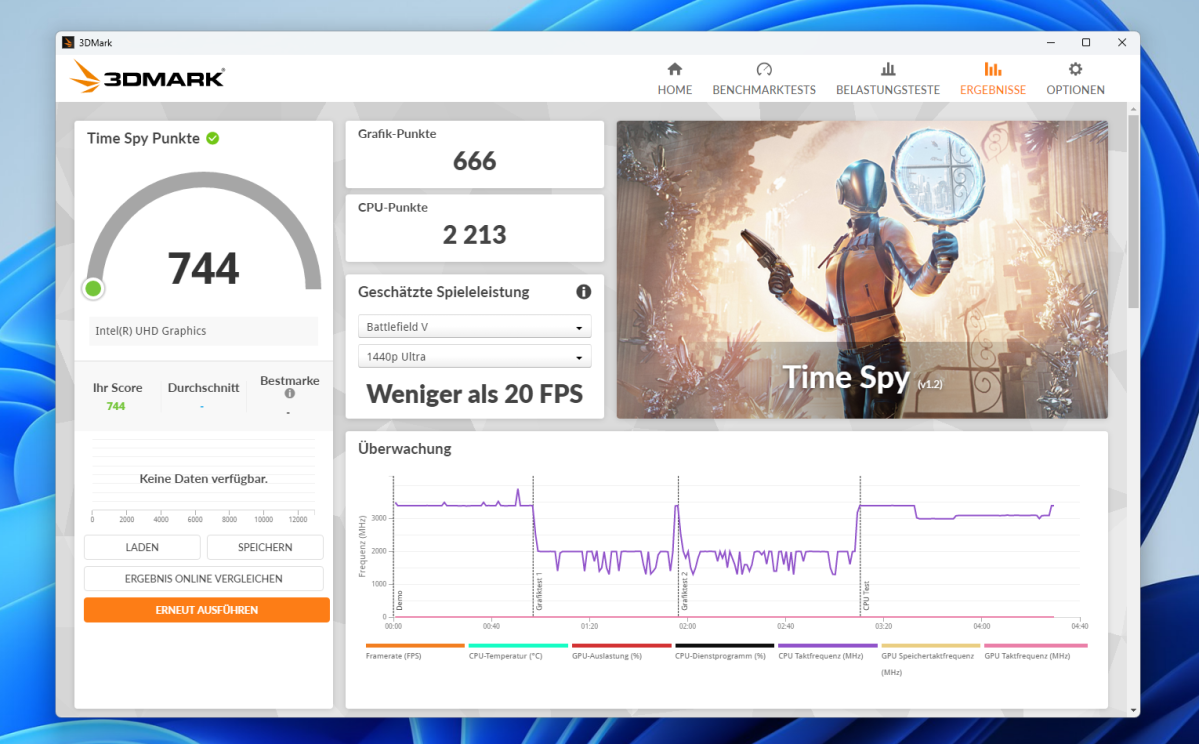
The 3DMark Time Spy test confirms the weakness of the integrated Intel UHD graphics, scoring just 744 points; in the more demanding Steel Nomad Light test, it manages only 485 points and just under 3.6 frames per second. This makes modern games unplayable.
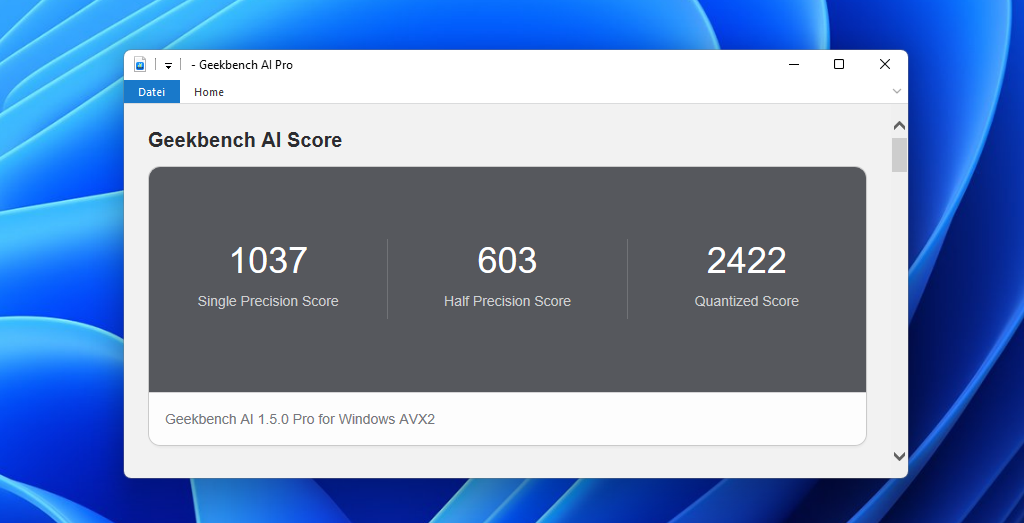
In the Geekbench AI Pro test, too, the Air12 remains at entry-level: 1,037 points for single precision, 603 points for half precision, and 2,422 points in the quantized test show that the mini PC offers virtually no headroom for local AI tasks.
Christoph Hoffmann
Furthermore, the RAM slows the system down: The 8GB of DDR4 RAM operates in single-channel mode and offers significantly less bandwidth than a dual-channel configuration.
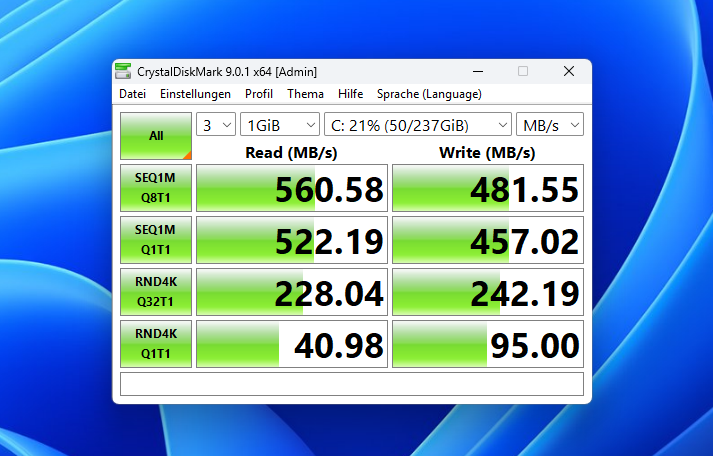
In terms of storage speed, the built-in SATA SSD is disappointing in CrystalDiskMark, with read speeds of 560MB/s and write speeds of 482MB/s. An NVMe SSD — now standard even in the most affordable mini PCs in this price range — would have enabled noticeably faster load times here.
Christoph Hoffmann
The Pentium Gold 7505 only maintains its turbo clock speed of 3.5 gigahertz for a short time; under sustained load, the frequency settles between 3.0 and 3.4 gigahertz. However, anyone using the Air12 for a more demanding task, such as converting several video files simultaneously, must expect extremely long waiting times.
Noise levels and power consumption
The Air12 2026’s cooling system relies on a fairly generously sized fan combined with two copper heat pipes. When idle and during light office tasks, the device remains pleasantly unobtrusive; the fan stays well below the threshold of perception in a normal office environment. Even under load, the noise level rises only moderately.
When it comes to power consumption, the 15-watt processor proves to be very economical: At idle, the system draws around 10 watts from the mains; during everyday use with several programs open, consumption is around 18 watts. Under full processor load, this figure rises to around 29 watts. Anyone who leaves the Air12 switched on permanently — for example, as a small, simple server or streaming client — need hardly worry about their electricity bill.
Should you buy the Geekom Air12 2026?
The Geekom Air12 2026 leaves us with mixed feelings following our test. Its performance is sufficient for basic word processing, web browsing, and streaming. We also like the slim chassis, the quiet cooling system, and the wide range of ports.
However, as soon as real multitasking is required, the dual-core Pentium from 2020 quickly reaches its limits. At just under $300, the value for money is therefore poor: Other mini PCs in this price range offer more modern processors and faster NVMe SSDs.
Anyone expecting performance headroom for the coming years should opt for a more up-to-date platform.
Technical specifications
- Processor: Intel Pentium Gold 7505 (Tiger Lake), 2 cores / 4 threads, up to 3.5 GHz, TDP 15 watts
- Graphics: Intel UHD Graphics (11th generation), 48 execution units, up to 500 MHz
- RAM: 8GB DDR4 SO-DIMM (single-channel, DDR4-2666), expandable up to 32 GB
- Storage: 256GB M.2 SATA SSD (tested configuration), second M.2 2280 slot free for upgrading to up to 2TB
- Operating system: Windows 11 Pro, pre-installed and activated
- Front ports: 1 × USB-C 3.2 Gen 2 (20 Gbit/s) with DisplayPort, 1 × USB-A 3.2 Gen 2 (10Gbit/s), 3.5 mm jack
- Rear ports: DC-In, 1 × USB-C with DisplayPort 1.4, Gigabit Ethernet, 2 × USB-A 3.2 Gen 2 (10Gbit/s), 1 × HDMI 2.0
- Other ports: Full-size SD card reader, Mini DisplayPort 1.4
- Connectivity: Wi-Fi 6 (Realtek RTL8852BE), Bluetooth 5.2
- Display support: Up to three monitors simultaneously
- Dimensions: 4.6 × 4.4 × 1.3 inches
- Weight: approximately 16 ounces
- Cooling: Active, fan with two copper heat pipes
- Warranty: 3 years
- Price: From around $299 (8GB RAM / 256GB SSD), variants available up to 16GB RAM / 512GB SSD


