At a glance
Expert’s Rating
Pros
- Very high CPU and graphics performance
- 128GB of fast shared memory
- Two M.2 slots and OCuLink
- Reliable cooling without significant throttling
- Robust metal casing
Cons
- Only one USB-C port, none on the front
- RAM soldered in place
- High price
Our verdict
The GMKtec EVO-X3 is an exceptionally fast compact PC for demanding creative work. Its large shared memory offers plenty of space for local AI models. The Radeon 8060S handles many games in Full HD, and in WQHD with adjusted detail settings. The cooling system keeps performance stable, and the computer remains quiet in everyday use. Two SSD slots and OCuLink provide scope for future upgrades. However, given the high price, the single USB-C port and the soldered-in RAM are all the more frustrating.
Price at time of review
This value will display the geolocated pricing text for product undefined
Best Price Today
Price When Reviewed
$3,799.99
Best Prices Today: GMKtec EVO-X3

Calling the EVO-X3 a “mini PC” is almost an understatement. GMKtec has packed AMD’s Ryzen AI Max 395, complete with 128GB of LPDDR5X, into a slim, console-style metal chassis. The combined memory is primarily designed for local AI and large media projects. The integrated Radeon 8060S also makes the computer suitable for gaming. However, with a current price of $3,799.99, it is priced on a par with high-performance desktop PCs. Expectations regarding speed, cooling, and features are correspondingly high.
Christoph Hoffmann
Design and build quality
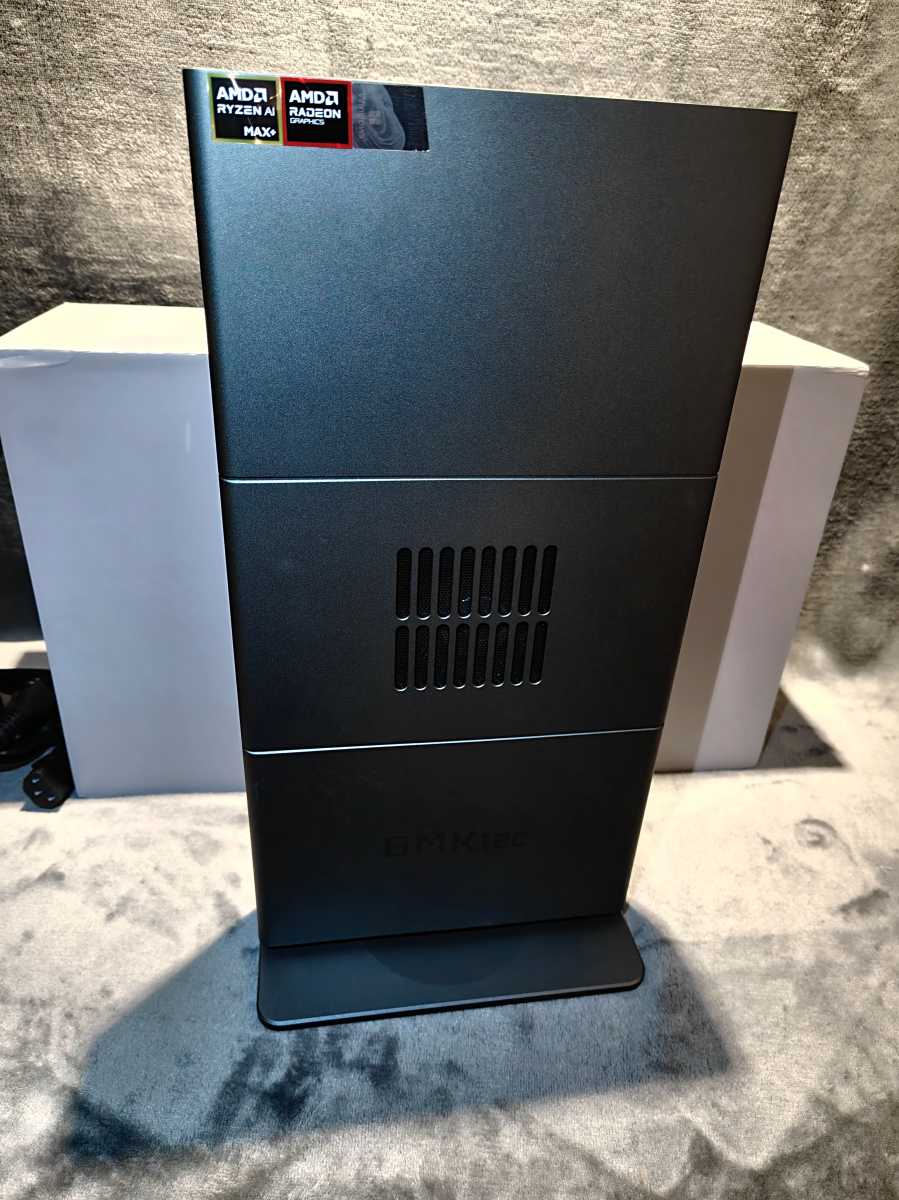
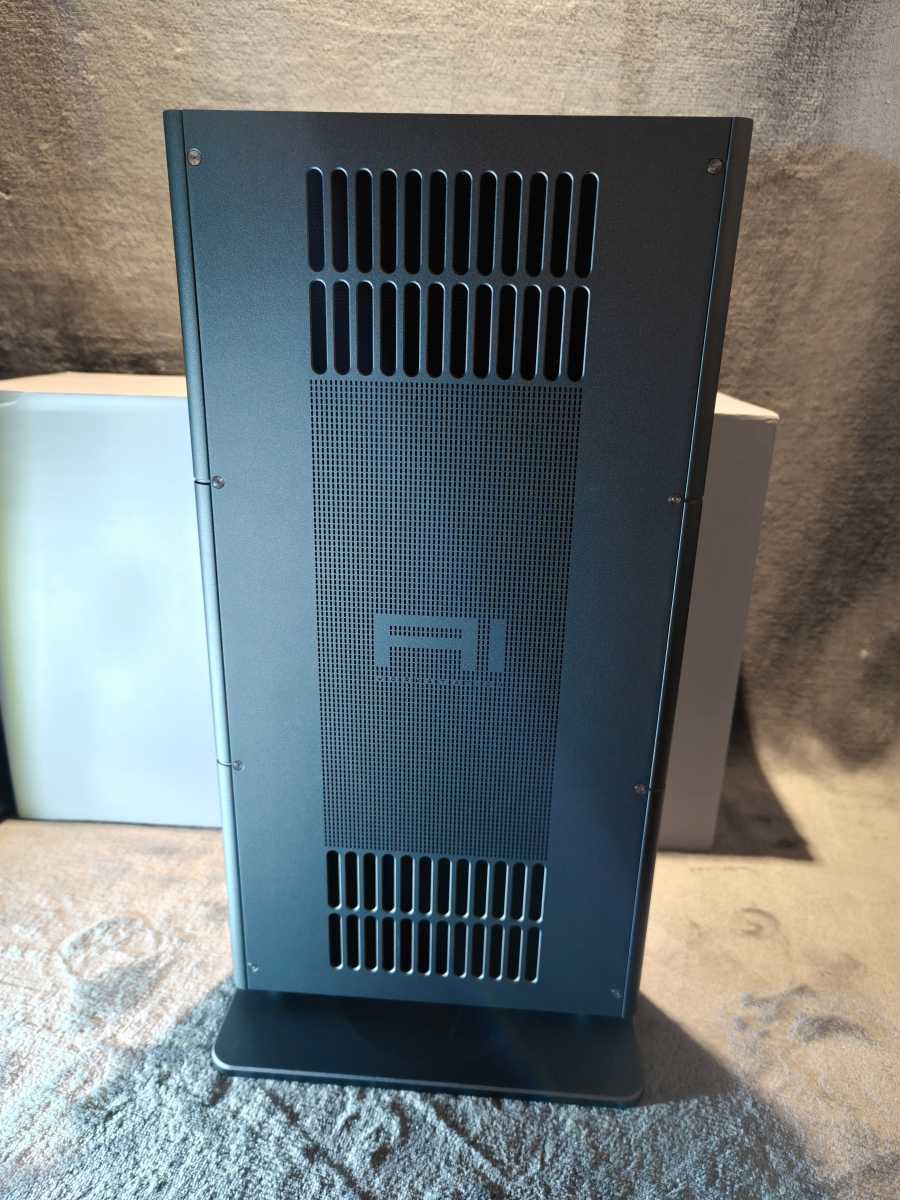
The EVO-X3 is more reminiscent of a compact games console than a typical mini PC. Its dark gray metal casing stands upright on a wide base and measures 13.89 × 7.32 × 1.61 inches without it. With the stand, the computer is 14.17 inches high. Thanks to its vertical orientation, it takes up little floor space, but is significantly taller than flat mini PCs.
Christoph Hoffmann
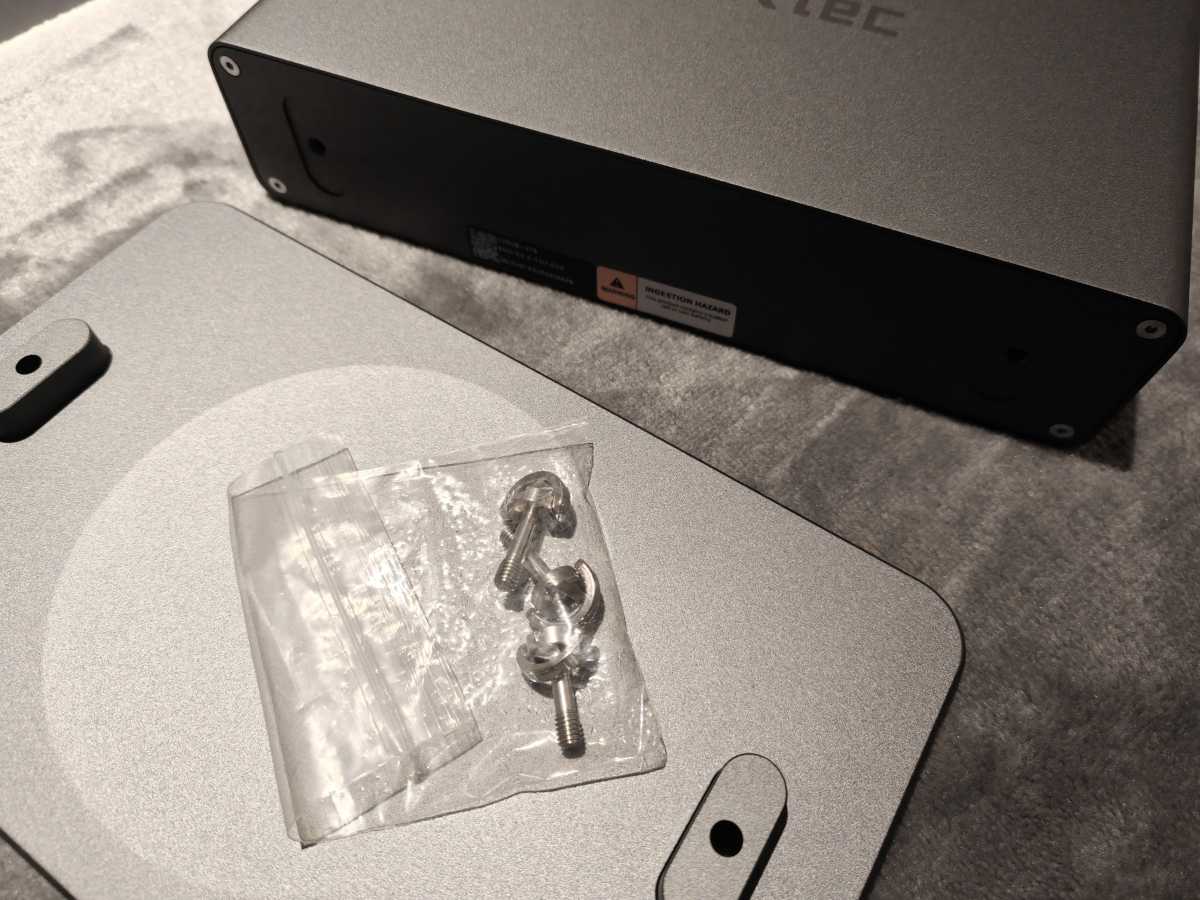
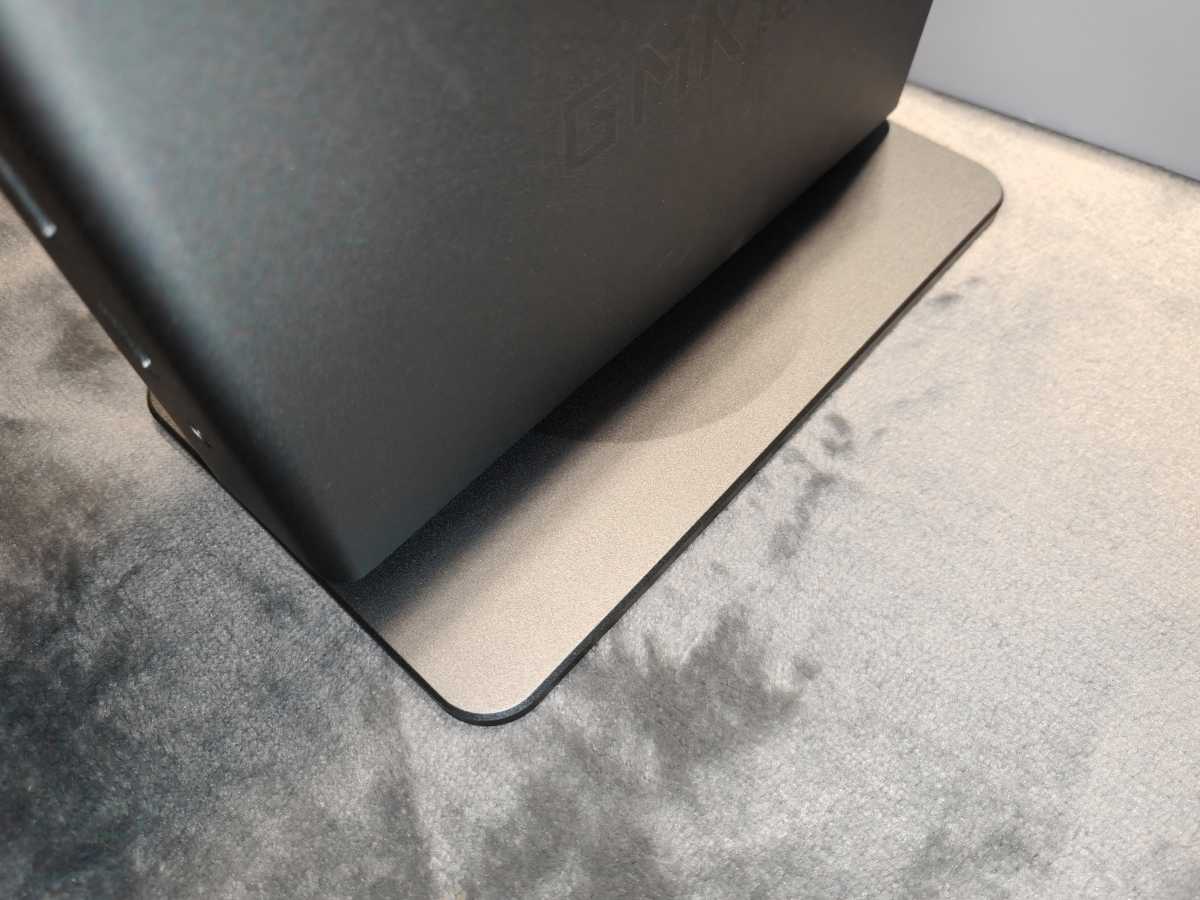
Weighing around 5 pounds and with a base secured by two screws, it stands firmly. The build quality lives up to the high price. The metal surfaces show hardly any give when pressed, and the gaps are uniform. The base is also secure with no play, and we found no sharp edges anywhere.
Christoph Hoffmann
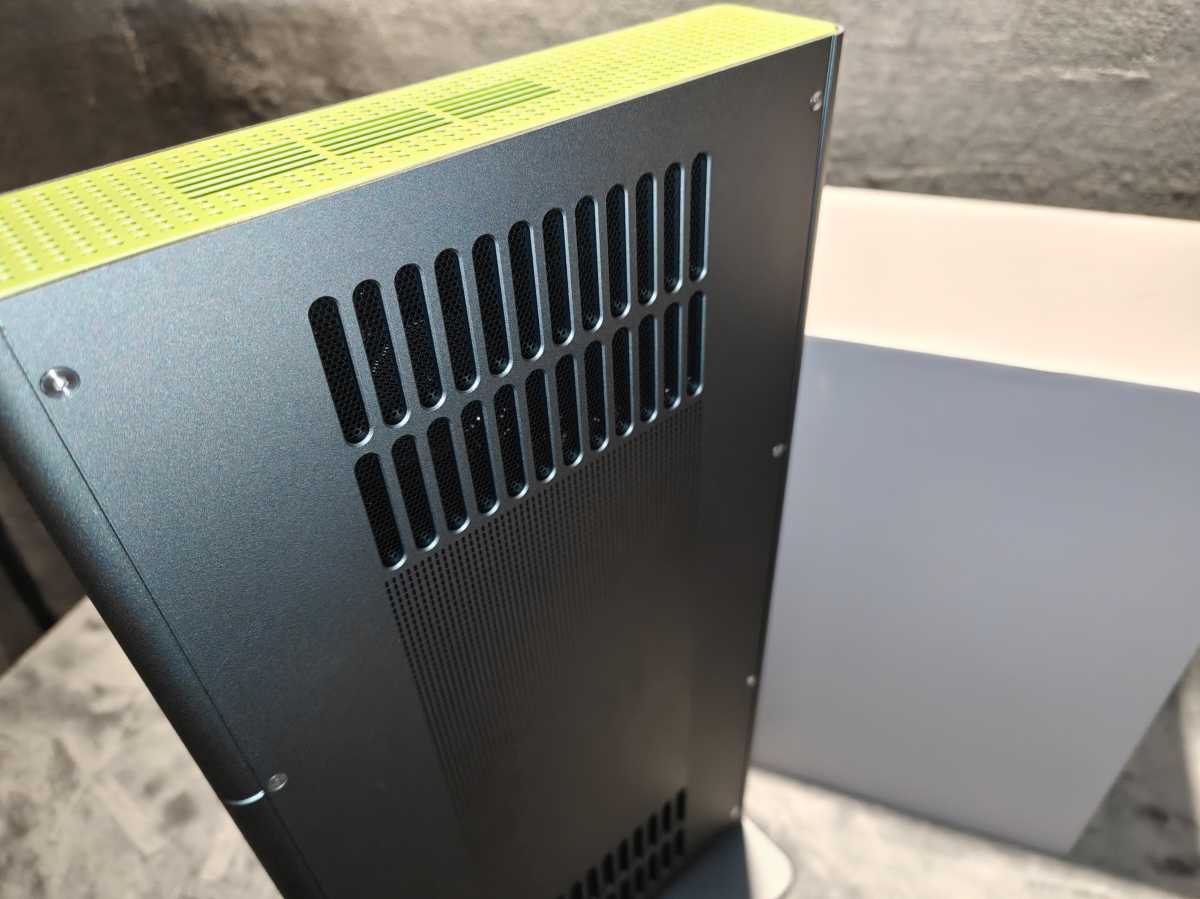
The green lid with its perforated grille and the matching power button provide an eye-catching splash of color. The design therefore really stands out in a plain office.
Christoph Hoffmann
Large ventilation openings on the sides and top ensure the necessary airflow. Space should therefore be left around the case. The ports are distributed across the narrow front edge and the rear. This keeps the cables out of sight, but makes frequently used sockets on the rear less accessible.
The case can be opened for maintenance work. Both M.2 slots are accessible. The LPDDR5X memory, on the other hand, is soldered directly onto the circuit board, as is standard for this platform. This means that upgrading at a later date or simply replacing a faulty module is not possible. However, at 128GB, the capacity is generously sized.
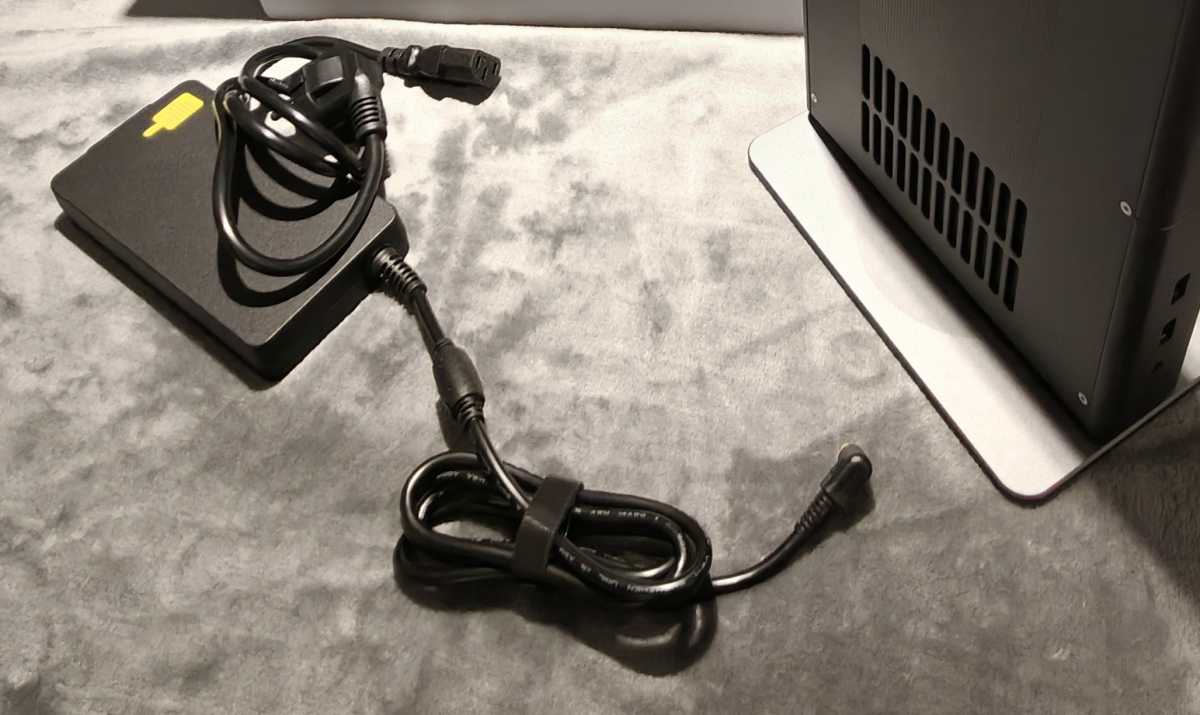
The only visual drawback is the external 230-watt power supply, which is rather bulky and doesn’t quite fit in with the slim design.
Christoph Hoffmann
Specifications
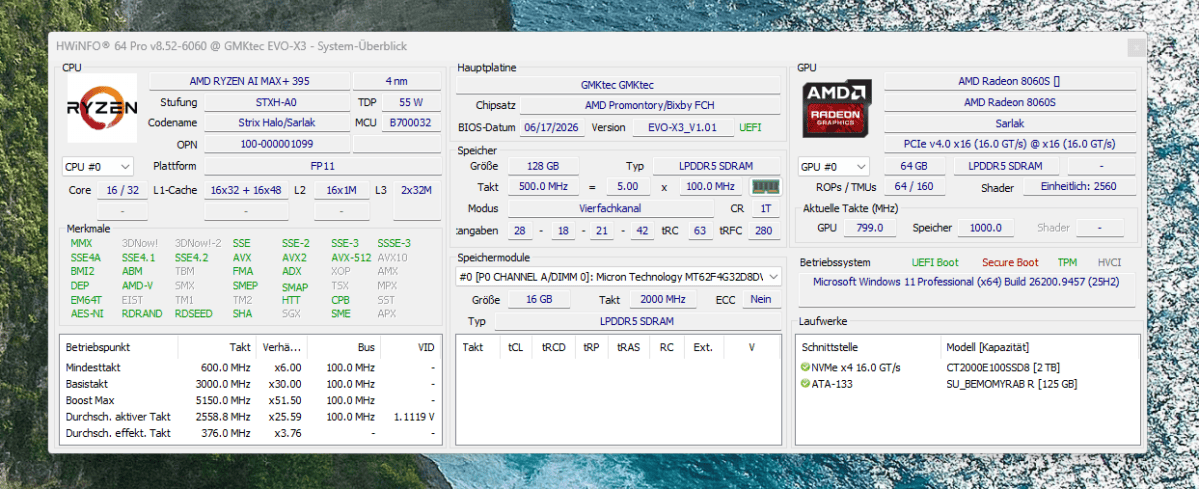
At the heart of the system is AMD’s Ryzen AI Max 395. The Zen 5 CPU has 16 cores and 32 threads, reaches up to 5.1GHz and shares memory with the Radeon 8060S. Its 40 compute units are based on RDNA 3.5. Added to this is an XDNA 2 NPU with 50 TOPS. GMKtec quotes a combined figure of up to 126 TOPS for the CPU, GPU, and NPU. This aggregated manufacturer’s figure is not equivalent to the NPU’s performance and is of limited use for comparisons.
Christoph Hoffmann
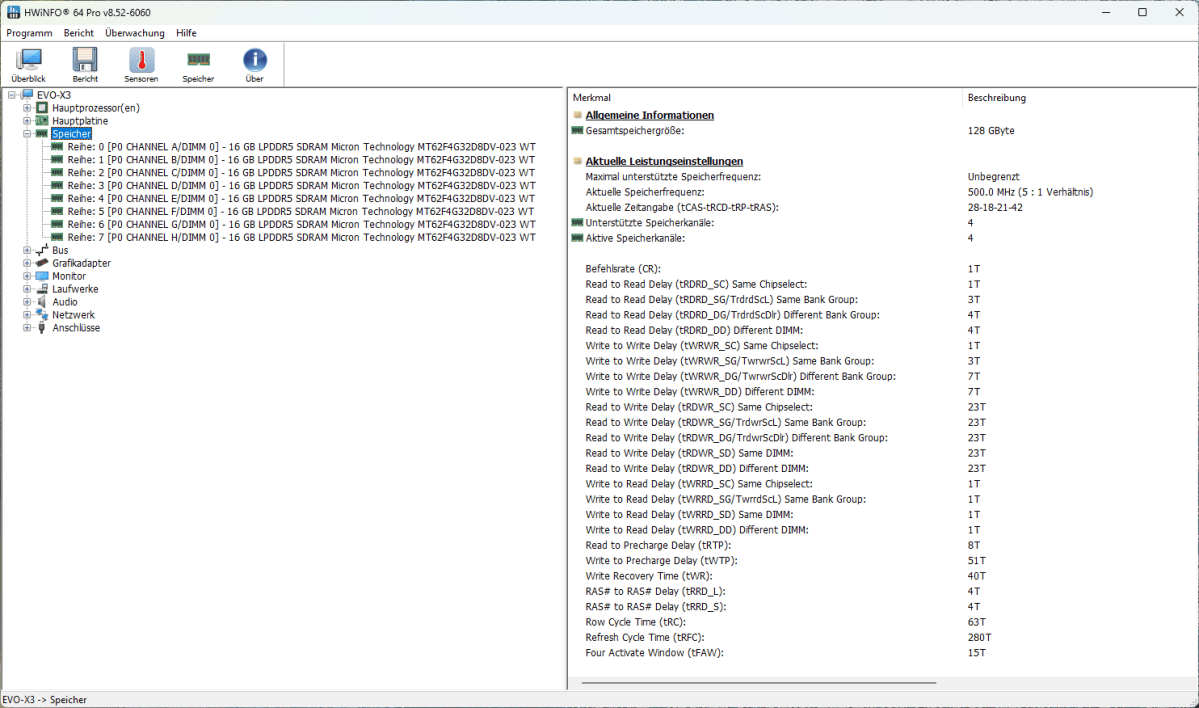
Our test unit reserved 64GB of the 128GB pool as graphics memory. The CPU and GPU access the same memory chips, so data does not first need to be copied between system memory and separate graphics memory. In suitable Vulkan applications, the GPU can utilize up to 96GB of the shared memory. The LPDDR5X memory, running at 8,000 MT/s, is fast but not replaceable.
Christoph Hoffmann
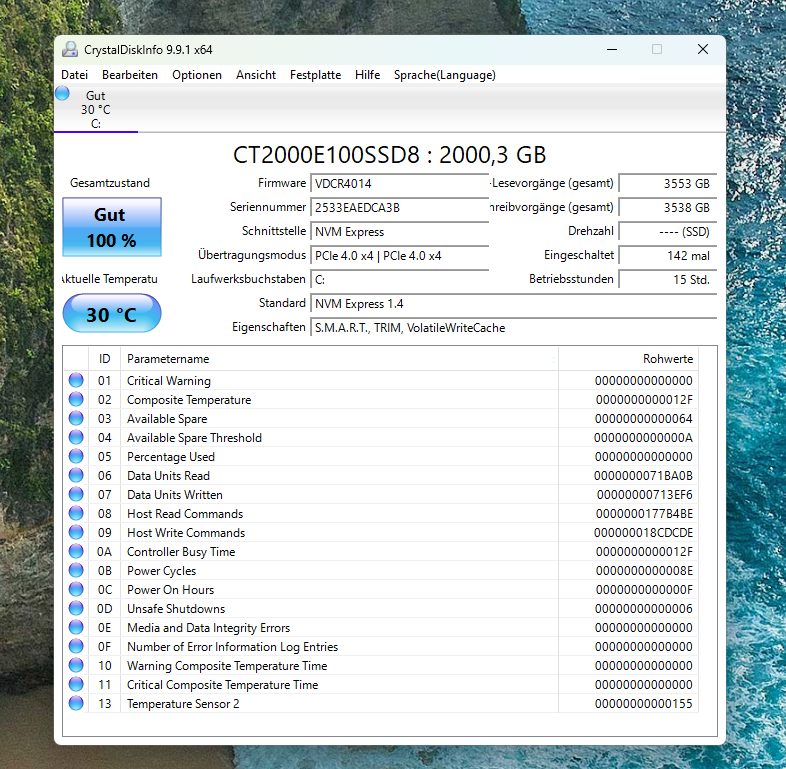
A 2TB Crucial CT2000E100 with PCIe 4.0 x4 serves as the system drive. Both M.2-2280 slots on the EVO-X3 support PCIe 4.0 x4; one remains free. According to GMKtec, a total of up to 16TB can be installed.
Christoph Hoffmann
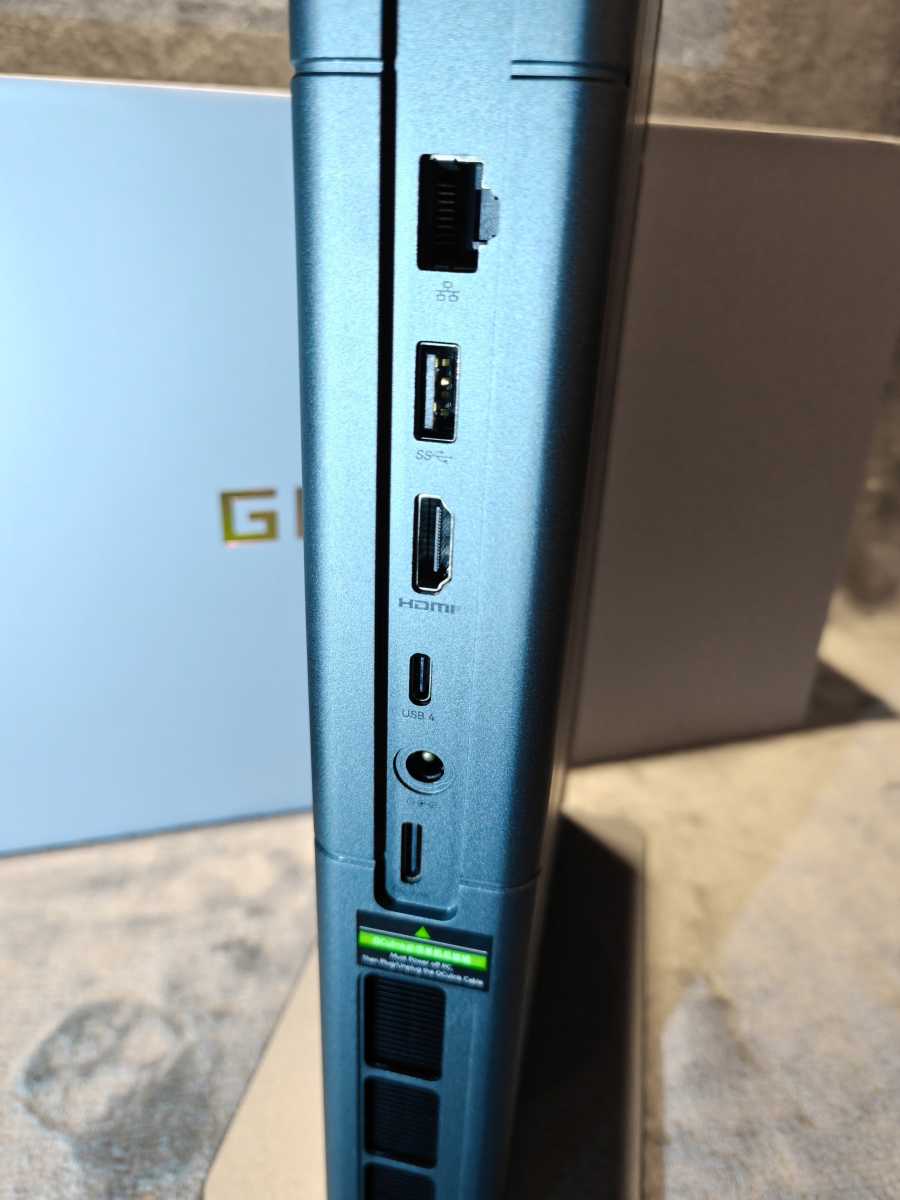
Given its size and price, there are surprisingly few ports. At the front are a USB-A port with 5Gbit/s, a USB 2.0 socket and the combined audio jack. At the rear are a USB-A port with 10Gbit/s, HDMI 2.1, and USB4 with 40Gbit/s. USB4 transmits data and a video signal and supports USB-C accessories. A second USB-C port, a separate DisplayPort, and a card reader are missing. It is particularly inconvenient that there is no USB-C port on the front.
Christoph Hoffmann
An external graphics card with four PCIe 4.0 lanes can be connected via OCuLink. This causes less protocol overhead than USB4 and is suitable for a stationary eGPU. The port does not support hot-plugging: The PC and eGPU must be switched off before plugging in or unplugging.
The EVO-X3 connects to the network via 2.5-Gigabit LAN or Wi-Fi 7. Bluetooth 5.4 is also on board. The wireless technology is up to date, but a second LAN port or 10-Gigabit Ethernet would have been more in keeping with this price range.
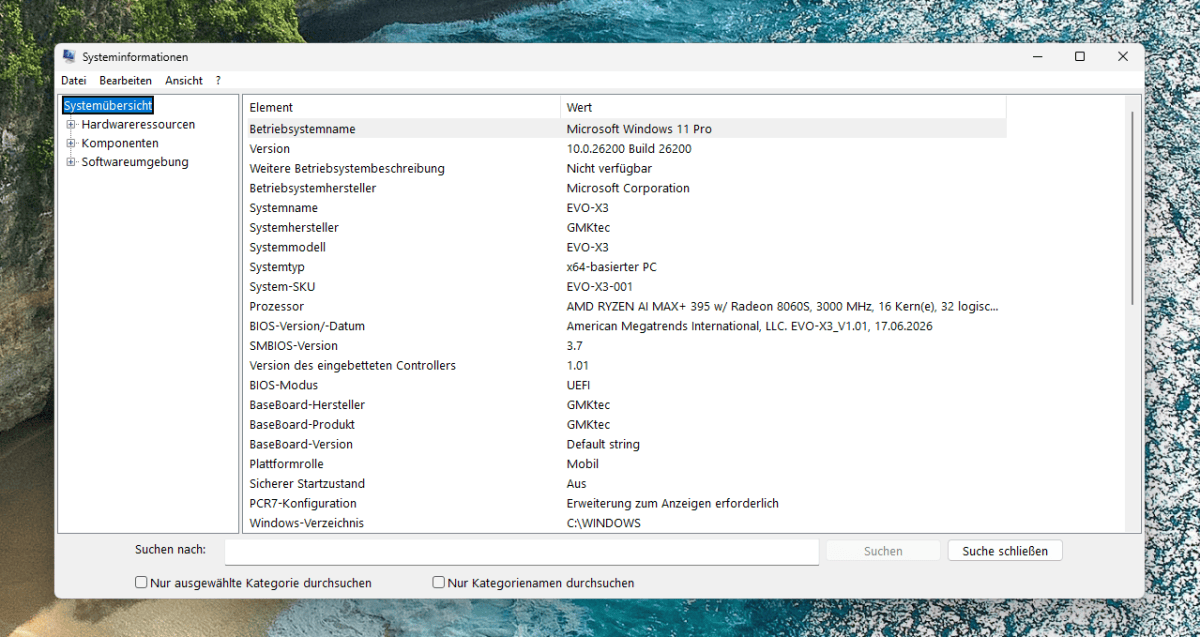
The test unit is running Windows 11 Pro 25H2 (Build 26200). During testing, Windows Update offered the optional September Preview Update KB5124010, which updates to Build 26200.9550. We installed the AMD Adrenalin Edition 26.8.1 software, including GPU and chipset drivers. Windows Update often only provides basic drivers without the Adrenalin interface.
Christoph Hoffmann
Computing performance
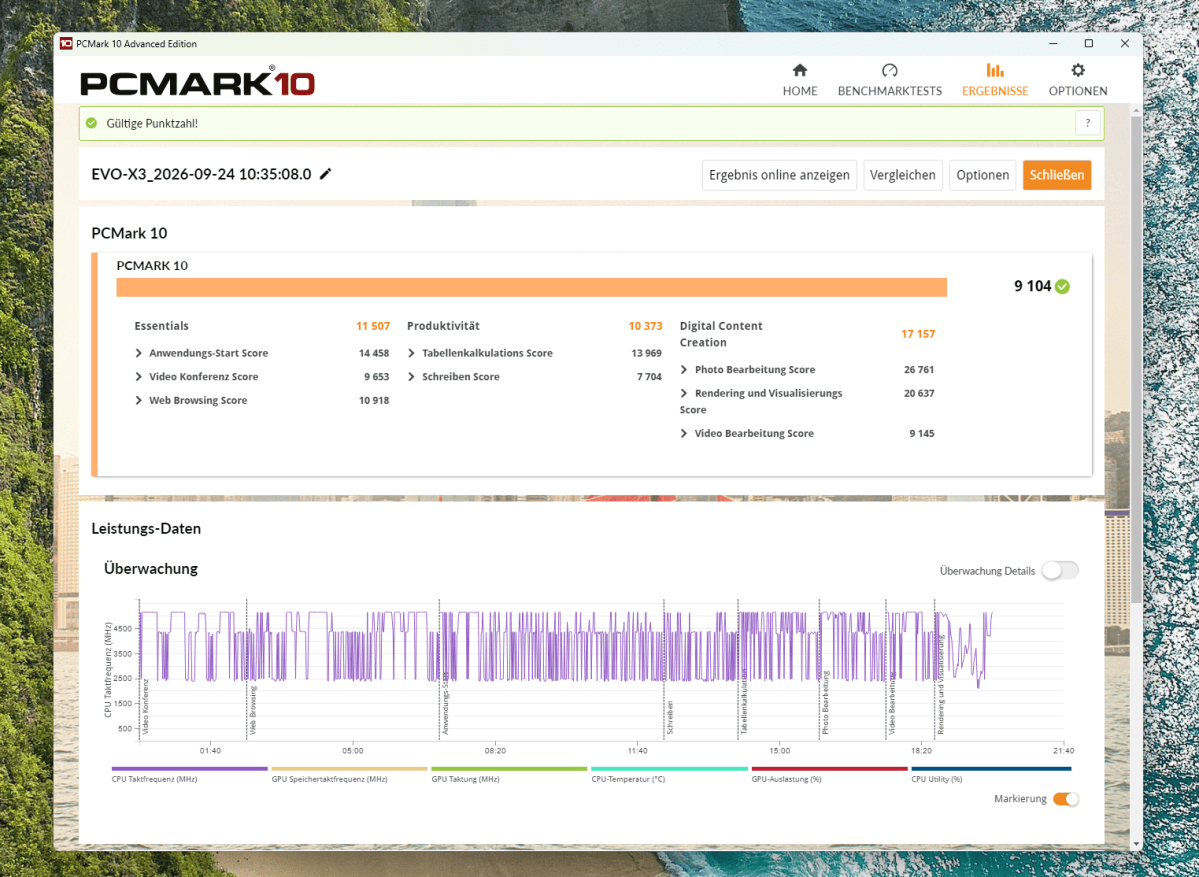
The Ryzen AI Max 395 delivers very high performance in everyday use. PCMark 10 scored 9,104 points. The sub-scores of 11,507 points for basic functions and 10,373 points for productivity indicate plenty of headroom for web browsing, Office applications, and video conferencing. In the Digital Content Creation category, it scored 17,157 points. This test includes, among other things, photo and video editing as well as rendering. This is where the 16 CPU cores and the large amount of memory really pay off.
Christoph Hoffmann
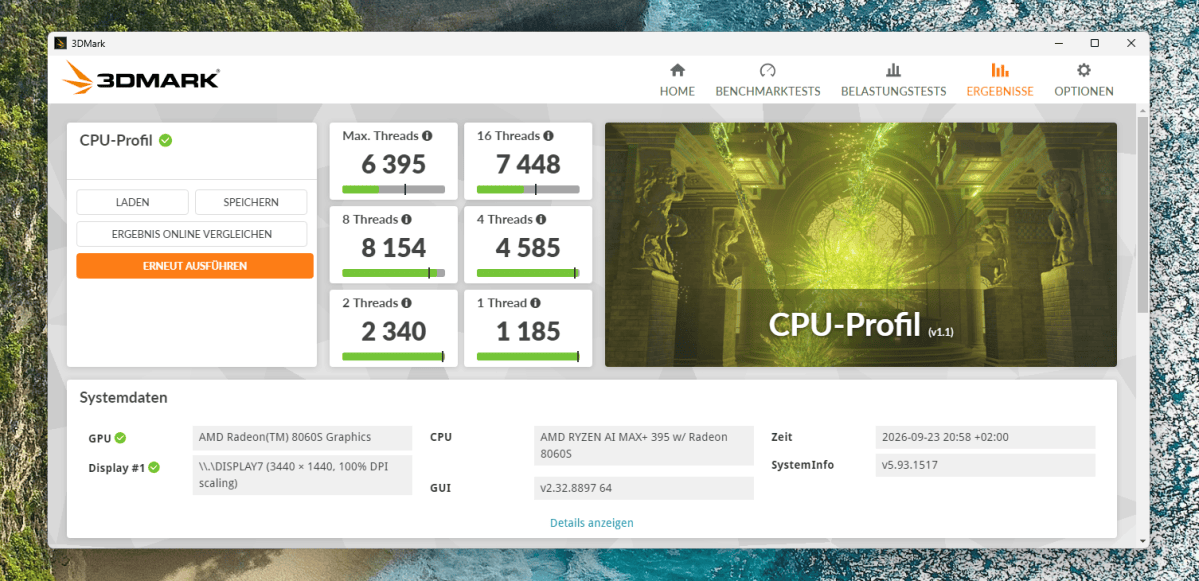
In the 3DMark CPU Profile, the test device achieved 8,154 points with eight threads, but only 6,395 points with all threads. A second run confirmed this unusual ratio with 8,122 to 6,200 points. Normally, the score with all threads should be higher. The repeatable result suggests an anomaly in the performance profile, firmware, or thread allocation. This does not mean, however, that real-world applications will run more slowly with 32 threads. In this configuration, the sub-test is therefore of limited use for assessing maximum multi-core performance.
Christoph Hoffmann
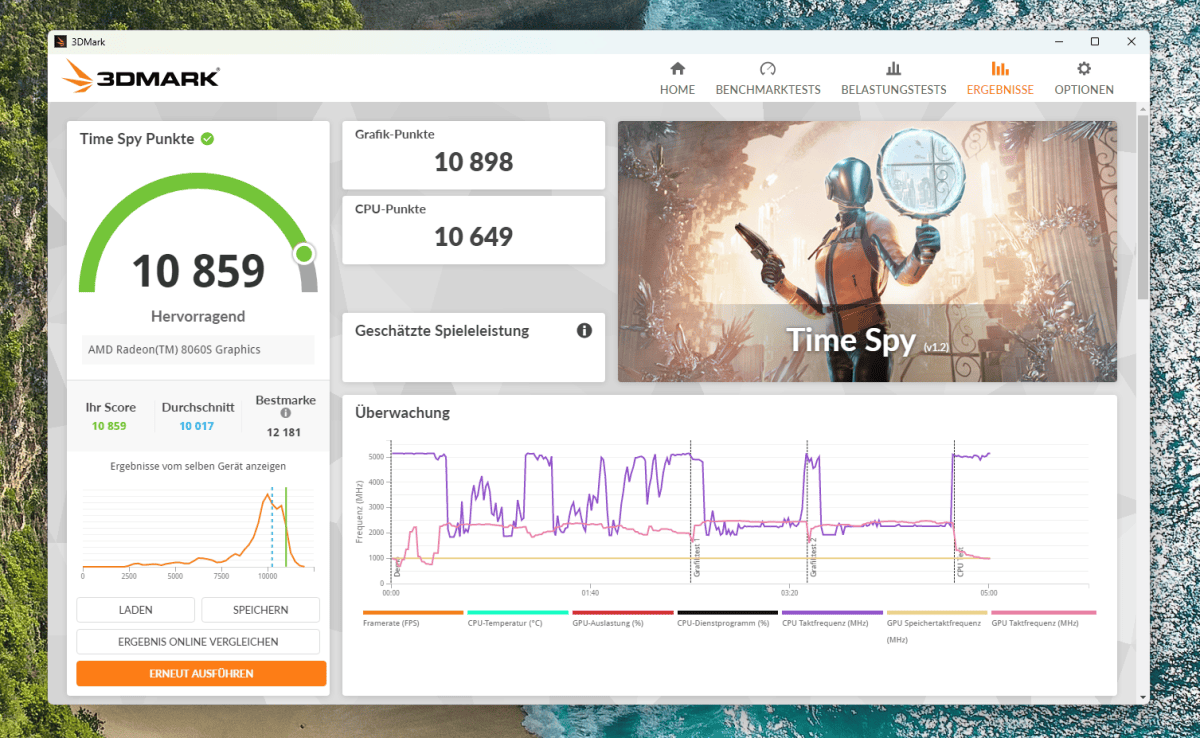
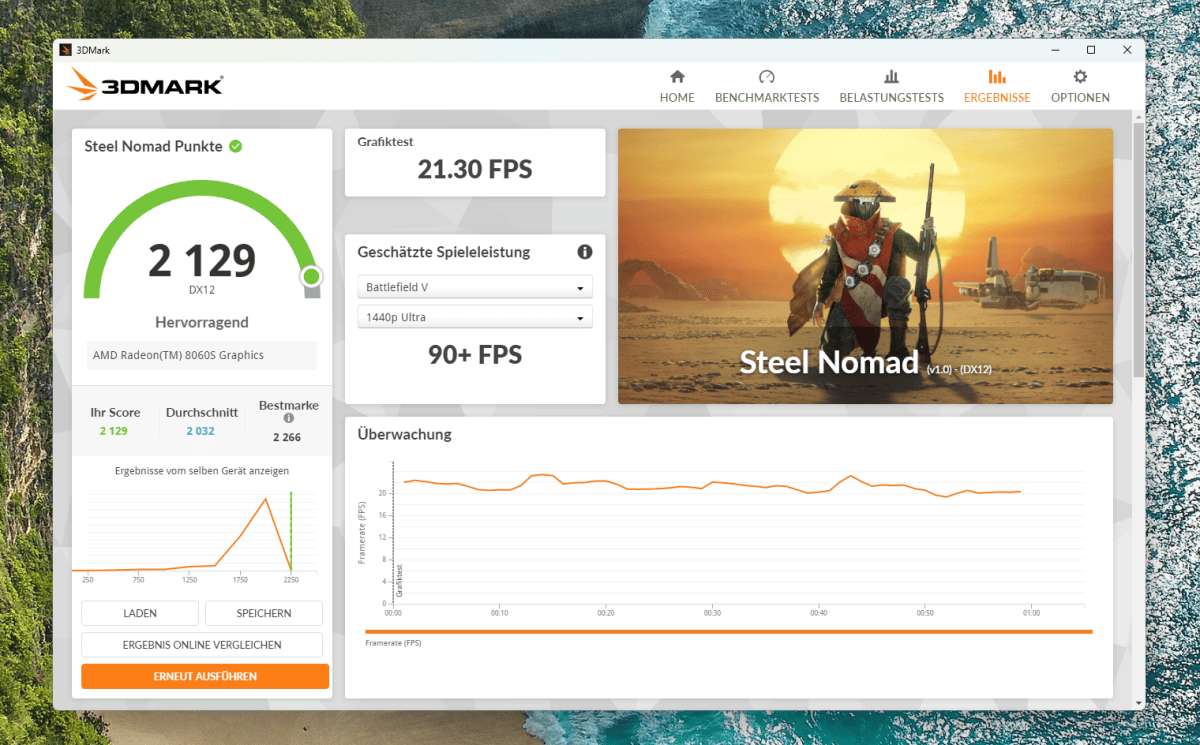
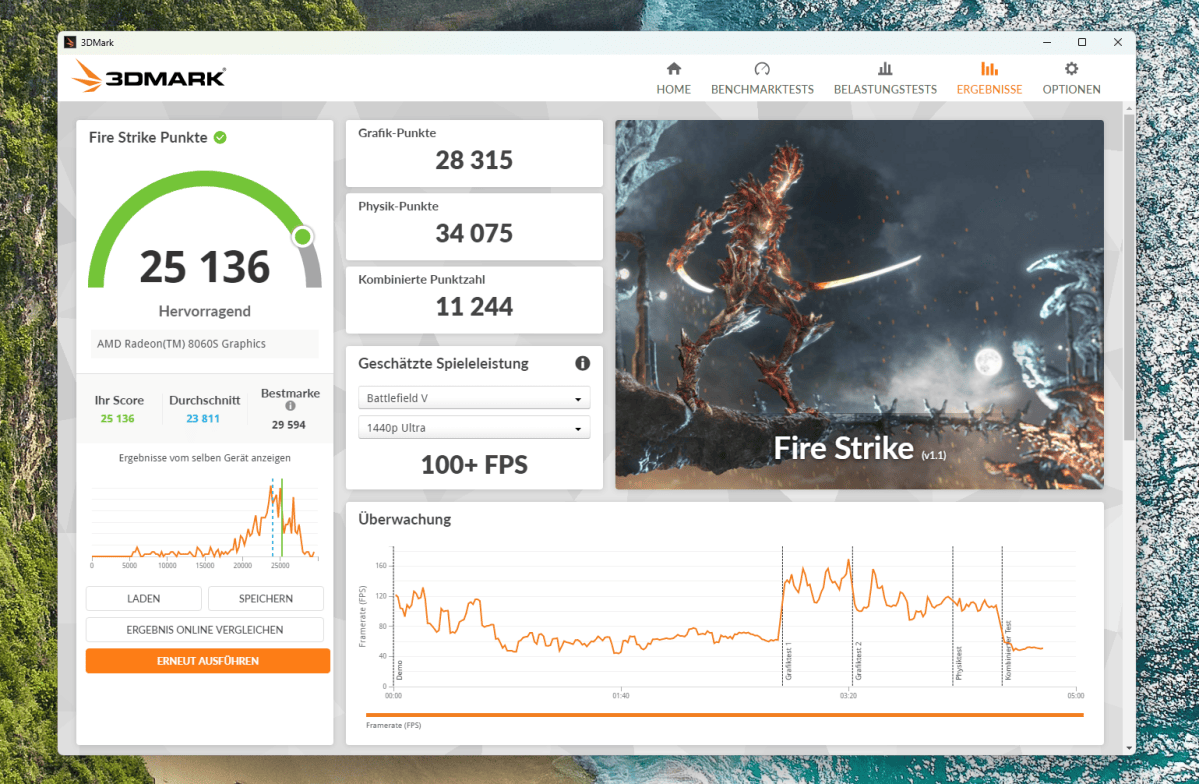
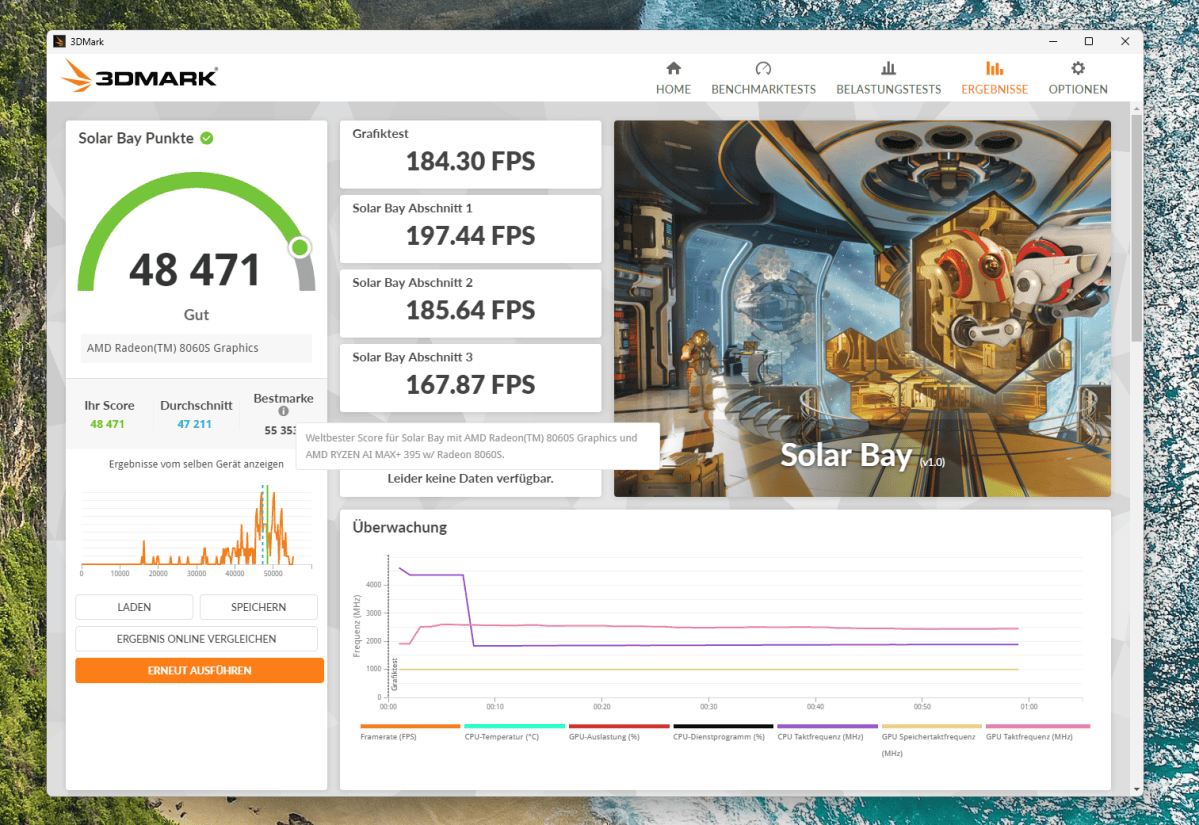
In terms of graphics performance, the EVO-X3 clearly stands out from standard mini PCs with small integrated GPUs. 3DMark Time Spy recorded 10,859 points, while Fire Strike recorded 25,136 points. In the more demanding Steel Nomad test, it scored 2,129 points, and in the Solar Bay ray-tracing test, 48,471 points. Many games therefore run smoothly in Full HD. WQHD is also possible, but requires adjusted settings or upscaling for demanding titles.
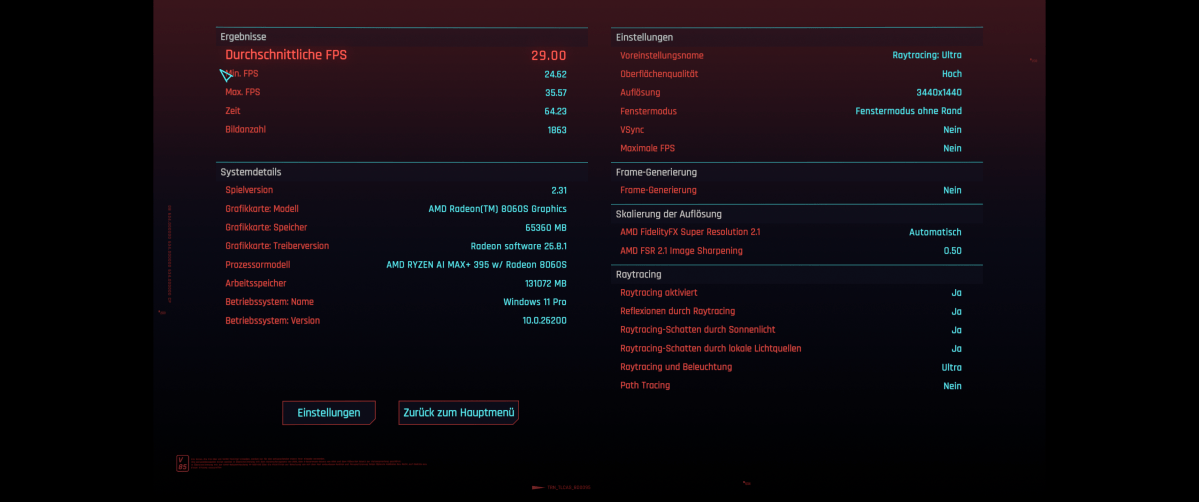
Cyberpunk 2077 highlights the limitations of the integrated graphics. At 3,440 × 1,440 pixels, with the Ray Tracing Ultra preset and FSR 2.1 in automatic mode, the system achieved an average of 29 frames per second. Frame Generation was disabled. This particularly demanding profile is therefore not playable at a smooth frame rate. To achieve higher frame rates, you’ll need to reduce ray tracing, lower the resolution, or opt for more aggressive upscaling. Anyone who expects maximum detail in the latest games will need an external graphics card via OCuLink.
Christoph Hoffmann
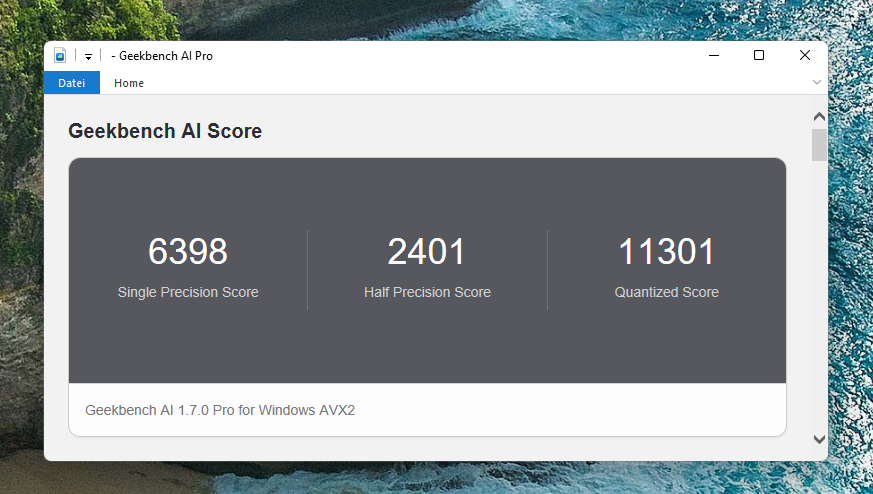
Geekbench AI 1 .7 recorded 6,398 points for single-precision calculations, 2,401 points for half-precision calculations and 11,301 points for quantized calculations. The AVX2 backend used runs the test on the CPU and therefore does not measure the XDNA-2 NPU.
Christoph Hoffmann
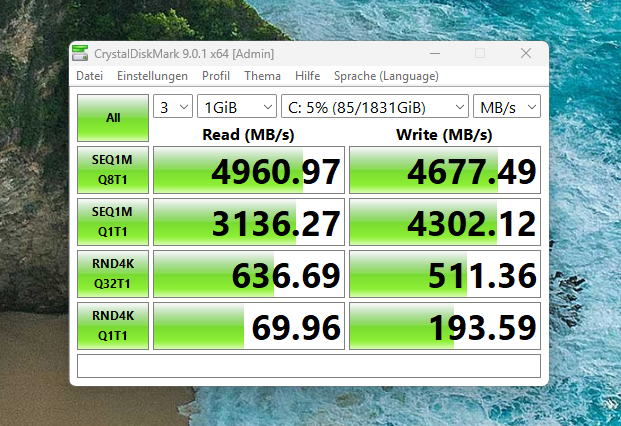
CrystalDiskMark recorded sequential read speeds of 4,961MB/s and write speeds of 4,677MB/s on the SSD. Crucial specifies the 2TB E100 as delivering up to 5,000- and 4,500MB/s respectively. The measured values are therefore consistent with the SSD’s specifications and do not indicate any limitation imposed by the PCIe 4.0 x4 slot. At 30 degrees Celsius, the drive status indicator reported that the drive was in perfect working order. Anyone storing a large number of local AI models or extensive media archives may wish to add a second SSD.
Christoph Hoffmann
The EVO-X3 really comes into its own with local language models. Here, graphics memory is particularly important, as a model must fit entirely within it; otherwise, performance drops sharply. Standard consumer graphics cards often offer 8- to 12GB and a maximum of 32GB of graphics memory. In suitable Vulkan applications, the Radeon 8060S can utilize up to 96GB of shared memory. This means the EVO-X3 offers space for models that do not fit into the graphics memory on standard gaming PCs. A 70-billion-parameter model occupies around 40GB with 4-bit quantization and therefore theoretically fits within the available space. We have not measured how quickly such models run in practice.
The NPU has so far played hardly any role in this regard. While it meets the specifications for Copilot functions on Windows 11, common programs for language models perform their calculations on the GPU. Image generators such as Stable Diffusion or Flux can, in principle, utilize the Radeon 8060S. However, as the software for AMD graphics is less mature than that for Nvidia, setting it up requires more effort.
Power consumption
GMKtec offers three performance profiles. Quiet mode limits the APU to 54 watts, while balanced mode limits it to 85 watts. In performance mode, the manufacturer specifies 115 watts and, for short periods, up to 140 watts. The included power supply delivers around 230 watts, providing sufficient reserve for the rest of the system and to account for conversion losses.
Christoph Hoffmann
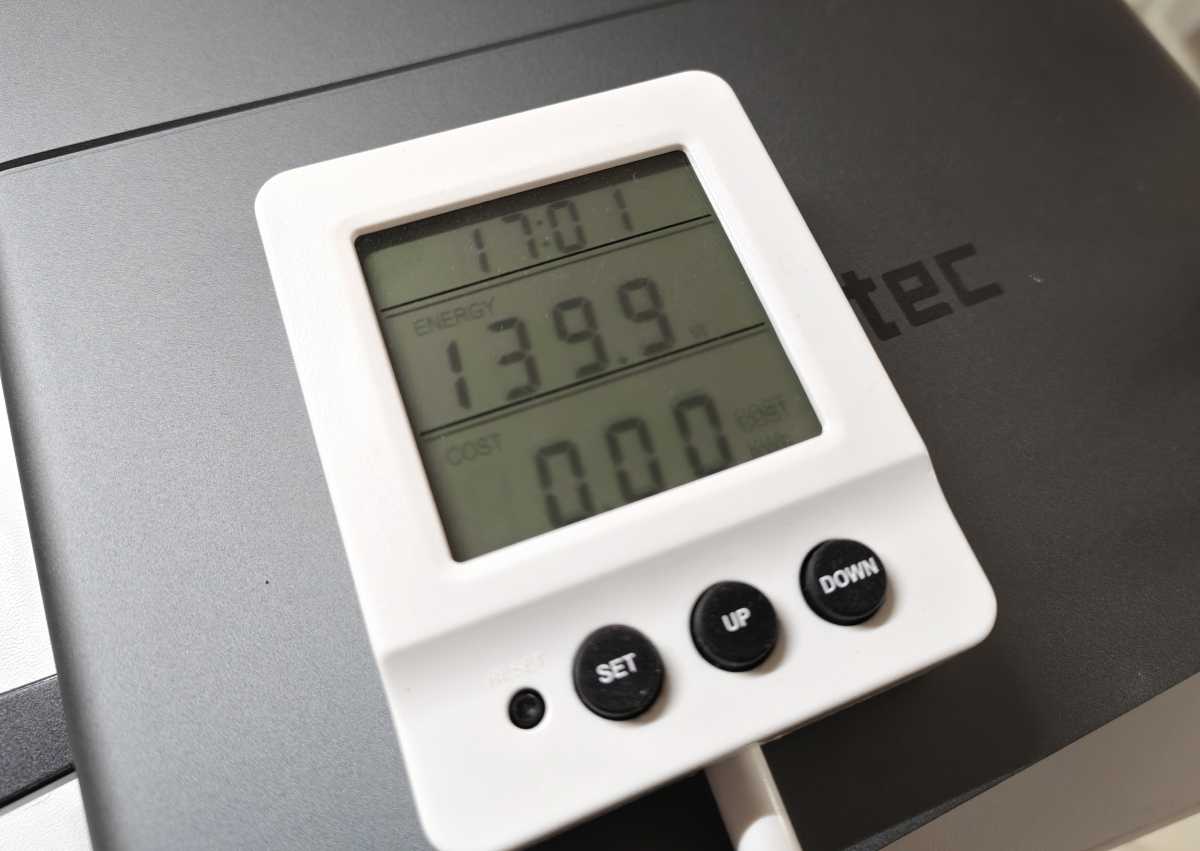
We measured 14 watts at the socket while idle. During the gaming test with Cyberpunk 2077, the meter showed a peak of 139.9 watts. That’s a lot for a compact PC, but plausible given the CPU and graphics performance on offer. Performance mode significantly increases power consumption and fan speed. Just how much of a performance boost it delivers depends on the application.
Compared to a desktop with a separate high-performance graphics card, the integrated chip and memory design can save energy. However, the EVO-X3 cannot compete with energy-efficient office mini-PCs. The high power consumption is only worthwhile if applications actually make use of the 16 cores, the powerful integrated GPU, or the large amount of memory. As a machine for browsing and word processing, the system would be significantly over-spec’d.
Cooling and noise level
The tall chassis provides space for large heatsinks and several fans. Fresh air flows in through the side vents, while the heated air escapes upwards. During normal Windows operation, the EVO-X3 runs pleasantly quietly. In a quiet room, you’ll only notice a steady hum. In brief test runs, the sound level meter recorded readings of between 33 and 39 dB(A), depending on the load. Under prolonged full load, the noise level may be higher.
Christoph Hoffmann
The SoC temperature reading remained at around 68 degrees Celsius even under prolonged computational load. This sensor reading is a good indicator, but does not necessarily correspond to the exact temperature of the CPU cores. There were no indications of significant thermal throttling. The case heats up mainly at the top exhaust vent; the sides remain at a safe temperature. For sustained high loads, a few centimeters of space should be left free around the ventilation grilles.
Repeated runs of the CPU profile varied by only a few percent across the individual sub-tests. This suggests there are no significant thermal fluctuations. The low score in the Max Threads run is therefore more likely to be related to the benchmark itself or the system settings.
The EVO-X3 is not silent. Passive cooling would be unrealistic for this performance class. The larger case dissipates heat more effectively than many slimline mini PCs. Nevertheless, the computer should not be placed directly next to the microphone when recording audio.
Should you buy the GMKtec EVO-X3?
The EVO-X3 is one of the fastest compact pre-built systems featuring the Ryzen AI Max 395. Its large shared memory is well-suited to local AI and large-scale media projects. Games also run surprisingly well for an integrated GPU. The cooling system kept performance stable throughout the test. Two M.2 slots and OCuLink allow for future upgrades.
The price prevents us from making a broad recommendation. The premium for the EVO-X3 is primarily due to the larger metal chassis, greater cooling capacity, and a built-in OCuLink port. If you don’t need OCuLink or the larger chassis, the previous EVO-X2 model offers similar baseline performance for less money.
The EVO-X3 is worth it for users who really make full use of the 128GB of shared memory and prefer a compact system without a separate graphics card. It is too expensive for office use and traditional gaming. The single USB-C port and the permanently soldered memory configuration also do not quite fit the price range. Technically, the computer is impressive; economically, it remains a specialist device.
Technical specifications
- Processor: AMD Ryzen AI Max 395, 16 cores, 32 threads, up to 5.1 GHz
- Graphics: AMD Radeon 8060S, 40 compute units, RDNA 3.5, up to 2.9 GHz
- NPU: AMD XDNA 2, 50 TOPS; combined AI performance, according to the manufacturer, up to 126 TOPS
- RAM: 128 GB LPDDR5X-8000, soldered, shared memory for CPU and GPU
- Storage: 2 TB Crucial E100, M.2 2280, PCIe 4.0 x4; second M.2 slot free
- Video outputs: HDMI 2.1 and USB4 with DisplayPort functionality
- USB: 1 × USB4 at 40 Gbit/s, 1 × USB-A at 10 Gbit/s, 1 × USB-A at 5 Gbit/s, 1 × USB-A 2.0
- Expansion: OCuLink via PCIe 4.0 x4, not hot-pluggable
- Network: 2.5 Gigabit LAN, Wi-Fi 7 and Bluetooth 5.4
- Audio: 3.5 mm combo jack
- Operating system: Windows 11 Pro
- Dimensions: 353 × 186 × 41 mm without stand
- Weight: Approx. 2.3 kg
- Power supply: 230 watts, 19.5 volts and 11.8 amps
- Manufacturer’s warranty: 24 months when purchased via the German GMKtec shop


