At a glance
Expert’s Rating
Pros
- Good physical connectivity with USB-C and USB-A ports
- Strong multi-core CPU performance
- Very long battery life
Cons
- Design is basic and has two notable issues
- OLED display is attractive, but brightness could be higher
- Weak integrated GPU performance
Our Verdict
The HP OmniBook 3 16 has good battery life and strong multi-core CPU performance in a light 16-inch chassis, but its design is a snooze and it’s not great for 3D graphics.
Price When Reviewed
This value will show the geolocated pricing text for product undefined
Best Pricing Today
Price When Reviewed
$1,139.99
Best Prices Today: HP OmniBook 3
At risk of dating myself, I’ll admit the word “omni” always reminds me of a particular nerdy reference: the OmniMech from the Mechwarrior PC games. Versatile yet all-around great, OmniMechs ruled the game’s virtual battlefield. That sets a high mark for HP’s 16-inch OmniBook 3 to hurdle, and while the laptop does have strengths, it also suffers from weaknesses that don’t seem very “omni” to me.
HP OmniBook 3: Specs
The HP OmniBook 3 16’s specifications are rather… 2025. That’s mostly because it has a Qualcomm Snapdragon X chip. Qualcomm has since launched the Snapdragon X2, so introducing a new laptop with a Snapdragon X isn’t exactly exciting.
- CPU: Qualcomm Snapdragon X X1-26-100
- Memory: 32GB LPDDR5X-8448
- Graphics/GPU: Qualcomm Adreno X1-45
- NPU: Qualcomm Hexagon NPU up to 45 TOPS
- Display: 16-inch 1920×1200 OLED 60Hz
- Storage: 1TB PCIe 4.0 solid state drive
- Webcam and microphone: 1080p webcam with IR camera and HDR, dual-array microphone, physical privacy shutter
- Connectivity: 1x HDMI 2.1, 2x USB-C 10Gbps with DisplayPort and Power Delivery 3.0, 2x USB-A 5Gbps, 1x 3.5mm combo audio jack
- Networking: Wi-Fi 6E, Bluetooth 5.3
- Biometrics: Windows Hello facial recognition
- Audio: Dual speakers
- Battery capacity: 68 watt-hours
- Dimensions: 14.12 inches x 9.91 inches x 0.82 inches
- Weight: 3.65 pounds
- Operating System: Windows 11 Home
- Price: $1,139.99 MSRP
It’s not just the Snapdragon X that dates the OmniBook 3, however. The laptop also lacks any form of modern high-speed physical connectivity (like Thunderbolt or USB-4). It lacks Wi-Fi 7 and Bluetooth 6.0 as well. And the OLED display, though nice to have, only provides 1920×1200 resolution.
There are two things that stand out—the RAM and storage. The OmniBook 3 I reviewed had 32GB of RAM and 1TB of solid state drive. These are healthy figures but, because of the current surge in RAM and SSD pricing, they also drive up the price. HP lists an MSRP of $1,139.99 for this configuration, which is a lot to ask for a laptop with an entry-level Snapdragon X chip.
I have one final note. While the laptop I reviewed had an OLED panel, HP hasn’t provided this exact model for sale to date. Currently, the configuration I reviewed is only available with a 1920×1200 IPS display (in touch and non-touch flavors) on HP.com. I expect the OLED panel might add a few dollars to the MSRP when it becomes available.
The HP OmniBook 3 16-inch has two main perks: multi-core CPU performance and battery life.
HP OmniBook 3: Design and build quality
Foundry / Matthew Smith
The HP OmniBook 3 doesn’t make an impression out of the box. You’ve likely seen this dozens of times before. It’s a simple, silver rectangle with a metallic sheen. HP does offer the laptop in a total of five color options, and some of those might be more remarkable, but the “Nouvelle Silver” laptop I received is undeniably dull.
I also noticed two functional issues. First, the laptop isn’t as thin as HP claims. HP’s online materials claim as little as 0.58 inches thick; the review briefing I received claimed 17.7mm thick. By my measurements, however, the laptop is 21mm thick at its thickest point or roughly 0.83 inches. That’s not all that thin and the bulk is noticeable.
The hinge on the model I reviewed was also rather loose. While that made the laptop easy to open with one finger, it also meant the display lid hung open when the laptop was tilted. This will make it easier for objects to slip between the display and keyboard when the laptop is stowed.
At least the design has a few perks. The edges are rounded and the plastic materials used across the laptop, though not luxurious, have a slight grip to their texture. Build quality is good for the price with only minimal flex visible across the display lid when it’s opened. And the 16-inch model I received is light for its display size at roughly 3.6 pounds.
HP OmniBook 3: Keyboard, touchpad
Foundry / Matthew Smith
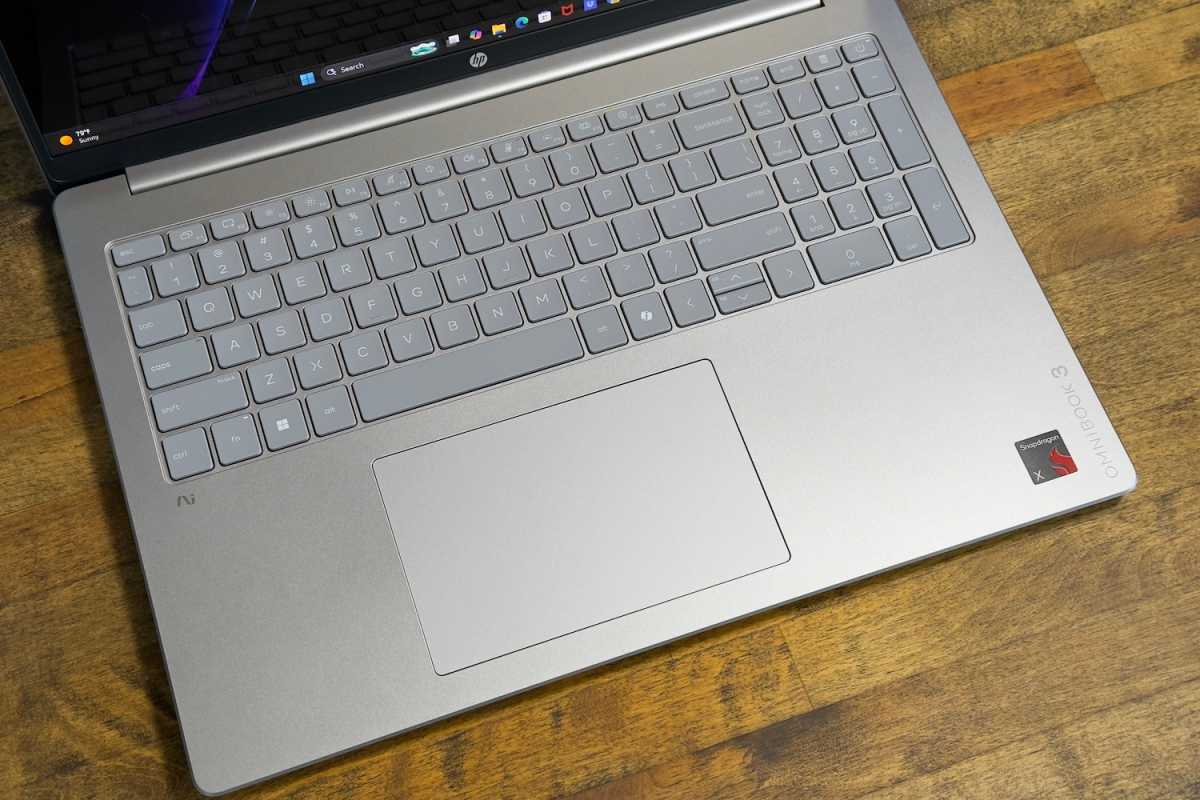
The 16-inch version of the HP OmniBook 3 makes use of its ample interior space to provide a spacious keyboard with numpad. Most keys are large and, while the numpad keys are a tad smaller than normal, they don’t feel crammed. The keyboard is placed far towards the hinge, as well, which is good. That leaves a ton of space to rest your palms.
Key feel is good. There’s a good range of key travel and keys activate with a taut action that provides an audible snap. A bit of keyboard flex can be found if you press hard on the center of the keyboard, but it didn’t occur in normal typing. The keyboard is backlit and offers two brightness settings. On the whole, the typing experience is pleasant.
The touchpad is similar. It measures about 5.25 inches wide and 3.25 inches deep, which is a typical size for a touchpad on a 16-inch laptop and provides a good amount of space for executing multi-touch gestures. The touchpad is smooth and responsive and doesn’t have problems with unintended input. Much like the keyboard, the touchpad is ultimately unremarkable but still enjoyable to use.
HP OmniBook 3: Display
Foundry / Matthew Smith
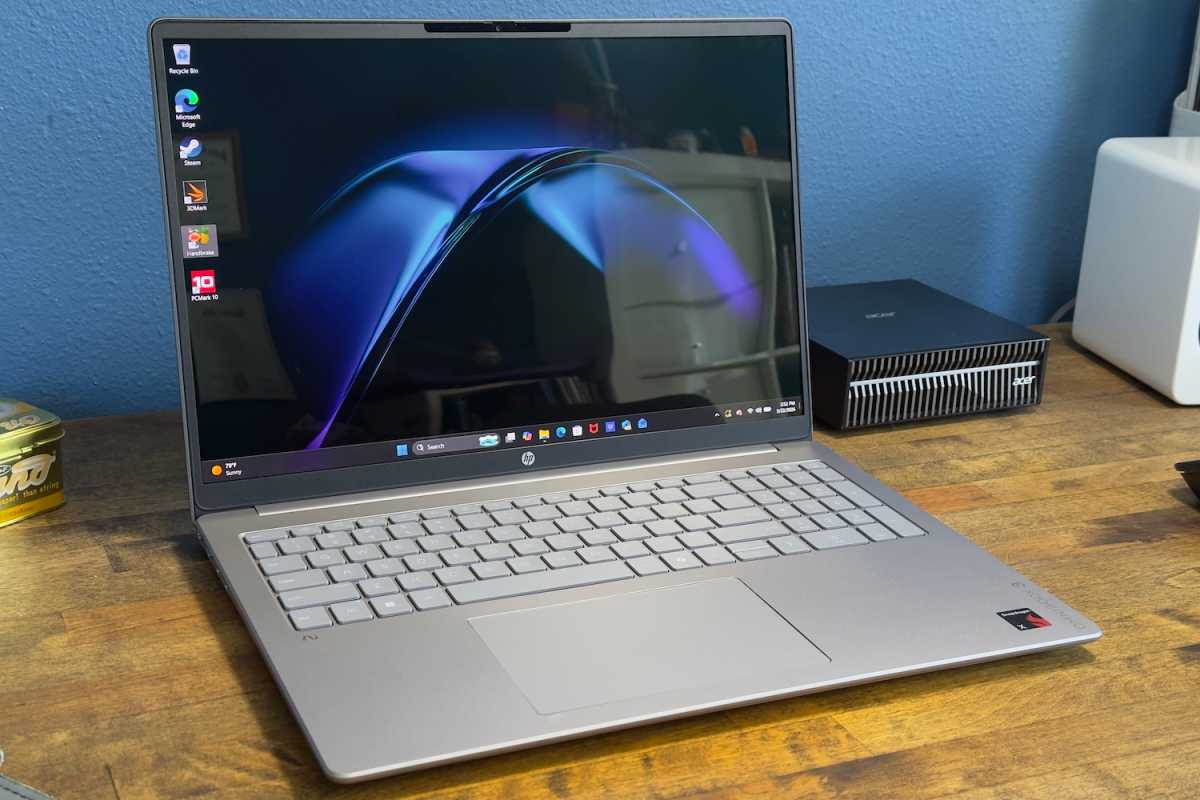
Many HP OmniBook 3 configurations have a 1920×1200 IPS display, but the model I reviewed had an upgraded 1920×1200 OLED display with a 60Hz refresh rate.
The OLED display is a solid choice with vivid color, great contrast, and deep blacks in dark content. All of this adds up to a realistic and engaging image that’s superior to any IPS panel.
Brightness is the sole downside. The panel is quoted to max out at about 300 nits, and that’s what I saw in my time with the laptop. That’s not bright and it can make the display uncomfortable to view in a bright room. It’s a glossy display, too, so glare is an issue.
While I like the OLED display overall, it doesn’t stand out as remarkable. Many laptops offer an OLED display and, at this price point, you may find competitors with a higher resolution or maximum brightness. Lenovo’s IdeaPad 5a 2-in-1, for example, offers an optional 15.3-inch 2560×1600 OLED display.
HP OmniBook 3: Audio
HP’s OmniBook 3 has a simple dual-speaker sound system that fails in all the ways Windows laptop users will be painfully familiar with. The speakers aren’t particularly loud, even at maximum volume, and lack low-end punch, which results in a tinny, hollow sound. At higher volumes this can make the speakers grating to listen to. They work in a pinch, but you’ll generally want to use headphones or external speakers.
HP OmniBook 3: Webcam, microphone, biometrics
A 1080p webcam is packed in the HP OmniBook 3’s top bezel. It provides reasonable video quality with good color capture and sharpness, though. But like most laptop webcams, the image will become grainy in darker environments. The laptop supports Windows’ Studio Effects to enhance or automatically frame the image, and a physical privacy shutter is included.
The dual-array microphone captures loud audio and does a good job of rejecting background noise, though I did notice the sound can be muddy. Still, it’s fine for Google Meet or Zoom.
Biometric login is supported through Windows Hello facial recognition, which is fast and generally reliable. A fingerprint reader is not available.
HP OmniBook 3: Connectivity
Foundry / Matthew Smith
The HP OmniBook 3’s connectivity may seem great or disappointing, depending on your perspective.
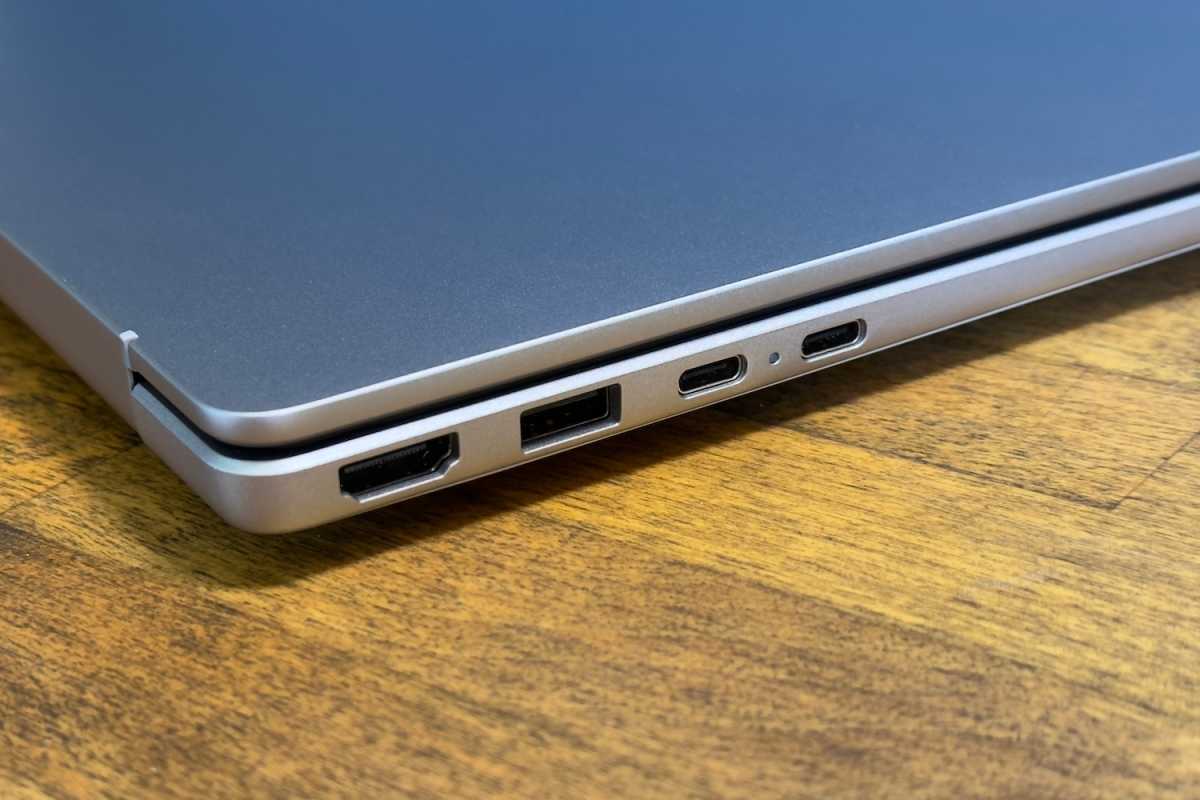
First, the bad news. The OmniBook 3 has two USB-C ports, both of which provide Power Delivery 3.0 and support DisplayPort, but the ports have a data rate of 10Gbps. You won’t find high-speed Thunderbolt 4 or USB-C 4 here. The USB-A ports cap out at 5Gbps.
On the plus side, the OmniBook 3 provides two USB-C ports and two USB-A ports. That’s a good range of USB options for connecting both modern and legacy devices. The OmniBook 3 also has an HDMI 2.1 port and a 3.5mm combo audio jack. The only port notably absent here is Ethernet, but it’s rare among laptops in 2026 and generally found only on thicker workstation and gaming machines.
Wireless connectivity includes Wi-Fi 6E and Bluetooth 5.3. I would have preferred to see Wi-Fi 7, which is the latest wireless standard. This isn’t a practical issue for most people right now, as most people still don’t have a Wi-Fi 7 router. But Wi-Fi 7 also isn’t new (routers have been available for over a year), so it’s disappointing to see a laptop priced over $1,000 omit it.
HP OmniBook 3: Performance
The HP OmniBook 3 I tested has a Qualcomm Snapdragon X chip inside. This is a bit disappointing because Snapdragon X2 has launched, though the less performant variants that will eventually replace the Snapdragon X and Snapdragon X Plus chips remain uncommon. This configuration pairs the Snapdragon X with a lot of RAM and solid state storage, however, at 32GB and 1TB respectively.
Foundry / Matthew Smith
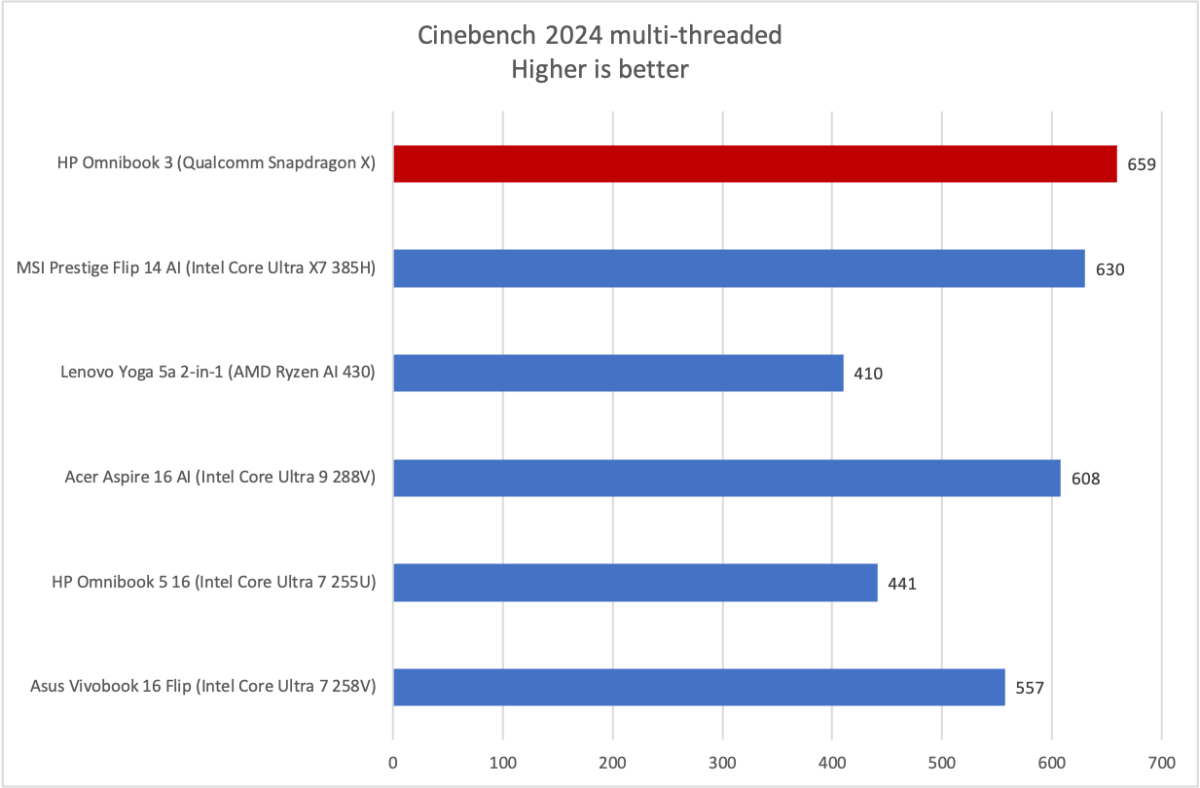
Cinebench 2024 is a heavily multi-threaded benchmark with a native Arm executable, and this test lets the Snapdragon X shine. It beats all comparable laptops with its multi-core score of 659. That’s a solid result for a mid-range laptop, and it goes to show that even less capable versions of Snapdragon chips benefit from Qualcomm’s powerful CPU core design.
Foundry / Matthew Smith
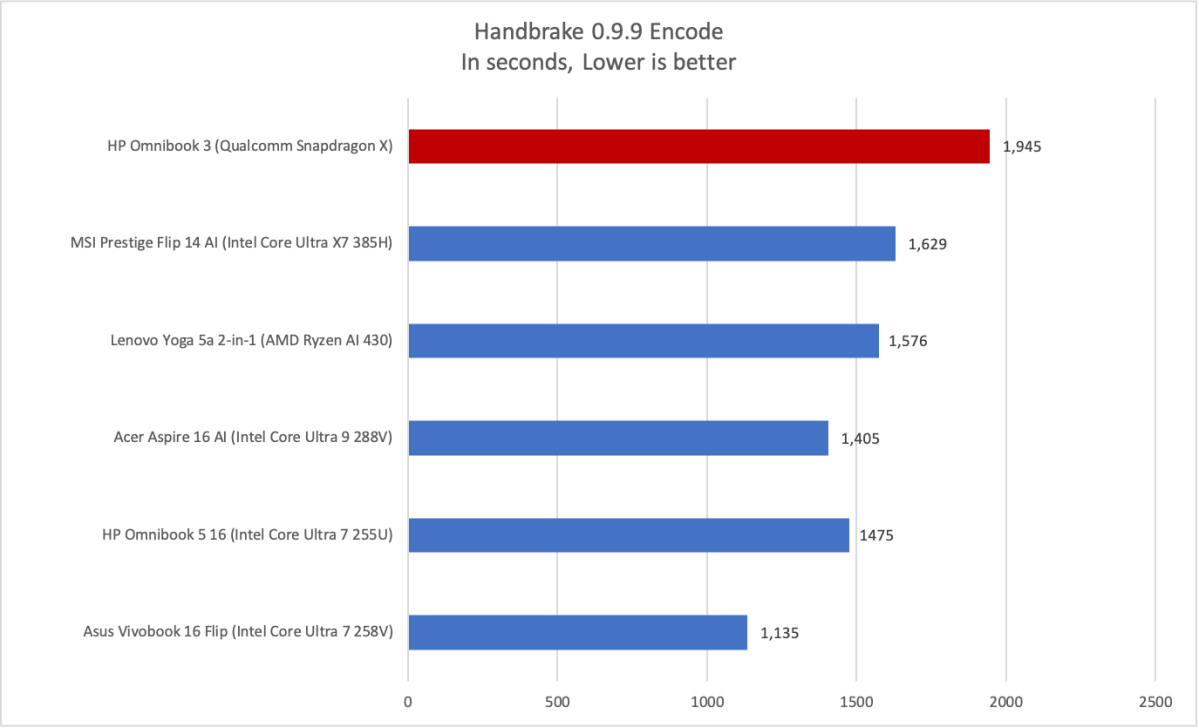
The situation is reversed in Handbrake, where the HP OmniBook 3 falls behind. That’s because we use an older version of Handbrake without an Arm executable. An x86 program without an Arm executable will run through the Windows Prism emulation layer, and that does result in a performance penalty.
Foundry / Matthew Smith
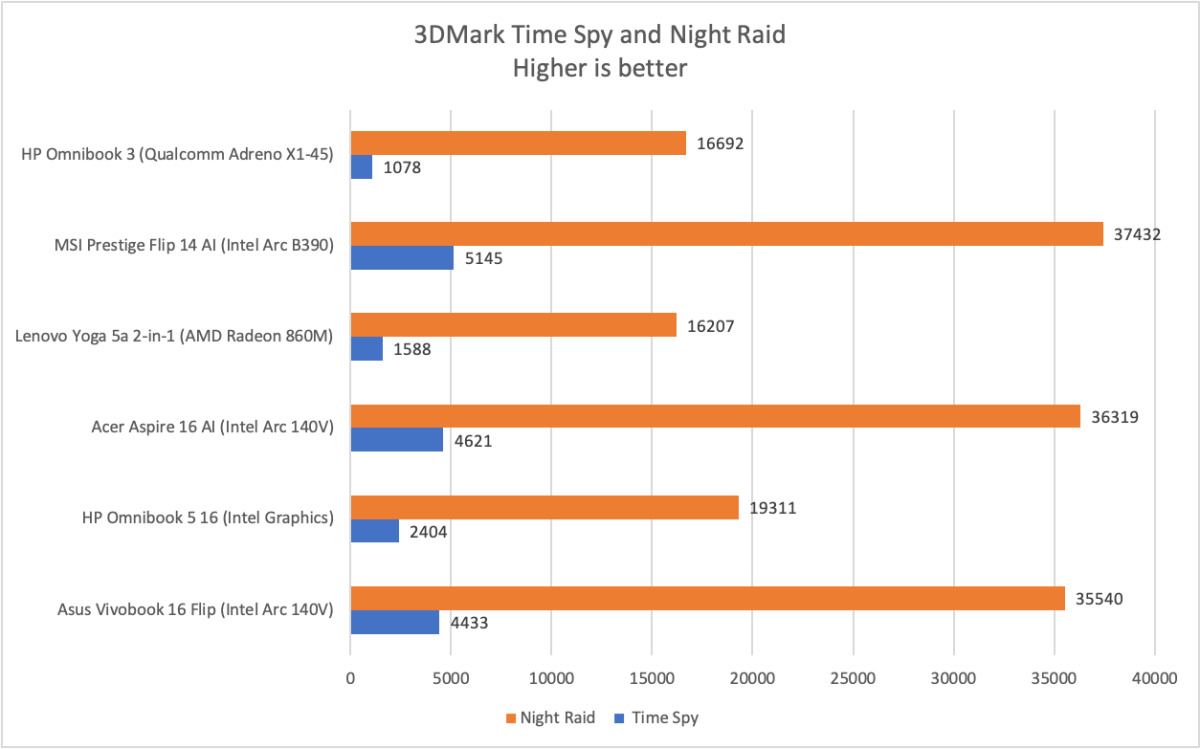
Moving on to 3D performance, we see that while the Snapdragon X provides good CPU performance, it lags in GPU performance. The integrated X1-45 GPU suffers two problems. First, it’s not particularly powerful to begin with. Second, it sometimes has to run through emulation, which further saps performance.
3DMark Night Raid has an Arm native version; here the HP OmniBook 3 is comparable to the Lenovo IdeaPad 5a 2-in-1 with AMD Radeon 860M integrated graphics. However, the Time Spy benchmark is not Arm native, and that results in much worse performance for the Snapdragon-powered HP. It’s 50 percent slower than AMD Radeon 860M, which isn’t quick to begin with.
In the real world, Arm compatibility is still an issue for PC games, as many do not have an Arm version. Games without an Arm version may still run but, as with the Time Spy benchmark, performance won’t be great.
HP OmniBook 3: Battery life and portability
The HP OmniBook 3 has a 68 watt-hour battery, which is a typical size for a laptop in its price range. Qualcomm’s Snapdragon X chips tend to sip power, however, and HP does a good job of managing performance to deliver solid battery life.
Foundry / Matthew Smith
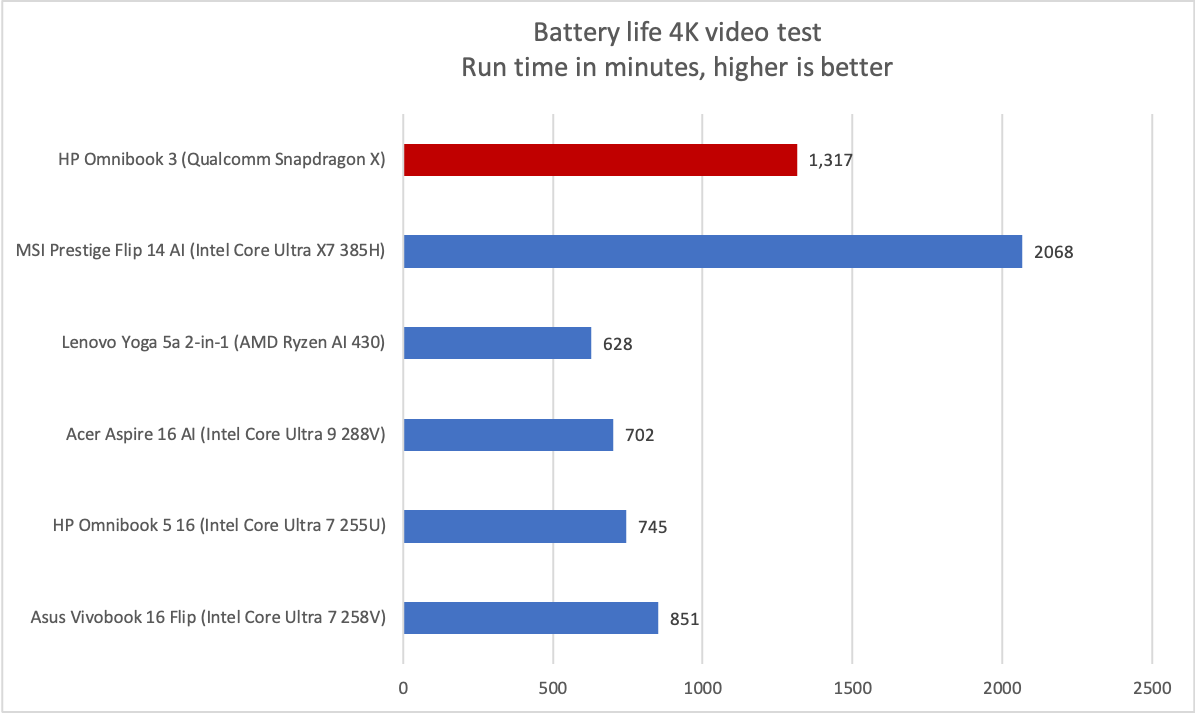
I recorded almost 22 and a half hours of battery life in PC World’s standard battery test, which loops a 4K file of the short film Tears of Steel. As the graph shows, this is a solid result and competes well with many 16-inch laptops. Battery life like this has a real impact on how the laptop is used. You can likely get away with using the laptop for two or three days before charging it.
Charging is easy, too, because the laptop’s USB-C ports support power delivery. HP ships the laptop with a very compact power adapter that measures roughly an inch in height and width and 2.5 inches deep. That’s small enough that you could stuff it in even the smallest purse, sling bag, or fanny pack. Most competitors ship with a larger power brick.
HP OmniBook 3: Conclusion
The HP OmniBook 3 16-inch has two main perks: multi-core CPU performance and battery life. While you can find a similarly priced laptop with better CPU performance if you opt for a thicker, heavier machine, the OmniBook 3 performs well for its category. Battery life is also solid, lasting nearly 22 and a half hours in our battery test.
These perks are diminished by the OmniBook 3 16-inch’s integrated GPU performance, which isn’t great for the price, and several other disappointments that are individually minor but add up. These include the lack of Thunderbolt 4 or USB-C 4, the lack of Wi-Fi 7, a dim OLED display, and weak speakers.
Pricing isn’t in HP’s favor, either. The configuration I tested rang up at $1,139.99, which is a lot for a laptop with an entry-level Snapdragon X chip. More affordable configurations dip as low as $519.99, though they have 16GB of RAM and 512GB of storage. While I didn’t get to test it, I suspect the entry-level configuration would have scored better, as disappointments like a lack of high-speed wired connectivity and weak speakers are easier to overlook at $520 than at $1,140.


