Summary created by Smart Answers AI
In summary:
- Macworld tested the new Siri AI in macOS 27 Golden Gate on a MacBook Neo, finding it performs like a generative AI chatbot with acceptable speed and no lag.
- Siri AI demonstrates significant improvements over its predecessor, successfully solving math problems and understanding complex questions while integrating with Mac apps for productivity tasks.
- This early beta version shows promise for students and professionals, with the AI also available across iOS 27, iPadOS 27, and visionOS 27 platforms.
The biggest deal about macOS 27 Golden Gate isn’t the design tweaks, the better responsiveness, or even the ultrawide display support. The star of the update is Siri AI, the new and improved digital assistant that is now essentially a generative AI chatbot built into macOS (as well as iOS 27, iPadOS 27, and visionOS 27).
Siri AI is available in the xOS developer betas released last Monday, and after 28 hours on a waitlist, I was finally granted access to Siri AI on a macOS Golden Gate dev beta installed on a MacBook Neo. (Learn more about what devices can run Siri AI.) Siri’s performance on the Neo was quite acceptable; there wasn’t any lag that was clearly due to the A18 Pro chip and its 8GB of RAM. Siri did take a moment to process my inquiries, but it never felt like it was struggling to process. If you watched the WWDC keynote and noticed the amount of time it took for Siri to process, my experience with Siri on the Neo was similar to those demos.
After insalling Siri AI and giving it some time to index, I started using it right away, so these are my initial thoughts. It’s important to keep in mind that this is an early beta, so expect things to change before the official release this fall.
A quick query about an upcoming trip
After pressing Command+spacebar to launch Spotlight (Siri AI is integrated into Spotlight), I was actually a little bit at a loss what to ask–so many places to start. I’m going on a trip soon, so I thought I’d ask about finding a place to get lunch after my plane lands.
Siri was able to pull information from Calendar, but it wasn’t able to pin a location in Maps. (Note: these are three different screenshots combined in one image.)
Foundry
I wanted to check if Siri can see my Calendar entry for this trip, so I entered in Spotlight, “What am I doing on June 11?” It responded by showing my Calendar entry, as well as some details in that entry. Good start!
I then asked for a recommendation for a burger place near the airport. I had to get specific here, because I realized that I didn’t provide enough data in my Calendar entry, such as my travel itinerary, so I had to note the airport in my query. It recommended three places. Next, I asked Siri to pin one of the restaurants in the Maps app. Unfortunately, it couldn’t do it, but it was able to open Maps so I can pin it myself.
This trip consists solely of a Calendar entry shared by my wife. I don’t have any emails or flight details anywhere on my Mac, so Siri was working with very little information. Overall, it was impressive that Siri was able to check my Calendar, get event details, and search a location for a place I asked about. But it’s odd that it couldn’t do the seemingly simple final step I wanted. Perhaps that functionality will come in a later beta.
I have another, more elaborate trip planned for later this summer, so I will do another test later to see how it handles all the data housed in different places on my Mac.
A little bit of research
My next Siri task was an easy research task: When will macOS Golden Gate be released? For this, it provided an answer, using Wikipedia as the source, which it linked to. And the answer was correct–it properly said that Golden Gate is “expected to be released in September 2026.” A specific date has not been announced.
Oddly, Siri showed a picture of an old MacBook Pro and with a display that clearly was showing a version of the Mac operating system that was not Golden Gate. When I clicked on the picture, it opened it in the Preview app.
Siri AI in macOS Golden Gate presents its answers in a window clearly made for the iPhone. While it is expandable manually, it gives the impression that Siri AI has simply been ported over from iOS 27.
Foundry
The goal of this task was to see how much it differed from the Siri that’s being replaced. Asking the “old” Siri this question usually resulted in a list of web articles you can use to look for yourself.
Do the math
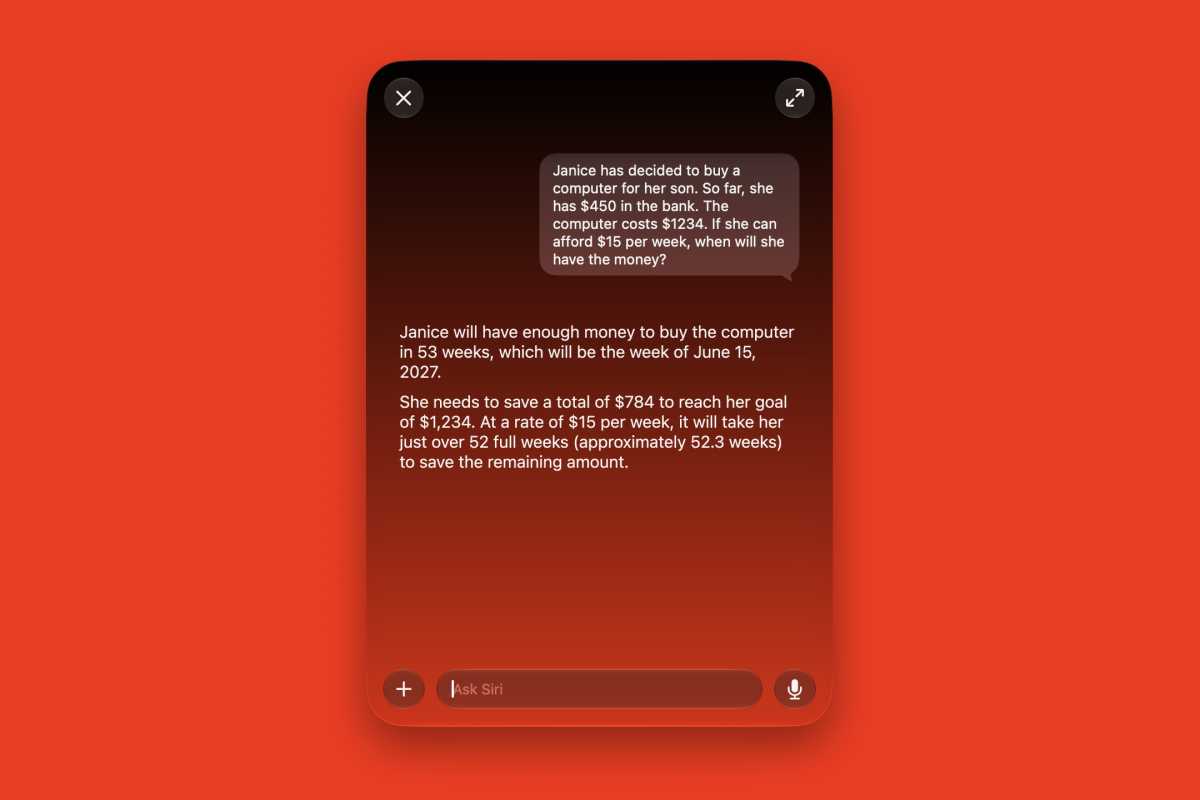
For my third task, I decided to see if Siri could do some math. Nothing too complex, but something that maybe a grade-level student would ask. I took a question from a textbook and pasted it into Spotlight.
Foundry
Siri got the answer correct. It even provided a few more details to give insight into the answer, but it didn’t actually show the work. But this Siri actually addressed the question; the Siri it is replacing couldn’t understand the question, offering only a list of search results.
Work in progress
This is just a quick first look at the new Siri AI, and it’s promising. The research and question-asking aspects seem like low-hanging fruit in terms of Siri AI’s ability–it’ll be able to handle it like other generative AI chatbots. What’s more interesting is its ability to do productivity tasks and interact with other Mac apps. Siri’s ability to take a brief agenda from me and enter it in all the proper apps will be a time saver, but it has to be able to do it without fault. I’ll keep testing and reporting back.
Got questions about the new Siri or want to ask it (or me) something? Drop me a line at [email protected]!


