Summary created by Smart Answers AI
In summary:
- Macworld highlights Apple’s new Pride Luminance wallpaper in iOS 26.5, featuring dynamic colorful shapes that celebrate LGBTQ+ communities and change with user interactions.
- The wallpaper complements iOS 26’s Liquid Glass interface with translucent layers and offers 11 presets plus custom color combinations for personalization.
- Users can access it through Settings > Wallpaper > Add New Wallpaper, with a matching Apple Watch face available in watchOS 26.5.
Apple has unveiled its 2026 Pride Collection, and as always, it includes a new Apple Watch band and matching wallpaper. To round out the theme, arriving alongside the Pride Edition Sport Loop and matching watch face, iOS 26.5 also introduces a new Pride-themed wallpaper for iPhone and iPad.
Unlike previous iterations of the Pride Wallpaper, this year’s version is highly customizable, so you can make it look exactly the way you want.
Apple’s 2026 Pride Luminance wallpaper
Apple’s new Pride Luminance wallpaper features colorful moving shapes that shift as you interact with your device. Apple says the design was inspired by “the vibrancy, spirit, and individuality of LGBTQ+ communities,” but its colorful, animated style will appeal to a wide array of users. The wallpaper also changes dynamically when users move, lock, or unlock their iPhone.
Like many of Apple’s newer wallpapers, this one was clearly designed with iOS 26’s Liquid Glass interface in mind. The translucent layers and vibrant colors blend nicely with the updated interface introduced last year.
By default, the wallpaper comes with 11 different color presets, all inspired by the flags of the LGBTQ+ community. However, you can also create your own color combination.
Be sure to update your iPhone or iPad first
First of all, make sure your device is updated with the latest software, because the Pride Luminance wallpaper comes with iOS 26.5. To do this, follow the steps below:
- Open the Settings app.
- Go to the General menu.
- Tap Software Update.
If your iPhone or iPad is running the latest software, you’ll see a message saying “iOS is up to date.” If not, you’ll be prompted to install iOS 26.5 (or the latest version available). You must update your device before continuing.
How to enable the new Pride wallpaper in iOS 26.5
Foundry
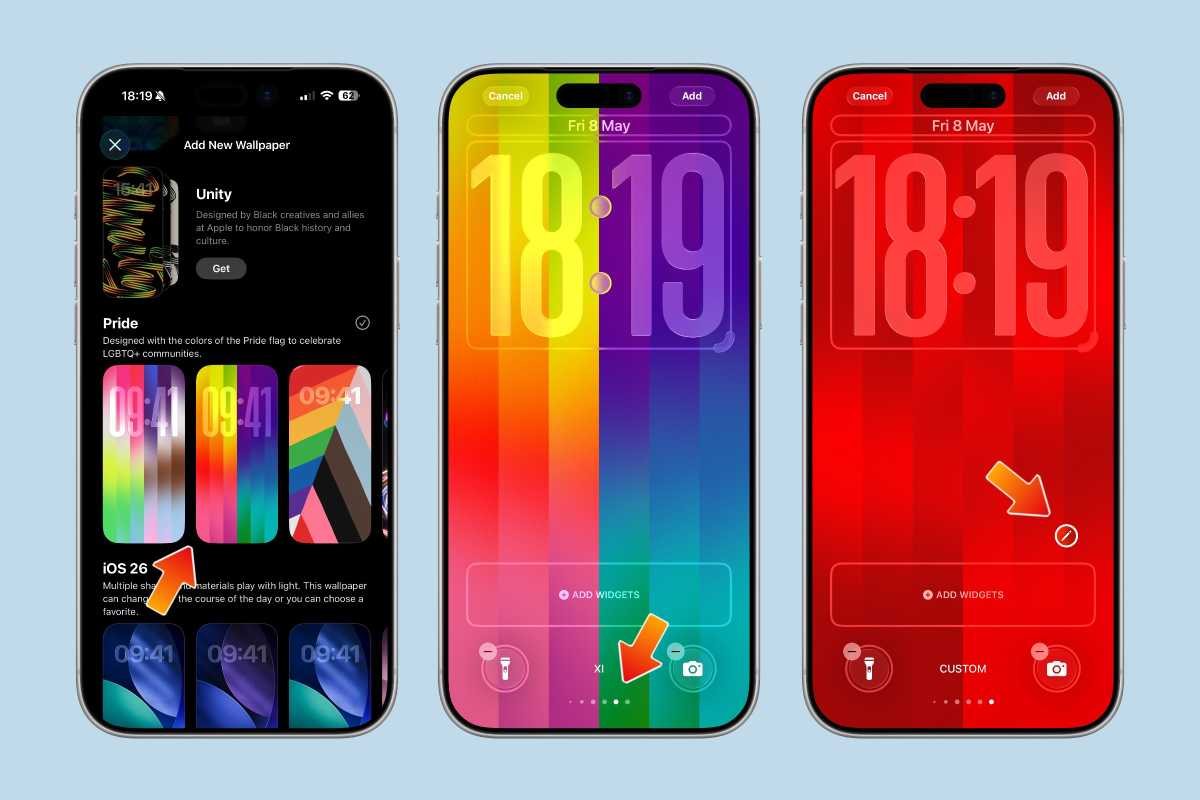
Once your iPhone or iPad is updated to iOS 26.5, here’s how to find the new wallpaper:
- Open the Settings app.
- Tap Wallpaper.
- Choose Add New Wallpaper.
- Scroll down to the Pride section.
- Select the new Pride Luminance wallpaper.
Then, you can choose your favorite style. Swipe left or right to see all the available presets. And if you want to customize it with your own color options, swipe until you find “Custom” at the bottom of the list.
Foundry
After that, tap the “Edit” icon that looks like a pencil to choose the colors you want. You can select up to 12 different colors.
Once you’re done customizing it, swipe down to close the color picker. Then tap “Add” and “Set as Wallpaper Pair” to make it your current wallpaper.
Foundry
Add it to your Apple Watch too
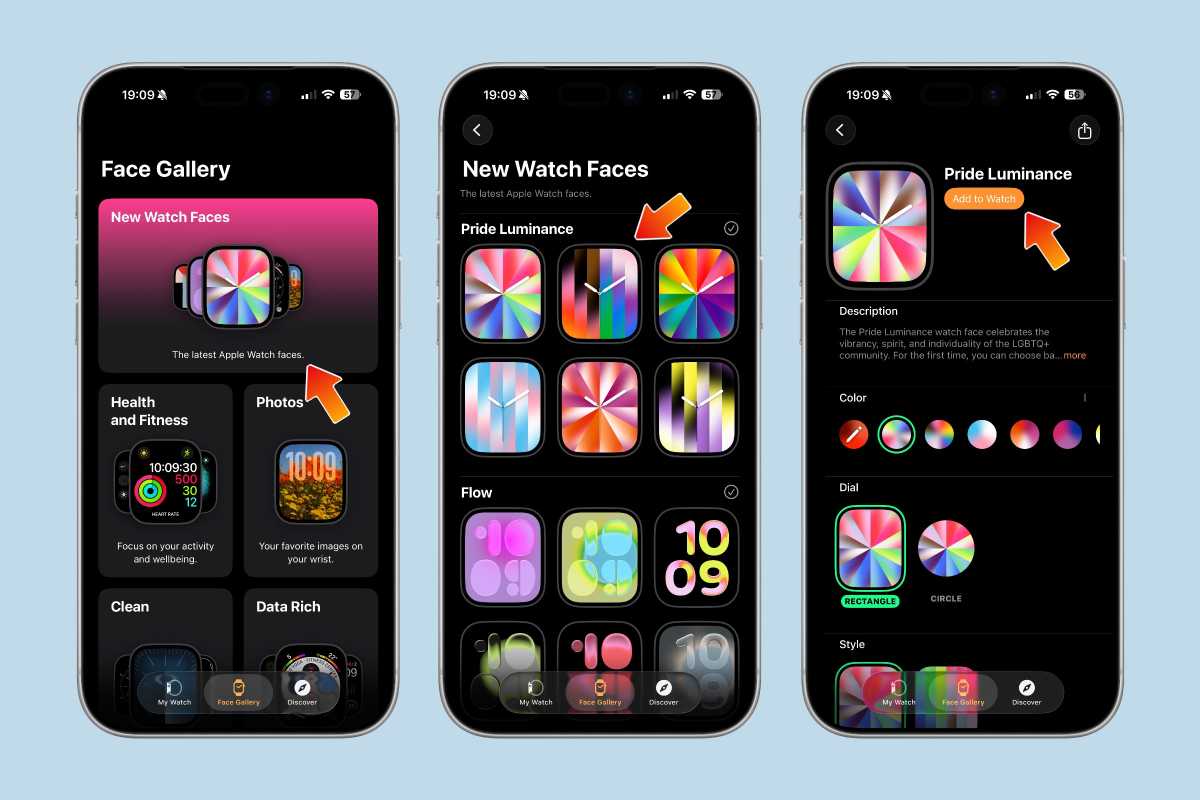
If you also have an Apple Watch, you can use the new Pride Luminance watch face to match your iPhone’s wallpaper. Here’s how to do it:
- Open the Watch app on your iPhone.
- Go to the Face Gallery tab.
- Tap New Watch Faces or scroll until you find Pride Collection.
- Choose your favorite style.
- Customize it, then tap “Add to Watch”.
Once you’ve done that, you’ll find Pride Luminance among your favorite watch faces. Make sure to update your Apple Watch to watchOS 26.5 first.
Foundry
Apple has made a lot of wallpapers and watch faces over the years, but Pride Luminance is easily one of the most fun and customizable ones yet. Between the animated effects, vibrant colors, and support for fully custom palettes, it’s a nice way to give your iPhone, iPad, or Apple Watch a fresh new look with iOS 26.5.
And even if you’re not interested in the yearly Pride Collection itself, the new wallpaper is worth checking out just because of how well it shows off Apple’s Liquid Glass design language.


