At a glance
Expert’s Rating
Pros
- Two great OLED display options; 1800p upgrade is affordable
- Good range of wired and wireless connectivity
- Enjoyable audio quality
- 1440p webcam resolution and quad-microphone array
Cons
- Design is sensible but not exciting
- Touchpad is a tad small
- AMD Radeon 840M delivers weak graphics performance
- Not the best value at MSRP
Our Verdict
The Lenovo Yoga 7a is a 2-in-1 with a good range of connectivity, attractive OLED displays, and nice extras like a 1440p webcam, though the AMD Radeon 840M integrated GPU lets it down in graphics tests.
Price When Reviewed
This value will show the geolocated pricing text for product undefined
Best Pricing Today
Price When Reviewed
$1,599.99
Best Prices Today: Lenovo Yoga 7a
Lenovo’s Yoga 7a is a mid-range 2-in-1. Priced at $1,599.99, it’s not exactly a budget machine, but it sweetens the deal with an OLED display, 24GB of RAM, 1TB of storage, and a bundled stylus. The 2-in-1’s most notable downside is AMD’s Radeon 840M integrated graphics, which is weak among the options available in 2026. Still, the Yoga 7a could make sense if you find it on discount.
Lenovo Yoga 7a 2-in-1: Specs and features as-tested
The Lenovo Yoga 7a 2-in-1 comes in a couple of configurations, and the model I tested was close to the most capable variant on offer. It has the AMD Ryzen AI 7 445 chip, 24GB of RAM, a 1TB PCIe 4.0 solid state drive, and an OLED touchscreen.
- CPU: AMD Ryzen AI 7 445
- Memory: 24GB LPDDR5x-8000
- Graphics/GPU: Integrated AMD Radeon 840M
- NPU: AMD XDNA NPU up to 50 TOPS
- Display: 14-inch 1920×1200 OLED 60Hz touchscreen
- Storage: 1TB M.2 PCIe 4.0 solid state drive
- Webcam and microphone: 5MP webcam with IR camera and privacy shutter
- Connectivity: 2x USB-C 10Gbps, 1x USB-A 5Gbps, 1x HDMI 2.1, 1x MicroSD card reader, 1x 3.5mm combo audio jack
- Networking: Wi-Fi 7, Bluetooth 5.4
- Biometrics: Windows Hello facial recognition
- Battery capacity: 70 watt-hours
- Dimensions: 12.44 x 8.94 x 0.60 inches
- Weight: 3.04 pounds
- Operating System: Windows 11 Pro
- Price: $1,599.99 MSRP
All of this brings the price to $1,599.99, up from an entry-level price of $1,229.99. If roughly $1,600 sounds like a lot for a laptop with these specifications, I agree. But, as you may have heard, there’s currently a RAM pricing crisis. This likely contributes to the price, as well as the decision to offer only 24GB, instead of 32GB, of RAM.
The Lenovo Yoga 7a 2-in-1 is a sensible laptop that’s let down by a mediocre AMD Ryzen chip.
Lenovo Yoga 7a 2-in-1: Design and build quality
Foundry / Matthew Smith
I can sum up the Lenovo Yoga 7a 2-in-1’s look in one word. Sensible. It’s a simple, clean design with a silver colorway that’s neither eye-catching nor offensive. The 2-in-1’s chassis is largely made of aluminum, which provides a premium feel, but there’s nothing unique about the materials to make the Yoga 7a stand out from competitors. The design includes handsome rounded edges, which make the laptop comfortable to handle.
There’s exactly one aspect of the design that stands out, and that’s the camera hump that projects slightly from the top bezel. It’s a little awkward, I suppose, but also provides an easy grip for opening the display.
The Yoga 7a weighs in at 3.04 pounds and measures about six-tenths of an inch thick. That’s certainly thin and light, but it’s not unusual for the category. The MSI Prestige Flip 14 AI+ and HP OmniBook X Flip 14 are roughly equal in size and weight, for example.
Because it’s a 2-in-1, the Yoga 7a can be used as either a laptop or a tablet. This is made possible by the 360-degree hinge. Its weight of 3.04 pounds is heavy for use as a tablet, so it’s no iPad replacement. Still, tablet mode is a nice bonus and can make the device more versatile. If you want to lay on your couch and watch Netflix, for example, the Yoga 7a can handle that more comfortably than a traditional laptop.
Lenovo Yoga 7a 2-in-1: Keyboard, touchpad

Foundry / Matthew Smith
A reasonably spacious keyboard stretches across the Yoga 7a 2-in-1’s interior. Most keys are large, with only the right-side Enter and Backspace keys feeling a bit small—though even they are large enough.
The keys activate with a healthy amount of key travel and a smooth action. I would prefer a more definitive and crisp bottoming action, however; the keys feel a bit soft. They’re also quieter than I prefer, though your opinion will vary. The keyboard is solid overall.
Keyboard backlighting is standard. That’s typical for a 2-in-1 or laptop in this price bracket. The backlight offers two brightness settings.
The touchpad measures about 4.5 inches wide and three inches deep. That’s fine, but it’s definitely on the small side for a touchpad on a modern 14-inch 2-in-1 or laptop. Competitors like the Asus Vivobook Flip and, of course, Apple’s MacBook Air delivers a larger touchpad surface. Still, the touchpad was responsive and worked well for multi-touch gestures.
Lenovo Yoga 7a 2-in-1: Display, audio
Foundry / Matthew Smith
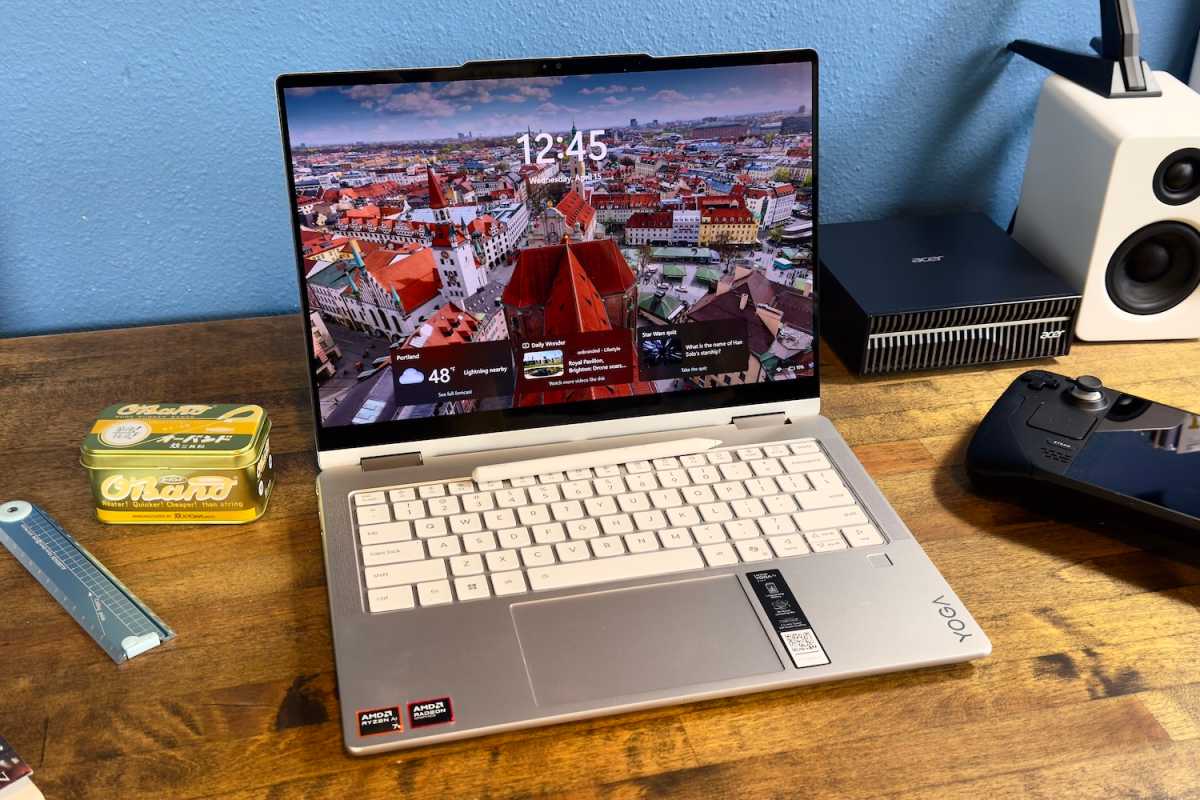
Lenovo offers the Yoga 7a 2-in-1 with one of two OLED displays; a 14-inch 1200p 60Hz touchscreen or a 14-inch 1800p 120Hz touchscreen. Mine arrived with the former, and I expect most people will also receive this display, as it’s the one included by default with pre-built configurations on Lenovo’s website.
A 14-inch 1920×1200 OLED with a 60Hz refresh rate is nothing to shout about in 2026, but that doesn’t mean it’s bad. On the contrary, the display provides about 161 pixels per inch (roughly equal to the sharpness of a 4K 27-inch monitor), excellent contrast, and a wide color gamut. The image is vivid, realistic, and immersive.
With that said, I recommend going for the display upgrade if you’re buying direct through Lenovo. The 2880×1800 120Hz upgrade is only $55 more expensive. You can grab the upgraded OLED for the same price as the model I reviewed. That’s because the model I reviewed has Windows 11 Pro, which is also a $55 upgrade. If you choose the upgraded OLED, and then ditch Windows 11 Pro, you’re still at a $1,599.99 MSRP. I expect most people will gain more from the OLED upgrade than from Windows 11 Pro.
OLED displays are extremely common at this price point, and nearly all of them are produced by Samsung. So, while both Yoga 7a display options will look great, they’re similar to what you’ll find in competing devices.
Audio is provided by four 2-watt speakers. Two appear to be placed alongside the keyboard, while two others are underneath the laptop. This is good placement, as it means at least two of the speakers should be unobstructed no matter how you use the device (remember—it’s both a laptop and tablet). The audio experience isn’t impressive but provides good volume and it’s enjoyable enough for most entertainment. Lenovo often has an edge over its Windows competitor in audio performance, and that remains true for the Yoga 7a 2-in-1.
Lenovo Yoga 7a 2-in-1: Webcam, microphone, biometrics
A 5MP webcam capable of up to 1440p resolution is stuffed in the Lenovo Yoga 7a 2-in-1’s camera bump. It’s a typical example of the breed; the image looks sharp in good lighting but grainy in darker settings and color capture is mediocre. Still, it’s comparable to most modern laptops and good enough for Zoom or Google Meet.
Lenovo includes a physical privacy shutter, which is always good to see and may give the laptop an edge among privacy-conscious buyers.
The Yoga 7a has a quad microphone array, which is a technical upgrade over the more common dual-microphone array. It’s a mixed result, though. On the one hand, audio pick-up is great and noise cancelation is highly effective.
However, the noise cancelation can be overly aggressive. For example, the noise cancelation frequently kicked in if I paused my conversation with a long “umm…”. Fortunately, this can be fixed by changing the microphone noise cancelation settings in Lenovo’s Vantage software. The default is “Multiple Voices,” but the “Normal” setting works better for most video calls.
Once I changed that setting, I found the microphone quality to be excellent. I still wouldn’t recommend it for recording a podcast, or any similarly intensive task, but audio pick-up is extremely clear and crisp.
Lenovo Yoga 7a 2-in-1: Connectivity

Foundry / Matthew Smith
The Lenovo Yoga 7a has two USB-C ports, each with 10Gbps of data. These also support Power Delivery and up to 65 watts of Power Delivery.
There’s actually a slight difference between them, as one supports DisplayPort 2.1 UHBR10, while the other supports DisplayPort 1.4. The ports are unlabeled, so there’s no way to notice this. This is a serious nitpick, however, because DisplayPort 1.4 is plenty capable of handling the 1440p/60Hz and 4K/60Hz monitors 99.9 percent of Yoga 7a users will connect.
You’ll also find one USB-C port on each side of the laptop, instead of both on one side. This is a nice bonus, as it makes cable management a bit easier. It means you don’t have to snake a cord around the rear of the laptop when connecting to a peripheral placed on the opposite side of the laptop. The USB-C ports are towards the rear of the laptop, too, which further helps with cable management.
The two USB-C ports are joined by one USB-A port with 5Gbps of data. Additional connectivity includes HDMI 2.1, a microSD card reader, and a 3.5mm combo audio jack.
This is a solid range of connectivity. My only real gripe concerns the data rate of the USB-C ports. Competitive laptops with Intel inside usually have Thunderbolt with at least 40Gbps of data. AMD laptops can potentially match that with USB-C 4, but Lenovo didn’t go that far. This could be a concern if you use a USB dock with many connected devices including fast USB storage.
Wireless connectivity includes Wi-Fi 7 and Bluetooth 5.4, and Wi-Fi 7 offered solid—though typical—performance on my home network.
Lenovo Yoga 7a 2-in-1: Performance
The Lenovo Yoga 7a 2-in-1 has an AMD Ryzen AI 7 445 processor. Despite what the Ryzen 7 branding might have you think, this is actually a rather low-end chip in AMD’s 2026 laptop chip line-up. It has six cores with 12 threads and a maximum turbo boost clock of 4.6GHz. It also sticks to AMD’s entry-level Radeon 840M integrated graphics.
Lenovo pairs the Ryzen AI 7 445 with a healthy 24GB of RAM and a 1TB PCIe 4.0 solid state drive. Overall performance is acceptable, but the Ryzen AI 7 445 feels a bit out of its league.
Foundry / Matthew Smith
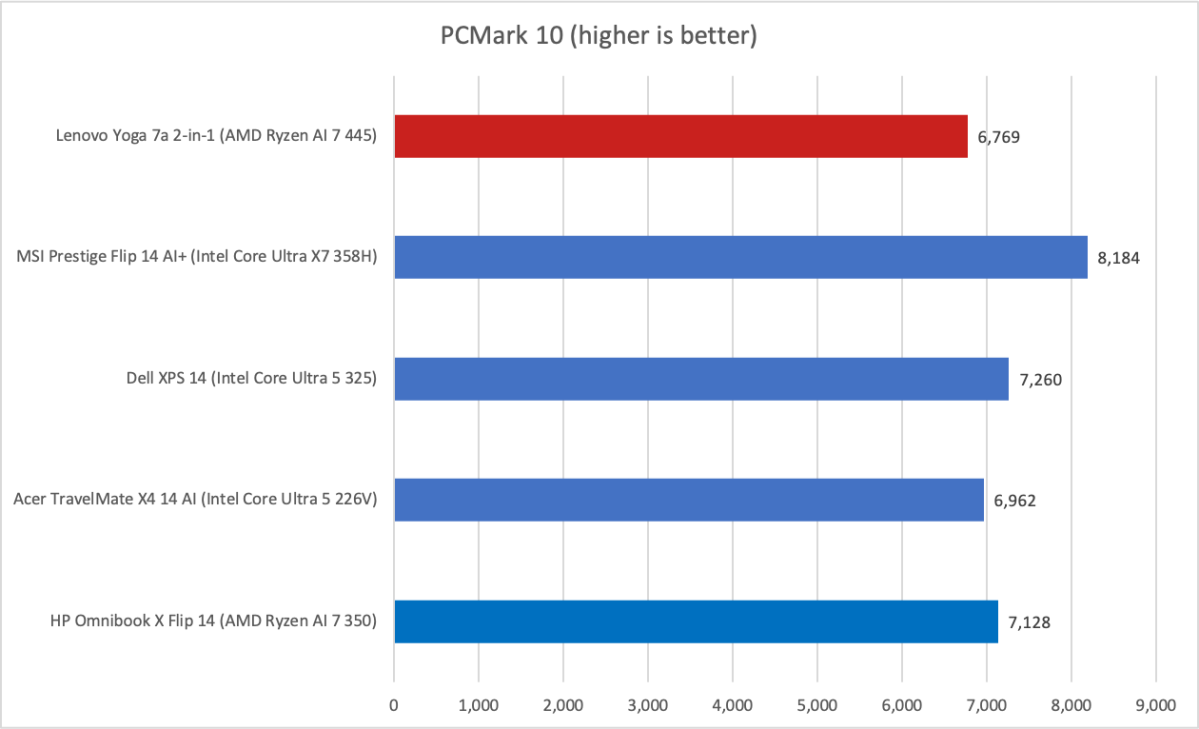
We start with PCMark 10, a holistic system benchmark. Here the Lenovo Yoga 7a hits a middling score of 6,962. That’s not bad, but it’s the lowest among similar laptops that PCWorld has recently tested.
Foundry / Matthew Smith
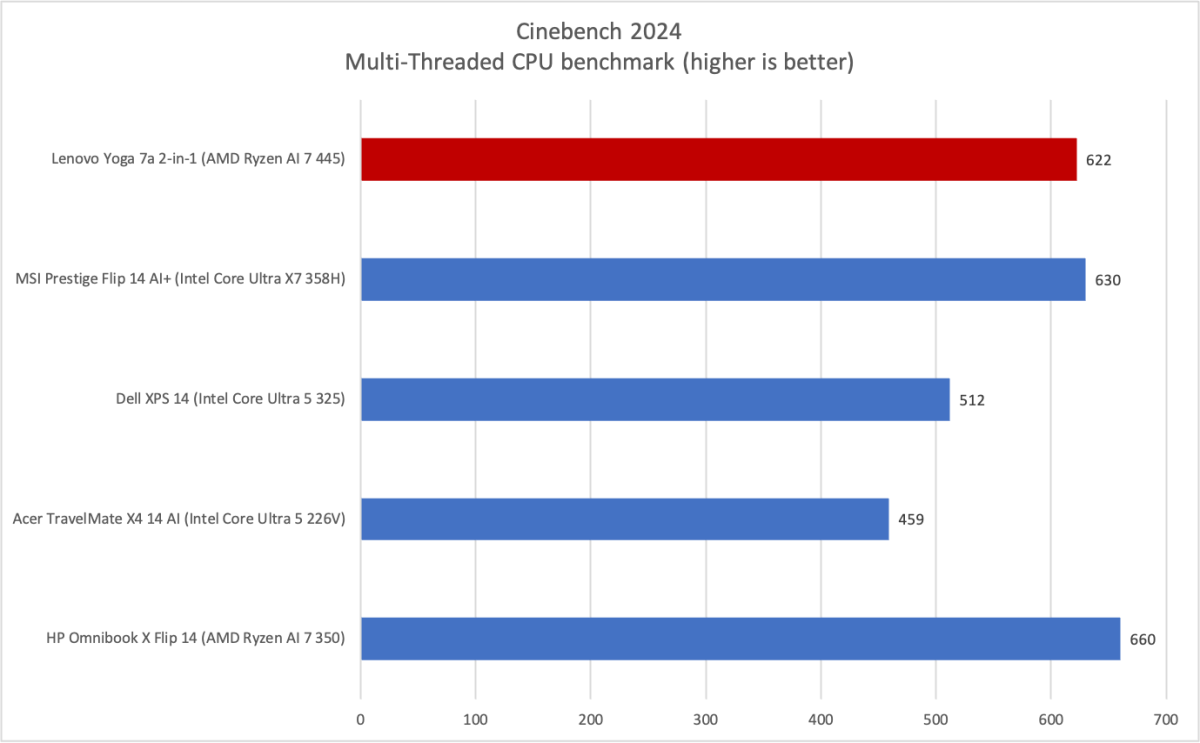
Next up is Cinebench 2024, a modern heavily multi-threaded CPU benchmark. The Ryzen AI 7 445 does better here with a score of 622, which is close to the MSI Prestige Flip 14 AI+ with Intel Core Ultra X7 358H. However, the HP OmniBook X Flip 14 takes the win despite the fact it has the older Ryzen AI 7 350 inside. It’s an older chip, but it also has two more cores than the Ryzen AI 7 445.
Foundry / Matthew Smith
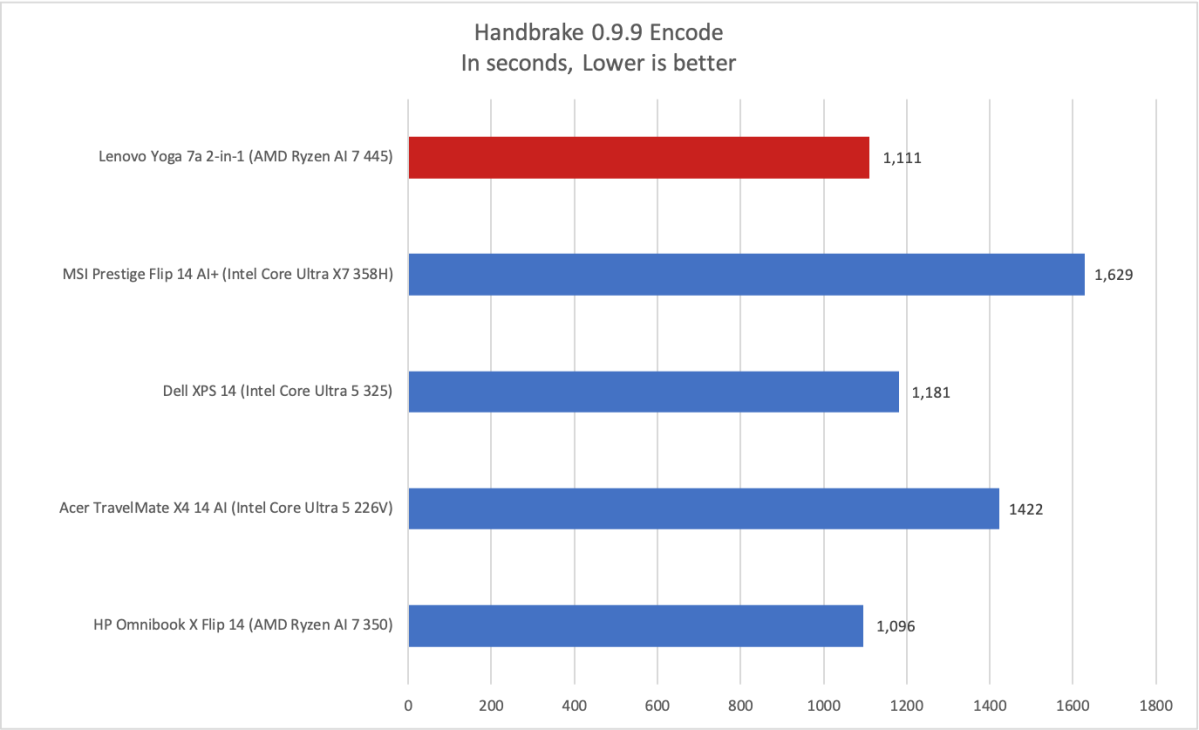
It’s a similar story in Handbrake, an older, heavily multi-threaded CPU benchmark. This long duration test once again shows the Ryzen AI 7 445 can achieve a decent result but can’t break away from the pack.
Foundry / Matthew Smith
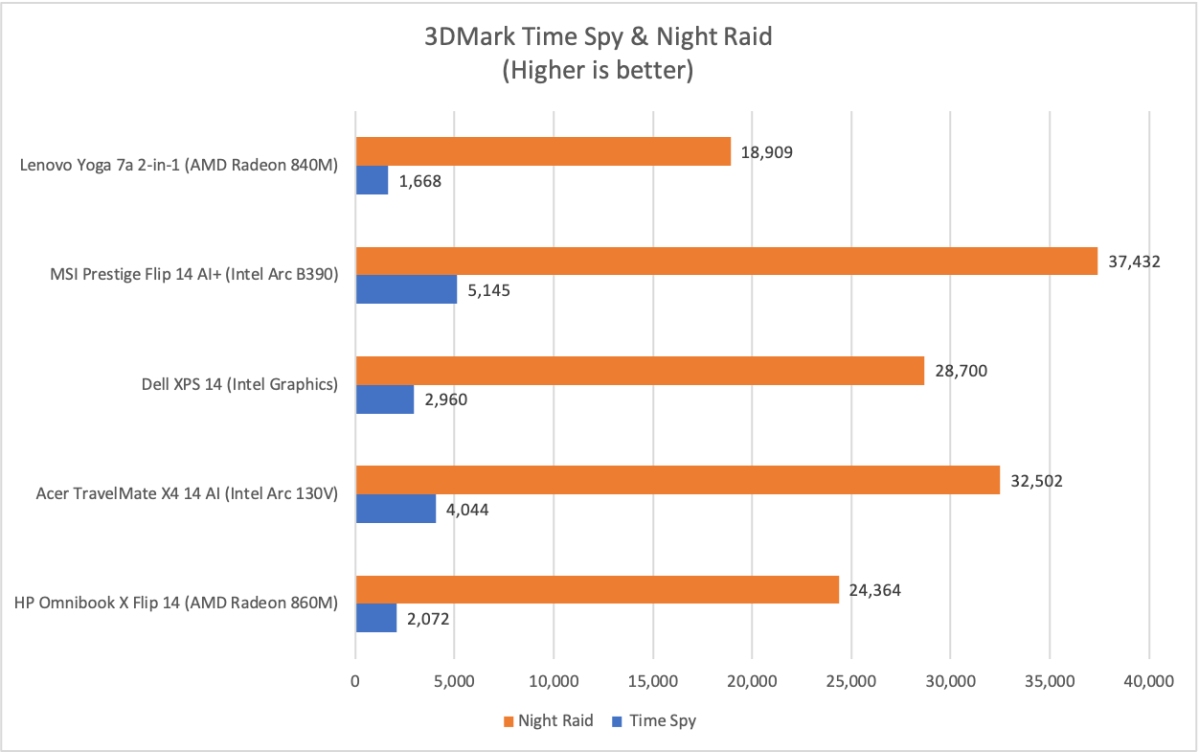
Moving on to GPU performance reveals the Ryzen AI 7 445’s biggest flaw. The AMD Radeon 840M was never an impressive integrated graphics option, and Intel’s release of Core Ultra Series 3 chips with improved Xe3 graphics cores leaves the Radeon 840M in a bad spot.
As a result, the Lenovo Yoga 7a 2-in-1 delivered the worst performance by a significant margin. The Dell XPS 14 with Intel Core Ultra 5 325 and Intel Graphics scored 2,960 in Time Spy, while the Yoga 7a with Ryzen AI 7 445 and Radeon 840M only scored 1,668. That’s a big gap. And remember, Intel Graphics is the entry-level Panther Lake integrated GPU, so this is an Apples-to-Apples comparison.
Lenovo Yoga 7a 2-in-1: Battery life and portability
Lenovo ships the Yoga 7a 2-in-1 with a 70 watt-hours battery. That’s an average size for a 14-inch machine. Not huge, but not tiny, either. Perhaps unsurprisingly, it also leads to average battery life.
Foundry / Matthew Smith
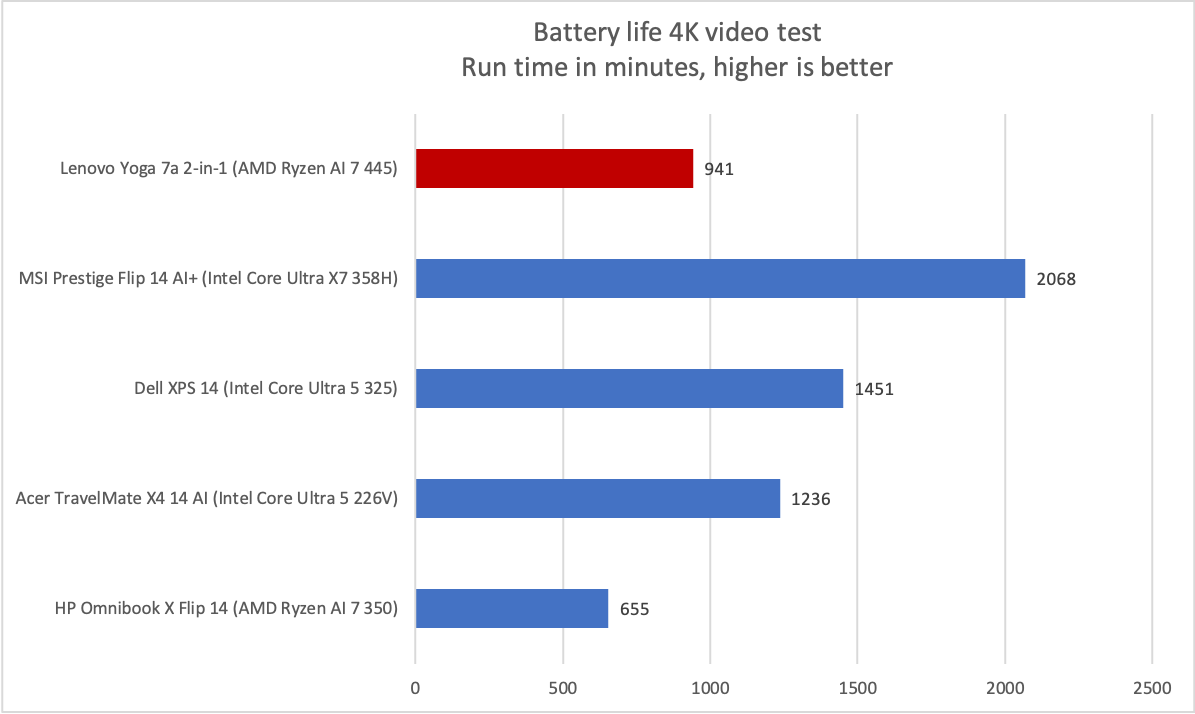
The Yoga 7a exceeded 15 and a half hours in PC World’s standard battery test, which loops a 4K clip of the short film Tears of Steel. As the graph shows, this is not a very typical result for a modern 14-inch machine. Many competitors offer roughly similar battery life.
There are some outliers, however, and those outliers often use Intel or Qualcomm hardware. The MSI Prestige Flip 14 AI+, for example, has an Intel Core Ultra X7 358H and exceeded 30 hours of battery life.
While that makes the Yoga 7a look bad, the graph is probably not representative of how the laptop will feel in real life. 15 hours is still a long time, and the Yoga 7a trended towards 10 to 12 hours of battery life even in my real-world workflows. Realistically, you’re likely to find yourself near a charger before the battery gives out. But if you want a serious long-haul laptop, or tend to forget to charge your laptop when home, then the MSI is a better pick than the Lenovo.
Speaking of charging, the Yoga 7a ships with a compact 65-watt charger that’s easy to pack. The laptop has a Rapid Charge Express feature that Lenovo says can deliver 3 hours of runtime in 15 minutes, though this only works when the laptop is in hibernation or fully shut down.
The laptop’s modest power draw also means it’s easy to charge not only on a 65-watt power source, but also on lower-wattage chargers. Even a modern iPhone charger should be able to deliver a full charge in a bit over 4 hours.
Lenovo Yoga 7a 2-in-1: Conclusion
The Lenovo Yoga 7a 2-in-1 is a sensible laptop that’s let down by a mediocre AMD Ryzen chip. The Ryzen AI 7 445 has only six cores (with 12 threads) and entry-level Radeon 840M graphics. While the AMD chip’s overall CPU performance is competitive with Intel chips like the Core Ultra 5 325, the Radeon 840M isn’t nearly as quick as Intel Graphics. The Yoga 7a’s MSRP of $1,599.99 further worsens the problem, as it feels rather high for a laptop with entry-level graphics performance.
On the other hand, the RAM crisis is real. A laptop with this level of performance wouldn’t be competitive at $1,600 in mid-2025. In mid-2026, however, it could represent a new normal. I’m not ready to say that yet, because retail MSRPs can see big discounts if PC makers find that consumers aren’t hitting the buy button. Still, the Yoga 7a 2-in-1’s pricing feels like a warning that RAM price increases are passing through to consumers in a big way, as Lenovo is usually aggressive on price.
With all that said, the Yoga 7a is a versatile pick that’s worth a look if you want a Windows 2-in-1, even if it fails to stand out in any one area.


