Microsoft has quietly begun adding a second Photos app to your Windows 11 PC: OneDrive Photos (beta), whose key addition seems to be an unwanted demand to know who the people are in your life…and a reduction in what made the original Windows Photos a critical part of my workflow.
To my knowledge, Microsoft hasn’t announced OneDrive Photos, and it’s not part of the Windows Insider program. It’s just there: a stripped-down version of the Photos app, but with a special “People” section that asks you to identify everyone in your photos. It’s on my PC, and it might be on yours!
Interestingly, Microsoft said that the new OneDrive Photos app should only be seen by Windows users enrolled in the Windows Insider program.
“OneDrive Photos is already generally available today, and we’re now previewing its new gallery as ‘Photos (Preview)’ for Windows Insiders in the Experimental channel,” the company said, in a statement provided by a company representative. “This update arrived through a OneDrive update rather than a separate install.
“Face grouping is visible only to the account owner and is never shared; users also have the ability to opt out at any time,” Microsoft added. “Microsoft does not use these facial scans to train its AI models, and all data is deleted after 30 days. We will gather feedback from Insiders and continue to iterate on the experience before rolling it out more broadly.”
The PC that OneDrive Photos installed upon is not enrolled in a Windows Insider program, however. (It is also installed on my work laptop in non-Preview version. ~Brad the editor.) I’ve asked Microsoft for further comment.
Here’s what’s in OneDrive Photos
OneDrive Photos, as noticed by Windows Latest, apparently just showed up out of the blue on some machines. It’s not a link to an app on the Microsoft Store; it simply downloaded by itself on to my PC, and to others as well. You can try searching for it on Windows Search to see if it’s on your PC, as well.
Mark Hachman / Foundry
OneDrive Photos and the regular Photos app share many similarities, but OneDrive Photos has a stripped-down menu that lists Moments, Gallery, People, Albums, Favorites, and This PC. Here’s what they are:
- Moments: This day in photos. It simply looks for photos taken on a particular day over the years — useful for birthdays and anniversaries.
- Gallery: Your photo roll.
- People: The controversial new addition, which I’ll talk about later.
- Albums: Collections of themed photos from a specific month.
- Favorites: Your favorite photos.
- This PC: This could be used to collect screenshots, but it looks like it’s just a link to your OneDrive folder on your PC…which should link back to the Gallery? I’m not sure what’s going on here.
What does the OneDrive Photos People app do?
I’ve always used the traditional Windows Photos app as a very streamlined productivity tool. It’s a quick and handy way to edit a photo: crop it, use AI to edit out some dust or an inadvertent detail, or pull out an image from its background for a specific purpose. Microsoft has actually removed a lot of those editing capabilities in the new app, stripping down OneDrive Photos to a subset of those editing apps and streamlining the interface.
Photos also contains a shortcut to Image Creator, where you can edit and even create image using AI. A subset of those editing features remains within OneDrive Photos, helping suggest that maybe the Photos app is too complicated? It’s unclear.
Mark Hachman / Foundry
In any event, by downplaying the editing aspect and making photo identification much more prominent, Microsoft is making the conversation around OneDrive Photos as much about privacy as productivity. And that starts with the People tab.
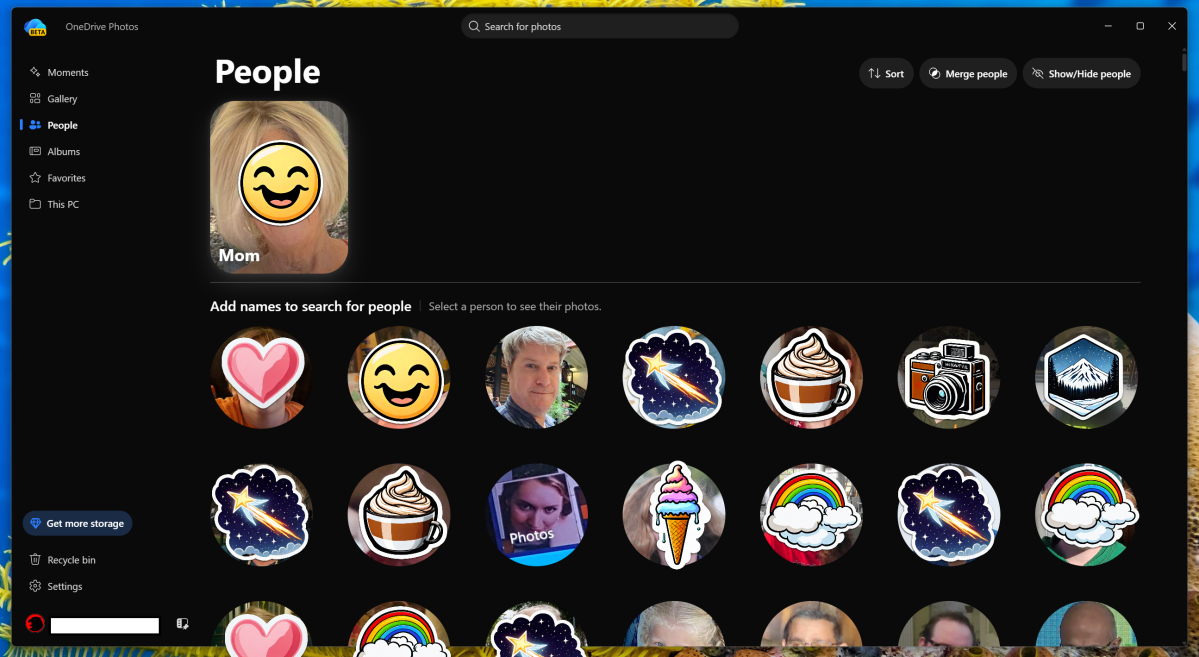
People is a little surprising, in that suddenly there is suddenly a number of faces staring at you. People collects faces of people you’ve snapped photos of over the years, or whose face has shown up in screenshots or in something else you’ve shared or put into OneDrive. (Expect faces of political figures and/or sports stars next to photos of Grandma.)
OneDrive Photos appears to pluck out the most common person in your photos by count, so expect a lot of family and friends to be grouped at the top. It then asks you for whatever name you’d like to attach to their face. You can then choose to search for photos by that face.
OneDrive Photos doesn’t seem to care what name you attach to a photo, or whether you do so; you can simply group photos by that particular face. Or you can simply ignore Microsoft’s requests entirely. OneDrive Photos suffers from the same limits as the recognition in other photos apps, namely that it struggles to associate baby photos with the same person as a child or teenager. A button to “merge photos” solves that problem — and likely provides some very valuable information to Microsoft’s classification engine. You can also highlight an indexed face or hide it entirely, such as for a detested ex.
Mark Hachman / Foundry
The conventional Photos app, as well as OneDrive Photos, has allowed you to search for specific scenes for years: “beach,” for example. That feature remains, along with a little tally of how many photos it found matching the description. You can also use more specific terms like “white car” or “license plate.” That’s never concerned me.
I really don’t mind Photos pulling out specific faces and allowing me to search for them. When Microsoft wants me to identify those faces, though, it adds a layer of creepiness.
From productivity to privacy
Put another way, a photo-editing app is a useful tool. A photo-identification app is another story. And I’ve noticed that the traditional Windows Photos app seems to be headed in that direction, too.
Windows Photos lacks a “People” section., but it now includes an “Identity” section instead. (My “Identity” section remains blank and unpopulated, but I don’t have any photos or screenshots of my driver’s license or birth certificate, either.) To that, Photos has added Notes, Receipts, and Screenshots, which identifies and stores them. (I should have a ton of receipts stored over the years, but it only found a few.)
I’m still a little surprised to see that neither Photos nor OneDrive Photos includes a link to the “Personal Vault,” the encrypted file store within OneDrive that can be used to store the stuff you really don’t want others to see, including personal information, legal documents, and spicier photos. The Photos “Identity” section doesn’t ask for a PIN code or biometric identifier, either, as the Personal Vault does. (The easiest way to access Personal Vault in my experience has been from the OneDrive mobile app, and the “Files” section.)
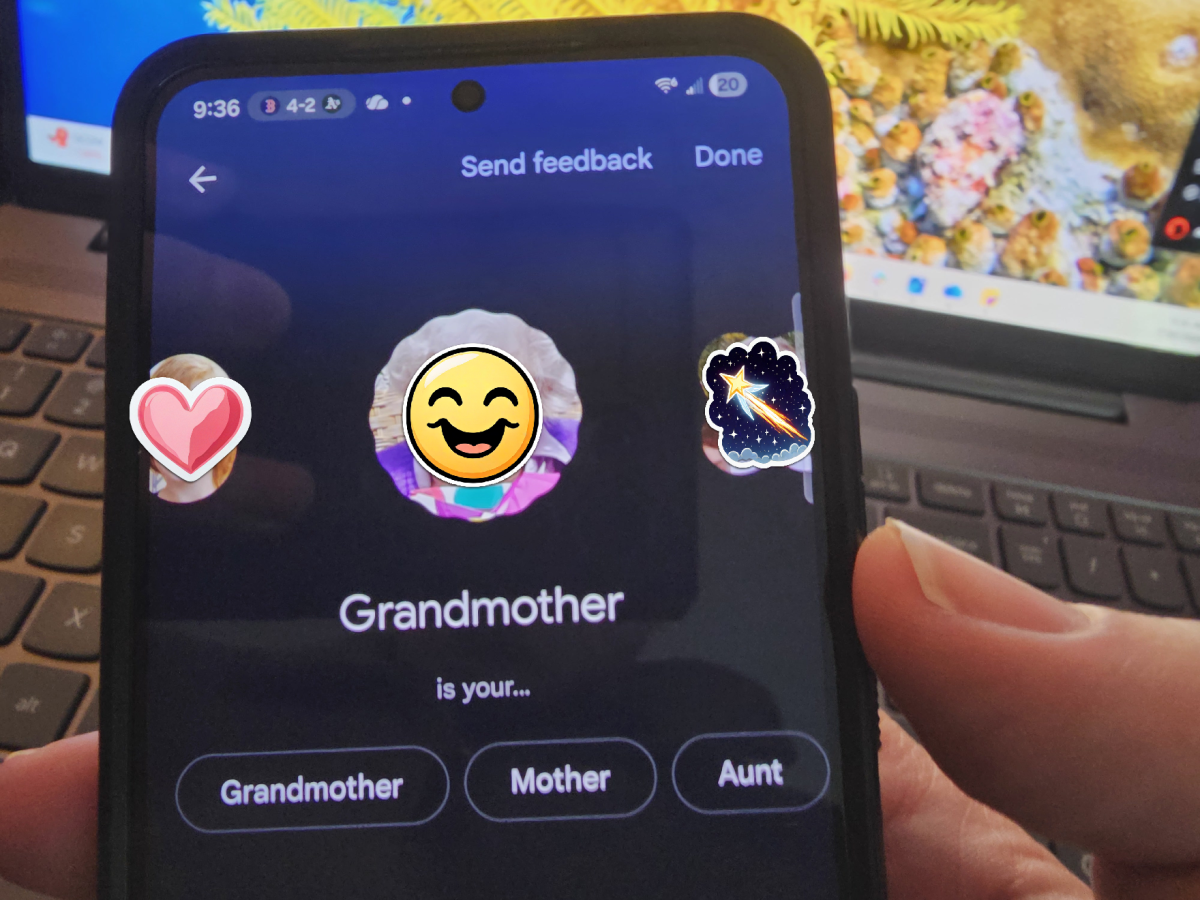
To be fair, Microsoft isn’t the only storage provider asking for details of my life. Google’s own Photos app goes even further: identifying faces (with permission) and asking to organize photos by face, too.
Mark Hachman / Foundry
As you can see from the screenshot above, Google apparently wants to begin putting together a family tree, based upon images of my relatives. That feels much more invasive than what Microsoft is putting out there.
It’s really not clear what Microsoft hopes to accomplish with OneDrive Photos. Simply pushing it to user PCs without permission or even discussion is a bad move, given Microsoft’s history of push advertising. That’s going to rile up the “Microsoft is watching you!!1!!” crowd. And they’re going to have a valid, viable point. At least you can totally ignore OneDrive Photos and its pleas for more information.
As always, consider what you’re trading off for convenience’s sake. Neither Microsoft nor Google needs to know every aspect of your personal life, no matter how useful the tool.


