At a glance
Expert’s Rating
Pros
- Very high CPU performance
- Three 10 Gbit ports (2 × SFP, 1 × RJ45) plus 2.5 GbE
- Three M.2 slots and U.2 support
- PCIe slot for expansion cards
- Two USB4 ports and Wi-Fi 7
- Intel vPro for remote management
Cons
- Just one RAM module slows down the integrated graphics
- Large external power supply
- Fluctuating, clearly audible fan speed
- Only one high-speed USB port at the front
Our Verdict
The Minisforum MS-03 is a compact workstation designed for demanding networking and computing tasks. The Core Ultra 9 386H is fast, and the SSD delivers high transfer rates. Four LAN ports make the computer an attractive option for NAS and virtualization tasks. It is also well-suited for use as a software router. Three M.2 slots and a PCIe slot provide plenty of expansion potential.
Price at time of review
This value will display the geolocated pricing text for product undefined
Best Price Today
Small PCs save space, but are usually difficult to upgrade. The Minisforum MS-03 (model S368H) takes a different approach. Its slim 1.78-litre case accommodates three M.2 SSDs and a PCIe card. It also features four network ports. In our review, we examine whether the performance and features justify the high price of more than $1,500. We also highlight the weaknesses of this compact workstation.
Christoph Hoffmann
Design and build quality
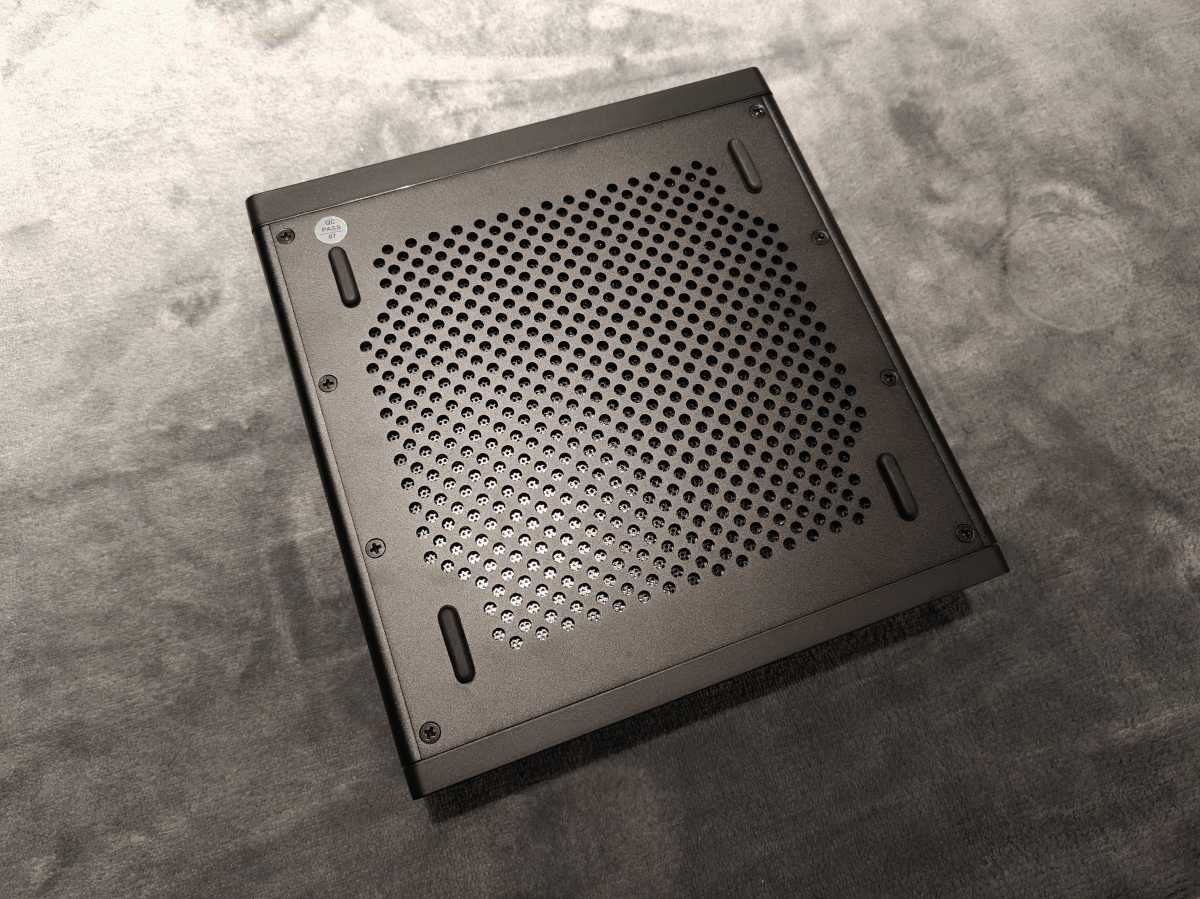
The MS-03 is more reminiscent of a compact network device than a typical mini PC. The black metal case measures 7.7 × 7.4 × 1.88 inches and has a volume of around 60 fluid ounces. Compared to cube-shaped mini PCs, it is wider but significantly flatter. The computer can be positioned either upright or horizontally. In the horizontal position, rubberized pads on the underside ensure it stands securely. Without the power supply, the MS-03 weighs around 3 pounds.
Christoph Hoffmann
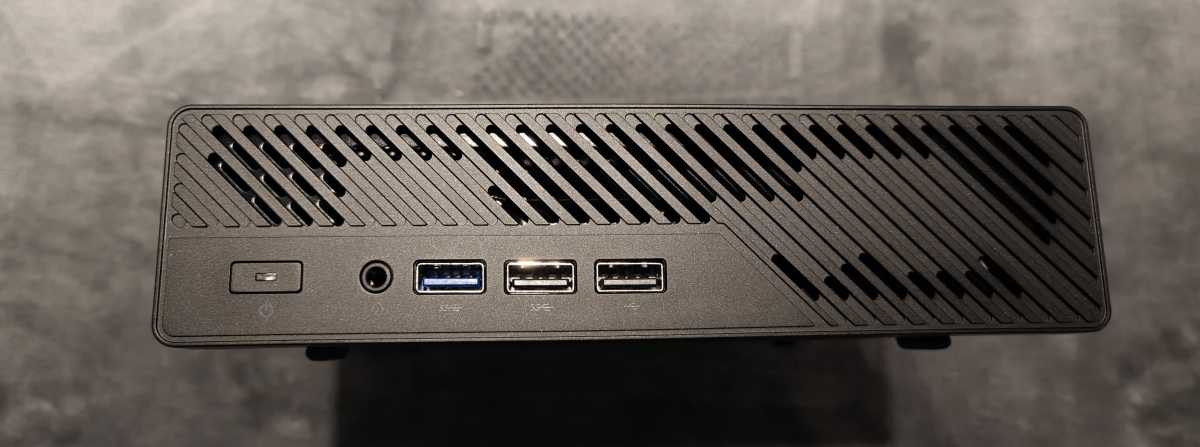
The casing is neatly finished and feels sturdy. Large openings on the top and bottom direct cooling air to the CPU and the expansion card. The memory is also situated in the airflow. The front features diagonal ventilation slots. The power switch is located on the left, next to which are the combined audio socket and a high-speed USB-A port. There are also two USB 2.0 sockets at the front. These are sufficient for input devices or licence dongles. For a workstation in this price range, faster ports would be more in keeping with the times.
Christoph Hoffmann
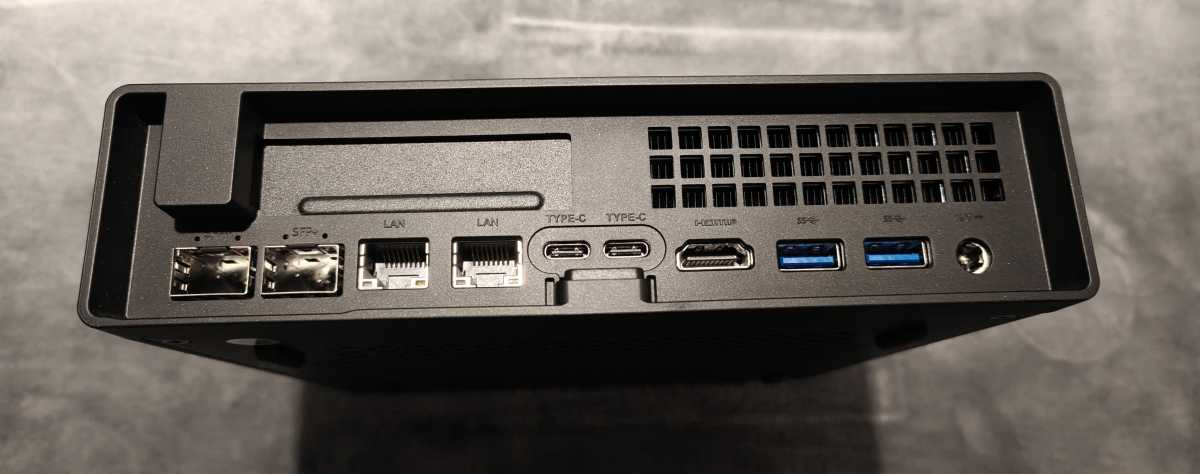
Most cables are connected at the rear. This is where the network ports and the HDMI output are located. There are also two USB4 ports, two high-speed USB-A sockets, and the power connection. However, if several ports are in use, a tangled mess of cables quickly builds up behind the computer. Furthermore, the external 240-watt power supply requires space. It takes up almost as much space as some particularly small office PCs.
Christoph Hoffmann
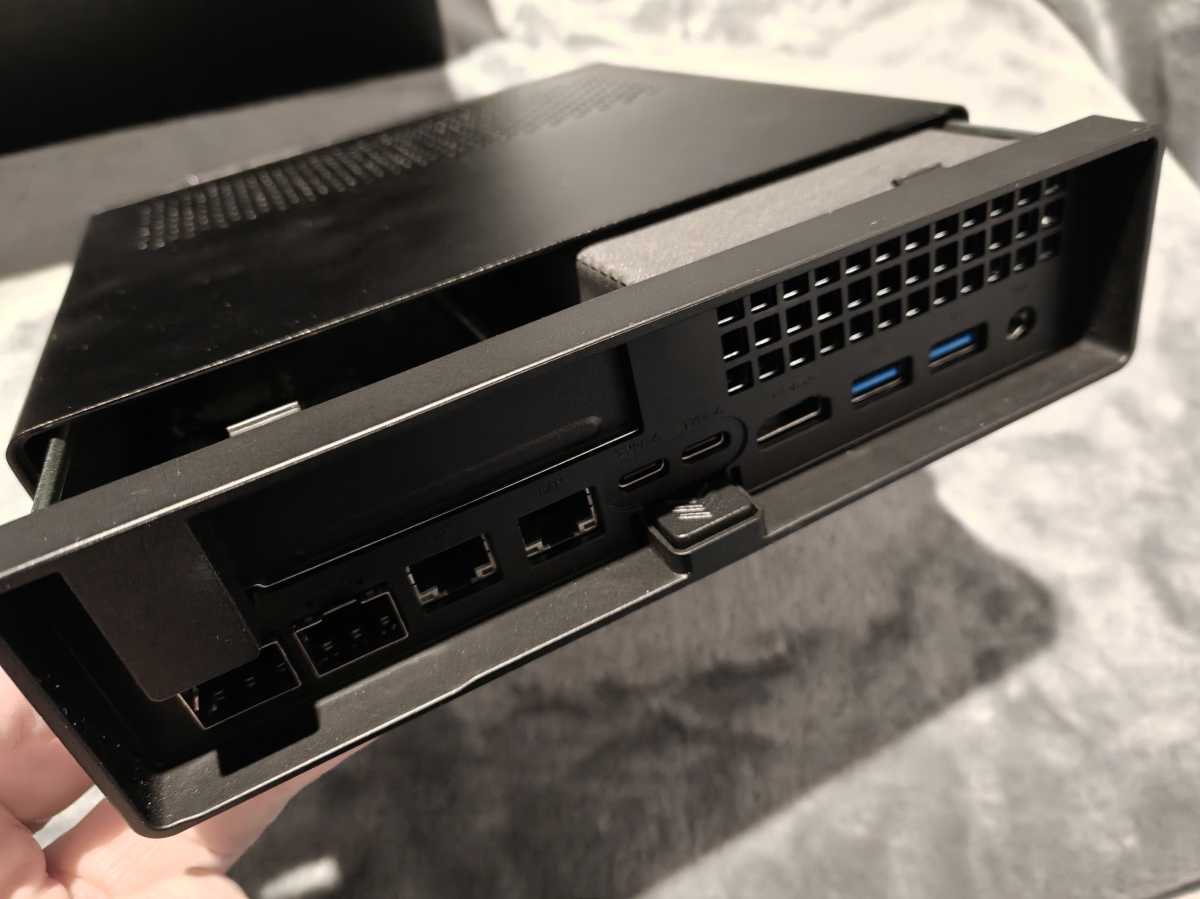
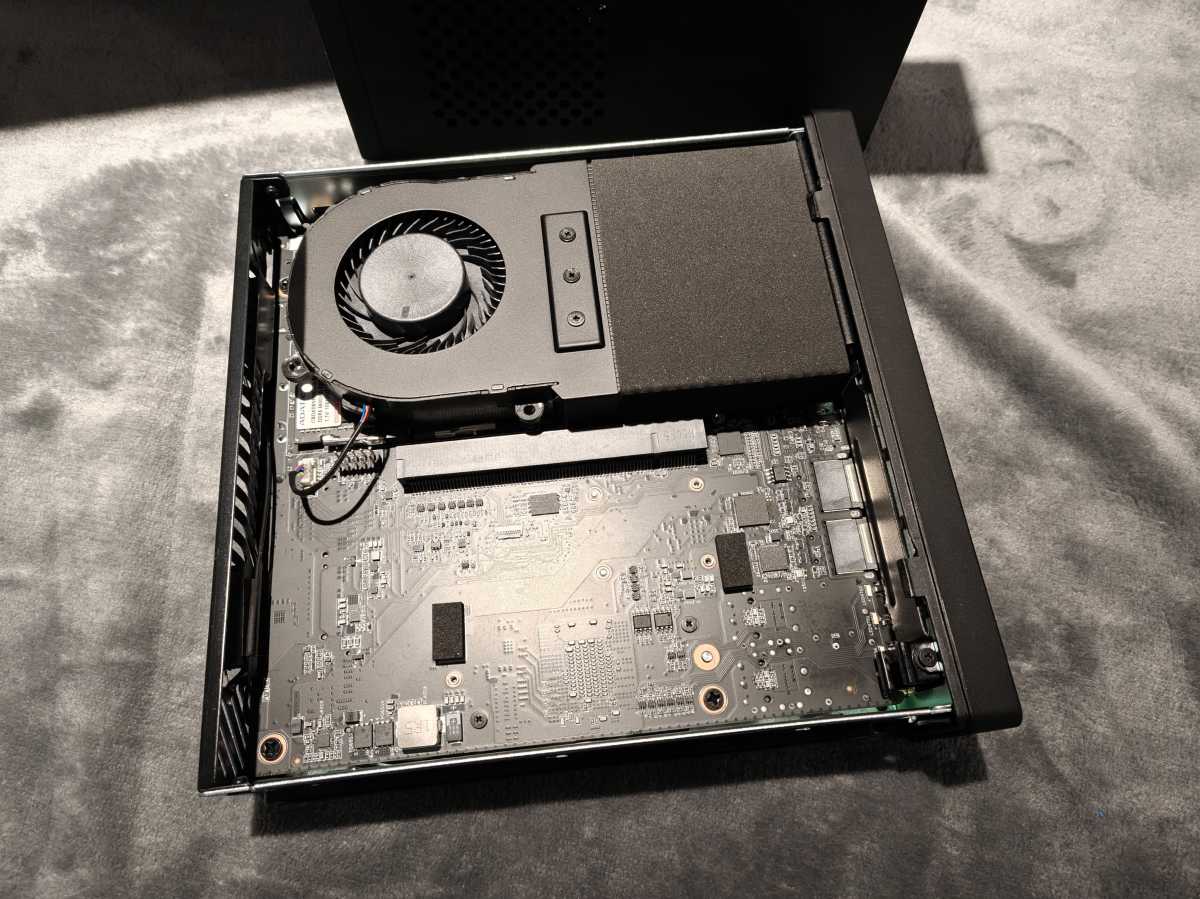
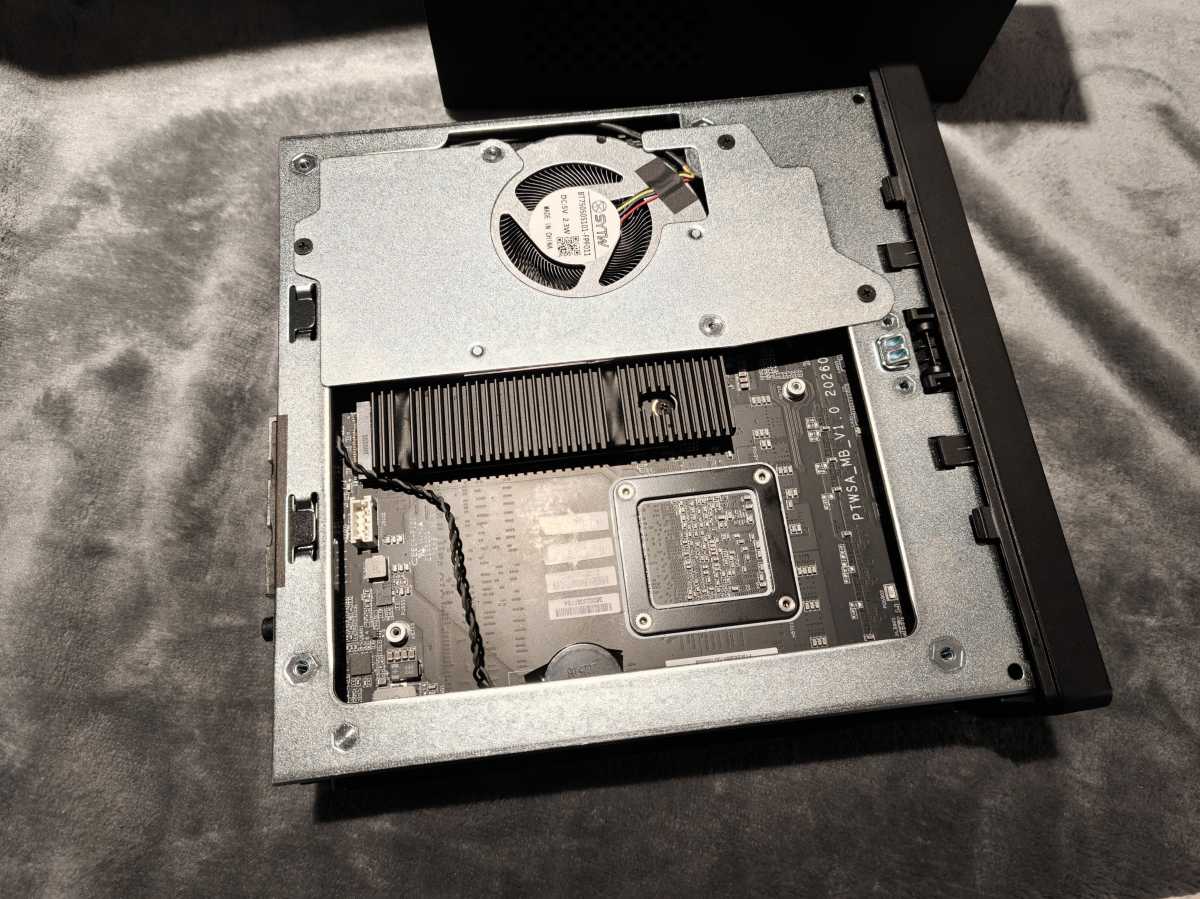
The case is quick to open. Once unlocked, the outer shell is pulled forwards. The RAM and M.2 slots are then accessible. The PCIe slot is also exposed. Buyers of the barebones version can therefore easily install RAM and an SSD themselves. Subsequent upgrades can also be carried out quickly. However, there is little space for expansion cards. They must comply with the low-profile single-slot format, be no longer than 6.6 inches and consume a maximum of 75 watts.
Specifications
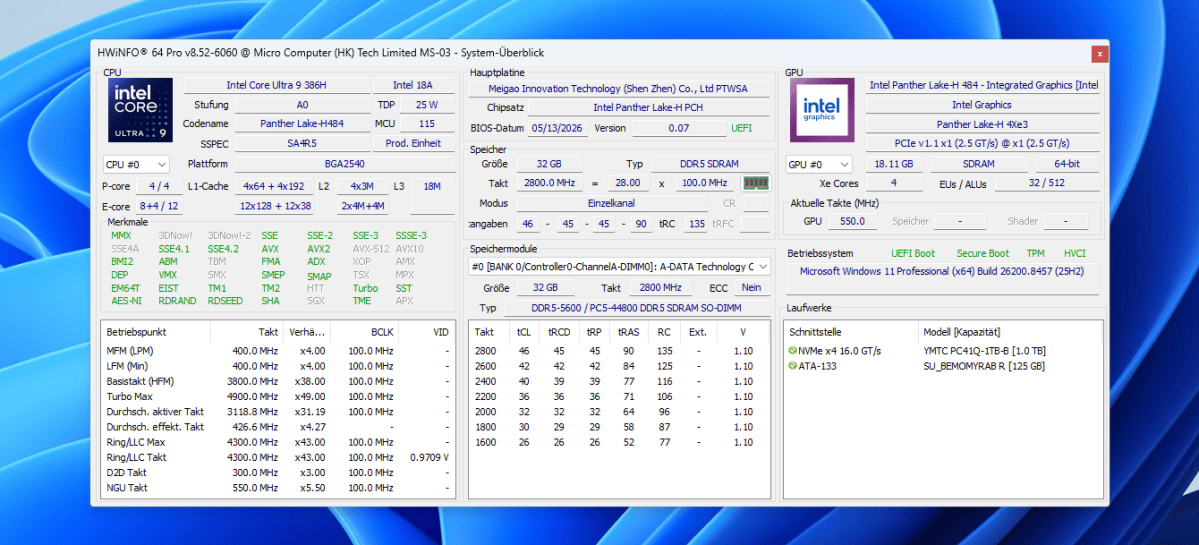
Our test unit is powered by the Intel Core Ultra 9 386H. The Panther Lake processor has 16 cores and handles 16 threads. It combines four P-cores with eight E-cores and four energy-efficient LP-E-cores. The maximum turbo clock speed is 4.9GHz. An NPU with up to 50 TOPS accelerates compatible AI functions. According to Minisforum, Intel vPro is enabled. This allows administrators to manage the computer remotely via Intel AMT, for example to perform reboots or access the BIOS without a monitor connected.
Christoph Hoffmann
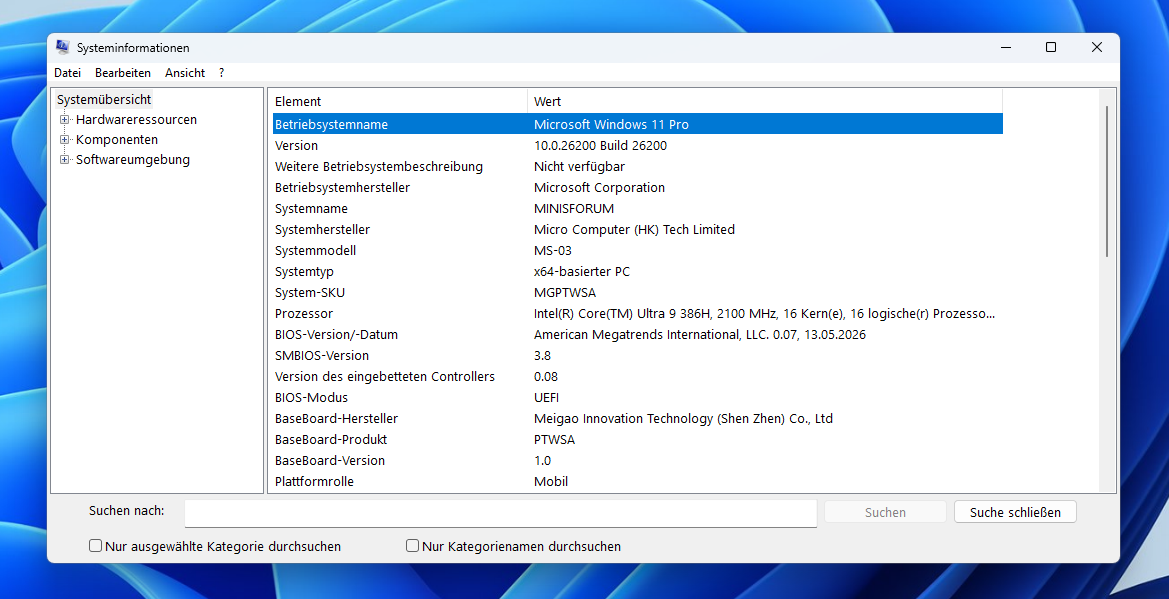
Windows 11 Pro was already installed on the test unit. The system information showed Windows 11 version 25H2 with build 26200. The BIOS version installed was 0.07, dated 13 May 2026. The low version number suggests this is an early firmware release. Later versions may still alter aspects such as fan control and power consumption.
Christoph Hoffmann
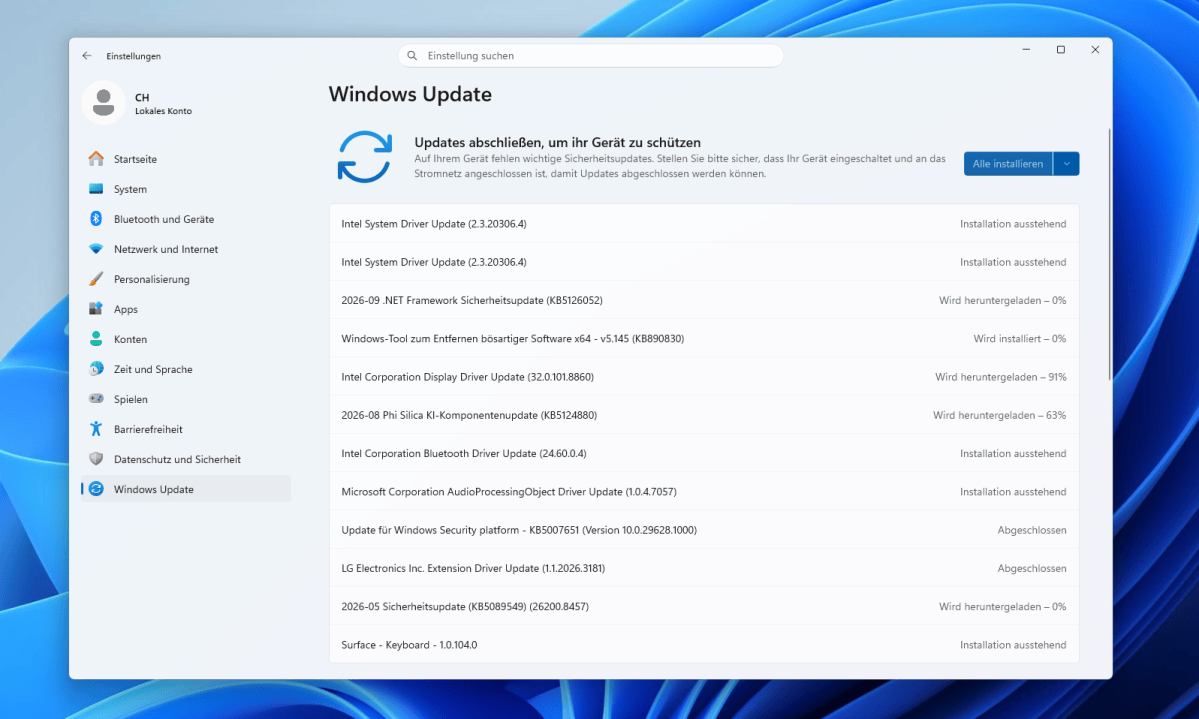
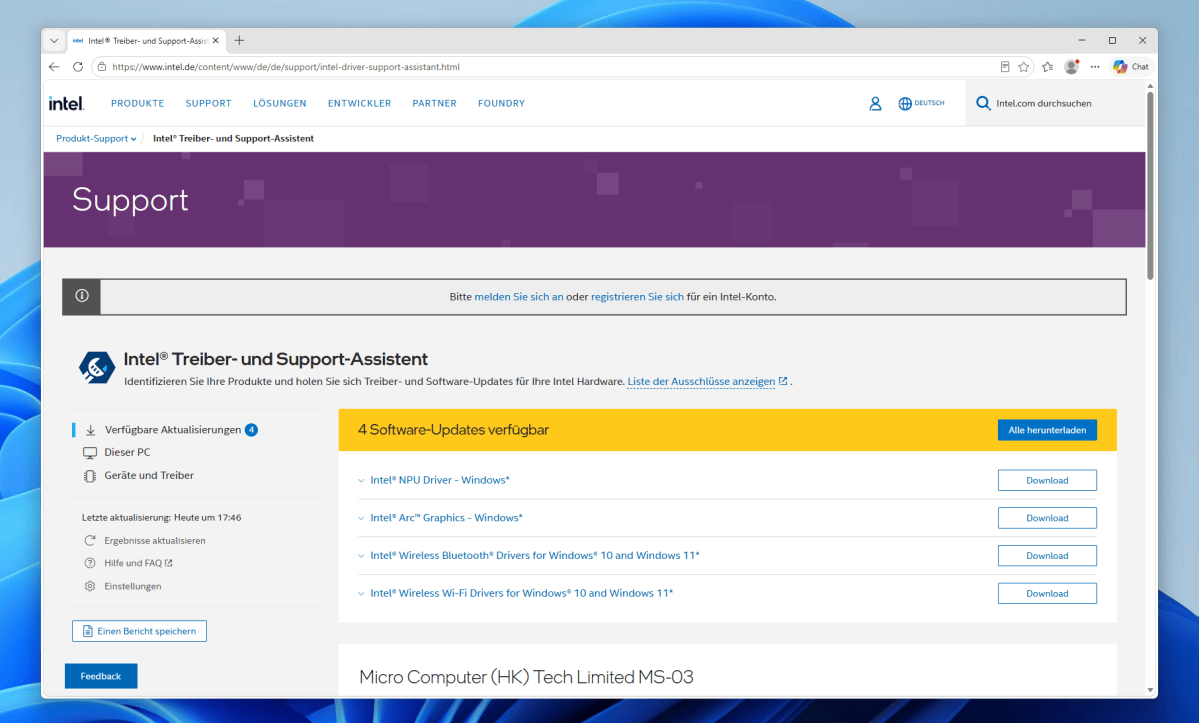
During the first update check, several updates were offered and installed.
Christoph Hoffmann
The Intel Driver & Support Assistant also found newer packages for the NPU and Intel graphics, as well as for Wi-Fi and Bluetooth. Minisforum also provides a complete driver pack and separate drivers for the wireless modules, audio, and Ethernet on its support page.
Christoph Hoffmann
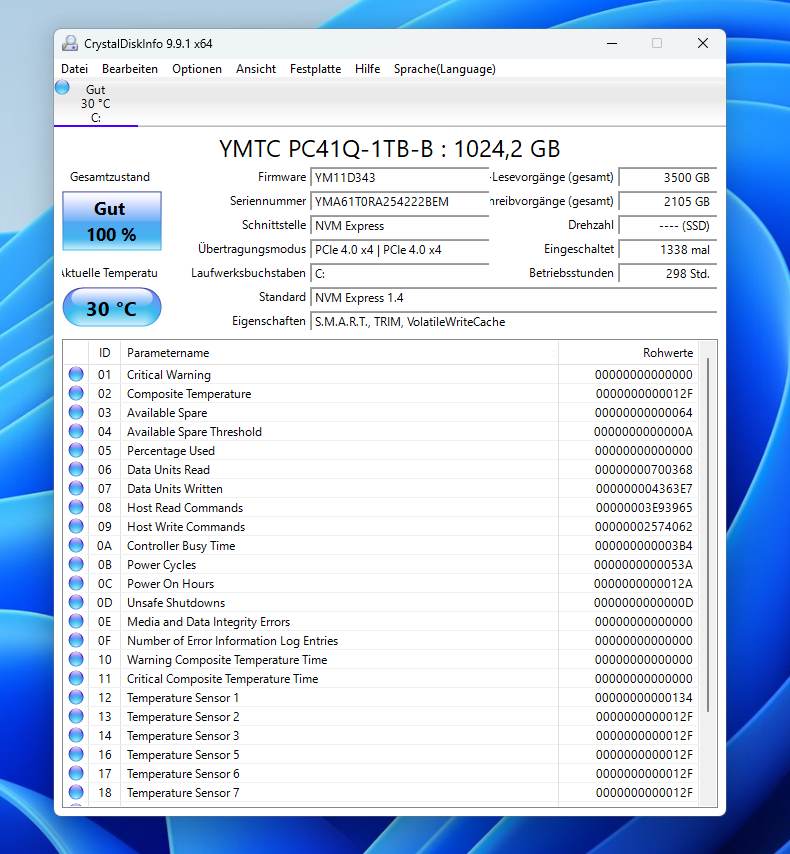
Minisforum combines the CPU with 32GB of DDR5-5600 RAM and a 1TB YMTC PC41Q SSD. Together, the two SO-DIMM slots support up to 128GB. However, only one was occupied in our unit. The RAM was therefore running in single-channel mode. Furthermore, at 5,600MT/s, the module is not operating at the fastest possible clock speed. According to Minisforum, the MS-03 supports up to DDR5-7200. In the CPU benchmarks we measured, this is less of an issue than with the integrated graphics. The integrated graphics has to share its memory bandwidth with the processor and consequently suffers a noticeable loss of performance. A second, compatible module is therefore one of the most sensible upgrades.
Christoph Hoffmann
When it comes to mass storage, the MS-03 offers far more flexibility than standard mini PCs. Two M.2 slots connect NVMe SSDs via PCIe 5.0 x4. A third slot operates with PCIe 4.0 x1. The included adapter also allows a U.2 SSD to be used in the first slot. The slots provide space for large local data sets and fast working drives. The MS-03 can therefore also be used as a compact NAS. An SSD heatsink and an HDMI cable are also included.
The second special feature is the internal PCIe slot in the physical x16 format. Electrically, it is connected via PCIe 4.0 x4 and delivers up to 75 watts. It is suitable, for example, for an additional storage controller or a compatible professional graphics card in low-profile format. However, the design is unsuitable for a high-performance gaming GPU.
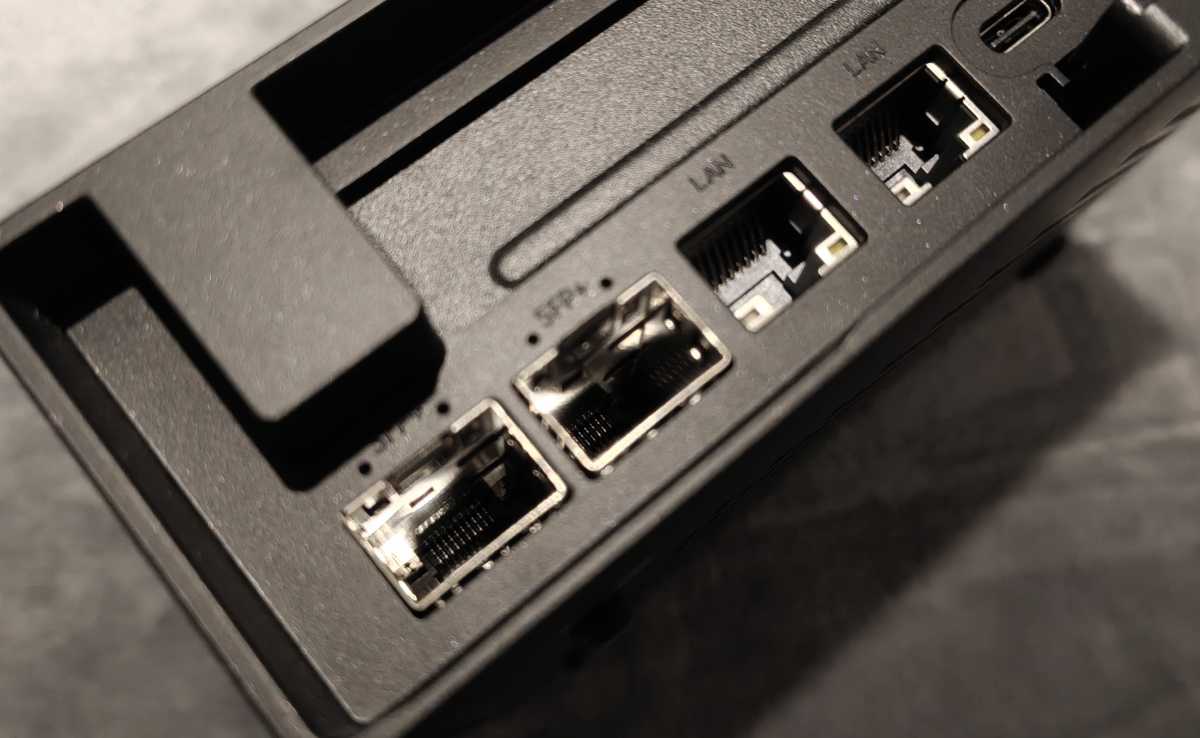
In terms of network connections, the MS-03 clearly stands out from standard mini PCs. Its two SFP ports each transmit up to 10Gbit/s. With the appropriate modules, they can be connected via fiber optic cable to a switch, NAS, or server. For short distances, cheaper DAC copper cables are a suitable alternative. Modules and cables are not included out of the box. Buyers should also check for compatibility with the Intel X710 controller. A fiber-optic connection from the internet service provider cannot usually be connected directly to the SFP ports. In most cases, the fiber-optic modem provided by the provider is still required.
Christoph Hoffmann
There are also two RJ45 sockets offering 10Gbit/s and 2.5Gbit/s. The 2.5Gbit interface uses Intel’s i226-LM, while the 10Gbit port, like the SFP ports, is connected to the X710. This provides three 10Gbit connections and one 2.5Gbit interface. The computer is suitable as a virtualization host or a high-speed file server. With its four network ports, it can also act as a software router to connect multiple network segments.
Wi-Fi 7 via Intel’s BE211 and Bluetooth 6 provide wireless connectivity. Two USB4 ports offer transfer speeds of up to 40Gbit/s and output DisplayPort signals. HDMI 2.1 complements the video output.
Computing performance
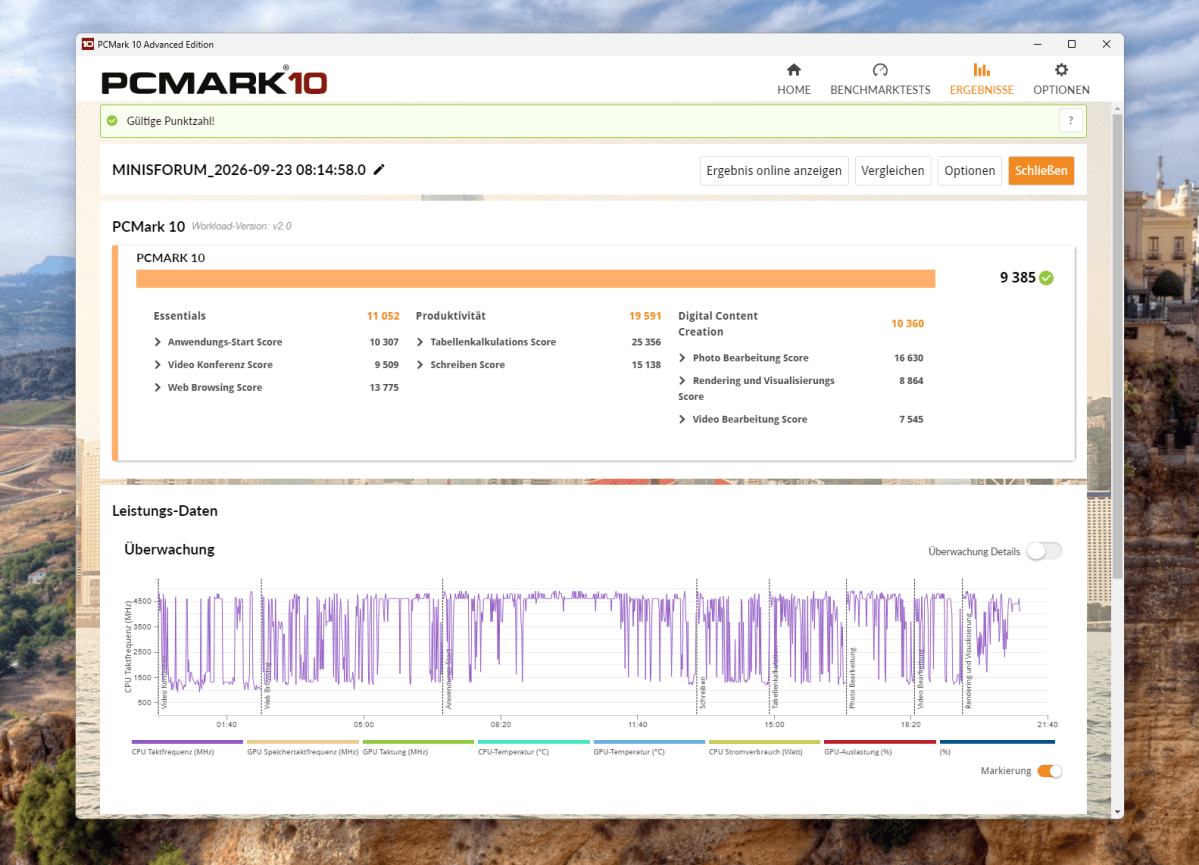
In PCMark 10, the MS-03 achieved a total score of 9,385 points. The ‘Essentials’ sub-score stands at 11,052 points. Productivity scored 19,591 points, while Digital Content Creation scored 10,360 points. The spreadsheet performance is particularly strong at 25,356 points. For rendering and visualization, the score is 8,864 points, while for video editing it is 7,545 points. The high productivity score is in line with the powerful CPU. In graphics-intensive tasks, the result is lower.
Christoph Hoffmann
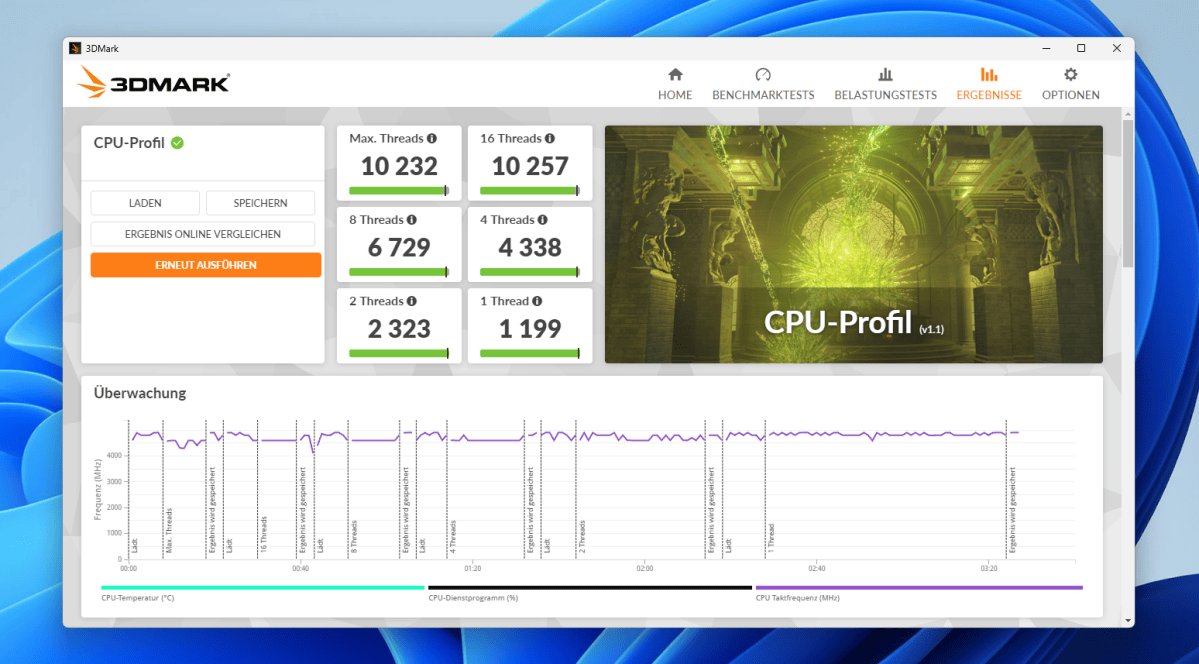
The Core Ultra 9 386H makes the MS-03 one of the faster compact computers. In the 3DMark CPU profile, the system achieves 10,232 points with the maximum number of threads. The run with 16 threads delivers virtually the same result at 10,257 points, as the processor handles exactly 16 threads. Eight threads score 6,729 points, while a single thread scores 1,199 points. These results confirm the processor’s high multi-core performance. This benefits, for example, development tools and multiple virtual machines running in parallel.
Christoph Hoffmann
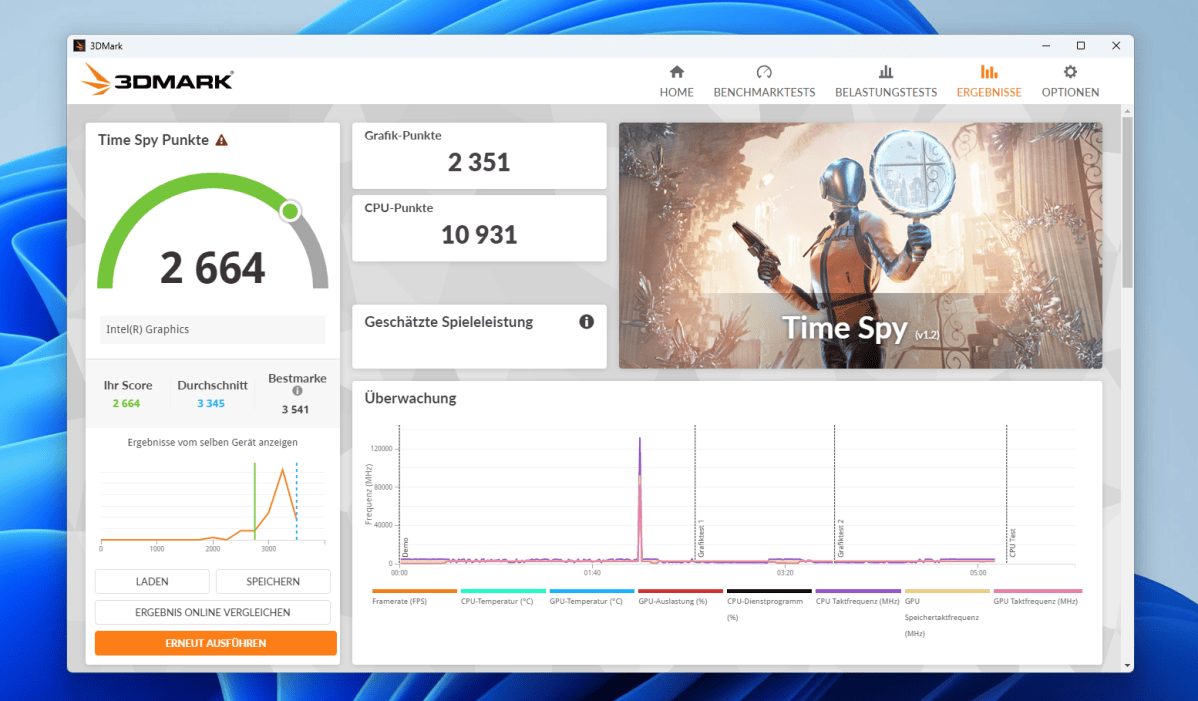
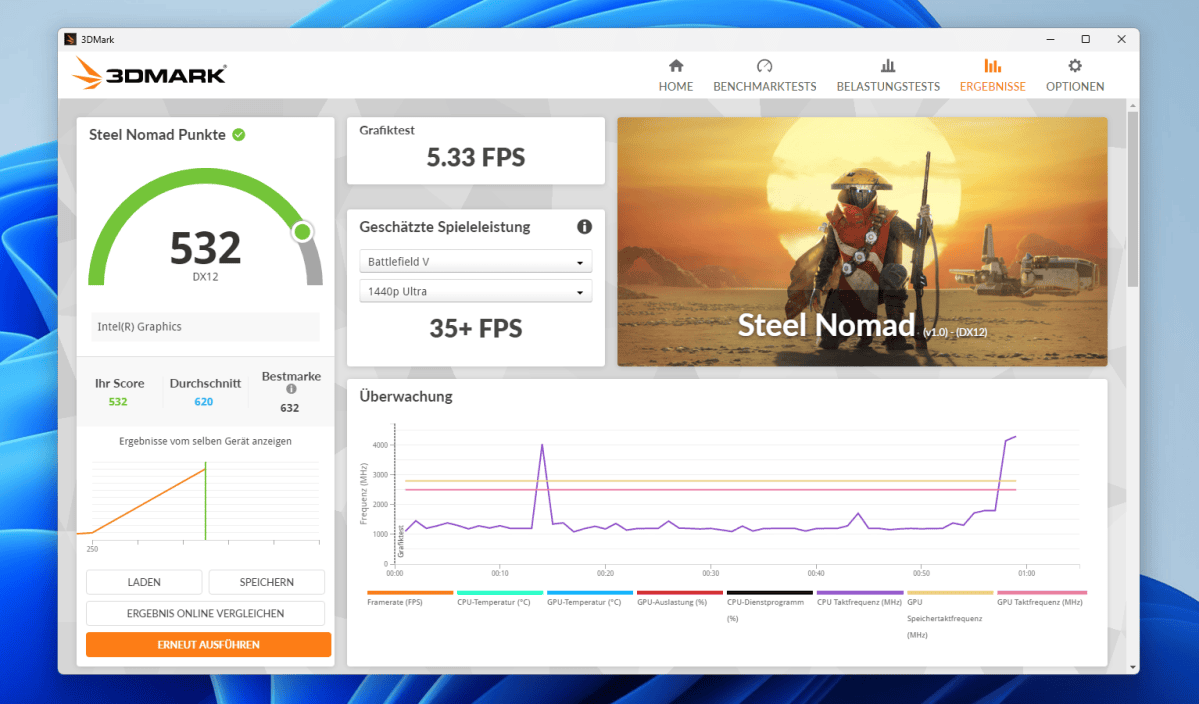
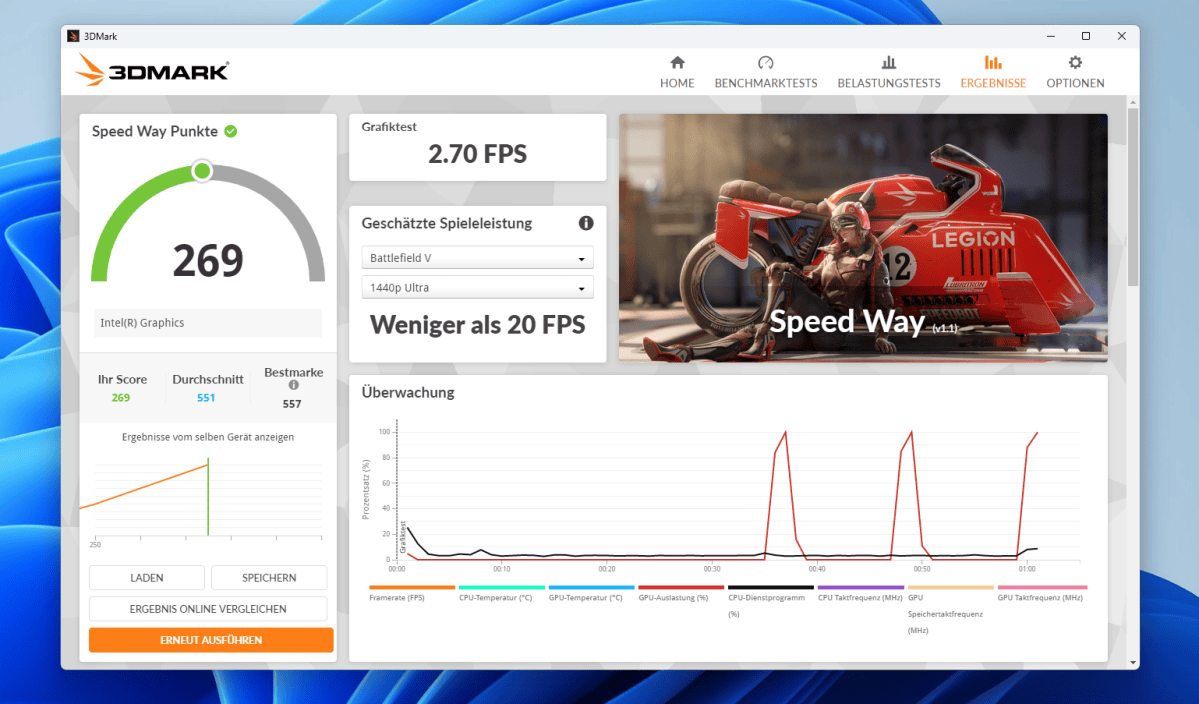
The integrated Intel graphics falls significantly short of the powerful CPU. It features four Xe3 cores and uses the RAM as graphics memory. In 3DMark Time Spy, the test device scores 2,664 points. The graphics score is 2,351 points, while the CPU score is 10,931 points. In Solar Bay, the system achieved 10,068 points and 38.28 frames per second. Steel Nomad delivered 532 points and 5.33 frames per second. The demanding Speed-Way test achieved only 269 points and 2.70 frames per second.
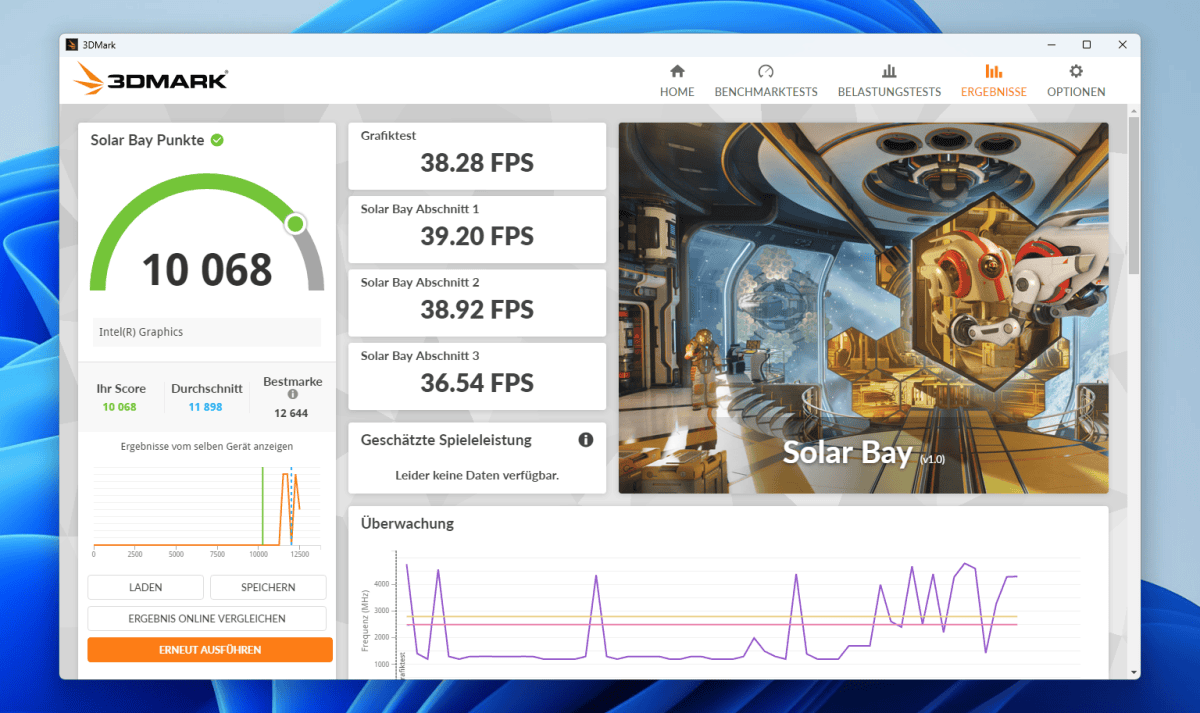
This performance is sufficient for Windows and video playback, even across multiple high-resolution monitors. Older or graphically simple games should run with reduced detail. The latest 3D titles or GPU rendering will quickly overwhelm the integrated solution. Part of the performance shortfall is likely due to the single-channel configuration of the RAM. With two RAM modules, graphics performance should improve noticeably, depending on the application.
Nevertheless, this does not turn the MS-03 into a gaming PC. CUDA applications require a compatible Nvidia graphics card. For larger local AI models, a powerful GPU supported by the relevant software is advisable. A more powerful GPU is also recommended for complex video editing.
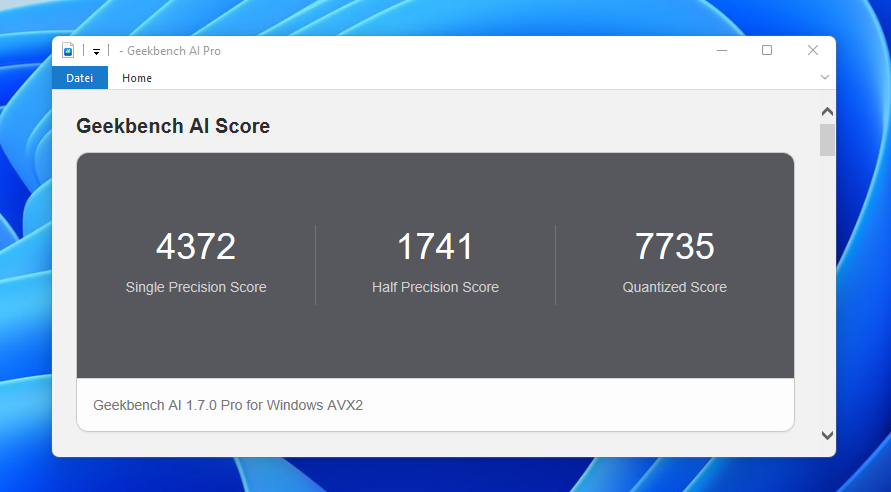
In Geekbench AI with an AVX2 CPU backend, the MS-03 scores 4,372 points in FP32 calculations. For FP16, the score is 1,741 points. The quantized test yields 7,735 points. These figures relate to the CPU and do not provide any indication of the NPU’s performance. Practical benefits depend heavily on the software. Many widely used applications still rely on the CPU or GPU and do not yet make full use of the NPU.
Christoph Hoffmann
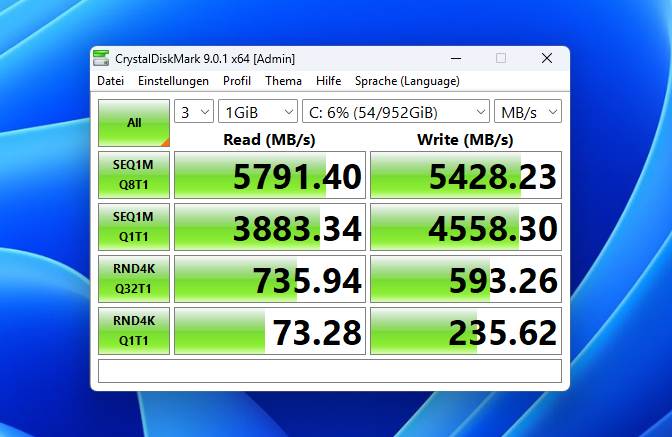
According to CrystalDiskMark , the 1TB SSD reads sequentially at 5,791MB/s and writes at 5,428MB/s. In the sequential Q1T1 test, it achieves 3,883MB/s for reading and 4,558MB/s for writing. These transfer rates are sufficient for large project files and virtual machines. Programs also launch without any noticeable SSD-related delays. The SSD does not fully utilize PCIe 4.0, but it does not slow down the computer in everyday use. Demanding users can upgrade to faster or larger drives. The third M.2 slot, with only one PCIe 4.0 lane, is better suited to capacity than to maximum transfer rates.
Christoph Hoffmann
In a price comparison of the mini PCs tested so far, the MS-03 ranks very highly. The configuration tested, featuring a Core Ultra 9, 32GB RAM and a 1TB SSD, cost $1,520 at the time of testing. The barebones version without RAM or SSD costs €1,079 (list price €1,349). It is a worthwhile option for buyers who intend to use their own two memory modules anyway. This makes it more expensive than the highly rated Minisforum AI X1 Pro at $869 or the Geekom IT15 at $999. The GMKtec EVO T2S and the EVO-X2 cost even more, at $1,959 and $1,700, respectively. However, the devices follow different design philosophies, so the price says little about their performance.
The MS-03 justifies its higher price primarily through its network connections and expansion options. For purely office-based tasks, cheaper mini-PCs offer sufficient performance, but usually lack 10Gbit Ethernet and the PCIe slot.
Power consumption
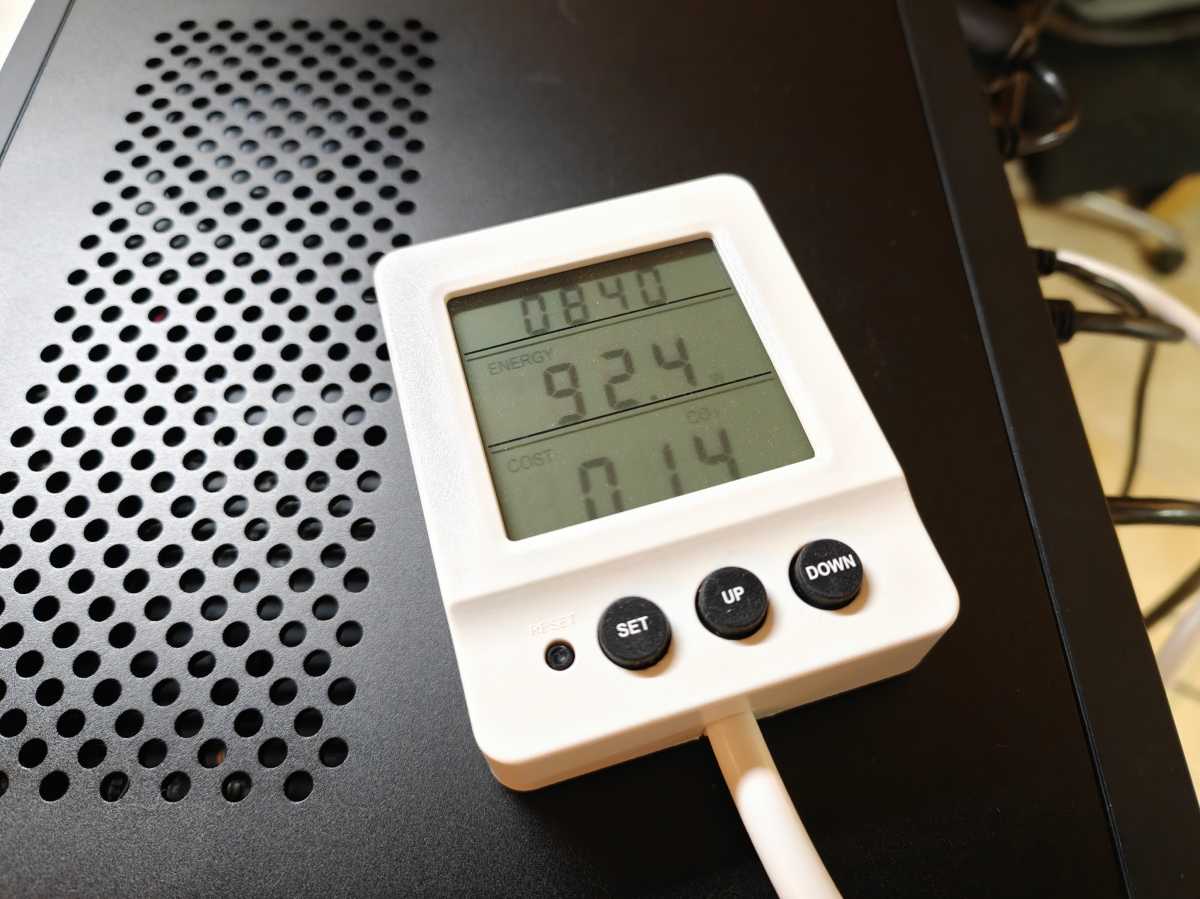
In terms of power consumption, we measured around 18 watts while Windows was idle. Depending on the light workload, the meter displayed between 28 and 34 watts. Under heavy load, power consumption rose to around 79 to 85 watts. In graphics-intensive benchmarks, it briefly reached 90 to 92 watts. This leaves enough headroom for additional SSDs or an energy-efficient PCIe card, as the power supply delivers 240 watts.
Christoph Hoffmann
For a dedicated office PC, the idle power consumption is not particularly low. The two network controllers, with their four LAN ports, are likely to increase the base power consumption. Judging by the CPU performance, the power consumption under load remains reasonable. If the MS-03 runs in idle mode round the clock, this amounts to around 158 kilowatt-hours per year. At 35 cents per kilowatt-hour, that amounts to around $60. Energy-efficient mini PCs often consume well under 10 watts when idle. As a continuous-run machine, it is therefore only worthwhile if the application requires its high performance and fast interfaces.
Cooling and noise level
The cooling system combines an 83-millimeter radial fan running at up to 5,100 rpm with two heat pipes. Minisforum uses a phase-change material (PCM) as the heat-conducting material. Air enters the case through the perforated surfaces and exits via the sides or the rear. During our benchmark tests, there were no sudden drops in clock speed. The computer maintained stable multi-core performance throughout the respective test runs.
At idle, the fan remains audible but does not become a distraction in a normal home office. In our quiet test environment, the measuring device recorded around 34.3dB(A) at idle and 49.4dB(A) under heavy load. As no standardized test chamber was available, these figures are for guidance only. Brief background tasks occasionally cause the fan speed to fluctuate. The fluctuating speed is more noticeable than a steady fan hum. Under heavy CPU or graphics load, the fan revs up significantly. The sound is more of a hum than a whistle, but is clearly audible at the desk.
The generous openings aid cooling but allow noise to escape almost unhindered. Furthermore, compact radial fans react more quickly to changes in load than large desktop fans. The fan noise is less noticeable at a greater distance from the workstation. In a server room, this is unlikely to be an issue. Right next to a microphone or in a very quiet office, the fluctuating speed can become a nuisance. A fixed, low-profile fan speed curve would be desirable for light continuous loads.
Christoph Hoffmann
For upgrades, the thermal headroom must be realistically assessed. A 75-watt graphics card significantly increases heat dissipation and noise levels. Multiple fast PCIe 5.0 SSDs also require effective heatsinks. There is space available for the components. However, the small case volume limits cooling and airflow. Anyone utilizing all the slots should check temperatures and airflow paths after the upgrade.
Should you buy the MS-03?
The Minisforum MS-03 is not a budget all-round mini PC. It is aimed at users who require numerous fast network connections and internal expansion slots in a compact space. This combination is particularly well-suited for a virtualization host running Proxmox or a fast home server. It can also be used as a software router. The Core Ultra 9 386H delivers high computing power for this purpose. The three M.2 slots and the PCIe slot provide scope for future upgrades.
The factory-fitted RAM configuration does not meet the requirements. A single 32GB module takes up a lot of memory bandwidth from the integrated graphics. Buyers should fill the second SO-DIMM slot or opt for the barebones version and install two suitable modules straight away. Even then, the graphics performance still lags far behind that of the CPU. An additional graphics card is advisable for demanding games or fast GPU rendering. This also applies to larger local AI models, provided the software being used supports the graphics card. However, due to the compact single-slot low-profile form factor, the selection of suitable cards is limited.
The price of the configuration tested is high. Standard mini PCs offering good everyday performance cost significantly less. The extra cost is only worthwhile if the buyer actually makes use of the 10Gbit ports and expansion slots. For these applications, the MS-03 offers high CPU performance and a neatly finished, expandable chassis. As a mere office PC, it would be over-spec’ed and unnecessarily expensive.
Technical specifications
- Processor: Intel Core Ultra 9 386H, 16 cores and 16 threads, up to 4.9GHz, vPro
- Graphics unit: Intel Graphics, four Xe3 cores, up to 2.5GHz
- NPU: Intel AI Boost, up to 50 TOPS
- RAM in the test: 32GB DDR5-5600, one SO-DIMM module, single-channel operation
- Maximum RAM: 128GB DDR5-7200 via two SO-DIMM slots
- SSD in the test unit: YMTC PC41Q, 1TB, NVMe PCIe 4.0
- Mass storage ports: 2 × M.2 PCIe 5.0 x4, 1 × M.2 PCIe 4.0 x1, U.2 via adapter
- Expansion: physical PCIe x16 slot, electrically PCIe 4.0 x4, for single-slot low-profile cards up to 170 × 20 millimetres, maximum 75 watts
- Network: 2 × 10Gbit SFP for compatible fibre-optic transceivers or DAC cables, 1 × 10Gbit RJ45 (all Intel X710), 1 × 2.5Gbit RJ45 (Intel i226-LM)
- Connectivity: Wi-Fi 7 and Bluetooth 6 (Intel BE211)
- Front ports: 1 × USB-A at 10Gbit/s, 2 × USB 2.0, 3.5mm jack
- Rear ports: 2 × USB4 at 40Gbit/s, 2 × USB-A at 10Gbit/s, HDMI 2.1
- Operating system: Windows 11 Pro
- Dimensions: 196 × 189 × 48 millimeters
- Weight: approximately 1.4 kilograms
- Volume: approximately 1.78 liters
- Power supply: external, 240 watts
- Contents: Power supply unit with mains cable, HDMI cable, SSD heat sink, M.2-to-U.2 adapter, screws and user manual


