At a glance
Pros
- Very high CPU and graphics performance
- 128GB of fast shared memory
- Plenty of ports, including two USB4 ports and a UHS-II card reader
- No thermal throttling observed during the benchmark run
- Integrated 300-watt power supply
Cons
- High price
- RAM soldered in place
- No OCuLink and no 10Gbit port
Our Verdict
The MSI Pro Max Edge AI+ is a powerful compact workstation for local AI and large-scale media projects. 128 GB of unified memory and two USB4 ports are well-suited to memory-intensive applications. The integrated power supply keeps the setup tidy. In the benchmark test carried out, the cooling system operated without thermal throttling. Weaknesses include the soldered-in RAM and the lack of OCuLink. The high price is an even greater drawback. With a street price starting at around $4,500 excluding the operating system, the computer is aimed at professionals who require a large amount of shared memory.
Price When Reviewed
This value will show the geolocated pricing text for product undefined
Best Pricing Today
With the Pro Max Edge AI+, MSI brings the Ryzen AI Max 395 into a 4-liter chassis with 128GB of shared memory. The computer is designed for local AI and rendering. Large media projects also fall within its scope of application. In our review, the system must therefore demonstrate whether its performance and specifications justify the high price.
Design and build quality
Measuring 9.78 × 7.41 × 3.83 inches, the Pro Max Edge AI+ is larger than a traditional mini PC but significantly more compact than a desktop tower. The case has a capacity of four liters. A size comparison with the Geekom A9 Max illustrates these dimensions.
MSI states a weight of 6.76 pounds. The computer can be used either flat or upright on its narrow side. When positioned vertically, the device — which is almost 10 inches tall – takes up little floor space and looks like a small workstation. The size comparison shows that the MSI Pro Max Edge AI+ takes up considerably more space than the slim GMKtec EVO-X3.
The dark gray aluminum casing gives a high-quality impression. The surfaces show hardly any give, and the edges are neatly rounded. The gaps are also uniform. A narrow copper-colored line adds a touch of flair to the understated front. There is no lighting. Rubber feet keep the unit securely level. It also stands stably when placed on its side.
Large perforated grilles on the top and sides supply fresh air to the three fans. The warm air is mainly expelled at the rear. You should therefore not place the computer directly against a wall. Frequently used sockets are located at the front, while permanently routed cables are hidden at the back. This keeps the workspace tidy. You don’t have to reach behind the unit to access a USB stick or memory card.
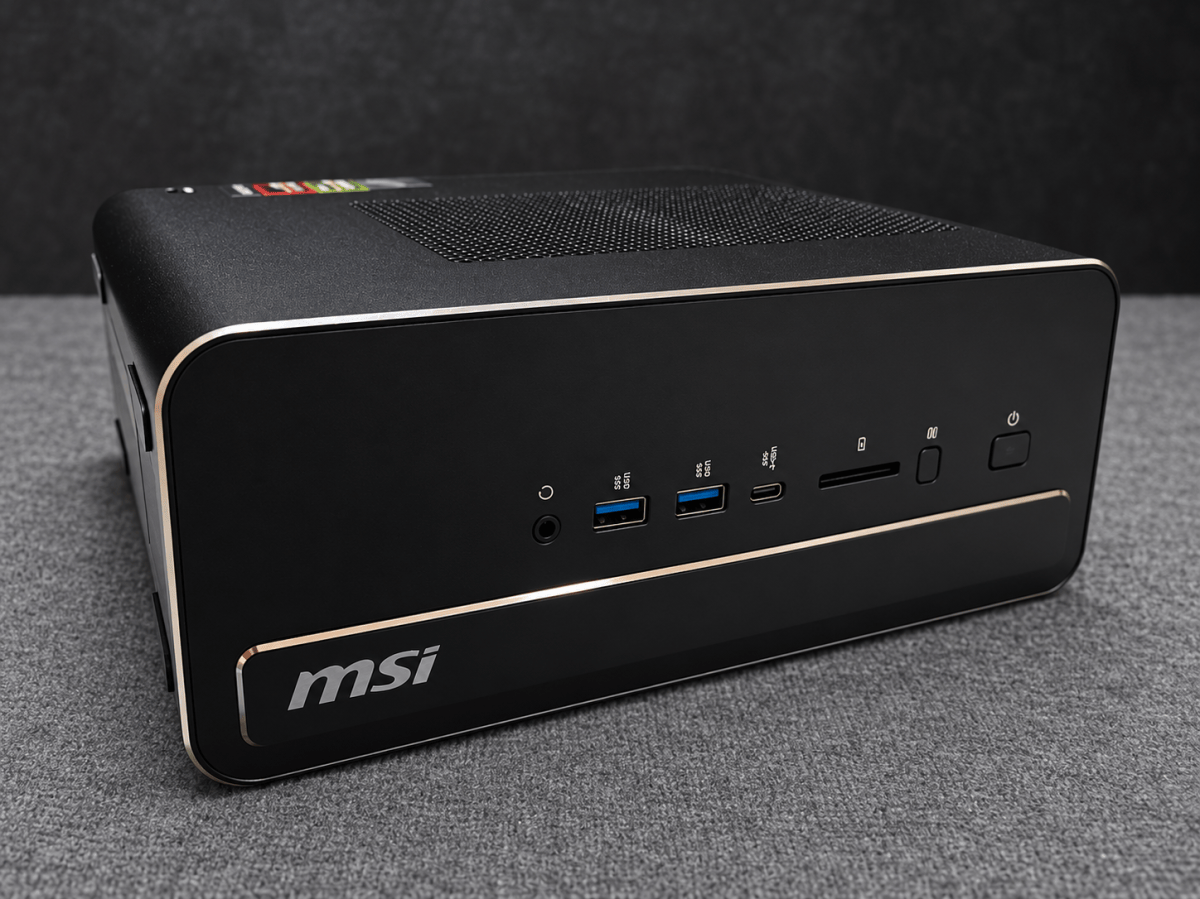
The integrated 300-watt power supply is a practical advantage. There is no bulky power supply unit, and a single power cable is sufficient for transport. As a result, the MSI case is wider and deeper than many mini PCs. Compact systems take up less space, but rarely offer a similarly powerful APU complete with a power supply. The slim design makes it easy to position the system under a monitor or next to a display.
The case can be opened for maintenance. Both M.2 slots are accessible, with one remaining free. The LPDDR5X memory is soldered directly onto the circuit board. It cannot be upgraded or replaced individually in the event of a fault. While 128GB provides ample capacity, the limited reparability remains a drawback in this price range. Overall, the case and build quality appear to meet professional standards.
Specifications
The test unit is powered by AMD’s Ryzen AI Max 395, featuring 16 Zen 5 cores, 32 threads, and up to 5.1GHz. The processor is also used in other mini PCs, such as the GMKtec EVO-X2 and EVO-X3 models, as well as the Acemagic M1A Pro.
The Radeon 8060S features 40 compute units based on RDNA 3.5. The XDNA 2 NPU delivers 50 TOPS. MSI quotes a combined total of 126 TOPS for all compute units. This combined figure should not be equated with the NPU’s performance.
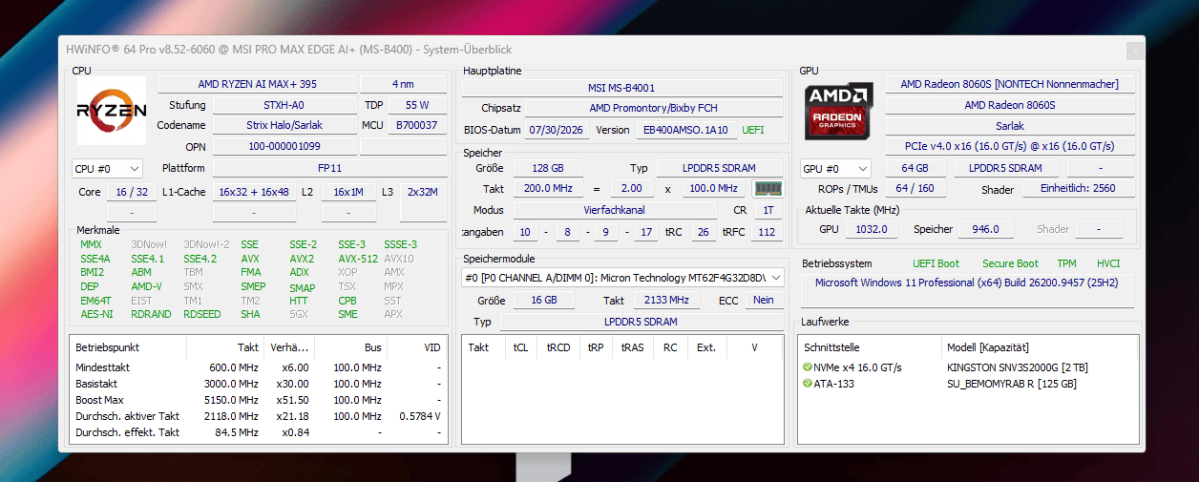
The CPU and GPU share 128GB of Micron LPDDR5X-8000 (MT62F4G32D8DV-023 WT). In our test, 64GB was reserved as graphics memory. This amount can be increased to up to 96GB via the ‘Variable Graphics Memory’ setting in the BIOS or in AMD’s Adrenalin software. This means that large AI models fit entirely within the graphics memory and do not need to be partially offloaded to the CPU.
MSI states that it directly supports AI models with up to 120 billion parameters. As a practical example, the manufacturer cites OpenAI’s open-weight model, gpt-oss-120b. Its checkpoint, natively quantized in MXFP4, comprises 60.8GiB; in the MSI benchmark, the model occupies around 65GB of memory. Llama 4 Scout, with a total of 109 billion parameters, is also a viable option in a suitable 4-bit version. MSI cites Qwen 3.6 35B as another recent example, with a memory requirement of around 23GB. AMD also provides GAIA, an actively maintained open-source framework for local chat applications and AI agents.
A Kingston SNV3S2000G with 2TB and PCIe 4.0 x4 serves as the system drive. A second M.2-2280 slot remains free. Both drives have their own heatsinks. There is no 2.5-inch bay.
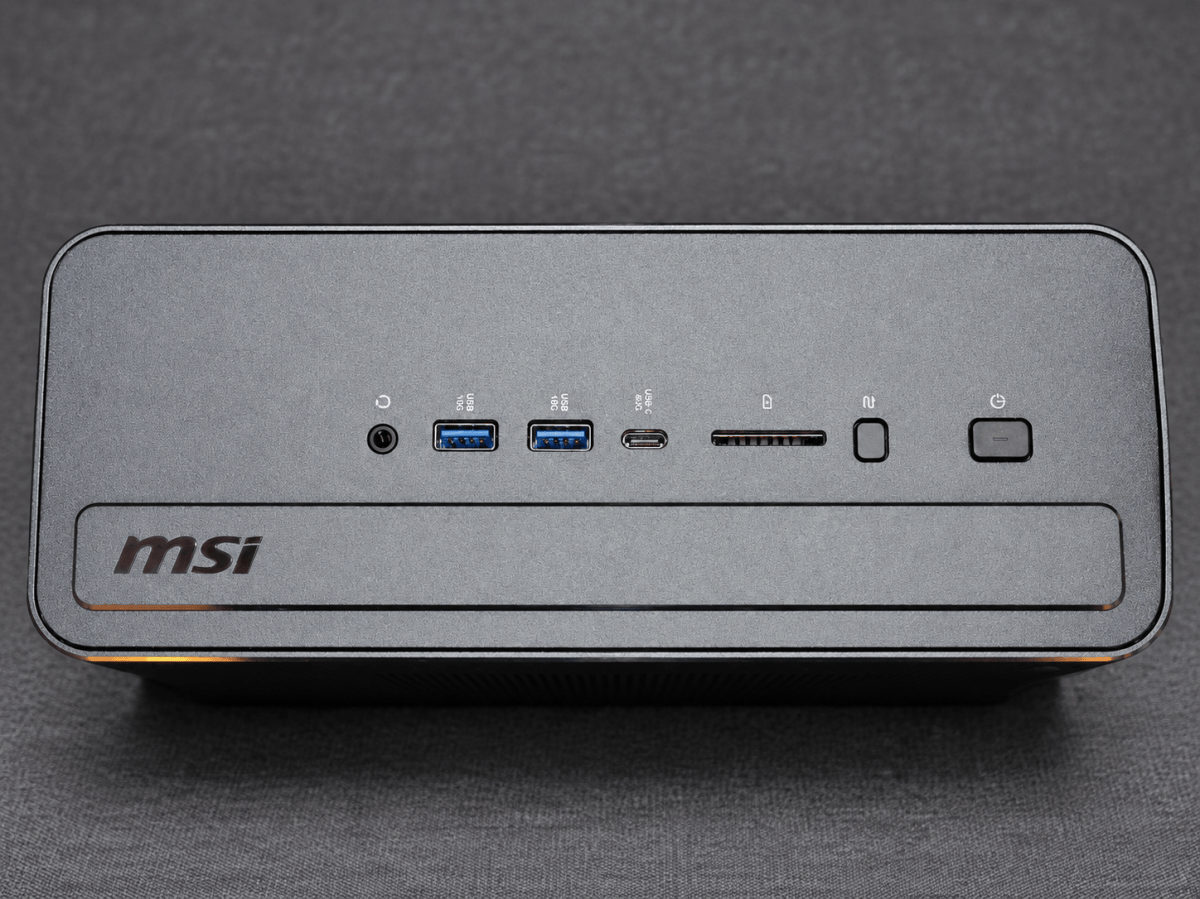
At the front are two USB-A ports with 10Gbit/s, a USB-C port with 40Gbit/s, and a combined audio jack. The SD 4.0 card reader supports UHS-II. On the right-hand side are the power button and a button for power profiles. This allows you to switch between them without using the MSI software on Windows.
At the rear are another USB-C port with 40Gbit/s, a USB-A port with 10Gbit/s, and two USB 2.0 ports. HDMI 2.1 and DisplayPort 1.4a complement the two USB-C video outputs. The MSI can drive up to four monitors. This makes the system well-suited to workstations with multiple displays.
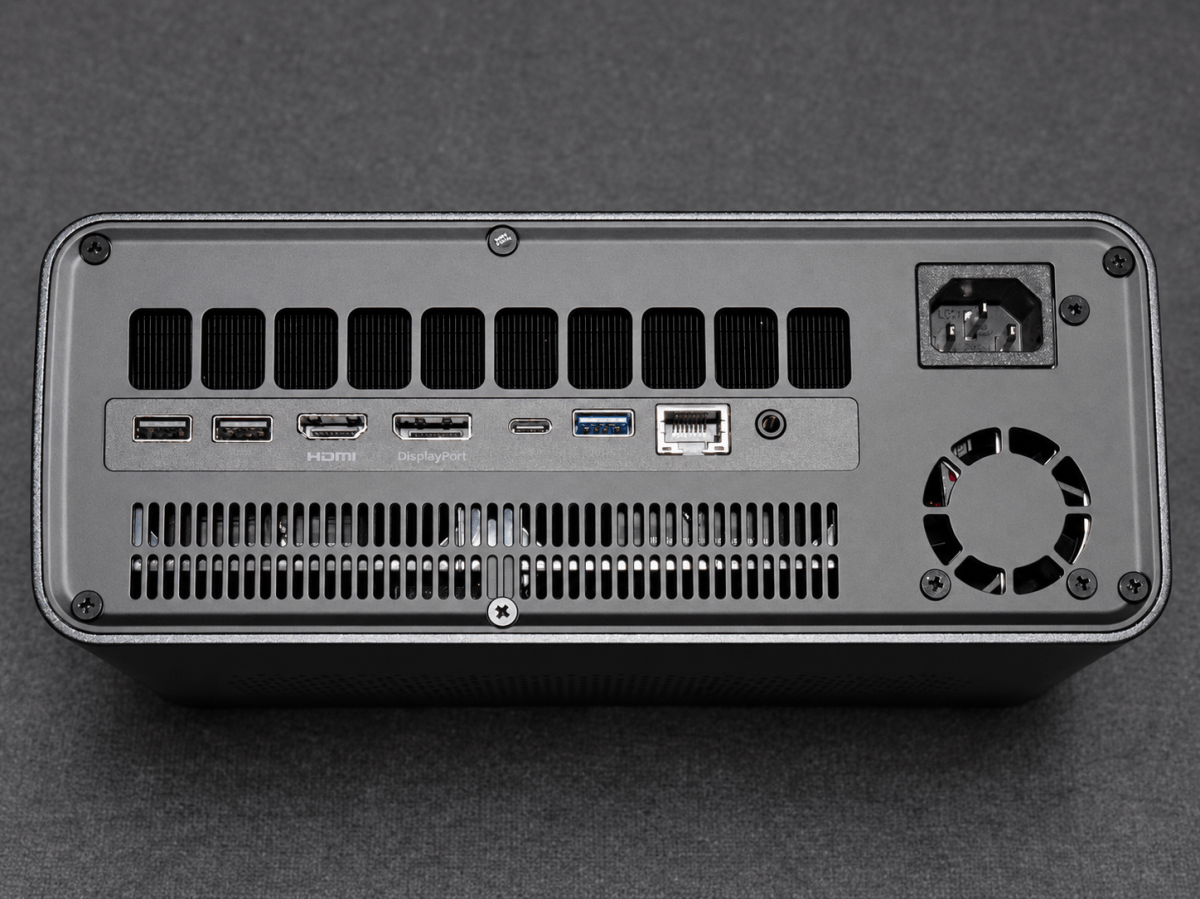
The computer connects to the network via 2.5-Gigabit LAN or Wi-Fi 7; Bluetooth 5.4 is also on board. 10-Gigabit LAN is missing. OCuLink, as found on the GMKtec EVO-X3, is also not available. A plug-and-play eGPU enclosure can only be connected via USB4 using the external ports. This offers flexibility, but causes more protocol overhead than OCuLink.
The test unit is running Windows 11 Pro 25H2 with Build 26200.9457 and AMD Adrenalin 26.8.1.
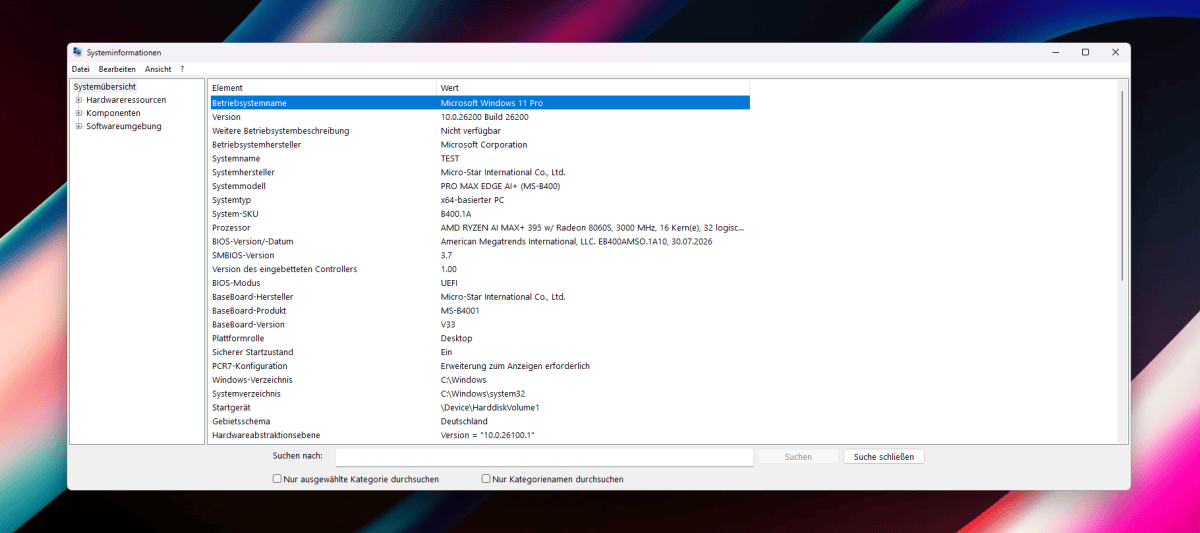
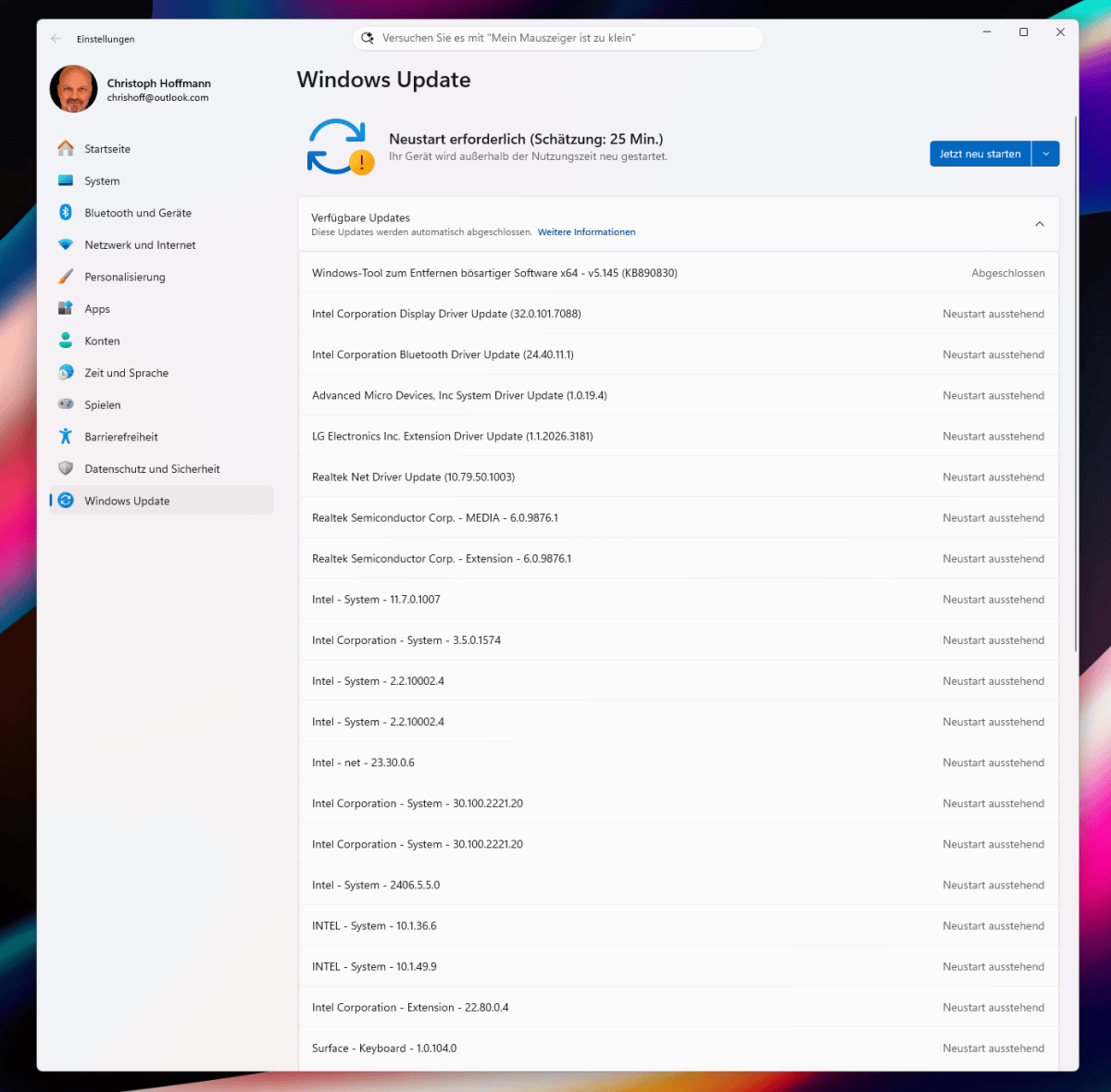
Windows Update was already offering version 26H2. Immediately after start-up, Windows Update installs numerous drivers for AMD, Intel, and Realtek components and estimates that the subsequent restart will take around 25 minutes.
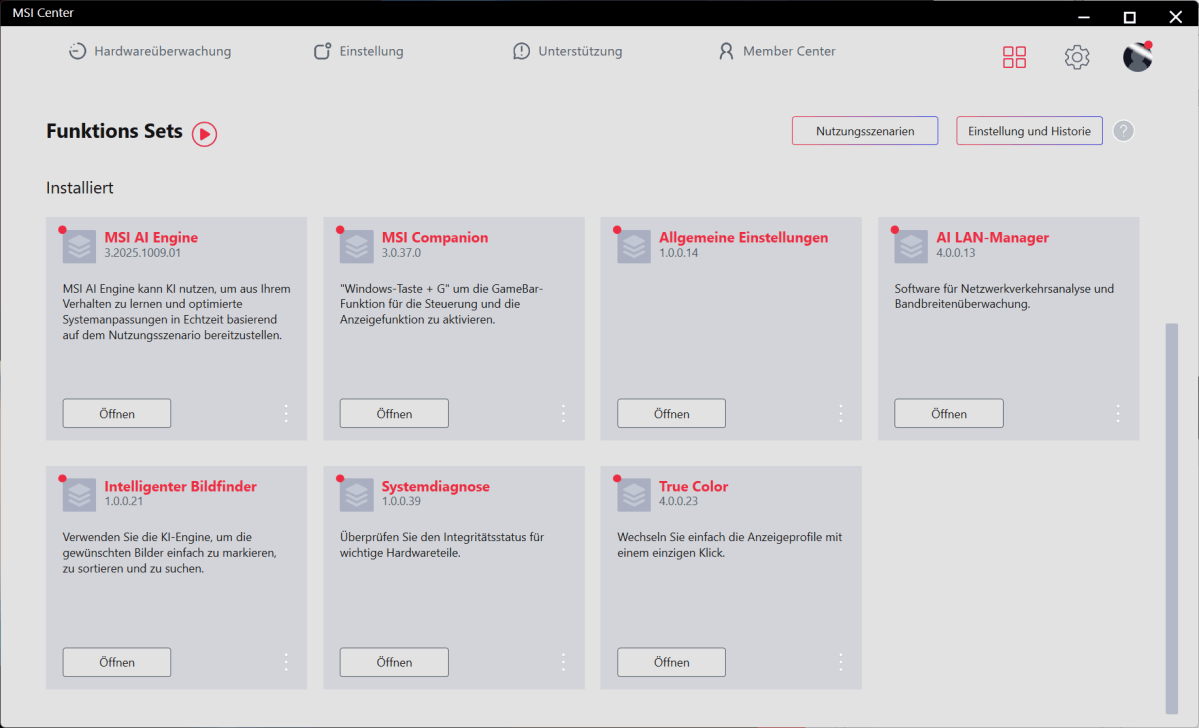
The MSI Center installs modules such as AI Engine or AI LAN Manager individually. The AI Engine adapts system profiles to the usage scenario. The LAN Manager prioritizes network traffic. The modules are optional. The computer’s basic functions are available even without them.
Computing performance
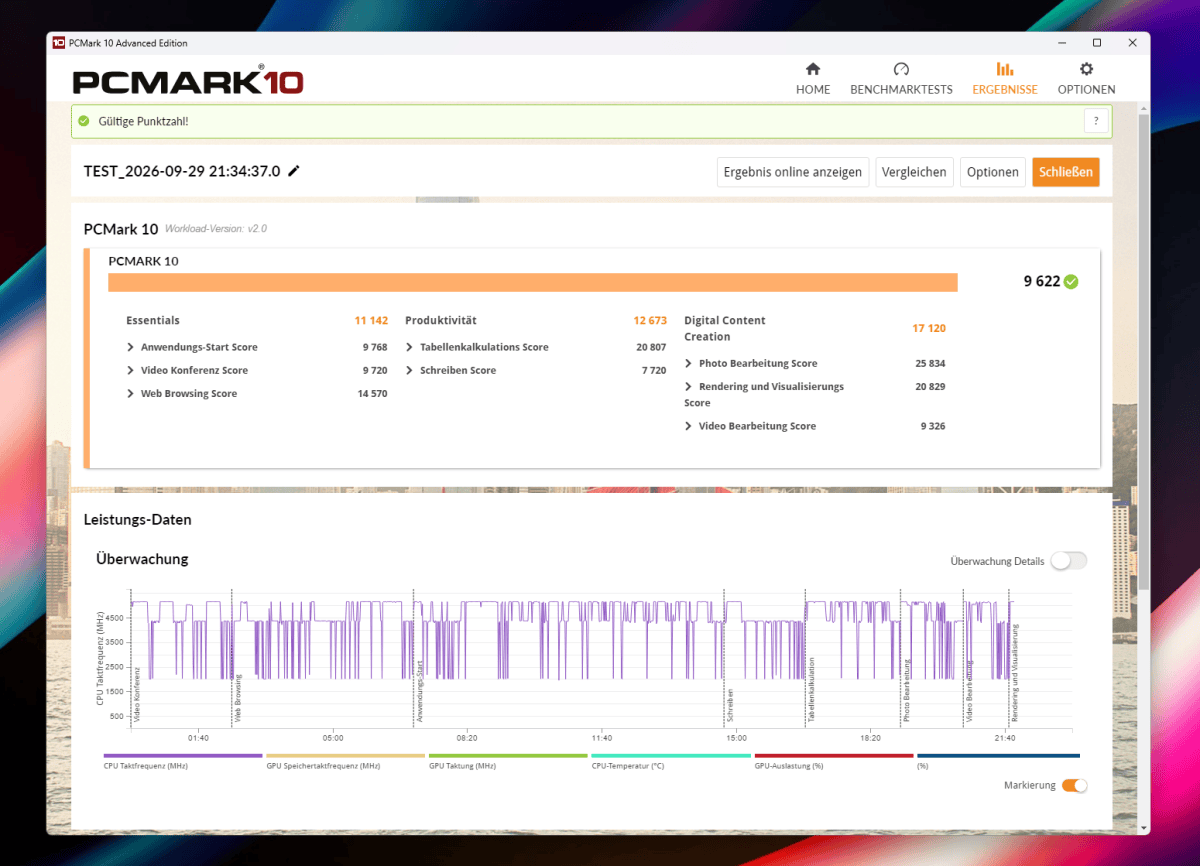
In PCMark 10, the Pro Max Edge AI+ scores 9,622 points, putting it just under 6 percent ahead of the EVO-X3, which scores 9,104 points. The lead is particularly clear in the productivity category: 12,673 to 10,373 points. In terms of basic functions, the EVO-X3 is slightly ahead with 11,507 to 11,142 points. In digital content creation, both perform at almost the same speed: 17,120 to 17,157 points. The MSI comes out on top in the overall score, primarily due to its stronger productivity result.
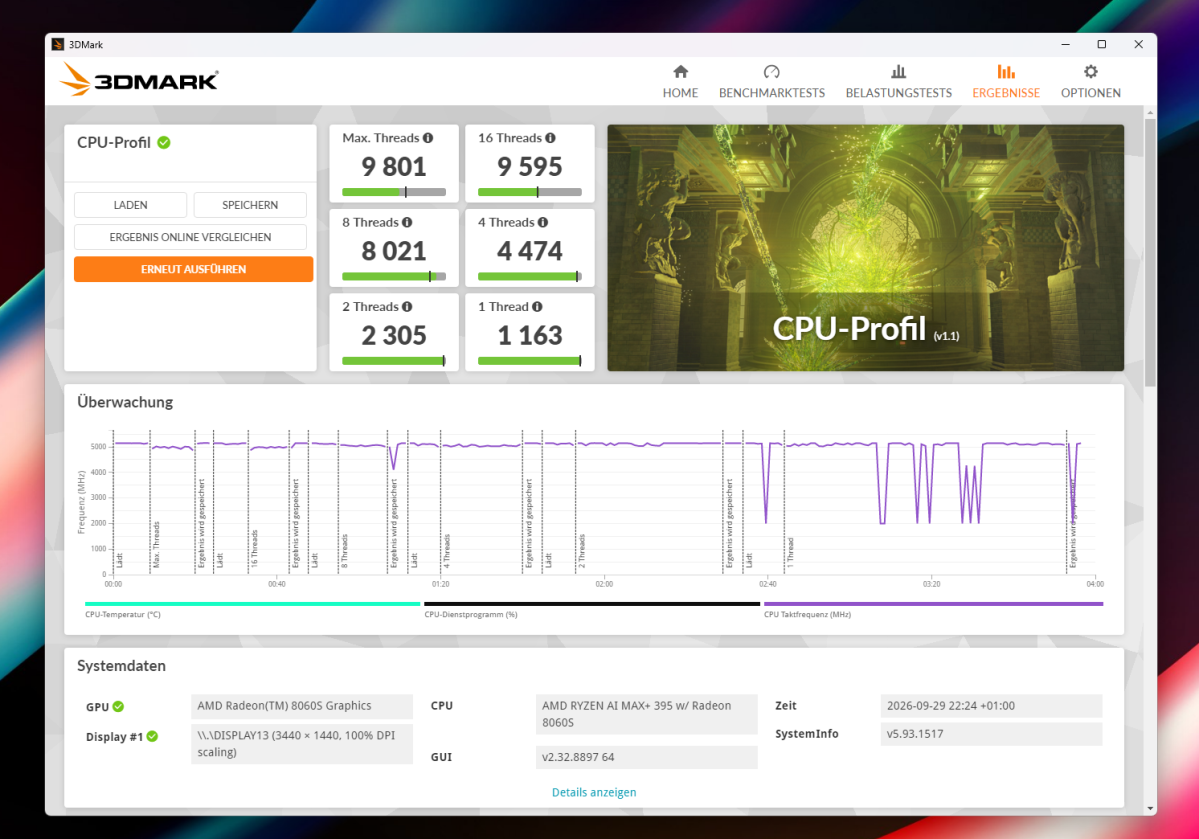
The 3DMark CPU Profile scores 9,801 points with all threads. With 16 threads, the score is 9,595 points; with eight threads, it is 8,021 points. In the single-thread test, the processor achieves 1,163 points. The EVO-X3 is on a similar level with eight threads and 8,154 points, but drops to 6,395 points when all threads are used. A second run confirms this unusual ratio, with 8,122 to 6,200 points. The MSI therefore leads by around 53 percent at the maximum number of threads and scales much more consistently. However, due to the striking EVO-X3 results, this gap cannot be generalized to every CPU application.
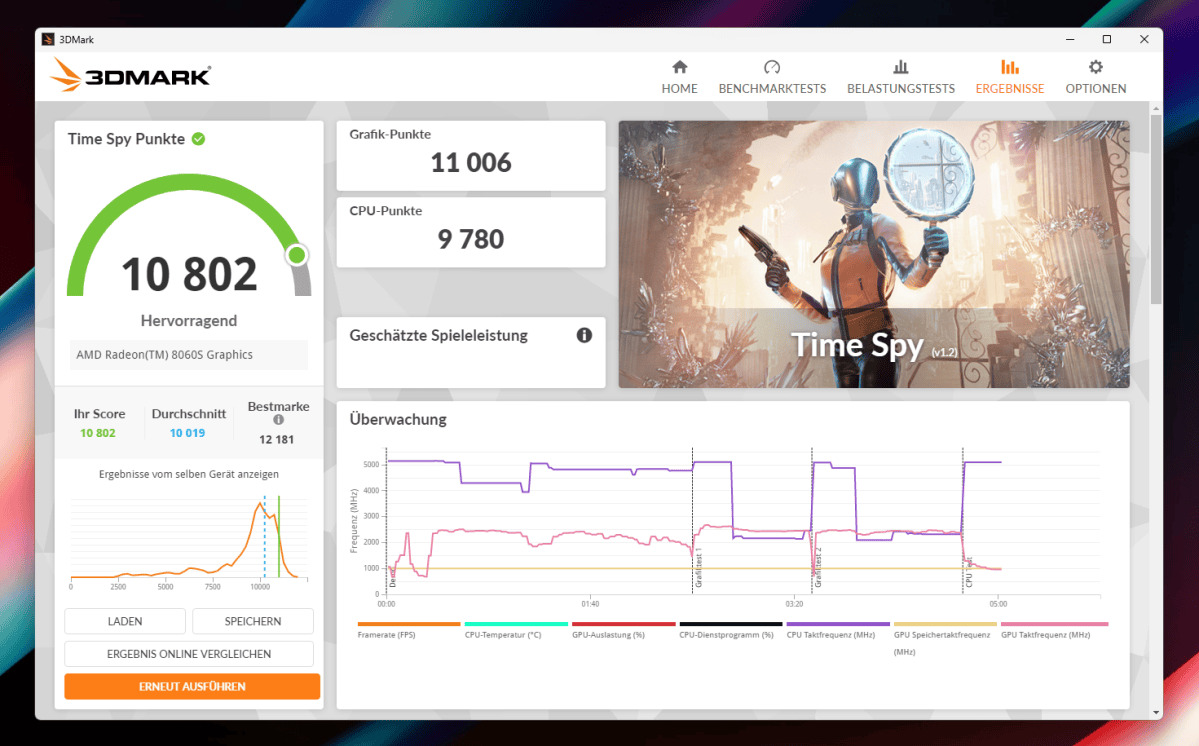
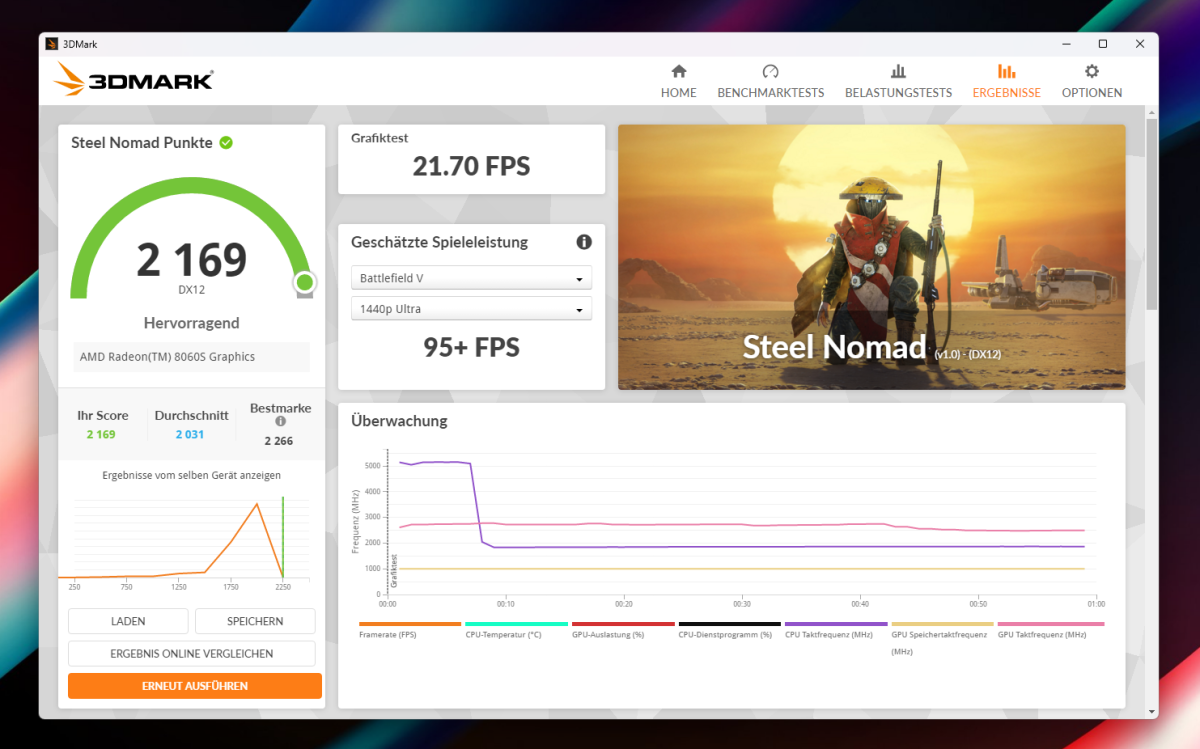
In 3DMark Time Spy, the MSI achieves 10,802 points. The graphics score is 11,006 points, while the CPU score is 9,780 points. Steel Nomad finishes with 2,169 points. In the ray-tracing-focused Solar Bay benchmark, it scores 48,685 points. This makes the Radeon 8060S suitable for GPU-accelerated applications. Upscaling remains necessary for very high frame rates with ray tracing.
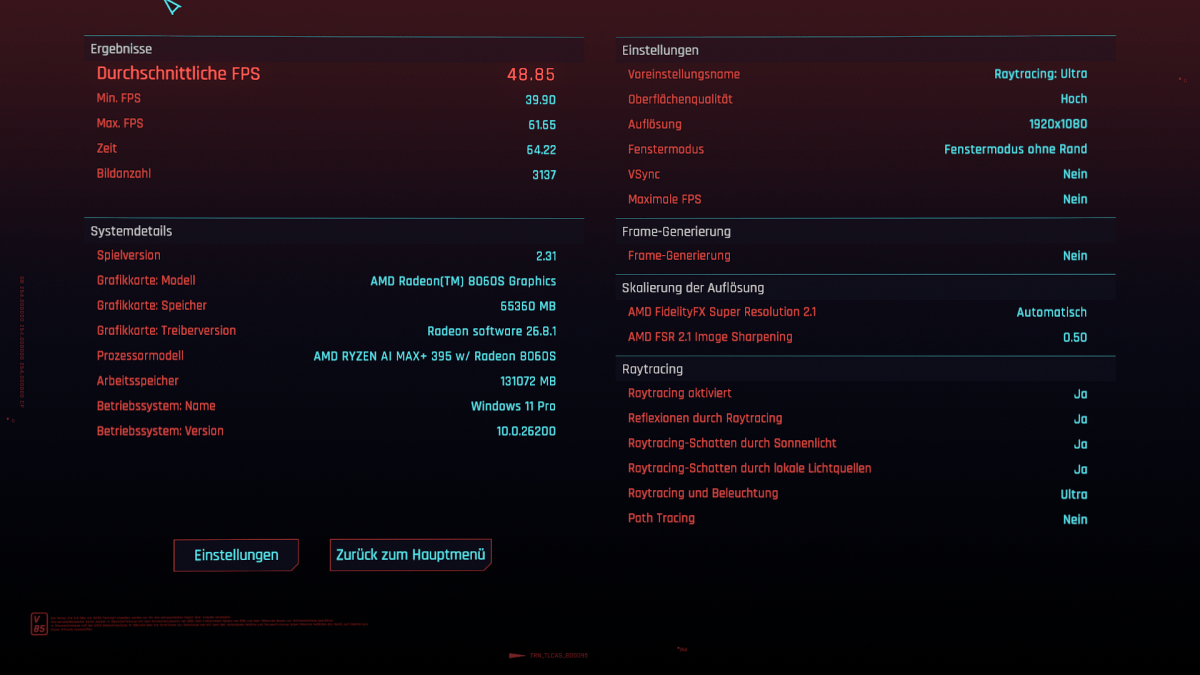
Cyberpunk 2077 runs at an average of 48.85 FPS in Full HD with Ray Tracing set to Ultra and FSR 2.1 in automatic mode. At 3,440 × 1,440 pixels, the average drops to 28.8 FPS. Frame generation was disabled. For smooth UWQHD gaming, you’ll need to reduce ray tracing or detail levels. In Full HD, the game remains perfectly playable with these settings.
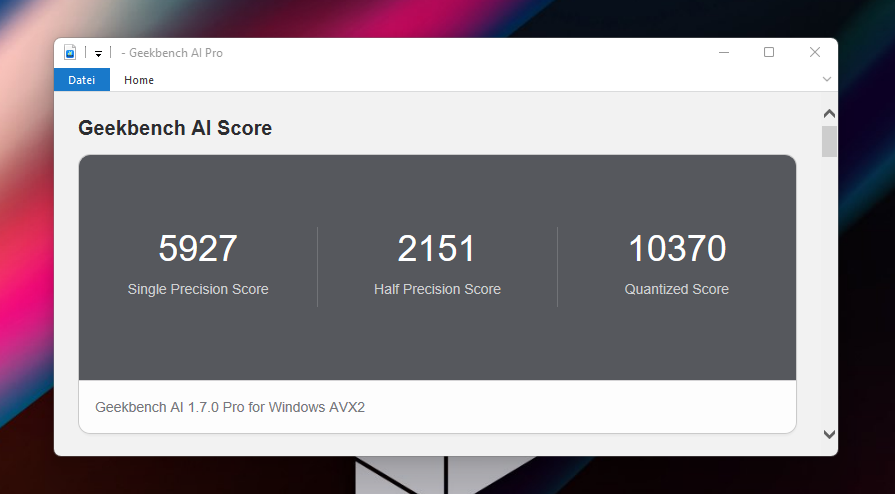
Geekbench AI reports 5,927 points for single precision and 2,151 points for half precision. In the quantized test, the system achieves 10,370 points. The AVX2 backend runs on the CPU and does not evaluate either the NPU or the Radeon GPU. The figures therefore only describe part of the AI performance. Other backends may yield significantly different results depending on hardware support.
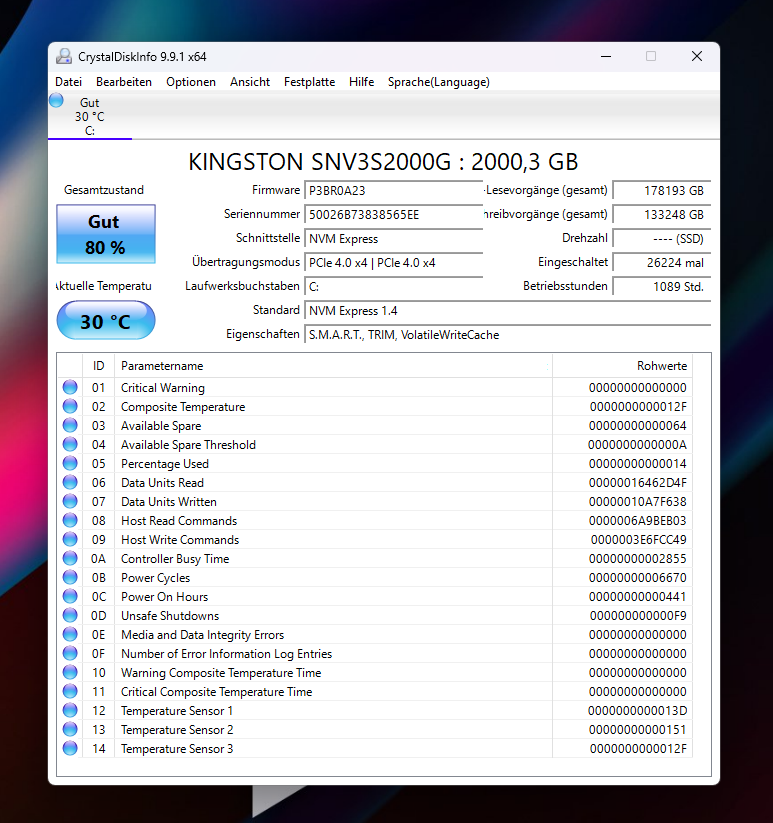
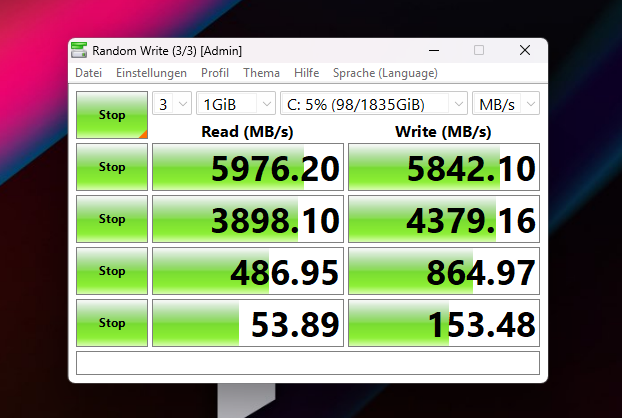
The Kingston SSD reads sequentially at 5,976MB/s and writes at 5,842MB/s. While this does not fully utilize PCIe 4.0, it performs very quickly in everyday use. The high read performance ensures short load times. The write speed is particularly beneficial for large file transfers. CrystalDiskInfo reported the drive to be in perfect condition at 30 degrees Celsius. The free second M.2 slot makes it easy to upgrade later.
Up to 96GB of shared graphics memory provides space for heavily quantized AI models. The inference speed depends on the model and its quantization. The computing backend also influences speed and compatibility. We did not measure token rates with large language models. The Ryzen AI Max 395 is officially supported by ROCm. Under Windows, its functionality is still limited. CUDA-exclusive applications cannot use the Radeon 8060S as a computing accelerator.
The MSI is a powerful compact workstation. The CPU and Radeon deliver a balanced performance, and the SSD is fast. Its strengths lie in memory-intensive applications and compact workstations. As a dedicated gaming PC, the machine is too expensive. A desktop with a dedicated graphics card offers a higher frame rate for the money.
Power consumption
The integrated Flex power supply delivers 300 watts and has sufficient reserve capacity for the APU, SSDs, and USB devices. Three power profiles can be selected via the front panel button. The mode affects fan speed and available power. The ‘Low’ profile is sufficient for office work, while the highest setting is recommended for rendering and gaming.
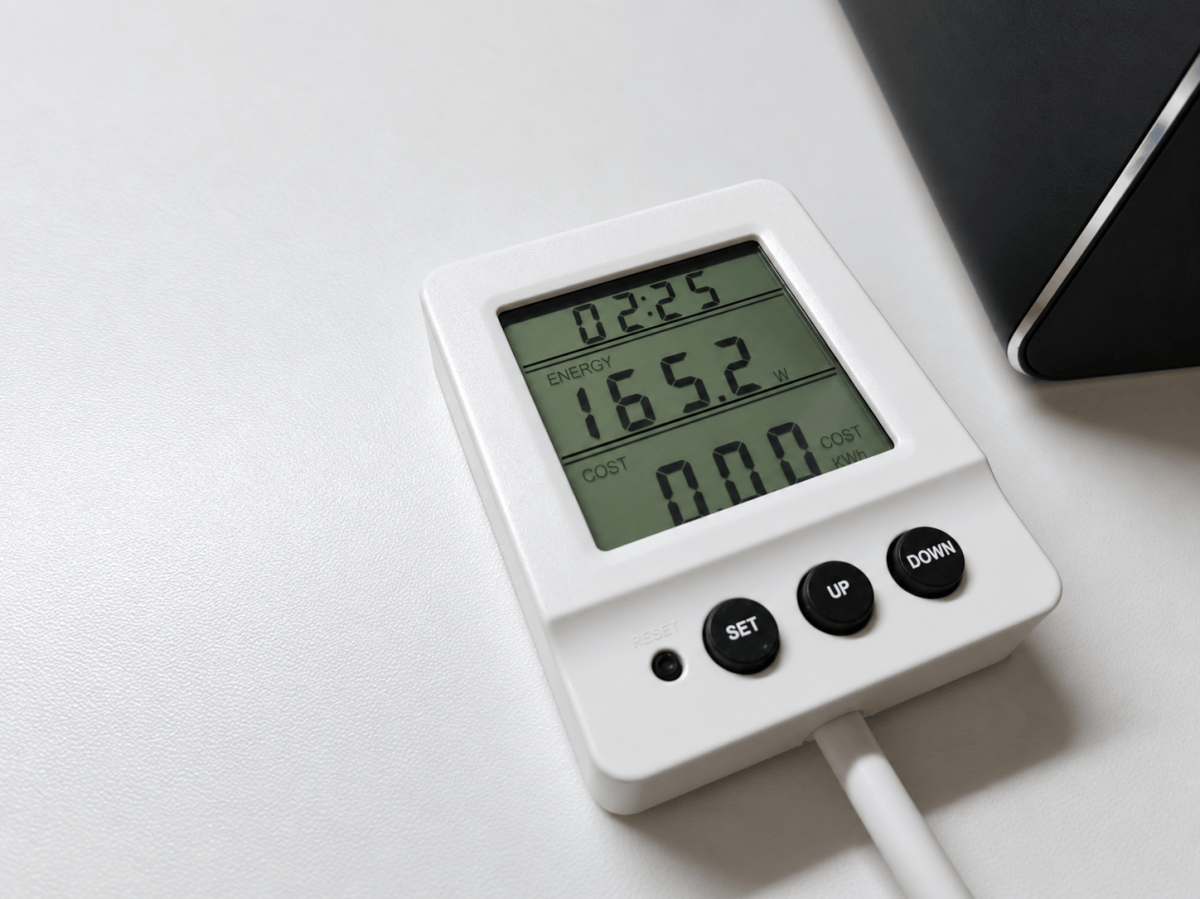
In Windows idle mode, our meter usually reads between 14.1 and 14.9 watts. Under heavy computational and graphics loads, power consumption rose to 165 watts; we recorded a peak of 179.5 watts. This means the system remains well within the 300-watt reserve. However, the large gap between idle and full load also shows that the performance profile and utilization have a significant impact on energy consumption.
Given the performance on offer, these figures remain plausible. A simple office mini-PC is more energy-efficient and costs considerably less. In terms of energy efficiency, the Pro Max Edge AI+ is only worthwhile if applications make full use of its 16 cores, the Radeon 8060S, or the large memory pool. The internal power supply eliminates the need for an external unit, but turns the computer itself into a heat source under load.
Cooling and noise level
MSI calls the cooling system Frozr AI Pro. A copper heat spreader and three heat pipes conduct waste heat from the APU to the cooling fins. Three fans circulate air through the chassis. There is a separate Glacier Armour cooling system for the permanently soldered memory modules. Both M.2 slots also feature heatsinks. The design is built to withstand continuous load and makes good use of the larger 4-liter volume. However, no dust filters are visible on the large openings.
In the HWiNFO recording, which lasted around 40 seconds, the CPU cores reached a maximum of 61.4 degrees Celsius. A maximum of 52.8 degrees was measured for the Tctl/Tdie sensor. According to the sensors, the CPU’s total power consumption reached up to 89 watts. HWiNFO reported no thermal throttling during this period. This brief recording is no substitute for a longer sustained-load test. The case heats up mainly around the exhaust vent. The front and side panels remain at non-critical temperatures.
When idle, the fans run at a low speed; however, the computer is not completely silent in a quiet room. Under prolonged CPU or graphics load, the noise becomes clearly audible. It remains steady and is less distracting than a high-pitched whine. A reliable dB(A) value was not recorded during this test. The profile button helps to reduce the noise during light tasks. For rendering, the performance mode should remain active so that the Ryzen maintains its speed.
The integrated power supply increases the heat build-up inside the case. In the test runs recorded, temperatures remained within safe limits. Under load, the three fans are clearly audible. However, there must still be space around the ventilation grilles. We wouldn’t place the computer right next to a microphone. For an office or studio, the background noise is acceptable as long as it isn’t operating at full load continuously.
Should you buy the MSI Pro Max Edge AI+ ?
The MSI Pro Max Edge AI+ combines very high CPU performance with a Radeon 8060S that is fast for an integrated solution. Its main advantage is 128GB of shared memory, of which up to 96GB can be allocated to the GPU. This provides space for large, heavily quantized AI models, though it says nothing about their inference speed. Two USB4 ports and the UHS-II card reader are well-suited to professional workflows. The integrated power supply eliminates the need for an external power brick. In the benchmark run recorded, the system did not experience any thermal throttling.
The price limits our recommendation. At the time of testing, the version without an operating system was available in shops for around $4,500. The GMKtec EVO-X3 with 128GB RAM and a 2TB SSD costs $3,799.99, including Windows 11 Pro. In our CPU and graphics tests, it achieved a similar level of performance. Depending on the MSI offer and variant, the premium is therefore around $1,100 or more. MSI offers a 36-month manufacturer’s warranty, while the comparable model from GMKtec comes with a two-year warranty. OCuLink only offers the cheaper system.
The MSI is worth considering for workstations where two USB4 ports and the fast card reader justify the extra cost. The integrated power supply can also be useful in confined spaces. Those primarily looking for computing power and 128GB of shared memory will find cheaper systems. The Pro Max Edge AI+ is therefore recommended for professional applications that require more than the usual amount of graphics memory and need to run in a compact chassis. Without our own inference measurements, it remains unclear how quickly large language models operate.
Technical specifications
- Processor: AMD Ryzen AI Max+ 395, 16 cores, 32 threads, up to 5.1 GHz, 64 MB L3 cache
- Graphics: AMD Radeon 8060S, 40 compute units, RDNA 3.5, up to 96 GB shared graphics memory
- NPU: AMD XDNA 2, 50 TOPS. Combined AI performance, according to the manufacturer, up to 126 TOPS
- RAM: 128 GB LPDDR5X-8000, soldered in place, shared memory for CPU and GPU
- Storage: 2 TB Kingston SNV3S2000G, M.2 2280, PCIe 4.0 x4. Second M.2 slot free
- Video outputs: HDMI 2.1, DisplayPort 1.4a and 2 × USB-C with DisplayPort Alt Mode. Up to four monitors
- Front USB ports: 2 × USB-A at 10 Gbit/s, 1 × USB-C at 40 Gbit/s and 15-watt Power Delivery
- Rear USB ports: 1 × USB-A at 10 Gbit/s, 2 × USB-A 2.0, 1 × USB-C at 40 Gbit/s and 15-watt Power Delivery
- Card reader: SD 4.0 UHS-II with SDXC support
- Network: 2.5 Gigabit LAN with Realtek RTL8125BG, Wi-Fi 7 with MediaTek RZ717, Bluetooth 5.4
- Audio: Two 3.5 mm combo sockets, 2-channel HD audio with SN6186
- Dimensions and volume: 248.5 × 188.4 × 97.5 mm, 4 litres
- Weight: 3.07 kg
- Power supply: integrated 300-watt Flex power supply
- Cooling: Frozr AI Pro with three heat pipes and three fans. Glacier Armor for the storage
- Security: dTPM and Kensington lock slot
- Manufacturer’s warranty: 36 months according to MSI product specifications


