At a glance
Expert’s Rating
Pros
- Dual SSD slots (M47P)
- Mac mini design
- UHS-II card readers (M47P)
- Dedicated power supply
Cons
- Noisy fan
- Placement can affect Wi-Fi performance
- External power supply required
Our Verdict
The 40Gbps USB4 M47P MiniLink offers the most in terms of faster and flexible storage, but even the slower 10Gbps M49P hub is a good choice for basic backups and archiving.
Price When Reviewed
This value will show the geolocated pricing text for product undefined
Best Pricing Today
Price When Reviewed
$159.99
Best Prices Today: Orico MiniLink 40Gbps One-Stop Storage and Dock
What is it? The Mac mini-like Orico MiniLink is a USB-C hub that adds two 8TB SSD slots, plus USB-A ports and card readers missing from the Apple Mac mini M4.
Who is it for? Mac mini M4 users who want the most flexible storage option without spoiling the mini’s good looks or compact footprint. The 40Gbps M47P is our favorite with its dual SSD slots, but you can save money with the slower 10Gbps one-slot model.
Who shouldn’t buy it? This Orico hub works only with the M4 Mac mini. If you want faster data-transfer rates, look to an 80Gbps Thunderbolt 5 dock such as Satechi’s CubeDock.
We love the dinky size and compact shape of Apple’s Mac mini M4, but the compromise is a lack of handy ports to expand connectivity.
Yes, it has a couple of 10Gbps USB-C ports at the front with the headphone jack, and either three speedy and versatile Thunderbolt 4 or Thunderbolt 5 ports at the back (depending on your Mac mini model) alongside the Gigabit Ethernet and HDMI port. But there’s no legacy USB-A port or portable storage card reader slots.
It’s also not possible for the user to install their own internal storage upgrades in the Mac mini, leaving you at the mercy of whatever you could afford at the time of purchase—and Apple fleeces royally you at this stage of the custom purchase.
Other manufacturers have started releasing new expansion docks and hubs for the Mac mini M4, adding missing ports and SSD slots that give the flexibility we crave and Apple rarely offers.
You have always been able to pair the mini with a USB-C or Thunderbolt dock, but few get into the small-footprint vibe as nicely as the dedicated Mac mini docks.
The Orico MiniLink 40Gbps One-Stop Storage and Dock is a mid-range Mac mini M4 expansion hub that offers a lot in a body even slimmer than the mini. In its other dimensions (length and width) it mimics the Apple computer, and you can sit it above or below the mini.
Simon Jary
Specs and features
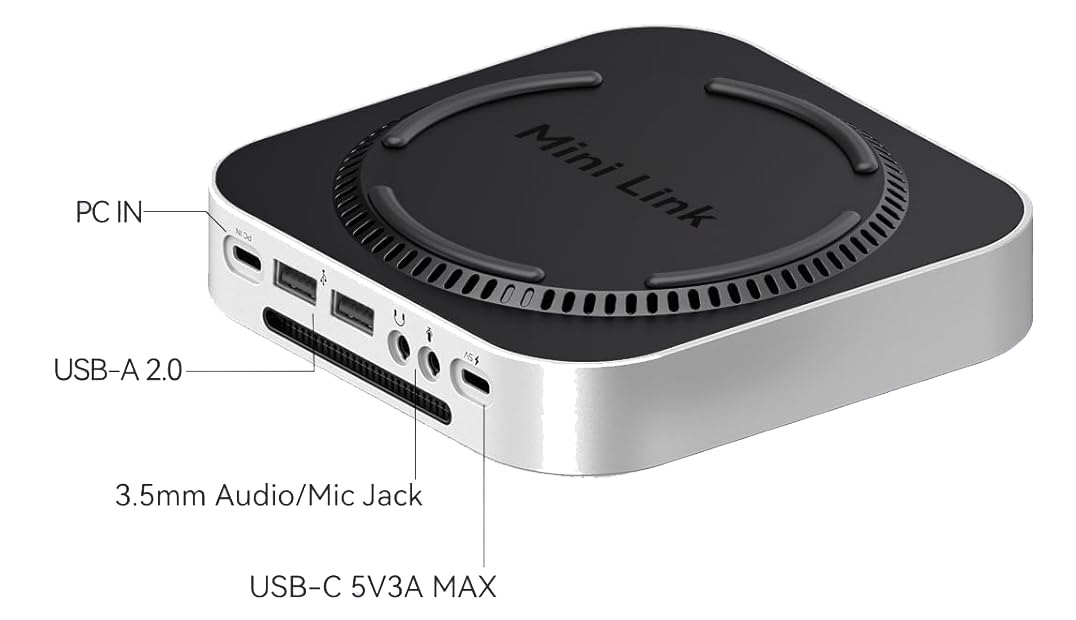
The MiniLink has nine ports to add to the Mac mini’s own eight. It comes in two models: one (M47P) with a fast 40Gbps USB4 interface and dual SSD slots, and another (M49P) at 10Gbps that has just the one SSD slot and slower card readers but other ports missing from the 40Gbps model. We tested the M47P.
M47P
- One upstream USB-C port (40Gbps)
- 3x USB-A (10Gbps)
- 2x M.2 SSD Enclosure (up to 16TB capacity)
- UHS-II SD card reader (312MBps)
- UHS-II microSD card reader (312MBps)
- 36W power supply
Simon Jary
M49P
- One upstream USB-C port (10Gbps)
- 2x USB-A (10Gbps)
- 2x USB-A (480Mbps)
- 1x M.2 SSD Enclosure (up to 8TB capacity)
- UHS-I SD card reader (104MBps)
- UHS-I microSD card reader (104MBps)
- 3.5mm mic jack (back)
- 3.5mm headphone jack (back)
- 36W power supply
Orico
The Mac mini itself has either 40Gbps (M4) or 80Gbps (M4 Pro) Thunderbolt compared to the MiniLink’s 40Gbps USB4 or 10Gbps USB-C. Both USB4 and Thunderbolt 4 use the same Type-C connector and share the same underlying protocol, but Thunderbolt 4 enforces stricter minimum hardware requirements for speed, displays, and security, whereas USB4 allows manufacturers more flexibility and optional features. For the purposes of this dock, USB4 will work seamlessly with the Mac mini at 40Gbps.
If you need the fastest data-transfer rates you should stick with 80Gbps Thunderbolt 5, but as the MiniLink has only USB-A ports this is less vital than if it offered spare USB-C or Thunderbolt ports. The $399 Satechi CubeDock marries Mac mini looks with an NVMe slot and Thunderbolt 5 connectivity.
USB-A is getting rather long in the tooth for anything but older or cheaper memory sticks, so its usefulness is diminished. Our preferred port package would be some decent USB-C ports with at least one offering over 20W for iPhone or iPad fast charging.
As it is the USB ports can output some power, of either 5W (enough for an Apple Watch or AirPods case) or 10W that will slowly recharge an iPhone.
Simon Jary
How much storage can the MiniLink add?
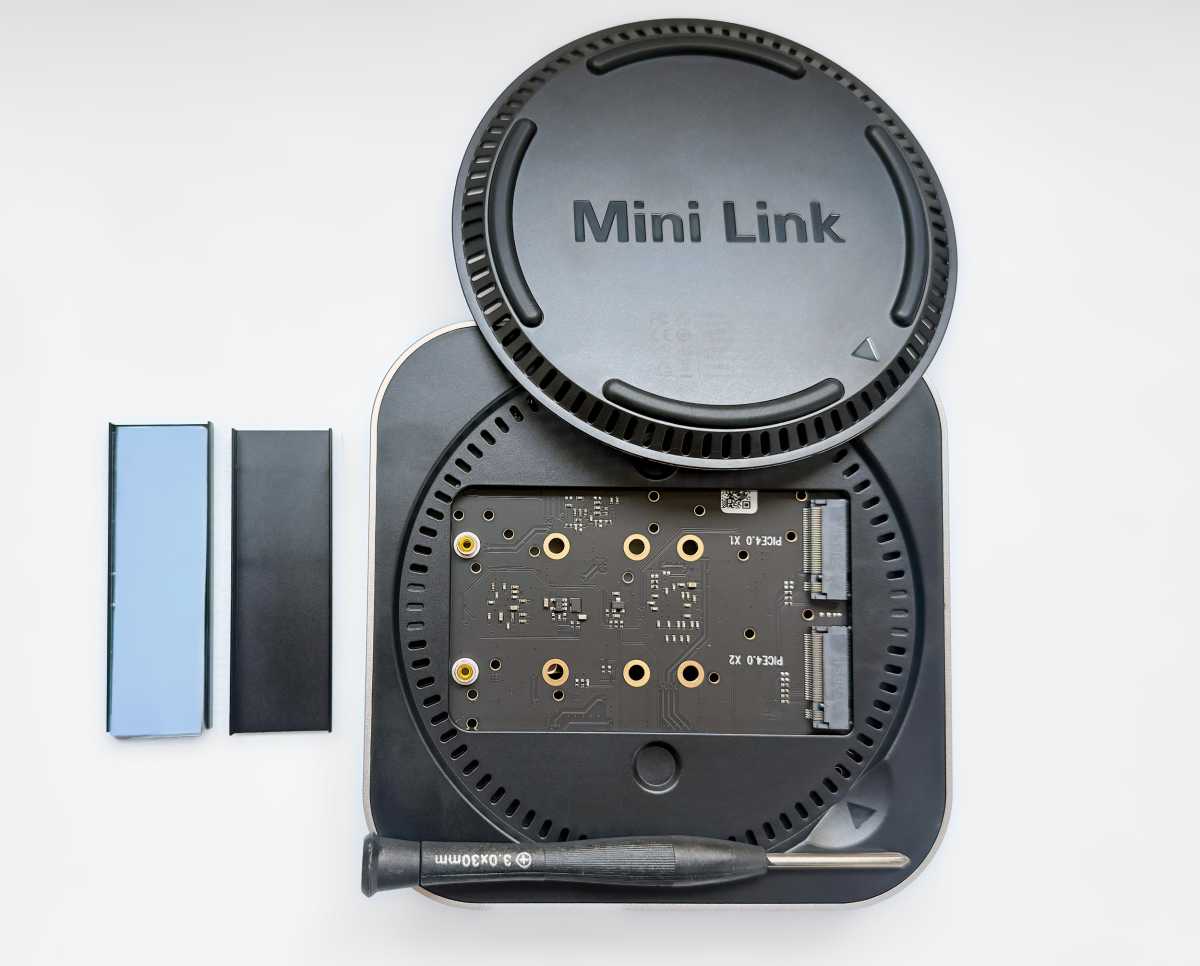
The advantage of the MiniLink is not its old-school USB-A ports but its storage options, with both models offering at least one SSD card storage in a bay underneath. It supports NVMe M.2 2280 SSDs, up to PCIe Gen 4.0. One slot is rated at around 3,000MB/s and the other around 1,300MB/s because the faster slot has more USB4 bandwidth available. Install your primary applications, photo libraries or video-editing projects on the faster drive, while using the slower slot for backups, archives and less performance-sensitive files.
The MiniLink M47P has two SSD slots, and the M49P just the one. The second SSD slot is about flexibility rather than simply doubling capacity. Start with an affordable drive today and add another later without replacing it, or dedicate one SSD to active projects and the other to backups, media libraries or archived files. Most Mac mini M4 hubs have just the one slot with an 8TB maximum. The MiniLink’s two slots mean you could add up to 16TB of storage. That amount of storage would be expensive—between $2,600 and $3,000 at today’s SSD prices.
The real advantage isn’t simply doubling maximum capacity to 16TB. The second SSD slot gives you far more flexibility: start with an affordable 1TB or 2TB drive today, then add a second SSD later instead of replacing the original. You can also dedicate one drive to fast working files and the other to backups, media libraries or archived projects.
Installing the SSD cards is easy, with the base cover magnetically attached. The small and short user manual covers several products, so you’ll have to work out which you have and fetch your magnifying glass.
You’ll get noticeably faster disk access with the 40Gbps M47P due to its faster USB4 interface with the Mac mini. It’s not full Thunderbolt but works at the speedy 40Gbps data-transfer rate.
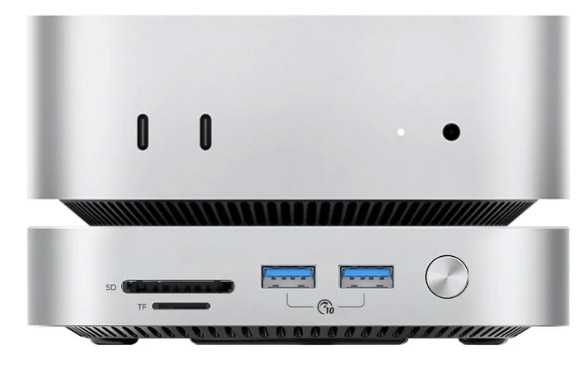
At the front are SD and MicroSD card reader slots. The M47P’s are fast at 312MBps and the M49P’s slower at 104MBps.
Such portable storage cards are an affordable way of adding storage, with cards transferable to others or you can keep a bank of them to hand when you need the extra storage capacity.
Orico
What’s it like to use every day?
The silvery Orico MiniLInk looks in its right place with the Mac mini M4, and won’t take up any further desk space when sitting under or on top of the mini.
It mirrors the mini’s length and width and measures 25.3mm in height, just over half the depth of the mini itself.
To keep it cool, the MiniLink has an internal fan and a ring of air holes to maximize heat dissipation. Note that the fan isn’t quiet, so if you need silence a fanless or external enclosure should be considered. The MiniLink does include a handy front power button if you can do without the SSD when requiring total silence. General use in a standard environment means the MiniLink’s fan noise is not disturbing, but is noticeable in quiet situations.
One problem with Mac mini docks and hubs is the effect on WiFi speeds. Apple didn’t design the M4 Mac mini with third-party accessories in mind, and placing the hub below the mini significantly affected wireless speeds.
The MiniLink comes with its own external power supply, which is required to drive the two SSDs.
The 40Gbps M47P costs $159.99 / £119.10. If all you need is an SSD enclosure you can pick up a speedy 40Gbps solution for under $100. The benefit of the MiniLink is its extra ports, plus the fact that two SSD slots give you more flexibility than one.
The 10Gbps M49P costs $89.99 / £67.50. On its own, a 10Gbps SSD enclosure costs about $30 at the budget end. As you get the extra ports with the Orico MiniLInk, this justifies the $89 price point if you need the other ports. We’re not sure many people need four USB-A ports, but the storage card readers are helpful.
I must admit to finding the direct pricing on Orico’s online store confusing. For the M47P the $159 list price was (at the time of writing) discounted to $119, but a highlighted box stated $69.99 although that much lower price in fact referred to the discounted price of the M49P. The products’ Amazon listings are also all over the place, stating a 4TB per slot maximum rather than the 8TB promised on the direct site. I alerted Orico to these offputting shortcomings so I hope they have been fixed by the time you read this—if not, it’s up to you to believe what you read here vs what’s on the buying pages.
Despite this, we find the M47P a winner with its more flexible and faster dual-SSD enclosure. Most Mac mini owners should choose the 40Gbps M47P. It offers faster transfers, quicker UHS-II card readers and, most importantly, a second SSD slot that makes future storage expansion much easier. The cheaper M49P is still a worthwhile option if your needs are limited to backups, archiving and occasional file transfers.
Which MiniLink should you buy?
| Model | Best for |
|---|---|
| M47P (40Gbps) | Users wanting maximum performance, dual SSD flexibility, faster card readers, and room to expand storage over time. |
| M49P (10Gbps) | Users who mainly need inexpensive backup, archive storage, and don’t require high transfer speeds or a second SSD. |
Should you buy the Orico MiniLink One-Stop Storage Hub?
Adding flexible storage to the Mac Mini M4 is desirable given that Apple doesn’t allow for user upgrading within the computer itself. The Orico MiniLink models offer an affordable SSD enclosure plus SD card reader slots and USB-A. With dual SSD slots, this Mac mini hub offers the greatest extra storage capacity of all the dedicated mini M4 hubs we’ve tested, doubling the standard 8TB to 16TB—although that much storage will cost you a lot, having two slots gives you greater flexibility even if you need much less. The inclusion of legacy USB-A ports is less interesting, and we’d have preferred USB-C ports with higher power output.
The 40Gbps USB4 M47P MiniLink offers the most in terms of faster and flexible storage, but even the slower 10Gbps M49P hub is a good choice for basic backups and archiving.


