At a glance
Expert’s Rating
Pros
- Attractive and rigid chassis with low weight for the size
- Lots of connectivity spanning Thunderbolt, USB-A
- Great speaker system with high maximum volume
- Excellent overall CPU and GPU performance
Cons
- Surface around keyboard is hot under load
- 18-inch IPS-LCD display has mediocre contrast
- Only 32GB of RAM despite as-tested MSRP above $5,000
Our Verdict
The Razer Blade 18 isn’t cheap—even with 32GB of RAM—but it provides excellent performance in an attractive chassis.
Price When Reviewed
This value will show the geolocated pricing text for product undefined
Best Pricing Today
Price When Reviewed
$5,399.99
Best Prices Today: Razer Blade 18
The Razer Blade 18 is a beast. There’s no getting around that. It’s over an inch thick, weighs over seven pounds, and has a 400-watt power adapter. The configuration I tested ships with an MSRP of $5,399. In short, this isn’t a laptop for everyone. Despite this, the Blade 18 is an excellent choice if you want a gaming or workstation laptop that delivers superb performance.
Razer Blade 18: Specs and features as-tested
The Blade 18 configuration that Razer sent me for review is in most respects the company’s best configuration. It has an Intel Core Ultra 9 290HX Plus, Nvidia RTX 5090, and 2TB of solid state storage—all of which are the same in more expensive configurations. However, this particular configuration sticks to just 32GB of RAM, which puts the MSRP at $5,399.
That’s expensive, but adding more RAM dramatically increases the price. The 64GB model is $5,999, and the 128GB model is $6,999.
- CPU: Intel Core Ultra 9 290HX Plus
- Memory: 32GB DDR5-6400
- Graphics/GPU: Nvidia RTX 5090 with 175 watts TGP
- NPU: Intel AI Boost 13 TOPS
- Display: 18-inch IPS-LCD dual-mode / 3840×2400 @ 240Hz or 1920×1200 @ 440Hz
- Storage: 2TB PCIe Gen 4.0 NVMe M.2 SSD
- Webcam and microphone: 5MP webcam up to 1440p @ 30 fps, dual-array microphone
- Connectivity: 1x Thunderbolt 5 (USB-C, DP 2.1, PD 100W), 1x Thunderbolt 4 (USB-C, DP 2.1, PD 100W), 3x USB-A 3.2 Gen 2 Type-A, 1x HDMI 2.1, 1x 3.5mm audio jack, 1x SD Card Reader, 1x 2.5Gb Ethernet
- Networking: Wi-Fi 7, Bluetooth 5.4
- Biometrics: Windows Hello facial recognition
- Audio: Six-speaker setup with dual woofers, dual tweeters, THX Spatial Audio+ support
- Battery capacity: 99 watt-hours
- Dimensions: 15.74 x 10.84 x 1.1 inches
- Weight: 7.06 pounds
- Operating System: Windows 11 Home
- Price: $5,399 MSRP as configured
If you want a Blade 18 at a lower price, you have two options. The model with an RTX 5070Ti and 1TB of storage starts at $3,999, and the model with the same specs and RTX 5080 is $4,499. The less expensive models still have the Intel Core Ultra 9 290HX Plus.
The Razer Blade 18 is an impressive 18-inch laptop that can work well as a gaming laptop, a workstation laptop, or both.
Razer Blade 18: Design and build quality
Foundry / Matthew Smith
The Razer Blade 18 reminds me of the monolith from 2001: A Space Odyssey. It’s sleek, black, imposing, and a bit mysterious. This is true for most Razer Blade laptops, but the sheer size of the 18-inch model sets it apart—both from other Blade laptops, and also most others on the market. This is a serious piece of kit.
It’s also seriously heavy, though whether it seems bulky or acceptable is a matter of perspective. The Blade 18 weighs 7.06 pounds and measures up to 1.1 inches thick, which means it’s larger than the vast majority of laptops sold today. You’ll also need an unusually large backpack to carry it. With that said, though, the Blade 18 is lighter than most competitors. The MSI Titan 18 HX and Acer Predator Helios 18 AI weigh nearly eight pounds; the Asus ROG Strix 18 is basically identical at 7.05 pounds.
The Blade 18’s monolithic feel is enhanced by its rigid chassis, which is constructed from CNC-milled aluminum. Picking up the laptop from one corner reveals almost no flex through the chassis, which is remarkable for a machine of this size.
Razer Blade 18: Keyboard, touchpad
Foundry / Matthew Smith
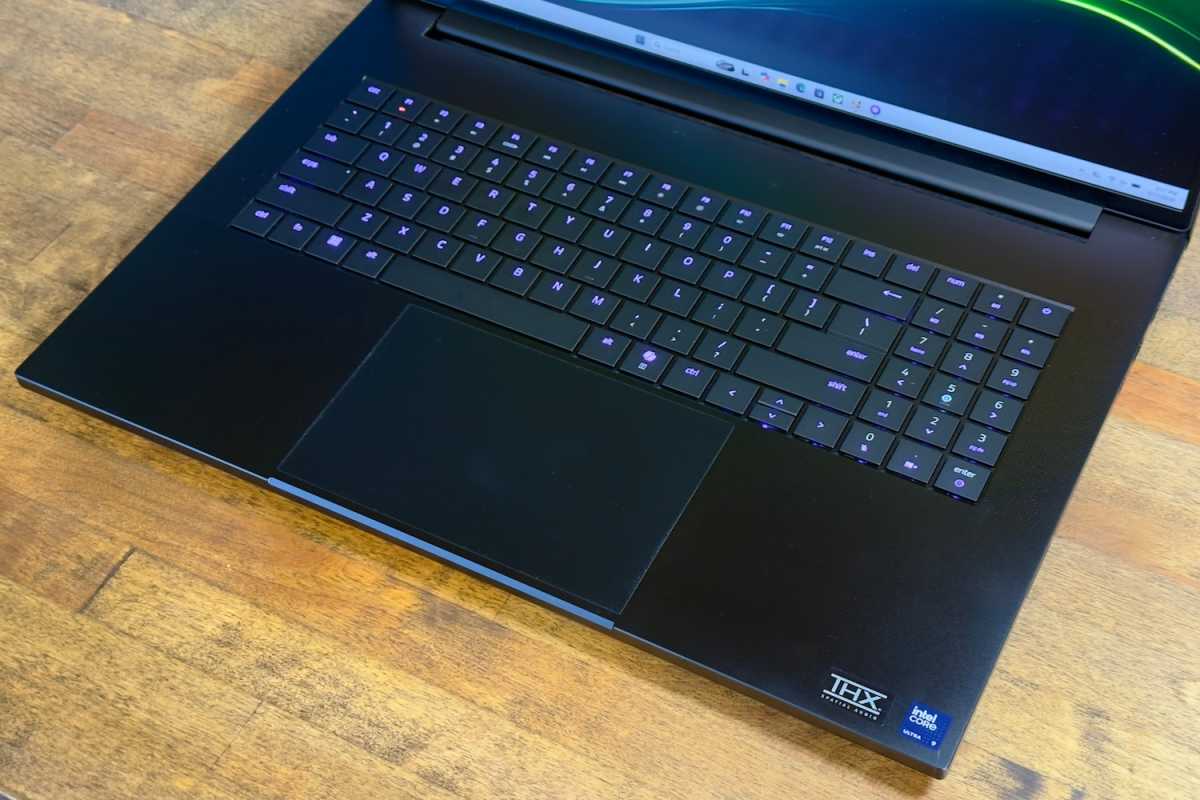
As you might expect, the Razer Blade 18’s big screen means there’s plenty of interior space for the keyboard. That means you receive a spacious keyboard layout and numpad with keys that are identical in size to the primary alphanumeric keys. There’s also a ton of space below and around the keyboard for resting your wrists and palms.
The keyboard feels snappy and provides a healthy 1.5 millimeters of key travel. It also supports N-key rollover with a 1000Hz polling rate, which means the keyboard reacts quickly to inputs and that pressing multiple keys won’t lead to delays or blocked input. I can’t say the keyboard felt more responsive than usual to me, but it was a good keyboard to type on.
An RGB-LED keyboard backlight is included and can be customized extensively through Razer’s Synapse software, which works well. The keyboard backlight is particularly attractive with bright, vivid keys that have fairly uniform lighting, though some variance is noticeable in particular keys, such as Shift and Caps.
The touchpad is large at nearly six inches wide and four inches deep. It’s not unusual for an 18-inch laptop to provide a large touchpad, but there’s plenty of room for waggling your fingers, and the touchpad is responsive. I also like that the touchpad is center-aligned. Some 18-inch laptops will move the keyboard to the left so that it’s centered under the spacebar, but this can encourage the user to slightly hunch or lean in that direction.
Razer Blade 18: Display
Foundry / Matthew Smith
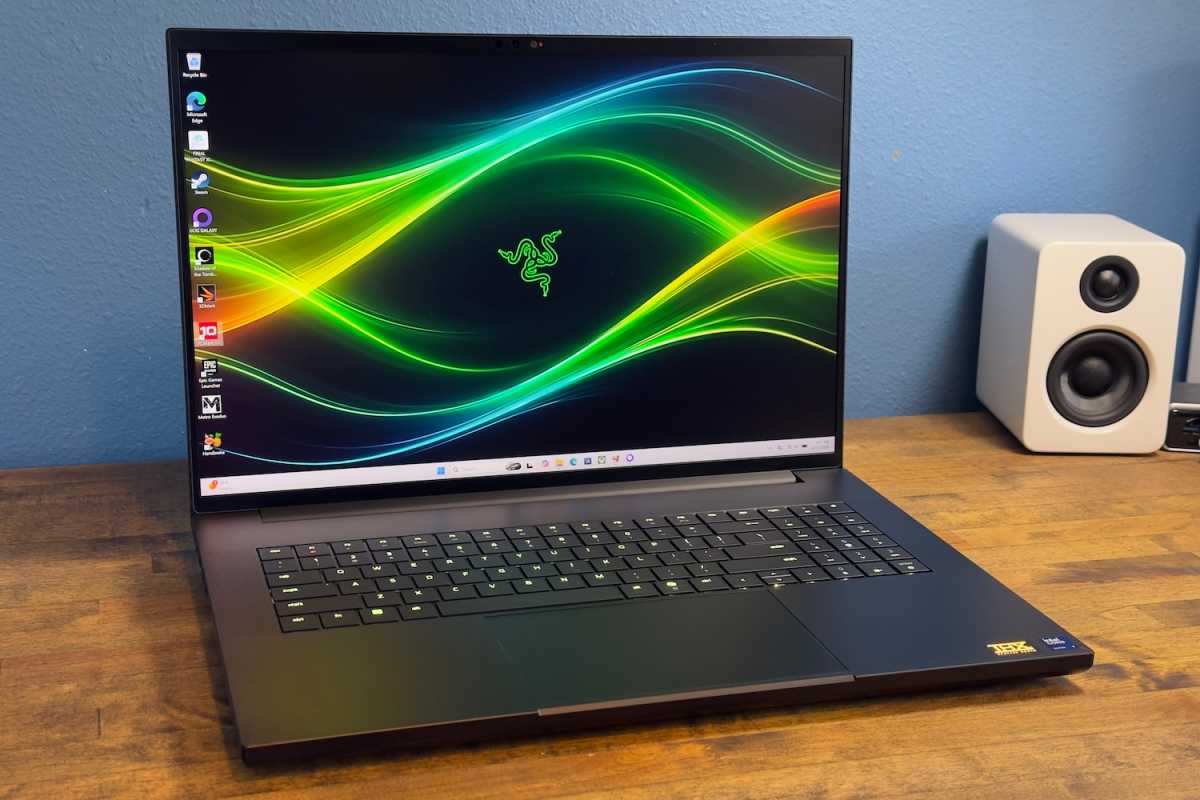
The Razer Blade 18’s massive display is one of its weaker points. It’s a dual-mode display which can achieve 3,840 x 2,400 at 240Hz or, if the resolution is reduced to 1920×1200, soar up to 440Hz. However, it’s also an IPS display without a Mini-LED backlight, which means the monitor’s black levels can appear elevated and overall contrast is mediocre.
This is a common problem among 18-inch laptops. Presumably, a suitable 18-inch OLED panel doesn’t exist, forcing these laptops to rely on IPS LCD. Still, you should know this issue going in. The 18-inch model is bright (with a quoted maximum of 600 nits) and offers good color performance, but it lacks the sense of depth a more contrast-rich OLED display can provide. Display quality enthusiasts may need to stick to a 16-inch machine.
Motion performance is good, for a laptop, and enhanced by the dual-mode display option which provides a refresh rate up to 440Hz.
I don’t often like dual-mode features because the sacrifice in image quality often feels like a so-so trade-off for improved motion clarity. However, reducing the resolution to 1920×1200 on an 18-inch display still results in a pixel density of about 126 PPI. That’s superior to a 27-inch 1440p display at roughly 110 PPI.
In other words, the display still looks reasonably sharp at 1200p, which means you can use the enhanced 440Hz refresh rate while maintaining reasonable image quality.
Razer Blade 18: Audio
I enjoyed the Razer Blade 18’s six-speaker sound system, which includes two woofers and two tweeters, as well as speakers flanking the keyboard which face the user. It delivers full, robust sound with a very high maximum volume and some low-end oomph.
Surprisingly, the laptop also avoids a harsh or rattling presentation, which can be an issue when a laptop’s speakers are powerful—sometimes they’re so powerful they cause vibrations in the chassis. Razer’s avoidance of the issue is part of what allows it to provide both volume and quality audio.
Razer Blade 18: Webcam, microphone, biometrics
The Razer Blade 18 includes a 5MP webcam that can offer up to 1440p resolution at 30 frames per second. That’s slightly better than a typical 1080p webcam. Unfortunately, this doesn’t provide a big boost in image quality. The image is a little more grainy and less vivid than the best 1080p webcams I’ve seen. Still, it’s an acceptable webcam for a Google Meet or Zoom call.
It’s a similar story for the dual array microphone. As is typical, it captures good volume and provides some noise cancellation (which can be further enhanced by Windows Studio Effects). However, the microphone can still sound distant and hollow. It’s fine for video calls, but not something I’d recommend for recording a podcast.
Biometric login is available through Windows Hello facial recognition, which is a quick and easy way to log in to Windows.
Razer Blade 18: Connectivity
Foundry / Matthew Smith
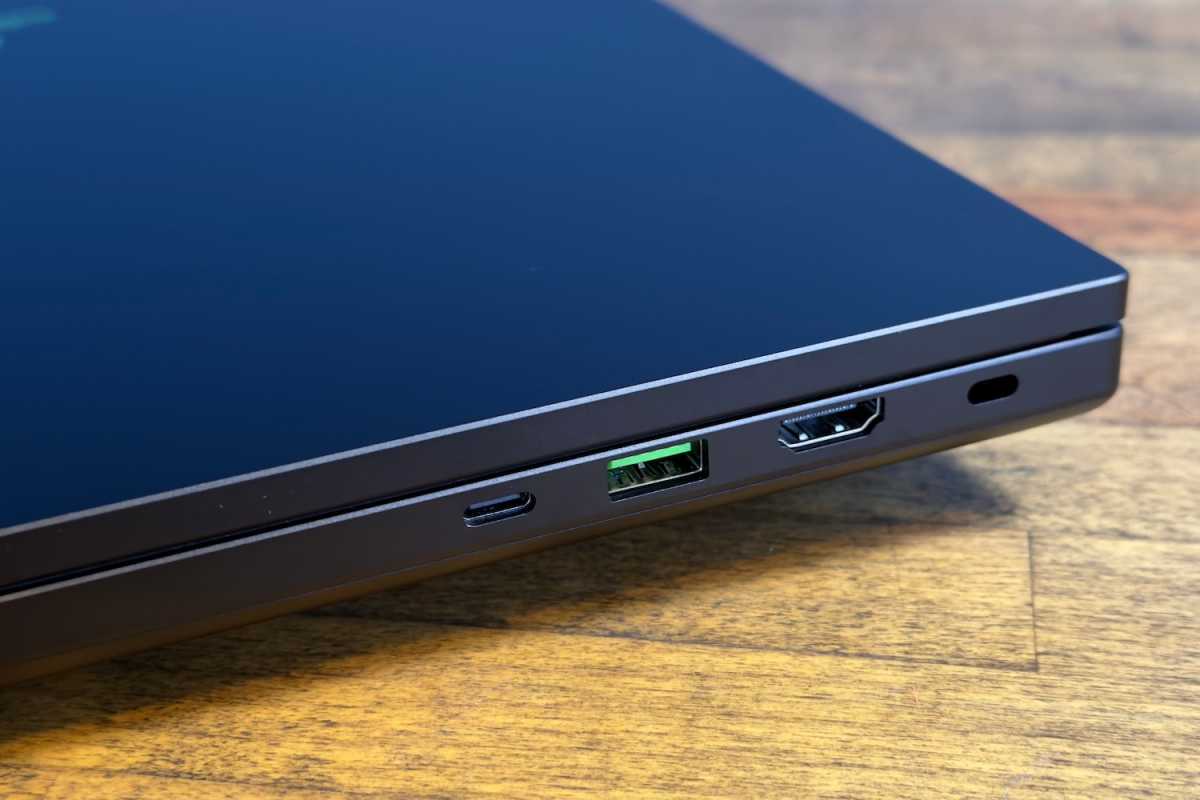
Connectivity is a highlight for the Razer Blade 18. It has one Thunderbolt 5 port and one Thunderbolt port, both of which also support USB, DisplayPort 2.1, and up to 100 watts of Power Delivery. These ports are amazing because they’re versatile and support high data rates. You can use them for external displays, docks, and high-speed external storage.
Yet Razer doesn’t ignore legacy connections, either. It also has three USB-A 3.2 Gen 2 ports, which is a lot for a laptop sold in 2026. Many laptops don’t even support USB-A, and those that do often have only one or two ports.
Additional video connectivity comes courtesy of an HDMI 2.1 port, while a 3.5mm combo audio jack provides options for external speakers and microphones. A 2.5Gb Ethernet port and SD Card Reader round out the options.
It’s worth noting that Razer, unlike some competitors, doesn’t use rear-facing ports on the Blade 18. The entire rear of the laptop is devoted to cooling. This design choice can make the Blade 18 a little more annoying on a desk, because you’ll have to route cords out of the sides of the laptop, which tends to add to cord clutter.
That minor downside aside, this is an excellent range of ports. Razer was also smart enough to split the Thunderbolt and USB-A ports across the left and right flanks, rather than concentrating on one side. That means you’re likely to always have a port available, even if you happen to be using a device with a short cord.
Razer Blade 18: Performance
Every Razer Blade 18 ships with an Intel Core Ultra 9 290HX Plus CPU. This is Intel’s high-end, 24-core chip with eight performance cores and 16 efficient cores, as well as a maximum Turbo clock speed of 5.5GHz. The particular Razer Blade 18 I reviewed also had an Nvidia RTX 5090 GPU, 32GB of DDR5-6400 memory, and 2TB of PCIe 4.0 solid state storage.
Foundry / Matthew Smith
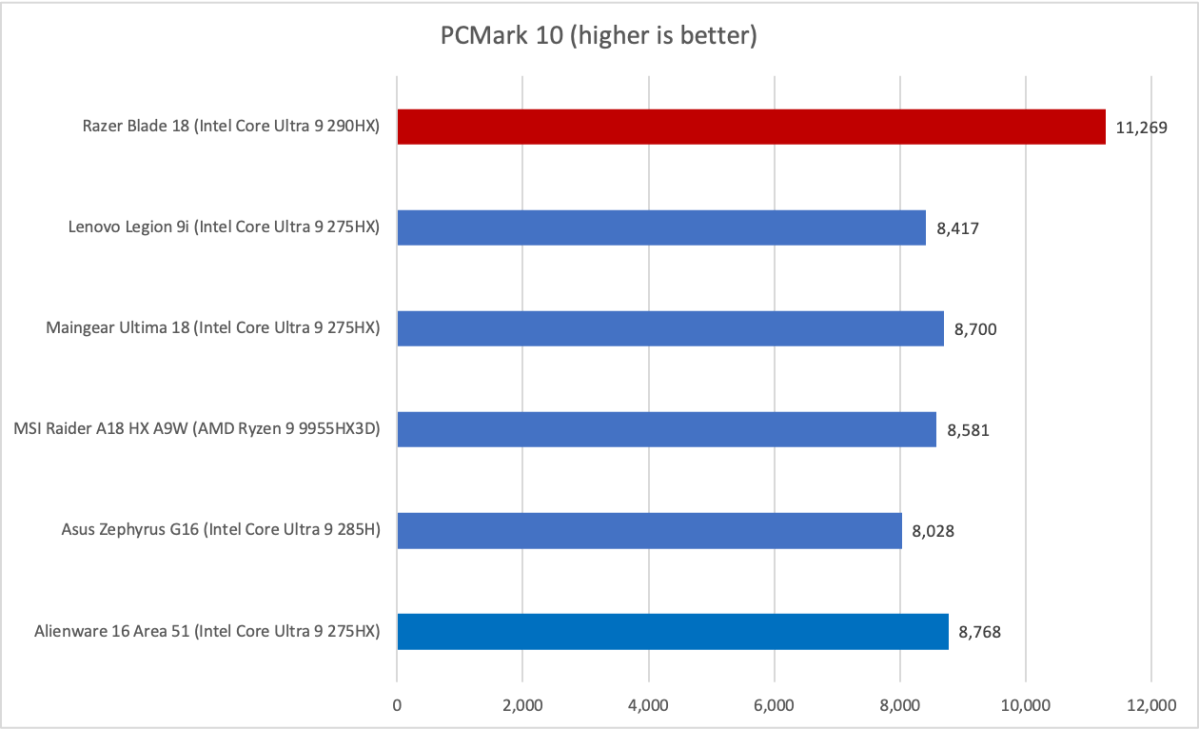
First up is PCMark 10, which turns out to be a clear victory for the Razer Blade 18. This holistic system benchmark tends to reward laptops that bring strong performance across multiple areas. As we’ll see, the Blade 18 is a very strong performer in both CPU and GPU tests, so it makes sense it will also do extraordinarily well here.
Foundry / Matthew Smith
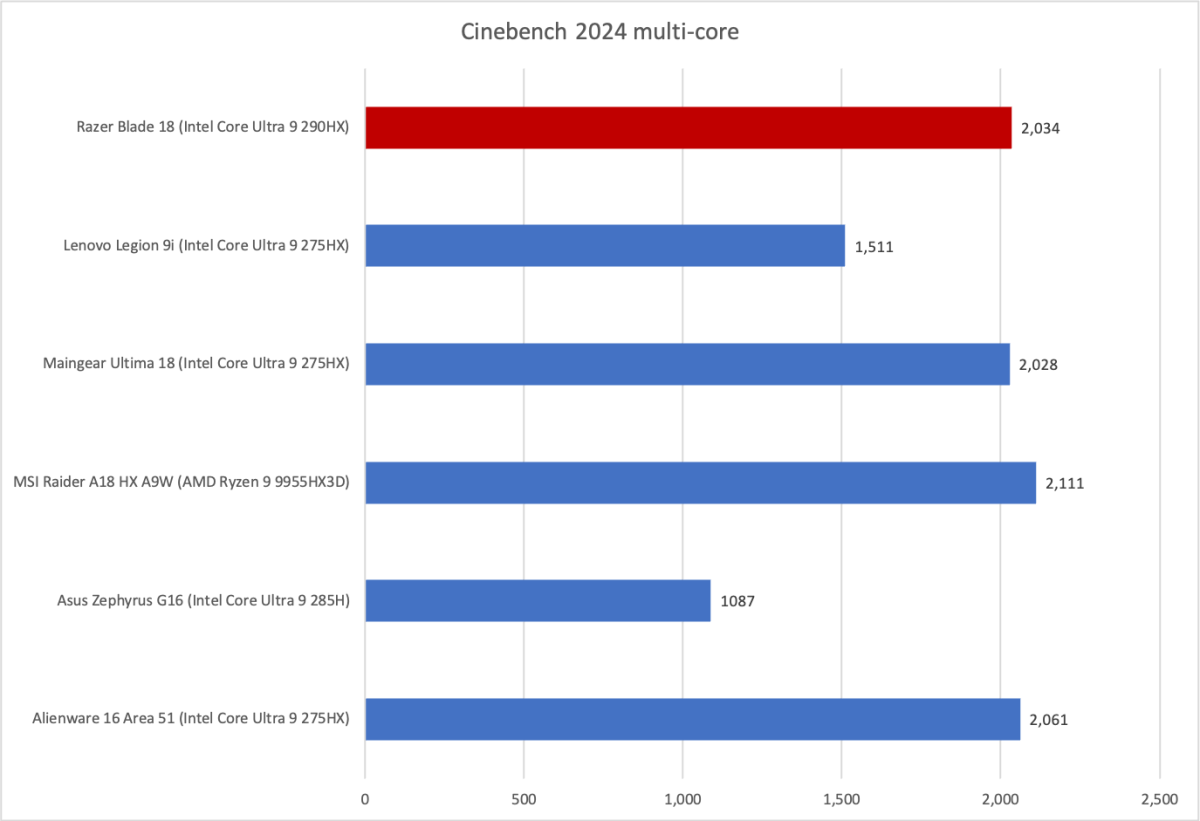
Next up is Cinebench. This brings the Razer Blade 18 slightly down to earth, at least in the sense that it’s now only competitive with the best alternatives. It should be said, however, that laptops which score about 2,000 in this test are still rare, so the Blade 18 is in good company here.
Foundry / Matthew Smith
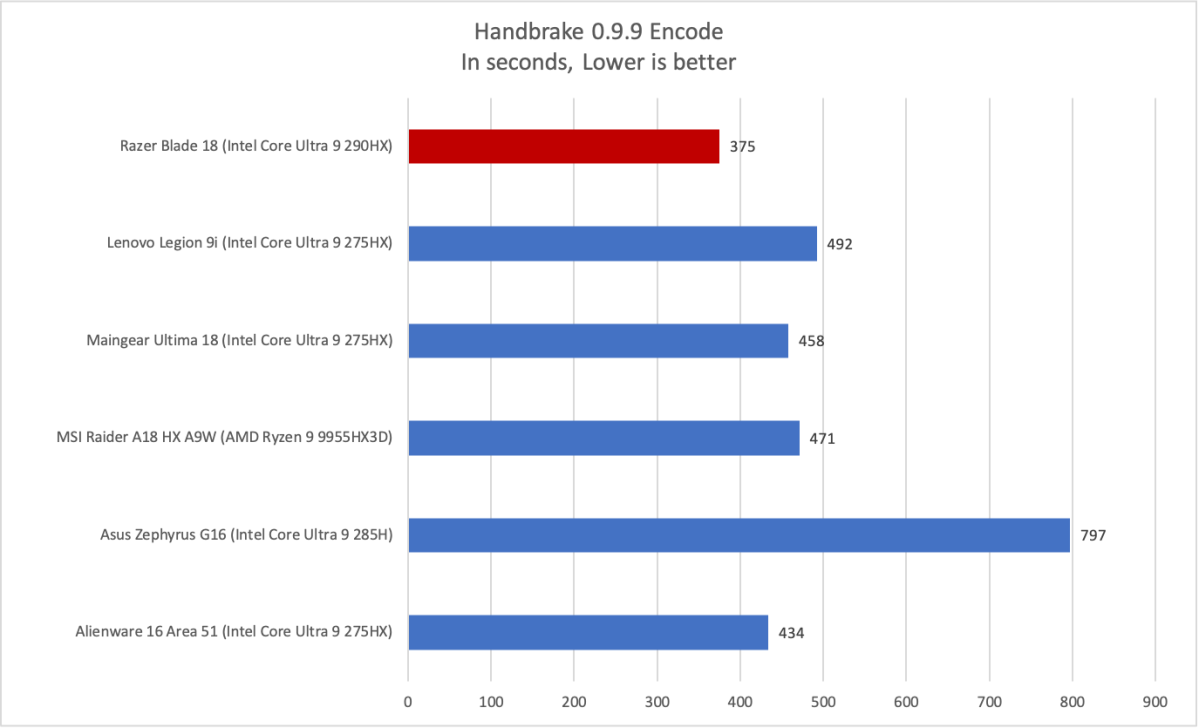
Moving on to another CPU-heavy test, Handbrake 0.9.9, we see the Razer Blade 18 leap a bit ahead of the competition. This shows once again that the Intel Core Ultra 9 290HX Plus is no joke.
Foundry / Matthew Smith
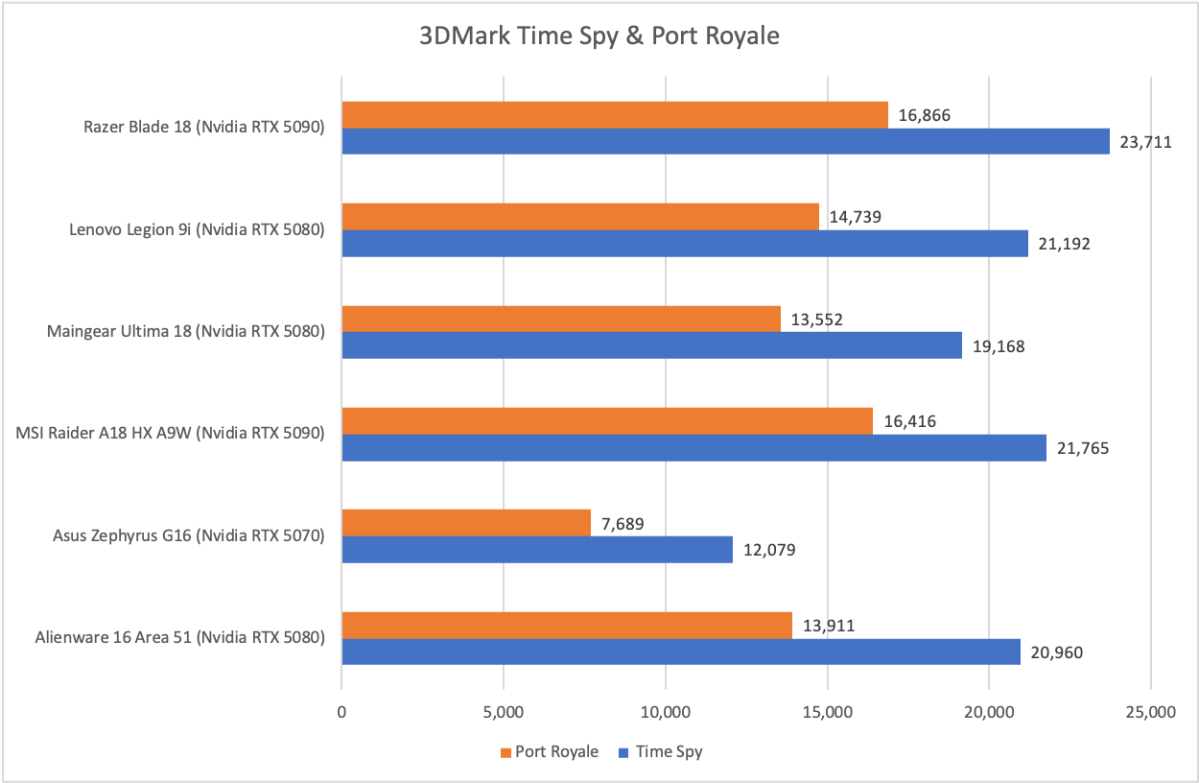
Ok, but the Blade 18 is a gaming laptop, right? Well, it turns out the Blade 18 delivers here, too.
The Blade 18 sweeps 3DMark, easily reaching new record performance in 3DMark Time Spy and Port Royal.
I’m rather surprised by the results here, because at this point I thought the RTX 5090 was pretty much a known quantity—but the Blade 18 manages to push it harder than any laptop PC World has tested to date.
Foundry / Matthew Smith
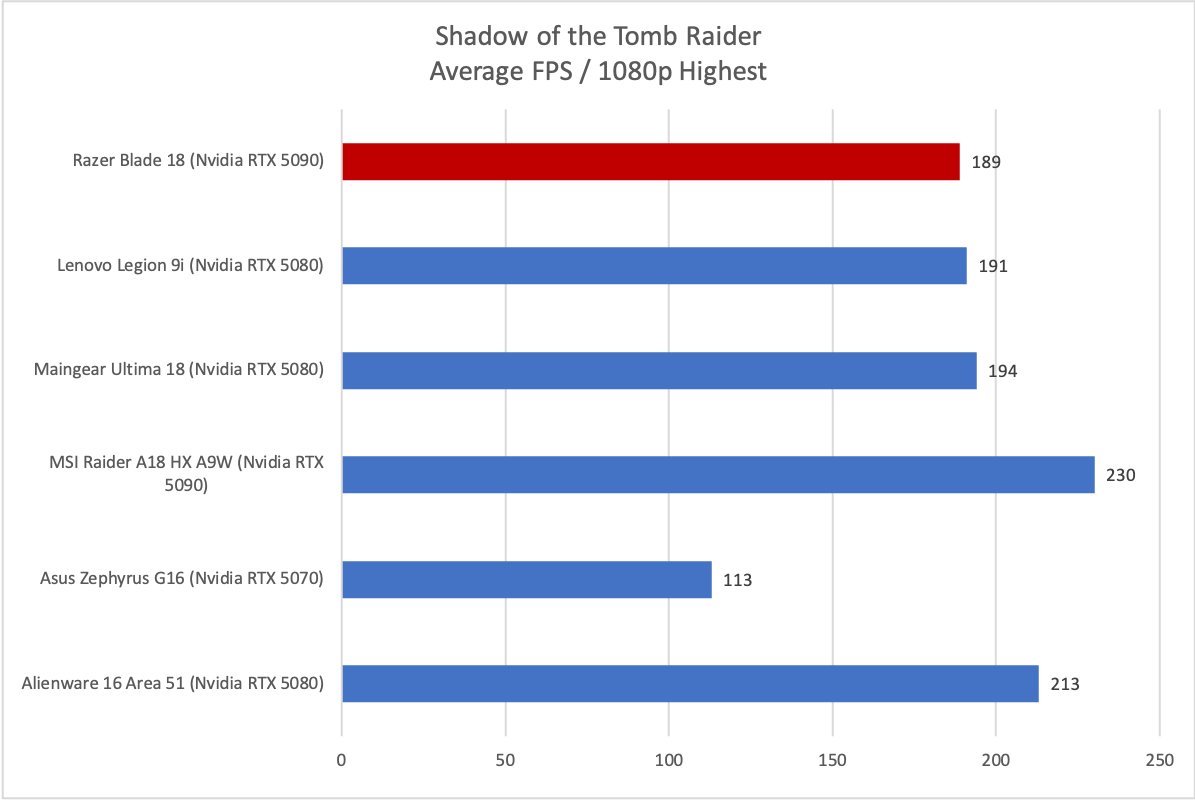
In Shadow of the Tomb Raider, we see performance that doesn’t follow the trend set by 3DMark—though the Blade 18 is still the better performer. The MSI Raider A18 HX A9W is still far in the lead, however. That’s likely due to its AMD X3D processor, which includes far more CPU cache than Intel processors, and can boost framerates in some games.
Foundry / Matthew Smith
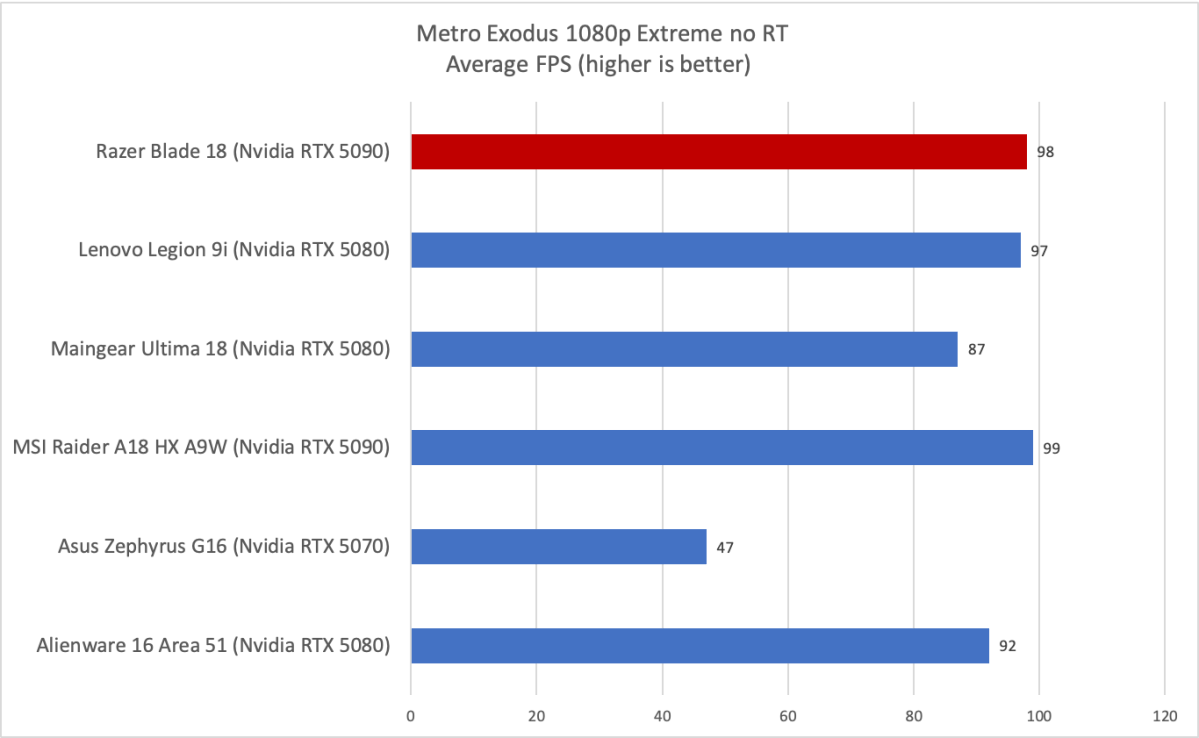
Moving on to Metro Exodus, we see what is more or less a tie for the top-performing laptops. One outlier worth mention at this point is the Lenovo Legion 9i, which manages to hit similar numbers with an Nvidia RTX 5080 instead of an RTX 5090. That makes it a better performance value than the Blade 18 or MSI Raider A18.
Foundry / Matthew Smith
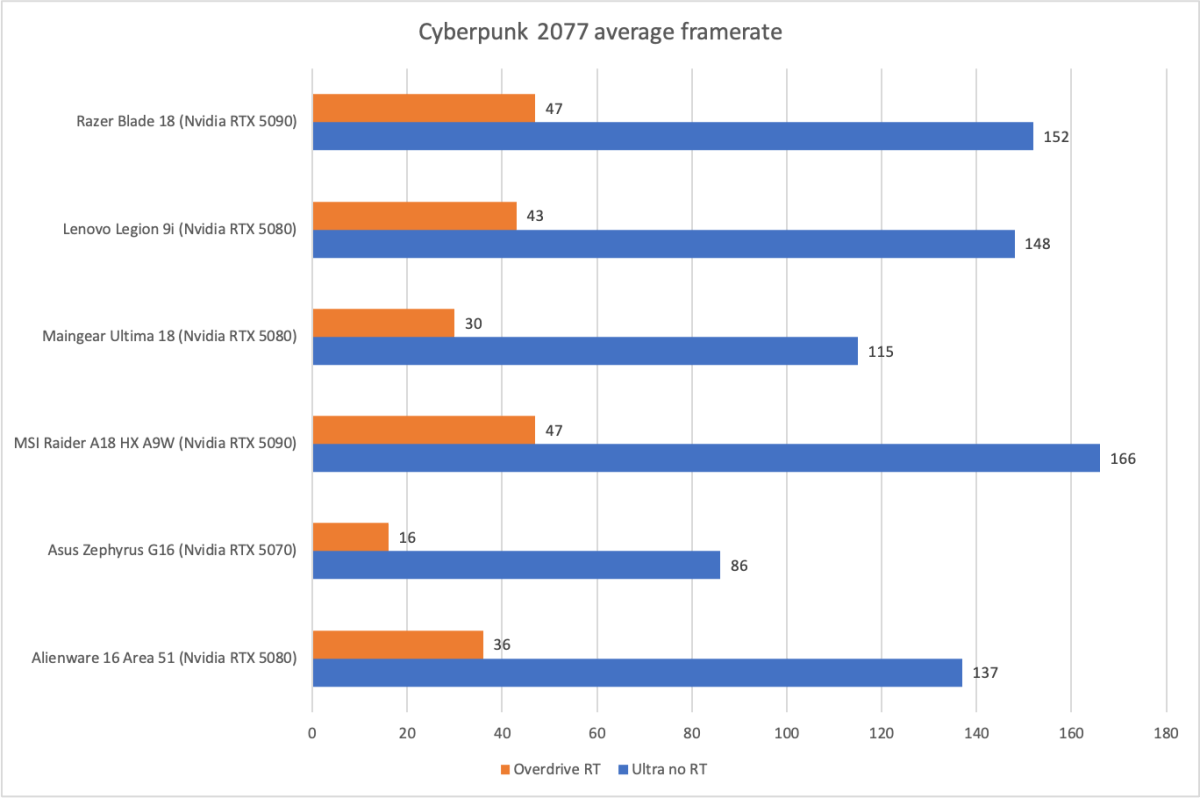
Cyberpunk 2077 keeps the trend going. Here the Blade 18 once again delivers highly competitive performance, though it still doesn’t quite match the MSI Raider A18 with an AMD X3D processor inside. Even so, the Blade 18’s performance is outstanding, and among the best you can expect from a modern laptop.
I’m impressed by the Razer Blade 18’s overall performance. However, as you might expect, it does come with a familiar downside: heat. Pouring this much performance through an aluminum slab results in exterior temperatures as high as 117 degrees Fahrenheit, which I measured just above the keyboard while playing Cyberpunk 2077. That’s rather toasty, to say the least, and it can make the keyboard uncomfortable to use when playing games.
Razer Blade 18: Battery life and portability
Razer packs a large 99 watt-hour battery in the Blade 18. This is to be expected, as the laptop certainly has plenty of room to stuff in as much battery as possible. However, that battery has to contend with an incredible amount of power draw due to the high-performance and power-hungry combination of CPU and GPU.
Foundry / Matthew Smith
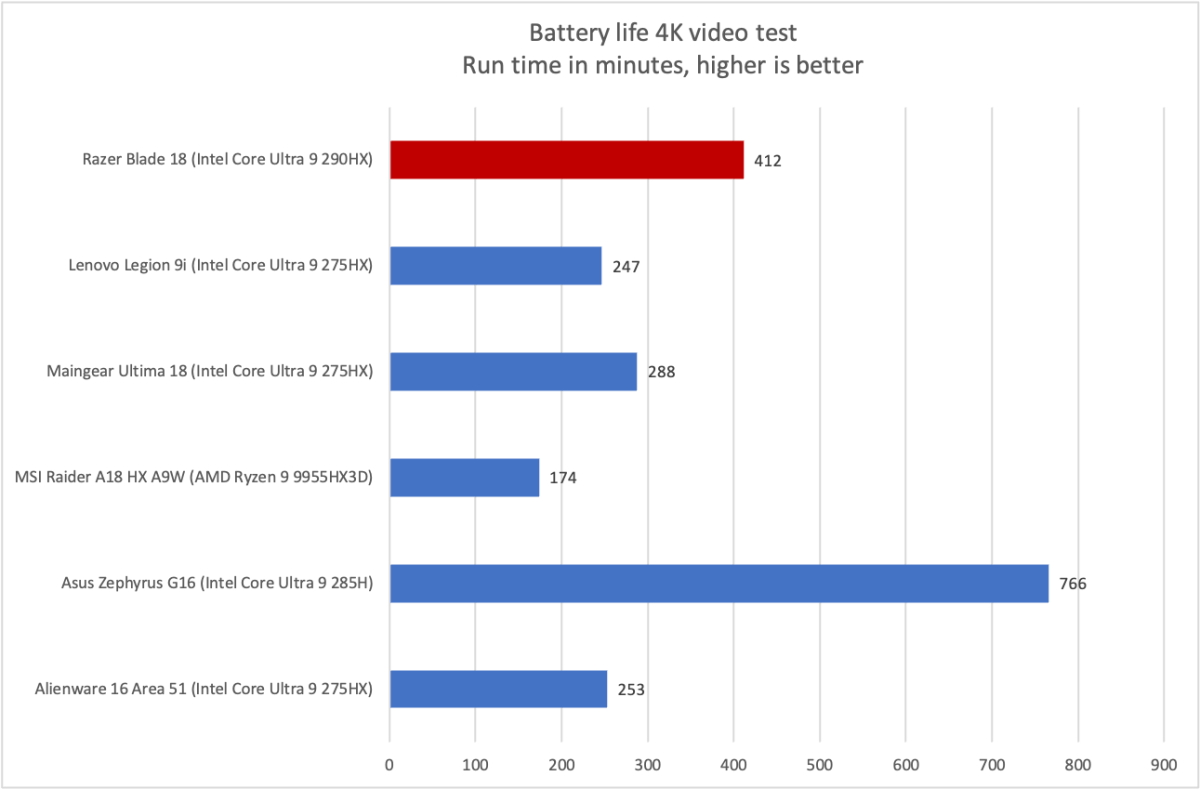
Razer does the best it can to manage this issue. The Battery Saver power profile, which I used for testing, greatly constrains performance to keep power draw as low as possible. As a result, the Razer Blade 18 achieved almost seven hours of battery life in PC World’s standard battery test, which loops a 4K file of the short film Tears of Steel.
That’s not a lot for a modern laptop, but as the graph hints, it’s decent for a high-end gaming laptop. Machines in this category universally struggle for obvious reasons: performance isn’t free, and power is part of the bill.
While the Razer Blade 18’s Thunderbolt ports support Power Delivery up to 100 watts, you shouldn’t expect to use a Thunderbolt or USB-C power source in most situations. You can charge the laptop this way, and in some light-use scenarios it may provide enough power to actively use the laptop without discharging the battery, but any significant load will require more power than what the Thunderbolt ports can provide.
You’ll instead want to use the included 400-watt power brick, which adds several pounds of extra weight to your bag. Though certainly not ideal, this is to be expected for a laptop in this category.
Razer Blade 18: Conclusion
The Razer Blade 18 is an impressive 18-inch laptop that can work well as a gaming laptop, a workstation laptop, or both. It achieves this with a one-two punch of excellent CPU and GPU performance. The laptop also provides usable battery life when set in a low-power mode, which is a surprise given its hardware. As is typical for Razer, the Blade 18 isn’t cheap—you’ll pay at least $3,999, and the model I reviewed was $5,399. But if you want an extreme high-performance laptop that can handle almost anything you throw at it, the Blade 18 is worth the price.


