At a glance
Expert’s Rating
Pros
- Good PCIe 4.0 performance
- Higher-than-average TBW rating
- Top-tier vendor
Cons
- Slows drastically off secondary cache
- Priced like TLC
- Only three-year warranty
Our Verdict
The 990 is a step up from the 990 EVO, though the write rate plummets when secondary cache runs out. But it’s slower than the older 990 EVO Plus and not a bargain, even given the current NAND crunch.
Price When Reviewed
This value will show the geolocated pricing text for product undefined
Best Pricing Today
Price When Reviewed
1TB: $270 I 2TB: $530
Best Prices Today: Samsung 990 PCIe 4.0 NVMe SSD
New NVMe SSD releases have become increasingly rare — another casualty of the AI data center gold rush. Because of that, I was stoked to see a new SSD release from Samsung — the 990. The good news? It’s more power efficient and faster overall than the SSD Samsung says it’s replacing, the 990 EVO.
The not-so-great news? It’s not as fast as the still-available 990 EVO Plus and significantly slower than both its predecessors when it runs out of secondary cache.
Also, if you were hoping for some relief from the recent high pricing of NVMe SSDs, the 990 offers none. In fact, at introduction it’s as expensive as the far faster 990 Pro, not to mention the far newer and even faster 9100 Pro.
Read on to learn more, then see our roundup of the best SSDs for comparison.
What are the Samsung 990’s features?
The 990 is a 2280 (22mm wide, 80mm long) form factor, NVMe 2.0, PCIe 4.0 x4 SSD using an in-house controller (the SALY028) and NAND whose nature Samsung was loathe to reveal.
Said NAND both acts, and is warrantied like QLC (Quad-Level Cell/4-bit), though I suppose it could also be particularly slow TLC (Triple-Level Cell/3-bit) with a below-average TBW rating, but that seems unlikely. If it walks like a duck, quacks like a duck…
The 990 uses a host memory buffer (HMB) design, meaning that it uses around 64MB of your system’s memory for primary caching chores. The QLC (yes, I’m sticking with that) written as SLC handles secondary caching chores to the tune of around 20 percent of total capacity.
Note that the 990 is pure PCIe 4.0, whereas the 990 EVO was a unique hybrid of 4×4 PCIe 4.0 and 2×4 PCIe 5.0. The EVO could save you a couple of PCIe lanes with the right hardware, but delivered the same performance in either mode.
The new 990 carries a three-year warranty, plus a 400TBW (terabytes that may be written) per 1TB of capacity rating. The warranty is two years shy of the five-year warranty offered by the TLC-based 990 EVO and 990 EVO Plus, though average for a QLC SSD.
That TBW rating is actually decent for an NVMe SSD using QLC NAND (I’ve seen 250TBW per TB quite a bit), though it’s 200TBW lower than the 600TBW per TB rating for the 990 EVO/EVO Plus with their TLC NAND.
Basically, QLC isn’t as good for as many write cycles as TLC so the company factors that into the warranty equation. Bear in mind that 400TBW is still a whole lot of writing — far more than the average user will perform over three years, or even five, and most likely even 10.
How much is the Samsung 990?
Sorry to say, folks, but the halcyon days of super-affordable NVMe SSDs, at least from major vendors, remain firmly in absentia. The Samsung 990 will set you back $270 in the 1TB capacity and $530 in the 2TB. Hmm. Of course, that’s the retail pricing Samsung provided pre-launch, and you may find the drives cheaper sooner rather than later.
Let’s hope, because there are comparable SSDs available on Amazon for half that price. They’re mostly from lesser known vendors, though I did spot a couple of more affordable units from Acer. Additionally, I spotted the 990 EVO Plus, which is a better SSD, for $20 less at 1TB and well over $100 less in the 2TB capacity.
To top things off, I also found the 990 Pro and 9100 Pro for around the same price as the 990. To be honest, I don’t understand what Samsung’s doing with the introduction pricing, unless they expect the 990 to remain in stock while all the others disappear. Given the present memory shortage, that could happen.
How fast is the Samsung 990?
I never saw the 6.4GBps sustained write speed that Samsung claims is possible (see our test bed specs below), but the 990 easily read at the promised 7.1GBps. Still, the 5.4GBps writing I got ain’t half bad. And both those results are far better than those of the 990 EVO — at least when both primary and secondary caches are in play.
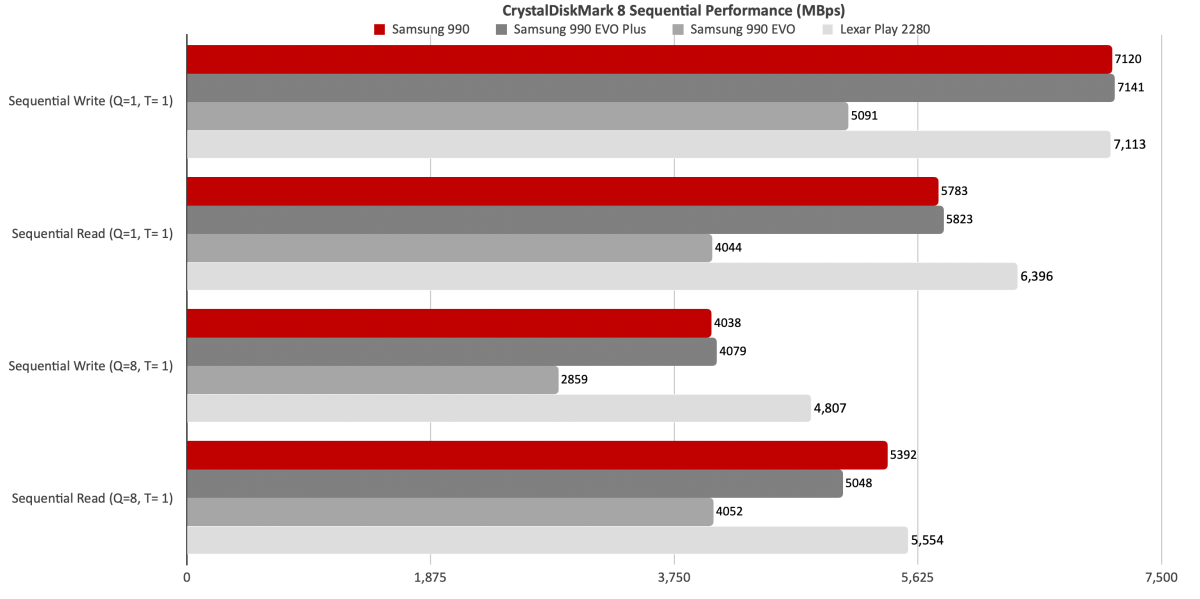
The 990’s performance in CrystalDiskMark 8’s sequential throughput tests show its improvement over the 990 EVO, though slightly slower than the 990 EVO Plus and not on the same plane with the mighty-for-PCs Lexar Play 2280.
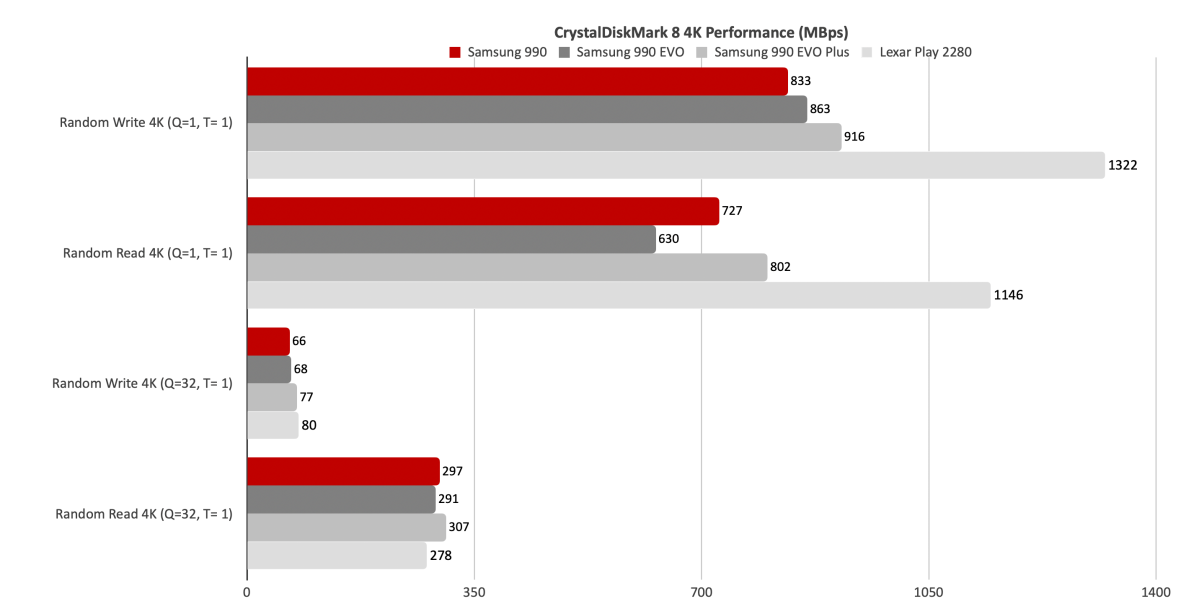
4K performance as measured by CrystalDiskMark 8 for the 990 was good, though not nearly as good as, again, the Lexar Play 2280.
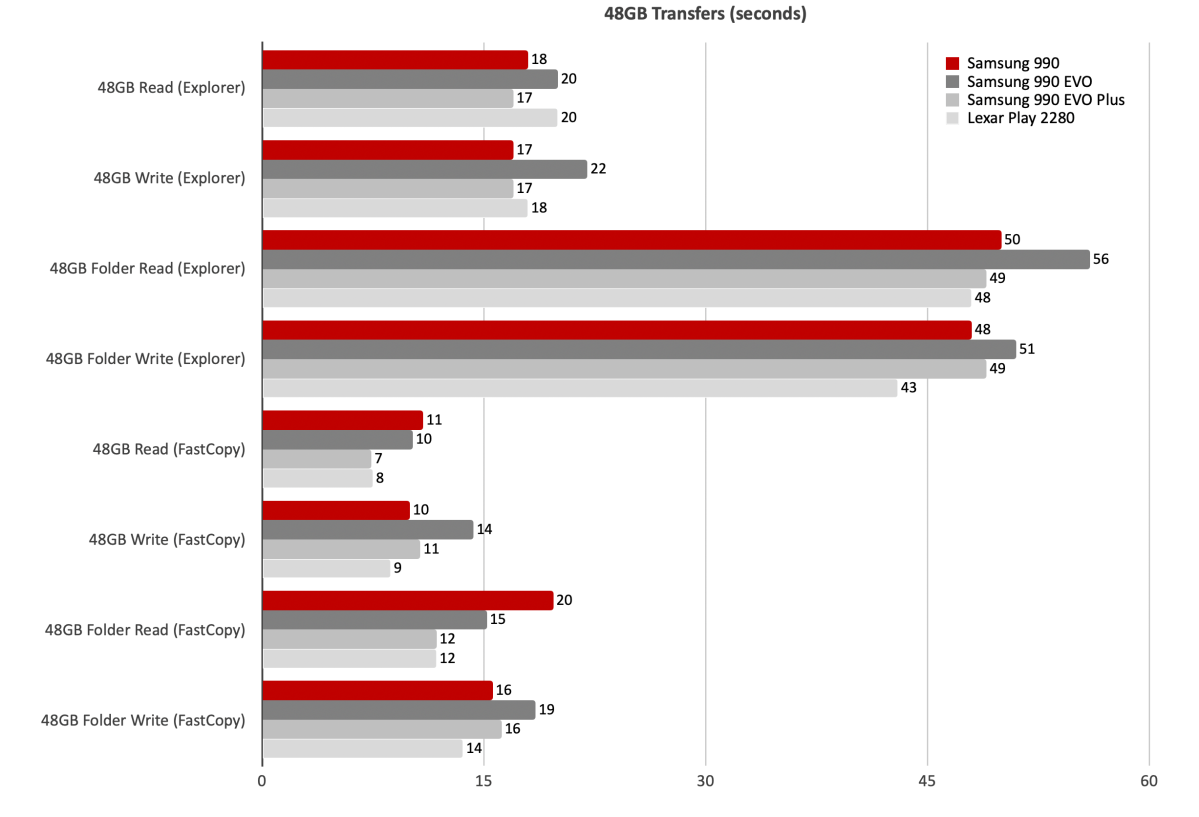
The 990 was more adept than the 990 EVO at our 48GB transfers, but no match for the EVO Plus or Lexar Play 2280.
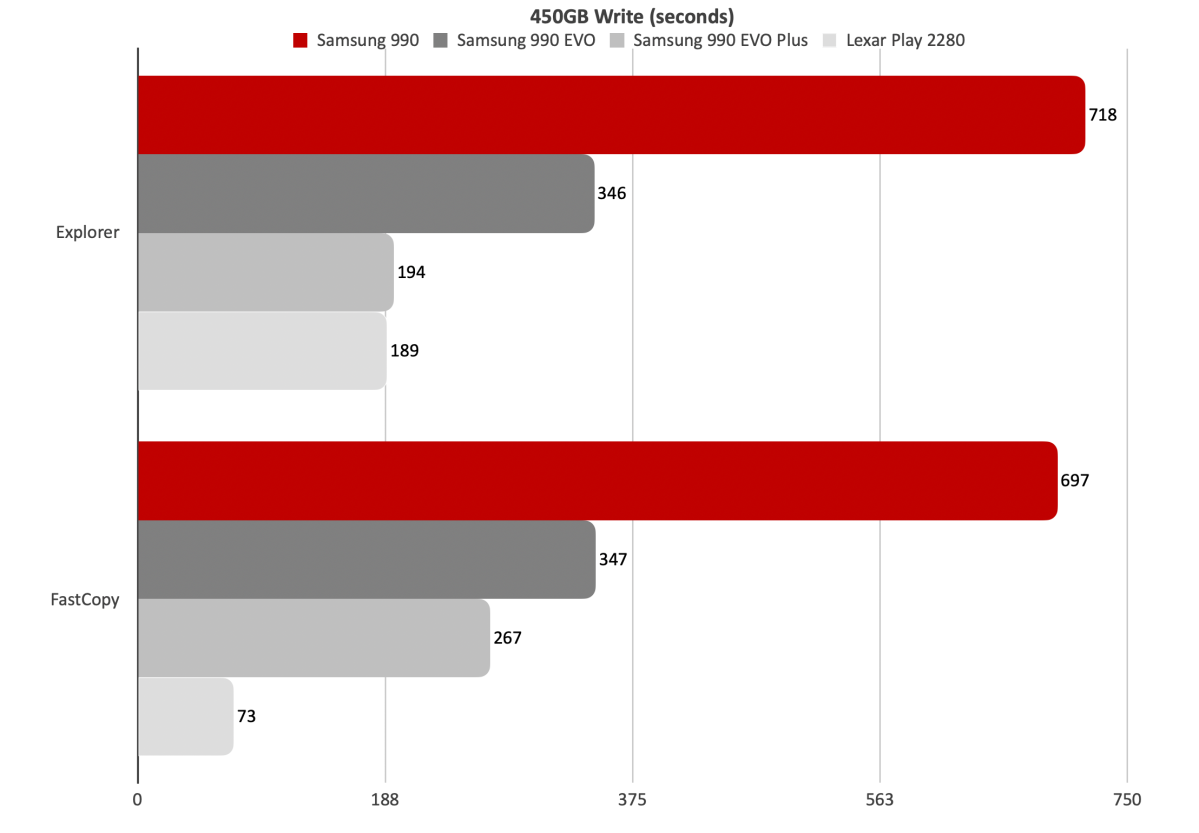
The 450GB write is where the new 990 fell flat. This test also shows what 4TB (Lexar Play 2280) of capacity can do during very long writes. Not that the Play 2280 isn’t plenty fast in lower capacities.
As you can see below, when the 990 runs out of secondary cache, write performance drops off a cliff. It waffles somewhere between 50MBps and 350MBps from there on in, mostly remaining somewhere around 200MBps. A near-sure sign of QLC. Or possibly, very old TLC.
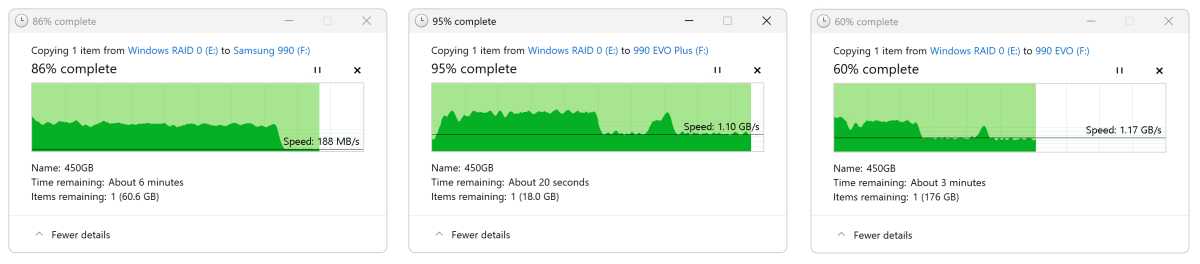
This is in stark contrast to the nearly 1.2GBps that the 990 EVO and 990 EVO Plus maintain after they run out of secondary cache, though that happens considerably sooner with these two. At around the 100GB mark with the EVO, the 225GB mark with the EVO Plus, as opposed to well over 350GB for the 990. All three SSDs were 2TB in capacity.
In total, the 990 is a great improvement over the 990 EVO for everyday use, but not as fast as the EVO Plus under the same scenario. Then there’s the decrepit write speed off cache, though it occurs well beyond what the average user will ever write at one time. Note that the slowdown will likely occur far sooner (around 150GB) with the 1TB model as secondary cache is generally allocated as a percentage of total capacity.
Samsung’s decision to use QLC may reflect the current NAND shortage. If I had to guess, I’d say that it’s likely easier to come by/less in demand than TLC at the moment. I’ll cut them some slack, as the decision will likely lead to greater availability and possibly lower consumer prices for all NVMe SSDs.
Should you buy the Samsung 990?
I’m genuinely pleased that Samsung is back to producing new NVMe SSDs. But while the 990 is a step up from the 990 EVO for the majority of tasks, it’s a step backwards from the 990 EVO Plus and currently costs more. Opt for the latter — if you can find it. Otherwise, in the real world, the 990 will do just fine. Most users will never notice the difference.
How we test
Drive tests currently utilize Windows 11 24H2, 64-bit, running off of a PCIe 4.0 Samsung 990 Pro in an Asus Z890-Creator WiFi (PCIe 4.0/5.0) motherboard. The CPU is a Core Ultra i5 225 feeding/fed by two Crucial 64GB DDR5 5600MHz modules (128GB of memory total).
10Gbps, 20Gbps USB, and Thunderbolt 5/USB4 are integrated into the motherboard. Intel CPU/GPU graphics are used. Internal PCIe 5.0 SSDs involved in testing are mounted in an Asus Hyper M.2 x16 Gen5 adapter card sitting in a PCIe 5.0 slot. External enclosures are tested using a Crucial T710.
We run the CrystalDiskMark 8.04 (and 9), AS SSD 2, and ATTO 4 synthetic benchmarks (to keep article length down, we report only the first) to find the storage device’s potential performance. Then we run a series of 48GB transfer and 450GB write tests using Windows Explorer drag and drop to show what users will see during routine copy operations, as well as the far faster FastCopy run as administrator to show what’s possible.
A 25GBps two-SSD RAID 0 array on the aforementioned Asus Hyper M.2 x16 Gen5 is used as the second drive in our transfer tests. Formerly the 48GB tests were done with a RAM disk serving that purpose.
Each test is performed on a NTFS-formatted and newly TRIM’d drive so the results are optimal. Note that in normal use, as a drive fills up, performance may decrease due to less NAND for secondary caching, as well as other factors. This issue has abated somewhat with the current crop of SSDs utilizing more mature controllers and far faster, late-generation NAND.


