At a glance
Expert’s Rating
Pros
- No perimeter wire or external antenna required
- Automatic LiDAR mapping makes setup much easier than traditional robot mowers
- Handles slopes, trees, shade, and yard obstacles well
- Delivers a clean, even cut once properly dialed in
Cons
- Expensive
- Tricky edges and drop-offs may require supervision or map edits
- Navimow Connect+ requires a paid renewal after the first year
Our Verdict
The Navimow i215 makes robot mowing feel practical for real-world yards, not just perfect rectangles of grass. It’s pricey, but the wire-free setup and confident navigation justify the cost for lawns with some complexity.
Price When Reviewed
This value will show the geolocated pricing text for product undefined
Best Pricing Today
Price When Reviewed
$1,599
Best Prices Today: Segway Navimow i215
Robot mowers promise less yard work, but getting one ready to mow is often an ordeal. Older models require you to run a perimeter wire around the edge of the lawn so the mower knows where to stop. That can mean staking the wire down, burying it, or working around garden beds, trees, walkways, and other obstacles before the mower ever cuts a blade of grass. Some newer GPS/RTK mowers avoid the wire, but still need an antenna placed somewhere in the yard to improve positioning accuracy.
The Navimow i215 LiDAR does away with both of these hurdles. It uses an on-board LiDAR module and an AI-assisted vision system to map the lawn, detect edges, and recognize obstacles, making installation far less involved than traditional robot mowers. It’s designed for lawns up to 0.37 acres and slopes up to 45 percent. Navimow gives the i215 an IP66 weather-resistance rating, meaning it’s sealed against dust and can handle rain or spray from a hose.
Segway Navimow i215: Setup
While the i215 removes the most annoying part of setting up a robot mower, it still requires a bit of preparation. The first step is installing the charging dock. Navimow recommends placing it on level ground, with about 6.6 feet of open space in front and 1.6 feet on each side. You also need to keep the power cable out of the mower’s path, which I accomplished by setting the dock on concrete adjacent to my lawn. For lawn placements, the i215 includes ground screws to anchor the dock and pegs to secure the power cable and keep it out of harm’s way.
My mower arrived with about a 50 percent charge, and the app requires more than 50 percent battery before mapping. I set the mower on the dock to charge while I connected it to the Navimow app. The app instantly recognized the mower and prompted me to connect it to my Wi-Fi, which took just a couple of minutes. But then I had to wait through two firmware updates, which added about 20 minutes to the setup process. By the time the updates were finished, the battery had cleared the threshold and I could start mapping.
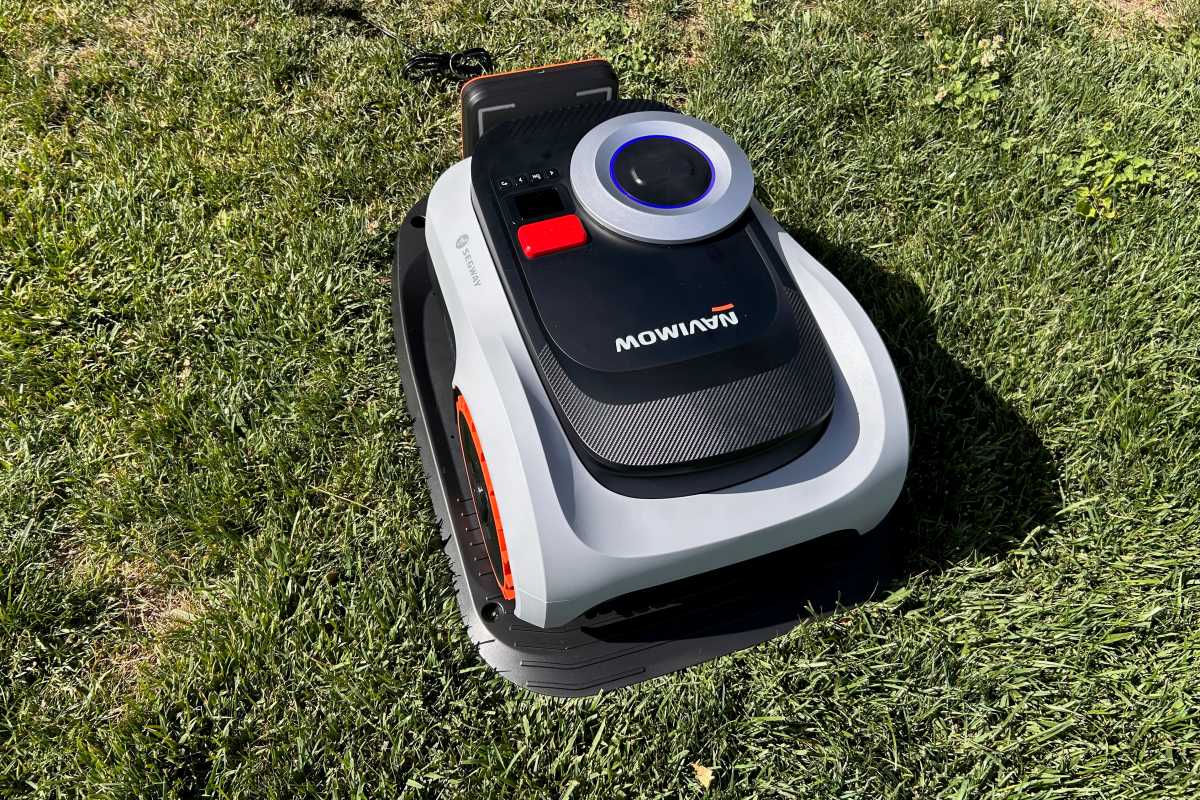
The Navimow i215 uses an on-board LiDAR module and AI-assisted vision to map the lawn without perimeter wire or an external antenna.
Michael Ansaldo/Foundry
The app offers two mapping options: auto and manual. With auto mapping, the mower scans the surroundings to detect edges, objects, and distance. Manual mapping requires you drive the mower around the boundary yourself and is probably best used if auto mapping has trouble with a particular lawn shape, edge, or passage. Because my mowing area is one continuous lawn, I went the auto-mapping route.
That said, even auto mapping requires a little hands-on driving. The app instructed me to use two on-screen joysticks to steer the mower out of the dock and onto the lawn until it recognized grass. At that point, it prompted me to mark the area as zone one. The app then gave me the option to create additional zones, which would be useful for separate grass areas divided by pavement, mulch, or another non-mowing surface. I skipped that step and let the i215 begin mapping.
The Navimow i215 removes the most annoying part of setting up a robot mower, but it still requires a bit of preparation.
From there, the mower took over, driving the perimeter of the lawn and building the boundary as it went. During auto mapping, the mower stays about 11.8 to 19.7 inches inside the lawn’s edge, then optimizes the final boundary afterward.
Once the map is complete, the app lets you refine it with boundaries, no-go areas, channels between separate zones, VisionFence-off zones for spots where the mower’s vision-based obstacle detection gets in the way, and MowGate channels for Navimow’s optional gate accessory. I didn’t need all of those tools for my test lawn, but they’re notable for providing a way to address problem spots without remapping the whole yard.
Segway Navimow i215: Performance
Before mowing, I had to do the usual yard check. I picked up a few twigs and a stray softball that had been left in the grass, then checked the cutting height in the app. The i215’s max cutting height is 4.0 inches, so I left it there for the first run rather than risk the mower taking off too much at once. Ultimately, I lowered it to 3.2 inches.
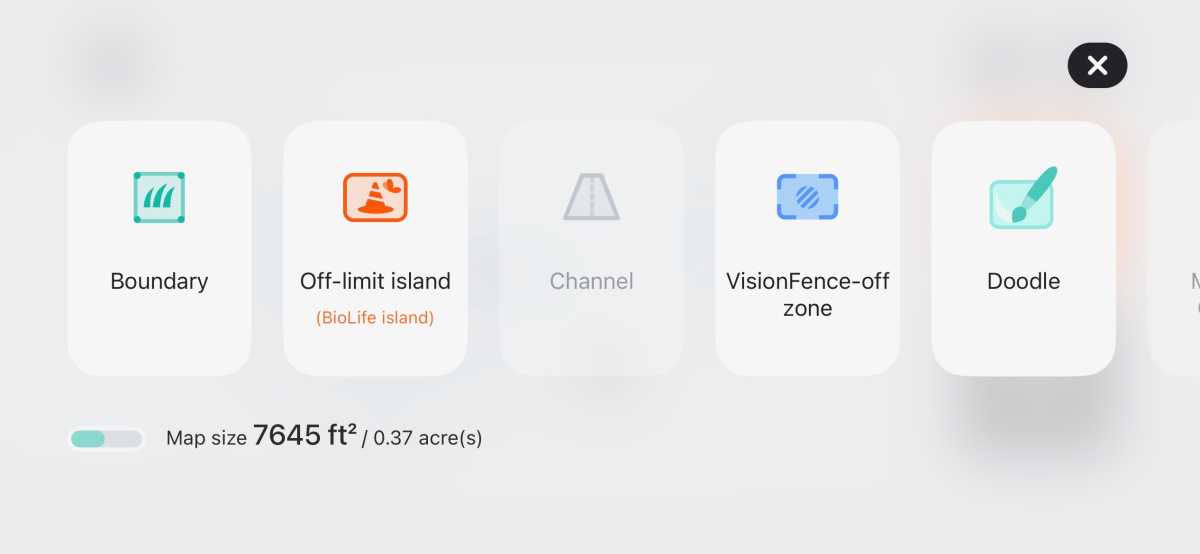
The Navimow app lets you refine the generated map with boundaries, off-limits islands, channels, and other map elements.
Michael Ansaldo/Foundry
My test area measured 7,645 square feet or roughly 0.18 acres. This included slopes, trees, bare patches, mulch borders, fencing, and a play structure sitting in the middle of the yard. The mower started by tracing the perimeter, then moved inward with each pass. It handled the terrain well, working around obstacles and never wandering into areas it wasn’t supposed to mow.
The one trouble spot was a narrow strip between the raised edge of the grass and a fence. During mapping, the mower avoided that drop-off as it kept slightly inside the lawn’s edge. During mowing, though, it worked closer to the final boundary and slipped off the grass into that space a couple of times, requiring me to rescue it. I confirmed with Navimow that the mower does not use a dedicated “cliff sensor” like many robot vacuums do. Those sensors typically point down to detect sudden floor-height changes, making them problematic when the ground height is constantly changing. In this case, the mower appeared to be following the mapped boundary. The physical edge just gave it very little room for error.
Once I set it back on the lawn, it regained its position and resumed mowing, delivering a clean, even cut across the mapped area.
Segway Navimow i215: App experience
The Navimow app keeps the most important mowing information and controls on the main screen. During a mowing job, it shows the i215’s position on a live map, along with battery level, connection status, and how much area it has covered. Big Stop and Home buttons are within thumb’s reach should you need to end a job before it’s complete.
Other features can be configured through the settings menu. In addition to lowering the mower’s cutting height, I also used the app to set schedules, switch between Precision and Efficient mowing modes, and manage features such as VisionFence and weather-adaptive mowing.
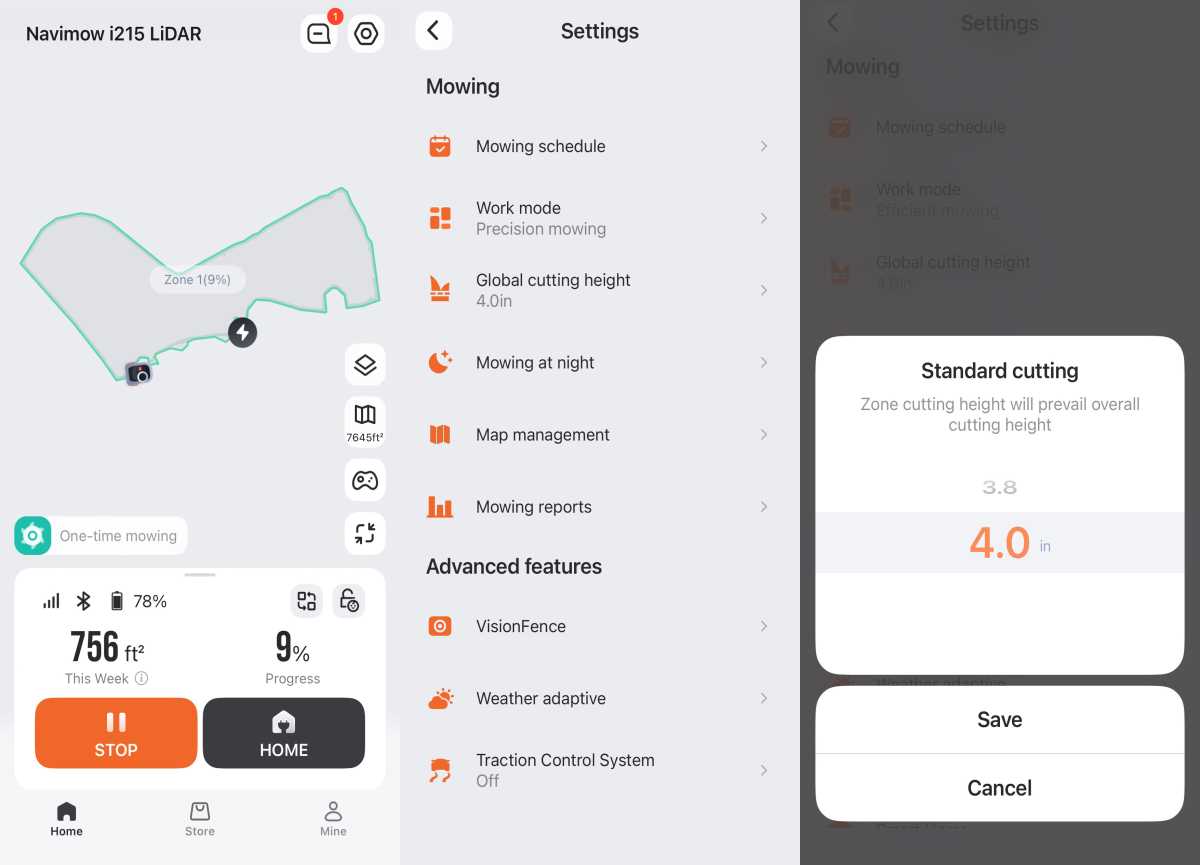
The Navimow app shows the mower’s live position, mowing progress, and key settings, including work mode and cutting height.
Michael Ansaldo/Foundry
The app also introduces Navimow Connect+, the subscription service behind the mower’s built-in 4G features. It gives the i215 a cellular connection for remote monitoring and anti-theft functions when the mower is outside Wi-Fi range. Navimow includes the first year of Connect+ service, but after that it costs $32.90 per year.
Should you buy the Segway Navimow i215?
The Navimow i215 retails for $1,599, and you’re mostly paying for the technology that makes a difference before you start mowing: no perimeter wire, no external antenna, automatic mapping, and app-based control. That’s an attractive proposition if you’ve been curious about robot mowers, but put off by the installation process.
It’s an even better value if your lawn has some complexity. A flat, open rectangle of grass may not need this much mower. The i215 makes more sense for yards with multiple sections, trees, slopes, shade, and other features that can trip up simpler robot mowers. For those lawns, it’s easy to recommend.


