At a glance
Expert’s Rating
Pros
- Supports four NVMe SSDs and four SATA SSDs/HDDs
- Good USB 3.2 10Gbps performer
- Easy drive access and installation
Cons
- No hardware RAID
- 10Gbps limits NVMe performance
Our Verdict
This eight-bay (four M.2 NVMe and four 3.5-inch SATA) 10Gbps storage box from TerraMaster offers a ton of capacity and decent performance. However, there’s no hardware RAID and 10Gbps limits the NVMe performance.
Price When Reviewed
This value will show the geolocated pricing text for product undefined
Best Pricing Today
Price When Reviewed
$300
Best Prices Today: TerraMaster D8 Hybrid HDD/SSD USB enclosure
There’s no storage as speedy as NVMe, but the technology is still priced steeply. As such, you might want to augment it with more affordable hard drives by leveraging a dual-technology box such as the 10Gbps TerraMaster D8 Hybrid 2 reviewed here.
That said, I’d be remiss if I didn’t mention that 10Gbps USB is far too slow to take full advantage of NVMe’s speed. You might be better off with a faster SSD enclosure and a cheaper SATA box.
Read on to learn more, then see our roundup of the best external drives for comparison.
What are the TerraMaster D8 Hybrid 2’s features?
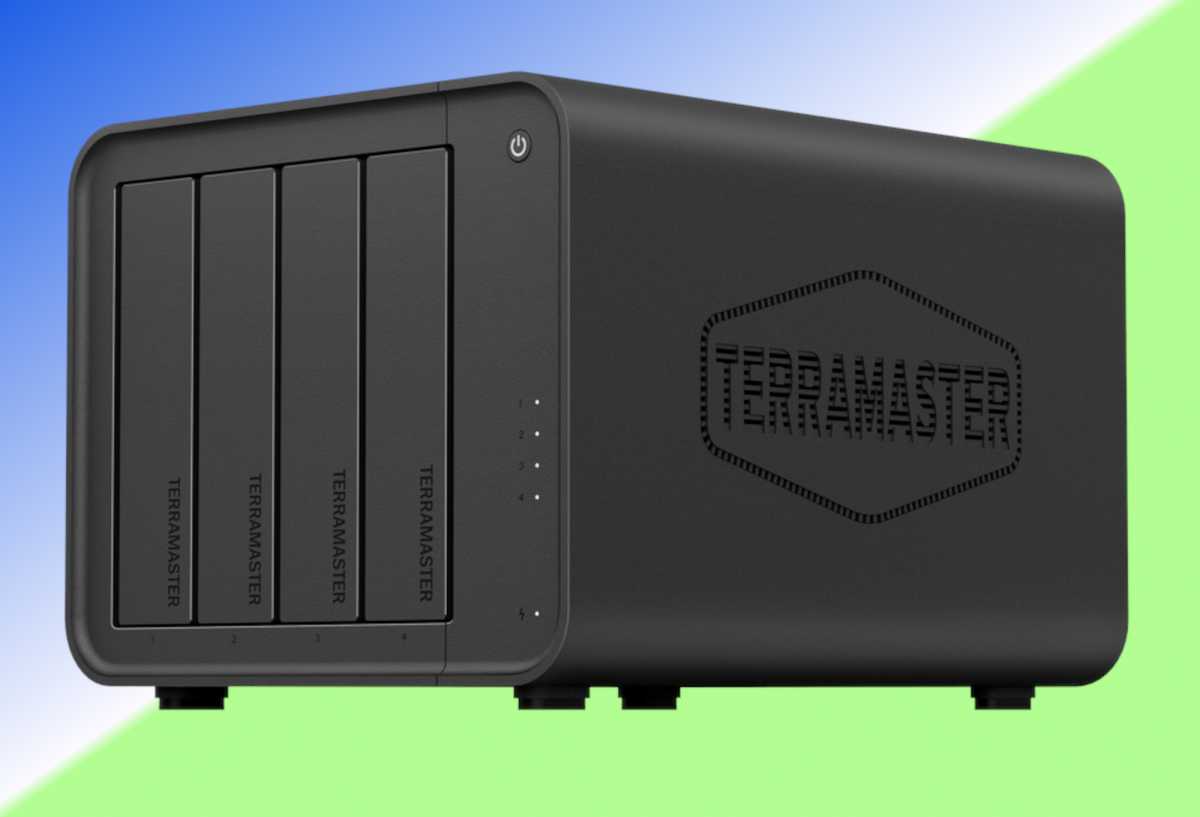
The D8 Hybrid 2 is a 10Gbps USB, eight-bay storage box split evenly between four 2280 M.2 NVMe slots and four 3.5-inch SATA bays. The slots are found under the side cover which is held in place by twin thumbscrews. The screws that hold the NVMe SSDs in place are also easily removed with your fingers.
The all-black box with its aluminum chassis and plastic exterior measures around 8.75-inches wide, by 6-inches tall, by 7-inches deep and weighs around 4 pounds unpopulated.
The 3.5-inch bays are unlocked, with quick change rails on the drive trays. TerraMaster also provides the screws you’ll need to mount 2.5-inch drives (HDDs or SSDs) in said trays.
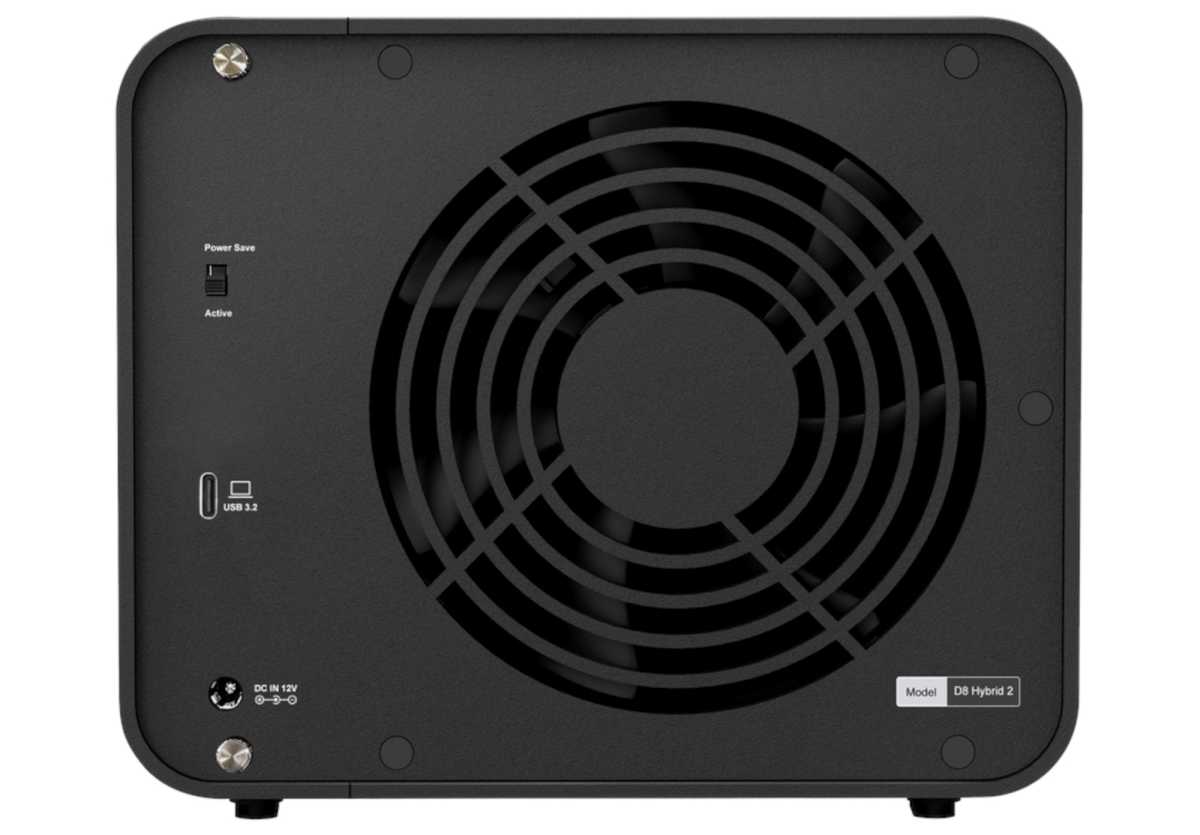
The back of the D8 Hybrid 2 is home to the AC adapter jack, the 10Gbps USB 3.2 Type-C port, and a rather large fan. Also in residence is the TPM, or TerraMaster Power Management switch. Basically, it will either enable a deep sleep when the box is not in use (Power Save Mode), or simply put the drives to sleep when they’re not active (Active Mode).
The box uses RealTek RTS5432, RTL9210CN, and RTL9201 controllers and TerraMaster bundles a version of Aomei Backupper called TPC Backupper — a very capable backup program.
One of the salient issues with the D8 Hybrid 2 is that there’s no hardware RAID to mirror data or enhance SATA performance. You’ll need software for that. I recommend OWC’s SoftRAID. Windows own Storage Spaces is slow and buggy, and Disk Management RAID doesn’t support removable storage. Sigh.
If you’re running on a Mac, macOS RAID performs as well as OWC’s RAID and doesn’t suffer the external drive limitation.
Don’t hate me, fine-folks-at-OWC, but the way around paying $150 for SoftRAID is to download the Pro trial, create your arrays (0, 1 + 0 through 5), then use the free Standard version to continue access to them. You can also replace failed drives.
That said, SoftRAID is a most excellent and handy program to have around. Especially as it lets you use SoftRAID APFS and HFS+ arrays created on the Mac on Windows. Yup, cross platform RAID.
How much is the TerraMaster D8 Hybrid 2?
Unpopulated, the TerraMaster D8 Hybrid 2 will set you back a cool $300. Not bad, but as with any direct attached storage product these days, the majority of the expense will be the drives you populate it with. Currently, 1TB NVMe SSDs run around $160 and 4TB HDDs about the same. That puts the cost of filling the box at around $1,300.
Of course you could spend a whole lot more: close to $10,000 for 8TB NVMe SSDs alone, and near $5,000 for 32TB HDDs. As discussed, the D8 Hybrid 2 offers no hardware RAID and SoftRAID Pro is $150.
On the other hand, if you have or can find older PCIe 3.0 NVMe SSDs, they’re still more than fast enough to saturate the 10Gbps USB bus. There’s no need for PCIe 4/5 NVMe SSDs that are 10 times faster than the D8 Hybrid 2 can transfer data.
How fast is the TerraMaster D8 Hybrid 2?
The numbers below are from the two Crucial T710 PCIe 5.0 NVMe SSDs capable of up to 15GBps. I used them to show the D8 Hybrid 2’s fastest possible performance, which once more, is basically capped at 1GBps by the fact that it’s communicating via 10Gbps USB 3.2.
SATA hard drives and SSDs will perform differently depending on if they are addressed singly (250MBps/550MBps) or in some sort of RAID array. Two SATA SSDs in RAID 0 will saturate the 10Gbps USB bus. It would take four recent vintage hard drives in RAID 0 to come close, and the random performance of hard drives will be significantly slower.
In the configuration I chose (there were also a SATA HDD and SSD installed, though not tested), the D8 Hybrid turned in very good numbers. Good enough to place sixth out of 15 10Gbps drives, though some of those were thumb drives. Regardless, you’d be hard-pressed to tell any difference between the D8 Hybrid’s NVMe and other 10Gbps SSDs in real-world usage.
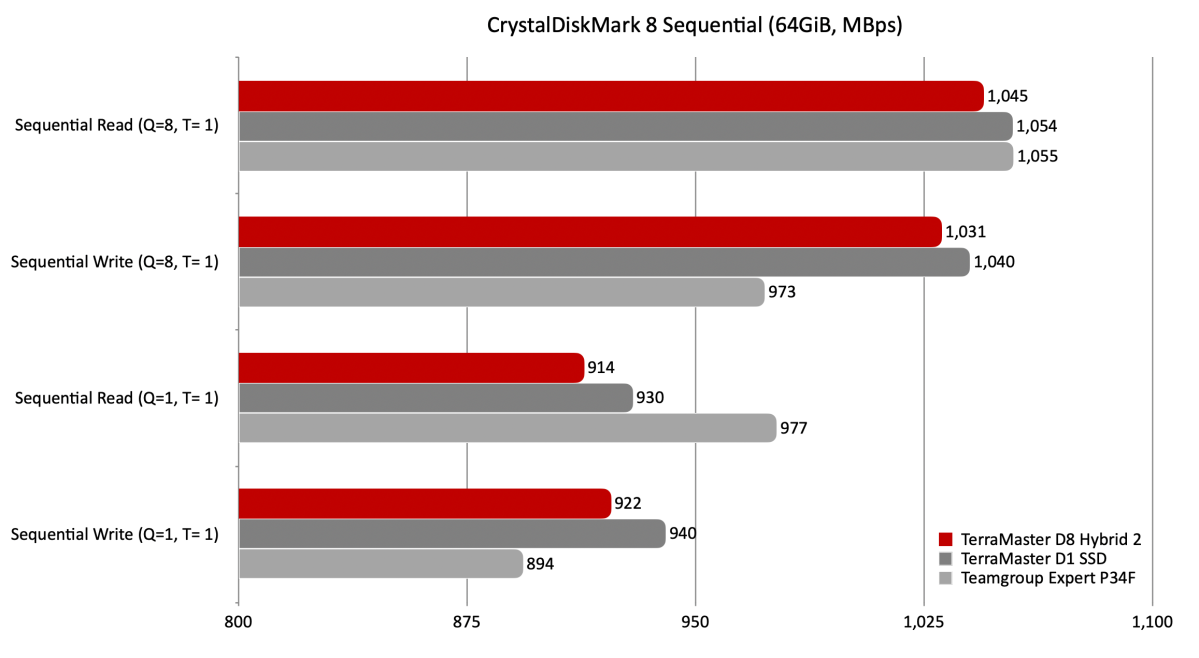
While not the top dog, the D8 Hybrid 2’s performance in CrystalDiskMark 8’s sequential tests was only a hair behind TerraMaster’s own D1 SSD and the Teamgroup Expert P34F.
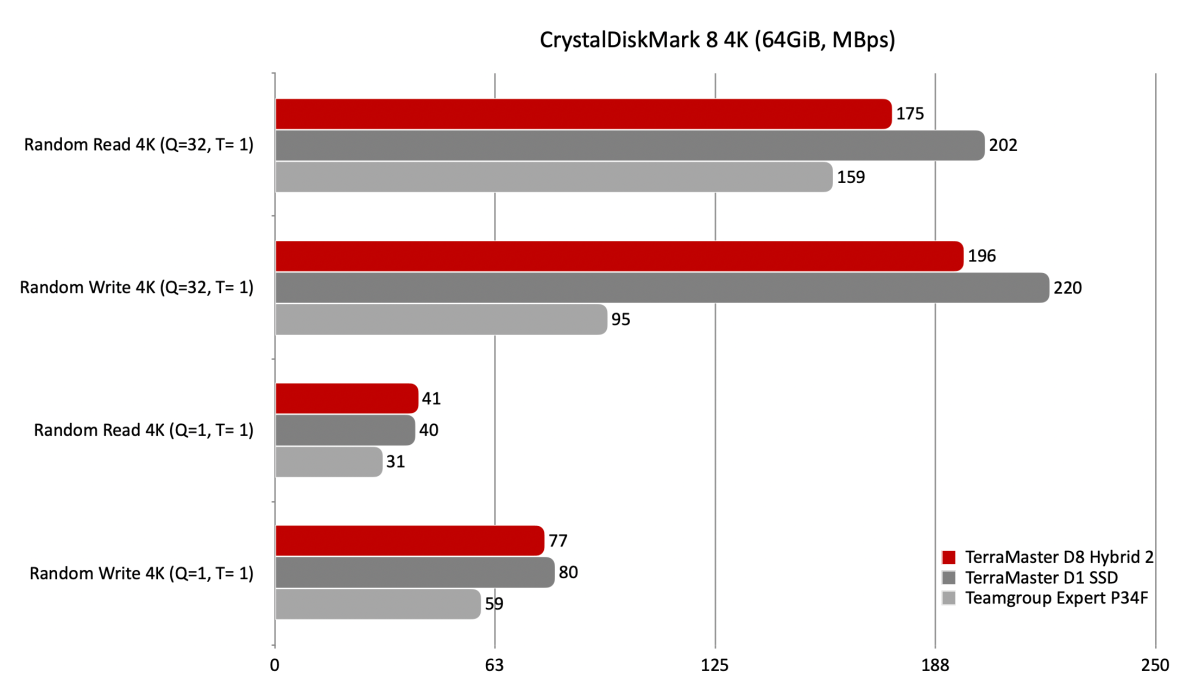
CrystalDiskMark 8 rated the D8 Hybrid 2’s 4K performance as fast, but not quite as fast as the D1 SSD or Expert P34F.
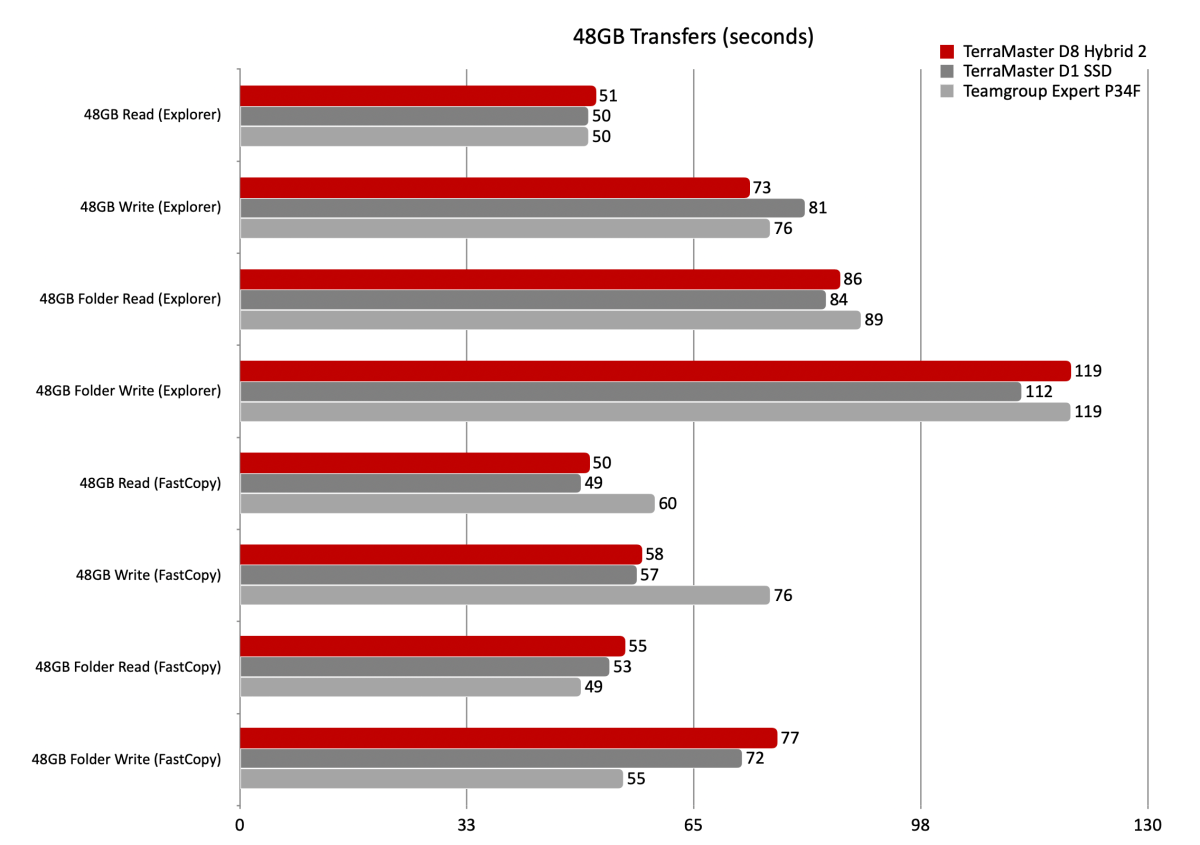
The D8 Hybrid 2 was again, good, if not spectacular in our 48GB transfer tests. I alway pitch FastCopy as a fantastic utility if you transfer lots of large files regularly. It’s also very handy for our purposes as it logs its results.
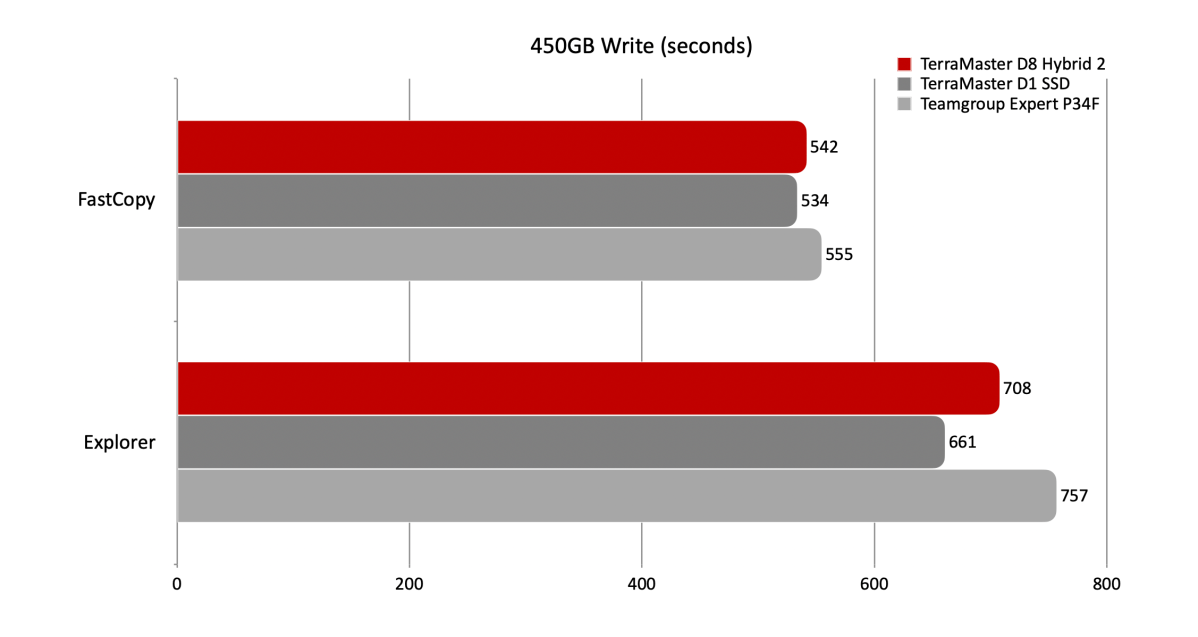
The story stayed the same in our 450GB write –the D8 Hybrid is fast, just not the fastest.
In total, I have no qualms as to the D8 Hybrid 2’s performance. Except of course that it’s only 10Gbps — fine for HDDs and SATA SSDs but not so much for NVMe.
Should you buy the D8 Hybrid 2?
For what it is, the D8 Hybrid 2 performs admirably. But what it is is 10Gbps, which, once again, will throttle the performance of any NVMe SSD. There are a host of higher-bandwidth solutions available, including TerraMaster’s own D4 SSD and OWC’s NVMe-based 4M2 that will leverage far more of NVMe’s transfer prowess.
Also, there are cheaper SATA-only solutions such as TerraMaster’s D4-320 if you’re simply looking to leverage the cheaper price per terabyte of hard drives or SATA SSDs.
How we test
Drive tests currently utilize Windows 11 24H2, 64-bit running off of a PCIe 4.0 Samsung 990 Pro in an Asus Z890-Creator WiFi (PCIe 4.0/5.0) motherboard. The CPU is a Core Ultra i5 225 feeding/fed by two Crucial 64GB DDR5 4800MHz modules (128GB of memory total).
Both 20Gbps USB and Thunderbolt 5 are integrated into the motherboard and Intel CPU/GPU graphics are used. Internal PCIe 5.0 SSDs involved in testing are mounted in a Asus Hyper M.2 x16 Gen5 adapter card.
We run the CrystalDiskMark 8.04 (and 9), AS SSD 2, and ATTO 4 synthetic benchmarks (to keep article length down, we only report one) to find the storage device’s potential performance, then a series of 48GB and 450GB transfers tests using Windows Explorer drag and drop to show what users will see during routine copy operations, as well as the far faster FastCopy run as administrator to show what’s possible.
A 20GBps two-SSD RAID 0 array on the aforementioned Asus Hyper M.2 x16 Gen5 is used as the second drive in our transfer tests. Formerly the 48GB tests were done with a RAM disk serving that purpose.
Each test is performed on a NTFS-formatted and newly TRIM’d drive so the results are optimal. Note that in normal use, as a drive fills up, performance may decrease due to less NAND for secondary caching, as well as other factors. This issue has abated somewhat with the current crop of SSDs utilizing more mature controllers and far faster, late-generation NAND.
Note that our testing MO evolves and these results may not match those from previous articles. Only comparisons inside the article are 100% valid as those results are gathered using the current hardware and MO.


