At a glance
Expert’s Rating
Pros
- Excellent overall malware protection
- Outstanding Email Guard feature
- Good VPN features
- Comprehensive security tools
Cons
- Excessive upselling and feature fragmentation, even with Premium tier
- “AI Assistant” limited to basic questions
- Detection gaps for some malware
- Some UI and interface limitations
Our Verdict
Avast One proves to be one of the best all-around security suites for Mac, offering excellent malware detection, outstanding phishing protection, and a capable VPN package with minimal impact on system performance. Its Email Guard, Web Guard, and Real Site features combine to offer impressive real-world spam and phishing filtering and protection. This is unfortunately hampered by ever-present upselling, a fragmented subscription approach, and a completely underwhelming chat-based AI Assistant. Still, it’s worth the 60-day free trial period.
Price When Reviewed
This value will show the geolocated pricing text for product undefined
Best Pricing Today
Price When Reviewed
Premium Security: $49.99 first year / renews at $77.99/yr, Ultimate: $49.99 first year / renews at $109.99/yr
Best Prices Today: Avast One
Who it’s best for: Avast One is best for Mac users who want a comprehensive security suite with excellent malware and phishing protection, built-in VPN features and straightforward everyday protection across multiple Apple and mobile devices.
Who it’s not for: It isn’t ideal for budget-conscious users, anyone wanting a single all-inclusive subscription, or Mac owners seeking advanced AI tools and comprehensive cleanup utilities without paying for additional add-on services
At a glance
Protection: ★★★★★
Performance: ★★★★★
Features: ★★★★☆
Ease of use: ★★★★☆
Value: ★★★★☆
Avast One is Avast’s all-in-one security platform for macOS, combining antivirus protection with phishing defence, a firewall, VPN, identity monitoring and network security tools. Premium Security includes the core protection features most Mac users will need, while Ultimate adds extras such as SecureLine VPN, Cleanup Premium and AntiTrack.
During our testing, Avast One delivered excellent malware and phishing protection with minimal impact on performance, although its fragmented subscription model means several features still require additional purchases.
Although Avast has simplified its branding, the product lineup can still be confusing. Avast One is the platform, while Premium Security and Ultimate are the subscription tiers most Mac users will choose between. Read on to see how it fairs compared to other Mac Antivirus solutions we have tested.
Avast One features
Avast One includes almost everything most Mac users expect from a premium security suite. Core features include real-time malware protection, scheduled and on-demand scans, ransomware protection, a firewall, Network Inspector, Email Guard, Web Guard and Real Site for phishing protection. Smart Scan also checks for junk files and common system issues, while SecureLine VPN provides encrypted browsing on public Wi-Fi. Together these tools deliver comprehensive protection with very little impact on Mac performance.
Malware Protection
Antiviral and anti-malware scanning and removal have always been Avast One’s bread and butter, and this version does it extremely well, even if there remains some room for improvement. The scan speeds are brisk, plowing through a MacBook Pro’s internal SSD with more than 848 gigabytes of stored data on it in less than 10 minutes, and running well in the background.
Unfortunately, there’s no elapsed time counter or ETA until completion on antivirus scans. The utility had some trouble removing the InQtana malware sample after it had been quarantined, and this took multiple attempts. It was, however, able to locate and quarantine more than 98% of the malware it was tested against, despite leaving developer files for the CrateDepression, Hovdy, Rubilyn, and Siggen intact and allowing them to be accessed and potentially executed. The feature pairs nicely with macOS’ built-in Gatekeeper and XProtect features, and it’s easy to set up scheduled scans as well as scanning external volumes as needed.
Cleanup Tools
Smart Scan results in Avast One
.
Foundry
The Smart Scan feature takes on the more general requirements and offers a quick scan for viruses, malware, advanced issues, and performance issues, and was able to remove 5.33GB of application caches, 147.5 MB of log files, and 128.7MB of trash items. Smart Scan won’t solve every performance issue, but it’s useful for quickly reclaiming storage space and identifying basic maintenance tasks.
This also delves into the territory of Avast One’s à la carte structure, wherein, even with a Premium account, the Disk Cleaner, Duplicate Finder, Photo Cleaner, App Uninstaller, Manage Startups, and System Monitor tools hook into an Avast Cleanup Premium account, which then retail between $2.99/month to $2.79/month depending on whether you opt for a one, two, or three-year account subscription.
Free tools such as the Browser Cleaner and Statistics work well and clean up web browser cache files and website history, but the Browser Cleaner tools don’t seem to offer cleanup for Google Chrome and instead support the Safari, Microsoft Edge, and Mozilla Firefox web browsers.
VPN
Avast One’s VPN settings
.
Foundry
The SecureLine VPN feature may not be the best VPN, but what’s present in Avast One works well, has a good variety of settings, and streams cleanly while offering ready access to geolocation servers on the fly. An overarching kill switch and VPN protocols offer Automatic, IPSec, and Mimic support, and multiple configurations can be turned on when accessing untrusted networks, as well as for banking, shopping, accessing sensitive content, streaming, and torrenting. What’s present is crisp, performs well, and can be taken on the road and worked with as needed, even if it doesn’t offer all the bells and whistles of an application that exclusively focuses on being a VPN client.
Identity & Privacy
Avast’s BreachGuard service moves into the ever-familiar sideline of identity theft recognition and prevention that’s becoming standard to the bottom line these days, but the company does it well. The service, like others, can scan an email address to see where it’s been involved in breaches and where your privacy has been compromised, and then offers breach tracking from there. The software also offers the Avast Online Security & Privacy web browser extensions for Avast Secure Browser, Google Chrome, and Microsoft Edge, while the BreachGuard service itself is available for a 60-day free trial, which is then available for between $3.67/month and $9.99/month, depending on the subscription tier chosen. There’s no current browser extension for Safari or Firefox, which is a bit disconcerting. This, invariably, ties into the Identity Assist feature, wherein you can call +1-866-410-1225 to ask for help, which is there when you need it, yet another Avast product to subscribe to…
Bundled with Ultimate, Avast AntiTrack is a privacy tool designed to make it harder for advertisers, websites and data brokers to follow your online activity. It blocks tracking attempts, disguises your browser’s digital fingerprint, and reduces the amount of identifiable information websites can collect. Unlike a VPN, which hides your IP address, AntiTrack focuses on preventing profiling and targeted advertising while you browse the web.
Secure Browser
Where Avast’s Secure Web Browser is concerned, this is another Chromium-based web browser that works to provide a more secure browsing experience. The browser hooks into Avast’s ecosystem and products (such as encouraging the use of its VPN), and runs briskly enough, but doesn’t seem as decidedly dedicated to a security goal as something like the Brave project.
While unlikely to replace Safari or Chrome, the Secure Browser provides a secure Chromium-based alternative with a handful of useful built-in tools.
Web & Phishing Protection
The three features that honestly make Avast One shine are its Email Guard, Web Guard, and Real Site features, which team up to verify web links and were able to suss out just about all the phishing emails in my Gmail spam folder, to their credit. For the first time in a long time, just about all the questionable emails that were clicked were returned with warnings as to malware and spyware that was attempting to be installed from a server, and this is where Avast One’s combined feature set was at its strongest during testing.
AI Assistant
The Avast Assistant is, unfortunately, where a trendy idea went to die. The feature functions as a chat-based AI helper, checks messages, links, or images for viral matter, but is just about useless when asked about specific strains of malware (such as InQtana, Genieo, and AdWind). This isn’t the handy assistant I’d like, and it seems essentially scripted with a few answers as to what a scam is and some generic online safety tips, and the AI revolution falls short with what’s promised here and what’s delivered.
Firewall & Network Protection
Avast One includes an integrated firewall that monitors incoming and outgoing network connections and works alongside the Network Inspector to identify connected devices. It is easy to enable and configure, although the review suggests it offers limited visibility into individual devices compared with specialist firewall tools.
Still, there are some interesting tools that both show promise and make Avast One worth considering. The Network Inspector is as good as it’s been in previous versions, and lists the devices present on a given network. While this doesn’t let you dive into the specifics of each device, it lets you know what’s present. This, when paired with the Firewall feature, allows you to see your recent internet activity across a world map, and is easily edited and configured.
Ease of use
Installation is straightforward, although macOS requires several security permissions before protection is fully enabled. Once configured, the interface is clean and responsive, but frequent upselling, fixed window sizes and the confusing separation between products slightly undermine the overall user experience.
Real-World Protection
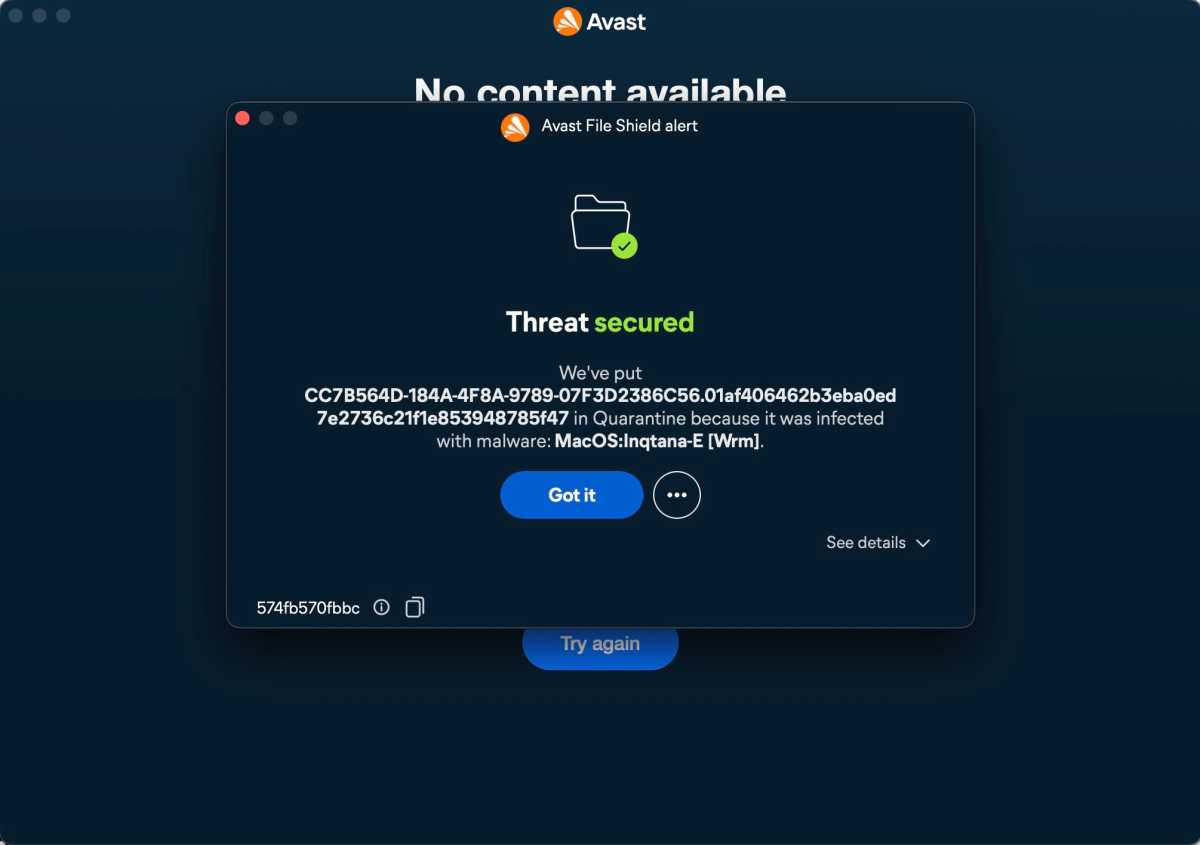
Avast One isolating an Inqtana malware sample during routine use
.
Foundry
Avast One proved highly reliable during testing, detecting more than 98% of malware samples while producing no stability issues or noticeable slowdowns. Although it occasionally struggled to remove specific threats and missed several installer files, these were relatively minor issues that didn’t undermine its consistently strong malware and phishing protection.
Performance
Despite everything Avast One works to do, it still runs briskly, offers top-notch scan speeds, runs well in the background, and there’s really nothing that makes it crash or lag. It played nicely with macOS Tahoe 26.5.1, and although it added some baggage to the system load, there was nothing that weighed my Mac down during the testing process.
What could be better?
Despite its impressive protection, Avast One isn’t without its frustrations. Several usability issues and its fragmented subscription model stop it from being an easy five-star recommendation.
- Window can’t be resized
- Weak AI Assistant
- Minor malware detection gaps
- Fragmented subscriptions
- Limited browser support
For some, window resizing is an aesthetic; for others, it’s a crucial testament to how screen real estate is used. The fact that you can only minimize Avast One’s windows to the Dock and not resize them feels as if Avast is shooting itself in the foot, especially since the user decides the window size and what it occupies.
Avast’s AI Assistant seems limited to a few very basic questions, and there were occasional detection gaps for some malware installers among the 130+ samples tried.
Independent lab results
AV-Test (March 2026)
- Overall score: 18/18
- Protection: 6/6
- Performance: 6/6
- Usability: 6/6
AV-Comparatives (2026 Mac Test)
Avast One Free for Mac received:
- Approved certification
- Passed malware protection
- Passed false positive testing
- Passed performance testing
How we tested
We tested Avast One on macOS Tahoe 26.5.1 using more than 130 real-world Mac malware samples from the Objective-See archive. Testing focused on malware detection, phishing protection, system performance, usability and overall impact on day-to-day Mac use. Where available, our results were compared against independent testing from AV-Test and AV-Comparatives.
Avast One pricing
Avast’s pricing is more complicated than most rivals because the Avast One platform is available with several subscription tiers. Premium Security includes the core protection features tested here, while Ultimate adds SecureLine VPN, Cleanup Premium and AntiTrack. Several optional services, such as BreachGuard, remain separate subscriptions.
| Plan | Devices | What’s included | What’s missing | First year | Renewal |
|---|---|---|---|---|---|
| Premium Security (1 Mac + 1 mobile) | 1 Mac + 1 iPhone / Android | Antivirus, ransomware protection, firewall, Web Guard, Email Guard, scam protection, AI Assistant | VPN, Cleanup Premium, AntiTrack, identity services | $49.99 | $84.99 |
| Premium Security (10 devices) | Up to 10 devices | Same features across Mac, Windows, iPhone, Android | VPN, Cleanup Premium, AntiTrack, BreachGuard | $69.99 | $84.99 |
| Avast Ultimate (10 devices) | Up to 10 devices | Premium Security plus SecureLine VPN, Cleanup Premium and AntiTrack | BreachGuard/identity monitoring still separate in some regions | $69.99 | $139.99 |
Which plan should you buy?
| Plan | Best for | Includes |
|---|---|---|
| Free | Basic protection | Antivirus, Smart Scan |
| Premium Security | Most users | Core security suite |
| Ultimate | Privacy enthusiasts | Premium + VPN + Cleanup + AntiTrack |
Premium Security: For most Mac users, Premium Security provides everything they need: excellent malware detection, outstanding phishing protection, a capable firewall, Email Guard, Web Guard and real-time protection. Since the review found the core security features to be Avast’s greatest strengths, most people are unlikely to miss the optional privacy and performance extras.
Ultimate: Only if you’ll actually use the extras. Ultimate adds SecureLine VPN, Cleanup Premium and AntiTrack, but your review suggests the cleanup tools are fragmented behind additional subscriptions and the VPN, while good, isn’t market-leading. If you specifically want an integrated VPN and privacy suite, Ultimate offers reasonable value; otherwise Premium Security is the more sensible purchase.
Best value: Premium Security (10-device plan) offers the best overall value. It delivers the same excellent malware, phishing and network protection that impressed throughout your testing without paying for extras many Mac users won’t need. Ultimate is worthwhile for households wanting VPN, AntiTrack and Cleanup Premium, but Premium Security strikes the best balance between price and protection.
Should You Buy Avast One?
Avast One is one of the strongest Mac security suites currently available, combining excellent malware detection, outstanding phishing protection and minimal performance impact. While the subscription structure remains confusing and some extras feel overpriced, the core protection is first class. For most users, Premium Security offers the best balance of features and value, making Avast One an easy recommendation for anyone looking for comprehensive Mac protection.


