At a glance
Expert’s Rating
Pros
- Surprisingly light for its (16-inch) size
- Top of the line office and CPU performance
- Excellent battery life, even under load
- Wonderful multimedia experience
Cons
- Two review units arrived with issues
- Gaming performance disappointed
- Expensive
Our Verdict
A solid productivity laptop, with top-notch office performance, an outstanding multimedia experience, and excellent battery life.
Price When Reviewed
This value will show the geolocated pricing text for product undefined
Best Pricing Today
Price When Reviewed
$1,699.99
Best Prices Today: Asus Zenbook A16 UX3607O
There’s a lot to love in the Asus Zenbook A16. It boasts strong CPU performance, excellent battery life, and an absolutely top-notch multimedia experience. The 16-inch frame is surprisingly lightweight, too.
There is, however, a caveat: I received two flawed review units, one of which forced a replacement, while the other was a minor blemish that didn’t affect its key strengths.
As a productivity machine, this laptop gets a lot right. But spending over $2,000 is still a significant investment, especially with Qualcomm positioning its Snapdragon X2 Elite Extreme chip as capable of handling the latest games. That wasn’t my experience, and Intel’s competing “Panther Lake” laptops have since carved out a stronger position for graphics performance. This is a strong productivity laptop with a lot to like, but its quality issues and premium price prevent it from being a true standout.
Asus Zenbook A16: Options
At press time, the Asus Zenbook A16 was only available from Best Buy with the option of either 512GB or a full terabyte of SSD storage. Weirdly, Best Buy’s 1TB configuration is priced at $1,699, while the 512GB configuration is priced at $1,899. Asus also offers a more powerful configuration (the UX3607OA-XS99 for $2,199.99) with the premium Snapdragon X2 Elite Extreme X2E96100 processor.
This review is a composite of two different laptops. My first review unit survived an early run of battery-life testing to generate a streaming score, but then failed to hold a charge thereafter. Asus sent a second unit over, which otherwise worked almost perfectly. I spot-checked some of the results I had compiled with the first laptop using the second laptop. The only substantive difference I noticed was in the display brightness, which changed from 434 nits to 460 nits — worth mentioning, but not particularly significant.
Mark Hachman / Foundry
Asus Zenbook A16: Configuration
- Model number: UX3607O
- CPU: Qualcomm Snapdragon X2 Elite Extreme X2E96100
- Memory: 48GB DLPDDR5X
- Graphics/GPU: Qualcomm Adreno X2-90
- NPU: Yes, 80 TOPS
- Display: 16-inch 2880×1800 OLED 120Hz, 500 nits rated
- Storage: 512GB PCIe 4.0 solid state drive
- Webcam and microphone: 1080p webcam with IR camera, array microphone
- Connectivity: HDMI 2.1, 2 USB4 (40Gbps), 1 10Gbps USB-A, audio jack
- Networking: Wi-Fi 7, Bluetooth 5.4
- Biometrics: Windows Hello facial recognition
- Audio: Six-speaker system
- Battery capacity: 50 watt-hours
- Dimensions: 13.52 x 9.43 x 0.74 inches
- Weight: 2.65 pounds
- Operating system: Windows 11 Home
- Price: $2,199.99 MSRP as configured
- Warranty: One year (manufacturer warranty) plus one-year accidental protection if registered
Asus Zenbook A16: Design, build quality
Asus ships this laptop in a single “Zabriskie Beige” colorway, named after an iconic vista in Death Valley, California. Perhaps I spent too much time living in the Arizona desert, but the beige doesn’t resonate with me at all and the reference to Christian Brevoort Zabriskie, of Borax fame, didn’t either. There was a time during which the industry all settled on beige boxes, and I don’t need to return to that time.
Otherwise, Asus built this laptop out of “ceraluminum,” which Asus says provides a soft finish that feels warm and smooth to the touch. That might be true, but it still feels like plastic, though it’s rated for MIL-STD 810H conditions as well.
There’s a bit of give in the center of the keyboard, but otherwise this laptop feels strong and structurally sound. The display reclines past 45 degrees, but not flat, with a stiff hinge that defies wobbling.
Mark Hachman / Foundry
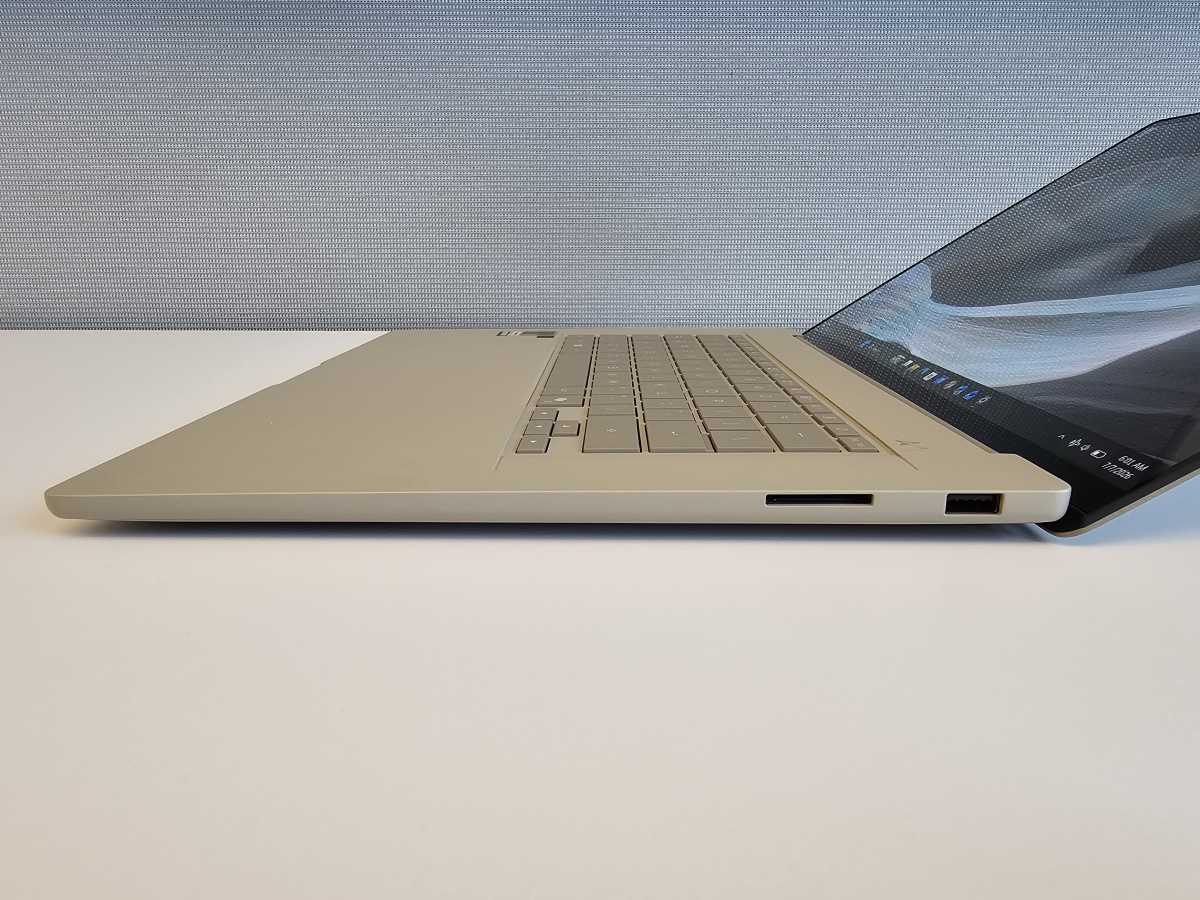
Aesthetically, I don’t love this laptop. Functionally, it’s a different story. When viewed from the side, this laptop is only 0.65 inches thick, with not a whole lot of extra space on either side of the chassis. At 2.87 pounds, the Zenbook A16 might not be the lightest laptop ever, but still, consider the size– it’s a 16-incher! All in all, you’re getting quite a lot of performance packed inside a large, light laptop that slips easily into your bag.
The Asus Zenbook A16 ships with a pair of USB 4.0 Gen 3 USB-C ports on the left-hand side; these are functionally equivalent to Thunderbolt 4, but without the Intel branding and certification. There’s also a USB-A port, HDMI 2.1 port, an SD card reader, and a 3.5mm audio jack. Asus could have used the extra space to either side of the keyboard for speakers. Instead, they’re downward facing and mounted under the keyboard tray.
There’s only a single M.2 2280 PCI 4 slot for storage, which is occupied by the built-in SSD.
Mark Hachman / Foundry
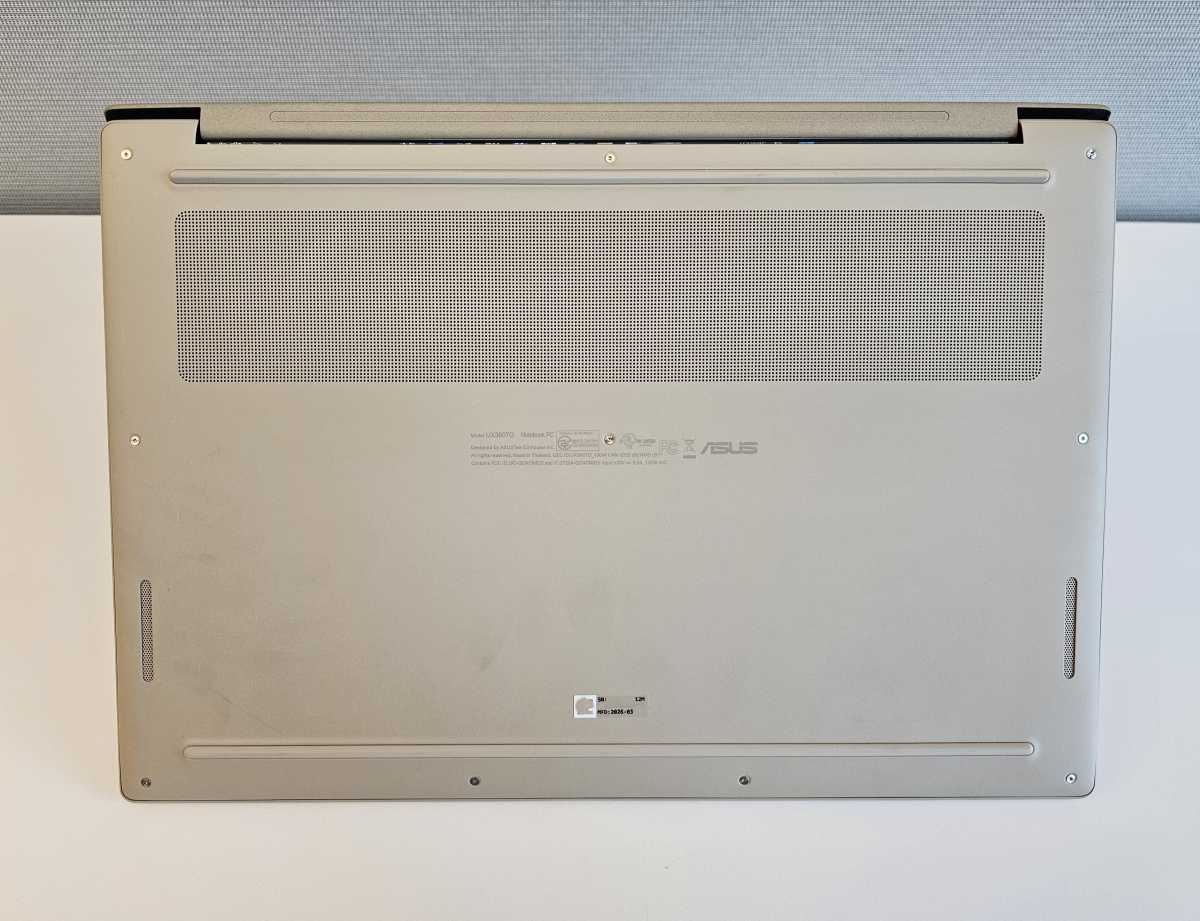
The laptop’s venting is standard: air is sucked in from a grille on the bottom of the device, then pushed out vents mounted inside the hinge. Even though Qualcomm designed the laptop’s Snapdragon Elite X2 Extreme processor to run at full speed on wall and battery power, the fan noise is quiet and unobtrusive at default levels.
Asus Zenbook A16: Display, audio
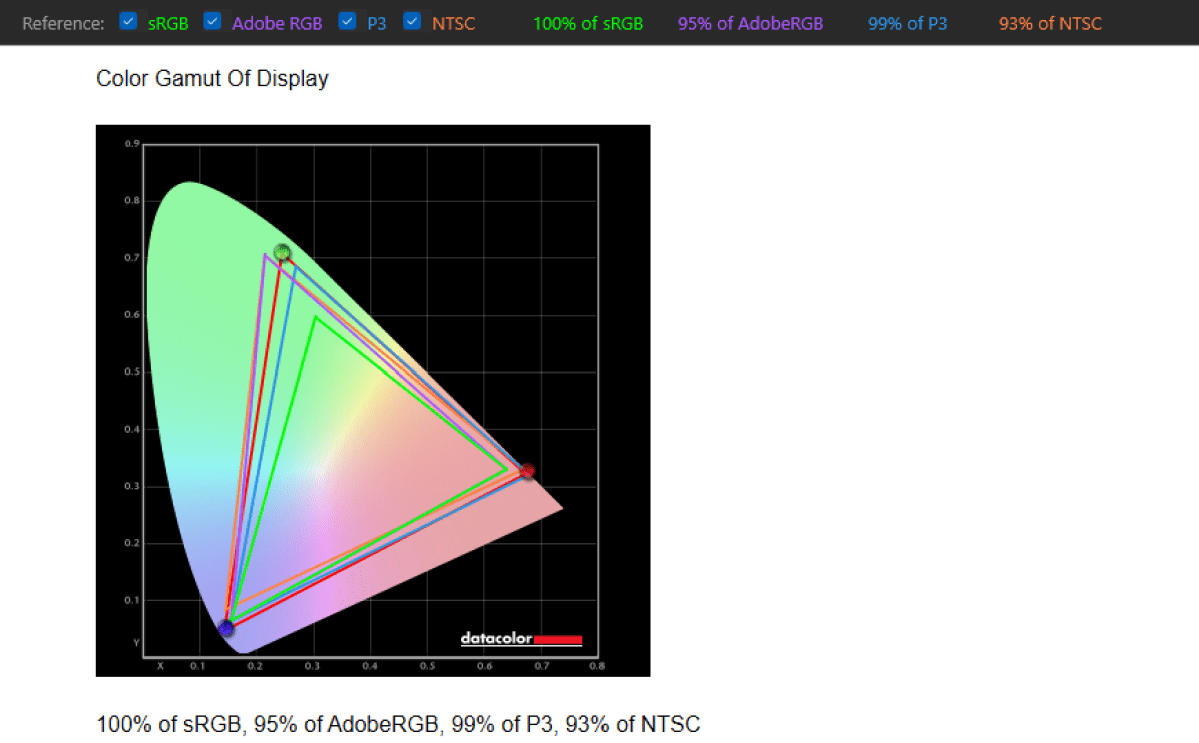
The Zenbook A16’s display is characterized as “3K,” a 2800×1800 OLED with a 16:10 aspect ratio. Visually, the display is rated with VESA’s VESA CERTIFIED Display HDR True Black 1000 rating, with 1,100 nits of peak HDR brightness. As noted above, my light meter put the display output at a maximum of 430 nits (460 nits on the replacement laptop), slightly less than the rated 500 nits. We use 250 to 260 nits as a comfortable light level for indoor use.
The display is not touch enabled, which is something I always like to see inside of a productivity laptop. But the Zenbook A16’s display is otherwise bright and relatively color-accurate.
Mark Hachman / Foundry
I also like the inclusion of variable refresh rate support, which can be set to either a fixed 120Hz refresh rate or allowed to wander dynamically between 120Hz and 30Hz. The former allows for smooth scrolling and mousing across the screen, shifting to 30Hz allows the laptop to reduce power when displaying a static image like a Word document. (That might not be as readily apparent in our tests, which use video running at a fixed rate as well as a more power-intensive office-like workload.)
Still, all that undersells the multimedia experience. OLED screens are fantastic, and I’m a fan of the “perfect” blacks that an OLED display projects. But the audio (Asus just calls it a “built-in speaker”) is fantastic, with terrific sound whether or not you have the volume dialed down or at its peak. Normally, at the high end, the audio degrades into a muddy mess, but not here.
Asus also has a “volume booster” control as part of the MyAsus app, but that’s not necessary. I should note that I manually used the MyAsus app to tune the audio to its “Music” setting, rather than the default Dynamic setting, which sounds almost as good.
I’m tempted to say that this laptop’s audio is as good as a portable Bluetooth speaker, but those tend to have a chamber that can produce deep, resonant bass. This laptop can’t quite achieve that, but it comes close.
On other Asus laptops powered by Intel chips, the MyAsus app also comes with additional options to tune the microphones to zero in on your voice and eliminate background sounds. This Snapdragon laptop lacks those additional features, but performs absolutely perfectly. You may hate AI, but being able to speak at a normal volume with a rock song blaring behind you is a cool kind of magic.
Asus Zenbook A16: Keyboard, trackpad
Keyboards are a subjective experience, and I’ve always ranked Asus keyboards somewhat below their competitors. The Asus Zenbook A16 includes a backlit chiclet keyboard with 1.3mm of key travel, which is about on par for most laptops. (Some people prefer a short, responsive keystroke, while I prefer a longer, more deliberate key travel, which was more typical years ago. Some business-class laptops push into the 1.4-1.5mm range.)
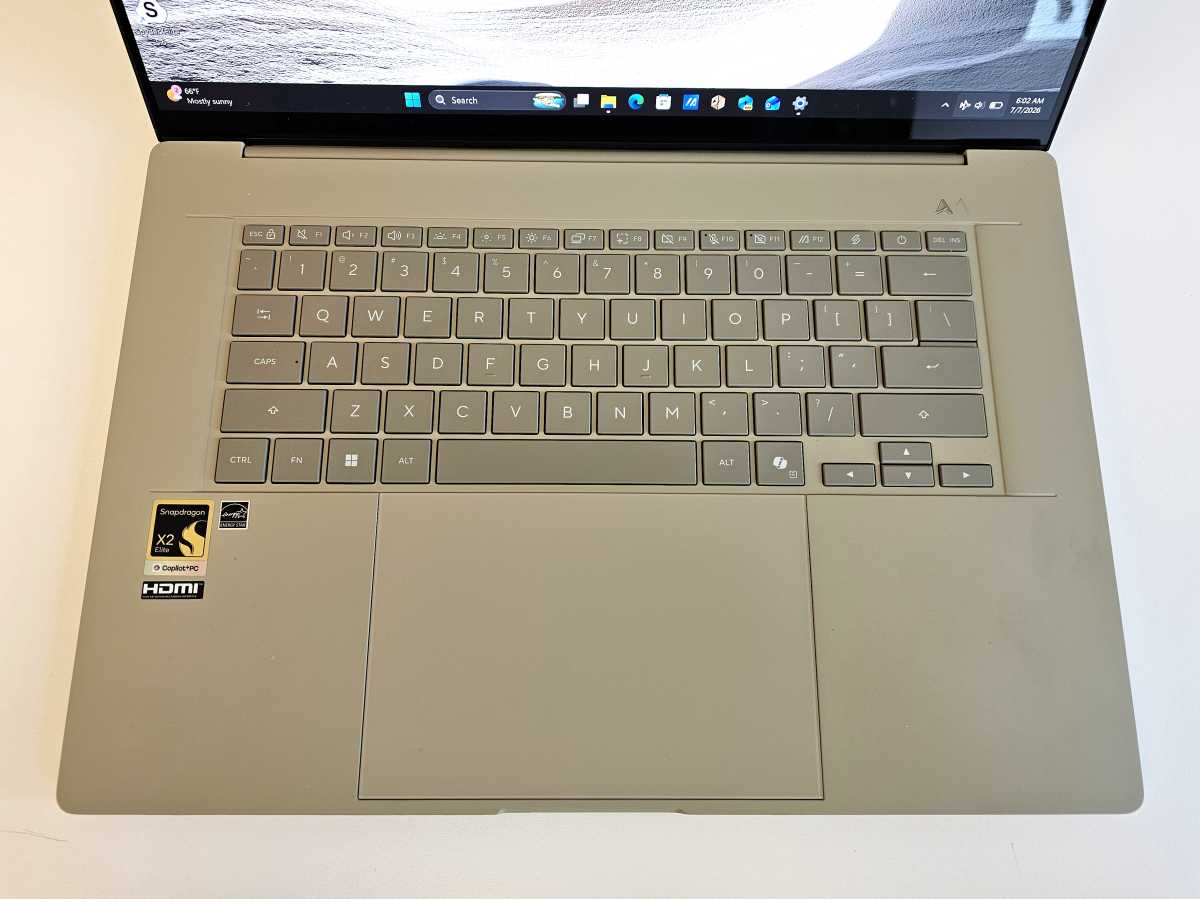
Asus modifies the top row of its keyboard to support some proprietary functions, which is a mixed bag. I like the dedicated “print screen” (or Screen Snip) key, which allows for easy screenshot grabs, and there are dedicated buttons for the touchpad, mic, and camera. (This laptop has no physical camera shutter.) Finally, there are dedicated keys for launching the handy MyAsus utility app, and the far less useful Asus ScreenShare app, which requires some hunting to actually banish.
Mark Hachman / Foundry
For a 16-inch laptop, however, some may be surprised at the lack of a dedicated 10-key keypad.
Asus includes a standard, large trackpad that covers a wide swath of the available space underneath the keyboard. It uses the traditional hinge method, which means that it’s clickable up to the top fourth or so of the trackpad. There are no haptics or force feedback, but the trackpad is perfectly functional otherwise.
Asus Zenbook A16: Webcam
I walked away rather impressed by the Zenbook’s webcam, whose 1080p resolution produced a very good, realistic image under normal, late afternoon natural light. By now, of course, that’s fairly standard, but still.

Mark Hachman / Foundry
About the only flaw here is the lack of a dedicated physical webcam shutter. Instead, you can disable the webcam and the mic from the top row of function keys. I also didn’t notice any webcam-specific features within the included MyAsus app, though that’s not a criticism.
I think you can certainly get away with not needing an external webcam with this laptop, however.
Asus Zenbook A16: Performance
The Asus Zenbook A16 and its Qualcomm Snapdragon X2 Elite Extreme processor continue to deliver about the same performance on battery life as they do while on wall power — not exactly, but pretty close. Since the original X1 Extreme launched with those same characteristics, we’ve seen Intel’s processors begin to follow suit, most recently in the Core Series 3 processor (Wildcat Lake) found within the Lenovo IdeaPad Slim 3i laptop.
As our results will show, the Asus Zenbook A16 and the X2EE chip inside of it are the foundation for a terrific productivity machine, though it doesn’t quite push into the gaming realm. Part of that might have had to do with a driver issue (explained below), but also, the landscape has changed — Intel’s X7 and X9 series of “Panther Lake” chips really add graphics prowess that other chips can’t keep up with. Nevertheless, this laptop nails the productivity basics. Strong CPU performance on wall and battery power, and long battery life.
Some still have lingering concerns about application compatibility. In this case, about the only issue here is in one of our benchmarks, PCMark 10. Otherwise, those issues have been largely solved, with games being the exception. For games, your odds are good but not guaranteed. Running well, though, is another story.
Mark Hachman / Foundry
As noted above, the fan noise is very quiet. That doesn’t mean that there isn’t some thermal throttling, however, when the laptop dials down the clock speed to prevent overheating. I was a little surprised to see performance drop by 18 percent over a prolonged CPU test. However, there was no issue with prolonged GPU use.
Like the first-generation Snapdragons, battery life can also take a huge hit when under steep workloads. The laptop chewed through our Handbrake CPU test on wall power just fine, averaging about 20 minutes or so per run. On battery, beginning with about 80 percent battery, the laptop completed one run perfectly well, but slowed dramatically as it neared the end of the second and couldn’t complete a third. I test battery life in multiple ways already, which I’ll explain below.
The laptop’s Arm processor means that we always have to do a bit of tap-dancing between apps for compatibility’s sake. I’ll first compare the Asus Zenbook A16 first as its own device, but add a bit of context with some other tests as well. That’s the case for the Procyon Office test, below.
Otherwise, I compared the Asus Zenbook A16 to several 16-inch laptops as well as a single 14-inch and 15-inch model. (Many of today’s 16-inch laptops would have been 15-inch laptops a few years ago, albeit with a thicker bezel.)
I chose the $1,139 HP OmniBook 3, with a first-generation Snapdragon X1 chip inside. I added the $2,349 Dell XPS 16 (2026) and the $1,799 Acer Swift 16 AI, both of which use Intel’s “Panther Lake” mobile processors with their powerful integrated graphics. The $3,997 Lenovo ThinkPad P16V Gen 3 mobile workstation includes Intel’s “Arrow Lake” mobile processor, while the $1,099 Acer Aspire 16 AI drops down to the older “Lunar Lake” processor at an aggressive price.
The 14-inch $1,479 Asus ExpertBook P3 adds an award-winning AMD Ryzen AI 300 chip to the mix, while the $899 15-inch Lenovo IdeaPad 5a 2-in-1 adds a member of AMD’s most recent Ryzen AI 400 family.
From a performance standpoint, the Qualcomm Snapdragon X2 Elite Extreme chip at the heart of this laptop has a killer strength: multithreaded CPU performance. Applications designed to take advantage of the Snapdragon X2 Elite Extreme architecture can see significant benefits. Gaming laptops offer higher performance, but when it comes to productivity laptops, Snapdragon chips deliver impressive results. Gaming laptops generally manage battery life measured in only a few hours, while this laptop can keep going for far longer.
The X2E-96-100 chip uses a 3nm manufacturing process and includes a total of 18 cores.
Mark Hachman / Foundry
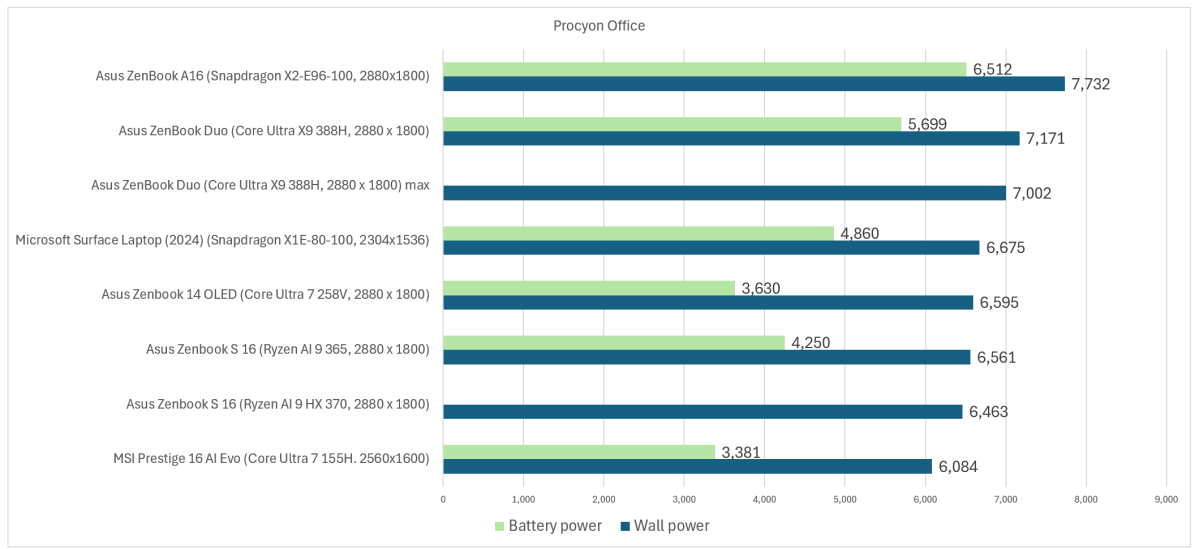
Our first test demonstrates this laptop’s strength: basically, it’s the best at office work in a number of historical laptops we’ve tested. We normally use the PCMark 10 test to run here, but that test is incompatible with Arm. Instead, I tested a number of representative laptops using Procyon’s Office test, which literally tests the laptop on how well it uses Microsoft’s Office applications.
I’d expect most of the laptops to perform well here. Nevertheless, it’s a strong endorsement if you’re on the hunt for a productivity laptop.
Mark Hachman / Foundry
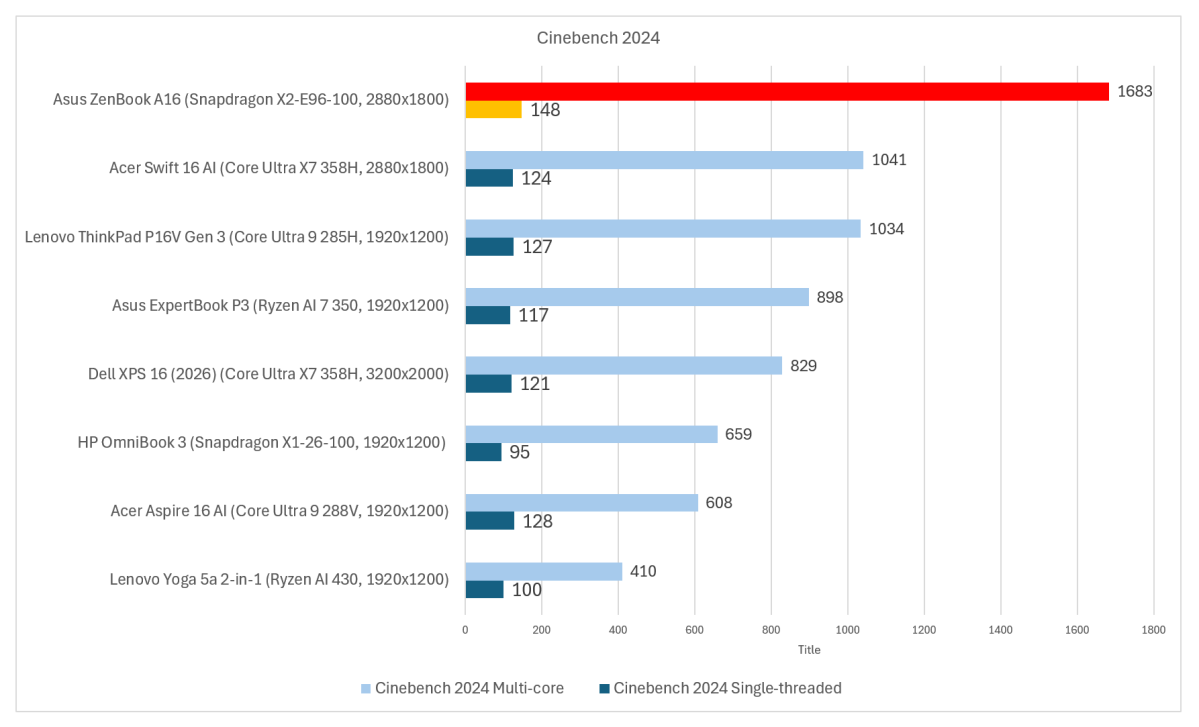
Cinebench is an alternative benchmark, showing how the laptop should work on other CPU-centric tests.
It’s also worth noting that this chip’s single-core performance is about 148 on the Cinebench 2024 benchmark, about on par with Apple’s older M3 silicon and close to its M4 chips. I view single-core CPU performance as an indicator of how snappy a laptop runs the operating system, and that was generally borne out by my testing as well. (Intel’s Core Ultra X9 388H Panther Lake chip, which excels in gaming, reported a single-core score of 130.)
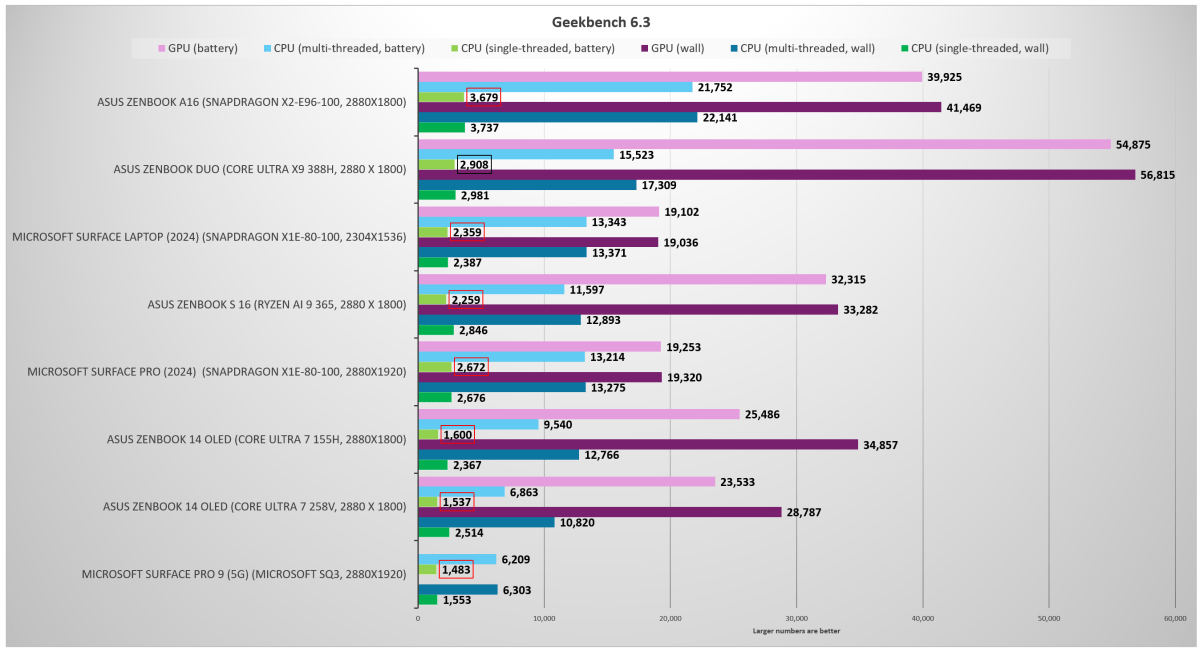
I also pulled a graphic from an earlier review, adding the Snapdragon X2 Elite Extreme data. There’s a lot of information here, but look for the differences between performance on battery and wall power. This is specific to the Geekbench cross-platform benchmark, a popular choice for showing CPU performance. The Asus laptop we’re testing here is right at the top of the list.
Mark Hachman / Foundry
Note that Windows uses a “Prism” emulator within Windows. If the application isn’t specifically written for the Arm chip, Windows can translate the instructions into those the chip can use. While this does reduce performance for non-native apps, the CPU performance helps offset this.
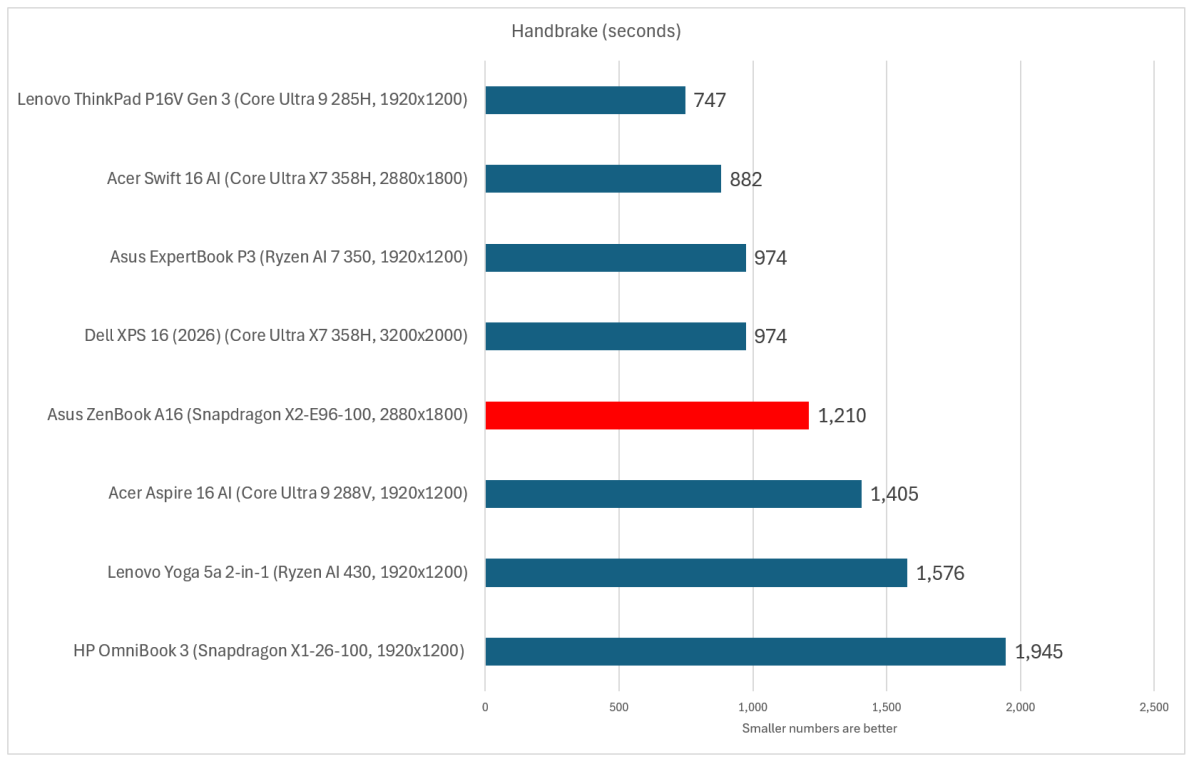
This matters in our Handbrake test, which transcodes a Hollywood movie into a different format: a prolonged CPU test. We do not use an Arm-specific app here, though there are new, modern Arm-compatible tests. Here, we use a version of Handbrake (0.99) from a few years ago for consistency’s sake.
Mark Hachman / Foundry
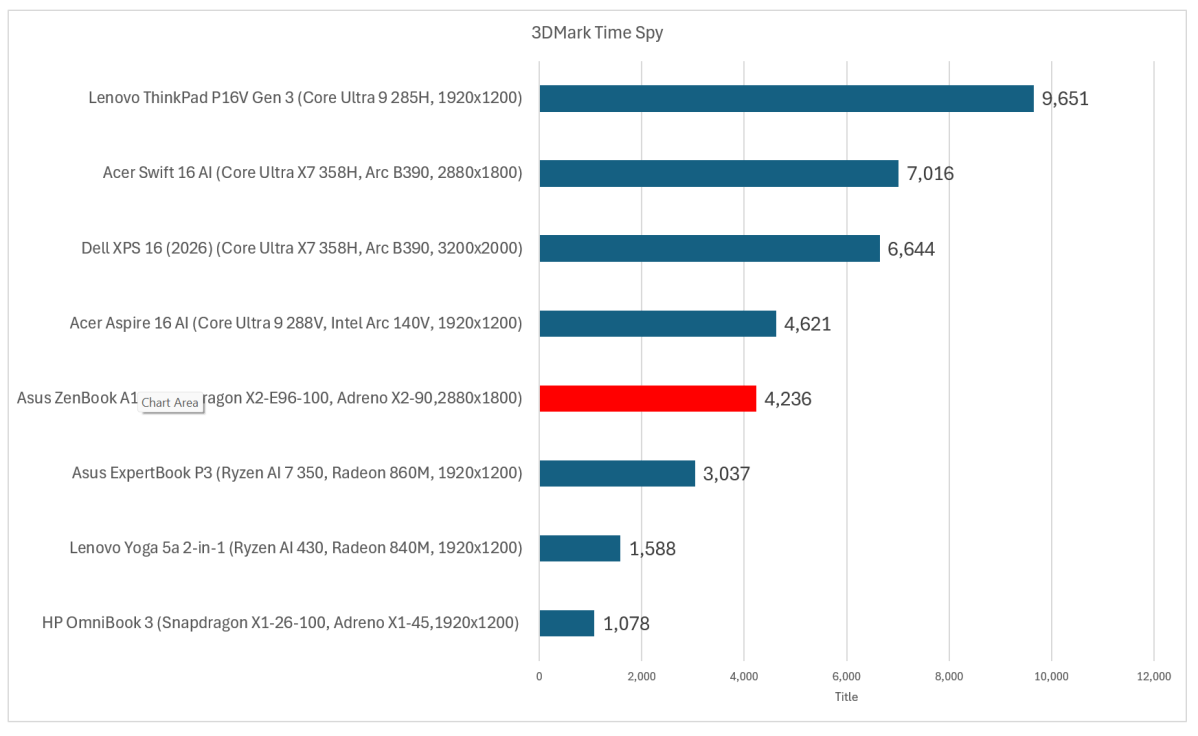
The 3DMark Time Spy benchmark that we use to show off graphics performance wasn’t specifically designed for Arm, either, though the tests were run on the laptop with the proper graphics driver.
This graphic shows that the latest Snapdragon chip actually performs quite well against earlier Snapdragon chips and the Arm Ryzen lineup we’ve tested. Intel has prioritized GPU performance, and that’s paid off. The Lenovo ThinkPad is in a separate category because it includes an Nvidia RTX Pro 2000 discrete GPU.
Mark Hachman / Foundry
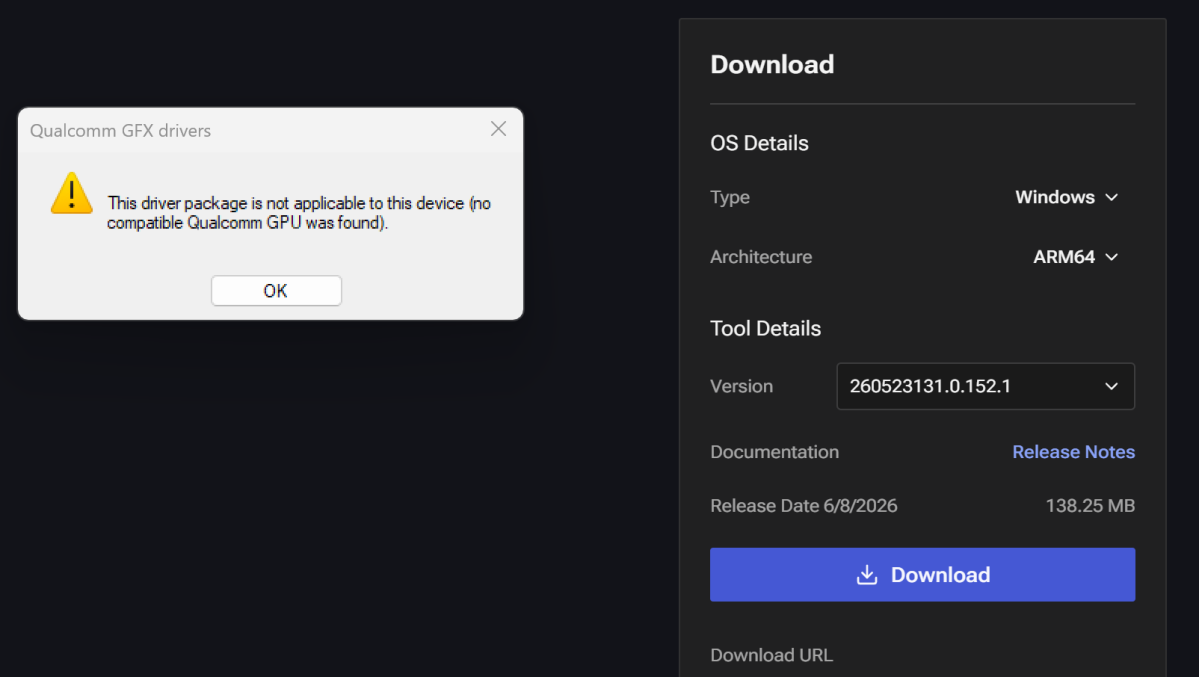
Graphically, our review unit had an issue under the hood. Nowhere during my testing did the laptop refuse to run an application or to do so with obvious glitches. However, when testing Cyberpunk: 2077, I noticed that the game reported the graphics driver as a generic one. When I tried to update the driver using Qualcomm’s Adreno GPU driver package, the software reported that it couldn’t find a Qualcomm GPU, which was obviously not the case. It also reported the lack of a display driver when opening Shadow of the Tomb Raider.
Still, I later downloaded Qualcomm’s Snapdragon Control Panel, which confirmed that I actually had the latest Adreno graphics driver (32.0.149.0, released Feb. 6).
That didn’t appear to affect gameplay from a compatibility standpoint. The laptop reported frame rates of 54 fps while playing Cyberpunk: 2077 at 1080p (Low settings enabled), almost at the 60 fps level most gamers consider playable. At 1080p Ultra settings, Shadow of the Tomb Raider produced frame rates of 38 fps.
After downloading the Snapdragon Control Panel, I checked again: the same 38 fps for Shadow, but frame rates climbed moderately to 62 fps while running Cyberpunk: 2077 at Low settings.
Mark Hachman / Foundry
But XDA Developers, for example, reported frame rates of 62 frames per second when running Cyberpunk in Steam Deck mode. My system reported 42 fps in the same configuration. After downloading the Snapdragon Control Panel, I rechecked: 62 fps, albeit just after boot on a cold system.
I also downloaded and ran LM Studio to test this laptop’s AI capabilities via an LLM or AI chatbot. Though I downloaded the Arm version, the app didn’t detect the GPU for offloading computational data, and it threw an error message that prevented the model from running. AI performance seems to have less emphasis these days, but this is where the humongous 48GB of soldered RAM comes into play, allowing larger AI models to be loaded. Theoretically, at least.
I chose not to pursue the matter any further. I have to review the laptop that I received, not what it might be capable of under ideal conditions.
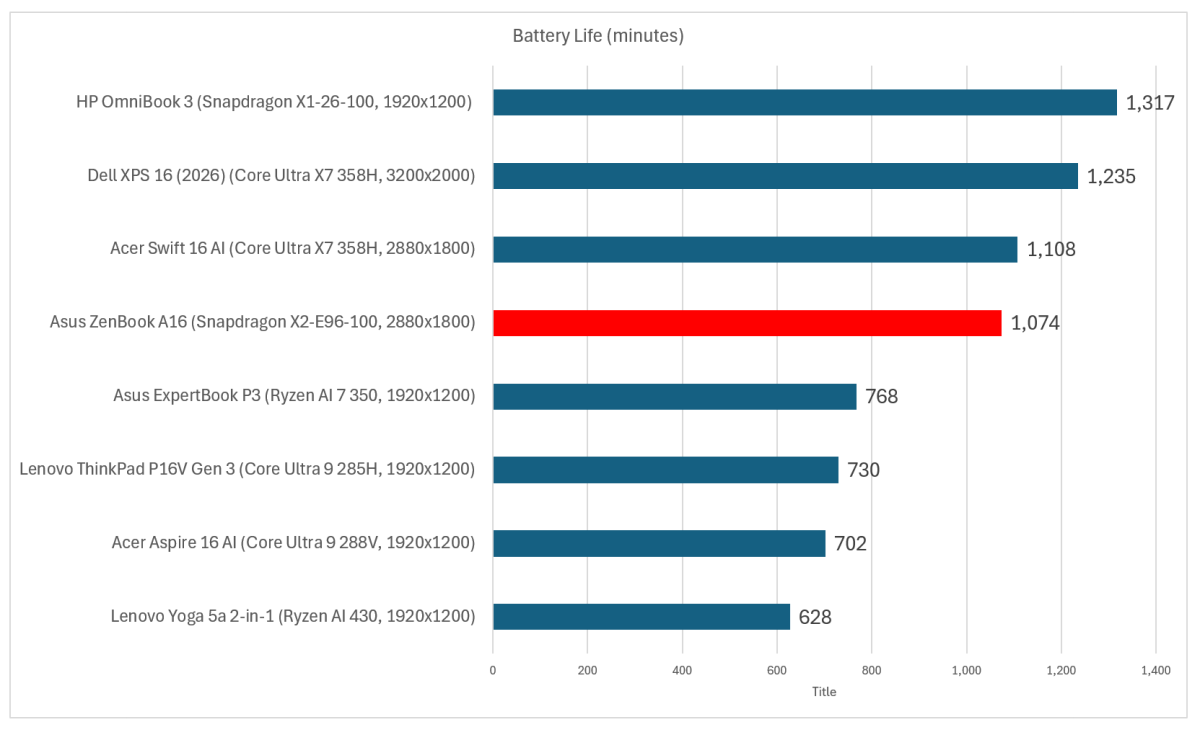
Finally, we come to battery life. This is where a Snapdragon laptop typically excels. Thankfully, this one does! Even with a modest 50Wh battery.
Mark Hachman / Foundry
All told, the Asus Zenbook A16 delivered almost 18 hours of battery life, which is fantastic for a laptop.
However, battery life is governed by what you’re asking the laptop to do. Gaming laptops last for a few hours, if you’re lucky, under full load. Our video test loops a 4K video over and over until the battery expires. Under different workloads, the battery life varies substantially. For example, while streaming Netflix, the laptop’s battery lasted about 13 hours. While performing a standardized office benchmark (which calculates Excel spreadsheets, formats Word documents, and more), the available battery shrank to about eight hours and five minutes. That’s more of a real-world battery test, which measures what I’d expect you’d be doing with this laptop: work and stream.
Should you buy the Asus Zenbook A16?
As a productivity laptop, sure. But is it the best option in its class? I’m less sure of that. On paper, the Acer Swift 16 AI outperforms it in price, performance, and battery life, with a similar display. I think characterizing the Swift 16 AI as an Editor’s Choice in this category is still the right move.
I also have to note that both laptops I received from Asus had their own issues. I’ve tested a number of Asus laptops and these are the first that gave me problems. While those issues are disappointing, they don’t erase the things this laptop does well. I was especially impressed by its multimedia performance, battery life under lighter workloads, and its remarkably light design.
Ultimately, the Zenbook A16 doesn’t quite reach the level needed for an Editor’s Choice award. However, there’s still a lot to like here, especially if you prioritize portability and battery life.


