At a glance
Expert’s Rating
Pros
- Low cost per TB compared to SSDs
- Type-C connectivity
- Good looking and very portable
Cons
- Slow compared to SSDs and 3.5-inch HDDs
Our Verdict
If you’re looking for a more affordable alternative to USB SSDs, the One Touch Portable provides lots of capacity for a lot less money in a still relatively portable profile. It’s also the fastest of its ilk that I’ve tested.
Price When Reviewed
This value will show the geolocated pricing text for product undefined
Best Pricing Today
Price When Reviewed
2TB: $158 I 4TB: $208
Best Prices Today: Seagate One Touch Portable
Seagate has expanded its One Touch line to include 2.5-inch hard drive models such as the One Touch Portable reviewed here. In short, there’s nothing revolutionary about the One Touch Portable, but it’s the fastest such beastie I’ve tested. It’s simply a very capable, attractive, and portable USB hard drive that will set you back a lot less per TB than a similar capacity USB SSD. A lot less.
What are the One Touch Portable’s features?
The One Touch Portable carries forth the sculpted, wavy styling of its 3.5-inch sibling and offers the same Type-C connectivity. It’s available in gray, ivory, and dark blue, at 2TB or 4TB capacities.
The drive measures approximately 4.65-inches long, by 3.15-inches wide, and 0.5-inches thick. Weight is a mere 4.6 ounces. Yup, portable. A Type-C to Type-C cable is included with the drive.
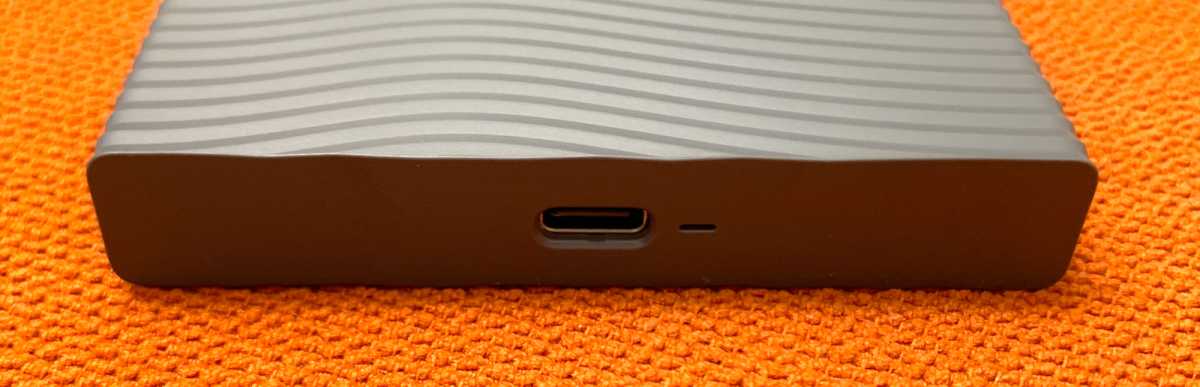
Seagate was specific about the flavor of USB involved, but it really doesn’t make any difference whether it’s 5Gbps or 10Gbps as both offer far more bandwidth than any hard drive can use.
The company’s Toolkit software is included and provides diagnostic and backup capabilities.
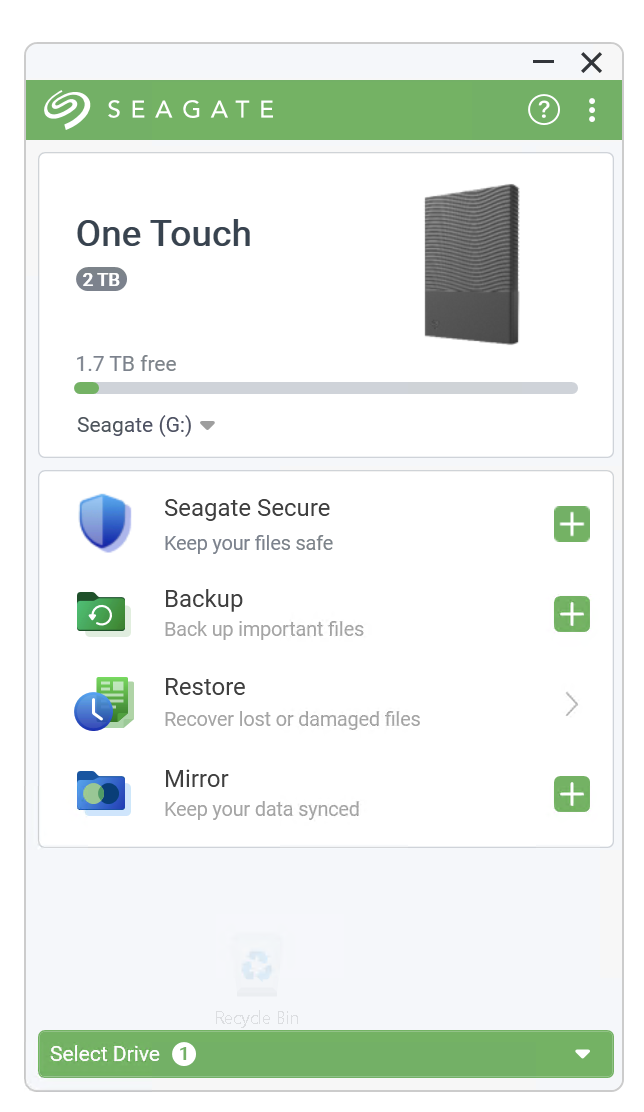
Seagate warranties the drive for two years with data recovery (where available?) for the same period. Why not three or five years? It is a hard drive with spinning platters and a mechanical read/write head moving about, after all. It’s also portable and likely to encounter at least moderately rougher handling than a desktop hard drive.
How much is the One Touch Portable?
The One Touch Portable is $158 in its 2TB capacity, and $208 for 4TB. That’s about half the current SSD price per terabyte, though quite a bit more than 2.5-inch drives were going for just a couple of years ago. The price per terabyte is also greater than 3.5-inch hard drives such as Seagate’s Expansion Desktop, One Touch USB, and X Vault, but not ridiculously so.
Note that after a slight dip in August 2026, SSD prices again soared in September. This surprised me just a tad, but if you need capacity, hard drives are by far the more affordable option at the moment and likely to remain so for the immediate future.
How fast is the One Touch Portable?
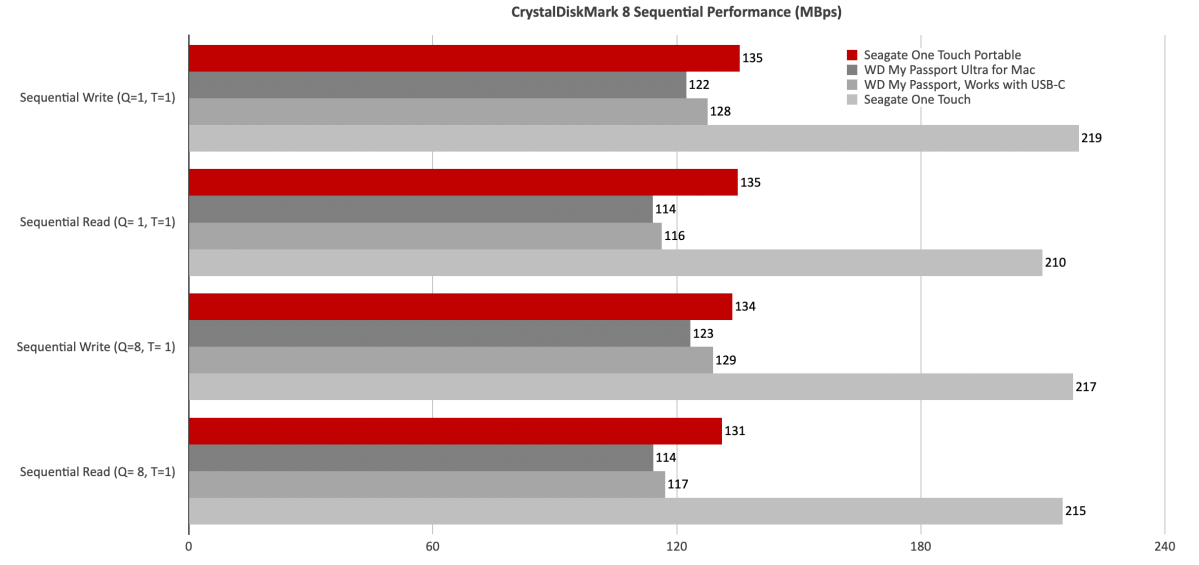
For a 2.5-inch USB hard drive, the One Touch Portable is actually quite fast — a couple MBps faster than the other 2.5-inch drives I’ve tested. It’s not for moving vast amounts of data in a hurry, but it’s more than adequate for unattended backup, streaming media, and other tasks.
Note that streaming even high-resolution movies doesn’t require nearly as much bandwidth as some people might think. Less than 50MBps generally speaking.
I included the 3.5-inch Seagate One Touch along with the WD My Passport, Works with USB-C and WD My Passport Ultra for Mac (yes, those are actually the names) just to show you how much faster the larger drive is.
As for the 2.5-inch competition, the One Touch Portable easily motored past the older WD My Passport drives in all our tests, including CrystalDiskMark 8 (shown below). The 4K tests are not included because the performance in those is generally only a MB or two per second and the chart looks a bit ridiculous.
If you need capacity, hard drives are by far the more affordable option at the moment and likely to remain so for the immediate future.
The One Touch Portable also banged on the competition in our 48GB transfers.
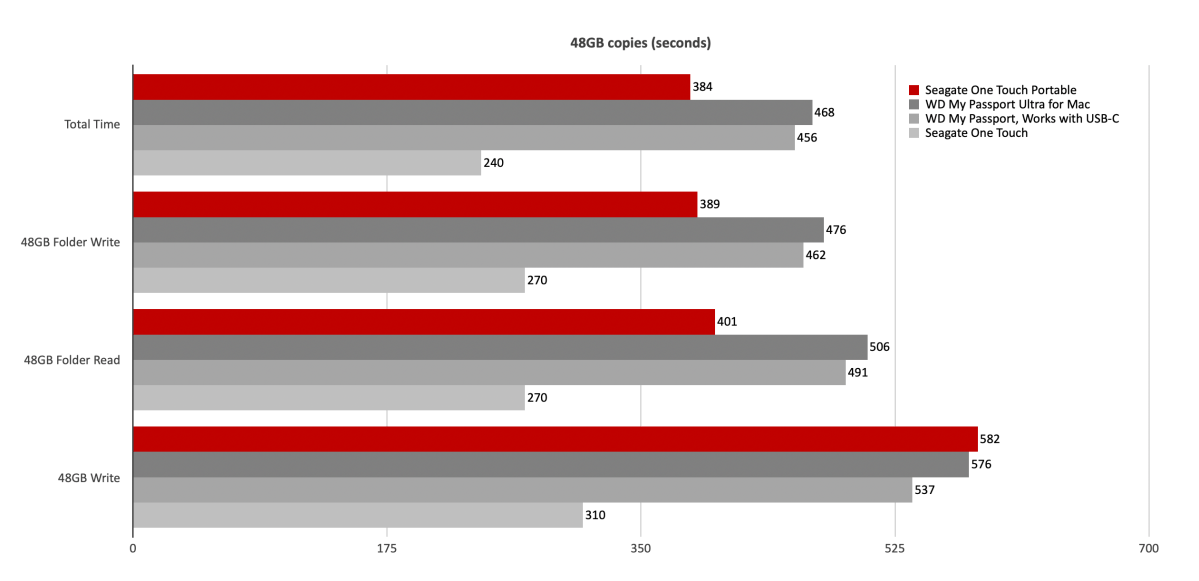
Shaving nearly 13 minutes off the 2.5-inch competition is no mean feat for the One Touch Portable. Here again, however, you can see the speed advantage of a 3.5-inch hard drive, which lopped off another 23 minutes.
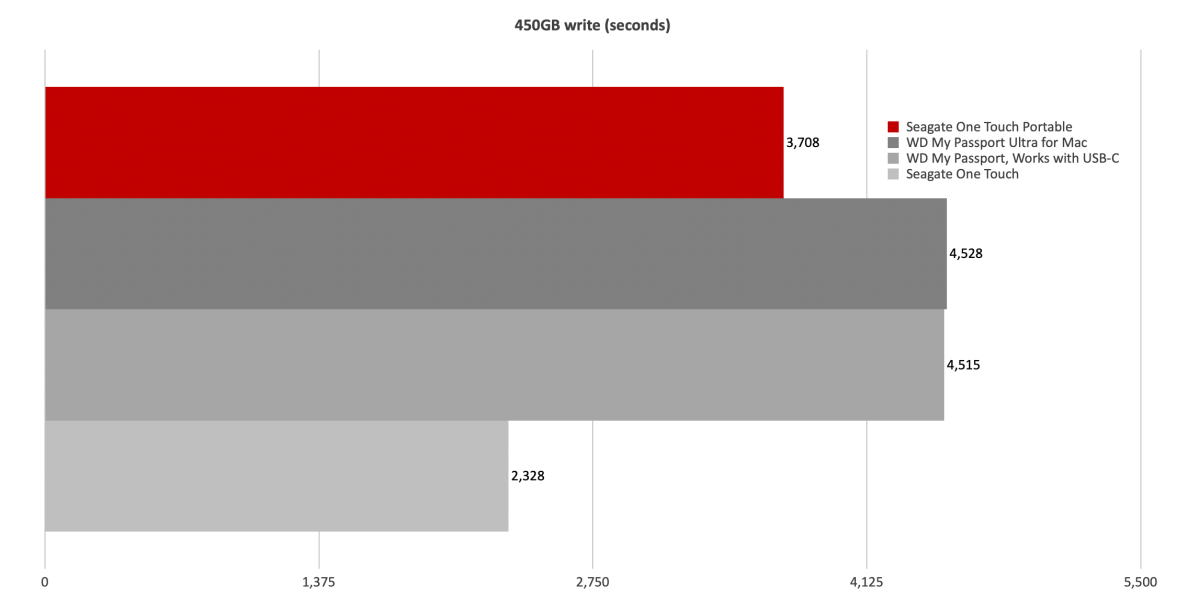
For a 2.5-inch USB hard drive, the One Touch Portable hauls the mail. That said, it’s still about the slowest type of external storage you can buy these days. Buy 2.5-inch for capacity and portability.
Should you buy the One Touch Portable?
If you need both capacity and portability, this buy makes sense. It’s the best 2.5-inch hard drive I’ve tested. You can get more capacity and speed with a 3.5-inch hard drive, but those are significantly less convenient in the haul-around department. Given the SSD’s rising price per TB, we’re currently favoring hard drives for a lot of storage missions.
Further, the 4TB unit is our choice between the two capacities thanks to a $52 versus $79 price per terabyte. Thank me later.
Drive tests currently utilize Windows 11 24H2, 64-bit running off of a PCIe 4.0 Samsung 990 Pro in an Asus Z890-Creator WiFi (PCIe 4.0/5.0) motherboard. The CPU is a Core Ultra i5 225 feeding/fed by two Crucial 64GB DDR5 4800MHz modules (128GB of memory total).
Both 20Gbps USB and Thunderbolt 5 are integrated into the motherboard and Intel CPU/GPU graphics are used. Internal PCIe 5.0 SSDs involved in testing are mounted in a Asus Hyper M.2 x16 Gen5 adapter card.
We run the CrystalDiskMark 8.04 (and 9), AS SSD 2, and ATTO 4 synthetic benchmarks (to keep article length down, we only report one) to find the storage device’s potential performance, then a series of 48GB and 450GB transfers tests using Windows Explorer drag and drop to show what users will see during routine copy operations, as well as the far faster FastCopy run as administrator to show what’s possible.
A 20GBps two-SSD RAID 0 array on the aforementioned Asus Hyper M.2 x16 Gen5 is used as the second drive in our transfer tests. Formerly the 48GB tests were done with a RAM disk serving that purpose.
Each test is performed on a NTFS-formatted and newly TRIM’d drive so the results are optimal. Note that in normal use, as a drive fills up, performance may decrease due to less NAND for secondary caching, as well as other factors. This issue has abated somewhat with the current crop of SSDs utilizing more mature controllers and far faster, late-generation NAND.
Note that our testing MO evolves and these results may not match those from previous articles. Only comparisons inside the article are 100% valid as those results are gathered using the current hardware and MO.


