The first surprise came before I even opened a browser tab: The seven-year-old Microsoft Surface Laptop 3 booted faster than the brand-new laptops I tested it against.
That wasn’t supposed to happen. Whenever laptop or chip makers don’t have much to say about how a PC improved from the prior generation, they trot out a tried-and-true comparison: How the new PC compares to one that is five years old.
It’s a safe bet. No matter how badly a chip performs — hello, Intel “Arrow Lake”! — it’s always going to be better than a PC from the distant past. New is better, right? Usually. But when you start factoring in price, and the dismal state of the economy, keeping your PC upgraded to the cutting edge loses its appeal fast. Put another way, can you save money by keeping or even buying an older laptop? Sure. And how much are you really giving up when you do?
At PCWorld, I can see both sides…rather literally. With a collection of new and older laptops, I set out to see if PC makers are right, or just blowing smoke.
This story isn’t designed to sell you a new PC, or to argue that you should hold on to your older PC. Instead, I tried to put representative laptops through a variety of scenarios to demonstrate the tradeoffs between old and new. Using either real-world tests or known benchmarks, I set out to demonstrate the following differences: boot times, the time to export a PDF, how long it takes to decompress a file, and so on. It’s up to you to decide whether these performance hits are actually meaningful, or whether you can wait.
The only twist, if there is one, is that a 5-year-old laptop wasn’t close at hand. Instead, I unearthed a lightly used, 7-year-old laptop instead: the Microsoft Surface Laptop 3, a device from the pre-pandemic Before Times. I compared it to a couple of modern laptops: the Asus ZenBook (UX3607OA), with a Snapdragon X2 Elite Extreme inside and Windows on Arm; as well as the Asus ZenBook Duo, with a top-of-the-line Intel Core Ultra 300 (“Panther Lake”) processor. Both shipped this year, in 2026.
Mark Hachman / Foundry
Were the new ones better? Sure. But by how much? And were the differences worth it? I don’t always think so…but you can decide for yourself.
The old laptop actually booted faster
My first test: boot time. We’ve moved well past the era of hard drives, so “booting” is more of a question of how fast the laptop’s SSD is. It’s also a result, in part, of how many applications you have running at startup, though Windows has made an effort to deliver a responsive desktop even as it continues to load applications.
For this test, I turned off all startup applications save for any the laptop shipped with (the Asus Mouse Agent) and then left Microsoft Defender, Edge, OneDrive, and Teams. For consistency, I also disabled apps I might normally run, such as a VPN. I then shut down the laptop entirely using the Windows “shut down” command and rebooted the laptop five times, measuring the time it took to be able to interact with the Windows desktop. This included logging on via Windows Hello.
(Most laptops don’t have Microsoft Edge “preloaded,” which can be enabled via Microsoft Edge’s Settings menu (Settings > System & Performance > Settings > Startup Boost). In my tests, it helped Edge open more quickly, but preloading added about three seconds to the laptop’s boot time.)
The results were exactly the opposite of what I expected. The Surface Laptop 3, running a stock version of Windows 11 24H2 (26100.8328), booted decidedly faster than the other four laptops. Four? Yes. Since the modern laptops were made by Asus, maybe there was something under the hood I couldn’t see? I added a pair of slightly older laptops for a sanity check. The older laptop snapped quickly from a cold boot to a responsive Windows desktop, while the other, modern laptops took markedly longer. Only the Microsoft Surface Laptop Studio 2 came somewhat close, with low boot times of 16 seconds, but also some odd outliers of over 40 seconds that pushed the average up.
In short, the 2019 Surface Laptop 3 booted about 10 seconds faster than its modern competitors. An interesting start, indeed.
Everyday Windows use still felt good enough
Again, I tried to shy away from benchmarks that lack grounding in real-world experiences. Put two laptops together, open 30 tabs or so, and start clicking back and forth — you’ll probably feel how one laptop improves over the other. In this case, I interacted with all three laptops, even writing parts of this story with each.
Subjectively, yes, you can feel a difference. The Surface Laptop 3 I tested includes 16GB of RAM, and navigating back and forth and launching apps did feel slower than the modern laptops, though not by much. I used all three laptops for a time, opening apps, interacting with Windows, and so on. On an older laptop, this all feels noticeably laggy and stuttery, but honestly nothing I couldn’t live with.
The hidden pitfall of older machines may just be their limited specs: For instance, the SL3 did include an 8GB memory option, which I tend to shy away from recommending. Its 256GB of SSD storage tripped me up when I tried to reset it by downloading a clean version of Windows, and then discovered almost no room remained. (I had just forgotten about some video files tucked away.)
Generally speaking, most operating-system functions rely on single-core, single-thread performance, measured here by Cinebench. The lower this number, the slower Windows feels. That’s exactly why Microsoft is reportedly working on some tweaks to Windows to lower latency — to improve this experience! We’ll see these improvements in about a month, I’m guessing. (Apple’s M-series silicon also excels here, providing a snappy experience. Its Cinebench 2024 score is about 200, according to Notebookcheck.net.)
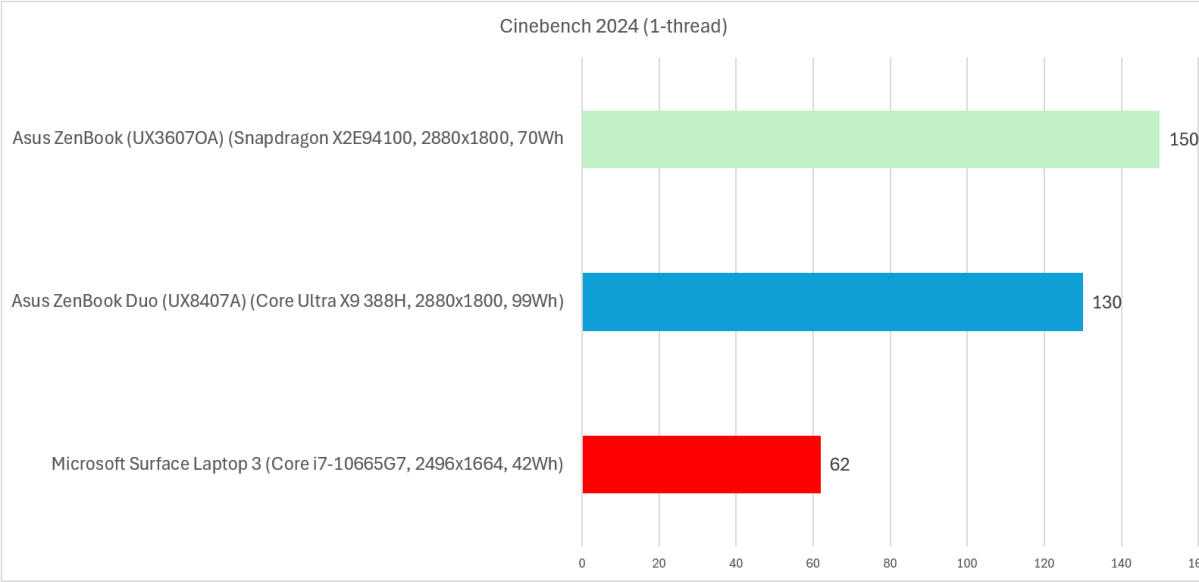
Again, interacting with web pages on the older laptop felt a little slow and stuttery, but not particularly painful. Here, too, we can assess this objectively.
Your browser processes APIs, frameworks, and other instructions behind the scenes, many of which you’re probably oblivious to. Two benchmarks, Speedometer and MotionMark, were set up to evaluate how well your laptop (and browser) process these, which are used by X/Twitter, Facebook, and other websites. The latter benchmark measures how smoothly you’ll see images and graphics process while you work on the web.
In this case, the new laptops render the web about twice as efficiently as the older laptop. Subjectively, it’s not a huge difference — though it is a difference.
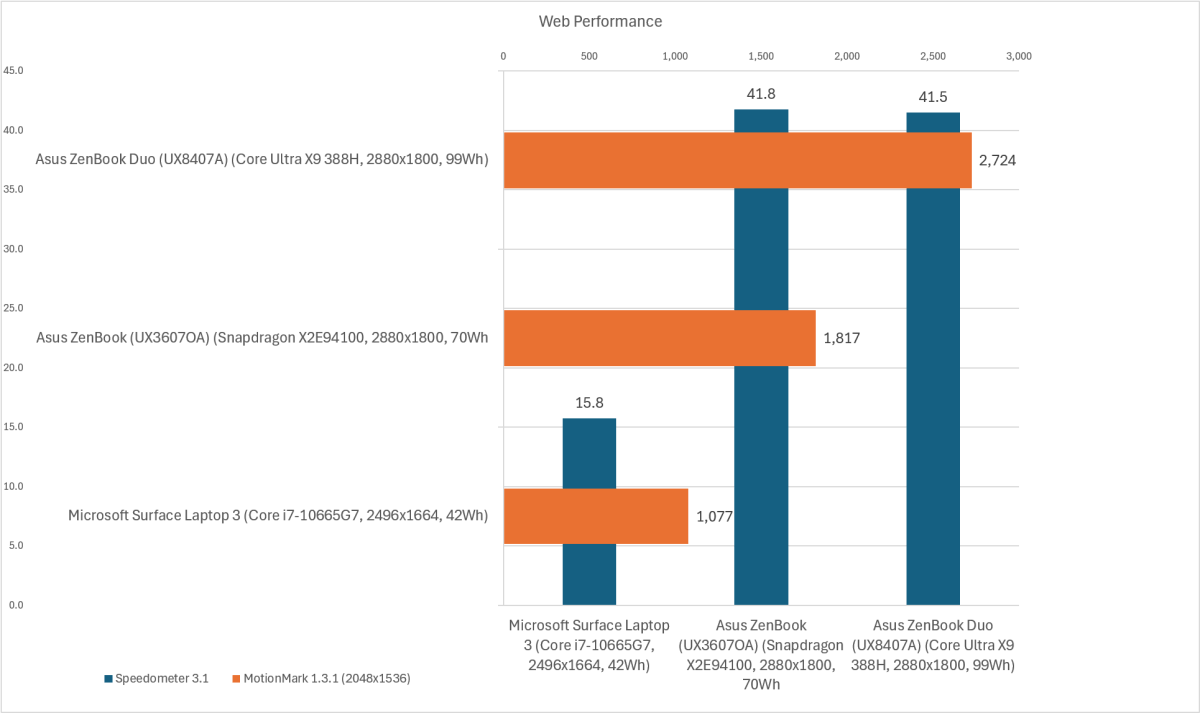
Again, I dislike abstract numbers to demonstrate differences, but we’ve been forced into it. Finally, however, we can see some more real-world comparisons.
Office work shows the real tradeoffs
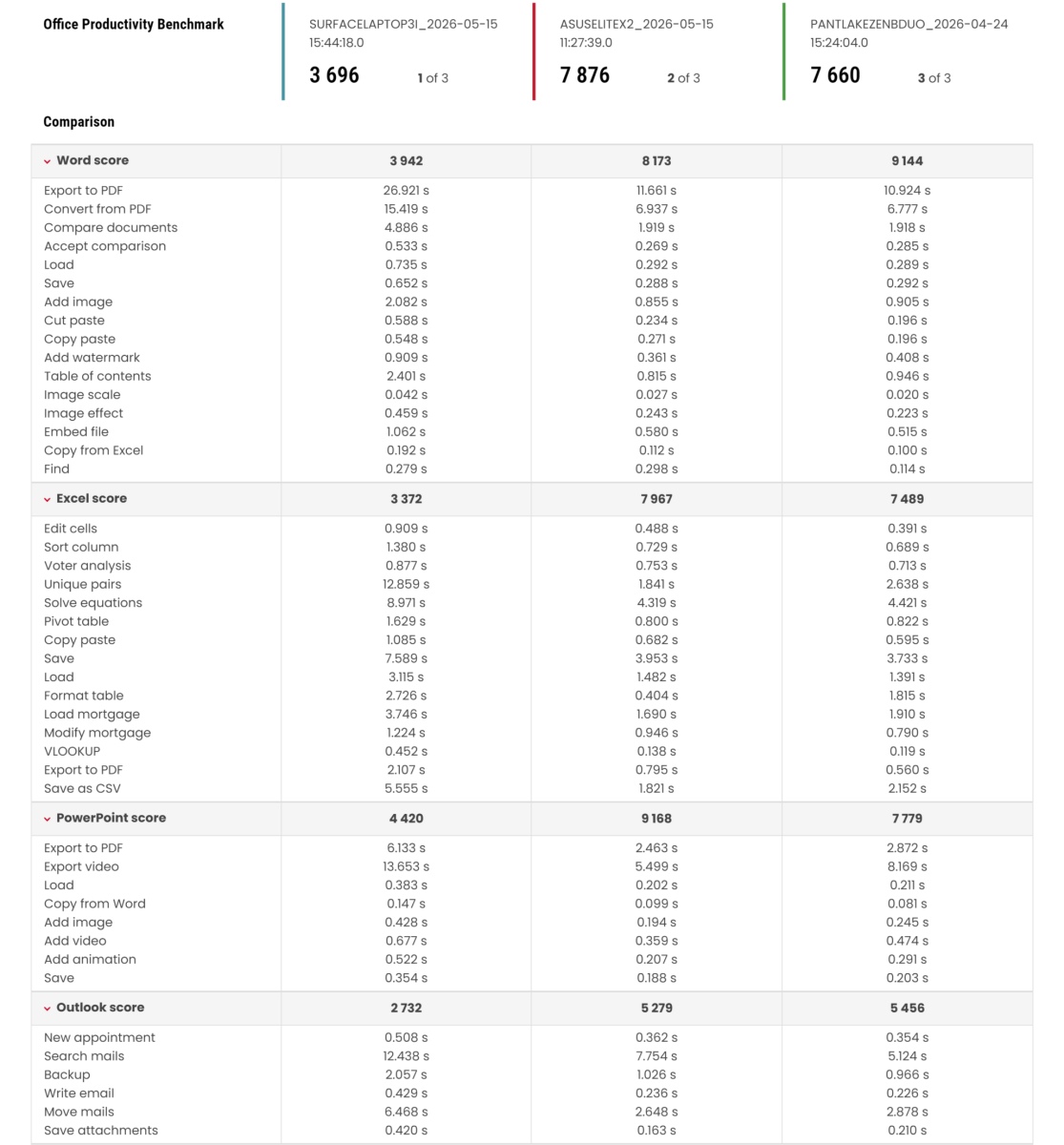
UL’s PCMark and Procyon applications measure performance in Word, Excel, and PowerPoint, tapping classic Outlook for some additional tests in the Office Productivity benchmark. The result is a score, which I show here at the top of the graphic below. But it also tracks the actual time taken for specific tasks, which really starts to distinguish actual differences between the older and newer laptops. The Surface Laptop 3’s average score (3,696) was about half that of the Asus ZenBook Duo (7,296) and the Asus ZenBook that used the Snapdragon X2E processor (7,824).
The graphic below is why I wrote this story, however. UL’s Procyon benchmark actually measures the time it took the test to complete specific tasks, providing a real-world comparison of just how fast each laptop generation was.
Some tasks took relatively no time at all: Can you tolerate 0.9 seconds to add a watermark on the old laptop, versus 0.36 seconds for the new? Probably. What about 2 seconds to add an image, versus less than 1 second? Maybe. How about 26 seconds to export a PDF, versus 11? Consider how often you perform these tasks, versus how long they’d take.
Dive into Excel: Formatting a table took almost 3 seconds on the Surface Laptop 3, versus a speedy 0.4 seconds for the Asus laptop with a Snapdragon inside. If you work in Excel regularly, that small delay could become irritating. Or 4 seconds to copy and paste, versus 7? Some people will be bothered by this. Others won’t. (Click to zoom in on the image.)
Mark Hachman / Foundry
Video calls, 30 browser tabs, and the limits of old hardware
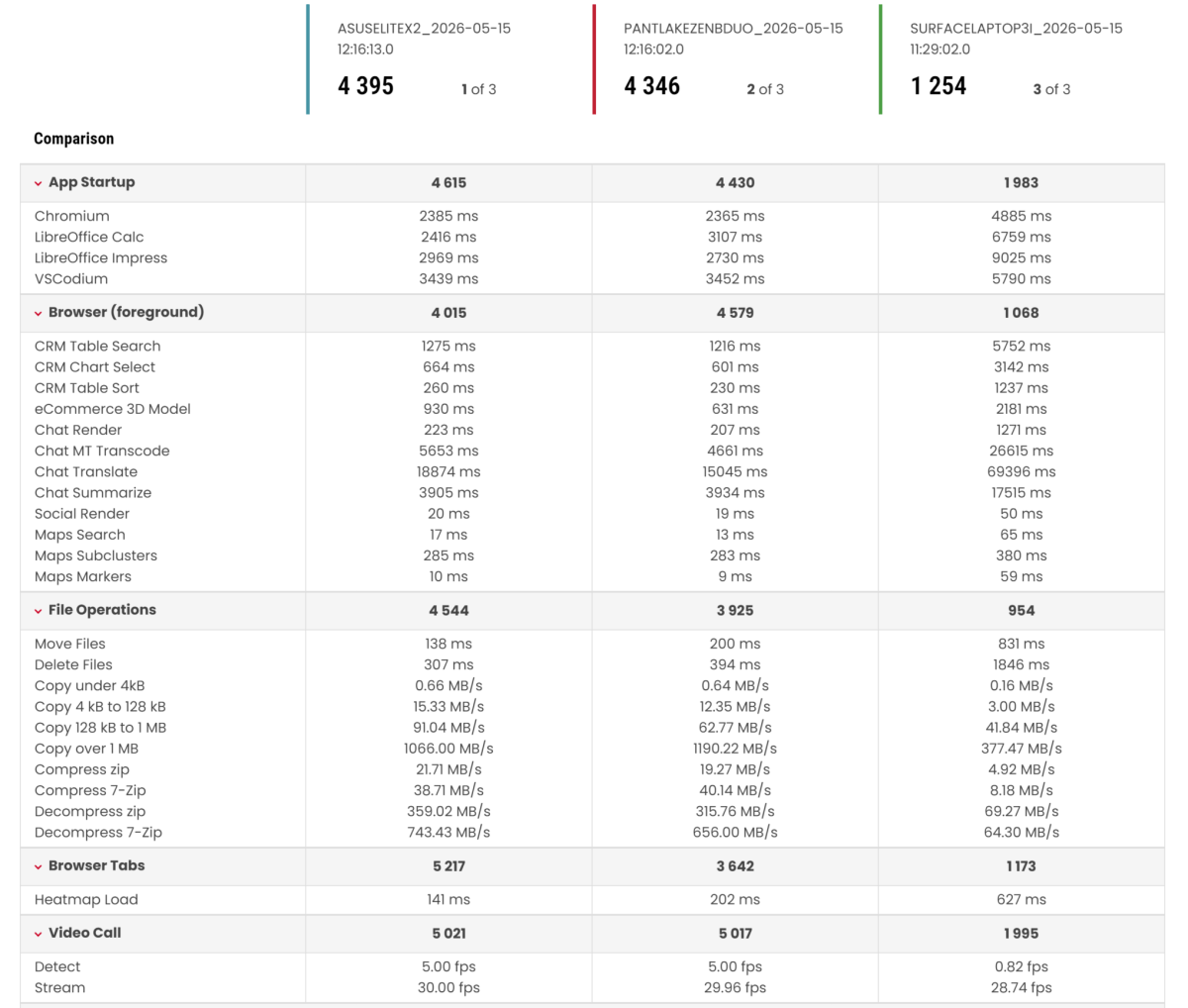
I’d like you to look at one more benchmark, UL’s new Essentials test, which works very much like I do.
Essentials opens a video chat, then runs it on top of a browser with 30 tabs open — and then starts opening various apps and performing tasks. (That sounds very much like my typical workday!) Those tasks measure the output of things we all do: compressing and decompressing files, navigating around a web-based CRM, and even social media.
As before, it’s worth thinking about whether these differences matter. If you’re thinking about sticking with an older laptop, will you even have 30 tabs open at once? If so, is spending 5752 ms (5.75 seconds) to navigate an online CRM, versus 1.2 seconds, going to be a hassle for you? It might. And this test even includes some AI tasks: Summarizing a chat took a whopping 69 seconds on the older laptop, versus 15 to 18 seconds on the newer models with NPUs inside them. Is this something you’ll be doing regularly? Decompressing a ZIP file was about five times faster on a new PC — but that’s not something you do every moment.
Don’t expect miracles from old integrated graphics
I’ve deliberately left out graphics: gaming, photo, and video editing. This story was authored with a productivity bent, and the latter two categories are still somewhat specialized applications. But if you do compare the graphics capabilities of both generations of laptops, modern laptops absolutely blow away the older models. The Asus ZenBook Duo offers about seven times the graphics capabilities (7,666 vs. 990, in UL’s 3DMark Time Spy benchmark), and even a 2024 Asus Vivobook S14 quadruples it, with a score of 4,209.
Mark Hachman / Foundry
Battery life is the clearest reason to upgrade
Unfortunately, there’s one area where modern laptops can enjoy a substantial advantage over their older counterparts — and you probably already know it. It’s in battery life.
I don’t consider a modern laptop to physically differ that much from even an older thin-and-light. Modern laptops can be manufactured from a range of materials — from lighter to more structurally robust — but the weight savings isn’t more than a pound.
Manufacturers have the option of “filling” that space with additional battery cells, which is why the battery capacity of modern laptops has increased. A laptop like the Asus ZenBook Duo contains both an efficient Panther Lake chip as well as a whopping 99Wh battery, the maximum allowed on U.S. aircraft. So while the battery life on the Surface Laptop 3 clocked in at a robust (for the time) 10 hours, the ZenBook Duo lasted 22 hours, 15 minutes. (The ZenBook with the Snapdragon X2 Elite inside it hasn’t been tested with out video rundown test, but it lasted 578 minutes, a bit less than 10 hours, using a more stringent office-productivity rundown test.)
And it gets worse. Batteries degrade, so the 45Wh battery that’s in the Surface Laptop 3 has undergone 70 battery cycles in the intervening years, according to Windows. That’s brought down the real-world full-charge capacity to 36.7Wh, an 18 percent decrease, or to an estimated 8 hours and 12 minutes of battery life. That’s not bad! Still, you’re not going to get a full day’s output out of that battery while working. (You can preserve your laptop battery’s health — here’s how.)
Nevertheless, in seven years, life has changed. Portable batteries are now commonplace. So are power outlets on planes, in airports, and in conference centers. Battery life has evolved, but so too has society’s ability to compensate for any shortcomings.
Should you upgrade your old laptop?
Here’s the simplest way to think about it: If your older laptop still feels responsive in the apps you use every day, holds enough battery for your routine, and has enough storage left to breathe, you probably don’t need to replace it yet.
A new laptop makes the most sense if battery life is becoming a daily problem — you regularly wait on heavy tasks like photo editing, video editing, AI tools, big spreadsheets, or file compression — or your machine is stuck with too little RAM or storage. For basic browsing, Office work, email, video calls, and light multitasking, a well-kept older laptop may still be good enough — and keeping it could be the smarter buy.
The world wants you to buy a new PC. Feel free to say no
At one time, six or seven years in the PC industry was an eon. In 1989, Intel shipped the 25MHz 486; in 1995, the Pentium Pro hit 200MHz. But now? Just a year or so ago we were complaining that Intel’s recent Arrow Lake chips with a base speed of 5.2GHz delivered less performance than its predecessors.
You might have read this story and thought to yourself, who cares? A half second here and there doesn’t make a difference. To you, I say, consider holding on to your old machine. Others might feel differently, zeroing in on all of the advantages a newer laptop brings.
Look, the technology industry wants to sell you new stuff, for a variety of reasons. FOMO is real. To be fair, we often agree. But you rarely have the ability to compare an old and a new PC to decide whether, in fact, the upgrade is worth the cost outlay. That’s the whole point here: I want to give you the information you need to make a smarter decision on whether to buy a new PC… whatever that decision may be.


