Summary created by Smart Answers AI
In summary:
- Macworld reports that iOS 26 has become one of Apple’s most buggy recent releases, featuring incomplete Liquid Glass interface and Apple Intelligence that cause significant performance issues.
- The new Liquid Glass features consume as much power as 3D gaming, causing overheating and battery drain, while promised Siri improvements remain undelivered nearly two years later.
- Apple has released 10 updates since September to address problems, but users still experience broken features, interface glitches, and slow performance across devices.
With iOS 26, Apple introduced one of the most significant changes to its operating system interface, arguably the most radical since iOS 7. However, this change has also led to many users experiencing annoying bugs and performance issues.
Not only that, but Apple still hasn’t delivered on many of the Apple Intelligence features it promised two years ago at WWDC 2024. That’s why, when Apple unveils iOS 27 at WWDC in June, my only wish is that it focuses on fixing iOS instead of changing it even more.
iOS 26 has been a troubled release
Every time Apple releases a new version of iOS, some bugs are to be expected. That’s why Apple is always releasing updates to refine its software. No platform is immune to bugs, especially when it has just undergone major changes.
But if you ask many iPhone, iPad, or Mac users, they’ll likely tell you that iOS 26 was one of the most buggy releases of recent times. It’s not hard to find reports online about broken features, interface glitches, or slow performance (especially on older devices).
Since September, Apple has released 10 software updates for iOS 26, including major updates and smaller security and bug fixes. We’ve gotten three in just the last month, with iOS 26.4 adding new features, followed by minor updates iOS 26.4.1 and iOS 26.4.2 that focused on bugs and security updates. Still, iOS 26 doesn’t feel as polished as iOS 18 did.
For me, one of the most annoying things about iOS 26 has been how hot my iPhone 17 Pro Max with the new vapor cooling chamber gets even when running basic apps like Messages. As a result, the battery has also been draining very quickly.
There are also a few minor but very unpleasant bugs, such as icons disappearing or showing up in a different style than the one I chose (like a light icon when dark mode is on), Face ID taking longer to authenticate, and extremely sluggish animations when Low Power Mode is enabled.
I could also mention how unreliable the virtual keyboard has become, even with all the fixes in iOS 26.4, and how the Liquid Glass interface has made some text unreadable.
Foundry
Liquid Glass might be to blame
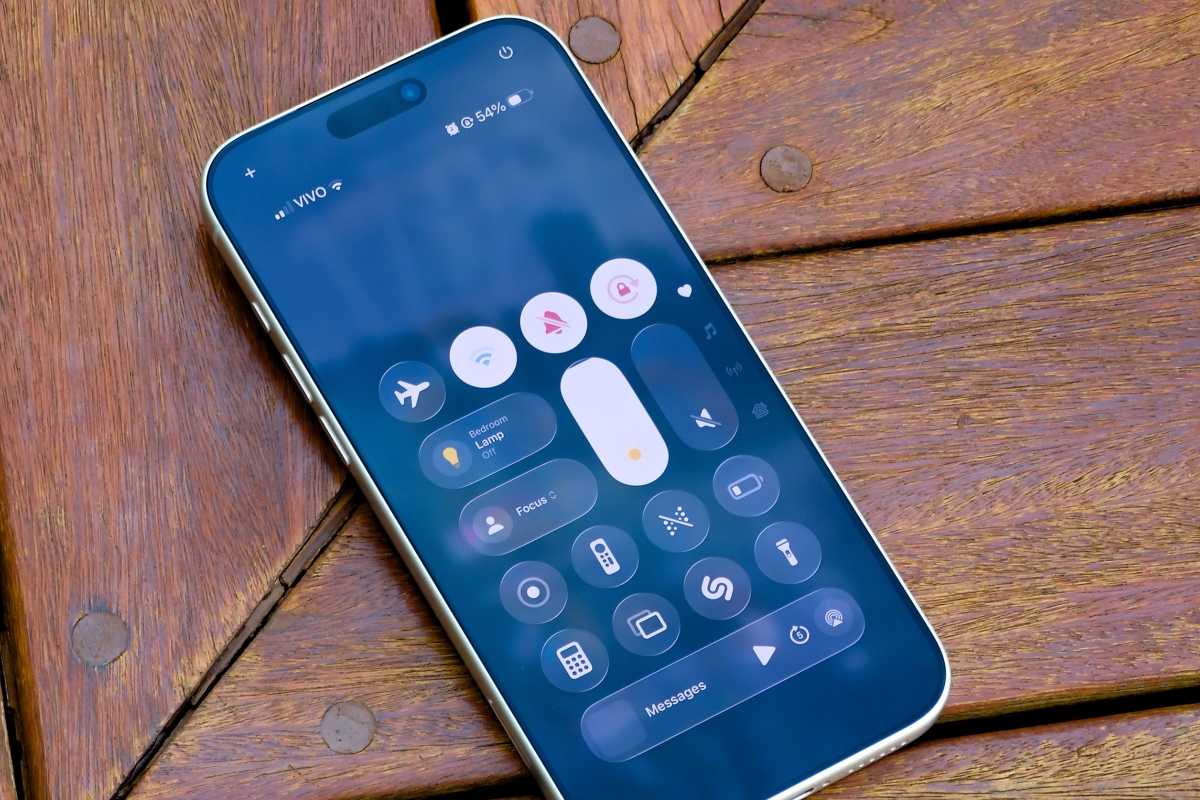
The problems all seem to come down to Liquid Glass. Apple’s new shiny interface demands a lot of hardware resources, especially graphics resources, since we see translucency and distortion happening in real time.
When Craig Federighi introduced Liquid Glass at WWDC 2025, he made sure to mention how the chips inside Apple devices have evolved in terms of performance in recent years, enabling the company to run a more demanding and complex interface. And that’s true, but it seems that Apple didn’t take the time to fine-tune the performance of this interface on devices that rely heavily on battery power.
To test just how resource-intensive the Liquid Glass interface is, I used my MacBook Pro with an M4 Pro chip since it’s easier to measure GPU and power usage on macOS than it is on iOS. Here, my Mac usually runs at around 3W when idle. It’s pretty impressive. Apple Silicon chips really shine here. And even when I’m doing simple things like scrolling through a webpage in Safari or opening a Finder window, power consumption rarely exceeds 5W.
But this is where things start to get interesting. When I open the Messages app in a chat with an animated background, power consumption spikes to 10W. At the same time, GPU usage, which typically ranges from 0% to 5% when idle, reaches 40 percent when the Mac is rendering animations in the Messages app.
Foundry
Since not everyone uses animated backgrounds in their chats, I ran another test with something that most people use: Control Center and Notification Center. And I set my widgets and icons to the “Clear” option. Here, the results were even more shocking.
When I opened both Control Center and Notification Center on my Mac, it recorded a peak power consumption of 15W, with GPU usage reaching up to 40 percent to render the animations.
I ran the same test with transparency turned off, and this time the peak power consumption was only 8W, with no more than 20 percent GPU usage.
For comparison, I also measured power consumption and GPU usage while running the popular game Asphalt 8 on my MacBook. To my surprise, the game (which is 3D rendered) averaged 15W of power consumption with peaks of 26 percent GPU usage.
In other words, doing something as simple as opening the Notification Center on your device can use just as many hardware resources as playing a 3D game, thanks to Liquid Glass. When you do this multiple times throughout the day, you make the GPU work harder, resulting in more heat and faster battery drain.
Broken promises
In addition to the bugs and performance issues, it’s impossible not to mention all of Apple’s broken promises in recent times. When the company announced Apple Intelligence at WWDC in 2024, it promised a brand-new version of Siri that would be capable of controlling the entire device.
Foundry
Almost two years later, the new Siri still isn’t here. All we got was a new animation for the old version of the assistant.
Apple also promised that it would integrate Apple Intelligence throughout the entire system. But in reality, we’ve only seen a few features, such as Genmoji, Writing Tools, and notification summaries.
While competitors are making rapid strides with AI features, Apple is still struggling to deliver the basics. Features that already exist in iOS, such as “Clean Up” in the Photos app, don’t work as well as alternatives available in third-party apps.
The focus should be on fixing things
At this point, Apple doesn’t need to come up with ambitious ideas for its operating systems. It needs to fix what’s broken.
iOS 26 shows what happens when big ideas ship without enough time to mature. Liquid Glass may represent the future of Apple’s interface design, and Apple Intelligence may still become something truly meaningful. But right now, both feel incomplete. The problem isn’t a lack of innovation. It’s that the experience doesn’t feel as reliable as the hardware it runs on.

Foundry
Apple is currently undergoing a major transition, with Tim Cook stepping down as CEO and John Ternus taking over the role. If there’s one thing he can do to get off on the right foot, it’s to deliver on what was promised years ago and show that Apple remains committed to creating not only great hardware but also excellent software.
I don’t need my iPhone to do more this year. I just need it to do the basics well again. And if Apple gets that right, WWDC might not be the most exciting keynote, but it could end up being one of the most important.


