At a glance
Expert’s Rating
Pros
- Attractive design
- Class-leading color gamut and color accuracy
- Extremely sharp 5K image
- Outstanding value for the quality of the display panel
Cons
- Stand is too short and only adjusts for tilt
- HDMI input doesn’t support full resolution and refresh rate
- Some menu options are mislabeled, no software control available
- HDR is available, but HDR image quality leaves a lot to be desired
Our Verdict
KTC’s H27P3 is among the least expensive 5K monitors available. It provides decent image quality and excellent sharpness, though with some trade-offs.
Price When Reviewed
This value will show the geolocated pricing text for product undefined
Best Pricing Today
Best Prices Today: KTC H27P3
Brands like KTC (which apparently stands for Key To Combat) are almost certain to appear if you search for a monitor on Amazon. KTC sells a huge variety of displays, many of which are much less expensive than those from better-known brands like Asus or Dell. The KTC H27P3 follows this trend, as it delivers a 27-inch 5K panel for roughly $550 (and sometimes less). The monitor has some quirks, but it’s a good choice if you want excellent sharpness and color performance at a more affordable price.
Read on to learn more, then see our roundup of the best monitors for comparison.
KTC H27P3 specs and features
The KTC’s headline feature is the panel. It’s a 27-inch panel that provides 5120×2880 resolution. 5K resolution isn’t as rare as it used to be—I’ve reviewed several 5K monitors over the past six months including the Asus ROG Strix 5K XG27JCG and BenQ PD2730S—but remains an extremely sharp resolution that’s unusual in a 27-inch form factor.
This is also a dual-mode monitor. That means it supports a lower resolution of 2560×1440 (half the 5K resolution) at a refresh rate of 120Hz. 5K resolution is capped at 60Hz.
- Display size: 27-inch 16:9 aspect ratio
- Native resolution: 5120×2880 / 2560×1440
- Panel type: IPS
- Refresh rate: 5K @ 60Hz / 1440p @ 120Hz
- Adaptive sync: Supported
- HDR: HDR10
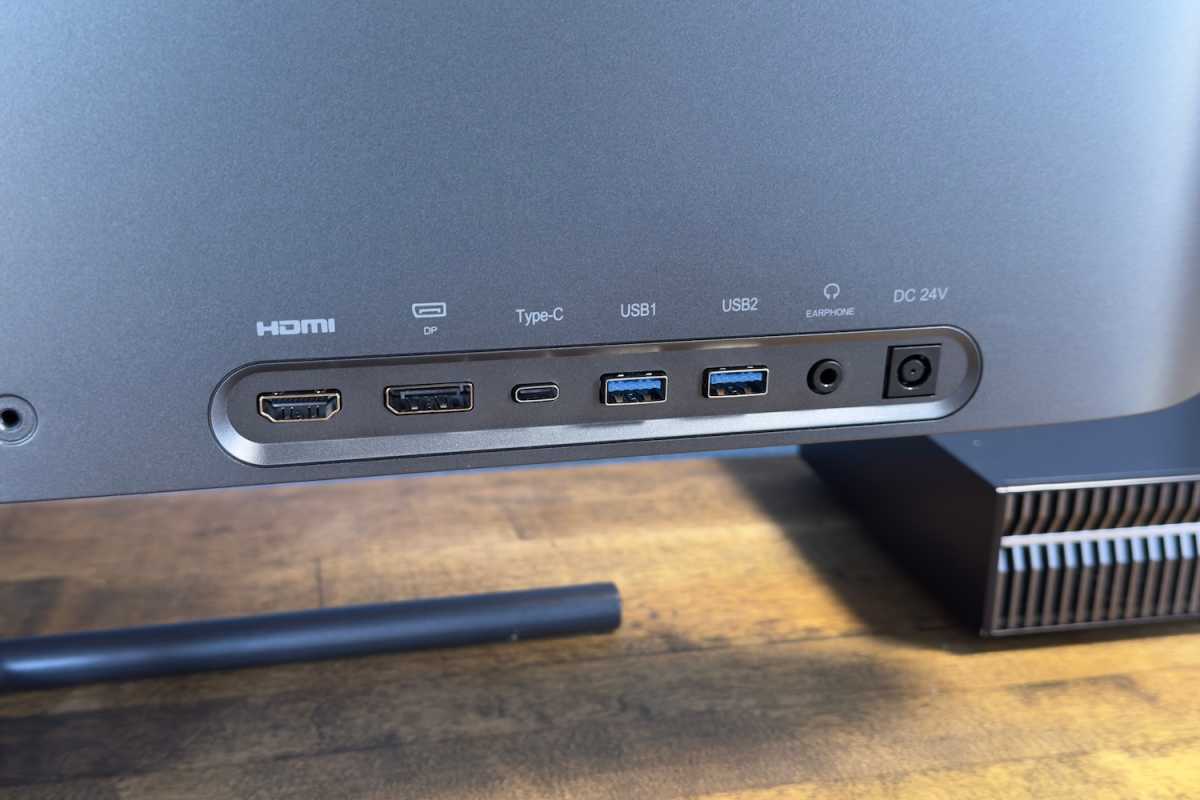
- Ports: 1x HDMI 2.0, 1x DisplayPort 1.4, 1x USB-C with DisplayPort Alternate Mode and 65 watts of Power Delivery, 2x USB-A 3.0 downstream, 1x 3.5mm audio jack
- Audio: None
- Price: $749.99 MSRP / $550 typical
As is often the case with lesser-known brands, the pricing is wonky. Amazon claims an MSRP of $749.99, but the monitor is often sold for about $550 (or less). KTC’s direct website lists the MSRP at $669.99 and the current retail price at $529.99. Either way, the KTC H27P3 is more affordable than competitors from Asus and BenQ, which are often listed at $800 and up.
KTC H27P3 design
The KTC H27P3 makes a good first impression. Contrary to its budget price, it provides an attractive, thin panel with small bezels. Plastic is the material of choice for the panel itself, but the build quality is solid.
I particularly like the piano black finish on the rear of the monitor. It’s a fingerprint magnet, to be sure, but there’s something about its particular jet-black hue and finish. A budget monitor is supposed to look less expensive than its competition, but I’d argue that the H27P3 actually looks more luxurious than its competition.
Unfortunately, the KTC H27P3 has a functional issue: the stand.
Matthew Smith / Foundry
This monitor ships with a tilt-only stand. It’s made of metal and has a thin, elegant design, but that’s where my praise ends. The stand is too short and only adjusts for tilt. Perhaps most people will find the monitor’s height comfortable, but I found myself with a pain in my neck after using the monitor for more than a couple hours.
KTC does provide a VESA mount on the rear of the monitor, so you can correct this with a third-party monitor stand or arm. That, however, is extra time and effort you need to spend to make the monitor usable.
I’d argue that the H27P3 actually looks more luxurious than its competition.
KTC H27P3 connectivity
KTC also stumbles on connectivity. KTC’s spec sheet says that HDMI only supports up to 4K resolution, and indeed I couldn’t hit 5K over HDMI. 5K is only supported over DisplayPort 1.4 and USB-C. That means the monitor has only two video inputs that can handle the monitor’s full 5K resolution at 60Hz.
Matthew Smith / Foundry
The USB-C port is versatile, at least. It includes DisplayPort for video input and 65 watts of Power Delivery. The USB-C port is also the upstream data port for the two USB-A downstream ports. A USB-B upstream port is lacking, so the monitor can’t support a second USB input. That also means it lacks KVM switch functionality, which is fairly common among monitors in this price bracket.
A 3.5mm audio port rounds out the connectivity. The monitor doesn’t include speakers. The absence of speakers is a minor disappointment, but many similar monitors also lack speakers.
KTC H27P3 menus and features
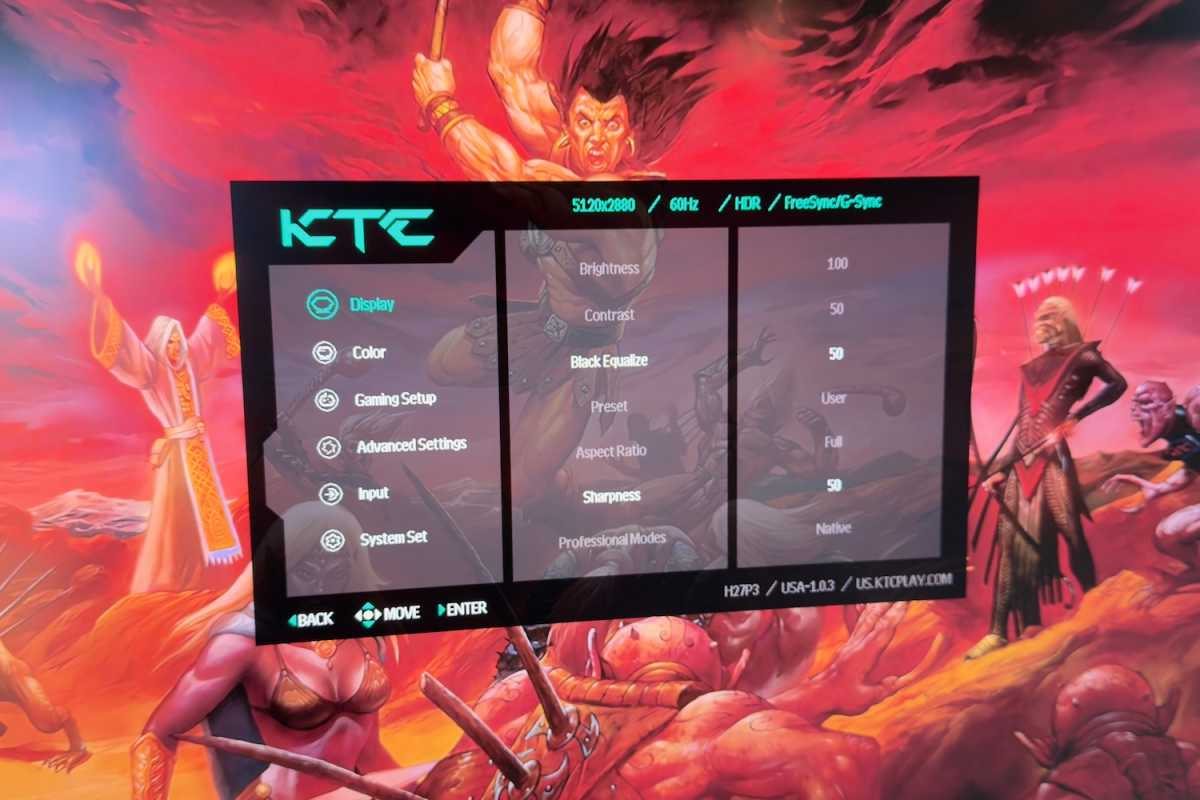
The KTC H27P3’s on-screen menus are controlled by a joystick tucked around the lower right-hand corner. It’s responsive and quick. The on-screen menu system is well labeled and the font, while not big, is larger than average.
KTC provides a mix of image quality features. On the plus side, it offers precise gamma modes and six-axis color calibration for color hue and saturation. The monitor also has sRGB, AdobeRGB, DCI-P3, and BT.2020 presets. However, the monitor lacks precise color temperature control.
Matthew Smith / Foundry
Unlike some competitors, including 5K monitors from Asus and BenQ, KTC doesn’t offer software designed to control the monitor from within Windows or MacOS. Whether that matters depends on how often you need to change between different settings.
I also noticed a few quirks. The monitor lists KVM functionality inside the menu, but the monitor doesn’t support it. I also saw support for AMD FreeSync and G-Sync, but the monitor isn’t certified for these; it instead offers Adaptive Sync (which is generally compatible, but there’s a difference between that and getting the official FreeSync or G-Sync badge).
Finally, the monitor includes some gaming features. It has an on-screen timer, crosshair, and FPS counter, as well as Night Vision and Eagle Eye modes that are meant to enhance contrast and reveal foes (the latter, Eagle Eye, only does this in a limited area of the display). This is all standard stuff for a gaming monitor—which the KTC H27P3 isn’t, so their inclusion is a nice bonus.
KTC H27P3 image quality
Clearly, I have a few issues with the KTC H27P3. I don’t like the stand, I don’t think it has enough ports, and I think the on-screen menu needs work. However, you might be willing to forgive those problems when you see how the monitor performs.
Matthew Smith / Foundry
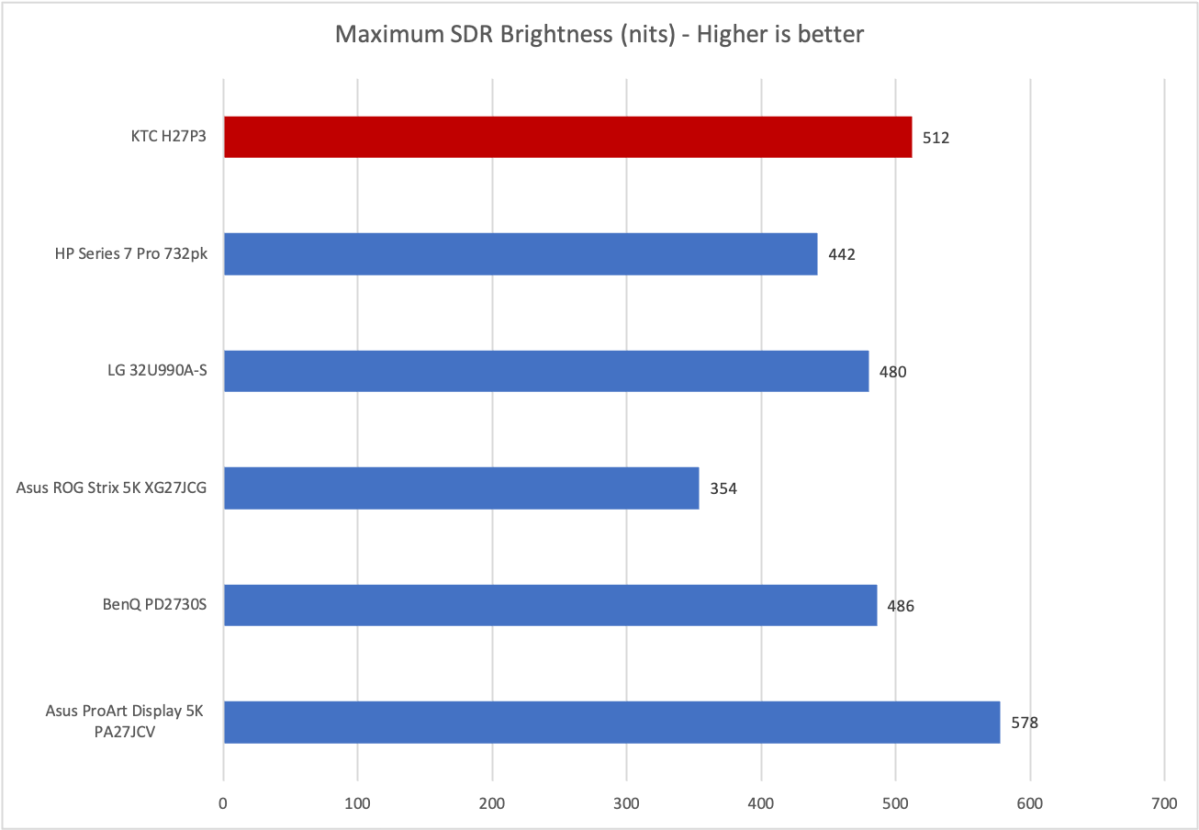
Here’s some trivia: The monitor ships with an external power adapter. This is usually a sign that a monitor has the potential to get very bright (after all, those LEDs don’t run on fairy dust!), and the KTC H27P3 doesn’t disappoint. It achieved a maximum brightness of 511 nits in SDR which, as the graph shows, is very bright indeed.
This level of brightness is not required for most situations but, if you have a sunlit room or other area with harsh lighting, the KTC H27P3 is a good bet.
Matthew Smith / Foundry
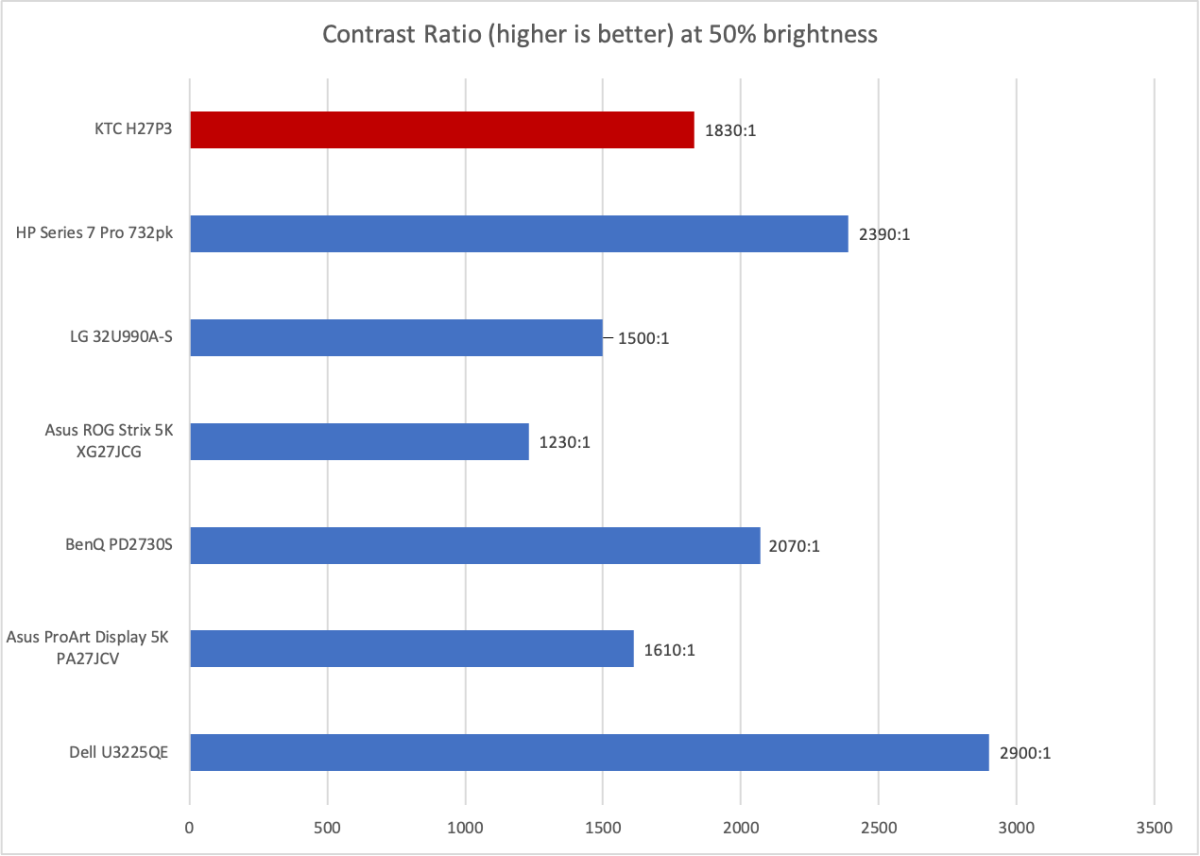
Contrast is a mix bag though, among competitive monitors, it’s quite good. The measured contrast of 1830:1 at 50 percent brightness is a solid result for an IPS monitor.
You’ll still notice IPS glow (a hazy gray hue to dark areas of the screen) when viewing the monitor in a dark room, as the monitor can’t display dark content as well as OLED or Mini-LED.
However, it’s acceptable for office use or for entertainment in a brighter room. Also, as the graph shows, it’s in line with what other 4K and 5K IPS monitors will deliver.
Matthew Smith / Foundry
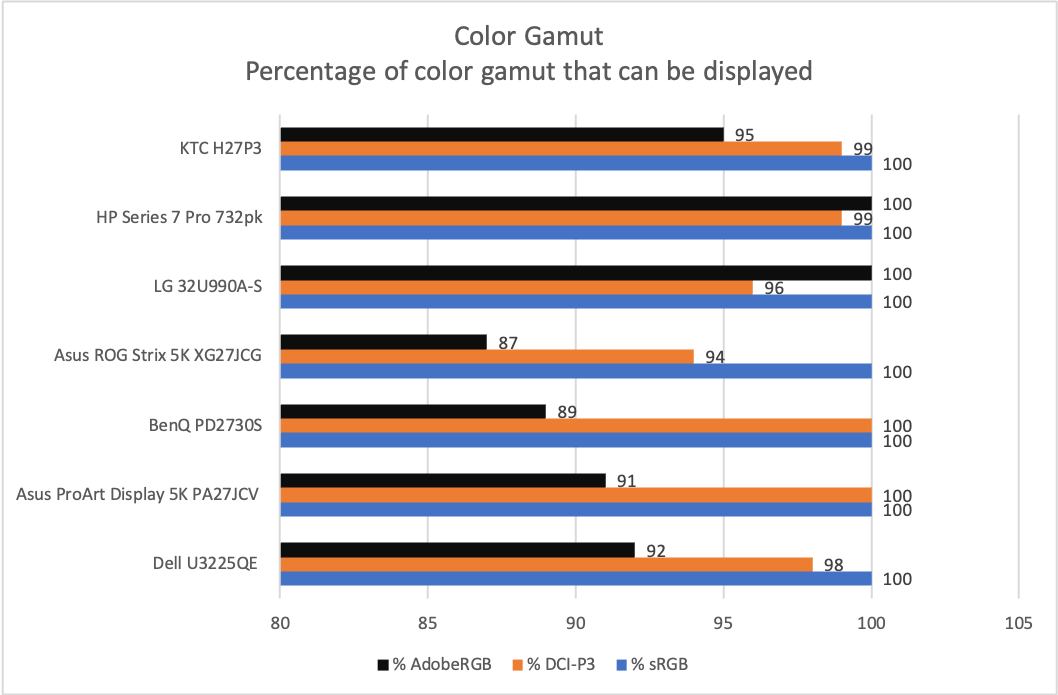
The hits keep coming in color gamut. Here we see the KTC H27P3 provide 100 percent of sRGB, 99 percent of DCI-P3, and 95 percent of AdobeRGB. That’s an excellent result in league with the best 4K and 5K monitors. The color gamut is broad, alluring, and saturated.
The KTC H27P3 lacks the image adjustment and calibration features that discerning professionals will expect of a true “studio” or “reference” display, but its color performance is good enough to use for a wide variety of creative work.
Matthew Smith / Foundry
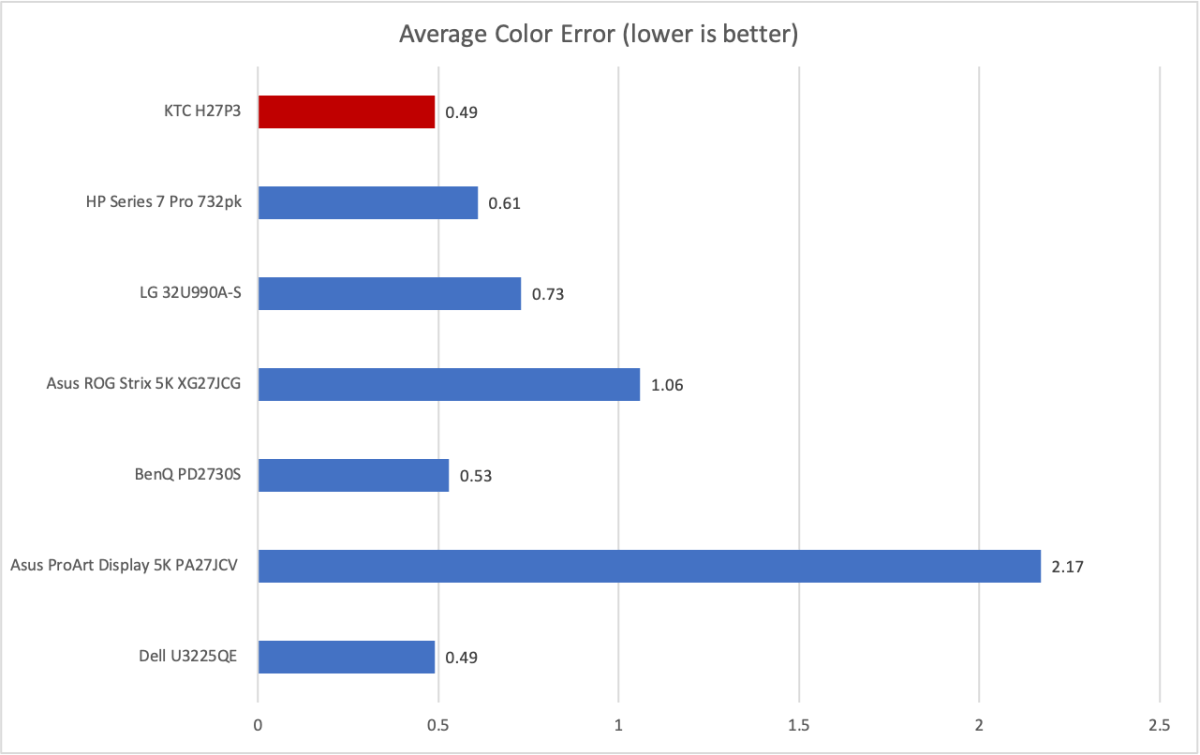
KTC drives the point home with absolutely stellar out-of-the-box color accuracy. In truth, most competitive monitors have great color accuracy, but the KTC’s score is objectively among the best. That’s a wild result for a monitor that aggressively undercuts the competition on price.
It’s not perfect. I measured a gamma curve of 2.3 (with the setting at the default of gamma 2.2). I also measured a color temperature of 6600K, slightly off the target of 6500K. This means the image is a bit darker and warmer (more reddish) than it should be. However, these variances are small and won’t leap out to most people. I myself hardly noticed them.
Sharpness, of course, is excellent. 5K resolution on a 27-inch panel works out to 217 pixels per inch. That’s a larger leap than you might expect over 4K, which packs only 163 pixels per inch. 4K is already extremely sharp, but 5K is ever-so-slightly better.
The 5K resolution also means you can view an image at 4K resolution with pixels left over. That’s handy if you’re working on 4K images or videos. You can view your work at full 4K resolution with some room left over for the interface of whatever software you choose to use.
KTC H27P3 HDR image quality
The KTC H27P3 technically supports HDR and claims “HDR400.” However, it lacks VESA DisplayHDR certification. That means the claim of “HDR400” is not specific and doesn’t hold much weight. I think this marketing is misleading and that KTC should avoid it, as it damages the brand’s credibility.
That issue aside, the KTC H27P3’s HDR is generally rather bad. This is not unique to the KTC H27P3, but instead a shared problem among current 5K monitors with IPS panels that lack Mini-LED backlights (which so far as I’m aware, is all of them).
The issue is both brightness and contrast. The KTC H27P3 isn’t brighter in HDR than in SDR. In addition, the contrast ratio becomes a limitation because it means the display can’t show bright objects at maximum brightness without also elevating the brightness of dark areas of the scene. That means dark scenes can look rather hazy and gray, specifically when bright objects are shown on an otherwise dark background.
While the monitor’s HDR performance is poor, it’s not necessarily a downside for this type of monitor. All similar monitors are also bad picks for HDR. Shoppers who want good HDR need to go for an OLED or Mini-LED display, but those generally cap out at 4K resolution, with the exception of a few high-end displays like the Apple Studio Display XDR and the LG 27GM950B. Those, however, are in a different (much higher) price tier.
KTC H27P3 motion performance
The KTC H27P3 is a dual-mode monitor. It supports 5120×2880 resolution at up to 60Hz or 2560×1440 resolution at up to 120Hz. Neither specification is impressive in 2026. For comparison, the Asus ROG Strix 5K XG27JCG can handle 5K at up to 180Hz and 1440p at up to 330Hz.
Motion clarity is fine for what it is. A refresh rate of up to 120Hz does provide a noticeable improvement in motion clarity over 60Hz, even on an IPS display that doesn’t have amazing pixel response times. Gamers who enjoy less action-packed titles, like Old World or Microsoft Flight Simulator, won’t see much issue.
But if you like to play highly competitive games, well, the H27P3 won’t cut it. Fast moving objects can be difficult to see and small interface elements, like hitpoint bars or character names, are hard to see when moving quickly across the display.
The monitor supports adaptive sync. While the menu has a FreeSync/G-Sync toggle, it doesn’t claim official certification for these standards. However, because these standards are interrelated, the monitor did work with adaptive sync when connected to an AMD Radeon 7800 XT and an Apple MacBook Air M4 (I did not test it with an Nvidia GPU).
Should you buy the KTC H27P3?
The KTC H27P3 is all about its SDR image quality.
Though well-built and attractive, the monitor has a tilt-only stand that’s too short (fortunately, it has a VESA mount that makes an upgrade possible). It also chooses to use an HDMI port that doesn’t support the monitor’s full resolution. The monitor doesn’t have much downstream USB connectivity and the on-screen menu has some quirks.
Yet you might be willing to forgive these issues in light of the spectacular 5K panel. As my tests show, the panel’s SDR image is a match for much more expensive 5K monitors. Yet the KTC H27P3’s typical retail price of around $525 to $550 undercuts those competitors by around $150 to $250, depending on the discounts available.
That trade-off won’t work for everyone, but if you want a great 5K IPS panel and don’t care about that other stuff, the KTC H27P3 will deliver.


