At a glance
Expert’s Rating
Pros
- Adds two 14-inch screens
- Portable
- High QHD resolution
- Easy setup
Cons
- Could be unwieldy in some environments
- Requires software installation
Our Verdict
But if what you need is a more lightweight and flexible solution that’s perfect for video conferencing, presentations or multiple application work, the Trio 3 Pro is a striking solution with some clever customizations.
Price When Reviewed
This value will show the geolocated pricing text for product undefined
Best Pricing Today
Price When Reviewed
$499.99
Best Prices Today: Mobile Pixels Trio 3 Pro
Connecting an external display to your MacBook to extend your desk-based screen space is a common practice, but making your laptop into a desktop workstation isn’t pushing the boundaries of laptop screen expansion. Even with many of today’s best portable monitors it’s not easy to take this setup on the road with you or pack it neatly away in a drawer.
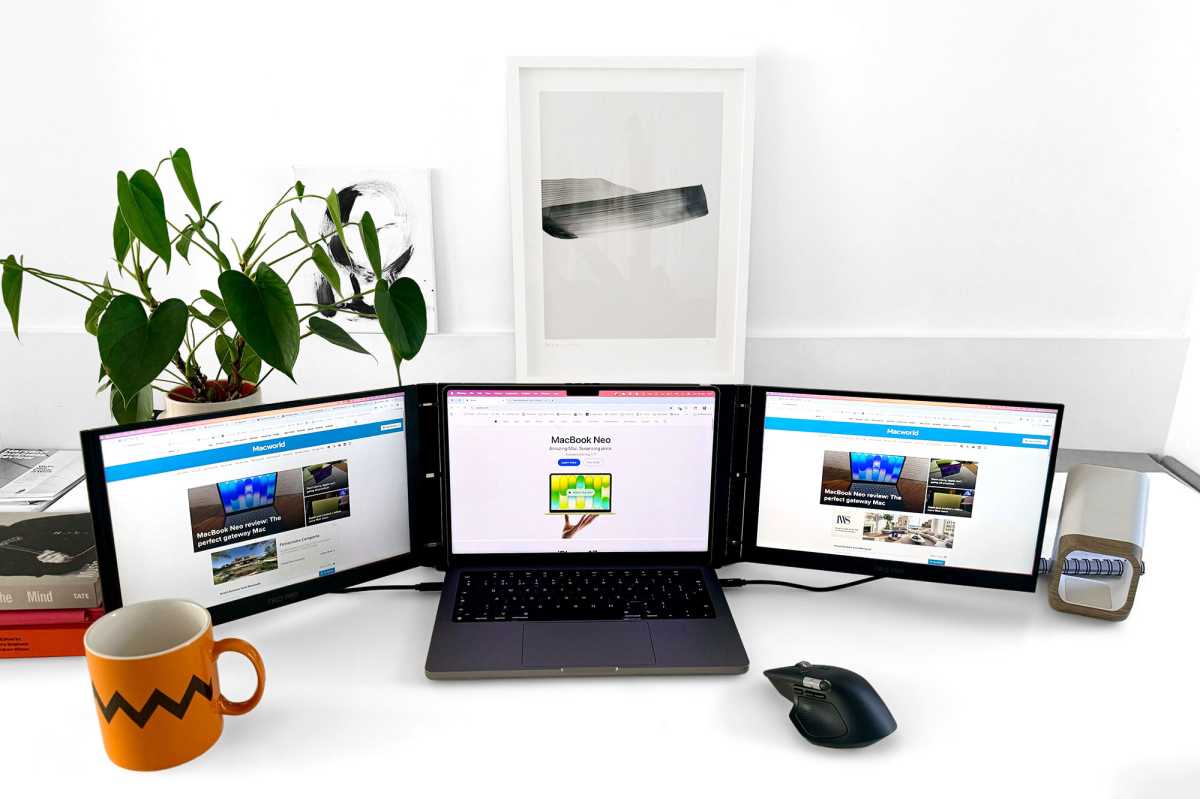
The Mobile Pixels Trio 3 Pro is a foldable package weighing 4.13lbs (1.9kg) that physically attaches to your MacBook to add a 14-inch 1400p QHD screen to each side of the laptop’s own screen. It makes your MacBook look like it has wings.
Design
Previously, we’ve tested some screen extenders that hang off just one side of the laptop and look rather strange and lopsided, like a motorbike with a dangling sidecar. A while ago we tested the Limink Al Alloy Portable Triple Monitor (LK14) that looks and acts a lot like the Mobile Pixels Trio 3 Pro.
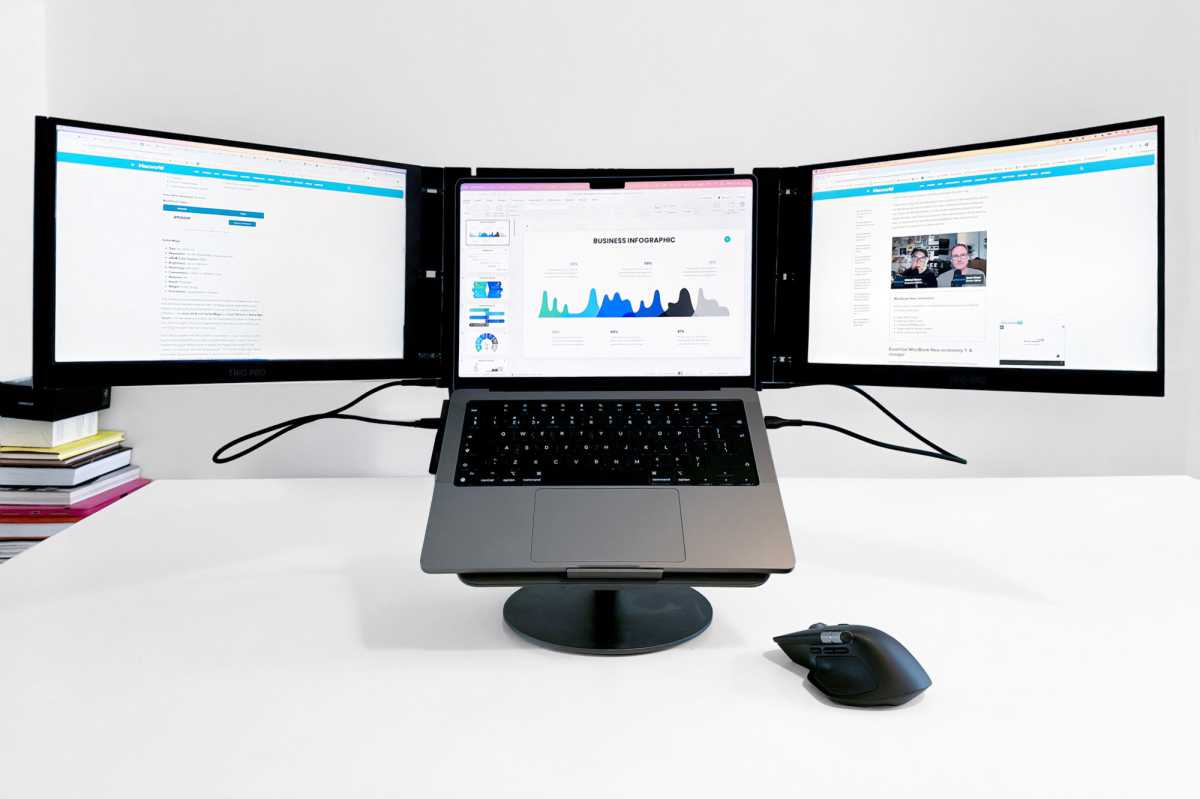
Both the Trio 3 Pro and LK14 are a more symmetrical screen setup when in standard Landscape Mode: either side of the MacBook’s own screen. When set up, the screen wings certainly create an impressive look sat next to a standard one-screen MacBook. At the end of the day or when it’s time to move to a new space, you simply disconnect and the two side screens fold onto the central area.
When folded up, the Trio 3 Pro measures 13.4 x 8.8 x 0.9 inches (34 x 22.4 x 2.3cm). In all its unfurled glory, it spans 40.3 inches (just over 1m) but can be pulled closer together if your available desk space doesn’t stretch that far.
It’s a design that will either excite you with its screen breadth or scare you with its wingspan. It looks cumbersome but is actually quite light and flexible.
The second and third screens each measure 14 inches diagonally, and the system is compatible with 13-inch to 16-inch MacBooks. I tested it with a 14-inch MacBook Pro.
Simon Jary
Setup and installation
You can just lean your MacBook into the central section of the Trio, or by attaching four super-strong magnets to the lid of your MacBook—a cardboard template is included in the box—you can achieve a stronger, yet more adjustable bond; see above photo.
Once the magnets are in place, you unfold the Trio 3 Pro’s two side screens and clamp the MacBook into the central section. If you don’t want magnets stuck to your MacBook the Trio 3 Pro might not be for you as without them the setup is not as easily adjustable. You can nervously prise the magnets off but you wouldn’t want to frequently add and remove them. If you’re using the Trio a lot, having the magnets there is recommended.
The LK14, in comparison, connected via a couple of metal clips at the top that snapped everything in place snap. With that dual-monitor I appreciated not having to add magnets to my laptop, but if you will be frequently using the triple screen setup, it’s a small initial task using the cardboard template and a fast one when attaching the Trio.
Simon Jary
The screens connect to the MacBook with the included two USB-C cables. The cables include a USB-A connector that you can pull away to reveal the more Mac-friendly USB-C end. One of the cables accidentally shed its USB-A connector while I was setting up, which is no problem for Mac users who don’t need it. If I had needed the USB-A section I’d have been more concerned.
Note that plain (non-Pro/Max) M1 and M2 Macs plus the new MacBook Neo are limited to connecting just a single monitor. To work with the Trio 3 Pro users of those Macs will need to download and install free software (rather like DisplayLink). Installation is fairly simple and a on-time operation—we have more detailed advice on connecting multiple screens to M1 and M2 MacBooks. You’ll need to tinker with your Mac’s Systems Setting during the installation—there’s detailed directions in the user manual, which is a QR code download.
The manual states that “if your laptop has two DP enabled USB-C ports … driver installation is not necessary”. “Two DP enabled USB-C ports” means your MacBook has at least one USB-C/Thunderbolt port on either side, which most MacBooks after 2018 do have.
A MacBook with anything as or more powerful than a standard M1/M2/M3 processor can set up the Trio’s two screens without the software download. That means an M1/M2/M3 Pro/Max or any M4/M5 MacBook should be fine.
However, the Trio’s screens can’t draw enough power from the connected laptop to allow for maximum screen brightness. The Trio 3 Pro takes power from the MacBook rather than having an external power supply or battery, making it more portable.
I found the capped screen brightness to be fine but if you want to max the brightness on the Trio’s two extra screens you need to attach a power adapter to one of the Trio’s USB-C ports. That will also passthrough up to 65W of power to your laptop. In turn, that means that you need to install the software so that your can run both screens from the single cable connection. If you have a Mac faster than a standard M1 or M2 I’d experiment first to see if you need the maximum brightness.
Simon Jary
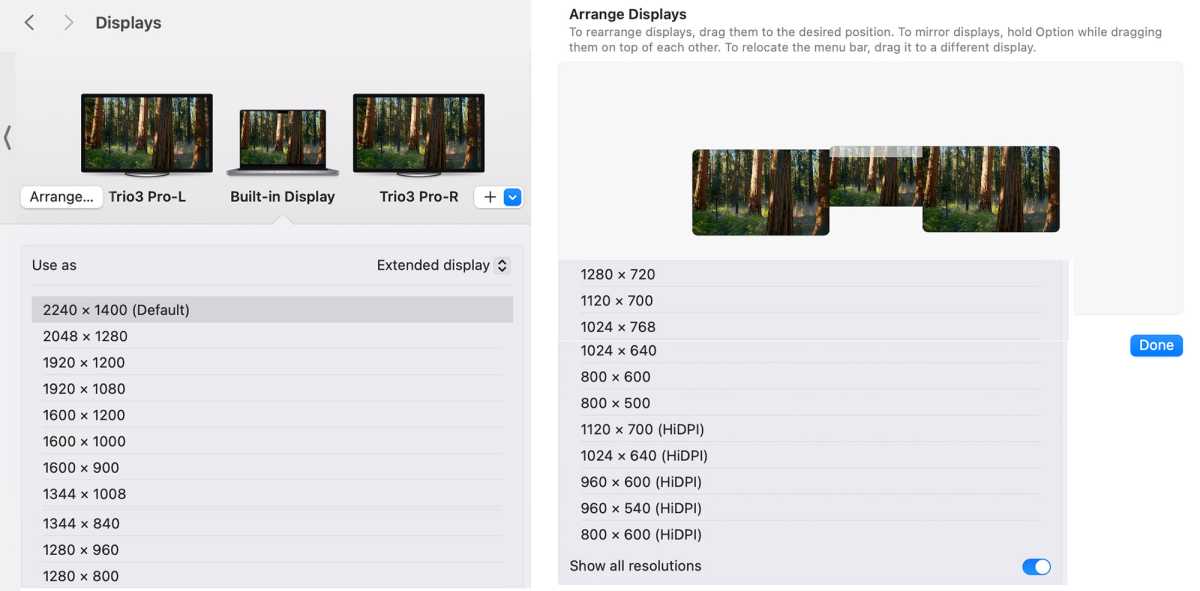
Finally, go into your Mac’s System Settings>Displays to arrange the screens in the right order and set the resolution of each screen.
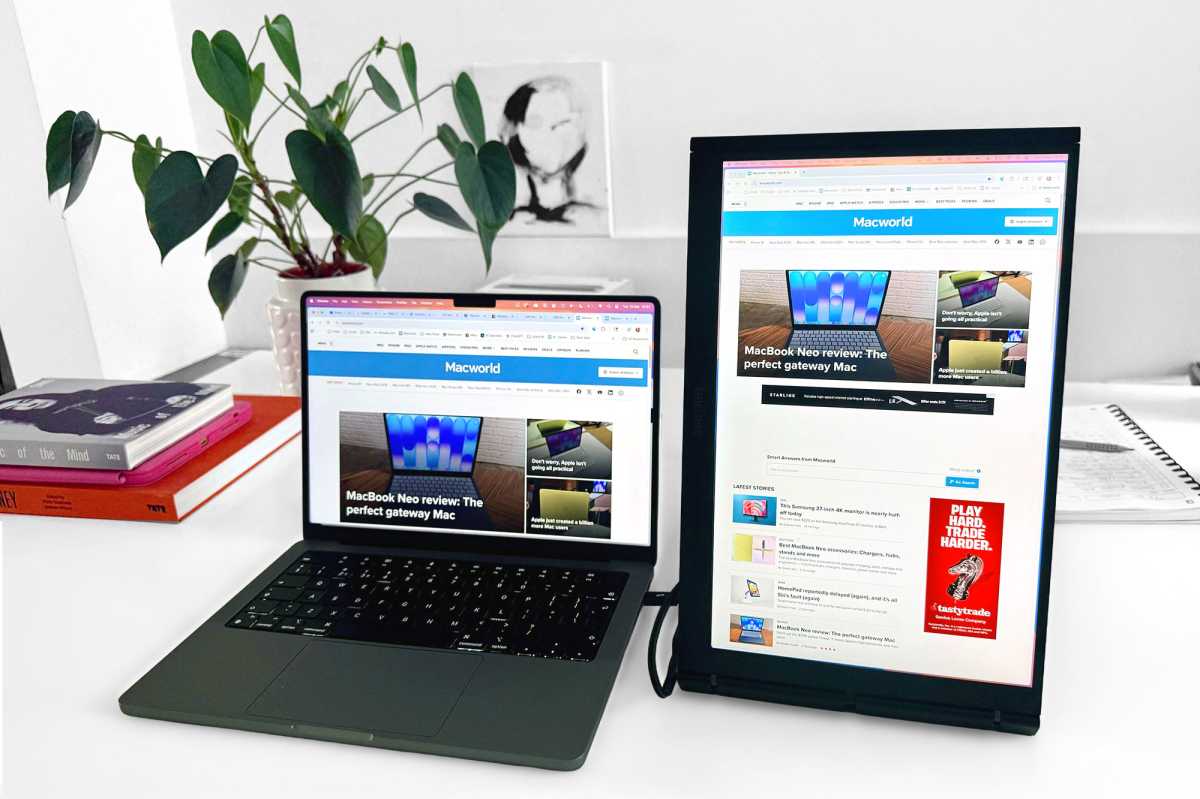
The USB-C cables are short at just 20 inches (0.5m) but must reach only a few inches from your MacBook’s Thunderbolt or USB-C port to the screen’s port. When in Portrait Mode (where it can be rotated and used as a single deeper vertical screen) the cable length is more important. In Landscape Mode they don’t get in the way but could surely have been shorter to reduce cable clutter, although you can hide the trailing cable within the stand if set up in that way.
Simon Jary
The Trio 3 Pro’s protective and subtly magnetic folio cover doubles up as an integrated stand that is reasonably firm. I prefer to use my laptop stand, and while the Trio didn’t unbalance when atop it I wouldn’t want to mess around with the position once in place (see above).
Performance
- Resolution: 2240 × 1400 pixels
- Brightness: 300 nits
- Aspect ratio: 16:10
- Color saturation (sRGB): 100%
- Color saturation (NTSC): 72%
The IPS screens are not as sharp as the MacBook’s own, although the QHD resolution up to a maximum 2240 x 1400 pixels is superior to the LK14’s mere HD (1920 x 1080).
Available resolutions range from 800 x 600, and a great many others for you to find the space vs clarity resolution that suits your needs. 2240 x 1400 is likely to be just too tight for most detailed tasks but allows for a lot of windows and tabs that would otherwise crowd out your main MacBook screen.
The 14.1-inch size is enough to host simple spreadsheets, browser windows or other applications—but if you’re looking for a large screen where you can enlarge Excel sheets for easier viewing, a much larger portable screen, such as the 24-inch Asus ZenScreen MB249C or even dual-screen UPerfect Delta Mega, is called for.
What you’re not getting is a screen larger than the laptop’s own. You are almost replicating it either side for expansion.
Using the Trio in Landscape Mode during a video call is a great use case. Leave the MacBook’s screen for the Zoom/Teams/Google Meet window and you can keep supporting apps or notes open either side.
You can control the Backlight, Contrast, Saturation, Color Temperature, Signal Source, Screen Mode, and Eye-care Mode via buttons at the top of the central section above your laptop’s screen.
Color saturation is fine for general productivity work. Unsurprisingly, it’s not of a standard that professional graphic designers would accept but for most of us it’s fine.
Each extra screen has a maximum brightness of 300 nits—compared to the peak MacBook brightness of 500 nits for standard SDR content, you will notice that the Trio’s screens are not quite as bright, but I found them bright enough. To increase to maximum brightness, you need to connect to an external charger—check our reviews of the best USB-C chargers.
Eye-care Mode controls the screen’s color temperature and brightness to minimize the emission of blue light, which should mean less eye fatigue while working in low-light environments.
Like an external display, you can set the extra screens to either mirror your laptop’s screen or extend it for extra real estate. This where the Trio 3 Pro gets clever.
Simon Jary
In addition to its wing-like Landscape Mode, in Portrait Mode you can pull the Trio away, rotate the screen vertically and set it to a 90° rotation in System Settings>Displays.
Simon Jary
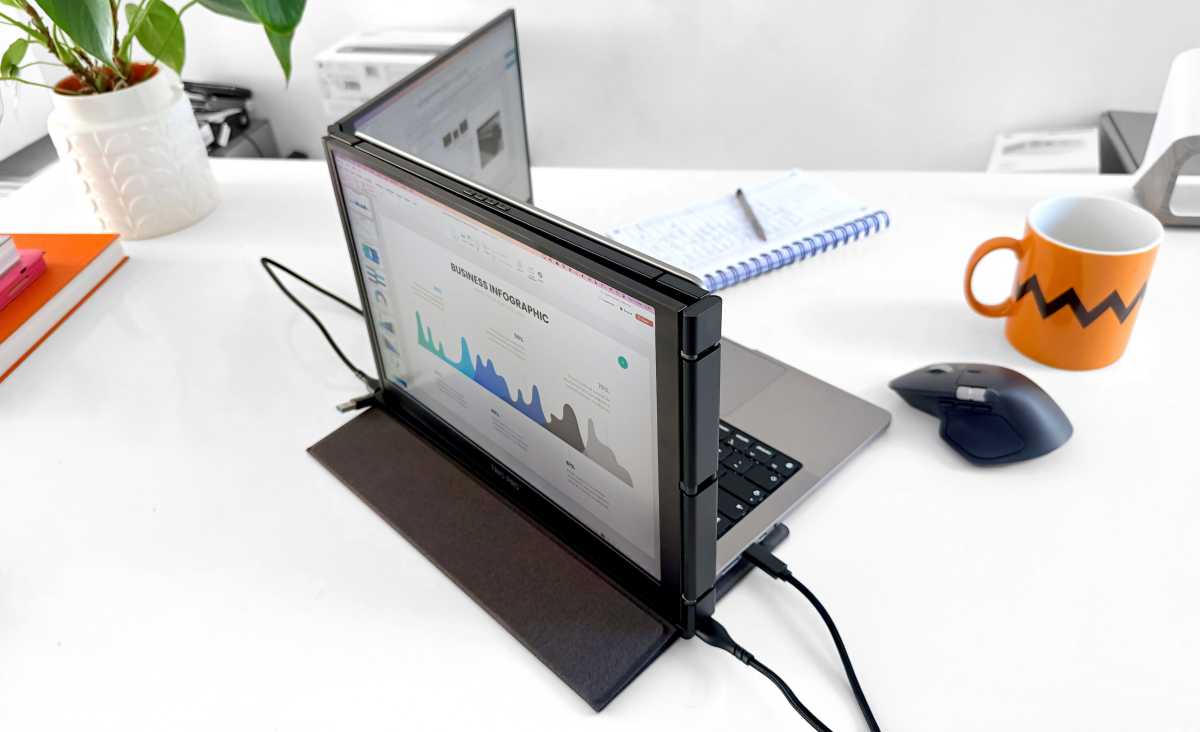
With one screen folded around 180°, Presentation Mode is useful for face-to-face meetings, where the person sitting opposite sees the slideshow while you present on the other side.

Mobile Pixels
Another innovative setup is Collaboration Mode, where both of the Trio’s screens are rotated outward, forming a wraparound that would work in meetings, creative reviews or at events.
Price and availability
The Mobile Pixels Trio 3 Pro is priced at $499.99 / £369.99. U.K. availability was limited at the time of writing.
Read our comparisons for more of the best portable monitors and best monitors for MacBook.
Simon Jary
Should you buy the Mobile Pixels Trio 3 Pro?
You’ll make quite the impression in your shared working space when you unfurl the Trio’s screen wings and probably cause a scene if you do so at your local coffee shop.
While a more fixed desktop solution with one or more larger external displays offers far greater screen-estate potential, the Trio 3 Pro can be attached quickly and detached with ease to be stored away when not in use.
If you want a permanent second screen at home or in the office, buy a larger external display. See our recommended best monitors for Mac. If you want the same large size screen but easier to store out of site, look at our other best portable monitors for Mac.
But if what you need is a more lightweight and flexible solution that’s perfect for video conferencing, presentations or multiple application work, the Trio 3 Pro is a striking solution with some clever customizations.


