At a glance
Expert’s Rating
Pros
- 4x Thunderbolt 5 ports
- Built-in NVMe SSD
- 140W Power Delivery (PD 3.1)
- 30W USB-C up front
- Cute compact size
- Apple-like aesthetic
Cons
- SSD installation a little fiddly
Our Verdict
Boasting as many Thunderbolt 5 ports as a single-chip dock can, the Satechi CubeDock is a powerful accessory to help you create the perfect connectivity setup for your system with simple display options and a built-in SSD enclosure, all wrapped up in a cute Mac mini-like shell that’s compact and will work with any modern Mac.
Price When Reviewed
This value will show the geolocated pricing text for product undefined
Best Pricing Today
Price When Reviewed
$399.99
Best Prices Today: Satechi Thunderbolt 5 CubeDock with SSD Enclosure
$399.99
The CubeDock is ideal for Mac users who want maximum Thunderbolt 5 connectivity, expandable storage, and a compact Mac mini-style dock. Its standout feature is combining four Thunderbolt 5 ports with a built-in NVMe SSD enclosure supporting up to 8TB. Skip it if you don’t need extra storage, prefer built-in display outputs, or want a cheaper dock. At $399, it offers strong value if you’ll use the SSD slot.
I’ve been reviewing a large batch of Thunderbolt 5 docks in recent weeks. The new 80Gbps connection standard has taken over 40Gbps Thunderbolt 4 as the mainstay of Mac docking stations.
Even if your Mac still packs Thunderbolt 4 ports your next docking station should have Thunderbolt 5 so it’s ready for your next Mac hardware upgrade, and it’s backwards compatible all the way back to USB-C so will work just fine with most older Macs and even the MacBook Neo (although Neo owners, less likely to upgrade in the near future, should consider a USB-C DisplayLink dock to free it from its display limitations).
Satechi has brought us some fine Thunderbolt docks and its latest Thunderbolt 5 dock, the CubeDock, looks different to most docks but brings a deep set of top-end ports to greatly expand your MacBook or desktop Mac. Its full name is the Thunderbolt 5 CubeDock with SSD Enclosure because it offers a storage capacity option (up to 8TB) as well as 12 ports.
Simon Jary
Specs and features
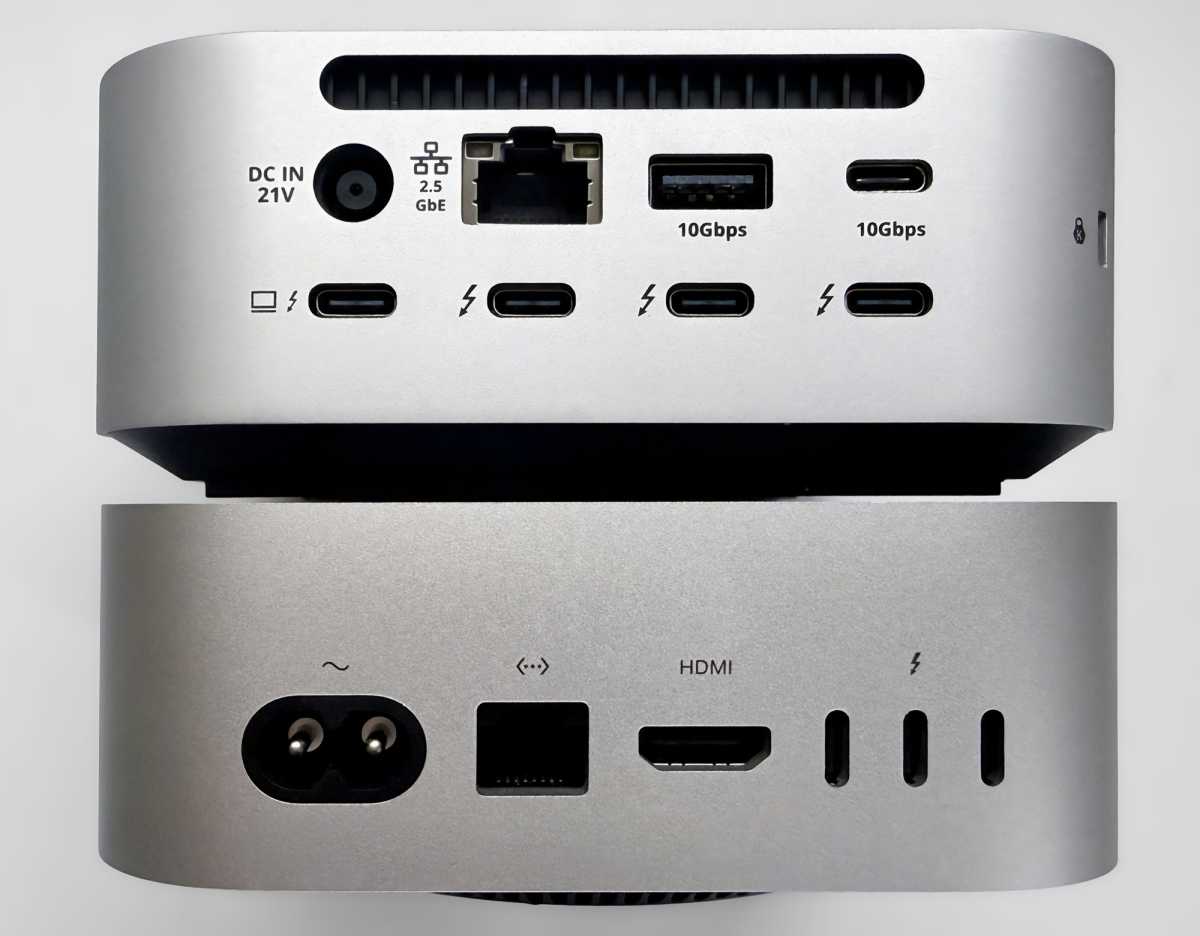
- One upstream Thunderbolt 5 port (80Gbps, 140W)
- Three downstream Thunderbolt 5 ports (80Gbps, 15W)
- 1x USB-C (10Gbps, 30W)
- 1x USB-C (10Gbps, 7.5W)
- 1x USB-A (10Gbps, 7.5W)
- 1x USB-A (10Gbps, 4.5W)
- M.2 SSD Enclosure (up to 8TB capacity)
- Ethernet (2.5Gb)
- UHS-II SD card reader (312MBps)
- UHS-II microSD card reader (312MBps)
- 3.5mm combo audio jack (front)
- 180W power supply
Simon Jary
Cute it might be, but the CubeDock is seriously powerful too. Thunderbolt 5 offers up to 80Gbps data bandwidth with a unidirectional 120Gbps Bandwidth Boost for video extension.
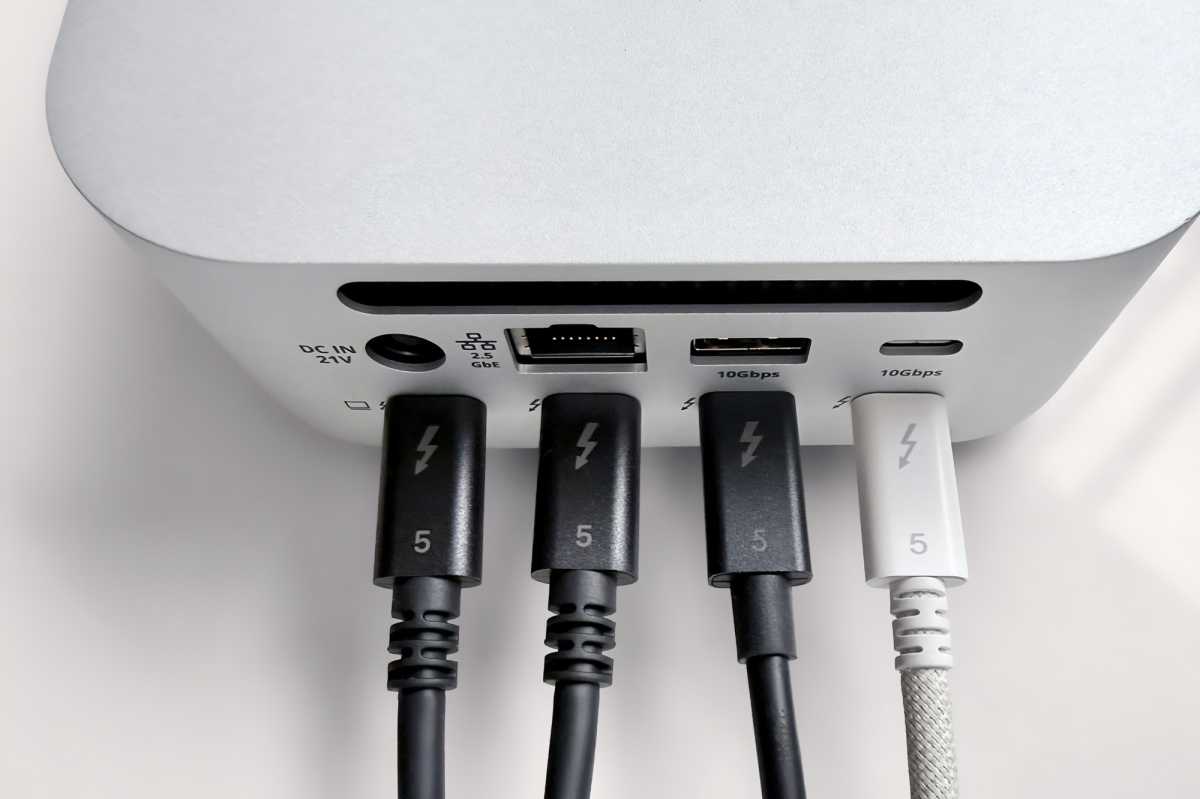
Satechi has avoided the route of many dock makers who sacrifice a downstream Thunderbolt 5 port for a dedicated video ports (either DisplayPort or HDMI). Instead, it gives you the option of choosing how you use each TB5 port as you please.
If connecting to Thunderbolt or USB-C monitors this needs just a decent Thunderbolt or even USB-C data cable, but if your chosen display requires DisplayPort or HDMI you’ll need to add a competent adapter cable at your own expense. This approach might require extra cables, but enough modern monitors can be connected via USB-C to make it a more flexible setup than one where the dock maker has decided you might be using a specific monitor connection.
Satechi
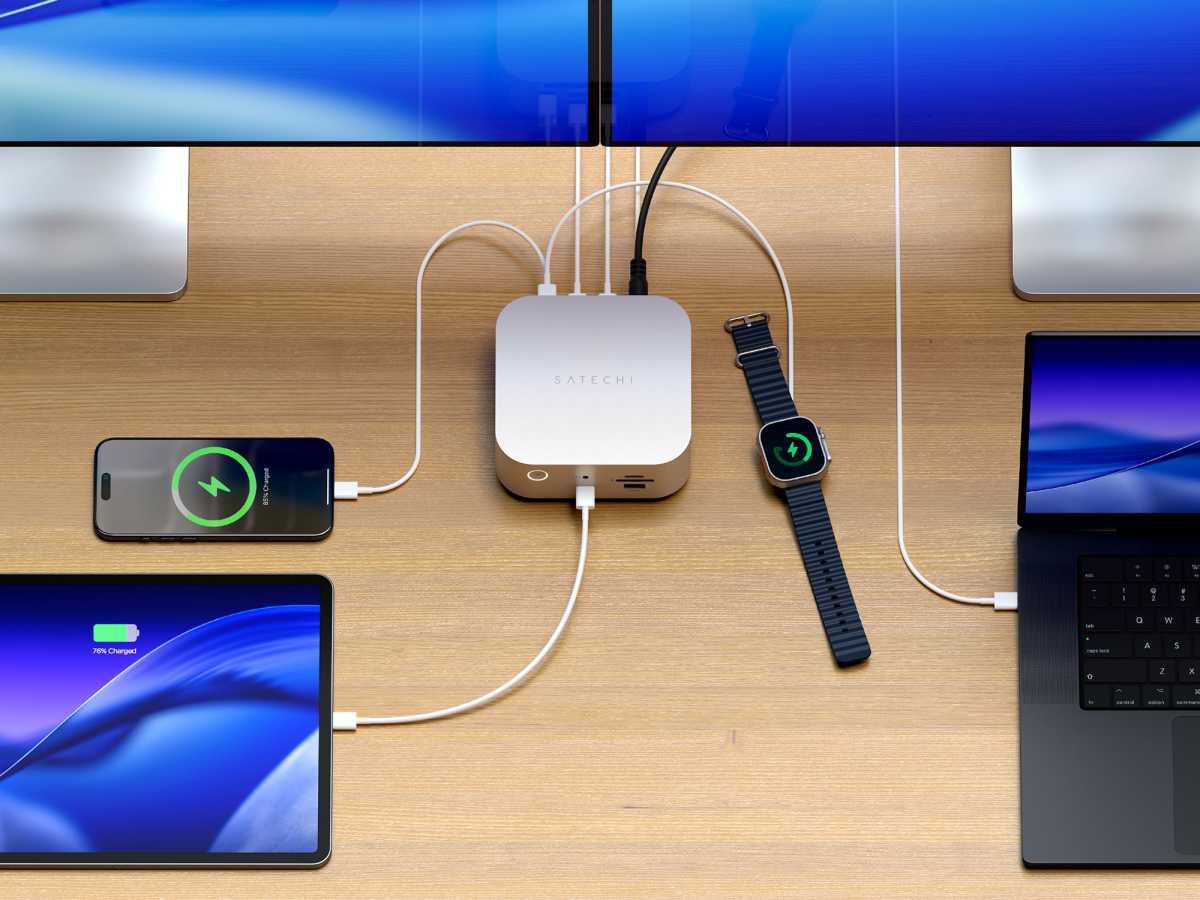
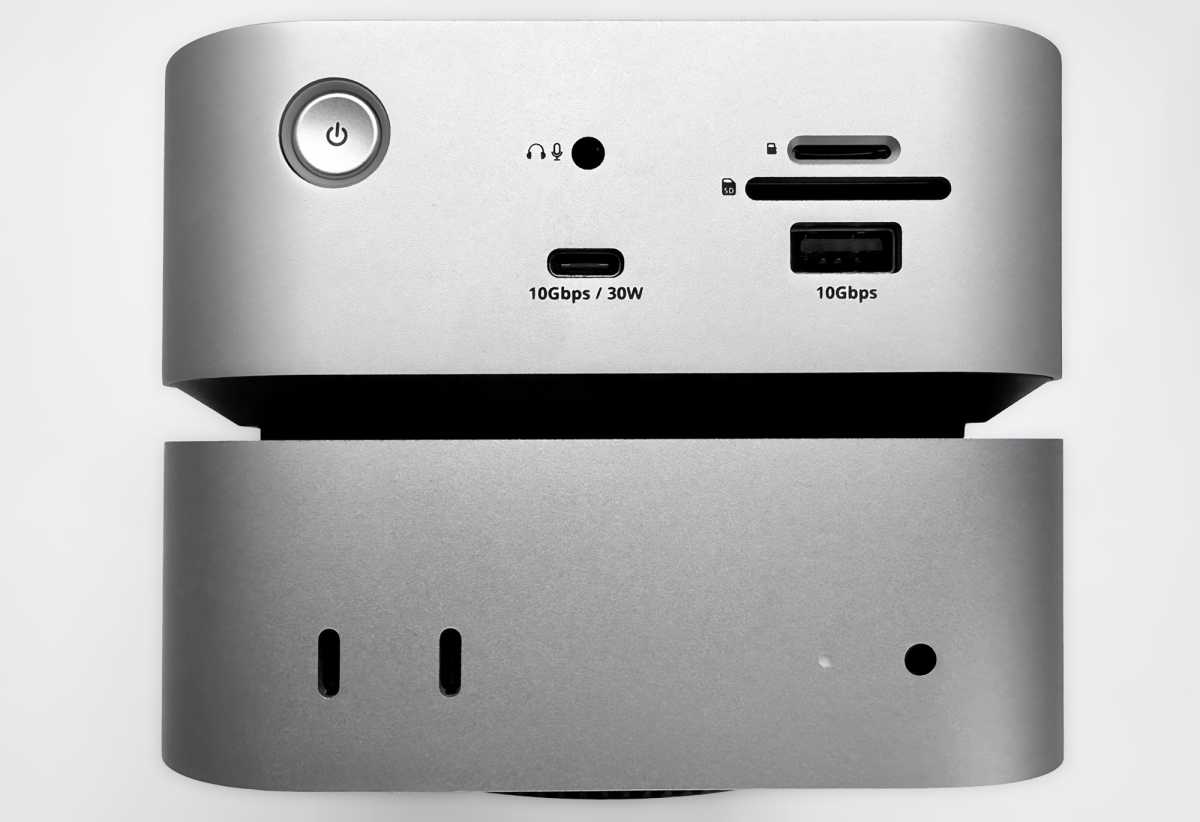
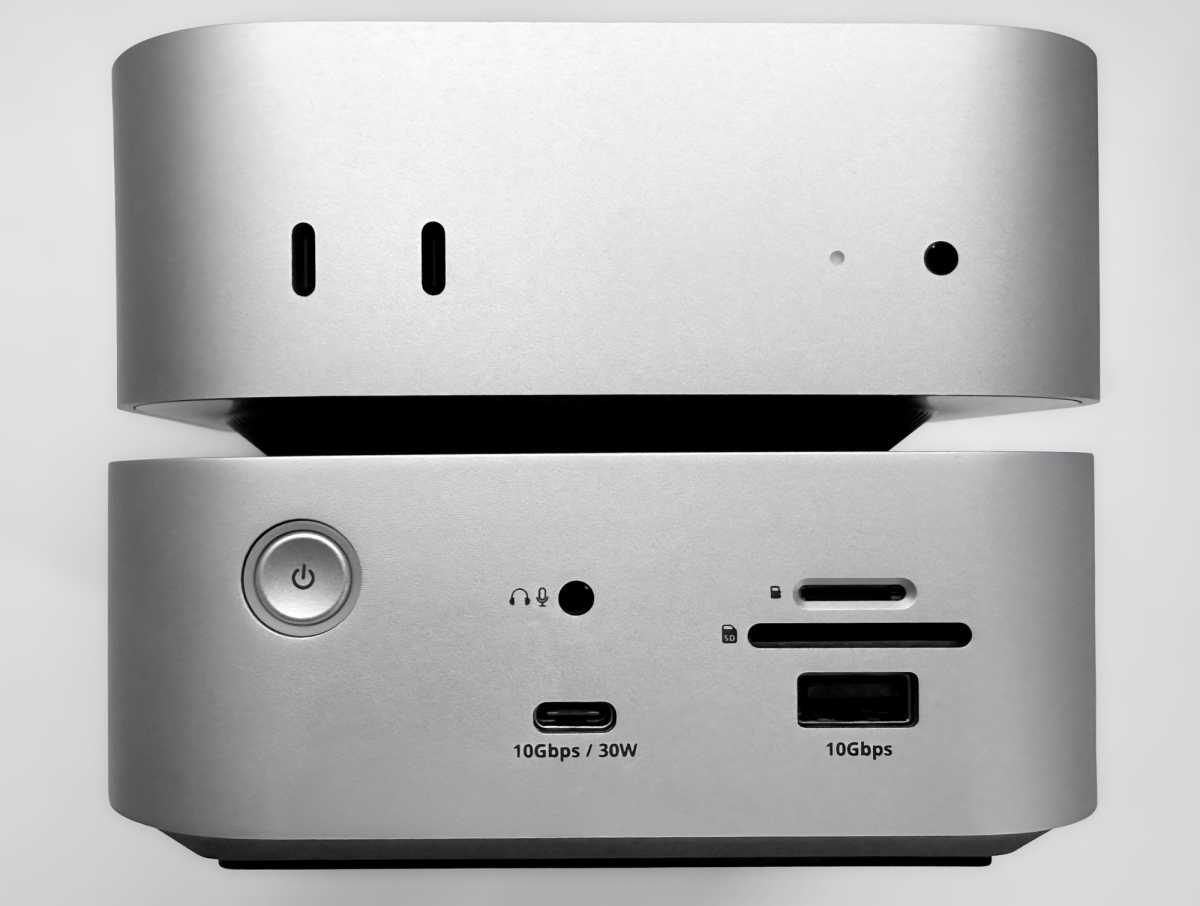
There are two additional USB-C ports: the one at the front supports up to 30W power output, which is enough to fast-charge an iPhone or iPad or even just enough to recharge a MacBook. Each of the downstream TB5 ports can supply 15W of power, bearing in mind that the maximum power of the dock is 180W.
If you are connecting a MacBook as the host, the CubeDock can supply up to 140W of power (PD 3.1) that is enough to fast-charge the top-end 16-inch MacBook Pro. The included Thunderbolt 5 cable will handle all the data and charging needs between MacBook and dock.
Simon Jary
Dinky design
The most striking aspect of Satechi’s new Thunderbolt 5 docking station is its size and shape that mirrors that of Apple’s diminutive Mac mini desktop Mac. More specifically, it mimics the M4 version of the Mac mini that Apple launched in November 2024. The previous Mac mini was small but nowhere near as compact as the M4 Mac mini, which is expected to remain the same dimensions when the M5 (or maybe M6 if the mini isn’t updated until later this year or early 2027) is released.
The CubeDock is almost exactly the same size as the Mac mini, with a marginal 0.04 inch (2mm) difference in height. Its base is square but, despite its name, it’s no cube—being less than half as high as it is either long or wide. Strictly it’s a square prism, but SquarePrismDock doesn’t sound as cute.
And the CubeDock is cute. Maybe it should be called the CuteDock.
CubeDock:
- Length: 5 inches (127mm)
- Width: 5 inches (127mm)
- Height: 2.04 inches (52mm)
- Weight: 1.3lbs (589g)
Mac mini:
- Length: 5 inches (127mm)
- Width: 5 inches (127mm)
- Height: 2 inches (50mm)
- Weight: 1.48lbs (670g)
The silver finish of Mac mini and CubeDock is the same so these two look perfect together, although the CubeDock will work with any modern Mac, be that a Mac mini, Mac Studio or MacBook. Indeed, it will work with Windows computers, too.
The Mac Studio is still the same size as the old Mac mini: 7.7 x 7.7 x 3.7 inches (197 x 197 x 95mm) so you can’t balance the CubeDock on top or below the pro-level Mac desktop. But you can top or tail the CubeDock with the Mac mini M4 as you please, or just place them side by side.
Some similar docks feature more of a cut-out to allow easier access to the Mac mini’s underbelly power button, but not the CubeDock if you place the mini on top. Remember that the CubeDock works with any Mac, not just its lookalike Mac mini M4.
Simon Jary
Buy the Satechi CubeDock if you need more Mac storage plus a bunch of fast ports. It works with any modern Mac but will woo Mac mini owners with its compact silvery doppelganger looks.
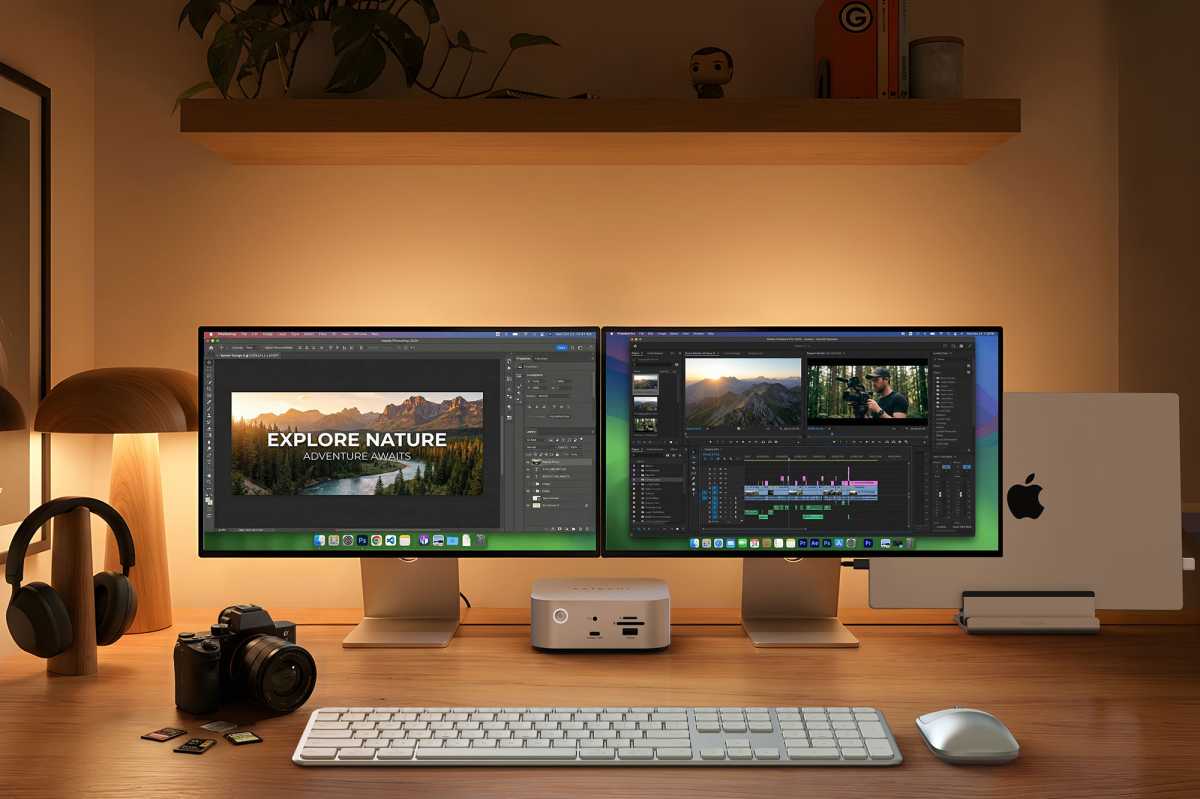
What display setups can it handle?
- The CubeDock supports up to three external displays via its Thunderbolt 5 ports, depending on your Mac.
- Thunderbolt, USB-C, HDMI, and DisplayPort monitors are supported, though HDMI and DisplayPort displays require adapter cables.
One of the key functions of a docking station is to add external screens to the host computer. How many and at what resolutions depends on the processor of your Mac.
You use the three Thunderbolt 5 ports to connect the displays. Thunderbolt/USB-C displays require a simple video-ready USB-C cable, but HDMI and DisplayPort monitors will require adapter cables.
If you prefer DisplayPort, then the CalDigit TS5+ docking station loses one TB5 port for a DisplayPort, and the Plugable TBT-UDH2 Dock takes two TB5 out to provide two HDMI 2.1 ports.
Satechi
All M-series Macs can connect to a single display up to 6K@60Hz (8K@144Hz on Windows). Any Mac with a Pro or Max processor or a base M3/M4/M5 chip can support dual displays up to 6K@60Hz each (8K@120Hz each on Windows).
Triple displays up to 6K@60Hz each are possible on Macs with an M5 Pro or Max (or 8K with compatible Windows PCs).
Over Thunderbolt specifically, 8K is largely an M5-generation capability—the whole M5 family handles it, with the M5 Max being the only laptop that drives two 8K displays at once. The two cross-generation exceptions are the Mac mini (M4 and M4 Pro), which does single 8K over Thunderbolt, and the M3 Ultra Mac Studio, which does multiple.
(It’s worth noting here that the M4 and M4 Pro/Max MacBook Pro and the M4 Max Mac Studio can all drive an 8K display, but only over their HDMI port—their Thunderbolt outputs top out at 6K/60Hz.)
If you require three or four displays and don’t own a Mac with a top-end M5 Pro/Max, look for one of the best DisplayLink docks we have tested. These require an extra software installation and come with a few compromises but free you up from Apple’s self-inflicted display technical limitations.
Simon Jary
How much storage can you add?
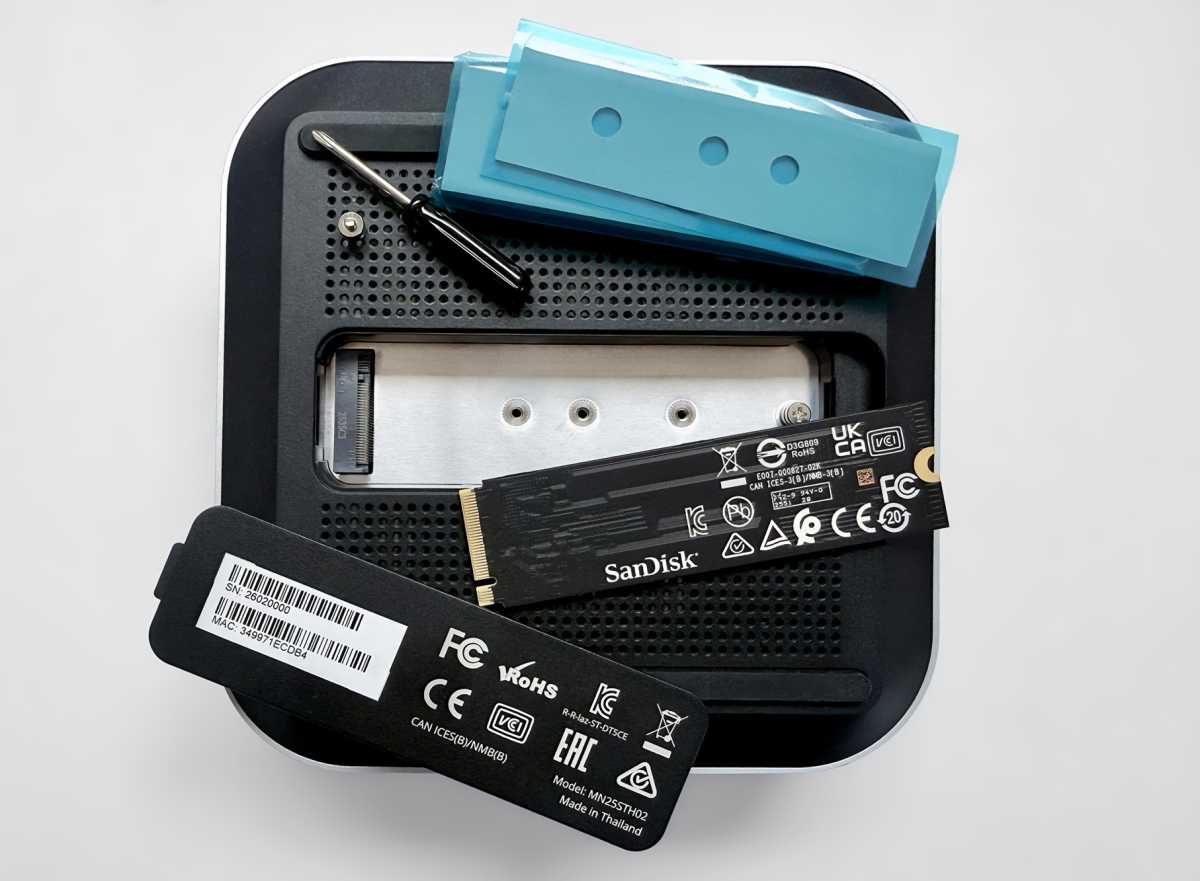
Underneath the dock there’s a hatch that when removed reveals a slot for an SSD drive. It supports 2280 and shorter 2230/2242/2260 M.2 NVMe SSD sizes (PCIe 4×4), and delivers up to 6000MBps in data transfer speed.
Having a built-in NVMe SSD slot is much neater than having an SSD enclosure hanging off your computer and taking up a valuable port on your Mac.
Simon Jary
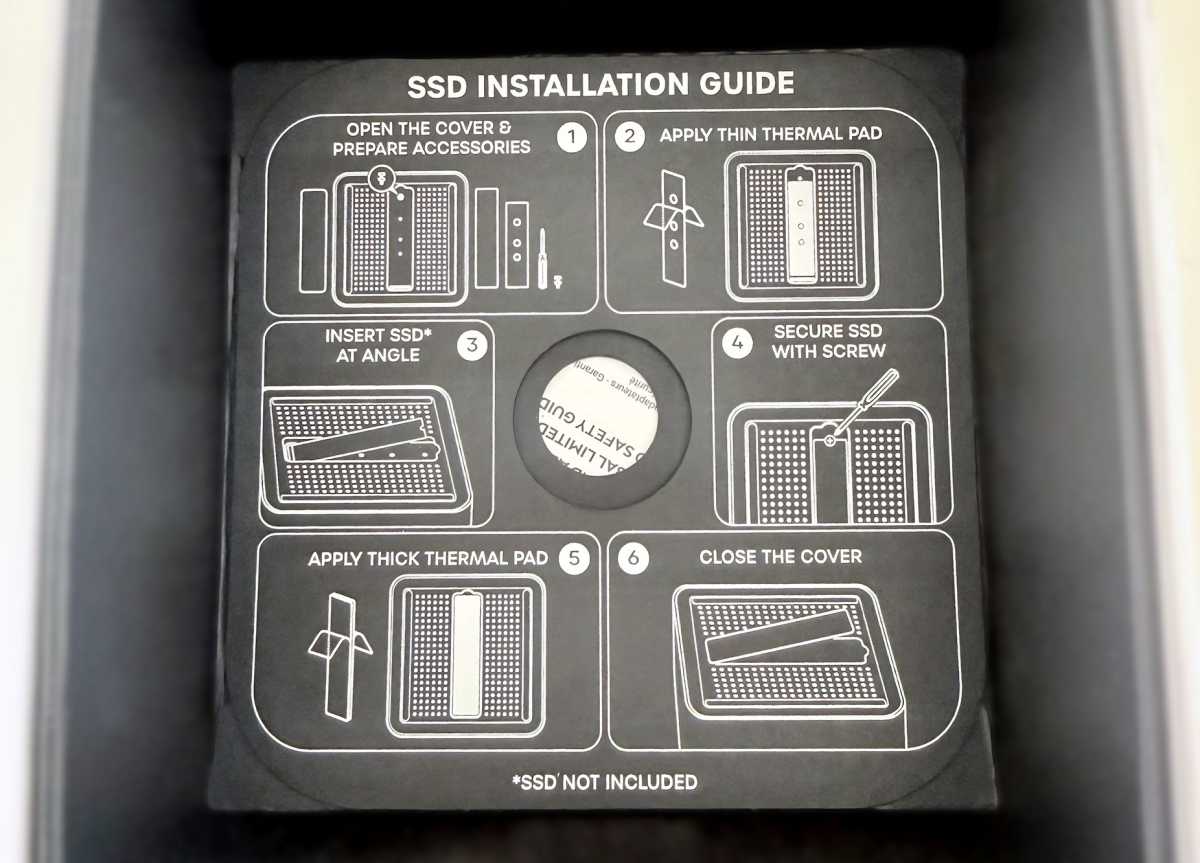
Satechi has included a handy SSD installation guide right there in the dock packaging. It is a little fiddly with the tiny screw when adding the card before tightening. Everything else is simple, so it can be frustrating when the screw is in the way or trying to get it back in if you remove it using the included mini screwdriver. Installing an SSD card into the similar but less cute Ugreen Thunderbolt 5 Maxidok was easier with a larger screw and screwdriver. A full toolless installation would be ideal.
The slot supports up to 8TB, which should be plenty for most users but comes at a high price at today’s storage prices.
Scanning Amazon’s SSD prices, here are the average prices we found for an internal M.2 NVMe SSD at the time of writing (note that storage prices can be volatile):
- 1TB: $175
- 2TB: $250
- 4TB: $450
- 8TB: $1,500
But, hey, if you need it you’re going to have to pay for it! It’s great for Time Machine backups or video projects—whatever takes up all the space on your Mac.
If you were adding a similar storage capacity to a MacBook Pro at the time of purchase, 2TB would add $400 via Apple, 4TB $1,000, and 8TB $3,200. You can see that adding it post purchase is. Much more economical, and flexible if you later need more.
Simon Jary
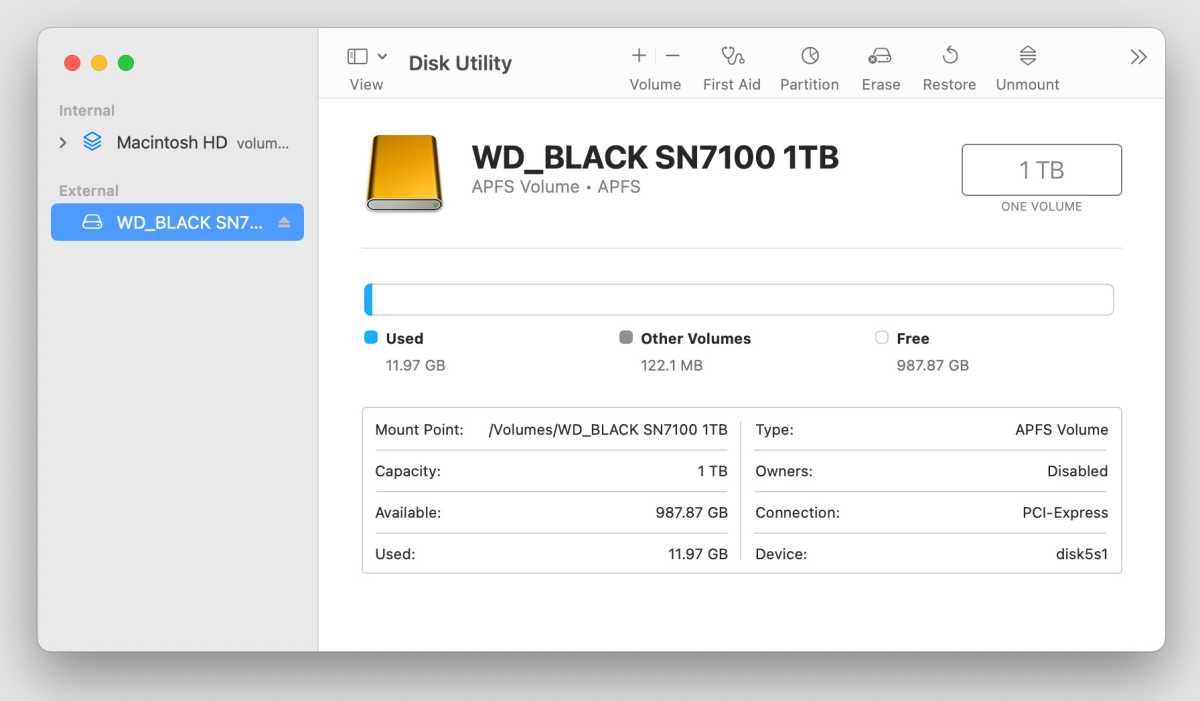
The SSD just shows up like an extra disk on your Mac.
Testing with a Samsung 9100 Pro 2TB SSD and a Thunderbolt 5 M4 Pro mini we achieved speeds of 5800MBps on the read and write, but plugging in two Apple Studio Displays dropped the speed to a still impressive 5100MBps. In comparison, an M4 mini with Thunderbolt 4 reached only 1400MBps with the Studio Displays connected. That Thunderbolt 5 connection really comes into its own if your Mac is similarly equipped of course.
Note that the more devices you have plugged into the dock, the SSD’s data-transfer speed can be throttled, but that’s true of most docks with enclosures.
The SSD enclosure includes an active cooling fan to filter air through the dock. This isn’t at all noisy but if you require absolute silence you might look for a different enclosure that is noiseless.
Definitely quiet are the front-facing SD and MicroSD card readers that offer even more affordable and ultra-portable storage options. A 1TB MicroSD card costs around $150 (at the time of writing) depending on speed. The CubeDock’s card readers support fast 312MBps UHS-II 4.0 storage cards.
Fast network
With a 2.5Gb Ethernet port, the CubeDock is ready for networks faster than the standard 1Gb Gigabit Ethernet. If you’re on a 10GbE network, you can add an adapter or choose a dock such as the CalDigit TS5 Plus or Sonnet Echo 21 Thunderbolt 5 SuperDock. The SuperDock also features an SSD enclosure like the CubeDock (plus a bunch more ports) but comes in at $499, a hundred bucks more than the Satechi.
Simon Jary
What features or accessories are missing?
The CubeDock doesn’t include an SSD, so storage must be purchased separately and installed manually. There’s no dedicated HDMI or DisplayPort port, requiring adapters for some monitors, and international buyers may need a local C5 power cable.
Is the CubeDock worth its $399 price?
The Satechi CubeDock is priced at $399.99. As I write, it is not available outside of North America in local currencies but you can get it shipped to the U.K., for instance, for an extra $30. You will need to buy a grounded C5 power cable (the one with a cloverleaf connector) with the correct plug for the country where it will be used. It is also available on Amazon US and Amazon Canada.
While you can buy Thunderbolt 5 docking stations for around $300, if you add a Thunderbolt 5 SSD enclosure like Satechi’s own DotDisk 80Gbps SSD Enclosure, that will add another $200, so the $399 price of the CubeDock makes a lot of sense if you need the SSD slot.
See our reviews and comparisons of the other best Thunderbolt docking stations.
Should you buy the Satechi Thunderbolt 5 CubeDock with SSD Enclosure
Boasting as many Thunderbolt 5 ports as a single-chip dock can, the Satechi CubeDock is a powerful accessory to help you create the perfect connectivity setup for your system with simple display options and a built-in SSD enclosure, all wrapped up in a cute Mac mini-like shell that’s compact and will work with any modern Mac.
Related posts:
 Sonnet Echo 21 Thunderbolt 5 SuperDock review: 20 ports and upgradeable 8TB SSD storage
 Ugreen Maxidok 17-in-1 Thunderbolt 5 Docking Station review: Plenty of ports plus SSD slot storage flexibility
 Kensington SD5000T5 EQ Thunderbolt 5 Dock review: 140W and 60W TB5 ports for MacBooks
 Satechi Thunderbolt 4 Docking Station with DisplayLink review