At a glance
Expert’s Rating
Pros
- Thunderbolt 5
- 100W Power Delivery to MacBook
Cons
- Upstream TB5 is a non-detachable cable
- Weak power options and supply
- DisplayPort less flexible than missing third Thunderbolt port
- No audio port
Our Verdict
While it may offer everything you need and is a decent and nicely compact docking station if it fits your requirements, we find the Maxidok 10’s numerous oddities perplexing and sometimes off-putting: the built-in cable rather than a more flexible upstream port, the weak power supply and ports, its insistence on DisplayPort, a lack of spare USB-C or audio port, and not-quite-as-fast-as-they-could be card readers.
Price When Reviewed
This value will show the geolocated pricing text for product undefined
Best Pricing Today
Price When Reviewed
£299.99
Best Prices Today: Ugreen Maxidok 10-in-1 Thunderbolt 5 Docking Station
$249.99
$299.99
Following the release of its flagship 17-port Maxidok Docking Station, Ugreen has a more entry-level Thunderbolt 5 dock with fewer ports at a more user-friendly price.
The more standard-looking Ugreen Revodok Maxidok 10-in-1 Thunderbolt 5 Docking Station lacks the 17-port dock’s built-in SSD slot and a bunch of ports but will fit the needs of most. Given its compact form and smaller number of ports, is the Maxidok 10 a mini dock or a super Thunderbolt 5 hub?
Simon Jary
Specs and features
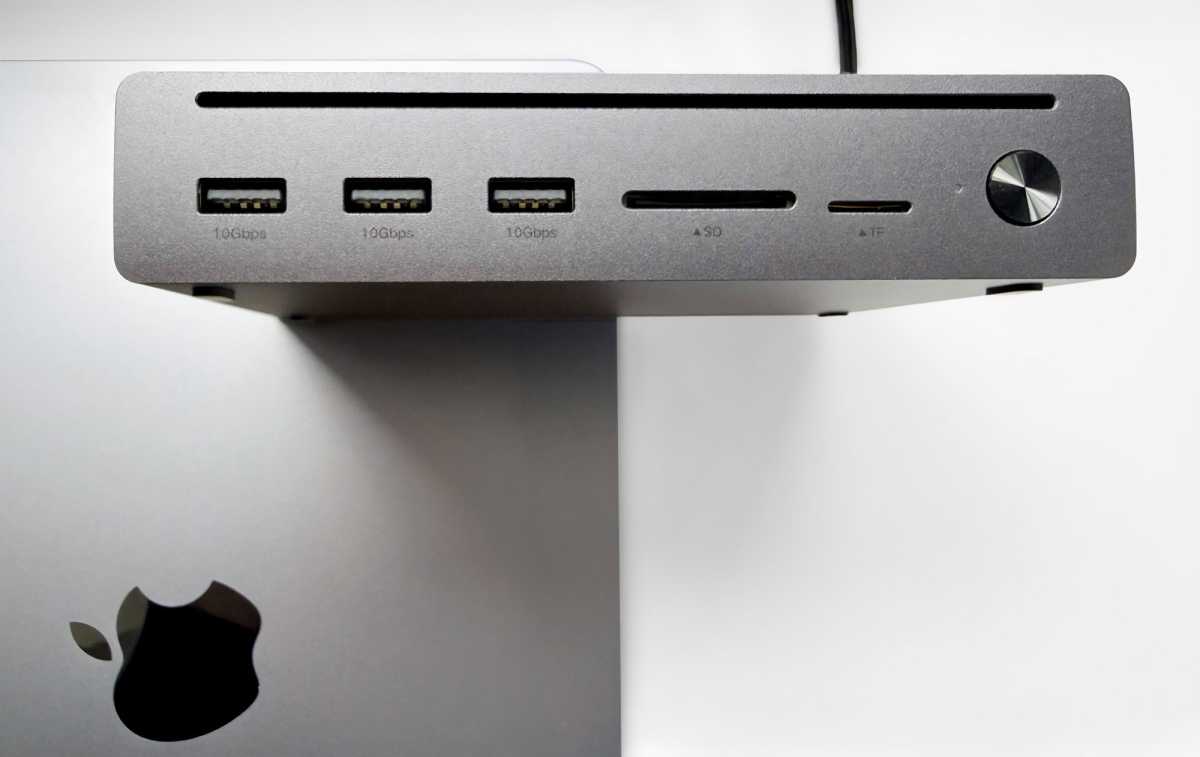
Ten ports is fewer than most Thunderbolt 5 docks—closer to the nine found on the CalDigit Thunderbolt 5 Element 5 Hub.
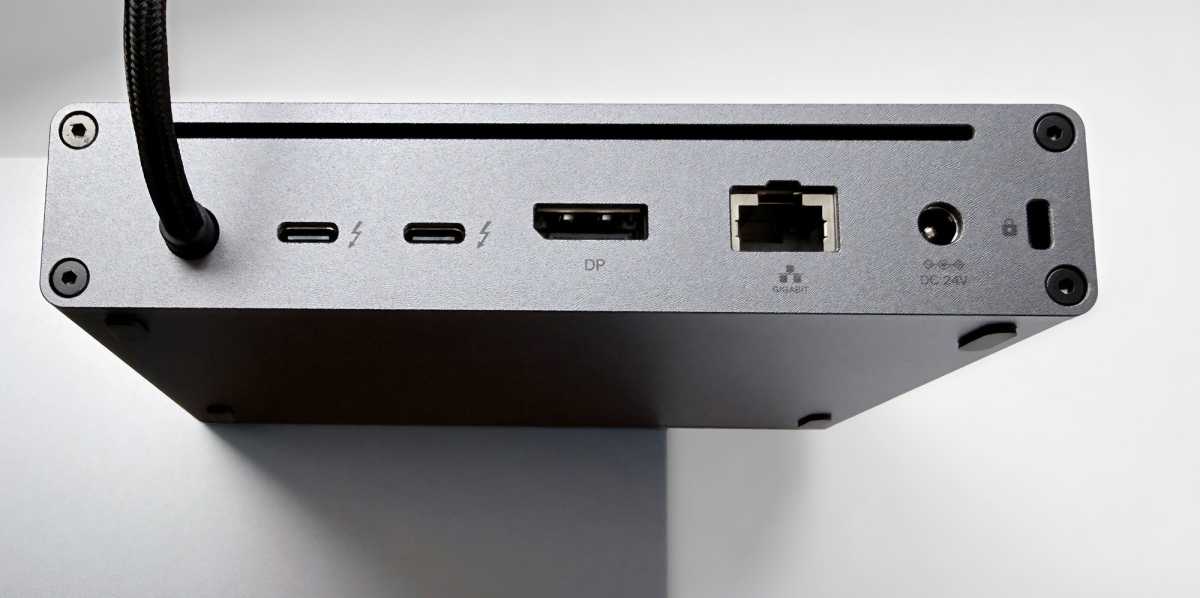
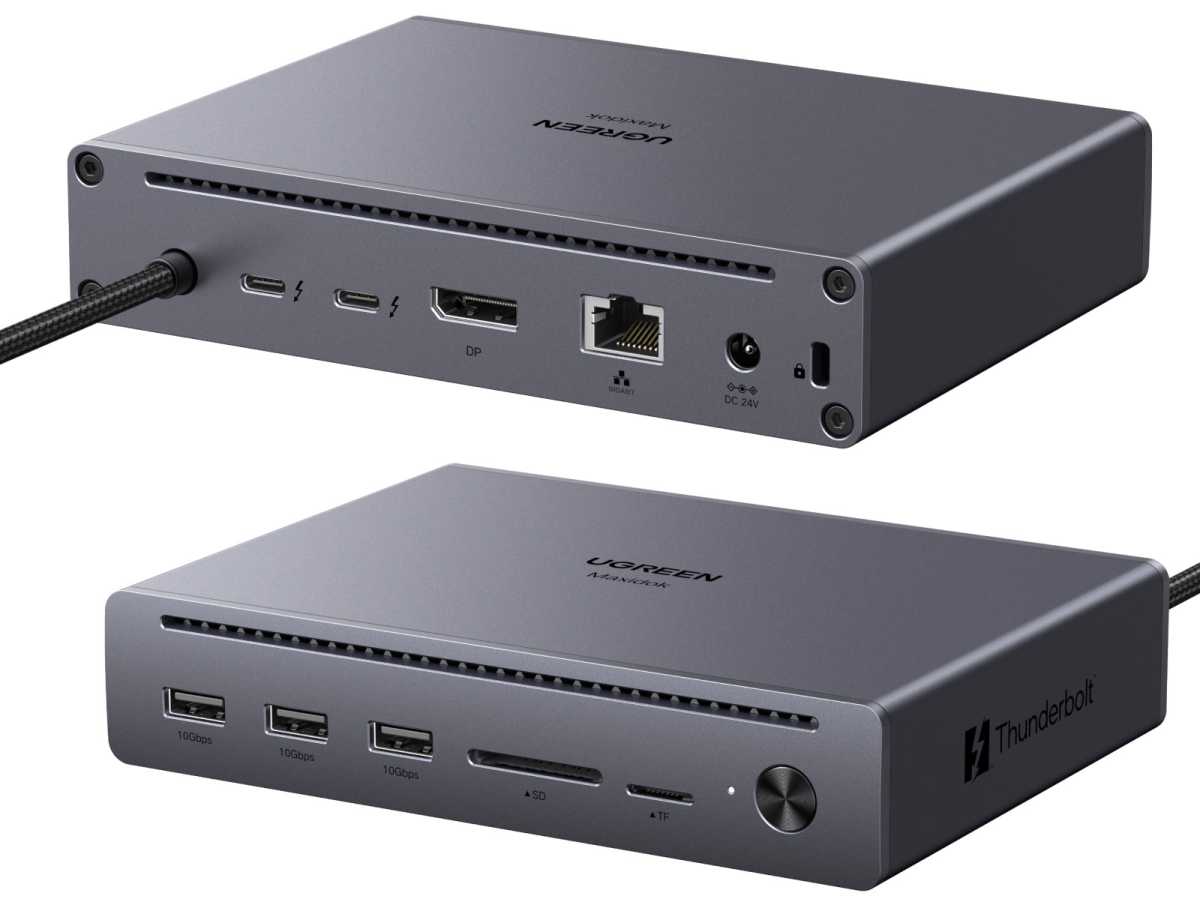
- One upstream Thunderbolt 5 port (80Gbps/120Gbps, 100W)
- Two downstream Thunderbolt 5 ports (80Gbps, 15W)
- Three USB-A ports (10Gbps, 4.5W)
- DisplayPort 2.1
- Ethernet (1Gb)
- UHS-II SD card reader (170MBps)
- MicroSD card reader (170MBps)
- 140W power supply
Simon Jary
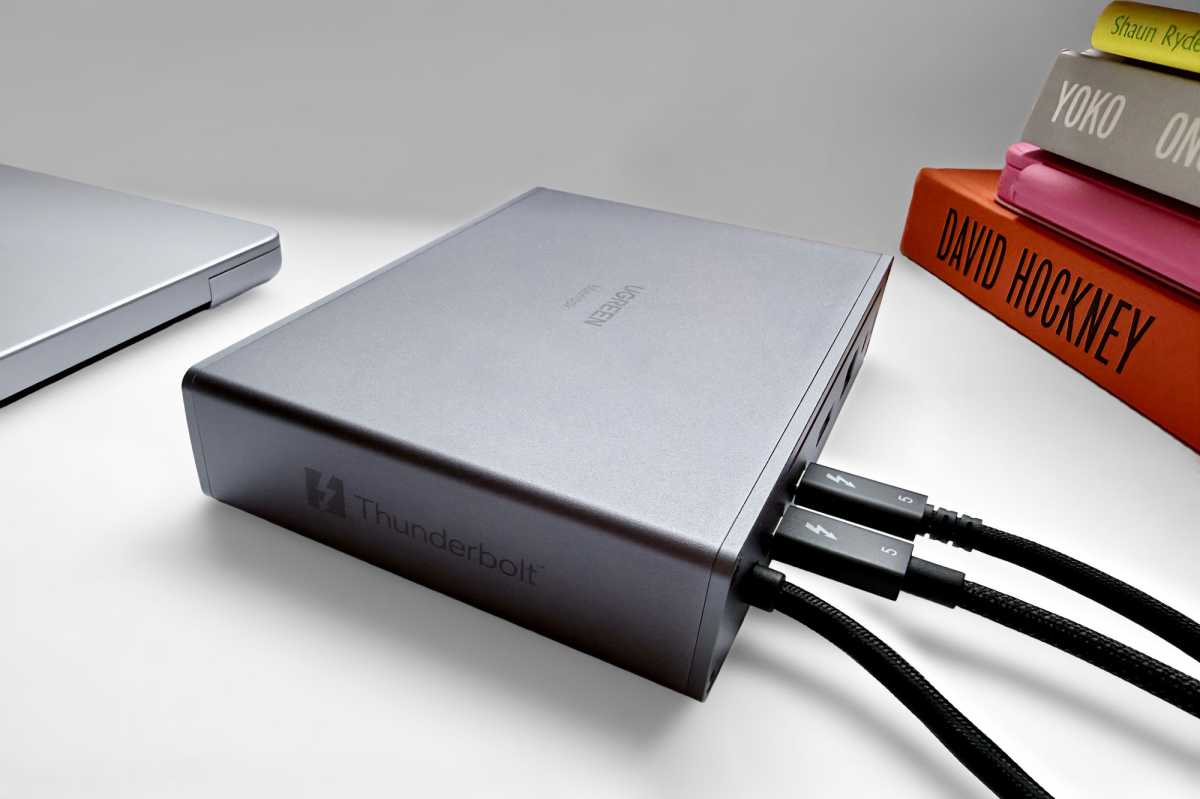
The upstream Thunderbolt 5 connection for your Mac is not an open port but an integrated TB5 cable measuring 2.6 feet (0.8m). This is unusual as it means you can’t swap it out for a longer cable if that’s what you require. The average TB5 cable length is 3.3 feet (1m), which is not much longer but still might make a difference in your setup. The CalDigit Active Thunderbolt 5 Pro Cable is available at a length of 6.56 feet (2m), but you simply can’t use a longer cable with the Maxidok 10 as its upstream port is not open.
That said, the near-meter-long cable will likely be long enough for most desktop setups—unless your power socket is far from your desk, in which case you could add a longer power cable.
Like the Maxidok 17, for the Maxidok 10 Ugreen sacrifices one of the possible downstream Thunderbolt 5 ports for a dedicated DisplayPort (2.1) video port. The decision to include a video-only port is one taken on many high-end Thunderbolt docking stations, but we think it’s a mistake on a dock with no other type-C ports.
It’s great if your designated monitor has a DisplayPort (DP) connection, but if you want to connect via HDMI or USB-C/Thunderbolt the DisplayPort might end up unused (or attached to an adapter cable). Apple’s Studio Display, for example, has no DisplayPort so you’d be forced to either use one of the two downstream TB5 ports and leave the DP redundant or buy yourself a DisplayPort to USB-C adapter cable.
We rate BenQ’s 4K MA270U and 5K MA270S as two of the best displays for Mac, and both lack a DisplayPort but happily connect via USB-C/Thunderbolt. If you want a touchscreen display like the Alogic Clarity Fold Touch it demands a type-C connection. The Maxidok can handle these monitors via either of its TB5 ports but leaves its DisplayPort unused where a third downstream TB5 port could have sat ready for action.
A more flexible approach would be to forget a dedicated video port and include a third Thunderbolt port, giving you the option to either connect using that or add the adapter your monitor demands.
The Maxidok 10 includes three fast USB-A ports at the front for legacy connections but, aside from the two downstream Thunderbolt ports, has no more modern USB-C ports. With most new devices bearing USB-C as a connection, three USB-A and no USB-C seems another oddity for the Maxidok 10.
Where the Maxidok 17 offered three audio ports—two at the back at one at the front—the Maxidok 10 oddly has none, which is rare for a docking station but quite common on Thunderbolt hubs.
The wired network port is Gigabit Ethernet, which remains the standard for office networks, although many recent docks include at a least backward-compatible 2.5Gb Ethernet port. Again, this shouldn’t be a problem for most users but it should put you off if your LAN is a fast one.
Simon Jary
Power issues
The Maxidok 10’s power supply supports up to 140W, but the maximum power to a connected laptop is 100W, which doesn’t rule out but does disadvantage users of the 16-inch MacBook Pro that requires 140W (PD 3.1) for fast-charging.
The downstream TB5 ports can each output power at 15W. That’s not enough power to fast-charge an iPhone, and the 4.5W USB-A ports offer little power to connected devices. One 30W USB-C port at the front would have been preferred and most Thunderbolt docks provide that or higher.
The Maxidok’s 140W power supply couldn’t support all its ports at full pelt (100W+15W+15W+4.5W+4.5W+4.5W) so the wattage going into the laptop could potentially fluctuate to accommodate other hungry connected devices. Given the dock’s power weaknesses, it’s not a great choice of you have demanding devices to connect.
The CalDigit Element 5 Thunderbolt 5 Hub and OWC Thunderbolt 5 Hub are no docks but both offer a more punchy 180W power supply.
Ugreen
Video options
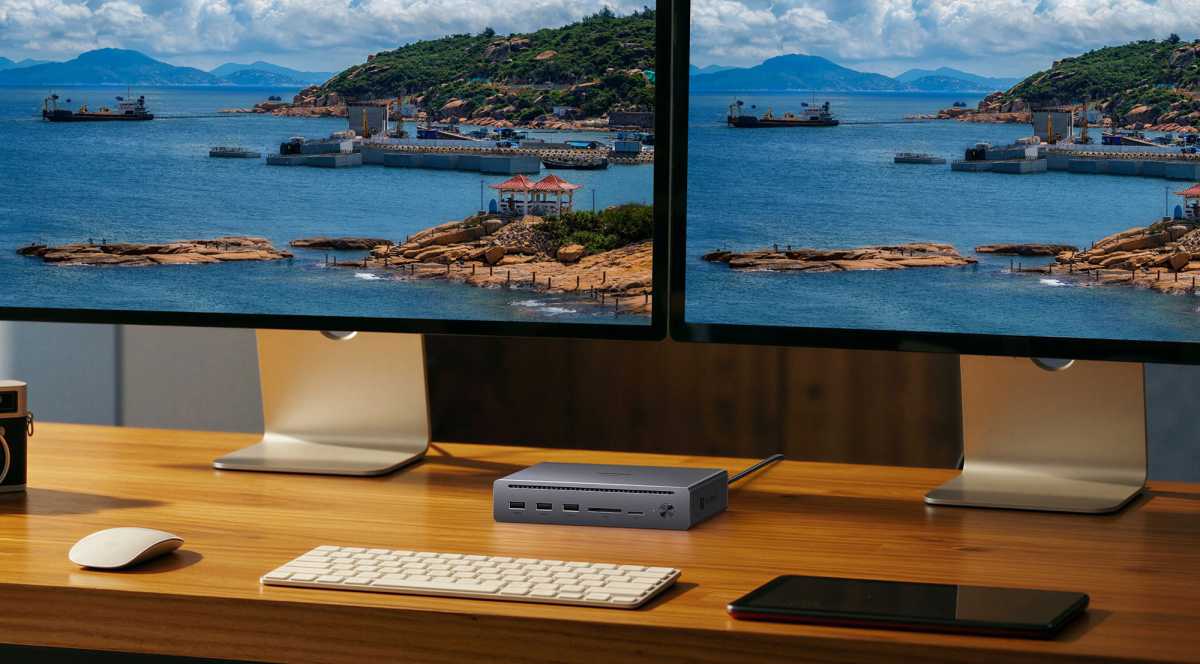
That leaves connecting multiple external displays as the Maxidok’s main function. These will most likely be self-powered so won’t trouble the dock’s 140W power supply.
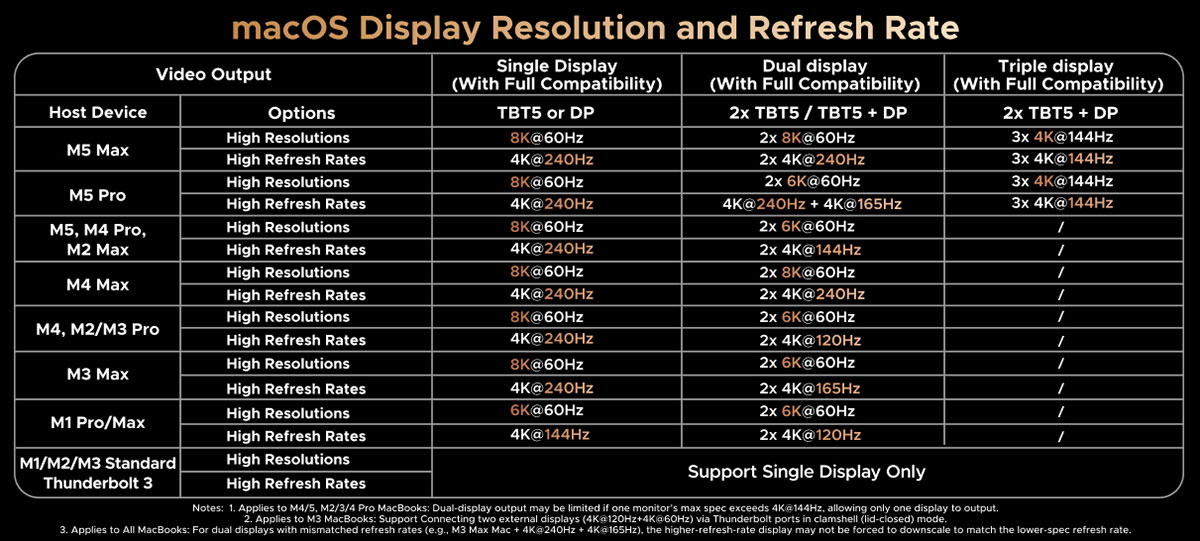
Depending on your Mac’s processor, the 10-port Maxidok can support a single 8K display at a 60Hz refresh rate or 4K at 240Hz.
Multiple display configurations are also set on the limitations of the connected Mac than the docking station itself. Connected to a Mac with the latest M5 Max processor it can support two 8K displays at 60Hz. With the M5 Pro, two monitors are possible with one 8K/60Hz and one 5K/60Hz.
Both M5 Pro and M5 Max support up to three 4K displays at 144Hz each. With the M5 Max you could daisy-chain a fourth display from the third.
M2/M3/M4 Pro/Max support a single 8K/60Hz display, while the M1 Pro/Max is limited to a 6K/60Hz. Pro/Max models of the M1/M2/M3/M4 can handle dual 6K/60Hz. For a full matrix of Mac monitor configurations, see below.
Windows users benefit from that operating system supporting Multi-Stream Transport (MST) for DisplayPort and Thunderbolt, and so more can connect to three displays using the Maxidok. The maximum resolution and refresh rate for a Windows triple-display setup is 4K at 144Hz.
Ugreen
Semi-fast storage
The Maxidok 10 lacks M.2 NVme SSD found on the Ugreen Maxidok 17-in-1 Docking Station. At this price point we wouldn’t have expected such a feature. You could instead add an external SSD enclosure to one of the spare downstream TB5 ports.
The dock does include both SD and microSD card readers at the front for you to add your own portable storage cards. These card readers have a possible 170MBps speed somewhere between the UHS-I (104MBps) and UHS-II (104MBps) card slots usually found on docking stations. That’s slower than the 250MBps SDXC card slot built into Apple’s current MacBook Pro.
While 170MBps is better than 104MBps, it’s another—presumably cost-cutting—oddity that sets the Maxidok 10 apart from other Thunderbolt 5 docks.

Simon Jary
Compact design
The Ugreen Maxidok 10 is a slim and quite compact horizontal dock, measuring 6.3 x 4.3 x 1.3 inches (160 x 110 x 32mm).
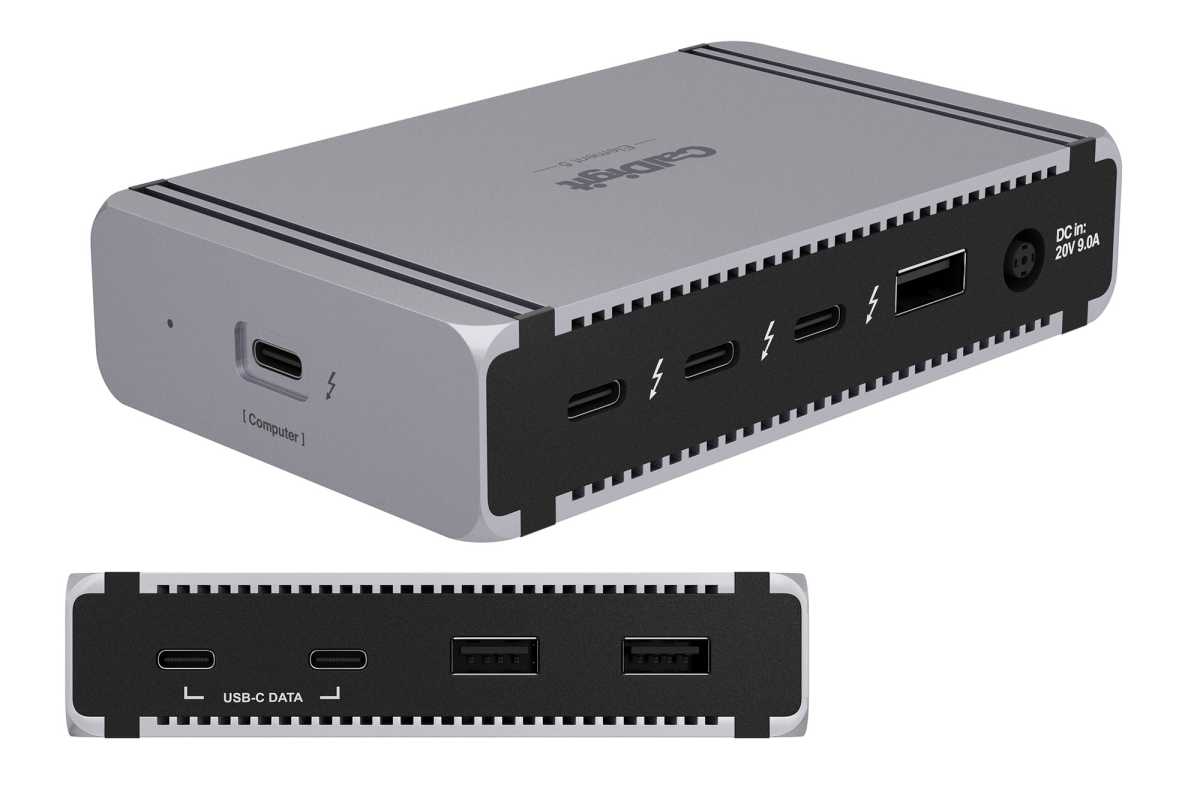
Having fewer ports allows it to be around the same size as a Thunderbolt hub rather than a larger dock yet offer a wider range of ports. The CalDigit Element 5 Hub (pictured below) measures 4.5 x 2.8 x 1 inches (114 x 70 x 25mm) but lacks the Maxidok’s Ethernet port and card-reader slots. It does, however, boast one extra downstream TB5, two USB-C and the same number of USB-A ports (7.5W vs 4.5W) as the Maxidok 10.
There is a power button on the front of the Maxidok 10, which we prefer to none (as found, or rather not found, on many docks) so it’s possible to manually stop power going to the laptop battery during periods of non-use.
Ugreen
Mini dock or super Thunderbolt 5 hub?
With just ten ports could the Maxidok 10 be better classed as a Thunderbolt 5 hub, bearing in mind the CalDigit Element 5 Hub has nine?
A dock usually has more different types of port than a hub, and no hub boasts the card readers and Ethernet port found on the Maxidok 10. If you want a card reader or wired network access on a hub, you’ll most likely need to add an adapter or two. With the Maxidok 10, there’s no need for such adapters, although you’ll have to use your Mac’s own headphone port as the Maxidok doesn’t have one.
However, the Maxidok 10 has just two downstream type-C connections: its Thunderbolt 5 ports, one of which you’ll need to use if adding a second external display as it demands you connect to one monitor via its one-use DisplayPort. All the Thunderbolt 5 hubs we’ve tested have three downstream TB ports. Maybe you’d never use a headphone/mic jack—in which case it’s no loss. But that paucity of USB-C/Thunderbolt keeps getting to me.
CalDigit
If you don’t need the Ethernet or card readers, you should consider the $249 CalDigit Element Hub as previously described. It has five type-C connections and better type-A, boasts a 180W power supply and can match the Maxidok on its display configurations. See the Element 5’s ports above; if you need a card reader or Ethernet you can add an adapter to connect better options than those found on the Maxidok.
If you desire more ports and/or faster network access, look to the Maxidok’s better endowed 17-in-1 sibling or one of the other best Thunderbolt 5 docks we’ve tested.
There will be people for whom the Maxidok 10 is the perfect match, but we think there are alternative docks or hubs that might do the same with more power and more flexible connectivity options.
Price
Ugreen has clearly cut out some of the higher-end features found on other Thunderbolt 5 docking stations and has so kept the price of its Maxidok 10 lower at $299.99. At the time of writing this was generously discounted to $249.99.
For the same list price, both the Plugable TBT-UDT3 dock and the Wavlink Thunderbolt 5 Dock have a generous collection of ports including three downstream Thunderbolt 5 ports, 2.5Gb Ethernet and fast 312MBps card readers, an audio port, and at least the same number of USB ports.
If you see it at the lower price, $249 seems a fairer price for a mini dock with few ports.
Should you buy an Ugreen Maxidok 10-in-1 Thunderbolt 5 Docking Station?
The Maxidok 10-in-1 is a decent and nicely compact docking station if it fits your requirements: your monitor uses DisplayPort, the planned connected devices require little power, and your wired network is basic. However, we find the Maxidok 10’s numerous oddities perplexing and sometimes off-putting: the built-in cable rather than a more flexible upstream port, the weak power supply and ports, lack of spare USB-C or audio port, and not-quite-as-fast-as-they-could be card readers.
If it had the third downstream Thunderbolt 5 port instead of DisplayPort I’d like the Maxidok 10 much more. I think its demand that you connect to a DisplayLink monitor or just lose use of one port, is an indulgence on a dock with just 10 ports in the first place.
At the right price, it could be a rival for the Thunderbolt 5 hubs but as a dock it looks weak compared to rivals.
Related posts:
 Ugreen Revodok Max 213 Thunderbolt Dock review: Mightier than the average hub
 Ugreen Revodok Max 313 13-in-1 Thunderbolt 4 Dock (U709) review
 OWC Thunderbolt 5 Hub review: Affordable super 80Gbps port booster
 Ugreen Maxidok 17-in-1 Thunderbolt 5 Docking Station review: Plenty of ports plus SSD slot storage flexibility